
Quick Summary
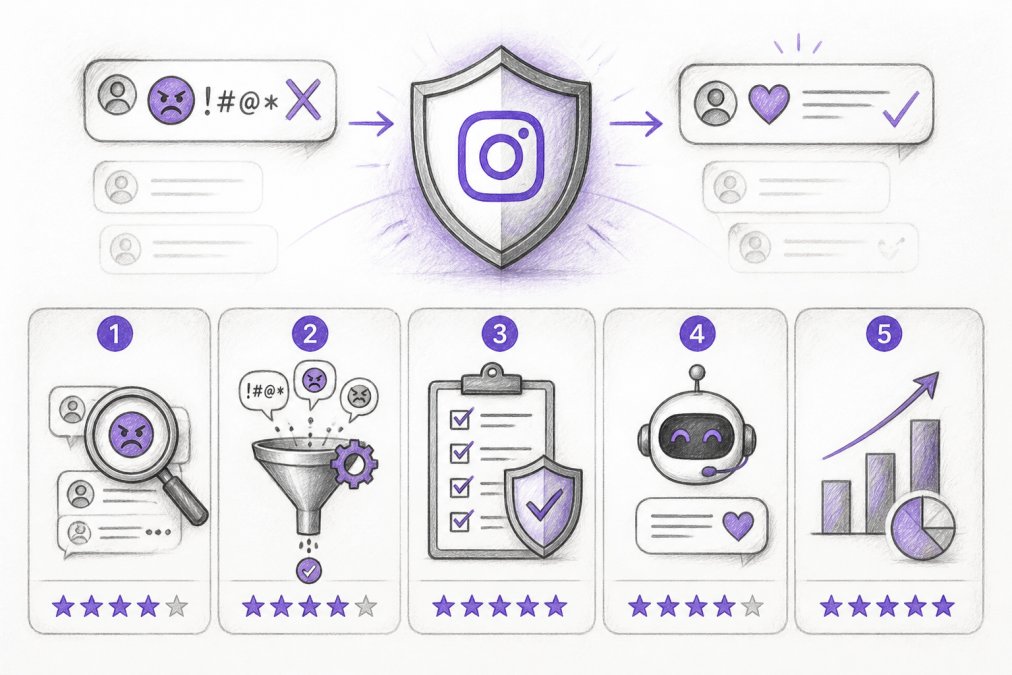
| Key Insight | What You Need to Know |
|---|---|
| Why Hate Speech on | Why Hate Speech on Instagram Comments Damages Your Brand |
| Method 1 | Enable Instagram's Built-in Offensive Comment Filters How to activate Hide Offensive Comments Creating your custom keyword filter list |
| How to activate Hide | How to activate Hide Offensive Comments |
| Creating your custom keyword | Creating your custom keyword filter list |
| Method 2 | Use AI-Powered Instagram Comment Moderation Tools How automated moderation catches what Instagram's filters miss Setting up real-time detection and auto-hiding |
| How automated moderation catches | How automated moderation catches what Instagram's filters miss |
Table of Contents
- Why Hate Speech on Instagram Comments Damages Your Brand
- Method 1: Enable Instagram's Built-in Offensive Comment Filters
- Method 2: Use AI-Powered Instagram Comment Moderation Tools
- Method 3: Block and Restrict Accounts Spreading Hate Speech
- Method 4: Document and Report Hate Speech to Instagram
- Method 5: Foster Empathy and Respond Strategically to Hate
- Common Mistakes to Avoid When Handling Hate Speech
- Conclusion
Last Updated: August 11, 2026
Why Hate Speech on Instagram Comments Damages Your Brand
Hate speech and abusive content on your Instagram posts damage brand reputation, suppress engagement, and tank ad performance. When toxic comments go unchecked, potential customers see conflict instead of your product. Instagram's algorithm penalizes posts with high report rates, meaning a single hateful comment can reduce your reach across your entire account.
The problem escalates fast. One inflammatory comment attracts hostile replies, your team spends hours deleting and blocking accounts, and people stop engaging because they don't feel safe. Your conversion rates drop as prospects see conflict instead of social proof.
The most successful brands don't rely on manual moderation alone. They layer multiple strategies: Instagram's native tools, AI-powered detection, strategic blocking, proper reporting, and community management. Each layer catches what the others miss.
Below, we'll walk you through each method, from Instagram's built-in offensive comment filters to AI-powered moderation tools that work 24/7.
Method 1: Enable Instagram's Built-in Offensive Comment Filters
Instagram offers native comment control features directly in your app settings. These are free, require no third-party tools, and work immediately. The two most powerful are the Hide Offensive Comments toggle and custom keyword filtering.
How to activate Hide Offensive Comments
Instagram's Hide Offensive Comments feature automatically filters comments containing words and phrases from Instagram's predefined list of offensive language. The commenter still sees their comment on their own profile, but other users don't. This prevents escalation.
To enable it: Go to Settings → Account → Community Guidelines Enforcement. Toggle on "Hide Offensive Comments." Instagram updates this list regularly based on community feedback and emerging slurs.
The limitation is clear: Instagram's list is generic. It catches common slurs and explicit language but misses context-dependent hate speech, dog-whistle terminology, and platform-specific harassment patterns.
Creating your custom keyword filter list
You can add your own words, phrases, hashtags, and emojis to a custom filter list. When someone uses these terms in a comment, it gets hidden automatically.
To set up: Go to Settings → Account → Community Guidelines Enforcement → Hidden Words and Phrases. Add terms relevant to your brand. Many e-commerce brands add competitor names to prevent spam. Community builders add terms that disrupt their specific community.
Start with 20-30 terms tied to your actual problem areas. Monitor your comments for 2 weeks, note patterns, and add more. Avoid over-filtering; too many blocked terms create a sterile comment section.
The limitation: This is reactive. If someone uses a slur you haven't added yet, it appears before you notice and block it.
Method 2: Use AI-Powered Instagram Comment Moderation Tools
AI-powered moderation tools analyze every comment in real-time, classify it as spam, hate speech, abusive content, or clean engagement, and take action automatically.
How automated moderation catches what Instagram's filters miss
AI moderation trains on millions of comments labeled as toxic or clean. The system learns patterns: not just specific words, but context, intent, sarcasm, and coded language. A comment saying "great product for idiots" is toxic; the AI catches the sentiment, not just the keyword.
Advanced systems detect hate speech and slurs, cyberbullying, misinformation, competitor spam, threats, and scam links. FeedGuardians detects spam, hate speech, and competitor links with 98.7% accuracy, meaning fewer false positives and fewer toxic comments that slip through.
The advantage over Instagram's native tools: speed and sophistication. An AI system processes comments in milliseconds, understands context, and evolves as new forms of hate speech emerge.
Setting up real-time detection and auto-hiding
Most AI moderation tools integrate directly with Instagram through the platform's API. Once connected, they scan comments as they arrive. You set your tolerance level: strict, moderate, or lenient.
Real-time detection means a hateful comment is hidden within seconds, not hours. This protects your community and prevents comment threads from spiraling. It also protects your ad performance; Instagram's algorithm penalizes posts with high complaint rates.
Look for tools that flag ambiguous comments for your team to review, rather than making binary hide/approve decisions. This prevents over-moderation and ensures edge cases get human judgment.
Method 3: Block and Restrict Accounts Spreading Hate Speech
Blocking prevents someone from seeing your content, commenting, or following your account. Restricting is gentler; their comments still appear to them but are hidden from others.
To block: Tap the three dots on their comment → Block. To restrict: tap the three dots → Restrict.
Use blocking for accounts with a clear history of harassment. Use restricting for first-time offenders. Blocking removes the person's ability to continue the attack and signals to your community that hate speech has consequences.
The limitation: Blocking is visible to the blocked user. They may escalate to harassment through DMs or other channels. This is why documentation matters; if the account escalates to threats, you have evidence to report to Instagram's support team.
Method 4: Document and Report Hate Speech to Instagram
When hate speech reaches the level of threats, organized harassment, or systematic discrimination, report it to Instagram. Instagram's support team can take action against accounts that violate community standards: warnings, suspension, or permanent bans.
Step-by-step reporting process
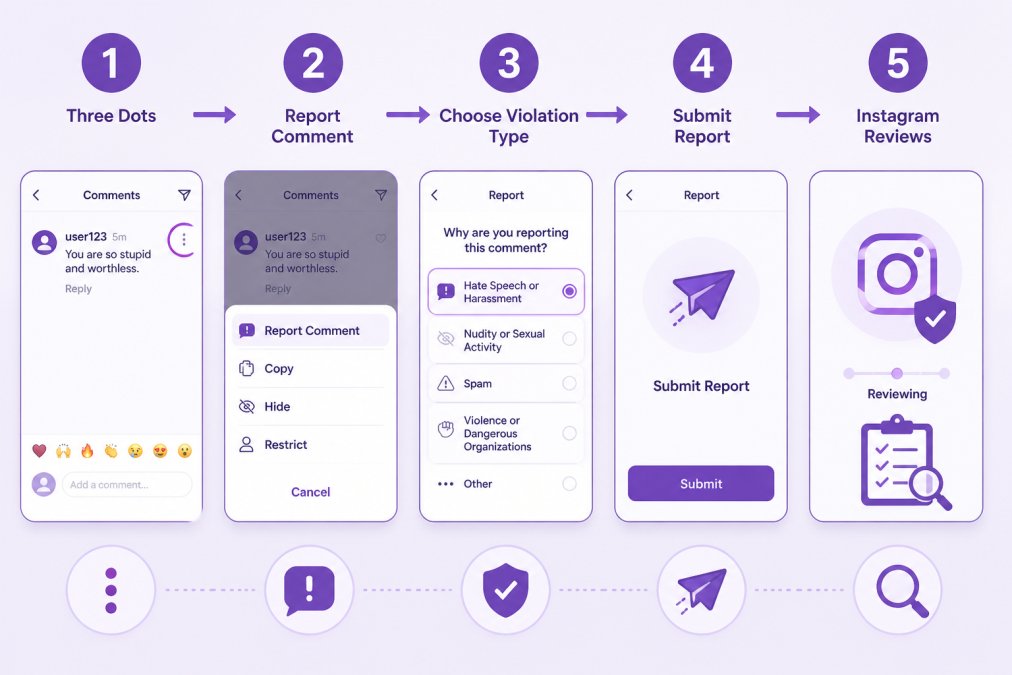
To report a single comment: Tap the three dots on the comment → Report Comment → Select the reason (Hate Speech and Discrimination, Harassment, or other).
For organized campaigns or repeated violations from the same account, report the account itself: Visit their profile → tap the three dots → Report Account → Select the reason. This escalates to Instagram's trust and safety team.
Be specific. Don't just report "this is mean." Explain what community standard it violates. Instagram's community guidelines prohibit hate speech based on protected characteristics, harassment targeting someone's identity, threats of violence, and misinformation that incites harm.
Reports are confidential. You'll see a notification if Instagram takes action.
Collecting evidence for serious violations
If hate speech escalates to threats or coordinated harassment, create a paper trail. Screenshot comments with timestamps, record account names and profile URLs, and note dates and times.
This documentation shows Instagram's support team a pattern of behavior, increasing the likelihood of account suspension. It also protects you legally if you need to report to law enforcement.
Create a simple spreadsheet: date, account, comment text, screenshot link, action taken. This takes minutes to maintain and becomes invaluable if you need to escalate.
Method 5: Foster Empathy and Respond Strategically to Hate
Not every comment deserves a response. Distinguish between trolls (seeking attention), genuine critics (with legitimate concerns), and people expressing hate speech (which should be hidden, not engaged).
For genuine critics, a thoughtful response shows your community that you listen. "We hear your concern about X. Here's how we're addressing it." This turns a potential negative into a trust-building moment.
For trolls, no response is often best. Engaging amplifies their visibility. If they're being abusive, hide or report instead of replying.
For hate speech, never engage. Responding legitimizes the comment and invites more harassment. Hide it. Report it. Move on.
Promote digital citizenship by responding thoughtfully to legitimate concerns. This models the behavior you want to see and signals that you value respectful discourse. Some brands use pinned comments to set tone: "We welcome feedback and questions. We don't tolerate hate speech, slurs, or personal attacks."
Common Mistakes to Avoid When Handling Hate Speech
Over-filtering legitimate criticism. Hiding every negative comment feels corporate and inauthentic. Allow genuine feedback even if harsh. Hide only abusive or off-topic comments.
Responding to trolls. Engaging gives them exactly what they want. Your response gets amplified and other trolls pile on. Hide or ignore, don't reply.
Ignoring patterns. One hateful comment is an incident. Five from the same account over two weeks is a pattern. Patterns are what Instagram's support team acts on.
Delaying action. The longer a hateful comment sits, the more damage it does. Hide immediately, report within 24 hours.
Not documenting. If you can't prove a pattern, Instagram can't act on it.
Assuming Instagram will handle it. Instagram's moderation is automated and imperfect. Layer your own tools and processes on top. Take ownership of your community's safety.
Forgetting the human element. Hate speech damages people. Acknowledge this and show that you care about their experience, not just your metrics.
Hate speech on Instagram comments is manageable with the right combination of tools and strategy. Instagram's built-in filters catch obvious cases. AI-powered moderation tools like FeedGuardians detect sophisticated hate speech in real-time with 98.7% accuracy, protecting your brand reputation and ad performance. Blocking and reporting escalate serious violations to Instagram's support team. Strategic responses build community trust.
The brands winning on Instagram aren't the ones with the most comments; they're the ones with the safest, most respectful communities. Start with Instagram's native tools. Layer in AI moderation for scale. Document and report patterns. Respond thoughtfully to legitimate feedback. Your community will feel the difference, and your metrics will follow. Get started with FeedGuardians's free tier and see how 24/7 AI moderation protects your brand while turning comments into conversations and conversions.
Frequently Asked Questions
How effective is Instagram's built-in comment filter at catching hate speech?
Instagram's Hide Offensive Comments feature filters predefined offensive words, but it relies on keyword matching and may miss nuanced hate speech, coded language, or context-dependent slurs. It works best when combined with a custom keyword list tailored to your brand's audience. For comprehensive protection, many brands pair Instagram's native tools with AI-powered Instagram comment moderation tools that use behavioral analysis to catch sophisticated hate speech Instagram's filters alone miss.
What's the fastest way to report hate speech on Instagram to their moderation team?
The fastest way to report hate speech on Instagram is directly within the app: tap the three dots on the comment, select 'Report Comment,' choose the violation type (hate speech, harassment, or bullying), and submit. Instagram typically reviews reports within 24-48 hours. For urgent threats or severe harassment, you can also report through Instagram's Help Center or contact their support team directly. Document the comment with screenshots before reporting in case it's deleted.
Can AI moderation tools really learn my brand voice well enough to reply to comments without sounding like a bot?
Modern AI tools like FeedGuardians learn your brand's tone, terminology, and communication style through your historical comments and messaging guidelines. The system adapts to your unique voice over time, improving accuracy with each interaction. However, for sensitive or complex comments, most tools offer a human escalation option so your team reviews high-stakes responses before they're posted, ensuring brand voice consistency while maintaining safety.
What should I do if someone posts hate speech in my Instagram comments, should I delete it or respond?
Best practice is to delete or hide the comment immediately using your moderation tools, then report it to Instagram. Responding directly to hate speech often amplifies it and can escalate the situation. Instead, focus on fostering constructive dialogue by responding to genuine questions and positive comments, which signals to your community that your space values respect. If the hate speech targets specific groups, consider posting a statement reaffirming your brand values and commitment to digital safety and empathy.
This article was written using GrandRanker
Tired of manually moderating comments?
FeedGuardians automates spam filtering, responds to customers, and protects your brand — setup in 3 minutes.
Frequently Asked Questions
How effective is Instagram's built-in comment filter at catching hate speech?
Instagram's Hide Offensive Comments feature filters predefined offensive words, but it relies on keyword matching and may miss nuanced hate speech, coded language, or context-dependent slurs. It works best when combined with a custom keyword list tailored to your brand's audience. For comprehensive protection, many brands pair Instagram's native tools with AI-powered Instagram comment moderation tools that use behavioral analysis to catch sophisticated hate speech Instagram's filters alone miss.
What's the fastest way to report hate speech on Instagram to their moderation team?
The fastest way to report hate speech on Instagram is directly within the app: tap the three dots on the comment, select 'Report Comment,' choose the violation type (hate speech, harassment, or bullying), and submit. Instagram typically reviews reports within 24-48 hours. For urgent threats or severe harassment, you can also report through Instagram's Help Center or contact their support team directly. Document the comment with screenshots before reporting in case it's deleted.
Can AI moderation tools really learn my brand voice well enough to reply to comments without sounding like a bot?
Modern AI tools like FeedGuardians learn your brand's tone, terminology, and communication style through your historical comments and messaging guidelines. The system adapts to your unique voice over time, improving accuracy with each interaction. However, for sensitive or complex comments, most tools offer a human escalation option so your team reviews high-stakes responses before they're posted, ensuring brand voice consistency while maintaining safety.
What should I do if someone posts hate speech in my Instagram comments—should I delete it or respond?
Best practice is to delete or hide the comment immediately using your moderation tools, then report it to Instagram. Responding directly to hate speech often amplifies it and can escalate the situation. Instead, focus on fostering constructive dialogue by responding to genuine questions and positive comments, which signals to your community that your space values respect. If the hate speech targets specific groups, consider posting a statement reaffirming your brand values and commitment to digital safety and empathy.