
Quick Summary
| Key Insight | What You Need to Know |
|---|---|
| What AI Moderation for | What AI Moderation for Live Stream Comments Actually Does |
| Real-Time Detection | How Automated Message Screening Works |
| Automated Chat Moderation Best | Automated Chat Moderation Best Practices |
| How to Stop Spam | How to Stop Spam in Live Chat |
| Managing Toxic Comments in | Managing Toxic Comments in Live Streams |
| Hybrid Human-in-the-Loop | Balancing Automation with Human Oversight |
Table of Contents
- What AI Moderation for Live Stream Comments Actually Does
- Real-Time Detection: How Automated Message Screening Works
- Automated Chat Moderation Best Practices
- How to Stop Spam in Live Chat
- Managing Toxic Comments in Live Streams
- Hybrid Human-in-the-Loop: Balancing Automation with Human Oversight
- False Positives and Latency: The Hidden Challenges
- Conclusion
- Frequently Asked Questions
Last Updated: September 2, 2026
What AI Moderation for Live Stream Comments Actually Does
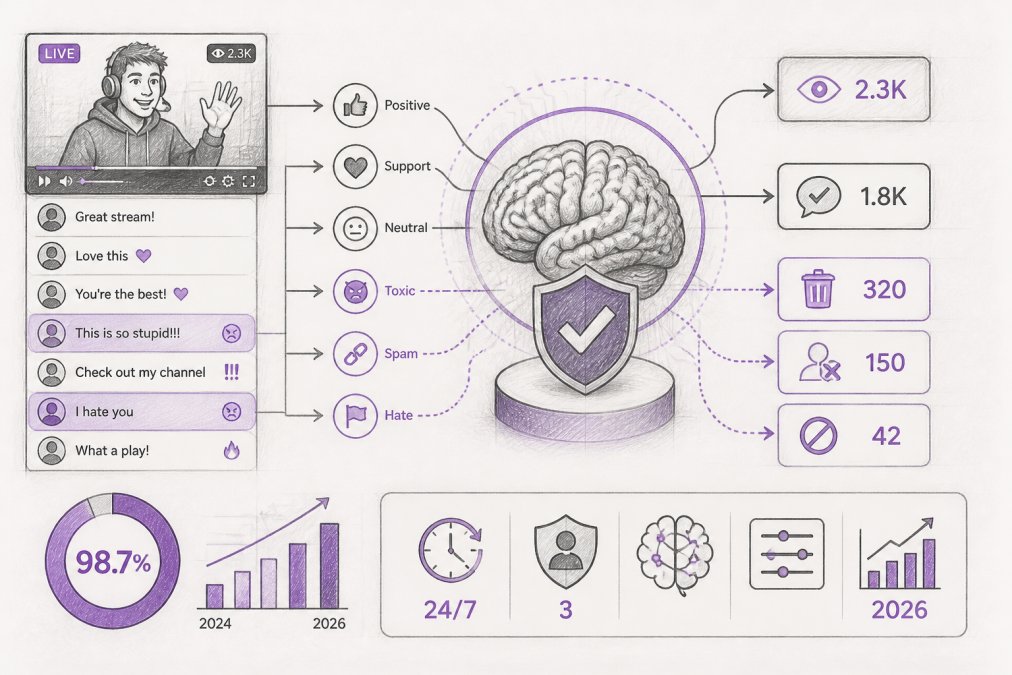
AI moderation for live stream comments is the automated process of identifying, filtering, and responding to harmful or unwanted content in real-time as viewers interact during live broadcasts. At FeedGuardians, we've built tools that detect spam, hate speech, competitor links, and scams instantly, then hide them or escalate them to human moderators, without slowing down your stream or requiring constant manual oversight.
Real-time moderation protects your brand reputation, keeps your audience safe, and frees your team from reading every comment during a broadcast. For e-commerce brands and content creators managing high comment volumes, this difference is measured in hours saved daily and in ad performance that doesn't tank because of toxic comments driving away buyers.
The technology combines natural language processing, sentiment analysis, and contextual understanding to catch what simple keyword blacklisting misses. A comment saying "I hate this product" is feedback, not hate speech. A comment with a slur followed by a smiley face is still harmful. Modern AI moderation learns these distinctions and handles thousands of comments per minute instantly, before violations accumulate and damage your stream's reputation (peer-reviewed research).
Real-Time Detection: How Automated Message Screening Works
Automated message screening happens in milliseconds. When a viewer posts a comment, the system routes it through a processing pipeline: it extracts the text, runs it through multiple detection models (toxicity, spam, competitor links, sentiment), scores each risk, and either publishes the comment, hides it, or flags it for human review, all before most viewers refresh their feed.
Natural language processing breaks down the comment into meaningful units so the system understands context, not just keywords. Toxicity detection identifies hate speech, slurs, and threats. Spam detection catches repetitive low-value comments, promotional spam, and scam links. Sentiment analysis determines whether a comment is genuine criticism or abusive. Competitor link detection spots rival brand promotion.
Real-time analytics feed this data to your moderation dashboard, showing comment volume, flagged items, and system confidence scores. This transparency is essential because automated action without visibility creates blind spots.
FeedGuardians processes comments quickly, fast enough that viewers don't notice delays. The system also learns your specific community over time, adapting to your platform, audience, and brand voice rather than relying on generic models that flag normal conversation or miss niche-specific insults.
Automated Chat Moderation Best Practices
The foundation of effective automated chat moderation is clear community guidelines. Define what spam looks like in your context, what counts as hate speech versus criticism, whether competitor mentions are always forbidden, and how strictly you want to filter profanity. Vague rules produce inconsistent results.
Once you've defined your standards, configure your system to match them. Most platforms let you set keyword blacklists, define severity levels, and create exceptions. A comment containing a competitor's name isn't always spam, if someone says "I switched from Competitor X and I love your product," that's positive social proof. Your rules need nuance.
Monitor false positives actively. Automated systems will occasionally hide legitimate comments. A customer asking "Is this product safe?" might get flagged if your toxicity filter is too aggressive. Someone needs to review hidden comments regularly and adjust rules accordingly.
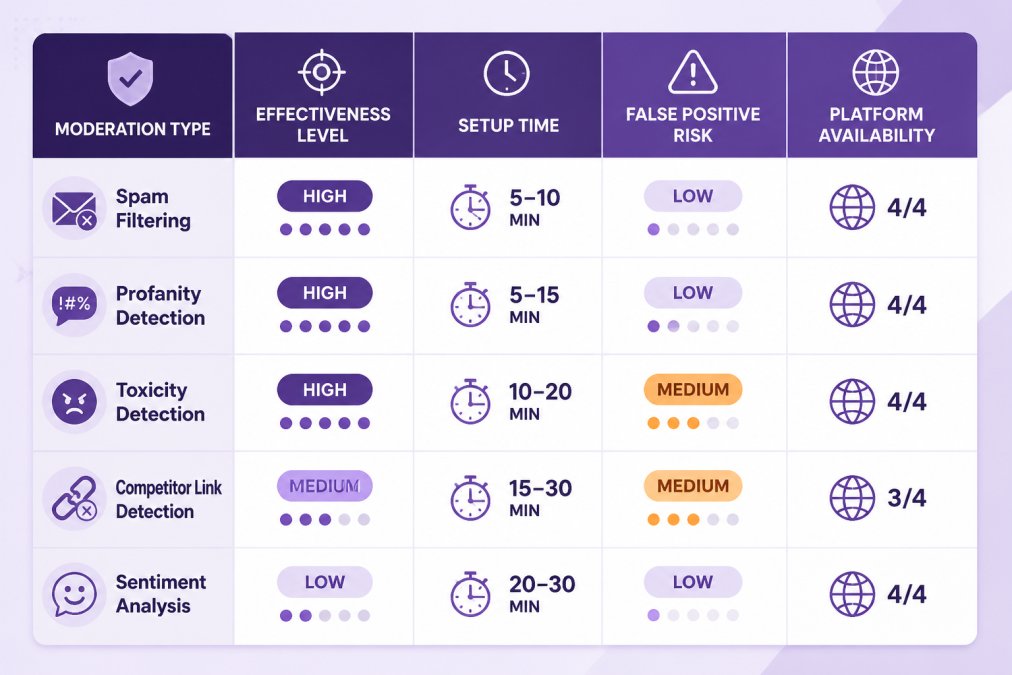
Balance automation with human escalation. Comments that are borderline or require context only humans understand should route to your team for review. A hybrid human-in-the-loop approach catches edge cases and reduces the risk of silencing customers unfairly.
Test your configuration on historical data before going live. Run past comments through your moderation rules and see what gets flagged. This reveals whether your rules are too strict or too loose. Adjust before you deploy.
How to Stop Spam in Live Chat
Spam takes several forms: repetitive promotional messages, links to malware or phishing sites, bots posting identical comments thousands of times, and low-effort engagement bait. Each requires a different approach.
Keyword blacklisting is the simplest defense, but determined spammers change URLs slightly or use misspellings. You need pattern detection, the system should recognize that 50 identical comments posted in 30 seconds is probably a bot, regardless of exact text.
Rate limiting is effective: if one account posts more than 10 comments in 60 seconds, hide those comments or require human approval (cisa.gov). This stops bot spam without blocking legitimate fast talkers.
Link filtering is essential. Most spam includes a link, and most legitimate viewers don't need to share URLs during live streams. Whitelist your own domain and block everything else, or allow links from verified accounts only. secure live streaming.
For competitor spam, you can block mentions of rival brands entirely or flag them for review. Some brands prefer to see competitor mentions so they can respond with counter-arguments.
The hardest spam to stop is fake accounts posting one comment that looks legitimate then disappearing. Detecting this requires looking at account age, posting history, and patterns of inauthentic behavior. AI moderation can flag these, but you'll need human judgment to decide whether to hide them.
Managing Toxic Comments in Live Streams
Toxic comments range from mild rudeness to threats and slurs. The challenge is that toxicity is context-dependent. Your moderation rules need to account for this nuance.
Profanity filtering is straightforward but crude. Some communities accept strong language as normal conversation. Others want it hidden only when directed at other users. Configure your system to match your community's norms.
Hate speech detection requires understanding slurs, dog whistles, and context. A system that only blocks explicit slurs will miss coded language. A system that's too aggressive will flag legitimate discussions. The best approach is layered: automated detection catches obvious violations, but borderline cases go to human moderators.
Sentiment analysis helps distinguish between a slur used satirically versus one used to attack someone. The system should flag both, but humans can make the final call.
When you hide a comment, notify the user why. "Your comment was hidden because it contains hate speech" is clearer than silent removal. It gives users a chance to understand your rules and reduces the perception of arbitrary censorship.
Hybrid Human-in-the-Loop: Balancing Automation with Human Oversight
The best moderation systems aren't fully automated. They're hybrid: AI handles obvious violations instantly and escalates edge cases to humans. This catches more violations than pure automation while avoiding false positives.
The workflow is: incoming comment → automated scan → if confidence is high, take action; if confidence is medium, escalate to human queue; if confidence is low, publish and monitor. Your team reviews escalated comments and makes the final call. Over time, the system learns from these decisions and adjusts its confidence thresholds.
Define confidence levels clearly. If your toxicity model is 95% confident a comment is hate speech, hide it. If it's 65% confident, escalate. If it's 40% confident, publish it. These thresholds vary by risk tolerance.
Human review also prevents "filter creep," where poorly tuned systems gradually hide more legitimate content over time. Human oversight catches this drift and corrects it.
Someone needs to review escalated comments, usually during your live stream. For high-volume streams, that's a dedicated role. FeedGuardians reduces this load by prioritizing escalations and learning from your team's decisions to improve automation over time.
False Positives and Latency: The Hidden Challenges
False positives, hiding legitimate comments by mistake, damage user trust and create a perception of arbitrary censorship. Common false positives include legitimate criticism flagged as hate speech, questions about safety flagged as trolling, comments in languages the system doesn't understand well, and sarcasm misread as toxicity.
The fix is active monitoring. Someone on your team should regularly check hidden comments and ask: did this deserve to be hidden? If you find patterns, adjust your rules. No system is perfect, but you can manage errors.
Latency, the time it takes to moderate a comment, is the second hidden challenge. If your system takes 5 seconds to approve or hide a comment, the viewer experience suffers. Fast systems (under 500 milliseconds) feel instant (acm.org). Slow systems feel broken. Latency also affects moderation quality, slower systems process fewer comments per second, so violations slip through.
The tradeoff is real: more complex AI models catch more violations but are slower. Simpler models are faster but miss more. The best systems use a tiered approach: fast simple models catch obvious violations, and more complex models run in the background on a sample of comments, learning and improving without blocking the fast path.
Ethical bias is the third challenge. AI models trained on biased data perpetuate that bias. A toxicity model trained mostly on English-language hate speech will misunderstand toxicity in other languages or cultures. Test your system on comments from your actual audience and adjust before deploying.
Conclusion
AI moderation for live stream comments solves a real problem: protecting your community and brand while scaling beyond what manual moderation can handle. The technology is mature enough to work reliably, but it requires thoughtful configuration and ongoing human oversight to avoid false positives and maintain trust.
The best approach is hybrid: let AI handle obvious violations in real-time, escalate edge cases to your team, and monitor continuously for errors. Start with clear community guidelines, test your rules on historical data, and adjust based on what you learn.
FeedGuardians handles this end-to-end: real-time moderation across Instagram, Facebook, TikTok, and YouTube, with 98.7% accuracy on spam, hate speech, and competitor links. The system learns your brand voice and community norms, escalates borderline cases to your team, and provides a real-time dashboard so you stay informed. Start for free and scale as your needs grow.
Frequently Asked Questions
Can AI moderation for live stream comments really catch 98.7% of harmful content?
AI moderation systems use natural language processing and machine learning trained on millions of harmful content examples to detect spam, profanity, toxicity, and hate speech. FeedGuardians' AI automatically detects and hides spam, scams, hate speech, and competitor links with 98.7% accuracy. However, accuracy can vary based on context, slang, and new attack patterns. Most platforms combine automated detection with human-in-the-loop workflows to catch edge cases and context-dependent violations that AI misses. Real-world performance depends on how well the system is tuned to your specific community guidelines and content types.
How does AI moderation improve live stream engagement and ad performance?
AI moderation improves engagement by enabling faster responses to genuine comments, reducing visibility of spam and toxicity that drives away viewers, and maintaining a healthier community environment. When moderators spend hours manually screening comments, they miss opportunities to respond authentically to customer inquiries. Automated moderation frees your team to focus on high-value interactions that build relationships. Cleaner comment sections also improve advertiser confidence, reduce brand safety risks that trigger ad policy violations, and increase viewer trust, all factors that improve ad performance and conversion rates. FeedGuardians helps boost ad performance instantly by protecting brand reputation and turning comments into valuable conversations and conversions.
What should I do about false positives when AI flags legitimate comments as spam or toxic?
False positives occur when AI incorrectly flags benign comments as harmful, for example, sarcasm misidentified as toxicity or slang interpreted as profanity. Minimize false positives by setting customizable moderation rules that reflect your brand's actual content policy, training the system on your specific terminology and community tone, and using a human-in-the-loop workflow where flagged comments are reviewed before action. FeedGuardians offers a human escalation option for borderline cases. Most modern AI moderation platforms allow you to whitelist certain phrases, adjust sensitivity thresholds per category, and create escalation rules so borderline cases go to human moderators instead of being automatically hidden.
How long does it take to set up AI moderation for live stream comments?
Basic setup typically takes 15-30 minutes: connect your social media accounts (Instagram, Facebook, TikTok, YouTube), configure your moderation rules, and enable real-time scanning. Customization, training the system on your brand voice, creating escalation workflows, and fine-tuning sensitivity levels, takes an additional 1-2 hours depending on complexity. Most platforms offer templates based on industry type (e-commerce, content creators, agencies) to accelerate setup. You can start with default rules and refine them over time as you see what the system catches and what it misses. No coding or technical expertise is required.
This article was written using GrandRanker
Tired of manually moderating comments?
FeedGuardians automates spam filtering, responds to customers, and protects your brand — setup in 3 minutes.
Frequently Asked Questions
Can AI moderation for live stream comments really catch 98.7% of harmful content?
AI moderation systems use natural language processing and machine learning trained on millions of harmful content examples to detect spam, profanity, toxicity, and hate speech. FeedGuardians' AI automatically detects and hides spam, scams, hate speech, and competitor links with 98.7% accuracy. However, accuracy can vary based on context, slang, and new attack patterns. Most platforms combine automated detection with human-in-the-loop workflows to catch edge cases and context-dependent violations that AI misses. Real-world performance depends on how well the system is tuned to your specific community guidelines and content types.
How does AI moderation improve live stream engagement and ad performance?
AI moderation improves engagement by enabling faster responses to genuine comments, reducing visibility of spam and toxicity that drives away viewers, and maintaining a healthier community environment. When moderators spend hours manually screening comments, they miss opportunities to respond authentically to customer inquiries. Automated moderation frees your team to focus on high-value interactions that build relationships. Cleaner comment sections also improve advertiser confidence, reduce brand safety risks that trigger ad policy violations, and increase viewer trust—all factors that improve ad performance and conversion rates. FeedGuardians helps boost ad performance instantly by protecting brand reputation and turning comments into valuable conversations and conversions.
What should I do about false positives when AI flags legitimate comments as spam or toxic?
False positives occur when AI incorrectly flags benign comments as harmful—for example, sarcasm misidentified as toxicity or slang interpreted as profanity. Minimize false positives by setting customizable moderation rules that reflect your brand's actual content policy, training the system on your specific terminology and community tone, and using a human-in-the-loop workflow where flagged comments are reviewed before action. FeedGuardians offers a human escalation option for borderline cases. Most modern AI moderation platforms allow you to whitelist certain phrases, adjust sensitivity thresholds per category, and create escalation rules so borderline cases go to human moderators instead of being automatically hidden.
How long does it take to set up AI moderation for live stream comments?
Basic setup typically takes 15-30 minutes: connect your social media accounts (Instagram, Facebook, TikTok, YouTube), configure your moderation rules, and enable real-time scanning. Customization—training the system on your brand voice, creating escalation workflows, and fine-tuning sensitivity levels—takes an additional 1-2 hours depending on complexity. Most platforms offer templates based on industry type (e-commerce, content creators, agencies) to accelerate setup. You can start with default rules and refine them over time as you see what the system catches and what it misses. No coding or technical expertise is required.