
Quick Summary
| Key Insight | What You Need to Know |
|---|---|
| Step 1 | Set Up Your TikTok Comment Filter SettingsEnable Keyword Filtering in the TikTok AppConfigure Who Can Comment on Your Videos |
| Enable Keyword Filtering in | Enable Keyword Filtering in the TikTok App |
| Configure Who Can Comment | Configure Who Can Comment on Your Videos |
| Step 2 | How to Block Spam Comments on TikTok |
| Step 3 | Manage Comments During TikTok LIVE Streams |
| Step 4 | Use AI Comment Moderation Tools to Moderate TikTok Comments AutomaticallyHow AI Moderation Works and What to Look ForStaying Compliant While AutomatingWhen Automation Fails: Troubleshooting |
Table of Contents
- Step 1: Set Up Your TikTok Comment Filter Settings
- Step 2: How to Block Spam Comments on TikTok
- Step 3: Manage Comments During TikTok LIVE Streams
- Step 4: Use AI Comment Moderation Tools to Moderate TikTok Comments Automatically
- Step 5: Set Up Automated Response for TikTok Comments
- Troubleshooting Common Automation Errors and Staying Compliant
- Frequently Asked Questions
Last Updated: September 10, 2026
Step 1: Set Up Your TikTok Comment Filter Settings
TikTok's built-in tools are the fastest way to reduce noise, and most creators never touch them. Learning how to moderate TikTok comments automatically starts here, before you ever connect a third-party tool.
TikTok comment filter settings live under Settings and Privacy > Privacy > Comments. Two controls do the heavy lifting: keyword filtering and comment permissions.
Enable Keyword Filtering in the TikTok App
Keyword filtering hides any comment containing words you specify. Add slurs, scam phrases ("DM me," "click link"), and competitor names. TikTok also offers a spam and offensive comments toggle that applies algorithmic filtering to suspected junk.
A common mistake is leaving the default list untouched. Defaults catch the obvious; they miss your niche's specific spam. Update keywords monthly.
Configure Who Can Comment on Your Videos
Comment permissions decide who gets to reply at all. Your options:
- Everyone - maximum reach, maximum spam
- Followers - cuts most bot traffic
- Friends - tightest control, lowest engagement
- No one - disables comments entirely
For high-volume e-commerce accounts, followers-only is usually the right default. It blocks drive-by spam without silencing your actual audience.
Step 2: How to Block Spam Comments on TikTok
Knowing how to block spam comments on TikTok comes down to four layers working together: platform filters, manual blocking, bulk hiding, and report-and-ban workflows. No single layer catches everything, and the order you apply them matters more than most guides admit.
Layer 1: The block list. Every time you block an account, TikTok prevents that account from commenting on your videos, viewing your profile, and sending you direct messages. Repeat offenders often operate in coordinated networks, the same handful of accounts rotating through dozens of profiles, so blocking one rarely solves the problem alone. Block the account, then check whether the same comment pattern appears under other usernames. If it does, you are looking at a network, not a person.
Layer 2: Bulk hide. TikTok's comment inbox lets you select multiple comments and hide them in one action, which is dramatically faster than deleting one at a time. The key mechanic: hidden comments remain visible to the person who posted them, but disappear for everyone else. That matters because a spammer who sees their comment still standing has no incentive to repost. A spammer who sees it vanish often tries again with a new account.
Layer 3: Report coordinated spam. When the same link, phrase, or @mention appears across dozens of comments, report the pattern rather than each comment. Reports on coordinated behavior give TikTok's systems a stronger signal than isolated reports, and they help flag the source account rather than just the symptom.
Layer 4: Delete versus hide, pick deliberately. Deleting removes the comment entirely and notifies no one. Hiding keeps it visible only to the poster. For scam links and hate speech, delete and block. For borderline criticism or a frustrated customer, hide, you keep the record without amplifying it. Deleting legitimate criticism is the fastest way to look like you are censoring, and screenshots travel faster than deletions.
| Spam Type | First Line of Defense | Escalation | Why |
|---|---|---|---|
| Scam links | Keyword filter | Report account | Pattern reporting flags the source |
| Competitor plugs | Block list | Hide comment | Hiding removes the incentive to repost |
| Bot floods | Followers-only mode | Bulk hide | Volume defeats one-by-one moderation |
| Hate speech | Spam toggle | Report and block | Platform escalation needed for enforcement |
| Repeat network | Block + report pattern | Document and monitor | Networks rotate accounts |
A common mistake is treating blocking as a one-time cleanup. Spam is a recurring event, not a state. The accounts that block you back, the ones that switch usernames, and the ones that post at 3 a.m. all require a standing process, not a single afternoon of deleting.
Step 3: Manage Comments During TikTok LIVE Streams
LIVE streams are the hardest moderation environment on any platform. Comments arrive in real time, and a single hateful message can derail a broadcast before you see it.
TikTok gives LIVE hosts a dedicated moderation panel with keyword filters and a "mute" option for viewers. Assign a moderator before you go live. On high-traffic streams, one person cannot both host and moderate.
A common mistake is running LIVE with default settings. Set your keyword list before the stream starts, not during it. You can mute a viewer instantly, but you cannot un-see a comment that already hit the screen.
For brands running regular LIVE shopping, real-time monitoring is not optional. One offensive comment left up for ten minutes can end up in a screenshot that outlives the stream.
Step 4: Use AI Comment Moderation Tools to Moderate TikTok Comments Automatically
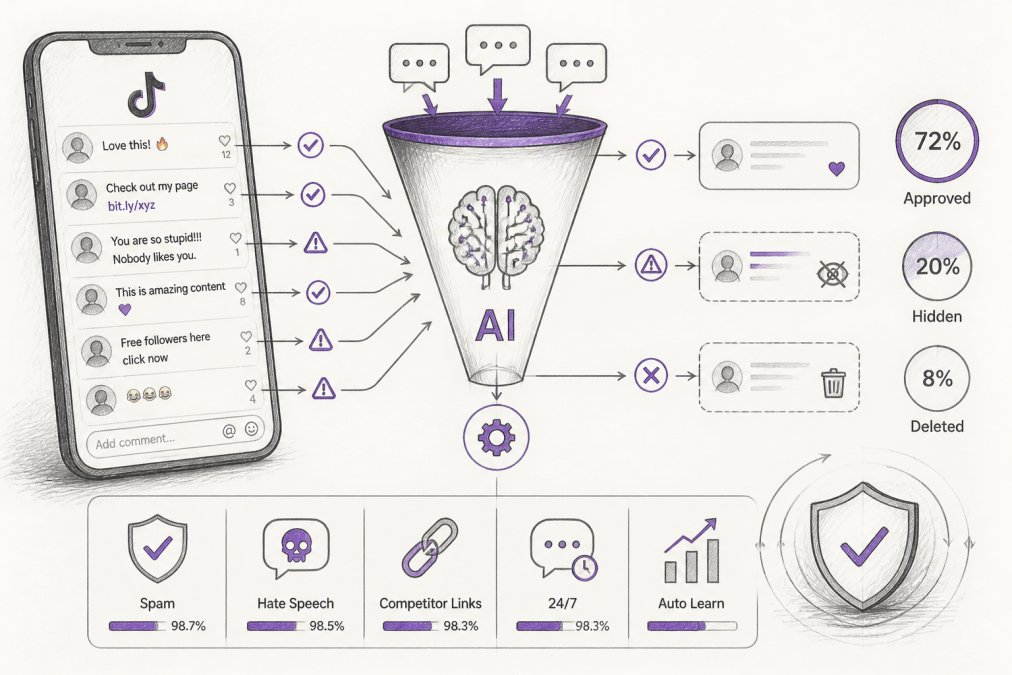
AI comment moderation tools are software that scans incoming comments in real time, classifies each one against your rules, and takes action automatically. They handle volume that no human team can match during peak hours, and they are the only realistic option once your comment section crosses a few hundred interactions a day.
This is where native settings hit a ceiling. TikTok's filters work on keywords and basic signals. AI tools read context, tone, and intent, which is why they catch scams and hate speech that keyword lists miss. A keyword filter sees "free" and "link" and blocks a customer asking about a restock. An AI model reads the whole sentence and knows the difference.
How AI Moderation Works and What to Look For
Most AI moderation engines follow the same pipeline:
- A comment arrives and gets parsed for text, links, emoji patterns, and account signals (account age, follower ratio, posting history)
- The model classifies it against categories like spam, hate speech, scam, or competitor promotion
- The system applies your rule: approve, hide, reply, or escalate to a human
- Logged outcomes feed back into the model to improve accuracy over time
When evaluating tools, look for five things: detection accuracy you can verify with your own comment history, a human escalation path, brand-voice reply capability, support for the platforms you actually use, and a clear data-handling policy. That last one matters more than most buyers realize, you are handing a third party access to your audience's comments, and you need to know where that data goes.
Staying Compliant While Automating
This is the part almost no guide covers, and it is the part that gets accounts suspended.
TikTok's Terms of Service prohibit automated activity that mimics human behavior in ways the platform considers deceptive, and they restrict scraping and bulk data collection. The practical implication: automation that reads and acts on comments through official channels is generally fine; automation that logs into accounts, scrapes user data, or mass-posts is not. Before you connect any tool, confirm it uses TikTok's official APIs rather than credential-based access. A tool that asks for your password is a red flag.
A second compliance layer is advertising law. The FTC's guidance on endorsements and advertising applies to how brands manage and respond to public comments, especially when testimonials are involved. Automated replies must not imply endorsements you cannot substantiate, and hidden comments should follow a documented, consistent policy, not an ad hoc decision made in the moment.
A third layer is disclosure. If a reply is automated, a light-touch disclosure (a signature, a small note, or a consistent phrasing) keeps you on the right side of both platform rules and audience trust. Most practitioners find that audiences accept automated replies when they are honest about it and resent them when they are not.
When Automation Fails: Troubleshooting
Automated filters break in predictable ways, and knowing the failure modes in advance is what separates a working setup from a suspended account.
Over-blocking. Rules so aggressive they hide legitimate customer questions. The fix is a review queue: borderline comments go to a human instead of being auto-hidden. Never let an AI tool auto-delete without a human review path for anything that is not unambiguously spam.
Trigger collisions. Two rules match the same comment and the system picks the wrong action. Order your rules from most specific to most general, and test new rules against a sample of recent comments before turning them live.
API errors and rate limits. When a platform changes an endpoint or tightens a rate limit, automated workflows stall silently. Monitor your integration health weekly and keep a manual fallback ready, a human who can step in when the automation goes dark.
False negatives. The filter misses a hateful comment that slips through. Log every miss, review the pattern weekly, and add the phrase to your keyword list. No model catches everything; the goal is to catch more each week than the week before.
TikTok's official community guidelines
Step 5: Set Up Automated Response for TikTok Comments
An automated response for TikTok comments handles the repetitive questions that eat your team's day: sizing, shipping, restock dates, and pricing. Done well, it turns a comment section into a sales channel.
The setup is straightforward. Define your trigger keywords, write replies in your brand voice, and set the rules for when a human takes over. The hard part is voice, not configuration.
Most generic bots sound like bots. Customers spot canned replies instantly, and that erodes trust faster than a slow response would. Our solution learns your tone, terminology, and guidelines, so replies sound like your team wrote them. It also replies 24/7, which matters when your audience comments at 2 a.m.
A practical starting workflow:
- List your ten most common comment questions
- Write one on-brand reply for each
- Set escalation rules for complaints and refund requests
- Run replies for one week and review every output
- Tighten phrasing, then let it run
Troubleshooting Common Automation Errors and Staying Compliant
Automation breaks in predictable ways. The most common failure is over-blocking: rules so aggressive they hide legitimate customer questions. The fix is a review queue, where borderline comments go to a human instead of being auto-hidden.
The second failure is trigger collisions, where two rules match the same comment and the system picks the wrong action. Order your rules from most specific to most general.
The third is API errors. When a platform changes an endpoint or rate limit, automated workflows stall. Monitor your integration health weekly and keep a manual fallback ready.
Compliance matters here. The FTC's guidance on endorsements and advertising applies to how brands manage and respond to public comments, especially when testimonials are involved. Automated replies must not imply endorsements you cannot substantiate, and hidden comments should follow a documented, consistent policy.
Ethical AI use matters too. Disclose automated responses where appropriate, never use AI to suppress legitimate criticism, and keep a human in the loop for anything sensitive. Moderation protects your brand; censorship damages it.
FTC advertising and marketing basics
Frequently Asked Questions
Can I use third-party tools to moderate TikTok comments automatically?
Yes. Third-party AI comment moderation tools connect to TikTok via API and automate filtering, hiding, and replying. They detect spam, hate speech, and competitor links in real time, often with higher accuracy than native settings. Look for tools that offer keyword filtering, sentiment analysis, and a human escalation option to handle edge cases. Pricing varies by volume and platform coverage, so check the provider's website for current plans.
How do I set up automatic keyword filtering on TikTok?
In the TikTok app, go to Settings and privacy > Privacy > Comments > Filter keywords. Add words or phrases you want to block. You can also enable 'Filter all comments' to review every comment before it appears. For more advanced filtering, like blocking competitor links or hate speech, use a third-party AI tool that integrates with TikTok's API.
What is the difference between manual and automated moderation on TikTok?
Manual moderation requires you or a team member to read and act on each comment, which doesn't scale for high-volume accounts. Automated moderation uses software to instantly filter spam, hide offensive content, and even reply based on rules or AI. Automation saves hours daily and ensures consistent enforcement, while manual review is best for nuanced or escalated cases.
How does AI-driven moderation protect brand reputation?
AI-driven moderation hides harmful comments before they damage your brand image. It detects spam, hate speech, and competitor links with high accuracy, preventing them from appearing under your videos. It also enables fast, on-brand replies 24/7, turning negative interactions into positive engagement. This real-time protection is especially important during ad campaigns, where a single offensive comment can hurt performance.
Manual moderation does not scale, and TikTok's native filters only get you partway. FeedGuardians closes the gap with real-time moderation, 24/7 AI replies in your brand voice, competitor protection, and a human escalation path when judgment matters. Start for free and turn your comment section from a liability into a conversion channel.
Tired of manually moderating comments?
FeedGuardians automates spam filtering, responds to customers, and protects your brand — setup in 3 minutes.
Frequently Asked Questions
Can I use third-party tools to moderate TikTok comments automatically?
Yes. Third-party AI comment moderation tools connect to TikTok via API and automate filtering, hiding, and replying. They detect spam, hate speech, and competitor links in real time, often with higher accuracy than native settings. Look for tools that offer keyword filtering, sentiment analysis, and a human escalation option to handle edge cases. Pricing varies by volume and platform coverage, so check the provider's website for current plans.
How do I set up automatic keyword filtering on TikTok?
In the TikTok app, go to Settings and privacy > Privacy > Comments > Filter keywords. Add words or phrases you want to block. You can also enable 'Filter all comments' to review every comment before it appears. For more advanced filtering, like blocking competitor links or hate speech, use a third-party AI tool that integrates with TikTok's API.
What is the difference between manual and automated moderation on TikTok?
Manual moderation requires you or a team member to read and act on each comment, which doesn't scale for high-volume accounts. Automated moderation uses software to instantly filter spam, hide offensive content, and even reply based on rules or AI. Automation saves hours daily and ensures consistent enforcement, while manual review is best for nuanced or escalated cases.
How does AI-driven moderation protect brand reputation?
AI-driven moderation hides harmful comments before they damage your brand image. It detects spam, hate speech, and competitor links with high accuracy, preventing them from appearing under your videos. It also enables fast, on-brand replies 24/7, turning negative interactions into positive engagement. This real-time protection is especially important during ad campaigns, where a single offensive comment can hurt performance.