

Quick Summary
| Key Insight | What You Need to Know |
|---|---|
| Why Manual Moderation Drains | Why Manual Moderation Drains Your Team's Time |
| Automated vs Manual Content Moderation | What Actually Works When to Use Automated Filters When Human Review Is Essential |
| When to Use Automated | When to Use Automated Filters |
| When Human Review Is | When Human Review Is Essential |
| The Role of AI | The Role of AI in Content Filtering and Response |
| Social Media Moderation Tools | Social Media Moderation Tools That Cut Time in Half Real-Time Detection and Keyword Filtering Human-in-the-Loop Escalation |
Table of Contents
- Why Manual Moderation Drains Your Team's Time
- Automated vs Manual Content Moderation: What Actually Works
- The Role of AI in Content Filtering and Response
- Social Media Moderation Tools That Cut Time in Half
- Step-by-Step: Set Up a Hybrid Moderation Workflow
- Social Media Moderation Best Practices to Protect Your Brand
- Common Mistakes That Waste Time and Damage Your Brand
- Conclusion
Last Updated: August 8, 2026
Why Manual Moderation Drains Your Team's Time
Social media managers spend countless hours reviewing comments, flagging spam, and responding to repetitive inquiries. A team managing multiple brand accounts across Instagram, Facebook, TikTok, and YouTube faces hundreds or thousands of comments daily, each requiring human judgment. Manual review creates bottlenecks: response times stretch from minutes to hours, spam accumulates, and your brand reputation suffers from unanswered inquiries or visible hate speech.
FeedGuardians addresses this core problem by automating high-volume filtering while preserving human judgment for edge cases. Rather than hiring more moderators, you configure automated systems that cut manual moderation time significantly while improving response quality. The challenge is implementing automation correctly so you catch harmful content without silencing legitimate voices or creating false positives that frustrate customers.
Automated vs Manual Content Moderation: What Actually Works
Automated moderation filters content in real time using keyword rules, AI pattern recognition, and behavioral signals. Manual moderation relies entirely on human reviewers. Neither works alone for high-volume accounts; the question is how to combine them strategically.
When to Use Automated Filters
Automation excels at high-volume, pattern-based decisions. If your brand receives 500+ comments daily, automation handles obvious cases: spam links, repeated promotional messages, known hate speech keywords, competitor mentions. A human reviewer takes 30-60 seconds per comment; automated systems process the same volume in milliseconds. For 1,000 comments daily, that's 8-16 hours of manual work versus near-instantaneous filtering.
Automation also maintains consistency. Human reviewers interpret ambiguous comments differently depending on context or fatigue. Automated rules apply the same logic every time, protecting your brand from accidental oversights.
Common use cases for automation:
- Filtering spam and scam links
- Hiding comments with known hate speech terms
- Removing competitor promotional content
- Flagging comments mentioning specific risk keywords
- Automatically hiding comments from flagged accounts
- Detecting and hiding deepfakes or manipulated media
When Human Review Is Essential
Humans excel at nuance and context. A comment containing a prohibited word might be sarcasm, criticism, or reclaimed language. A customer complaint might deserve a compassionate response or a private message. A competitor mention in a neutral context differs from a competitor link posted for self-promotion.
Automated systems struggle with these edge cases. They see keywords but lack context, creating false positives that damage trust more than missing spam.
Human review is essential for:
- Responding to customer service inquiries with empathy and brand voice
- Evaluating context-dependent comments (sarcasm, cultural references, criticism)
- Making judgment calls on borderline content
- Handling crisis situations or sensitive topics
- Crafting personalized responses that strengthen customer relationships
- Reviewing escalated content flagged by automated systems
The hybrid approach assigns automation to high-confidence decisions and routes uncertain cases to humans, maximizing speed while preserving accuracy where it matters most.
The Role of AI in Content Filtering and Response
AI-powered content filtering uses machine learning models trained on millions of comments to identify harmful content patterns without relying on static keyword lists. Unlike simple keyword matching, AI learns context, tone, and emerging threats, adapting as language evolves.
AI detects harmful content by analyzing multiple signals simultaneously: word choice, sentence structure, user history, timing patterns, and behavioral indicators. A comment that looks benign in isolation might be flagged if it matches patterns associated with coordinated spam campaigns. Conversely, a comment containing a flagged keyword might be approved if surrounding context indicates legitimate use.
Beyond filtering, AI powers automated responses. Instead of hiding every customer inquiry, FeedGuardians generates replies in your brand voice, delivering 24/7 responses without human involvement. This transforms comments from a time drain into a scalability advantage.
The key limitation: AI requires training data. A new brand without moderation history needs time for the system to learn. Highly specialized brand voices may require more manual examples before AI captures the tone accurately.
Social Media Moderation Tools That Cut Time in Half
The best moderation tools combine automated filtering, AI response generation, and human escalation into a single workflow, integrating directly with your social accounts.
Real-Time Detection and Keyword Filtering
Real-time detection catches comments the moment they're posted, before they accumulate or influence your ad performance. The system scans incoming comments against your configured rules and acts instantly.
Keyword filtering remains foundational. You define prohibited terms, competitor names, or risk phrases specific to your industry. Combined with AI pattern recognition, keyword filtering catches both obvious spam and emerging threats.
FeedGuardians detects and hides spam, hate speech, and competitor links with 98.7% accuracy. This precision matters because false positives damage customer trust more than false negatives. The platform learns your specific context, since what constitutes spam for an e-commerce brand differs from what matters for a content creator.
Human-in-the-Loop Escalation
Not every comment requires human review, but some do. The system flags uncertain cases and routes them to your team. This human-in-the-loop model preserves accuracy on edge cases while eliminating busywork.
Escalation rules determine what reaches your team. You might escalate comments containing specific keywords, comments from new accounts, or comments with ambiguous sentiment. This approach reduces manual workload by 70-90% depending on your comment volume, with your team handling only the 10-30% requiring judgment.
Step-by-Step: Set Up a Hybrid Moderation Workflow
Setting up a hybrid workflow takes time upfront but pays dividends in ongoing efficiency.
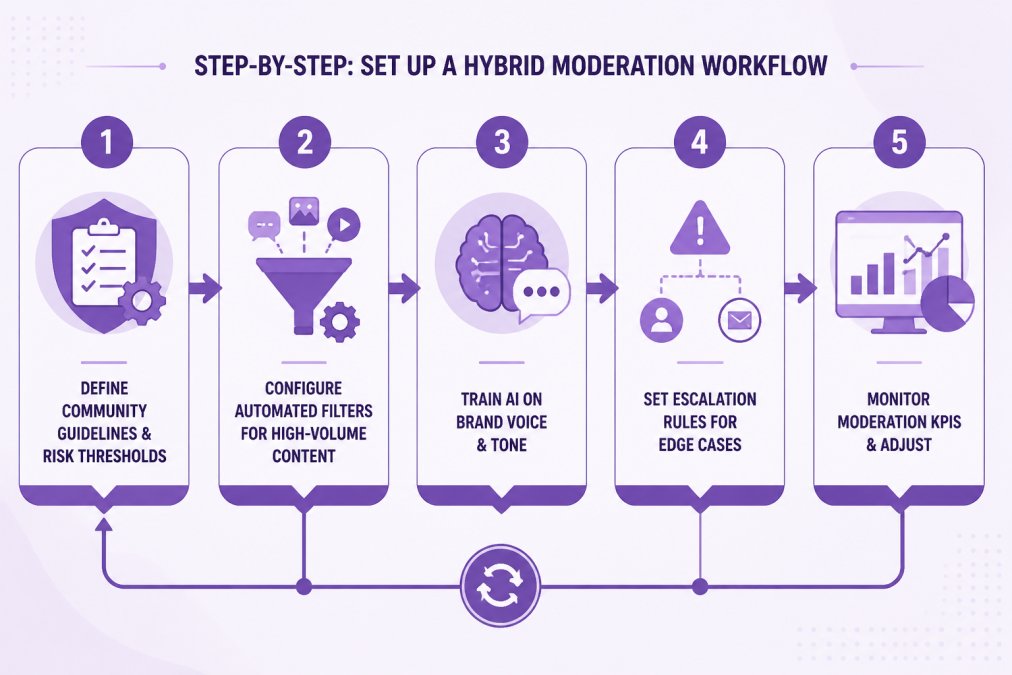
Step 1: Define Your Community Guidelines and Risk Thresholds
Document what you will and won't tolerate. Community guidelines establish clear standards: Are product complaints acceptable? Do you allow competitive discussions? What language is prohibited? Do you hide or respond to negative reviews?
Risk thresholds determine how aggressively you filter. A luxury brand might hide any negative language. A B2B SaaS company might allow criticism but hide spam. Document these decisions and share them with your moderation team to ensure consistent enforcement.
Step 2: Configure Automated Filters for High-Volume Content
Map your guidelines to automated rules. Create keyword lists for prohibited terms, competitor names, and risk phrases. Define patterns that trigger automatic actions (hide, flag, or auto-reply).
Start conservative. It's easier to relax filters than recover from over-aggressive moderation. Hide obvious spam and hate speech first, then monitor false positive rates and adjust thresholds based on real-world performance.
Most platforms allow you to combine multiple filters: keyword matching, account age, comment history, behavioral signals. A comment from a brand-new account containing competitor links gets higher scrutiny than the same comment from a verified customer.
Step 3: Train Your AI on Your Brand Voice and Tone
Provide examples of responses you want the AI to generate. Share past customer service interactions, email templates, and social media replies. The system learns your terminology, tone, and response patterns.
FeedGuardians learns your tone and delivers AI-powered replies that sound authentically like your brand. Quality matters here: if you provide thoughtful, personalized examples, the AI replicates that quality.
Step 4: Set Escalation Rules for Edge Cases
Define which comments require human review. Route uncertain cases to your team based on specific triggers: product defect claims, account age, sentiment, or custom keywords.
Escalation rules should be specific. "Flag all negative comments" is too broad; "Flag comments containing product defect claims" is actionable. Your team reviews these flagged items and decides whether to hide, respond, or take other action.
Step 5: Monitor Moderation KPIs and Adjust
Track metrics that indicate workflow health: response time, false positive rate, escalation volume, and customer sentiment.
Response time should drop significantly once automation is active. False positive rates should stay below 5%. Escalation volume should represent 10-30% of total comments. Review these metrics monthly and adjust your filters, escalation rules, and AI training based on performance.
Social Media Moderation Best Practices to Protect Your Brand
Effective moderation balances speed with accuracy, automation with human judgment, brand protection with customer trust.
Minimize False Positives Without Sacrificing Safety
False positives damage customer trust more than missing occasional spam. A customer asking a genuine product question shouldn't be hidden because they used a flagged word in context.
Reduce false positives by using context-aware rules instead of simple keyword matching, allowing humans to review borderline cases before hiding, testing rules on historical data, monitoring customer feedback, and adjusting thresholds based on false positive rates.
Manage Regulatory Compliance Across Platforms
Different platforms have different rules. Instagram's community guidelines differ from TikTok's. Your moderation policy must comply with each platform's standards while maintaining consistent brand values.
Document platform-specific rules and train your team on what each platform prohibits. Configure your moderation tools to enforce platform-specific policies if supported. Account for regulatory requirements around customer communications, data privacy, or advertising standards.
Common Mistakes That Waste Time and Damage Your Brand
Over-relying on keywords alone. Keyword-based filtering misses context-dependent content. A customer saying "Your product is a scam" is expressing a legitimate complaint; the same phrase from a bot promoting a competitor should be hidden.
Ignoring false positives. Hiding too many legitimate comments frustrates customers. If your system hides 15% false positives, you're silencing real customers.
Treating all comments equally. A comment from a verified customer deserves different treatment than one from a brand-new account. Sophisticated moderation considers account history, engagement, and context.
Neglecting response quality. Automated responses that sound robotic undermine your brand voice. Invest time training the AI system to match your tone.
Failing to escalate appropriately. If your team reviews 80% of comments manually, automation isn't working. Escalation rules should be specific enough that your team handles only genuine edge cases.
Not monitoring performance. Set up moderation KPIs and review them monthly. Adjust based on data, not assumptions.
Assuming one approach fits all platforms. Instagram requires different moderation than TikTok. Your strategy should account for platform-specific norms.
Manual social media moderation consumes hours your team could spend on strategy, content creation, or customer relationships. The solution is implementing a hybrid workflow that automates high-confidence decisions while preserving human judgment for nuanced cases.
FeedGuardians combines AI-powered filtering, real-time detection, and automated responses to reduce manual moderation time. The platform learns your brand voice, detects harmful content with 98.7% accuracy, and delivers 24/7 responses that sound authentically like your team. By configuring your community guidelines, setting escalation rules, and monitoring performance, you transform moderation from a time drain into a scalability advantage. Start your free trial with FeedGuardians and see how much time your team can reclaim.
| Workflow Component | Manual Only | Automated Only | Hybrid (Recommended) |
|---|---|---|---|
| Response Time | 30-60 min | Seconds | Seconds (auto) + 5-10 min (escalated) |
| Scalability | Limited by team size | Unlimited but risky | Unlimited with safety |
| False Positive Rate | 1-2% | 5-8% | 2-3% |
| Brand Voice Consistency | High | Low | High |
| Cost | High (per moderator) | Low | Low-Medium |
| Suitable For | <100 comments/day | High volume, simple rules | All volumes, all complexity |
Common Questions About Reducing Manual Social Media Moderation Time
How do I know if a moderation system is actually catching harmful content? Monitor false positive rates (legitimate comments hidden) and false negative rates (harmful content missed). FeedGuardians achieves 98.7% accuracy by combining keyword filtering, AI pattern recognition, and behavioral analysis. Test the system on historical data before deploying at full scale.
What's the difference between automated moderation and AI-powered moderation? Automated moderation uses static rules and keyword lists. AI-powered moderation learns from data and adapts to new threats, catching context-dependent content that keyword matching misses.
Can AI responses really sound like my brand? Yes, if you train the system properly. Provide 20-50 examples of responses matching your brand voice. The AI learns your terminology, tone, and response patterns, sounding authentic enough that customers don't immediately recognize it as automated.
How long does setup take? Initial configuration takes 2-4 hours. Ongoing monitoring and adjustment takes 30-60 minutes weekly. The upfront investment pays off within weeks through time savings.
What happens if the AI makes a mistake? Set up human escalation so your team reviews uncertain cases before the system takes action. Most platforms allow you to override automated decisions and adjust rules to prevent recurrence.
Can I use moderation tools across multiple client accounts? Yes. FeedGuardians handles multiple Instagram, Facebook, TikTok, and YouTube accounts from a single dashboard, scaling to handle 15+ accounts without significant overhead.
How much does this actually cost compared to hiring moderators? Moderation tools cost significantly less than hiring moderators. A moderator costs $15-25/hour and handles 60-100 comments per hour. A moderation platform costs a fraction of that and processes unlimited comments. ROI is typically positive within the first month.
Frequently Asked Questions
What is the most effective way to automate social media moderation?
The most effective approach combines AI-powered real-time filtering with human escalation. Set up automated systems to catch spam, hate speech, and competitor links immediately, then route flagged content that falls outside clear guidelines to your team for review. This hybrid model reduces manual workload by 70-80% while maintaining brand safety. Start by defining your community guidelines clearly, then train your AI tool on your specific risk thresholds and brand voice so it learns what matters most to your business.
How do you balance automated and manual content moderation?
Assign automation to high-volume, clear-cut issues: spam comments, known offensive keywords, and competitor links. Reserve manual review for nuanced content, sarcasm, context-dependent comments, and brand voice responses. Use moderation benchmarks to track performance: measure false positive rates, response time, and brand sentiment. If your automated system flags more than 10-15% of comments, adjust your filters to reduce noise. This balance prevents both under-moderation (brand safety risks) and over-moderation (deleting legitimate customer conversations).
What are the risks of relying solely on automated moderation?
Automated systems alone generate false positives, mistaking sarcasm or legitimate criticism for harmful content. They also miss context-dependent issues and cannot replicate human judgment in edge cases. Over-reliance creates brand reputation damage if customers feel their comments are being censored unfairly. Additionally, automated filters can miss sophisticated attacks or new slang that hasn't been trained into the system. The safest approach uses automation to flag and filter, then routes uncertain cases to human moderators who understand your brand's values and customer relationships.
How can AI tools reduce manual content moderation time?
AI tools reduce manual time by handling three tasks simultaneously: detecting harmful content in real-time, filtering comments before they appear on your feed, and generating on-brand replies automatically. Instead of your team manually reviewing every comment, the AI screens thousands per hour, escalating only edge cases or unanswered customer questions. This workflow saves 5-8 hours daily for high-volume accounts. The key is training the AI on your community guidelines and brand voice so it makes decisions aligned with your values, reducing the need for your team to override or correct its choices.
This article was written using GrandRanker
Tired of manually moderating comments?
FeedGuardians automates spam filtering, responds to customers, and protects your brand — setup in 3 minutes.
Frequently Asked Questions
What is the most effective way to automate social media moderation?
The most effective approach combines AI-powered real-time filtering with human escalation. Set up automated systems to catch spam, hate speech, and competitor links immediately, then route flagged content that falls outside clear guidelines to your team for review. This hybrid model reduces manual workload by 70-80% while maintaining brand safety. Start by defining your community guidelines clearly, then train your AI tool on your specific risk thresholds and brand voice so it learns what matters most to your business.
How do you balance automated and manual content moderation?
Assign automation to high-volume, clear-cut issues: spam comments, known offensive keywords, and competitor links. Reserve manual review for nuanced content, sarcasm, context-dependent comments, and brand voice responses. Use moderation benchmarks to track performance: measure false positive rates, response time, and brand sentiment. If your automated system flags more than 10-15% of comments, adjust your filters to reduce noise. This balance prevents both under-moderation (brand safety risks) and over-moderation (deleting legitimate customer conversations).
What are the risks of relying solely on automated moderation?
Automated systems alone generate false positives, mistaking sarcasm or legitimate criticism for harmful content. They also miss context-dependent issues and cannot replicate human judgment in edge cases. Over-reliance creates brand reputation damage if customers feel their comments are being censored unfairly. Additionally, automated filters can miss sophisticated attacks or new slang that hasn't been trained into the system. The safest approach uses automation to flag and filter, then routes uncertain cases to human moderators who understand your brand's values and customer relationships.
How can AI tools reduce manual content moderation time?
AI tools reduce manual time by handling three tasks simultaneously: detecting harmful content in real-time, filtering comments before they appear on your feed, and generating on-brand replies automatically. Instead of your team manually reviewing every comment, the AI screens thousands per hour, escalating only edge cases or unanswered customer questions. This workflow saves 5-8 hours daily for high-volume accounts. The key is training the AI on your community guidelines and brand voice so it makes decisions aligned with your values, reducing the need for your team to override or correct its choices.