
Quick Summary
| Key Insight | What You Need to Know |
|---|---|
| Why Agencies Are Adopting | Why Agencies Are Adopting AI Comment Reply Tools in 2026 |
| Quick Comparison | AI Comment Reply Tools for Agencies |
| AI Comment Moderation Software for Agencies | What to Look For |
| Social Media Response Templates for Agencies | Building a Reusable Library |
| Best Practices for AI | Best Practices for AI Social Media Responses |
| Human-in-the-Loop Workflows and Compliance | Human-in-the-Loop Workflows and Compliance for Agency AI Replies |
Table of Contents
- Why Agencies Are Adopting AI Comment Reply Tools in 2026
- Quick Comparison: AI Comment Reply Tools for Agencies
- AI Comment Moderation Software for Agencies: What to Look For
- Social Media Response Templates for Agencies: Building a Reusable Library
- Best Practices for AI Social Media Responses
- Human-in-the-Loop Workflows and Compliance for Agency AI Replies
- Conclusion
- Frequently Asked Questions
Last Updated: September 15, 2026
Why Agencies Are Adopting AI Comment Reply Tools in 2026
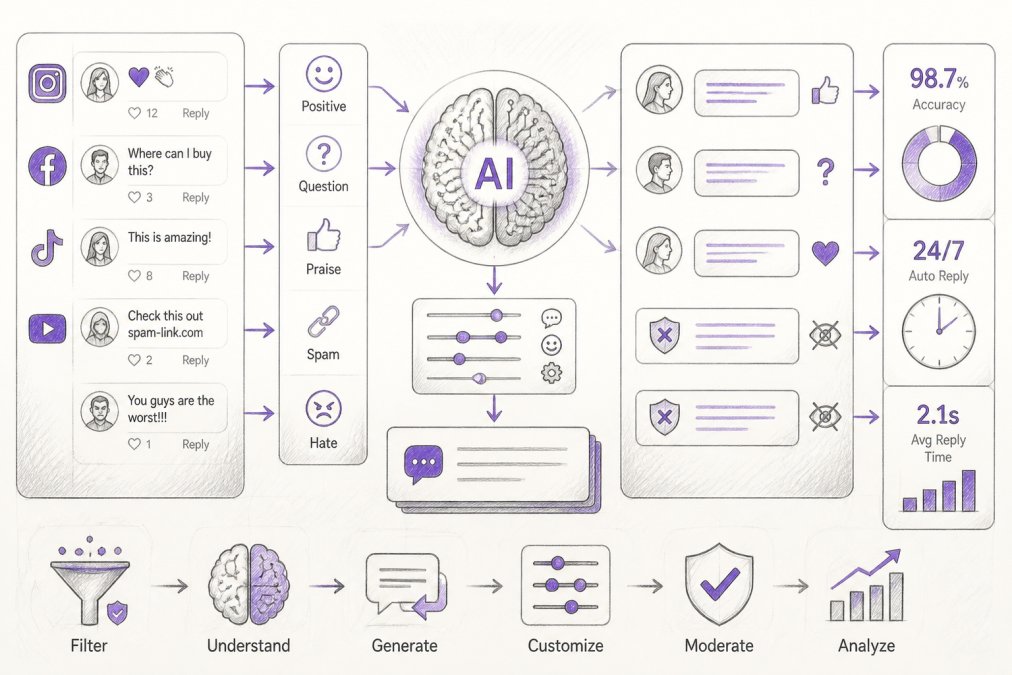
Agency social teams are drowning in comment volume, and the math no longer works in their favor. This guide from FeedGuardians breaks down how ai comment reply tools for agencies turn that overflow into controlled, on-brand engagement. AI comment reply software is a category of tools that automatically drafts, moderates, or publishes responses to comments and DMs across social platforms using natural language processing. The core appeal for agencies is simple: fewer hours spent moderating, faster response latency, and consistent brand voice across every client account.
The operational reality is that manual moderation does not scale past a handful of accounts. When one social media manager handles fifteen clients across Instagram, Facebook, TikTok, and YouTube, comment triage eats the day before any strategic work happens (The Complete Guide to Social Media Community Management). AI comment reply tools for agencies exist to absorb that triage load. They handle spam filtering, sentiment analysis, and draft generation so humans can focus on the judgment calls that actually need a person.
Below, we'll show you exactly what separates a tool that works at agency scale from one that collapses under multi-client volume, and where the real risks sit.
Quick Comparison: AI Comment Reply Tools for Agencies
FeedGuardians combines real-time comment moderation with 24/7 AI replies in each client's voice. Where most tools specialize in either filtering or drafting, FeedGuardians does both, which matters when you're running moderation and engagement under one roof.
| Tool | Starting Price | Free Tier | AI Replies | Moderation | Agency Fit |
|---|---|---|---|---|---|
| FeedGuardians | See pricing page | Yes | Yes, brand voice | 98.7% accuracy | Multi-client, all four platforms |
| ManyChat | $15/month | Yes | Flow-based | Limited | E-commerce automation |
| Sprout Social | $249/month | No | Suggested | Smart Inbox | Enterprise accounts |
| Planable | $11/month | Yes | Draft generation | Limited | Approval workflows |
| Podium | $399/month | No | Review-focused | Messaging inbox | Local businesses |
| Birdeye | $599/month | No | Review-focused | Multi-location | Large reputation campaigns |
| RepliFast | $17/month | No | Review responses | No | Budget reputation work |
| Respondology | Contact for pricing | No | Copilot | Strong filtering | High-volume moderation |
| EmbedMyReviews | $99/month | No | Review drafts | No | Flat-rate reputation |
| Reply.io | $69/month | Yes | Outreach replies | No | Lead generation |
A few patterns stand out. Tools built for reputation management handle reviews well but treat social comments as an afterthought. Tools built for automation handle flows well but leave moderation gaps. FeedGuardians sits in the middle by design. If you're evaluating this category for the first time, start with the platforms you actually manage, not the feature list that looks longest.
AI Comment Moderation Software for Agencies: What to Look For
The features that separate usable AI comment moderation software for agencies from tools that create more work are specific and testable. Most buyers stop at four generic criteria, detection accuracy, escalation paths, voice configuration, and platform coverage, and then discover the real gaps in week two, when they are juggling fifteen client accounts in one dashboard. The criteria below are the ones that actually break at agency scale.
1. Detection accuracy you can verify. FeedGuardians reports 98.7% accuracy on spam, scams, hate speech, and competitor links. That number matters because a moderation tool that misses harmful comments is worse than no tool at all. Ask any vendor for their false positive and false negative rates before you commit. A tool that hides legitimate customer questions by mistake damages client trust fast, and you will be the one explaining it on a client call (Misinformation).
2. Multi-client account switching without cross-contamination. This is the criterion most single-brand tools fail. An agency dashboard needs to switch between client accounts in one or two clicks, keep each client's flagged queue separate, and prevent one account's moderation rules from bleeding into another's. If a junior moderator can accidentally see Client A's flagged comments while logged into Client B's workspace, the tool is not agency-ready, regardless of how good its AI is.
3. White-label reporting per client. Clients do not want to log into your tool. They want a branded PDF or dashboard that shows their comment volume, response rate, sentiment trend, and escalation count for the month. If the tool cannot export per-client reports under your agency's logo, you will rebuild those reports by hand in a spreadsheet every month, which is exactly the manual work the tool was supposed to eliminate.
4. Human escalation with per-client routing. No AI should have final say on every comment. The best setups route edge cases, legal risks, and high-value buyer inquiries to a human queue, and that queue needs to be per-client so one agency team member does not see another client's flagged items. Tiered routing, auto-publish for spam and praise, human review for complaints, hard block for legal and crisis, is the pattern that holds up.
5. Per-client voice configuration. Your clients do not sound the same, and a tool that applies one generic tone across all of them will get noticed. FeedGuardians learns each client's tone, terminology, and guidelines, which is the difference between a reply that reads like the brand and one that reads like a chatbot. Test this against your quirkiest client, not your most generic one.
6. Platform coverage that matches your book of business. Do not buy for the longest feature list. Buy for the platforms your clients actually pay you to manage. A tool that covers eight platforms but only does Instagram well is worse for a TikTok-heavy roster than a tool that covers three platforms deeply.
7. Seat and permission structure. Agencies run on contractors, freelancers, and part-time moderators. The tool needs role-based permissions, owner, manager, moderator, read-only client, so you can give a contractor access to one client's queue without exposing the rest of your roster.
Social Media Response Templates for Agencies: Building a Reusable Library
A response template library is the fastest way to get consistent output from any AI reply tool, and it's the asset most agencies skip. Templates give the AI a starting structure, which reduces draft generation time and keeps tone aligned across team members.
Build your library in four layers:
- Acknowledgment templates: short openers for praise, complaints, and neutral comments
- Escalation templates: language that moves a conversation to DM or support without sounding robotic
- Crisis templates: pre-approved phrasing for sensitive topics that require legal review
- Conversion templates: replies that guide interested commenters toward a link, DM, or booking
Store them per client, not per agency. A template that works for a skincare brand will read wrong for a B2B SaaS client. FeedGuardians lets you load client-specific guidelines directly, so the AI draws from the right library automatically. Maintaining this granular control ensures that your automated responses remain authentic, which remains the primary challenge when integrating generative AI brand messaging into a scalable agency workflow.
The mistake most agencies make is treating templates as a one-time setup. Review them quarterly, retire what underperforms, and add new patterns as client products change.
Best Practices for AI Social Media Responses
Good AI social media responses follow three baseline rules: match the brand voice, respond fast, and know when to stop. Every competitor says that.
Human-in-the-Loop Workflows and Compliance for Agency AI Replies
Conclusion
Frequently Asked Questions
How can agencies use AI to manage social media comments at scale?
Agencies connect each client's Instagram, Facebook, TikTok, and YouTube accounts to an AI comment reply tool that monitors incoming comments in real time. The tool filters spam and hate speech, drafts or sends on-brand replies, and routes edge cases to a human reviewer. FeedGuardians, for example, learns each client's tone and guidelines and replies 24/7, which lets a small team cover many accounts without hiring proportional staff.
Can AI comment reply tools maintain a brand's unique voice?
Yes, if the tool is trained on the right inputs. Most platforms let you upload tone guidelines, approved phrases, and sample replies, then fine-tune output per client. FeedGuardians learns your tone, terminology, and guidelines, which keeps replies consistent across accounts. Review the first few hundred AI replies manually and correct anything that sounds generic before you widen automation.
What should agencies look for in AI comment moderation software for agencies?
Prioritize multi-client dashboards, real-time spam and hate speech filtering, brand-voice training, human escalation paths, and platform coverage across Instagram, Facebook, TikTok, and YouTube. Check for audit logs and role-based permissions so you can show clients what was hidden or replied to. Pricing should scale per client, not per seat, so adding accounts stays predictable.
How do agencies keep AI comment replies compliant and on-brand?
Set up a human-in-the-loop workflow: AI drafts or sends routine replies, while flagged comments (complaints, legal risks, sensitive topics) route to a manager for approval. Keep an audit trail of every hidden comment and automated reply, and document client-specific rules in a shared playbook. This protects both the agency and the client if a reply is ever questioned.
Tired of manually moderating comments?
FeedGuardians automates spam filtering, responds to customers, and protects your brand — setup in 3 minutes.
Frequently Asked Questions
How can agencies use AI to manage social media comments at scale?
Agencies connect each client's Instagram, Facebook, TikTok, and YouTube accounts to an AI comment reply tool that monitors incoming comments in real time. The tool filters spam and hate speech, drafts or sends on-brand replies, and routes edge cases to a human reviewer. FeedGuardians, for example, learns each client's tone and guidelines and replies 24/7, which lets a small team cover many accounts without hiring proportional staff.
Can AI comment reply tools maintain a brand's unique voice?
Yes, if the tool is trained on the right inputs. Most platforms let you upload tone guidelines, approved phrases, and sample replies, then fine-tune output per client. FeedGuardians learns your tone, terminology, and guidelines, which keeps replies consistent across accounts. Review the first few hundred AI replies manually and correct anything that sounds generic before you widen automation.
What should agencies look for in AI comment moderation software for agencies?
Prioritize multi-client dashboards, real-time spam and hate speech filtering, brand-voice training, human escalation paths, and platform coverage across Instagram, Facebook, TikTok, and YouTube. Check for audit logs and role-based permissions so you can show clients what was hidden or replied to. Pricing should scale per client, not per seat, so adding accounts stays predictable.
How do agencies keep AI comment replies compliant and on-brand?
Set up a human-in-the-loop workflow: AI drafts or sends routine replies, while flagged comments (complaints, legal risks, sensitive topics) route to a manager for approval. Keep an audit trail of every hidden comment and automated reply, and document client-specific rules in a shared playbook. This protects both the agency and the client if a reply is ever questioned.