
Quick Summary
| Key Insight | What You Need to Know |
|---|---|
| What Is AI Comment | What Is AI Comment Moderation and Why It Matters |
| How AI-Powered Comment Moderation | How AI-Powered Comment Moderation Works |
| 1. FeedGuardians | AI Replies in Your Brand Voice |
| 2. Bodyguard.ai | Enterprise-Grade Real-Time Detection |
| 3. Sightengine | Visual and Text Moderation APIs |
| 4. Hive Moderation | Multi-Modal Content Analysis |
Table of Contents
- What Is AI Comment Moderation and Why It Matters
- How AI-Powered Comment Moderation Works
- Top AI Tools for Comment Moderation: Feature Comparison
- 1. FeedGuardians: AI Replies in Your Brand Voice
- 2. Bodyguard.ai: Enterprise-Grade Real-Time Detection
- 3. Sightengine: Visual and Text Moderation APIs
- 4. Hive Moderation: Multi-Modal Content Analysis
- 5. CleanSpeak: Customizable Filtering Across Languages
- 6. WebPurify: Hybrid AI and Human Review
- 7. OpenAI Moderation API: Free Baseline Protection
- 8. Google Cloud Content Moderation AI: Enterprise Scale
- Social Media Comment Filtering Best Practices
- Comment Moderation Policy Examples and Implementation
- How to Set Up Comment Moderation Rules for Your Brand
- Key Features to Look For in AI Moderation Tools
- Managing False Positives and Human Escalation
Last Updated: August 7, 2026
What Is AI Comment Moderation and Why It Matters
AI comment moderation automatically detects and filters harmful content across social media platforms in real-time, protecting brand reputation while maintaining authentic community engagement. At FeedGuardians, we've found that unmoderated comments cost brands real money through wasted ad spend, damaged reputation, and lost conversions.
The problem is scale. A brand with 10,000 followers might receive hundreds of comments daily. Manual review becomes impossible, spam, hate speech, competitor links, and scams slip through while your team drowns in notifications. A single toxic comment can tank ad performance and trigger policy violations.
AI-powered comment moderation detects harmful content automatically, hides it in real-time, and optionally escalates to humans. The best solutions don't just filter, they also reply to legitimate comments with your brand voice, turning engagement into conversions.
How AI-Powered Comment Moderation Works
AI comment moderation combines multiple detection techniques to identify harmful content faster than humans can review it manually. Text analysis and machine learning models scan comments against patterns of spam, profanity, hate speech, and harassment. Advanced systems use optical character recognition to detect text hidden inside images and memes, catching bypass attempts that simple keyword filters miss.
Sentiment analysis understands context and intent, not just keywords. A comment saying "I hate waiting for shipping" is flagged differently than "I hate your company." Real-time filtering means decisions happen in milliseconds before harmful content reaches your audience.
Advanced tools layer in human-in-the-loop workflows. When the AI is uncertain, it routes comments to a moderation queue for human review rather than making a binary decision. Over time, the model adapts to your brand's specific voice, community standards, and risk tolerance.
Top AI Tools for Comment Moderation: Feature Comparison
1. FeedGuardians: AI Replies in Your Brand Voice
FeedGuardians solves moderation and response simultaneously. While competitors focus purely on filtering, FeedGuardians adds 24/7 AI-powered replies that speak in your brand's actual voice.
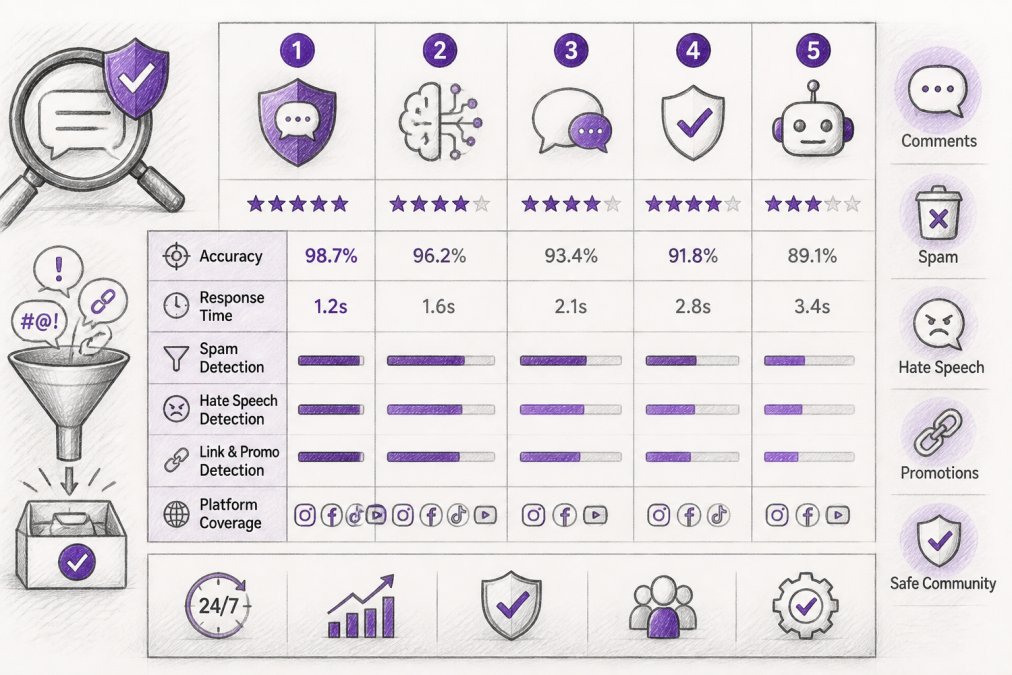
FeedGuardians detects and hides spam, hate speech, scams, and competitor links with 98.7% accuracy. The system learns your tone and brand guidelines, so replies feel native rather than obviously automated. Real-time moderation across Instagram, Facebook, TikTok, and YouTube means no lag between comment posting and action.
Pros:
- AI replies in your brand voice, not generic bot responses
- 98.7% accuracy on harmful content detection
- Real-time moderation across four major platforms
- Human escalation option for uncertain cases
Cons:
- Requires active brand voice training for best results
2. Bodyguard.ai: Enterprise-Grade Real-Time Detection
Bodyguard.ai is built for scale. Its hybrid AI model combines proprietary algorithms, large language models, and classic machine learning to catch nuanced threats that single-method systems miss.
The real differentiator is OCR capability. Text hidden inside images, memes, and screenshots gets detected automatically. Customizable escalation rules let you define what "toxic" means for your specific community. Sentiment analysis provides audience insights beyond moderation, showing whether your community is becoming more positive or negative.
Pros:
- Hybrid AI model handles nuanced language and evolving threats
- OCR detects text in images and memes
- Highly customizable escalation workflows
- Sentiment analysis and audience insights included
Cons:
- No publicly available pricing; requires contacting sales
- No free trial available
3. Sightengine: Visual and Text Moderation APIs
Sightengine is the choice for developers who need to embed moderation directly into applications. The API-first approach means clean endpoints you call from your code. Sightengine detects nudity, violence, gore, weapons, drugs, and offensive content across images, videos, and text. Customizable blocklists let you add brand-specific keywords, and the API returns confidence scores so you set your own thresholds.
Integration is straightforward with SDKs for Python, JavaScript, PHP, and other languages. The free tier includes enough usage for proof-of-concept testing.
Pros:
- Comprehensive visual, video, and text moderation via APIs
- Flexible integration for developers
- Customizable blocklists and confidence thresholds
- Free tier for testing
Cons:
- Usage-based pricing scales quickly at high volumes
- Requires technical expertise for non-developers
4. Hive Moderation: Multi-Modal Content Analysis
Hive Moderation handles images, video, audio, and text in a single pipeline. If you're managing user-generated content across multiple formats, Hive's multi-modal approach reduces integration complexity. Hive's AI-generated content detection is notably strong, identifying AI-generated images and deepfakes with higher accuracy than most competitors.
The REST API design makes integration straightforward with confidence scores for each detection. The pay-as-you-go model means no fixed costs.
Pros:
- Strong AI-generated content and deepfake detection
- Covers images, video, audio, and text in one platform
- REST API with confidence scores for each detection
- Free tier available for testing
Cons:
- Per-call pricing escalates quickly at very high volumes
- Requires human review for high-stakes decisions
5. CleanSpeak: Customizable Filtering Across Languages
CleanSpeak is the comprehensive profanity filtering and moderation platform for teams needing deep customization. Multi-lingual support across 15+ languages means you can moderate global communities without separate tools per language. The profanity filtering detects derivatives and bypass attempts (like "h3ll0" instead of "hello") that simple keyword matching misses.
Machine learning models for text, image, and video content add layers beyond basic filtering. Flexible deployment options, cloud or on-premise, matter for teams with strict data residency requirements.
Pros:
- Highly customizable filtering rules and multi-lingual support
- Detects profanity derivatives and bypass attempts
- Cloud or on-premise deployment options
- Free tier for small-scale testing
Cons:
- Pricing higher than some API-only solutions
- Audio moderation requires transcription first
6. WebPurify: Hybrid AI and Human Review
WebPurify combines AI speed with human expertise. AI handles profanity filtering and image moderation while humans step in for complex decisions requiring context. Integration is frictionless for WordPress, Drupal, and Joomla users via CMS plugins.
Live video moderation with human review is a differentiator. If you're streaming or accepting video submissions, WebPurify's human team can monitor in real-time.
Pros:
- Hybrid approach combines AI efficiency with human accuracy
- CMS plugins for easy WordPress, Drupal, Joomla integration
- Affordable starting price for profanity filtering
- Live video moderation with human review available
- Free trials for all services
Cons:
- Human moderation for video is expensive (15¢ per minute)
- Pure AI moderation may miss nuanced or context-dependent content
7. OpenAI Moderation API: Free Baseline Protection
The OpenAI Moderation API is free, making it the obvious choice for startups testing moderation workflows. It detects violence, self-harm, sexual content, harassment, hate, and illicit content in both text and images. The "omni-moderation-latest" model continuously updates as OpenAI improves detection.
If you're already using OpenAI's ecosystem, the moderation API integrates seamlessly. For production systems handling sensitive content, you'll likely need additional layers on top of the free API.
Pros:
- Completely free for OpenAI API users
- Easy integration for teams already in the OpenAI ecosystem
- Multimodal (text and image) detection
- Continuously updated models
Cons:
- Free pricing doesn't cover workflow infrastructure
- Insufficient alone for complex, production-grade moderation
- Limited customization compared to specialized platforms
8. Google Cloud Content Moderation AI: Enterprise Scale
Google Cloud's Content Moderation AI classifies text into content categories including Adult, Violence, and Toxic. Multi-language support and seamless integration with other Google Cloud services appeal to enterprises already on the platform. The pay-as-you-go pricing model ($1 per 1,000 text records) scales efficiently.
The limitation is scope. This tool focuses on text content. Image and video moderation require separate APIs, adding complexity and cost.
Pros:
- Seamless integration with Google Cloud ecosystem
- Pay-as-you-go pricing scales efficiently
- Free tier available for initial testing
- Multi-language support built-in
Cons:
- Text-focused; image and video moderation require separate APIs
- Requires custom integration for multi-modal workflows
Social Media Comment Filtering Best Practices
Define your community standards explicitly before configuring filters. What constitutes spam? Hate speech? Competitor promotion? Document these definitions so your entire team and your moderation AI operate from the same rulebook.
Real-time monitoring beats batch processing. Comments that sit in a queue for hours create windows where harmful content damages your brand. Instant detection and hiding keeps your community healthier.
False positives damage engagement more than you might expect. A customer asking "Is this product safe?" gets flagged and hidden. They assume you're ignoring them and leave negative reviews elsewhere. Monitor false positive rates and adjust thresholds when legitimate comments get caught.
Transparency about moderation builds trust. Disclose when content is hidden and why. Users understand that spam gets filtered and are less likely to feel censored if they know the rules.
Escalation workflows prevent AI from making high-stakes decisions alone. Comments on sensitive topics, product safety, health claims, legal issues, should route to humans even if the AI is confident.
Comment Moderation Policy Examples and Implementation
A strong moderation policy balances brand protection with community trust:
Spam and Commercial Content: Hide comments that promote unrelated products, services, or links. Allow legitimate customer questions and product recommendations.
Hate Speech and Harassment: Define hate speech specifically. "I disagree with your politics" is protected speech. "People like you should [harm]" is hate speech.
Misinformation: For health, safety, or legal claims, establish when you hide versus when you add context. Hiding claims that contradict medical guidance is appropriate.
Brand Voice Consistency: If you reply to comments, ensure replies match your brand voice. Your moderation tool should learn and maintain these distinctions automatically.
Escalation Triggers: Document which comments automatically escalate to humans: comments mentioning refunds or complaints, comments with mixed sentiment, comments on recent news or sensitive topics.
Transparency and Appeals: Tell users why their comment was hidden and how they can appeal. This builds goodwill even when moderation is correct.
Implementation starts with configuration. Spend time training your AI tool on your actual community. Feed it examples of comments you want hidden and comments you want to keep. Over two to four weeks, false positive rates typically drop 40-60% as the model adapts to your specific standards.
How to Set Up Comment Moderation Rules for Your Brand
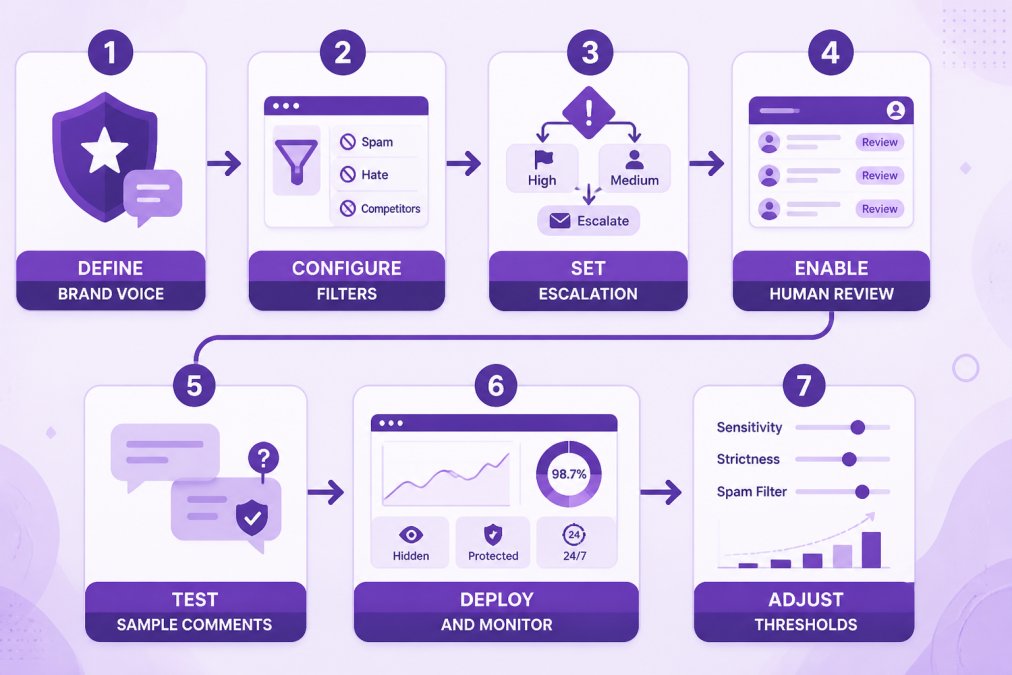
Step 1: Define Your Brand Voice and Moderation Standards
Document your brand's communication style, tone, and values. What constitutes a violation? Write these down. They become the foundation for every rule you'll create and train your AI system.
Step 2: Configure Keyword Filters and Blocklists
Define keywords and phrases that trigger automatic hiding or escalation. Start with obvious categories: competitor names, profanity, known spam domains. Add brand-specific terms. Be conservative, blocking "viagra" makes sense; blocking "safe" catches legitimate customer questions.
Step 3: Set Escalation Rules
Define which comments go to humans for review. Examples: comments with mixed sentiment, comments mentioning refunds or complaints, comments on sensitive topics, comments from new accounts.
Step 4: Enable Human Review Queues
Set up workflows where flagged comments wait for human approval before being hidden. For high-velocity accounts, this queue prevents mistakes from scaling.
Step 5: Test with Sample Comments
Before deploying to your live account, test your rules against 100-200 recent comments. How many are correctly flagged? How many false positives? Adjust thresholds until you're comfortable with accuracy.
Step 6: Deploy and Monitor
Activate your rules on the live account. Monitor performance daily for the first week. False positive rates, escalation queue size, and user feedback inform whether adjustments are needed.
Step 7: Adjust Thresholds Based on False Positives
As your system processes real comments, adjust rules that are too aggressive or too lenient. Most teams reach stable moderation within 2-4 weeks.
Key Features to Look For in AI Moderation Tools
Real-Time Detection and Filtering: Comments should be hidden or escalated within seconds of posting.
Multi-Platform Support: If you operate across Instagram, TikTok, YouTube, and Facebook, a tool that handles all four reduces complexity.
Accuracy Metrics: Ask vendors for false positive and false negative rates. A tool that hides 99% of spam but also hides 5% of legitimate comments is worse than one that catches 95% of spam with 1% false positives.
Customization Depth: Tools that let you customize rules, keyword lists, and escalation workflows adapt to your needs.
Human-in-the-Loop Workflows: Pure AI moderation fails on edge cases. Tools that route uncertain comments to humans prevent over-moderation.
Language Support: If your community spans multiple languages, ensure your tool handles them.
API Integration: For custom applications, well-documented APIs with SDKs in multiple languages make integration faster and cheaper.
Sentiment Analysis and Community Insights: Tools that provide sentiment trends and community health indicators give visibility into broader patterns.
Pricing Transparency: Transparent pricing lets you budget accurately and compare tools fairly.
Managing False Positives and Human Escalation
False positives damage engagement and trust. A customer asking "Is this safe?" gets hidden and assumes you're ignoring them.
The first defense is threshold tuning. Most AI tools output confidence scores. You set the threshold, maybe you hide comments above 85% confidence and escalate 60-85% to humans. Lower thresholds catch more spam but increase false positives. Higher thresholds reduce false positives but miss harmful content.
The second defense is escalation. Comments below your confidence threshold go to humans for review. This hybrid approach catches edge cases where context matters.
The third defense is feedback loops. When you manually approve a flagged comment, tell the system. Over time, the model learns your community's norms. After two weeks of feedback, false positive rates typically drop 40-60%.
Monitor false positive rates continuously. If humans approve above 20% of escalated comments, your thresholds are too aggressive. Below 5% suggests you might be missing harmful content.
Transparency with users reduces damage from occasional false positives. Tell them why their comment was hidden and how they can appeal. Users understand that automated systems make mistakes and are forgiving if they know the rules.
Protecting your brand's reputation in real-time requires more than hoping your community stays clean. The best AI tools combine automated detection with human oversight, learning from your specific community standards to improve continuously.
FeedGuardians solves this by pairing real-time moderation with AI-powered replies in your brand voice. You stop spam and hate speech instantly while maintaining authentic engagement with legitimate customers. With 98.7% accuracy on harmful content detection and 24/7 automation across Instagram, Facebook, TikTok, and YouTube, FeedGuardians lets your team focus on strategy while the AI handles the volume. Start for Free and see how much time your team recovers and how much your engagement improves.
Frequently Asked Questions
How does AI comment moderation achieve 98.7% accuracy, and what does that actually mean?
AI comment moderation combines machine learning models, natural language processing, and pattern recognition to detect toxic content, spam, and hate speech. The 98.7% accuracy figure typically refers to how many harmful comments the system correctly identifies and flags compared to manual review. This metric is tested against datasets of known spam, offensive language, and competitor links. However, accuracy varies by content type, detecting obvious spam is easier than catching nuanced hate speech. Most tools use confidence scores, meaning borderline content gets flagged for human review rather than auto-deleted, reducing the risk of incorrectly removing legitimate comments.
Can AI comment moderation tools learn my brand's unique voice and tone?
Yes, modern AI moderation tools can learn your brand voice through training on your past comments, customer interactions, and brand guidelines. Tools like FeedGuardians specifically train on your terminology, tone, and communication style so automated replies sound authentic rather than generic. The system learns what topics your brand typically addresses, how you handle complaints, and your preferred response style. However, this requires an initial setup period (usually 1-2 weeks) where the tool analyzes your historical data. For brands with very specific or quirky voices, you can also set custom rules and templates to guide the AI's responses.
What happens if AI moderation makes a mistake and deletes or replies to the wrong comment?
Most AI moderation platforms include human escalation options and audit trails to prevent costly mistakes. When an AI system flags content, it typically holds it in a review queue rather than auto-deleting, giving your team a chance to approve or reject the action. Tools offer confidence scores so you only auto-delete high-confidence matches (e.g., obvious spam) while lower-confidence content waits for human review. If an error does occur, the audit log shows exactly what happened and who approved it. For critical decisions, brands managing high-value accounts often set moderation to 'flag and hold' rather than 'auto-delete,' maintaining human oversight over final decisions.
Do AI comment moderation tools comply with US data privacy laws and regulations?
Reputable AI moderation platforms comply with US data protection standards, including FTC requirements for consumer privacy and data security. Most tools encrypt data in transit and at rest, limit employee access, and allow you to control data retention policies. However, compliance depends on the specific tool and your implementation. If you're collecting user data through comments, you should have a privacy policy disclosing how comments are moderated. Some platforms offer on-premise or private cloud options for enterprises requiring stricter data isolation. Always review a tool's privacy policy and data processing agreement before signing up, especially if you handle sensitive customer information.
Can I start with one platform and add more later without rebuilding my entire setup?
Yes, most AI moderation tools offer flexible scaling and multi-platform support. If you start with Instagram and TikTok, you can add YouTube and Facebook later without losing your existing configurations. Many platforms use API integrations that work across social channels, so your keyword filters, escalation rules, and brand voice training carry over. Some tools like FeedGuardians let you manage multiple client accounts from a single dashboard, making it easy to scale across 15+ accounts without separate setups. Check whether a tool charges per-platform or per-account to understand pricing as you expand, and confirm that adding new platforms doesn't require retraining the AI from scratch.
This article was written using GrandRanker
Tired of manually moderating comments?
FeedGuardians automates spam filtering, responds to customers, and protects your brand — setup in 3 minutes.
Frequently Asked Questions
How does AI comment moderation achieve 98.7% accuracy, and what does that actually mean?
AI comment moderation combines machine learning models, natural language processing, and pattern recognition to detect toxic content, spam, and hate speech. The 98.7% accuracy figure typically refers to how many harmful comments the system correctly identifies and flags compared to manual review. This metric is tested against datasets of known spam, offensive language, and competitor links. However, accuracy varies by content type—detecting obvious spam is easier than catching nuanced hate speech. Most tools use confidence scores, meaning borderline content gets flagged for human review rather than auto-deleted, reducing the risk of incorrectly removing legitimate comments.
Can AI comment moderation tools learn my brand's unique voice and tone?
Yes, modern AI moderation tools can learn your brand voice through training on your past comments, customer interactions, and brand guidelines. Tools like FeedGuardians specifically train on your terminology, tone, and communication style so automated replies sound authentic rather than generic. The system learns what topics your brand typically addresses, how you handle complaints, and your preferred response style. However, this requires an initial setup period (usually 1-2 weeks) where the tool analyzes your historical data. For brands with very specific or quirky voices, you can also set custom rules and templates to guide the AI's responses.
What happens if AI moderation makes a mistake and deletes or replies to the wrong comment?
Most AI moderation platforms include human escalation options and audit trails to prevent costly mistakes. When an AI system flags content, it typically holds it in a review queue rather than auto-deleting, giving your team a chance to approve or reject the action. Tools offer confidence scores so you only auto-delete high-confidence matches (e.g., obvious spam) while lower-confidence content waits for human review. If an error does occur, the audit log shows exactly what happened and who approved it. For critical decisions, brands managing high-value accounts often set moderation to 'flag and hold' rather than 'auto-delete,' maintaining human oversight over final decisions.
Do AI comment moderation tools comply with US data privacy laws and regulations?
Reputable AI moderation platforms comply with US data protection standards, including FTC requirements for consumer privacy and data security. Most tools encrypt data in transit and at rest, limit employee access, and allow you to control data retention policies. However, compliance depends on the specific tool and your implementation. If you're collecting user data through comments, you should have a privacy policy disclosing how comments are moderated. Some platforms offer on-premise or private cloud options for enterprises requiring stricter data isolation. Always review a tool's privacy policy and data processing agreement before signing up, especially if you handle sensitive customer information.
Can I start with one platform and add more later without rebuilding my entire setup?
Yes, most AI moderation tools offer flexible scaling and multi-platform support. If you start with Instagram and TikTok, you can add YouTube and Facebook later without losing your existing configurations. Many platforms use API integrations that work across social channels, so your keyword filters, escalation rules, and brand voice training carry over. Some tools like FeedGuardians let you manage multiple client accounts from a single dashboard, making it easy to scale across 15+ accounts without separate setups. Check whether a tool charges per-platform or per-account to understand pricing as you expand, and confirm that adding new platforms doesn't require retraining the AI from scratch.