Quick Summary
| Key Insight | What You Need to Know |
|---|---|
| The native Zendesk Facebook | The native Zendesk Facebook channel links one Page per channel instance. |
| Comment capture requires pages_read_engagement | Comment capture requires pages_read_engagement and pages_manage_engagement scopes. |
| Subscribe the app to | Subscribe the app to the Page's feed webhook field or no comment payloads arrive. |
| Store the comment ID | Store the comment ID in a custom field to deduplicate and reply to the right comment. |
| Route spam and hate | Route spam and hate to moderation instead of an agent queue to save hours. |
| What the Zendesk Facebook | What the Zendesk Facebook Integration Actually Covers |
Last Updated: October 25, 2026
Quick Summary
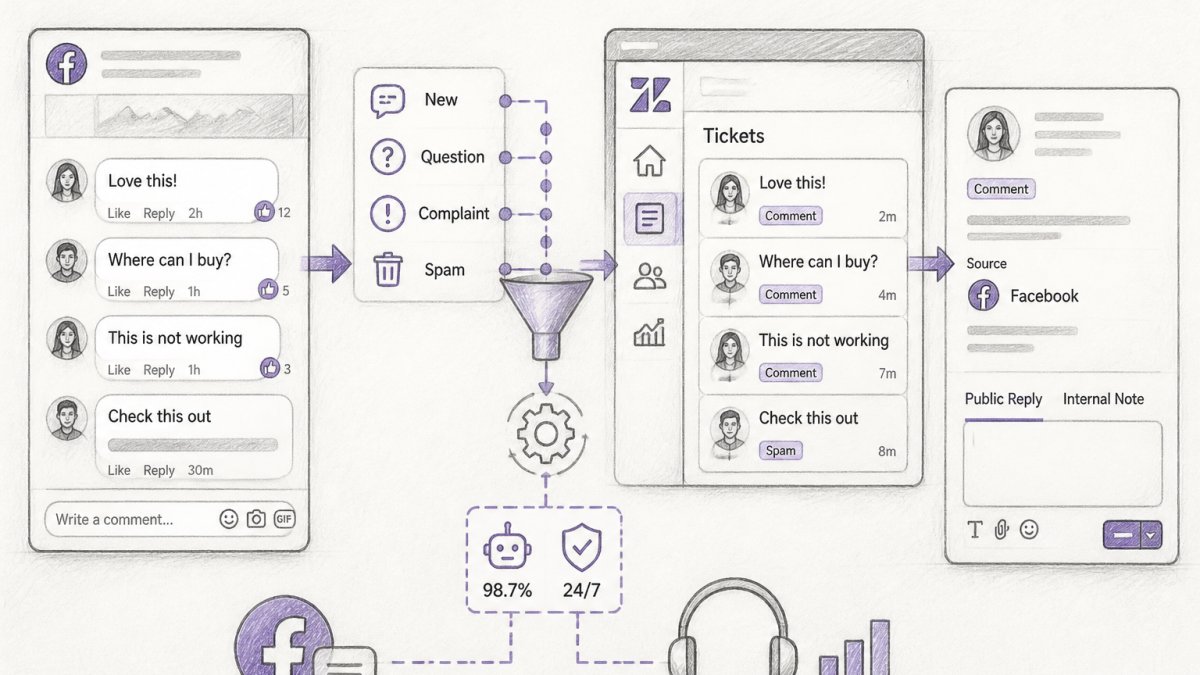
Facebook comments Zendesk integration is possible, but only through a bridge: the native Zendesk Facebook channel captures Messenger DMs as tickets, not Page comments. To route comments you need a third-party connector, middleware, or an AI moderation layer with comment webhook permissions.
- The native Zendesk Facebook channel links one Page per channel instance.
- Comment capture requires pages_read_engagement and pages_manage_engagement scopes.
- Subscribe the app to the Page's feed webhook field or no comment payloads arrive.
- Store the comment ID in a custom field to deduplicate and reply to the right comment.
- Route spam and hate to moderation instead of an agent queue to save hours.
Table of Contents
- What the Zendesk Facebook Integration Actually Covers
- Native Limits: Does Zendesk Support Facebook Comments or Only Messenger?
- Turning Facebook Comments to Zendesk Tickets: Step by Step
- How the Facebook Messenger Zendesk Integration Differs from Comment Routing
- How to Manage Facebook Comments for Customer Service at Volume
- Troubleshooting Connection and Sync Failures
- Measuring Comment-to-Ticket Performance After Setup
- Start Routing Facebook Comments Into Your Support Queue
- Frequently Asked Questions
What the Zendesk Facebook Integration Actually Covers
Facebook comments Zendesk integration is possible, but the native path is narrower than most helpdesk marketing suggests. At FeedGuardians, we see support teams assume one switch turns every Page comment into a ticket.
Here's the practical split:
- Messenger DMs: flow into Zendesk as tickets natively.
- Facebook Page comments: not captured as tickets by the standard connector.
- Workaround options: a third-party connector, a middleware tool, or an AI moderation layer that catches comments before they reach the queue.
So the honest answer to "can you connect Facebook comments to Zendesk?" is yes, with a bridge. Below, we'll show you how to build it, map the fields, and keep it from breaking.
Native Limits: Does Zendesk Support Facebook Comments or Only Messenger?
Zendesk supports Facebook Messenger natively, not Page comments. The official Zendesk Facebook channel documentation describes a Messenger-based channel where direct messages become tickets. Comments are a different object on Facebook's side, and the native connector does not pull them in as separate tickets.
That gap matters for one reason: comments are public. A complaint left under a post is visible to every shopper scrolling past. A Messenger DM is private.
The native tool also has other limits worth knowing before you plan:
- It links one Facebook Page per channel, so multi-brand setups need separate configuration.
- It needs admin access to the Page and a connected Zendesk account.
- It doesn't classify comments by intent, so a spam link and a real refund request look the same.
What the native connector actually subscribes to
Under the hood, the Zendesk Facebook channel is built on Meta's Messenger Platform. When you authorize the channel, Zendesk subscribes to Messenger webhook events for the selected Page, primarily messages and messaging_postbacks, and turns each inbound DM into a ticket with the sender as requester. Comment events are a separate webhook family (feed changes, via the Graph API's /comments and /feed edges), and the native channel does not subscribe to them.
A few practical consequences follow from that architecture:
- Permissions are Messenger-scoped. The authorization flow requests Page-level permissions such as
pages_messagingandpages_manage_metadata; it does not requestpages_read_engagementorpages_manage_engagement, which are the scopes a comment-capture tool needs to read and reply to comments. - Page tokens expire or get revoked. Meta Page access tokens can be invalidated when an admin changes their password, removes the app, or when a long-lived token lapses. The native channel usually surfaces this as a silent stop in new tickets rather than a loud error.
- One Page per channel instance. Multi-brand or multi-region Page setups need one channel each, and each needs its own admin authorization.
The takeaway: native Messenger routing is fine for private conversations. Public comment triage needs an added layer that subscribes to comment webhooks, holds the right Page scopes, and maps comment objects into ticket fields. That's the gap FeedGuardians fills.
Quick capability matrix
| Facebook interaction | Native Zendesk channel | Requires a bridge or third-party tool |
|---|---|---|
| Messenger DM to ticket | Yes | No |
| Page comment to ticket | No | Yes |
| Comment reply from Zendesk | No | Yes |
| Comment moderation (hide/delete) | No | Yes |
| Post-level analytics | No | Yes |
| Multi-Page in one queue | Per-channel only | Yes, with a unified inbox |
Use this as a scoping checklist before you promise a stakeholder that "Zendesk handles Facebook." It handles one slice of it.
Turning Facebook Comments to Zendesk Tickets: Step by Step
Converting Facebook comments to Zendesk tickets takes three stages: connect the Page with the right permissions, map comment fields to ticket fields with routing rules, then build the reply and escalation path. Each stage has a failure point: miss the permissions and nothing syncs; miss the field mapping and every ticket lands in one pile.
Most guides stop at "connect the app." The walkthrough below goes deeper: which scopes to request, which comment fields to carry into Zendesk, how to write routing conditions that actually fire, and how to reply without leaking private data into a public thread.
Step 1: Set Up the Facebook Page Connection and Permissions
Start with admin access, not the connector. You need a Facebook Page admin role and a Zendesk admin seat to authorize the connection. Handing setup to an agent-level user is a common mistake, the Page won't appear in the channel list.
- Confirm you hold the Page admin role in Meta Business Suite.
- In Zendesk, open Admin Center, then Channels, then Messaging.
- Add the Facebook channel and log in with the account that manages the Page.
- Grant the requested Page permissions, including message and content access.
- Select the correct Page and save.
If you are building the bridge yourself or configuring a third-party connector, permissions trip most teams. A comment-capture integration needs, at minimum:
pages_read_engagement, to read posts and comments on the Page.pages_manage_engagement, to reply to, hide, or delete comments.pages_show_list, to enumerate the Pages the authorizing user can manage.
Request these through Meta's App Review if your app isn't already approved; unapproved scopes silently drop from the token.
Step 2: Map Comment Fields to Ticket Fields and Route by Topic
Field mapping is where comment-to-ticket quality is won or lost. Every comment carries data you can push into ticket fields: the commenter's name, the post, the comment text, and a timestamp.
A Facebook comment payload gives you more than most teams use. The fields worth carrying into Zendesk are:
id, the comment ID; store it in a custom field so you can deduplicate and reply to the right comment later.from.nameandfrom.id, the commenter's display name and Facebook user ID; use these to build or match the requester.message, the comment text; truncate into the subject and keep the full text in the description.
Map these to Zendesk fields:
- Requester: commenter's Facebook profile, matched on the Facebook user ID first, then email if you have it.
- Channel: a custom field tagged "Facebook comment."
- Subject: the post name plus a short comment excerpt.
Then build routing rules. Send refund and order issues to your orders group, product questions to general support, and spam and hate to moderation, not an agent queue.
Write conditions against the tags and custom fields you just created, not free text.
Step 3: Build the Reply and Escalation Workflow
Decide up front which comments get a public reply and which move to a private message. Public replies show other shoppers you respond; private replies protect order details.
Use the comment ID from Step 2 to reply to the exact comment, not the post.
Set escalation triggers for anything with legal language, threats, or repeated complaints from the same user. Route those to a senior agent with a flag.
How the Facebook Messenger Zendesk Integration Differs from Comment Routing
The Facebook Messenger Zendesk integration is native and private; Facebook comments Zendesk routing is public and needs a bridge. That core difference changes how you staff each channel.
Messenger tickets arrive private, so agents can ask for order numbers freely. Comment tickets start in public view, so the first reply must be careful: acknowledge publicly, resolve privately.
The same comment-to-support-software pattern works on other channels too. If you want to see how it runs on video platforms, our guide on how to integrate YouTube comments with support software walks through the parallel setup.
How to Manage Facebook Comments for Customer Service at Volume
Managing Facebook comments for customer service at volume comes down to triage, not speed. When hundreds of comments land daily, an agent reading each one is the bottleneck.
A working volume setup looks like this:
- Auto-hide spam, scam links, and hate speech before they reach the queue.
- Auto-reply to common questions with a brand-voice answer.
- Escalate order issues and complaints to a shared inbox.
This is where FeedGuardians earns its place. Our AI comment moderation for customer support teams covers how the routing works in practice, and a unified comment management inbox keeps agents out of five separate tabs.
Troubleshooting Connection and Sync Failures
Most sync failures trace to permissions, tokens, or duplicate records. When comments stop appearing as tickets, check these in order:
- Page admin rights: did the authorizing user lose access?
- Expired token: reconnect the channel to refresh authorization.
- Duplicate requester: a commenter with an existing profile may merge into one ticket thread.
- Routing rule conflict: two rules may be fighting over the same tag.
A quick diagnostic: post a test comment and watch whether it appears in Zendesk within minutes. If it doesn't, the break is upstream in the connection; if it lands in the wrong group, it's in field mapping. For moderation rules and tool options, our Facebook comment moderation guide covers best practices and setup checks.
Measuring Comment-to-Ticket Performance After Setup
Measure comment routing on four numbers: response time, resolution time, ticket volume, and customer satisfaction. Track them weekly for the first month, then monthly.
| Metric | What It Tells You | Target Direction |
|---|---|---|
| First response time | How fast agents reach public comments | Down |
| Resolution time | How long issues take to close | Down |
| Ticket volume | How many comments become tickets | Down if automation works |
| Customer satisfaction | How commenters rate the outcome | Up |
If ticket volume stays flat while comment volume climbs, your automation isn't filtering. To see comment trends, sentiment, and spam rates in one view, a comment analytics dashboard shows where the queue is actually coming from.
Start Routing Facebook Comments Into Your Support Queue
The hard part isn't the connector. It's deciding which comments deserve a ticket and which deserve an automatic hide or reply. Get that triage right and your queue shrinks while response time improves.
FeedGuardians handles the front line: AI replies in your brand voice, real-time moderation, competitor protection, and a human escalation path when a comment needs a person. You keep the tickets that matter.
Frequently Asked Questions
Can Facebook comments be integrated with Zendesk?
Yes, but not through a single built-in switch. Zendesk's native Facebook channel focuses on Messenger conversations and Page messages. Page comments typically reach Zendesk through a third-party connector, a middleware tool, or the Zendesk API paired with Facebook's Graph API. Each route creates a support ticket from the comment so your agents work inside one queue instead of switching between Facebook and Zendesk.
What permissions are needed to connect a Facebook Page to Zendesk?
You need admin access to the Facebook Page and a Facebook app with the pages_manage_metadata, pages_read_engagement, pages_manage_engagement, and pages_messaging permissions approved. The person authorizing the connection must be a Page admin, not just an editor. If your Page sits under a Business Manager, confirm the connecting user has the Page asset assigned. Missing permissions are the most common cause of a connection that authorizes but never syncs comments.
Does Zendesk support Facebook comments or only Messenger messages?
Native Zendesk support centers on Messenger and Page direct messages. Comment threads on Page posts are not captured out of the box, which is why teams add a connector or API workflow. If comments are a real support channel for you, plan for that extra layer from the start rather than assuming the standard Facebook channel covers it.
How do I manage Facebook comments for customer service without tickets piling up?
Route comments into a shared inbox with clear rules: public replies for general questions, private replies for order details, and escalation to a human for refunds or complaints. Tag tickets by post and topic so reporting stays clean, and set a response-time target for comments separate from email. Tools that moderate spam and hate speech before it reaches the queue keep ticket volume manageable.

Tired of manually moderating comments?
FeedGuardians automates spam filtering, responds to customers, and protects your brand — setup in 3 minutes.
Frequently Asked Questions
Can Facebook comments be integrated with Zendesk?
Yes, but not through a single built-in switch. Zendesk's native Facebook channel focuses on Messenger conversations and Page messages. Page comments typically reach Zendesk through a third-party connector, a middleware tool, or the Zendesk API paired with Facebook's Graph API. Each route creates a support ticket from the comment so your agents work inside one queue instead of switching between Facebook and Zendesk.
What permissions are needed to connect a Facebook Page to Zendesk?
You need admin access to the Facebook Page and a Facebook app with the pages_manage_metadata, pages_read_engagement, pages_manage_engagement, and pages_messaging permissions approved. The person authorizing the connection must be a Page admin, not just an editor. If your Page sits under a Business Manager, confirm the connecting user has the Page asset assigned. Missing permissions are the most common cause of a connection that authorizes but never syncs comments.
Does Zendesk support Facebook comments or only Messenger messages?
Native Zendesk support centers on Messenger and Page direct messages. Comment threads on Page posts are not captured out of the box, which is why teams add a connector or API workflow. If comments are a real support channel for you, plan for that extra layer from the start rather than assuming the standard Facebook channel covers it.
How do I manage Facebook comments for customer service without tickets piling up?
Route comments into a shared inbox with clear rules: public replies for general questions, private replies for order details, and escalation to a human for refunds or complaints. Tag tickets by post and topic so reporting stays clean, and set a response-time target for comments separate from email. Tools that moderate spam and hate speech before it reaches the queue keep ticket volume manageable.