
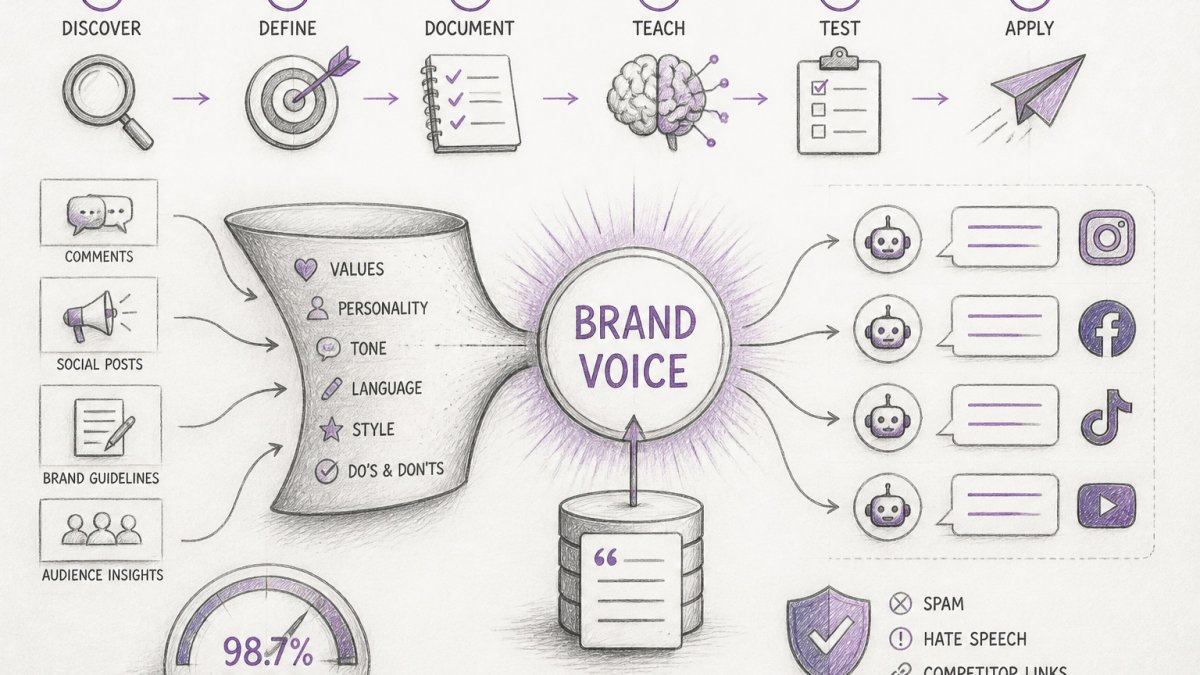
Quick Summary
| Key Insight | What You Need to Know |
|---|---|
| Audit 30 to 50 | Audit 30 to 50 real replies from the last 60 days to find your actual voice traits. |
| Turn voice traits into | Turn voice traits into observable rules, such as opening with the answer in the first sentence. |
| Include ordinary replies as | Include ordinary replies as examples so the AI learns your normal range, not just your best posts. |
| Score 20 AI replies weekly against four checks | trait match, length, forbidden items, and factual safety. |
| Route refunds, legal or | Route refunds, legal or safety language, and angry customers to a human before launch. |
| Can AI Actually Learn | Can AI Actually Learn a Brand Voice? |
Last Updated: October 28, 2026
Quick Summary
AI cannot absorb your personality the way a new hire does, but it can imitate the patterns of your brand voice, such as word choice, sentence length, sign-offs, and formality. Consistent, specific instructions and examples bring its output closest to your real voice.
- Audit 30 to 50 real replies from the last 60 days to find your actual voice traits.
- Turn voice traits into observable rules, such as opening with the answer in the first sentence.
- Include ordinary replies as examples so the AI learns your normal range, not just your best posts.
- Score 20 AI replies weekly against four checks: trait match, length, forbidden items, and factual safety.
- Route refunds, legal or safety language, and angry customers to a human before launch.
Table of Contents
- Can AI Actually Learn a Brand Voice?
- Step 1: Audit Your Existing Brand Voice
- Step 2: Write an AI Brand Voice Prompt That Actually Works
- Step 3: Show the AI Examples of Your Writing
- Step 4: Train ChatGPT With Your Brand Voice Materials
- Step 5: Measure Voice Consistency and Catch Failures
- Choosing AI Brand Voice Tools for Social Comments and Replies
- Setting Up Your First Brand Voice Workflow This Week
- Frequently Asked Questions
Can AI Actually Learn a Brand Voice?
AI does not learn your voice the way a new hire does. It cannot absorb your personality from a single conversation.
Most failures come from vague instructions. You can see how a tool learns and applies your brand voice to replies in Replies That Sound Like You.
Watch out: an AI that has seen only your best posts will imitate your best posts, and then sound odd on routine questions.
Step 1: Audit Your Existing Brand Voice
Before you write a single prompt, find out what your voice actually is. Teams often believe their voice is "warm and witty" when their real replies are short and transactional. The audit closes that gap.
- Collect 30 to 50 real replies. Pull them from the last 60 days across each platform you use.
- Sort them into three piles: replies you are proud of, replies that were fine, and replies you would rewrite.
- Note the patterns. Record greeting style, average length, emoji use, how you handle complaints, and what you never say.
- Write three to five voice traits in plain words. For example: "direct, reassuring, no jargon, one emoji maximum."
| Voice element | What to record | Example from your replies |
|---|---|---|
| Greeting | Name, emoji, or none | "Hi Sam," |
| Length | Typical word count | 25 to 40 words |
| Complaints | Apologize first or explain first | Apologize, then fix |
| Forbidden words | Phrases you never use | "unfortunately," "per our policy" |
This audit becomes the foundation of everything else. A clear list of traits is far easier for an AI to follow than a general feeling.
Step 2: Write an AI Brand Voice Prompt That Actually Works
A brand voice prompt is a set of instructions the AI reads before every task. Good prompts are specific, short enough to keep, and built from your audit. A prompt built in layers can be tested and revised one layer at a time.
A weak prompt looks like this: "Write in our friendly brand voice." A strong prompt looks like this:
You write replies for an online store that sells home goods. Keep replies under 40 words. Greet the customer by first name when available. Use plain language and avoid jargon. Apologize once, then state the fix. Never use exclamation marks or emojis. Never promise refunds without checking the order policy.
Build the Prompt in Four Layers
- Role and audience. State who the AI is writing as and who it is writing for. "You are a support writer for a home-goods store. You write to busy customers who want a fast, clear answer." This single line does more work than three adjectives.
- Voice traits as rules. Turn each trait from your audit into an observable instruction. "Direct" becomes "lead with the answer in the first sentence." "Reassuring" becomes "name the fix before the apology ends."
- Hard constraints. Length, greeting style, emoji policy, forbidden phrases, and anything the AI must never promise. These are the rules you will check first when output drifts.
- Output format. Tell the AI exactly what to return: a single reply, a reply plus a one-line rationale, or a draft with flagged uncertainties. Format instructions reduce the editing you do later.
Iterate on the Prompt, Not Just the Output
A common pattern is to treat the first prompt as a draft. Run it against five messages you did not use as examples, then revise one layer at a time. If replies are too long, change the length rule, not the whole prompt.
Keep a version history. A simple numbered file ("voice-prompt-v1," "voice-prompt-v2") with a one-line note on what changed and why is enough.
What to Include in Your Brand Voice Guide for AI
A brand voice guide is the longer reference document behind the prompt. Include these sections:
- Who you are: one paragraph on your business and the customer you serve
- Voice traits: the three to five traits from your audit, each with an observable rule
- Do and don't list: ten items each, with real examples
Keep the guide under two pages. A longer document often gets ignored, both by people and by the model, once the input gets crowded. If you need more detail, split it into a short prompt and a longer reference file the AI reads only when asked.
Common mistake: writing rules that conflict, such as "be concise" in one line and "always explain fully" in another. Re-read the guide and remove contradictions before you use it. Conflicting rules are the most common reason an AI seems to "ignore" a brand voice prompt.
Step 3: Show the AI Examples of Your Writing
Examples teach more than rules. Once your prompt is set, add real examples of your approved replies and ask the AI to match their style.
Use a mix of at least 10 examples:
- Common questions (shipping, sizing, hours)
- Complaints, handled well
- Praise and thanks
Format each example as a pair: the customer message on one line, your approved reply on the next.
Do not paste everything you have. A set of 15 carefully chosen examples usually beats 200 random ones.
Step 4: Train ChatGPT With Your Brand Voice Materials
Most people who ask how to train ChatGPT with their brand voice are really asking how to get consistent output across many sessions. Establishing a reliable foundation for these persistent instructions requires you to first define brand values that anchor your messaging regardless of the specific platform or tool in use.
Here is a practical setup:
- Create a custom instruction or project. Paste your voice traits and do-and-don't list into the persistent instructions field, or into a dedicated project.
- Upload your brand voice guide and the example pairs as reference files.
- Test with five new messages you have not used in the examples.
- Compare the output against your audit list. Note every place it drifts.
- Adjust the instructions and test again.
For teams, a shared prompt document is safer than individual setups. When each person writes their own version, the voice splinters within weeks.
Privacy note: before uploading customer messages, remove names, order numbers, and contact details. Check your AI tool's data settings to confirm whether your inputs are used for model training, and follow your own data policy.
Step 5: Measure Voice Consistency and Catch Failures
Setup is not the finish line. Voice drifts as models update and as new team members write prompts. You need a simple way to measure it and a clear list of where AI reliably misses.
A Review Rubric You Can Apply in Under a Minute
Score a sample of 20 AI replies each week against your audit traits. Use four checks, each scored pass or fail, rather than a single gut-feel rating:
| Check | What passes | What fails |
|---|---|---|
| Trait match | Opens and closes the way your audit says | Generic greeting or sign-off |
| Length | Within your stated word range | Noticeably longer or shorter |
| Forbidden items | No banned phrases, emoji, or punctuation | Any rule broken |
| Factual safety | States only what it can verify | Promises, prices, or timelines it cannot confirm |
Roll the four checks into one status per reply: on-brand (all four pass), needs edit (content right, style off), or off-brand (a rule broken or a fact wrong). Track the share of on-brand replies over time. If it falls below your target, check the recent prompt changes, the model version, and the examples the AI pulled from, in that order.
Where AI Commonly Misses
AI can miss nuance in several ways:
- Nuance and sarcasm. The AI reads a joking complaint as a real one and replies with a straight apology.
- Audience context. A reply that fits a first-time buyer sounds wrong to a long-time customer who expects familiarity.
- Humor and personality. Jokes land flat or, worse, read as mocking when the model has no read on the relationship.
Set Escalation Rules Before You Launch
Decide what the AI may send on its own and what must go to a person. A workable split:
- AI may send: order status, store hours, product basics, and thank-you replies.
- Human must review: refunds and returns, legal or safety language, angry customers, and anything a customer has already escalated.
- Human must send: public complaints, press inquiries, and messages that mention a competitor by name.
Write these rules into the prompt and into your tool's routing settings so the AI does not have to judge a sensitive case on its own.
Before-and-after example: a generic reply to a late delivery reads "We apologize for any inconvenience. Please contact us for further assistance." After a voice setup, the same reply reads "Sorry your order is late, Sam.
Choosing AI Brand Voice Tools for Social Comments and Replies
General chat tools can draft replies, but comments on social platforms bring extra demands: high volume, spam, hate speech, competitor links, and tight timing. Dedicated tools are built for that workload.
When you compare AI brand voice tools for social comments, check these points:
| Criterion | What to look for |
|---|---|
| Voice learning | Can it learn your tone, terminology, and guidelines? |
| Moderation | Does it hide spam, scams, and hate speech automatically? |
| Platform coverage | Does it cover Instagram, Facebook, TikTok, and YouTube? |
| Human escalation | Can complex or sensitive comments go to a person? |
| Reporting | Can you review what was replied to and hidden? |
FeedGuardians is built for this use case. It moderates comments across Instagram, Facebook, TikTok, and YouTube, detects and hides spam, scams, hate speech, and competitor links, and sends AI replies in your brand voice around the clock, with a human escalation option.
Whatever tool you pick, measure the on-brand rate from Step 5.
Setting Up Your First Brand Voice Workflow This Week
Here is a plan:
- Day 1: Complete the audit. Collect 30 to 50 replies and write your three to five voice traits.
- Day 2: Write the brand voice prompt and the do-and-don't list.
- Day 3: Select 15 example pairs and build the voice guide.
- Day 4: Test with five new messages and score the output.
Start small. Expand to complaints and sensitive topics only after your weekly score stays consistently high. To try brand-safe replies to negative comments right away, use the free Negative Comment Reply Generator.
The real win is not the AI itself. It is a documented voice that anyone on your team can follow, measure, and improve. Start for Free with FeedGuardians.
Frequently Asked Questions
Can AI learn my brand voice?
Yes, within limits. AI models can copy patterns from examples you provide, including sentence length, vocabulary, humor level and sign-offs. They do not understand your brand the way your team does, so output drifts without clear rules and examples. Give the model 10 to 20 representative samples, a written guide of do and don't rules, and a human review step. Expect the voice to be close, then refine it through a few rounds of feedback before publishing anything at scale.
How do I train ChatGPT to write in my brand voice?
Start with custom instructions or a system prompt that describes your audience, tone, banned phrases and preferred structure. Then paste in your best existing content as examples and ask the model to match them. Test with real prompts from your workflow, such as product questions or comment replies, and correct the outputs. Save the corrected versions as new examples. Repeat this loop until drafts need only light editing. Training here means configuration and examples, not changing the model itself.
Can AI write social media replies in my brand voice?
It can, when the reply rules are narrow. Define which comment types the AI may answer, such as shipping questions or product sizing, and which it must escalate, such as complaints, legal topics or anything involving a specific customer. Review a sample of replies weekly during the first month. Human escalation should always be available for sensitive threads.

Tired of manually moderating comments?
FeedGuardians automates spam filtering, responds to customers, and protects your brand — setup in 3 minutes.
Frequently Asked Questions
Can AI learn my brand voice?
Yes, within limits. AI models can copy patterns from examples you provide, including sentence length, vocabulary, humor level and sign-offs. They do not understand your brand the way your team does, so output drifts without clear rules and examples. Give the model 10 to 20 representative samples, a written guide of do and don't rules, and a human review step. Expect the voice to be close, then refine it through a few rounds of feedback before publishing anything at scale.
How do I train ChatGPT to write in my brand voice?
Start with custom instructions or a system prompt that describes your audience, tone, banned phrases and preferred structure. Then paste in your best existing content as examples and ask the model to match them. Test with real prompts from your workflow, such as product questions or comment replies, and correct the outputs. Save the corrected versions as new examples. Repeat this loop until drafts need only light editing. Training here means configuration and examples, not changing the model itself.
Can AI write social media replies in my brand voice?
It can, when the reply rules are narrow. Define which comment types the AI may answer, such as shipping questions or product sizing, and which it must escalate, such as complaints, legal topics or anything involving a specific customer. Review a sample of replies weekly during the first month. Human escalation should always be available for sensitive threads.