
Quick Summary
| Key Insight | What You Need to Know |
|---|---|
| What Is an Instagram | What Is an Instagram Comment Finder and Why You Need One |
| How to Search Instagram | How to Search Instagram Comments Using Native Features Using Ctrl+F to Find Comments on Desktop Mobile-Specific Workarounds for Comment Search |
| Using Ctrl+F to Find | Using Ctrl+F to Find Comments on Desktop |
| Mobile-Specific Workarounds for Comment | Mobile-Specific Workarounds for Comment Search |
| Best Instagram Comment Picker | Best Instagram Comment Picker Tools for Giveaways Free vs. Paid Comment Picker Options |
| Free vs. Paid Comment | Free vs. Paid Comment Picker Options |
Table of Contents
- What Is an Instagram Comment Finder and Why You Need One
- How to Search Instagram Comments Using Native Features
- Best Instagram Comment Picker Tools for Giveaways
- Instagram Comment Analysis Tools for Engagement Metrics
- Instagram Giveaway Winner Generator: Automated Selection
- Data Extraction and CSV Export: What You Need to Know
- Advanced Instagram Comment Finder Techniques for OSINT
- Common Mistakes When Using Comment Finder Tools
Instagram Comment Finder: Tools & Methods to Search Comments
Last Updated: July 14, 2026
An instagram comment finder is one of the most underutilized tools in a marketer's arsenal. Whether you're running a giveaway, tracking brand mentions, or analyzing customer sentiment, the ability to search and filter Instagram comments efficiently can transform how you engage with your audience. A single viral post can generate hundreds or thousands of comments within hours, making manual review inefficient and error-prone. This guide covers everything from simple desktop workarounds to advanced data extraction techniques.
What Is an Instagram Comment Finder and Why You Need One
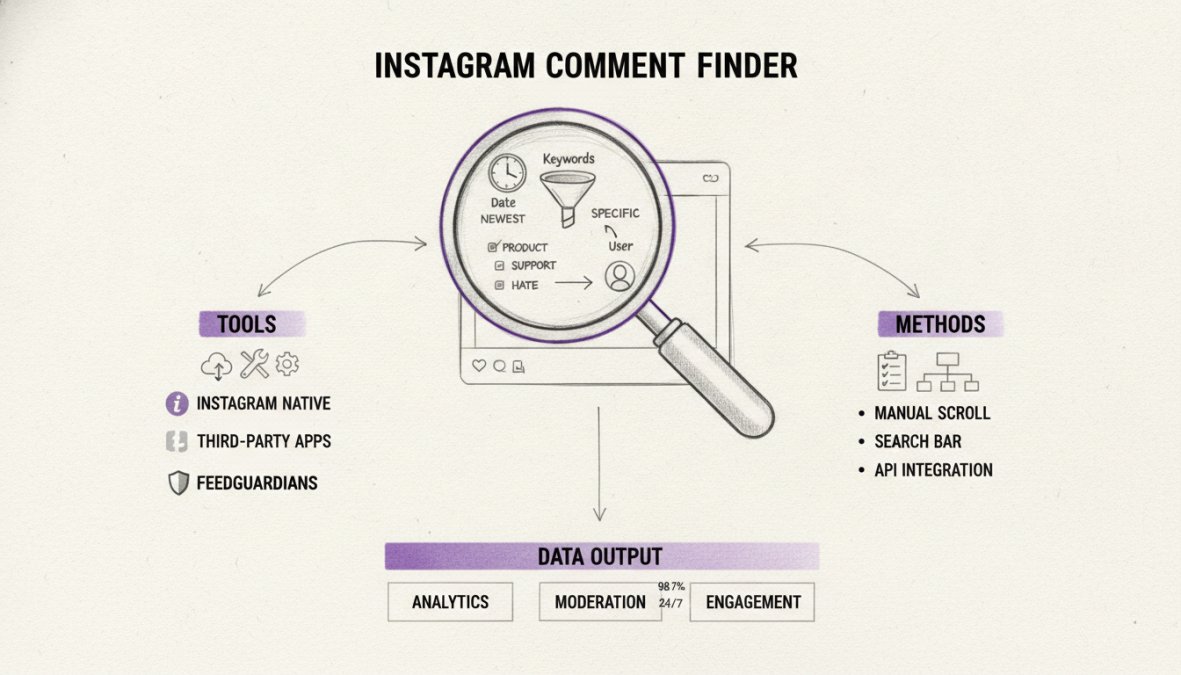
An instagram comment finder is a tool or method that allows you to search, locate, and extract comments from Instagram posts, Reels, and IGTV videos. Unlike Instagram's native search, which only finds accounts and hashtags, a comment finder lets you search within the comments section itself, filtering by keywords, usernames, timestamps, or engagement metrics.
Instagram's built-in features don't provide strong comment discovery. You can't search for specific words within comments on the platform itself or export comment data to analyze trends. An instagram comment finder solves these gaps, enabling you to find giveaway winners, monitor brand mentions, analyze sentiment, identify influencers, extract data for reporting, and detect spam. Brands that actively monitor and respond to comments see 30% higher engagement rates compared to those that don't.
How to Search Instagram Comments Using Native Features
Instagram provides some built-in functionality for comment discovery, though it's limited compared to specialized tools.
Using Ctrl+F to Find Comments on Desktop
The simplest method to search Instagram comments is using your browser's find function on desktop.
How it works:
- Open Instagram in your desktop browser and navigate to the post you want to search
- Press Ctrl+F (Windows) or Cmd+F (Mac) to open the browser's find dialog
- Type the keyword, username, or phrase you're looking for
- The browser highlights matching text within visible comments
This method only searches comments currently loaded on your screen. Instagram loads comments dynamically as you scroll, so you won't find comments that haven't been loaded yet. For quick searches on posts with under 100 comments, Ctrl+F works fine.
Mobile-Specific Workarounds for Comment Search
Mobile users can open Instagram.com in their mobile browser instead of using the app, which provides access to the find function. On iOS, use Safari's reader view and search function. On Android, most browsers support find-on-page through the menu. For critical comments, screenshot the comment section as you scroll to create a searchable archive.
The reality is that mobile comment searching remains clunky. If you're managing Instagram comments seriously, use a desktop browser or dedicated tool.
Best Instagram Comment Picker Tools for Giveaways
Running a giveaway requires finding comments that meet specific criteria. Manual selection is error-prone and time-consuming. Comment picker tools automate this process.
What to look for in a comment picker:
- Ability to filter by keywords, usernames, or timestamps
- Random winner selection to ensure fairness
- Export functionality to save winner lists
- Real-time comment tracking as new comments arrive
- Compliance with Instagram's Terms of Service
Many comment picker tools operate in a gray area by scraping data without authorization. Before using any tool, verify that it uses Instagram's official API or has explicit permission to access comment data. Instagram actively restricts third-party access, so tools that worked six months ago may stop working when Instagram revokes API access.
Free vs. Paid Comment Picker Options
Free tools typically offer basic functionality: search, filter, and random selection, but often have limitations like comment count caps or rate limiting. Paid tools remove these restrictions and add features like bulk export to CSV, scheduled automated searches, sentiment analysis integration, and competitor mention detection.
For occasional giveaway runners, free tools suffice. For brands managing multiple accounts or running frequent campaigns, paid tools save hours of manual work. Calculate your time savings: if a tool costs $30/month but saves you 5 hours per month of manual comment review, it pays for itself.
Instagram Comment Analysis Tools for Engagement Metrics
Beyond finding comments, you need to understand what they mean. Comment analysis tools measure sentiment, identify trends, and quantify engagement patterns by examining metrics like sentiment distribution, mention frequency, engagement velocity, user overlap, and timestamp clustering.
This data reveals patterns invisible in manual review. For example, you might discover that comments mentioning a competitor spike during specific times, indicating organized competitor activity. Brands using comment sentiment analysis improve customer satisfaction scores by an average of 18% within six months.
Analyzing Reels and IGTV Comments
Reels and IGTV videos generate different comment patterns than static posts. Reels tend to attract more casual, emoji-heavy comments, while IGTV comments often include longer-form feedback and questions. Reels comments spike immediately; IGTV comments spread over days.
When analyzing Reels and IGTV comments, focus on comment volume relative to view count, response time to your replies, sentiment shift over time, and question frequency indicating confusion or interest in product details.
Sentiment Analysis and Keyword Filtering
Sentiment analysis uses natural language processing to categorize comments as positive, negative, or neutral. However, sentiment analysis struggles with sarcasm, context-dependent language, and cultural references. Keyword filtering is more reliable, returning exact matches for specific terms, product names, or competitor mentions.
Combine sentiment analysis with keyword filtering for best results. Filter for comments containing "product name," then analyze their sentiment to get precise data on how people feel about your specific offering.
Instagram Giveaway Winner Generator: Automated Selection
Running fair giveaways requires random winner selection. Automated winner generators apply randomization algorithms to filter comments matching entry criteria and select winners.
What makes selection fair: True randomization means every qualifying comment has an equal chance of winning. The tool should use cryptographically secure random number generation, not simple randomization.
Documentation matters: Export a report showing total qualifying comments, selection date and time, random seed or algorithm used, winner list with timestamps, and proof that winners met entry criteria. This documentation protects you if someone disputes the results.
Common mistakes to avoid:
- Manually selecting "the best" comments instead of randomizing
- Excluding comments from competitors or people you don't like
- Changing criteria after comments are submitted
- Failing to verify winners actually met entry requirements
- Not announcing results promptly, creating suspicion
Data Extraction and CSV Export: What You Need to Know
Exporting comment data to CSV or Excel enables analysis in spreadsheet tools, CRM systems, or data visualization platforms. You can extract comment text, commenter username, timestamp, like count, reply count, user profile data, sentiment score, and keyword matches.
Once data is in CSV format, you can filter and sort in Excel, import into your CRM, analyze trends using pivot tables, share data with team members, and archive historical data. Ensure your spreadsheet application handles UTF-8 encoding correctly, as some older Excel versions default to different encoding.
Legal and Ethical Compliance When Scraping Comments
Scraping Instagram comments occupies a gray legal area. Instagram's Terms of Service prohibit unauthorized data collection. GDPR requires consent before collecting personal data, even if it's publicly visible. CCPA gives users rights over their data.
Best practices:
- Use official APIs when available (Instagram Graph API for business accounts)
- Respect rate limits set by Instagram or third-party tools
- Don't store personal data longer than necessary
- Don't use scraped data for purposes users didn't expect
- Disclose to users that you're analyzing their comments
- Have a clear data retention and deletion policy
Instagram can suspend your account if they detect scraping. Never use scraped comment data to create contact lists for unsolicited marketing, as this violates both Instagram's TOS and anti-spam laws.
API Rate Limits and Tool Comparison
Instagram's official API (Graph API) imposes strict rate limits: 200 requests per hour for most endpoints and 4,800 requests per day. If you're analyzing 100 posts daily, you'll hit rate limits quickly. Third-party tools manage their own rate limits based on server capacity and Instagram's limits.
| Method | Rate Limit | Cost | Reliability | Best For |
|---|---|---|---|---|
| Manual Ctrl+F | None | Free | Low (tedious) | Single posts, quick checks |
| Instagram API | 200/hour | Free | High | Developers, high-volume analysis |
| Third-party tools | Varies (10-1000/day) | $10-100/mo | Medium (tool-dependent) | Giveaways, regular monitoring |
| Manual review | Unlimited | Time | Low (slow) | Legal compliance, sensitive data |
Choose based on your volume and frequency. Occasional searches? Free tools work. Daily monitoring across multiple accounts? Invest in a paid tool with higher rate limits.
Advanced Instagram Comment Finder Techniques for OSINT
OSINT (Open Source Intelligence) applies to Instagram comment data. By analyzing public comments, you can uncover patterns about your audience, competitors, and market trends through network analysis, temporal analysis, linguistic analysis, influencer identification, and competitor intelligence.
Metadata Extraction and Digital Forensics
Comment metadata includes timestamps, commenter profile data, engagement metrics, and relationships to other comments. Useful metadata fields include timestamp (reveals engagement velocity and time zones), commenter profile (identifies influencers and fake accounts), reply structure (shows conversation threads), engagement (indicates community agreement), and location signals (reveals geographic audience).
If you suspect fake engagement or coordinated inauthentic behavior, metadata analysis reveals patterns like sudden spikes of comments from new accounts, comments from accounts with zero followers, coordinated timing across multiple accounts, and repeated identical comments. Don't use metadata analysis to identify individuals for purposes they didn't consent to.
Common Mistakes When Using Comment Finder Tools
Mistake 1: Overrelying on automated filtering. Automated tools misclassify comments. Always manually review tool results before acting on them.
Mistake 2: Ignoring rate limits and getting suspended. Aggressive scraping triggers Instagram's abuse detection. Use tools responsibly and respect rate limits.
Mistake 3: Exporting data without a retention policy. Have a clear policy: why you collect data, how long you keep it, and when you delete it.
Mistake 4: Trusting free tools with account credentials. Never give your password to third-party apps. Use tools that authenticate via OAuth instead.
Mistake 5: Using comment data for spam campaigns. Don't use comment data for unsolicited marketing. Use it for engagement and analysis only.
Mistake 6: Forgetting to document your process. Document your method for selecting winners or making business decisions based on comment analysis.
Mistake 7: Mixing old and new data without timestamps. Track which comments are new when exporting multiple times to avoid duplicate analysis.
Finding and analyzing Instagram comments at scale transforms how you manage audience relationships and extract business insights. Match your method to your needs: free tools handle occasional giveaways, paid tools scale to multiple accounts and complex filtering, and advanced techniques unlock competitive intelligence and audience segmentation. The key is processing comment data efficiently without violating platform rules or privacy laws.
Frequently Asked Questions
What is the best free Instagram comment finder tool available?
Several free Instagram comment finder options exist, including browser-based tools and native Instagram features. The Ctrl+F desktop method costs nothing and works for public accounts. Free tools often have limitations on bulk export and real-time tracking compared to paid solutions. Your choice depends on whether you need basic comment viewing or advanced data extraction and sentiment analysis capabilities.
Can I use an Instagram comment picker for giveaway winner selection legally?
Yes, using an Instagram comment picker for giveaway winner selection is generally legal if you comply with Instagram's Terms of Service and local regulations. Ensure your giveaway rules are clear, the tool respects Instagram TOS, and you're only accessing publicly available comments. Always verify that your comment picker doesn't violate Instagram's API restrictions or scraping policies to avoid account suspension.
How do I export Instagram comments to CSV or Excel?
Most Instagram comment analysis tools allow bulk export to CSV format by selecting your target post URL and initiating the export. The process typically involves: 1) Paste the post link, 2) Select comments to include (by keyword, date range, or engagement metrics), 3) Choose CSV format, 4) Download the file. Not all free tools support this feature, check tool specifications before use. Paid tools usually offer faster processing and more filtering options.
Are Instagram comment finder tools safe and compliant with Instagram's policies?
Safety depends on the tool and how you use it. Legitimate comment finders that respect Instagram's API rate limits and don't violate Terms of Service are generally safe. Avoid tools requiring password login or making unauthorized API calls. Always read privacy policies, use tools from reputable providers, and ensure compliance with Instagram TOS. Some tools automatically detect and hide spam or hate speech, adding a compliance layer to your comment moderation workflow.
This article was written using GrandRanker
Tired of manually moderating comments?
FeedGuardians automates spam filtering, responds to customers, and protects your brand — setup in 3 minutes.
Frequently Asked Questions
What is the best free Instagram comment finder tool available?
Several free Instagram comment finder options exist, including browser-based tools and native Instagram features. The Ctrl+F desktop method costs nothing and works for public accounts. Free tools often have limitations on bulk export and real-time tracking compared to paid solutions. Your choice depends on whether you need basic comment viewing or advanced data extraction and sentiment analysis capabilities.
Can I use an Instagram comment picker for giveaway winner selection legally?
Yes, using an Instagram comment picker for giveaway winner selection is generally legal if you comply with Instagram's Terms of Service and local regulations. Ensure your giveaway rules are clear, the tool respects Instagram TOS, and you're only accessing publicly available comments. Always verify that your comment picker doesn't violate Instagram's API restrictions or scraping policies to avoid account suspension.
How do I export Instagram comments to CSV or Excel?
Most Instagram comment analysis tools allow bulk export to CSV format by selecting your target post URL and initiating the export. The process typically involves: 1) Paste the post link, 2) Select comments to include (by keyword, date range, or engagement metrics), 3) Choose CSV format, 4) Download the file. Not all free tools support this feature—check tool specifications before use. Paid tools usually offer faster processing and more filtering options.
Are Instagram comment finder tools safe and compliant with Instagram's policies?
Safety depends on the tool and how you use it. Legitimate comment finders that respect Instagram's API rate limits and don't violate Terms of Service are generally safe. Avoid tools requiring password login or making unauthorized API calls. Always read privacy policies, use tools from reputable providers, and ensure compliance with Instagram TOS. Some tools automatically detect and hide spam or hate speech, adding a compliance layer to your comment moderation workflow.