
Quick Summary
| Key Insight | What You Need to Know |
|---|---|
| Why Spam Overwhelms High-Traffic | Why Spam Overwhelms High-Traffic Posts |
| Recognizing Spam, Fake Accounts | Recognizing Spam, Fake Accounts, and Suspicious Activity |
| Setting Up Social Media | Setting Up Social Media Comment Moderation ControlsPlatform-Specific Moderation Settings |
| Platform-Specific Moderation Settings | Platform-Specific Moderation Settings |
| Deploying Social Media Spam | Deploying Social Media Spam Filters Effectively |
| How to Stop Spam | How to Stop Spam on Facebook Posts and Other PlatformsFacebook PagesInstagramTikTokLinkedInX (formerly Twitter)The order to apply controls during a live surge |
Table of Contents
- Why Spam Overwhelms High-Traffic Posts
- Recognizing Spam, Fake Accounts, and Suspicious Activity
- Setting Up Social Media Comment Moderation Controls
- Deploying Social Media Spam Filters Effectively
- How to Stop Spam on Facebook Posts and Other Platforms
- Responding to Spam Comments Without Amplifying Them
- Automating Spam Detection and Response at Scale
- Measuring Moderation Effectiveness and Adjusting Your Strategy
- Frequently Asked Questions
Last Updated: October 18, 2026
Why Spam Overwhelms High-Traffic Posts
When your post goes viral, spam follows.
High-traffic posts attract spam at scale because volume creates cover: a few spam comments disappear among hundreds of legitimate ones.
Preventing spam on high traffic social media posts isn't optional anymore. You can't manually moderate thousands of comments; you need systems that work 24/7, catch what humans miss, and respond intelligently.
At FeedGuardians, we work with brands managing thousands of comments daily. The fix requires a three-part strategy: recognition, prevention, and response.
Recognizing Spam, Fake Accounts, and Suspicious Activity
Spam takes many forms. Before you can stop it, you need to spot it.
Spam comments are the most obvious: promotional messages, links to unrelated products, or requests to click external URLs, noise designed to capture clicks or steal data.
Fake accounts are trickier: generic profile names, stock photos or none, minimal post history, following hundreds but followed by few.
Suspicious activity includes patterns like:
- Repetitive comments with identical text across multiple posts
- Comments that arrive in rapid bursts from different accounts
- Links to competitor sites or sketchy domains
Setting Up Social Media Comment Moderation Controls
Most platforms offer built-in moderation tools. They're basic, but they're a start. Here's what to activate.
Platform-Specific Moderation Settings
Facebook filters comments by keywords and links under Page Settings → Moderation.
TikTok has "Comment Filtering" in Creator Tools to block specific words, usernames, or phrases.
YouTube includes Community Guidelines enforcement. Enable "Likely to be disliked" filtering. Block channels or keywords.
The reality: platform filters catch obvious spam but miss sophisticated attempts. They work best combined with additional tools and human oversight.
Deploying Social Media Spam Filters Effectively
Built-in filters have limits. Spammers evolve, using misspellings, emojis, and encoded links to bypass keyword blocks. A strong spam filter needs intelligence.
Link filtering is critical for high-traffic posts.
Account reputation scoring evaluates whether a commenter is trustworthy: new accounts with no history get flagged, frequent spammers get blocked, and high-engagement accounts get prioritized.
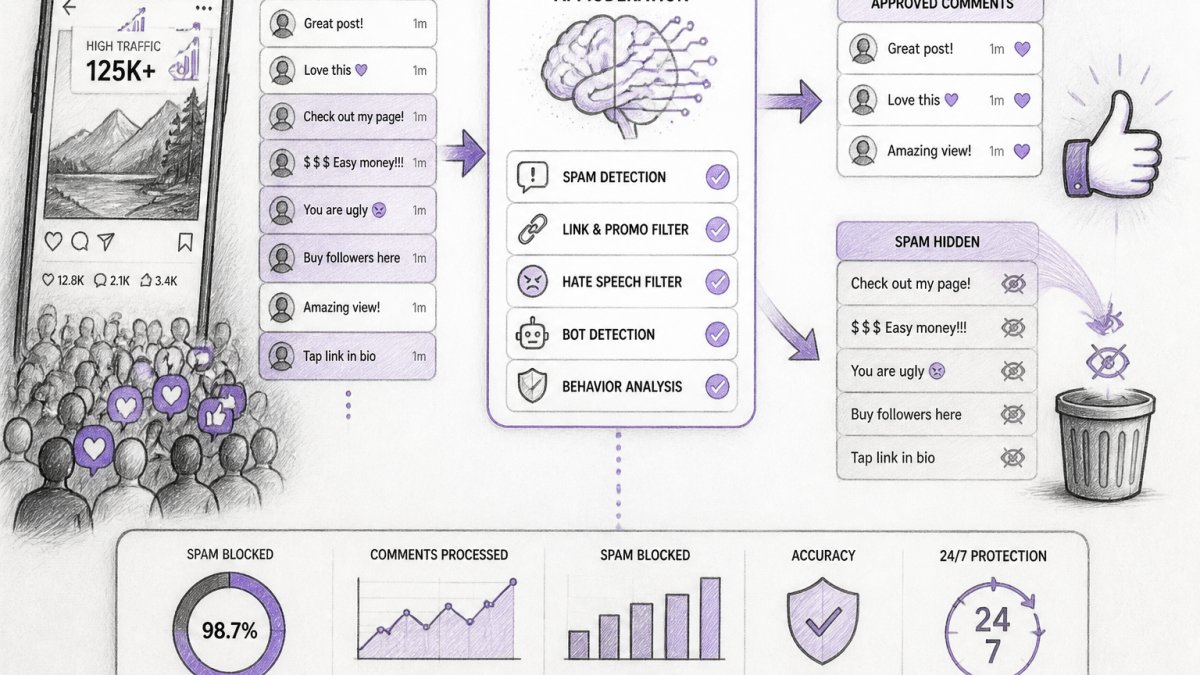
The best approach combines multiple signals. Layer keyword blocking, link detection, and account scoring to catch 95%+ of spam before it appears; the remaining 5% requires human review.
How to Stop Spam on Facebook Posts and Other Platforms
Most guides stop at "use the platform's tools," but that advice collapses when a post spikes, because each platform hides its controls in a different menu and enforces them differently. Below is a configuration walkthrough for the five networks that generate the most comment surges, followed by the order to apply them when a post is already live.
Facebook Pages
- Moderation Assist (Page Settings → Moderation → Moderation Assist) lets you set criteria for comments and posts, including keyword matches, links, and repeated content, and choose whether to review or hide them. Turn on the criteria that match your spam patterns rather than accepting the defaults.
- Profanity filter and keyword blocking live under Page Settings → Moderation. Add competitor domains and common scam phrases as blocked words; Facebook matches on partial phrases, so enter stems ("free-followers", "crypto-giveaway") rather than full sentences.
- Comment ranking and hiding: hiding a comment removes it from public view but keeps the reply thread intact, which is preferable to deleting when you want to preserve context for customers who already replied.
- Hidden words (Settings → Privacy → Hidden words) filters comments and message requests containing your list of words, phrases, and emoji. It is the single highest-leverage control on Instagram because it applies to future comments automatically.
- Offensive comment filtering and manual filter are separate toggles; enable both, then add custom keywords to the manual filter.
- Restrict is a lighter tool than blocking: a restricted account's comments are visible only to that account unless you approve them, which is useful for borderline accounts you do not want to ban outright.
TikTok
- Comment filters (Settings → Privacy → Comment filters) include a spam and offensive-comment filter plus a custom keyword list. TikTok also offers a filter for comments from accounts with no profile photo, which catches a large share of throwaway spam accounts.
- Who can comment can be limited to followers, friends, or everyone; on a viral post, switching to followers-only for the first 24-48 hours cuts the anonymous spam pool sharply.
- Filter all comments holds every comment for review before it appears; reserve this for the highest-risk posts because it will slow legitimate engagement.
- Comment controls (Settings → Visibility → Comment controls) let you limit comments to connections or disable them per post.
- Blocking and reporting are per-member rather than keyword-based, so LinkedIn rewards a fast triage habit: report the account, block it, and hide the comment in one pass.
- LinkedIn spam skews toward fake recruiter and investment pitches; add those phrases to your manual review list rather than relying on automated filters, which are thinner here than on Meta properties.
X (formerly Twitter)
- Muted words (Settings → Privacy → Mute and block → Muted words) can be scoped to timeline, notifications, or both, and can be set for a duration. Mute the phrases driving reply spam without blocking the accounts, which keeps your reply thread clean without signaling to spammers that they were actioned.
- Reply controls per post (Everyone, Accounts you follow, Verified accounts, Only accounts you mention) are the most effective surge control on X; setting replies to "Accounts you follow" during a spike removes most drive-by spam.
- Block and report from the post's three-dot menu; X's spam reporting feeds its automated detection, so report even when you have already hidden the comment.
The order to apply controls during a live surge
- Restrict replies or comments first (X reply controls, Instagram turn-off commenting, TikTok followers-only). This stops the inflow while you assess.
- Enable keyword and hidden-word filters second. These work on future comments and take effect immediately.
- Hide, do not delete, existing spam. Hiding preserves thread context and avoids notifying the spammer.
- Block and report repeat offenders last. Blocking is per-account and does not scale to a surge; reserve it for accounts that return after hiding.
Turning off comments entirely is the fastest fix and the most damaging to legitimate engagement. On a high-traffic post, a customer with a support question who finds comments disabled often leaves rather than switching to DM. Use reply restrictions and keyword filters before you reach for the off switch.
Screenshot your filter lists before and after each surge. Spammers rotate phrases weekly, and a filter list that caught last month's spam will miss this month's. A five-minute weekly review of blocked-word lists is the cheapest maintenance you can do.
Responding to Spam Comments Without Amplifying Them
Here's the mistake most brands make: they respond to spam publicly, arguing with spammers and asking them to stop.
The right approach is silent removal. Hide the comment. Don't engage. Don't reply. Don't draw attention to it.
For legitimate comments that happen to look suspicious, a quick clarification works:
- "Thanks for your interest. We only sell through our official site."
- "That link isn't affiliated with us. Please use our store instead."
Keep responses brief. Don't lecture. Don't explain your moderation policy. Just redirect and move on.
Responding to hate speech or threats requires a different approach. Report these to the platform immediately. Don't engage publicly.
Automating Spam Detection and Response at Scale
Manual moderation does not scale past a few hundred comments a day. Automation does, but only if you configure it around the failure modes of high-traffic posts: surges faster than a human can triage, spammers who mutate keywords to evade filters, and legitimate customers who look suspicious to a naive filter.
Keyword and phrase filters
Keyword filters are the first line and the easiest to misconfigure. Two rules keep them useful:
- Use stems, not full phrases. Blocking "free-followers" catches "free followers," "freefollower," and "free-followers-now" in most platform filters, which match on substrings. Blocking the exact phrase "free followers here" catches almost nothing.
- Separate block lists by intent. Keep one list for scam and phishing phrases, one for competitor domains, and one for profanity. Mixing them makes it impossible to tell which list is generating false positives when a legitimate comment disappears.
Rate limits and burst detection
Spam on a viral post arrives in bursts from many accounts posting near-identical text within minutes. A rate-limit rule flags any account posting more than a set number of comments in a short window, or any comment matching text already posted by a different account in the last hour. Most tools expose this as a "duplicate content" or "burst" rule; set the window tight enough to catch coordinated spam (more than three comments in ten minutes) but loose enough not to catch an enthusiastic customer replying to several threads.
Account reputation scoring
Reputation scoring weighs signals spammers cannot easily fake: account age, follower-to-following ratio, post history, and prior comments on your page. A new account with no photo, following hundreds and followed by few, is a strong spam signal even when the text is clean. Score these into a review queue rather than auto-hiding, because new legitimate customers also have thin histories.
Automated replies and when not to send them
Automated replies work for high-volume, low-variance questions (shipping, returns, store hours) and fail badly for anything emotional or complaint-shaped. Route them only to comments matching a known intent and send everything else to a human; a canned reply to a customer describing a bad experience reads as indifference and damages trust more than a slow human reply would.
Escalation and staffing for a surge
A surge plan needs three tiers:
- Tier 1, automated hide and reply. Spam and common questions are handled without human touch.
- Tier 2, review queue. Borderline comments go to a queue with a target response time; on a high-traffic post, aim to clear the queue within two hours during business hours and set an after-hours auto-reply that sets expectations.
- Tier 3, human escalation. Threats, doxxing, and legal-risk comments go to a named owner, not a shared inbox. Decide in advance who that person is and what triggers the escalation.
The goal of automation is not to remove humans from moderation. It is to reserve human attention for the comments where judgment changes the outcome: complaints, threats, and borderline cases. Configure filters to catch the obvious, and staff the queue for the ambiguous.
Measuring Moderation Effectiveness and Adjusting Your Strategy
You can't improve what you don't measure. Track these metrics:
Spam catch rate: How many spam comments did your system hide before they appeared publicly? Aim for 95%+; at 80%, your filters need adjustment.
False positive rate: How many legitimate comments did your system incorrectly flag as spam?
Response time: How fast do you reply to customer comments? Aim for under 2 hours on high-traffic posts.
Comment volume trends: Are comments increasing or decreasing? Spam-heavy posts see declining legitimate engagement.
The goal isn't perfect moderation. It's effective moderation. Some spam will slip through. Some legitimate comments might get caught.
Preventing spam on high traffic social media posts protects your brand reputation and keeps your community safe. Your ad performance improves because your posts stay clean and trustworthy. Learn more about comment moderation best practices from Meta's Community Guidelines to understand platform-specific requirements.
Frequently Asked Questions
How can you tell spam comments from genuine customer questions?
Spam typically includes suspicious links, repetitive messaging across multiple posts, generic praise unrelated to your product, requests for personal information, or promotional content for unrelated services. Genuine questions reference your specific product, ask clarifying details, or express real concerns. Look for patterns: one account posting identical comments on every post is spam; varied questions from different accounts are usually legitimate. Fake accounts often have no profile picture, minimal post history, or recently created dates. Real customer engagement shows context and specificity.
Should you delete or hide spam comments?
Hiding is better than deleting. When you hide a comment, it remains visible only to the person who posted it and their friends, preventing spam amplification while preserving a record if you need it for reporting. Deleting removes all trace, which can make patterns harder to identify and complicates escalation if the spam becomes threatening or violates policies. Most platforms recommend hiding first, then escalating serious violations to the platform's abuse team. This approach protects your brand reputation while maintaining transparency and compliance.
What moderation settings help reduce spam on Instagram, Facebook, TikTok, and YouTube?
All four platforms offer keyword filtering, comment approval queues, and restricted account lists. Facebook and Instagram let you filter comments by keywords and set comment restrictions by account age or new followers. YouTube allows you to hold potentially inappropriate comments for review and block channels. TikTok offers comment filtering and the ability to restrict who can comment based on account status. Enable word filters for common spam terms, restrict comments from new or unverified accounts during high-traffic posts, and use the approval queue feature to review comments before they appear. These settings reduce spam volume significantly without requiring manual review of every comment.
How long does it take to set up automated moderation and start seeing results?
Basic platform controls take 15-30 minutes to configure. Automated moderation tools typically require 1-2 hours for initial setup, including connecting your social accounts, defining your brand voice and guidelines, and setting filter rules. Most brands see spam reduction within the first 24 hours as automated filters begin catching repetitive content and suspicious accounts. Full effectiveness, including accurate brand-voice replies and learning your specific tone, develops over 1-2 weeks as the system processes your historical comments and customer interactions. The time investment upfront saves hours daily in manual moderation and response work.
Tired of manually moderating comments?
FeedGuardians automates spam filtering, responds to customers, and protects your brand — setup in 3 minutes.
Frequently Asked Questions
How can you tell spam comments from genuine customer questions?
Spam typically includes suspicious links, repetitive messaging across multiple posts, generic praise unrelated to your product, requests for personal information, or promotional content for unrelated services. Genuine questions reference your specific product, ask clarifying details, or express real concerns. Look for patterns: one account posting identical comments on every post is spam; varied questions from different accounts are usually legitimate. Fake accounts often have no profile picture, minimal post history, or recently created dates. Real customer engagement shows context and specificity.
Should you delete or hide spam comments?
Hiding is better than deleting. When you hide a comment, it remains visible only to the person who posted it and their friends, preventing spam amplification while preserving a record if you need it for reporting. Deleting removes all trace, which can make patterns harder to identify and complicates escalation if the spam becomes threatening or violates policies. Most platforms recommend hiding first, then escalating serious violations to the platform's abuse team. This approach protects your brand reputation while maintaining transparency and compliance.
What moderation settings help reduce spam on Instagram, Facebook, TikTok, and YouTube?
All four platforms offer keyword filtering, comment approval queues, and restricted account lists. Facebook and Instagram let you filter comments by keywords and set comment restrictions by account age or new followers. YouTube allows you to hold potentially inappropriate comments for review and block channels. TikTok offers comment filtering and the ability to restrict who can comment based on account status. Enable word filters for common spam terms, restrict comments from new or unverified accounts during high-traffic posts, and use the approval queue feature to review comments before they appear. These settings reduce spam volume significantly without requiring manual review of every comment.
How long does it take to set up automated moderation and start seeing results?
Basic platform controls take 15–30 minutes to configure. Automated moderation tools typically require 1–2 hours for initial setup, including connecting your social accounts, defining your brand voice and guidelines, and setting filter rules. Most brands see spam reduction within the first 24 hours as automated filters begin catching repetitive content and suspicious accounts. Full effectiveness—including accurate brand-voice replies and learning your specific tone—develops over 1–2 weeks as the system processes your historical comments and customer interactions. The time investment upfront saves hours daily in manual moderation and response work.