
Quick Summary
| Key Insight | What You Need to Know |
|---|---|
| Why Reply 24/7 Automatically | Why Reply 24/7 Automatically Matters for Brand Management |
| Setting Up Auto-Reply Message | Setting Up Auto-Reply Message Templates for Your Brand Voice Defining Your Tone and Personality Creating Response Rules by Comment Type |
| Defining Your Tone and | Defining Your Tone and Personality |
| Creating Response Rules by | Creating Response Rules by Comment Type |
| Configuring Trigger-Based Automated Responses Keyword | Configuring Trigger-Based Automated Responses Keyword and Sentiment Triggers Timing and Escalation Rules |
| Keyword and Sentiment Triggers | Keyword and Sentiment Triggers |
Table of Contents
- Why Reply 24/7 Automatically Matters for Brand Management
- Setting Up Auto-Reply Message Templates for Your Brand Voice
- Configuring Trigger-Based Automated Responses
- Automated Customer Service Tools: Integration and Workflow
- Best Practices for Business Auto-Replies and Compliance
- Customer Response Time Standards and Measuring ROI
- Common Mistakes to Avoid When Automating Replies
- Conclusion
Last Updated: August 15, 2026
Why Reply 24/7 Automatically Matters for Brand Management
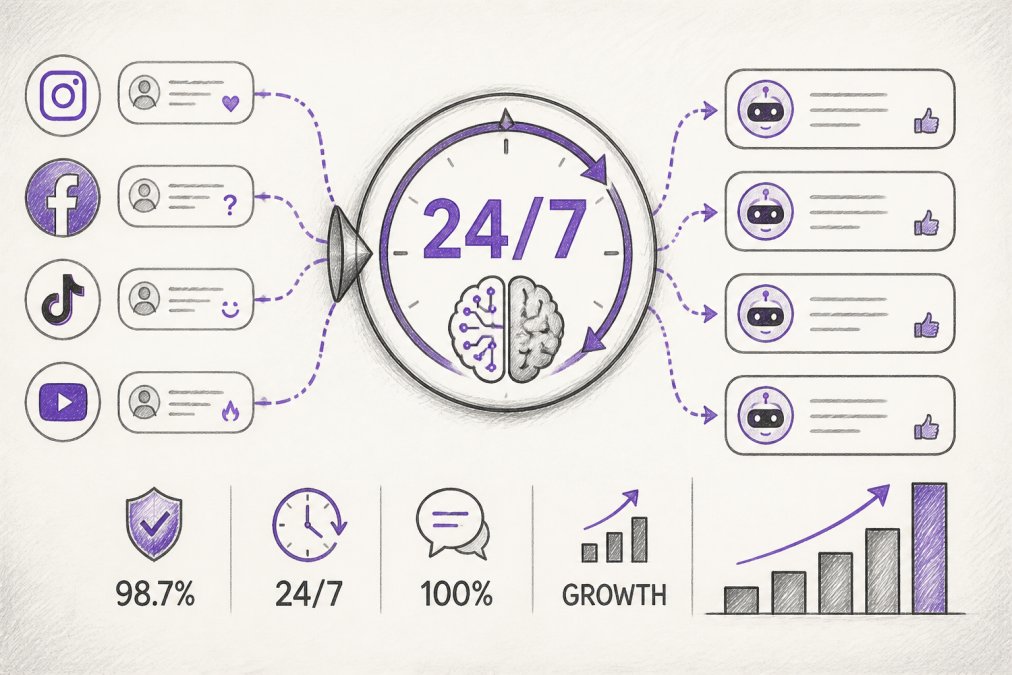
Brands that reply 24/7 automatically see faster customer engagement, stronger brand protection, and improved conversion rates. Comments don't wait for business hours, and neither should your responses. When a customer posts a question at midnight or a competitor drops a link in your replies, manual moderation can't keep pace. Automated responses close that gap.
At FeedGuardians, we've tracked how brands manage thousands of daily comments across Instagram, Facebook, TikTok, and YouTube. The difference is measurable: response times drop from hours to seconds, spam and hate speech get hidden before most people see them, and customer inquiries turn into conversations instead of frustration.
The challenge isn't whether to automate, it's how to do it without sounding robotic. A generic auto-reply damages trust. A reply that captures your actual brand voice builds it. This guide covers the setup, best practices, and common pitfalls of building a 24/7 automated response system that protects your reputation and turns comments into conversions.
Setting Up Auto-Reply Message Templates for Your Brand Voice
The foundation of effective automation is templates that sound like your brand, not like a chatbot.
Defining Your Tone and Personality
Your tone guides every automated response your brand sends. If your brand is playful and irreverent, a formal corporate response will confuse your audience. If you're a financial services company, a casual joke will erode trust.
Write down 3-5 example responses to common customer inquiries in your natural brand voice. Notice patterns: Do you use exclamation marks or periods? Do you ask follow-up questions or provide direct answers? Do you use emojis, and if so, which ones?
These examples become your reference set. When you build templates, you're teaching the system to sound like these examples. A one-sentence auto-reply feels dismissive. A response that acknowledges the customer, provides useful information, and invites further conversation feels human. Target 2-4 sentences for most replies.
Creating Response Rules by Comment Type
Not every comment deserves the same response. A compliment, a product question, a complaint, and a competitor link all need different handling.
Start with these core types: product inquiries, compliments, complaints or concerns, spam or suspicious links, and competitor mentions. For each type, write 2-3 template variations so responses don't feel repetitive.
Product inquiry templates should be helpful and specific. Instead of "Thanks for your interest," try "We love that question. [Specific answer]. If you need more details, DM us or check our link in bio."
Compliment templates should acknowledge the customer and reinforce your brand values. "This means everything to us, thank you for sharing" is better than a generic "Thanks for the feedback."
For complaints, validate the concern and provide next steps. "We're sorry you had this experience. We want to make it right, can you DM us the details?" This signals that complaints are taken seriously and escalated.
Spam and competitor links need professional templates. "We appreciate all comments, but we keep our feed focused on our community. Thanks for understanding."
Configuring Trigger-Based Automated Responses
Trigger-based automation means your system watches for specific conditions and responds automatically when they're met. A keyword trigger might detect "Where do I buy?" and send a product link. A sentiment trigger might identify a negative comment and escalate it to your team.
Keyword and Sentiment Triggers
Keyword triggers are the simplest form of automation. You define a word or phrase like "shipping," "refund," or "how to use," and the system sends a matching template when it detects that keyword.
The key is specificity. Don't trigger on just "order" because that will catch comments like "I love this order of colors in your latest post." Instead, trigger on phrases like "order status," "track my order," or "when will my order arrive."
Sentiment triggers analyze the emotional tone of a comment and route it accordingly. A positive comment might get a simple thank you. A negative comment should skip the auto-reply and go straight to your team for a human response. Don't automate responses to negative comments, customers complaining about a product want someone to actually address their concern.
Timing and Escalation Rules
Timing rules determine when responses are sent. You might reply immediately to product questions during business hours, but batch them for morning review if comments come in at 2 AM. This keeps your brand available 24/7 without sending responses when your team can't follow up.
Escalation rules define which comments need human attention. A complaint about a defective product should go to your support team immediately. A question about a feature should get an instant answer. Set escalation thresholds based on your team's capacity.
Automated Customer Service Tools: Integration and Workflow
Your reply 24/7 automatically system only works if it's connected to where your customers actually are. That means integrating with your CRM, your messaging platforms, and your social channels.
Connecting to Your CRM and Messaging Platforms
Your CRM holds customer history, past purchases, and interaction notes. When your automated response system connects to your CRM, it can pull context: "Hi Sarah, thanks for your question about the blue widget you purchased last month," instead of generic replies.
Most platforms support API integrations that sync comment data to your CRM in real time. A customer inquiry on Instagram gets logged as a contact record with the comment text attached. Your team can see the full conversation history without jumping between apps.
Messaging platforms like email, SMS, and WhatsApp can also be integrated. A customer might comment on Instagram, but your system could send a follow-up via SMS or email if they don't respond within a set timeframe.
Cross-Platform Synchronization
Managing multiple platforms creates complexity. A customer might comment on Instagram, TikTok, and YouTube about the same product. Without synchronization, your team could send three different responses.
Cross-platform synchronization means your system recognizes the same customer across channels and syncs their conversation history. When your team opens the customer's profile, they see all interactions from all platforms in one place.
Setting up synchronization requires mapping customer identifiers across platforms, usually email address or phone number. Once synced, a note added to a customer's profile in your CRM appears when they comment on any channel.
Best Practices for Business Auto-Replies and Compliance
Automation is powerful, but it carries risk. A poorly configured system can delete legitimate comments, send replies to sensitive situations, or violate privacy regulations.
Balancing Automation with Human Touch
The biggest mistake with automation is forgetting that the goal is better customer service, not fewer humans involved. Automation should handle volume and routine tasks so your team can focus on complex, high-value interactions.
Automate responses to predictable, low-risk questions: "How much does this cost?" "Where's my order?" "What are your store hours?" Don't automate responses to complaints, product defects, or situations where the customer is clearly frustrated.
Set up escalation workflows so your team sees important comments. A comment with certain keywords, "broken," "defective," "lawsuit," "scam", should bypass automation and go straight to a person. Many teams also use a "human review" window where a team member reviews automated replies within an hour to ensure they were appropriate.
Privacy, Opt-In, and Legal Considerations
Automated messaging is regulated differently depending on the platform and message type. SMS automation requires explicit opt-in under the Telephone Consumer Protection Act. Email automation has similar requirements under the CAN-SPAM Act. Social media automation has fewer restrictions, but you should still be transparent.
Disclose that your replies might be automated: "Thanks for your message, we may use automation to respond quickly." Customers are less frustrated by an auto-reply if they know it's coming.
For customer data, ensure your automation system complies with privacy regulations. Data collected through comments should be stored securely and used only for customer service purposes. If your system integrates with your CRM, make sure customer data is encrypted and access is restricted to authorized team members.
If you're using an AI-powered system like FeedGuardians, verify that the platform has clear data handling policies and compliance certifications.
Customer Response Time Standards and Measuring ROI
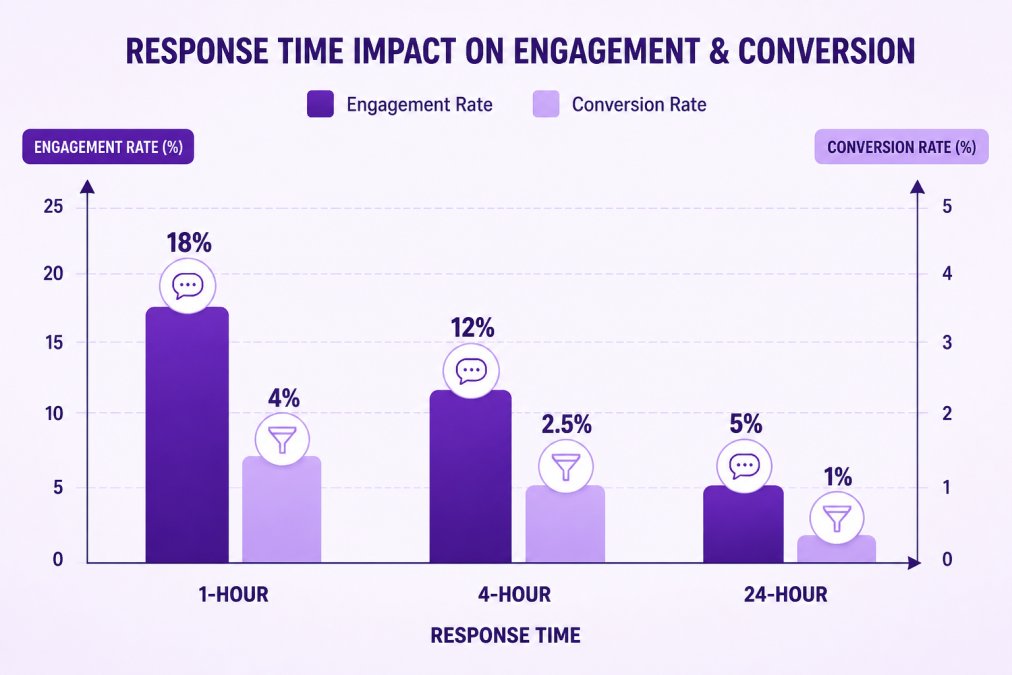
Response time directly impacts customer satisfaction and conversion rates. Industry standards vary by channel. On Instagram and Facebook, customers expect a response within 24 hours. On SMS, customers expect responses within minutes.
The real ROI of automation comes from consistency. A manual system might respond to some comments in 30 minutes and others in 8 hours. An automated system responds to every comment in seconds, setting a consistent expectation and improving overall satisfaction.
Tracking Engagement and Conversion Impact
Set up tracking to measure how automation affects your metrics. Monitor response time, reply rate, and customer satisfaction scores before and after implementing automation. Most brands see response times drop from hours to minutes, and reply rates increase because you're not missing comments anymore.
For conversion impact, track whether automated replies lead to sales or customer actions. If an automated response to "Where do I buy?" includes a product link, measure how many customers click that link.
The biggest ROI often isn't from direct conversions, it's from time saved. If automation handles 70% of comments, your team saves hours daily. That time can be redirected to product development, content creation, or strategic customer relationships.
Common Mistakes to Avoid When Automating Replies
Automating everything. Don't treat automation as a replacement for human judgment. Comments about product defects, privacy concerns, or negative experiences need human attention.
Ignoring brand voice. Generic templates sound generic. Invest time in creating templates that reflect your actual tone and values.
Not monitoring escalations. If escalated comments don't get reviewed, they pile up and customers feel ignored. Set clear SLAs for escalated comments.
Forgetting about context. A customer who's complained three times in a week needs different handling than a first-time complainer. Use your CRM to provide context to automated responses.
Neglecting compliance. Automated SMS or email requires explicit opt-in. Automated replies on social media should disclose that they're automated.
Over-relying on sentiment analysis. Sentiment detection isn't perfect. A sarcastic compliment might be detected as negative. Always review how sentiment triggers are working.
Setting and forgetting. Automation requires ongoing maintenance. Review your templates and triggers monthly and adjust based on what you're learning.
Automating 24/7 responses is the difference between a brand that's always available and one that goes silent after hours. The brands winning on social media aren't responding faster because they have more staff, they're responding faster because they've automated the routine work and reserved human judgment for situations that actually need it.
The setup requires upfront work: defining your brand voice, creating templates, configuring triggers, and integrating your platforms. Once in place, the system handles volume that would require hiring additional staff. More importantly, it ensures that no customer inquiry gets missed, no spam sits in your feed, and no competitor link goes unaddressed.
FeedGuardians automates this entire process with AI-powered replies that learn your brand voice and real-time moderation that detects and hides spam, hate speech, and competitor links with 98.7% accuracy. The platform handles Instagram, Facebook, TikTok, and YouTube, syncing everything to your CRM so your team has full context on every customer.
Start with your templates, test your triggers, and measure the impact on response time and engagement. The ROI compounds over time as your system learns and your team focuses on what actually matters.
| Automation Element | Setup Time | Maintenance Frequency | Key Benefit |
|---|---|---|---|
| Auto-reply templates | 2-3 hours | Monthly review | Consistent brand voice |
| Keyword triggers | 1-2 hours | Weekly refinement | Faster response to FAQs |
| Sentiment escalation | 1 hour | Monthly tuning | High-risk issues caught |
| CRM integration | 1-2 hours | As needed | Full customer context |
| Cross-platform sync | 2-3 hours | Monthly verification | Unified customer view |
| Compliance review | 1-2 hours | Quarterly audit | Legal protection |
Frequently Asked Questions
What is an example of an automated reply that protects brand reputation?
A customer comments asking about a product defect. Your automated reply detects the negative sentiment and immediately responds with empathy: 'We're sorry to hear you had trouble. Our team reaches out to all feedback within 2 hours.' This acknowledges the concern instantly, preventing the comment from appearing ignored or hostile, and signals that you take feedback seriously. The reply is branded with your tone, not generic-sounding.
What are customer response time standards for business inquiries?
Social media inquiries typically see better engagement when answered within 1-4 hours. Brands responding within 1 hour see higher conversion rates on average. For customer service issues, a 24-hour maximum response time is standard across most industries. However, with 24/7 automated replies, you can acknowledge inquiries instantly while routing complex issues to your team, combining speed with accuracy and protecting your brand reputation.
How do auto-reply message templates prevent over-automation from damaging brand perception?
Templates that reflect your unique brand voice and personality avoid the robotic feel that damages trust. Instead of generic 'Thank you for your comment,' you craft responses that sound like your brand: casual, professional, or witty depending on your identity. Best practice: use automation for acknowledgment and triage, but flag sensitive comments for human review. This hybrid approach maintains authenticity while saving hours daily on routine responses.
What happens if an automated reply makes a mistake on a sensitive comment?
Robust automated customer service tools include human escalation options. Comments flagged as potentially sensitive, angry, or containing specific keywords can be routed to your team before any automated reply is sent. You maintain final approval over high-risk responses. This protects your brand from costly missteps while still automating the bulk of routine inquiries, balancing efficiency with accountability.
This article was written using GrandRanker
Tired of manually moderating comments?
FeedGuardians automates spam filtering, responds to customers, and protects your brand — setup in 3 minutes.
Frequently Asked Questions
What is an example of an automated reply that protects brand reputation?
A customer comments asking about a product defect. Your automated reply detects the negative sentiment and immediately responds with empathy: 'We're sorry to hear you had trouble. Our team reaches out to all feedback within 2 hours.' This acknowledges the concern instantly, preventing the comment from appearing ignored or hostile, and signals that you take feedback seriously. The reply is branded with your tone, not generic-sounding.
What are customer response time standards for business inquiries?
Social media inquiries typically see better engagement when answered within 1-4 hours. Brands responding within 1 hour see higher conversion rates on average. For customer service issues, a 24-hour maximum response time is standard across most industries. However, with 24/7 automated replies, you can acknowledge inquiries instantly while routing complex issues to your team, combining speed with accuracy and protecting your brand reputation.
How do auto-reply message templates prevent over-automation from damaging brand perception?
Templates that reflect your unique brand voice and personality avoid the robotic feel that damages trust. Instead of generic 'Thank you for your comment,' you craft responses that sound like your brand: casual, professional, or witty depending on your identity. Best practice: use automation for acknowledgment and triage, but flag sensitive comments for human review. This hybrid approach maintains authenticity while saving hours daily on routine responses.
What happens if an automated reply makes a mistake on a sensitive comment?
Robust automated customer service tools include human escalation options. Comments flagged as potentially sensitive, angry, or containing specific keywords can be routed to your team before any automated reply is sent. You maintain final approval over high-risk responses. This protects your brand from costly missteps while still automating the bulk of routine inquiries, balancing efficiency with accountability.