
Quick Summary
| Key Insight | What You Need to Know |
|---|---|
| Log every influencer marketing | Log every influencer marketing task for five working days to create a real time baseline. |
| Give each campaign stage | Give each campaign stage a named owner and a defined output in a shared checklist. |
| Timebox creator discovery, outreach | Timebox creator discovery, outreach follow-ups, and draft review to prevent open-ended delays. |
| Build three outreach templates | first contact, a single follow-up, and offer and terms. |
| Automate spam and hate-speech | Automate spam and hate-speech hiding, but keep replies to creators about their own content human. |
| Where Influencer Marketing Time | Where Influencer Marketing Time Actually Goes |
Quick Summary
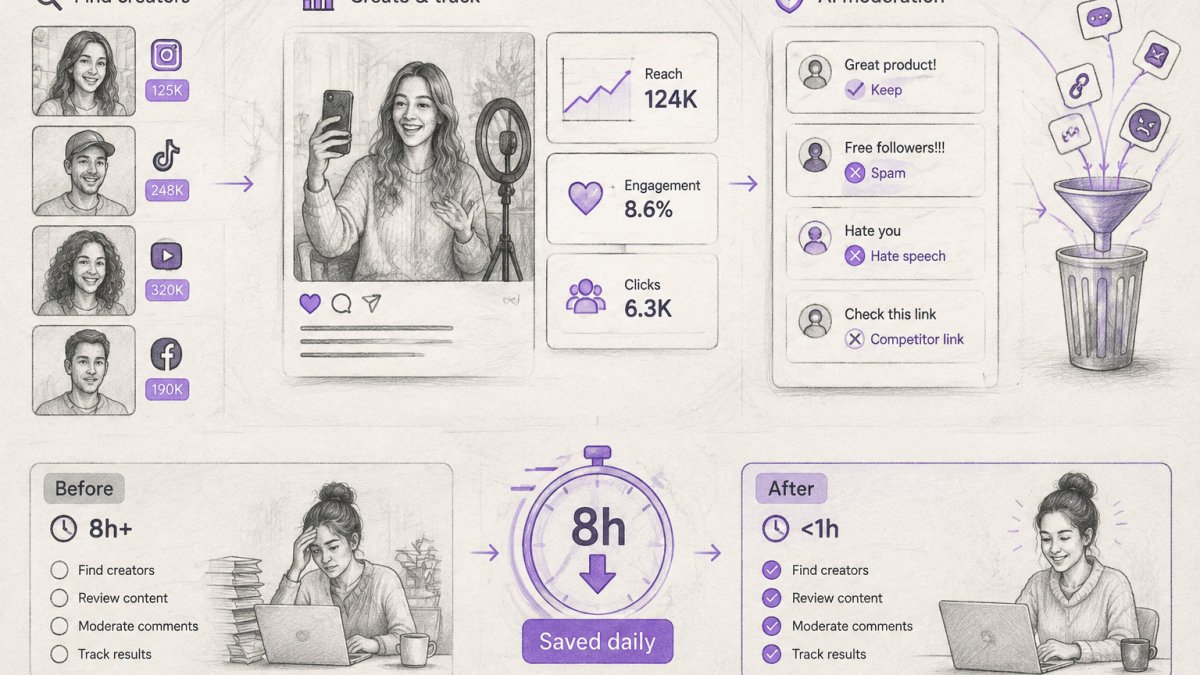
To save hours every day on influencer marketing, first measure where your time goes, then build a repeatable workflow with a named owner for each stage. Standardize outreach templates, automate comment moderation, and roll out changes one step at a time while tracking hours against your baseline.
- Log every influencer marketing task for five working days to create a real time baseline.
- Give each campaign stage a named owner and a defined output in a shared checklist.
- Timebox creator discovery, outreach follow-ups, and draft review to prevent open-ended delays.
- Build three outreach templates: first contact, a single follow-up, and offer and terms.
- Automate spam and hate-speech hiding, but keep replies to creators about their own content human.
Table of Contents
- Where Influencer Marketing Time Actually Goes
- Step 1: Measure Your Current Hours by Task
- Step 2: Build a Repeatable Influencer Marketing Workflow
- Step 3: Choose Influencer Marketing Tools by Team Size and Volume
- Step 4: Standardize Influencer Outreach Templates
- Step 5: Automate Comment Moderation Without Losing Creator Relationships
- Step 6: Roll Out the Changes and Track Hours Saved
- Your Next Step: Book a Workflow Audit
- Frequently Asked Questions
Where Influencer Marketing Time Actually Goes
Last Updated: November 7, 2026
Most influencer marketing teams lose hours every day to work that never shows up in a campaign plan. Creator discovery, outreach emails, brief revisions, contract chasing, and comment replies all pile up at once.
Social media managers and agencies often feel this every week.
Start by looking at where the time goes. Teams that track their week often find three or four tasks eating most of their hours. Those tasks are the best places to start.
- Finding and vetting creators
- Writing and sending outreach messages
- Briefing creators and handling revisions
- Answering comments and messages on campaign posts
- Building reports for clients
Step 1: Measure Your Current Hours by Task
You cannot save time you have not measured. Log every task for five working days before you change anything.
Use a simple spreadsheet with four columns: task, minutes spent, platform, and campaign. Be honest about how long each task takes.
What to track:
- Creator research and vetting
- Outreach and follow-ups
- Brief writing and approvals
- Comment and DM handling on campaign posts
- Reporting and invoicing
Once the week is over, total each category. Many teams find that comment moderation and replies on creator content take far more hours than anyone expected.
Here is a sample weekly baseline for a small agency managing eight influencer campaigns:
| Task | Hours per Week (Baseline) | Hours per Week (Target) |
|---|---|---|
| Creator discovery and vetting | 6 | 3 |
| Outreach and follow-ups | 5 | 2 |
| Briefs and approvals | 4 | 3 |
| Comment moderation and replies | 7 | 1 |
| Reporting | 3 | 1 |
Hours per Week (Target)
Your numbers will differ. The point is to have a real baseline so you can prove what changed later.
Step 2: Build a Repeatable Influencer Marketing Workflow
A repeatable workflow means every campaign follows the same steps in the same order, with a named owner and a defined output for each stage.
Write the workflow down as a checklist with three columns: stage, owner, and output. Keep it short enough to fit on one page, but do not skip the stages that feel administrative. Those are usually where the hours hide.
- Campaign brief and budget lock, Owner: account lead. Output: one-page brief with goal, budget range, deliverables, timeline, and disclosure requirements. Do not open discovery until this is signed off.
- Creator discovery and vetting, Owner: talent scout or coordinator. Output: shortlist of 15-25 creators per campaign with audience fit notes, engagement rate, and prior brand deals. Use fixed criteria so the shortlist does not get rebuilt from scratch each time.
- Outreach and negotiation, Owner: outreach manager. Output: agreed rate, deliverables, usage rights, and exclusivity terms logged in the tracker. Send the first-contact template, then one follow-up after five to seven days.
- Contracting and compliance, Owner: legal or ops. Output: signed agreement and a disclosure checklist. Confirm the creator knows the required disclosure language and platform rules before any content is made.
- Brief delivery and draft review, Owner: campaign manager. Output: approved brief, then one round of draft feedback with a deadline. Cap revisions at one round unless the brief changes.
- Posting and live monitoring, Owner: community or moderation lead. Output: live post log with links, posting time, and a comment escalation path.
- Payment and reconciliation, Owner: finance or ops. Output: invoice matched to deliverables, payment scheduled, and any shortfall documented. This stage is the most commonly skipped and the most common source of creator friction.
- Reporting and lessons log, Owner: analyst or account lead. Output: performance report plus three lessons written into the workflow doc for the next campaign.
Teams that skip stage 1 and jump straight into outreach often rework later when the budget or goal changes. Lock in the first stage before anything else.
Watch out: a workflow that exists only in someone's head will break the moment that person is out sick.
To make the workflow save hours rather than add bureaucracy, timebox each stage. With those deadlines in place, Postwell can help keep the same disciplined rhythm across multiple social media accounts, so routine publishing does not become another open-ended task.
Finally, connect the workflow to your baseline from Step 1.
Step 3: Choose Influencer Marketing Tools by Team Size and Volume
Tools save time only when they fit your team size, budget, and campaign volume. A solo marketer running two campaigns a month does not need the same setup as an agency running thirty.
Score yourself on three axes:
- Team size: How many people touch a campaign? One person, two to five, or six or more.
- Monthly campaign volume: How many creator campaigns go live per month? One to three, four to ten, or more than ten.
- Budget band: What can you spend per month on software without cutting into creator fees? Separate the creator budget from the tool budget so one does not silently eat the other.
Use the scores to narrow the field before you book a demo:
- Solo or small team, low volume (one to three campaigns per month): A shared spreadsheet, a scheduling tool, and one comment management tool may be enough. Prioritize tools with flat pricing and no per-seat penalty, because adding a freelancer should not double the bill.
- Mid-sized agency, several clients (four to ten campaigns per month): Add a centralized campaign tracker and standard templates so every account runs the same way. At this stage, client separation and reporting exports matter more than feature count. Check that the tool keeps each client's creators, comments, and reports walled off.
- High volume across platforms (more than ten campaigns per month): Look for tools that cover multiple networks in one dashboard, automate routine replies, and support approval workflows. At this volume, a tool that forces manual workarounds costs more hours than it saves.
For comment-heavy campaigns, FeedGuardians can handle the moderation layer. It automatically detects and hides spam, scams, hate speech, and competitor links, and it can reply in your brand voice.
Questions to ask before you commit:
- How does the tool separate clients, and can you export a clean report per campaign?
- Does it support an approval step before automated replies go live?
- What happens to your data if you leave, can you export creator lists and comment history?
- How is pricing structured: per seat, per campaign, or per connected account?
- Does it integrate with the scheduling and reporting tools you already use?
Implementation steps that prevent wasted hours:
- Run a two-week pilot on one low-stakes campaign before rolling out to all clients.
- Migrate your existing creator list and templates first, so the team is not rebuilding work in two places.
- Assign one owner for the tool and one backup, so configuration knowledge does not sit with a single person.
- Set escalation rules and test them on a live post before you trust automated replies at scale.
Watch out: a cheap tool that forces manual workarounds often costs more hours than it saves, and a feature-heavy tool your team never configures is just an expensive dashboard.
Step 4: Standardize Influencer Outreach Templates
Outreach is one of the biggest time drains in influencer marketing. Writing every message from scratch means a lot of repeated effort for little return.
Build three templates:
- First contact: Short intro, who you are, why this creator fits, and a clear next step
- Follow-up: One reminder sent after five to seven days
- Offer and terms: Budget range, deliverables, and timeline
Here is a sample first-contact template:
Hi [Creator name], I'm [Your name] from [Brand or agency]. We noticed your recent [specific video or post] and think your audience would like [product]. Would you be open to a paid collaboration? If so, I can send the brief and budget details this week.
Fill in the brackets with specific details for each creator. Templates save time, but generic messages get ignored. Personalize one line in every message.
Common mistake: sending the same template to creators who have never worked with your category. Segment your list first so the message fits the creator.
Step 5: Automate Comment Moderation Without Losing Creator Relationships
Comments on creator posts can overwhelm a small team quickly. Spam bots, scam links, and hostile comments pile up within hours of a post going live.
The safe approach is to automate the filtering and keep the human touch where it matters.
Automate these:
- Hiding spam, scam links, and competitor promotions
- Hiding hate speech and abusive messages
- Sending standard replies to common questions, such as shipping or discount codes
Keep these human:
- Replies to creators about their own content
- Negotiation and contract questions
- Any comment that signals a serious complaint
FeedGuardians can hide harmful comments automatically and reply to routine questions in your brand voice. Set clear escalation rules so anything sensitive reaches a person quickly.
Watch out: test automated replies on a low-stakes post first. A tone mismatch on a creator's most important video can damage the relationship faster than a slow reply ever would.
Step 6: Roll Out the Changes and Track Hours Saved
Change one step at a time. If you roll out a new workflow, new templates, and new tools in the same week, you will not know which change helped.
Run this rollout in four weeks:
- Week 1: Introduce the workflow checklist
- Week 2: Switch to standard outreach templates
- Week 3: Add the moderation tool and set escalation rules
- Week 4: Compare hours against your baseline from Step 1
Track the same categories you logged before. Compare weekly totals and note any task that did not improve. Those tasks need a closer look.
Your actual savings depend on your volume and how consistently the new process gets used.
Share the results with your team every week. People stick to a process faster when they see the time it returns to them.
Your Next Step: Book a Workflow Audit
You now have a clear method to measure, standardize, automate the repetitive parts, and track results. The next move is to apply it to your own campaigns.
If comment moderation is the biggest drain on your team, FeedGuardians can help with that work. Start for Free to see how automated moderation and brand-voice replies fit into your workflow.
Frequently Asked Questions
How much time can social media automation save?
The time saved depends on your current volume, platforms and how much of the work is repetitive. The most reliable way to find out is to log hours for one week before changing anything, then compare the same tasks after automation. Focus first on comment moderation, reply drafting and reporting, since these repeat daily and are easiest to measure. FeedGuardians' website lists current plans and offers a free plan, so you can test the time savings on your own accounts before committing.
Which influencer marketing tasks can be automated?
Repetitive, rule-based tasks are the strongest candidates: filtering spam and off-brand comments, drafting first-pass replies to common buyer questions, scheduling posts, collecting approval status and pulling campaign reports. Tasks that depend on judgment, such as choosing creators, negotiating terms and handling sensitive complaints, should stay with a person. A practical rule is to automate anything you already do the same way more than three times a week.
What tools help streamline influencer outreach and campaign management?
Look for tools that combine creator discovery, shared contact records, template-based outreach, approval tracking and reporting in one place. Match the tool to your team size and campaign volume: a solo marketer with a few campaigns a month needs less than an agency running dozens of creator relationships across clients. Before buying, check whether it connects to the platforms you use and whether you can start with one or two platforms. Check FeedGuardians' pricing page for current plan details.
How can brands manage influencer comments and replies at scale?
Set up automated comment moderation to hide spam, scam messages and competitor links, then draft replies to frequent questions in your brand voice. Keep a human escalation path for complaints, creator comments and anything involving legal or safety concerns. Review the automated decisions weekly for the first month to confirm accuracy, and adjust your rules where the system hides or answers something it should not.

Tired of manually moderating comments?
FeedGuardians automates spam filtering, responds to customers, and protects your brand — setup in 3 minutes.
Frequently Asked Questions
How much time can social media automation save?
The time saved depends on your current volume, platforms and how much of the work is repetitive. The most reliable way to find out is to log hours for one week before changing anything, then compare the same tasks after automation. Focus first on comment moderation, reply drafting and reporting, since these repeat daily and are easiest to measure. FeedGuardians' website lists current plans and offers a free plan, so you can test the time savings on your own accounts before committing.
Which influencer marketing tasks can be automated?
Repetitive, rule-based tasks are the strongest candidates: filtering spam and off-brand comments, drafting first-pass replies to common buyer questions, scheduling posts, collecting approval status and pulling campaign reports. Tasks that depend on judgment, such as choosing creators, negotiating terms and handling sensitive complaints, should stay with a person. A practical rule is to automate anything you already do the same way more than three times a week.
What tools help streamline influencer outreach and campaign management?
Look for tools that combine creator discovery, shared contact records, template-based outreach, approval tracking and reporting in one place. Match the tool to your team size and campaign volume: a solo marketer with a few campaigns a month needs less than an agency running dozens of creator relationships across clients. Before buying, check whether it connects to the platforms you use and whether you can start with one or two platforms. Check FeedGuardians' pricing page for current plan details.
How can brands manage influencer comments and replies at scale?
Set up automated comment moderation to hide spam, scam messages and competitor links, then draft replies to frequent questions in your brand voice. Keep a human escalation path for complaints, creator comments and anything involving legal or safety concerns. Review the automated decisions weekly for the first month to confirm accuracy, and adjust your rules where the system hides or answers something it should not.