
Quick Summary
| Key Insight | What You Need to Know |
|---|---|
| Understanding TikTok's Moderation System | Understanding TikTok's Moderation System for Creators |
| TikTok Comment Filter Settings | How to Configure Your First Line of Defense |
| Automated Comment Moderation Tools | Beyond TikTok's Built-In Features |
| How to Handle Hate | How to Handle Hate Speech on TikTok Without Damaging Engagement |
| Avoiding Shadowbans and Account | Avoiding Shadowbans and Account Restrictions Through Smart Moderation |
| Real-Time Monitoring and Community-Driven | Real-Time Monitoring and Community-Driven Reporting Mechanisms |
Table of Contents
- Understanding TikTok's Moderation System for Creators
- TikTok Comment Filter Settings: How to Configure Your First Line of Defense
- Automated Comment Moderation Tools: Beyond TikTok's Built-In Features
- How to Handle Hate Speech on TikTok Without Damaging Engagement
- Avoiding Shadowbans and Account Restrictions Through Smart Moderation
- Real-Time Monitoring and Community-Driven Reporting Mechanisms
- Post-Moderation Recovery: Rebuilding Trust After Backlash
- Frequently Asked Questions
Last Updated: October 1, 2026
Understanding TikTok's Moderation System for Creators
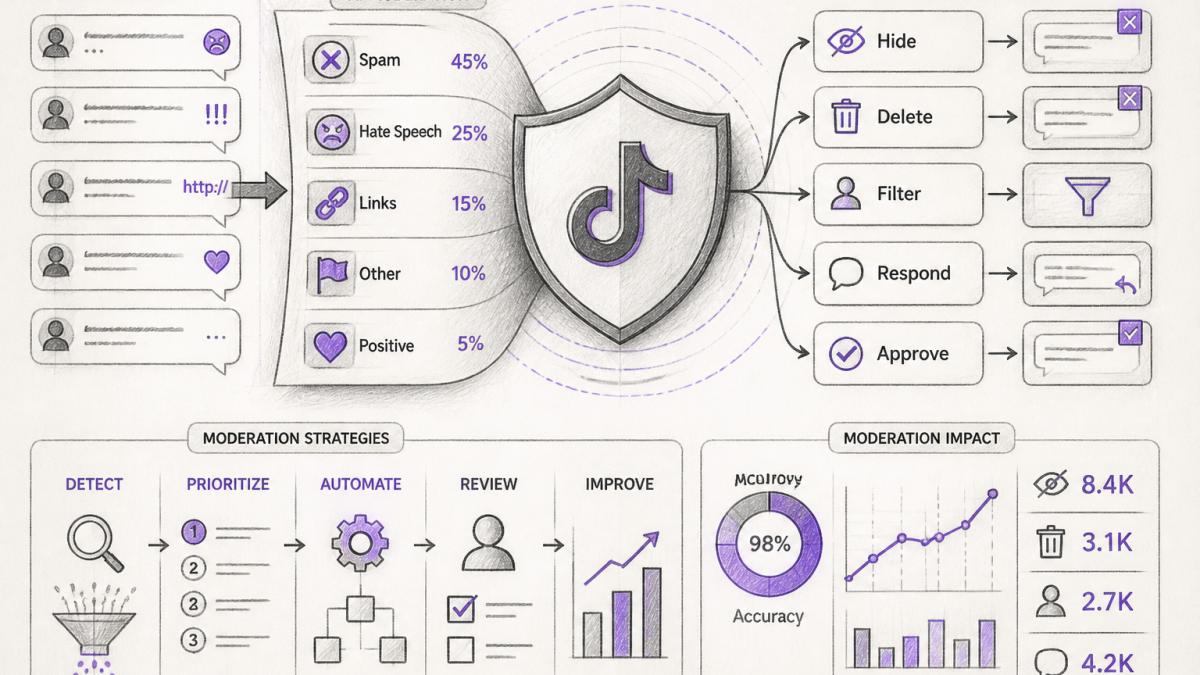
TikTok moderation strategies operate on three distinct layers: automated filters powered by machine learning, human review teams, and community-driven reporting mechanisms. For influencers managing high-volume comment sections, understanding how these layers interact is essential to protecting brand reputation while maintaining authentic engagement.
The platform's automated filters scan comments in real-time, flagging content that violates community guidelines before it ever appears on your videos. These systems detect spam, hate speech, scams, and competitor links with varying accuracy depending on how you configure your settings. However, automation alone isn't foolproof. Human moderators at TikTok handle appeals and review edge cases where context matters. Your role as a creator is to configure the filters that work for your specific audience and content type, then monitor what slips through.
At FeedGuardians, we work with creators who've learned that the most effective moderation strategy combines platform defaults with custom keyword lists and third-party tools.
The reality is that TikTok's built-in tools are a starting point, not a complete solution. A comment might pass TikTok's automated filters but still damage your brand if it's from a competitor, contains subtle harassment, or spreads misinformation about your products. This is where intentional configuration and real-time monitoring become critical.
TikTok Comment Filter Settings: How to Configure Your First Line of Defense
Configuring your TikTok comment filters correctly is the foundation of effective tiktok moderation strategies. The platform offers four filter levels: Off, Mild, Moderate, and Strict. Most creators default to Mild, which catches obvious spam but allows through comments with minor profanity or borderline content.
Start by accessing your settings through the Creator Fund dashboard. Navigate to Comment Settings and select your preferred filter level based on your audience demographics and content type. Mild works for general audiences and lifestyle content. Moderate suits e-commerce brands and educational creators who need stronger protection. Strict is appropriate only for brands targeting very young audiences or operating in highly regulated industries.
Beyond filter levels, TikTok allows you to build custom keyword lists. This is where tiktok comment filter settings become truly powerful. Add competitor brand names, known scam phrases, and problematic keywords specific to your niche. If you sell skincare, for example, add terms that competitors commonly use in comment spam. If you're in finance, add language associated with crypto scams or pyramid schemes.
You can also create an "approved commenter" list for VIP followers, brand ambassadors, and team members. Comments from these accounts bypass filters entirely, ensuring your most trusted community members are never accidentally hidden.
The critical mistake most creators make is setting filters too high, which hides legitimate comments and tanks engagement metrics. A Strict filter can suppress 30-40% of comments on high-volume videos, including genuine customer questions and positive feedback. Test your configuration on a few videos before rolling it out to your entire account.
Automated Comment Moderation Tools: Beyond TikTok's Built-In Features
TikTok's native comment filters handle baseline moderation, but they lack sophistication for nuanced brand protection. Automated comment moderation tools designed specifically for influencers and e-commerce brands fill this gap by offering real-time detection of context-aware violations, sentiment analysis, and intelligent response capabilities.
These tools integrate with your TikTok account via API or direct connection, scanning comments before they're published or immediately after. Unlike TikTok's filters, third-party solutions can detect sarcasm, backhanded compliments, and subtle harassment that automated filters miss. They can also identify competitive threats, a comment praising a rival's product, for instance, and flag it for your review without hiding it automatically.
The best tools learn your brand voice and guidelines over time. They're trained on your previous moderation decisions, so they understand what matters to your specific business. A fashion brand might want to hide comments about sizing issues, while an apparel brand treats those comments as valuable product feedback. Automated moderation tools adapt to these distinctions.
Many platforms also include AI-powered reply functionality, which is where moderation and engagement converge. Rather than just hiding bad comments, these tools can respond automatically to common questions, complaints, and compliments in your brand voice. This creates the impression of 24/7 customer care without requiring your team to monitor comments around the clock.
FeedGuardians, for example, detects and hides spam, hate speech, and competitor links automatically, while simultaneously offering AI-powered replies that sound authentically like your brand. This dual capability means you're not just protecting your account, you're actively converting comments into conversations and conversions.
How to Handle Hate Speech on TikTok Without Damaging Engagement
Hate speech on TikTok presents a unique challenge: it violates community guidelines and harms your brand reputation, but heavy-handed moderation can appear censorious and alienate your audience. The goal is to remove harmful content while maintaining the perception of an open, authentic community.
The first step is distinguishing hate speech from criticism. A comment saying "I don't like this product" is feedback. A comment saying "Anyone who buys this is [slur]" is hate speech. Hate speech on TikTok typically includes slurs, dehumanizing language, calls for violence, or targeted harassment based on protected characteristics. TikTok's filters catch obvious instances, but context matters.
When you encounter hate speech, you have three options: hide the comment (removes it from view but keeps it in the backend), delete it permanently, or report it to TikTok for potential account action against the commenter. Most creators use a combination.
Avoiding Shadowbans and Account Restrictions Through Smart Moderation
A shadowban occurs when TikTok's algorithm suppresses your content distribution without notifying you. Your videos still publish, but they reach far fewer people. Account restrictions include reduced visibility, comment limitations, or temporary suspension. Both stem from algorithm detection of policy violations or suspicious account behavior.
Real-Time Monitoring and Community-Driven Reporting Mechanisms
Effective moderation requires real-time visibility into your comment section. Waiting until you manually check comments means harmful content has already been visible to your audience for hours. Real-time monitoring systems alert you instantly when comments matching your violation criteria are posted, allowing you to take action before engagement metrics are damaged.
Post-Moderation Recovery: Rebuilding Trust After Backlash
Backlash on TikTok can escalate quickly. A single controversial comment, misunderstood video, or perceived misstep can trigger coordinated criticism from your audience. Once backlash begins, aggressive moderation often amplifies the problem, hiding critical comments makes your audience feel censored, which fuels more backlash.
Frequently Asked Questions
How do I filter comments on TikTok to protect my brand?
Use TikTok's built-in Comment Filter in your Creator Studio settings. Select your filter level (Off, Mild, Moderate, or Strict), add custom keyword filters for brand-specific terms or competitor names, and enable the Approved Commenter List to allow only trusted users. For deeper protection, pair these with automated comment moderation tools that detect spam, hate speech, and policy violations in real time. Most creators combine platform filters with third-party solutions for comprehensive coverage.
What are the best practices for managing hate speech on TikTok?
First, enable strict comment filters and add hate speech keywords to your custom filter lists. Don't engage with hateful comments publicly, as this amplifies visibility. Instead, hide or delete violations using TikTok's moderation tools, then report severe cases to TikTok's support team. Document patterns of harassment for potential account action requests. Use automated moderation tools to catch hate speech before it appears on your videos. Finally, foster positive community culture by highlighting respectful comments and setting clear community guidelines in your bio.
Can influencers automate comment moderation on TikTok?
Yes. TikTok's native Creator Care Mode offers basic automation, but third-party automated comment moderation tools provide far more control. These tools detect spam, hate speech, competitor links, and policy violations with high accuracy, then hide or flag them for review. They can also auto-reply to common questions using your brand voice, saving hours daily. Automation works best when paired with human review for edge cases, ensuring brand safety while maintaining authentic community engagement.
How does community reporting help with TikTok moderation?
Community-driven reporting lets your followers flag inappropriate comments, giving you additional eyes on your content. When viewers report comments, TikTok reviews them and may hide or remove violations. This mechanism is especially valuable for high-volume comment sections where manual review is impossible. Enable this feature in your moderation settings and encourage your community to report policy breaches. Combined with your own filters and automated tools, community reporting creates a multi-layer defense that scales with your audience growth.
What happens if TikTok shadowbans my account due to moderation mistakes?
A shadowban reduces your content visibility without warning, typically triggered by repeated policy violations or aggressive moderation tactics. To recover, stop any aggressive moderation practices, ensure all content complies with TikTok's Community Guidelines, and post consistently with high-quality content. Review your comment moderation for false positives (over-filtering legitimate comments). If you believe the shadowban is an error, submit an appeal through TikTok's support. Prevention is key: use accurate filters and human review to avoid accidental policy violations that trigger algorithmic suppression.
How can automated tools improve my TikTok ad performance?
Automated comment moderation protects your brand safety, which directly impacts ad performance. Platforms like Google and TikTok prioritize accounts with clean, compliant comment sections. By removing spam, hate speech, and competitor content automatically, you maintain higher engagement metrics and lower policy violation risk. Additionally, AI-powered auto-replies in your brand voice keep conversations active and boost engagement rates, signaling quality content to TikTok's algorithm. This combination improves your account health score, leading to better ad delivery and lower cost-per-action.
What's the difference between TikTok's built-in filters and third-party moderation tools?
TikTok's native Comment Filter handles basic keyword filtering and commenter lists, but it's limited to simple pattern matching. Third-party automated comment moderation tools use AI to understand context, detect nuanced hate speech, identify competitor links, and catch scams that simple keyword filters miss. They also offer 24/7 monitoring, real-time alerts, human escalation options, and AI-powered auto-replies in your brand voice. For influencers managing high comment volumes or multiple accounts, third-party tools provide the depth and automation that native tools cannot deliver alone.
Tired of manually moderating comments?
FeedGuardians automates spam filtering, responds to customers, and protects your brand — setup in 3 minutes.
Frequently Asked Questions
How do I filter comments on TikTok to protect my brand?
Use TikTok's built-in Comment Filter in your Creator Studio settings. Select your filter level (Off, Mild, Moderate, or Strict), add custom keyword filters for brand-specific terms or competitor names, and enable the Approved Commenter List to allow only trusted users. For deeper protection, pair these with automated comment moderation tools that detect spam, hate speech, and policy violations in real time. Most creators combine platform filters with third-party solutions for comprehensive coverage.
What are the best practices for managing hate speech on TikTok?
First, enable strict comment filters and add hate speech keywords to your custom filter lists. Don't engage with hateful comments publicly, as this amplifies visibility. Instead, hide or delete violations using TikTok's moderation tools, then report severe cases to TikTok's support team. Document patterns of harassment for potential account action requests. Use automated moderation tools to catch hate speech before it appears on your videos. Finally, foster positive community culture by highlighting respectful comments and setting clear community guidelines in your bio.
Can influencers automate comment moderation on TikTok?
Yes. TikTok's native Creator Care Mode offers basic automation, but third-party automated comment moderation tools provide far more control. These tools detect spam, hate speech, competitor links, and policy violations with high accuracy, then hide or flag them for review. They can also auto-reply to common questions using your brand voice, saving hours daily. Automation works best when paired with human review for edge cases, ensuring brand safety while maintaining authentic community engagement.
How does community reporting help with TikTok moderation?
Community-driven reporting lets your followers flag inappropriate comments, giving you additional eyes on your content. When viewers report comments, TikTok reviews them and may hide or remove violations. This mechanism is especially valuable for high-volume comment sections where manual review is impossible. Enable this feature in your moderation settings and encourage your community to report policy breaches. Combined with your own filters and automated tools, community reporting creates a multi-layer defense that scales with your audience growth.
What happens if TikTok shadowbans my account due to moderation mistakes?
A shadowban reduces your content visibility without warning, typically triggered by repeated policy violations or aggressive moderation tactics. To recover, stop any aggressive moderation practices, ensure all content complies with TikTok's Community Guidelines, and post consistently with high-quality content. Review your comment moderation for false positives (over-filtering legitimate comments). If you believe the shadowban is an error, submit an appeal through TikTok's support. Prevention is key: use accurate filters and human review to avoid accidental policy violations that trigger algorithmic suppression.
How can automated tools improve my TikTok ad performance?
Automated comment moderation protects your brand safety, which directly impacts ad performance. Platforms like Google and TikTok prioritize accounts with clean, compliant comment sections. By removing spam, hate speech, and competitor content automatically, you maintain higher engagement metrics and lower policy violation risk. Additionally, AI-powered auto-replies in your brand voice keep conversations active and boost engagement rates, signaling quality content to TikTok's algorithm. This combination improves your account health score, leading to better ad delivery and lower cost-per-action.
What's the difference between TikTok's built-in filters and third-party moderation tools?
TikTok's native Comment Filter handles basic keyword filtering and commenter lists, but it's limited to simple pattern matching. Third-party automated comment moderation tools use AI to understand context, detect nuanced hate speech, identify competitor links, and catch scams that simple keyword filters miss. They also offer 24/7 monitoring, real-time alerts, human escalation options, and AI-powered auto-replies in your brand voice. For influencers managing high comment volumes or multiple accounts, third-party tools provide the depth and automation that native tools cannot deliver alone.