
Quick Summary
| Key Insight | What You Need to Know |
|---|---|
| What Community Management Software | What Community Management Software Does |
| Automated Content Moderation | Real-Time Detection and Response |
| Social Media Moderation Tools | Capabilities and Limitations |
| Community Management Best Practices | Community Management Best Practices and When to Use Each |
| Building Your Social Media | Building Your Social Media Moderation Workflow |
| Automated Moderation vs Community Management | Key Differences |
Table of Contents
- What Community Management Software Does
- Automated Content Moderation: Real-Time Detection and Response
- Social Media Moderation Tools: Capabilities and Limitations
- Community Management Best Practices and When to Use Each
- Building Your Social Media Moderation Workflow
- Automated Moderation vs Community Management: Key Differences
- Making the Right Choice for Your Brand
- Frequently Asked Questions
Last Updated: October 21, 2026
What Community Management Software Does
Community management software helps brands organize conversations, build relationships, and respond to customer inquiries across social platforms without checking every notification manually, though it differs fundamentally from automated moderation vs community management software in scope and execution.
These platforms typically offer unified inboxes that collect messages from Instagram, Facebook, TikTok, and YouTube in one place, so your team sees all comments and DMs side by side. You can assign conversations, set priorities, and track response times from a single dashboard.
The core strength of community management software is relationship building: understanding what customers are saying, identifying brand advocates, and responding thoughtfully to feedback. Many teams also use these tools to segment audiences, schedule posts, and analyze which content drives conversations.
However, community management software typically requires human review and manual responses. Your team reads each comment and types out answers; the software smooths the workflow but doesn't automate moderation or responses. For high-volume brands, this becomes overwhelming quickly.
Automated Content Moderation: Real-Time Detection and Response
Automated content moderation uses AI and rule-based systems to scan comments in real time, detecting spam, hate speech, scams, competitor links, and other harmful content, then hiding or flagging it before customers see it.
The key difference from community management software is speed and scale. Automated moderation analyzes text as it arrives and decides instantly, coverage that's impossible to achieve manually at thousands of comments daily.
Modern AI moderation learns from your guidelines and brand voice, applying your community standards consistently across every comment. Some platforms also offer AI-powered replies that answer common questions 24/7 in your brand's tone.
Real-time monitoring matters: a scam comment that sits for an hour can damage trust and confuse customers. Automated moderation removes that delay, protecting ad performance and brand reputation.
The tradeoff is nuance. Automated systems can struggle with context, sarcasm, and cultural references, and false positives happen. That's why most platforms include a human escalation option, letting your team review flagged content and override the system.
Social Media Moderation Tools: Capabilities and Limitations
Social media moderation tools sit between pure automation and pure manual management, combining automated filtering with human review workflows.
These platforms typically include:
- Spam and abuse detection that flags obvious harmful content
- Keyword filters that let you block specific words or phrases
- Escalation workflows that route flagged content to your team for review
- Moderator dashboards that show all pending items needing human approval
- Appeal workflows that let users contest moderation decisions
The strength of this hybrid approach is control: your team sees what the system flagged and makes the final call, which matters for brands with strict guidelines.
The limitation is labor. Even with automation, your team still reviews and approves most moderation decisions, so high-volume accounts need dedicated moderator staff and costs scale with comment volume.
Many social media moderation tools also offer engagement features, sentiment analysis, audience insights, and conversation tracking. These are separate from moderation itself: a tool can excel at detecting spam but be weak at community analytics, or vice versa.
Community Management Best Practices and When to Use Each
Choosing between automated moderation and community management software depends on comment volume, team size, and brand risk tolerance.
Use community management software when your team is small and volume is manageable. At 2-3 posts per week and 50-200 comments daily, your team can realistically read and respond to most conversations, and the personal touch builds loyalty.
Use automated moderation when volume overwhelms your team's capacity to respond. If you post daily, receive thousands of comments, or manage multiple accounts, automated systems become necessary.
Many brands use both: automated moderation handles spam, hate speech, and competitor links in real time, while community management software organizes legitimate conversations and ensures timely human responses.
Brand risk tolerance also matters. If a single inappropriate comment can damage your reputation or violate ad policies, automated moderation is worth it; regulated brands and those running expensive campaigns often prioritize aggressive filtering over false-positive risk.
Relying entirely on manual moderation at scale leads to slow response times, missed harmful content, and team burnout. Set a threshold: if your team can't respond to 80% of comments within 24 hours, it's time to automate.
Building Your Social Media Moderation Workflow
A solid moderation workflow combines automation, human review, and clear escalation paths:
Layer 1: Automated Detection Set up automated rules to catch obvious harmful content immediately: spam patterns, known scam phrases, hate speech keywords, and competitor links, removing the most damaging content before it reaches your audience.
Layer 2: Flagged Content Review Route content that doesn't clearly violate rules to your moderation team. These edge cases, possible sarcasm, criticism, or context-dependent comments, get a human decision within a set timeframe, typically 4-24 hours.
Layer 3: AI-Powered Responses For common questions like "What are your hours?" or "Do you ship internationally?", let AI respond to save time. Set guardrails so the AI only handles low-risk questions; everything else goes to your team.
Layer 4: Human Follow-Up Your team handles complex inquiries, complaints, and conversations requiring empathy or judgment, the interactions that build loyalty and convert customers. Aim to respond within hours, not days.
Document the workflow and train your team on what gets auto-hidden, escalated, or answered by AI, refining the rules as your community evolves.
Automated Moderation vs Community Management: Key Differences
The core distinction between automated moderation and community management software comes down to priorities, but the practical differences show up in scope, workflow, data model, and failure modes.
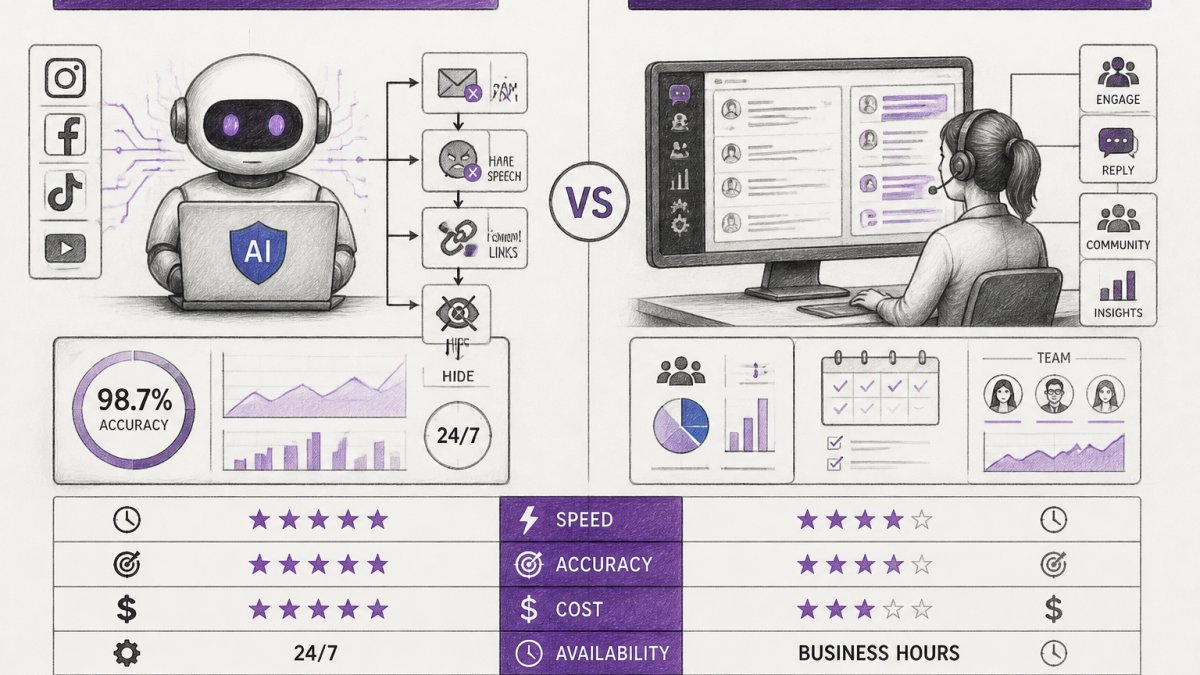
Automated moderation focuses on protection and speed. It scans every comment instantly and removes harmful content before customers see it. The workflow is: detect → act → optionally escalate to human.
Community management software focuses on relationship and organization. It helps your team respond thoughtfully, track conversations, and build community. The workflow is: collect → organize → human reads → human responds. Your team makes every decision.
Automated moderation answers the question: "How do we keep harmful content off our page?" Community management software answers: "How do we nurture conversations and build loyalty?"
A side-by-side view makes the overlap and the gaps clearer:
| Dimension | Automated moderation software | Community management software |
|---|---|---|
| Primary job | Detect and act on harmful content in real time | Organize, assign, and respond to conversations |
| Decision owner | System first, human on escalation | Human on every response |
| Strength at scale | High, coverage grows without proportional headcount | Limited, labor grows with volume |
| Strength at nuance | Limited, context, sarcasm, and cultural references are hard | High, humans read intent and tone |
| Typical failure mode | False positives and missed context | Slow response times and moderator burnout |
| Core metrics | Detection rate, false-positive rate, time-to-remove | Response time, resolution time, sentiment, engagement |
| Best fit | High-volume, high-risk, multi-account environments | Smaller or relationship-led communities |
In practice, the choice isn't binary.
Where the two categories genuinely overlap. Many community management platforms now include keyword filters, basic spam detection, and escalation workflows, and many moderation platforms now include inboxes, assignment, and analytics.
Where they diverge sharply. Moderation tools are built around classifiers and rules that must be tuned, tested, and monitored; community management tools are built around people and SLAs.
The cost curve differs too. Automated moderation scales without proportional increases in team size, but carries tuning and review overhead.
Making the Right Choice for Your Brand
Most buyers get stuck comparing feature lists instead of mapping their operating reality to the right software category. A short decision framework resolves this faster than any demo.
Step 1: Score your volume and risk. Answer four questions with numbers, not impressions:
- How many comments and DMs do you receive per day across all channels?
- How many people can realistically review and respond each day, and for how many hours?
- What is the worst realistic outcome of a harmful comment staying live for an hour (ad policy violation, customer harm, press coverage)?
- How many channels and accounts are you responsible for?
Teams under roughly a few hundred comments per day with a small, stable channel set can usually run on community management software alone. Teams above that, or with high brand risk, usually need automated moderation in the stack.
Step 2: Match the category to the bottleneck. If spam and harmful content are the main concern, automated moderation solves that immediately. If slow response times and disorganized conversations are the problem, community management software helps.
Step 3: Evaluate on measurable criteria, not demos. Ask every vendor for the same evidence:
- Detection quality: How is accuracy measured, on what sample, and how often is it re-tested? Ask for the false-positive rate and the missed-content rate separately, they trade off against each other.
- Appeal and override workflow: Can a user contest a removal? Can a moderator override a decision, and is the override logged with a reason code?
- Audit trail: Can you export every automated decision with timestamp, rule or model version, and reviewer? This matters for governance and for improving the system.
- Response-time benchmarks: What is the median time from comment arrival to human response, and how is it reported?
- Coverage: Which channels and content types (comments, DMs, mentions, live chat) are actually supported, and which are partial?
- Data handling: Where is data stored, how long is it retained, and what is the deletion process?
Step 4: Model total cost of ownership. Subscription price is only one line. Add moderator labor (hours × loaded hourly cost), implementation and integration time, ongoing rule and model tuning, and the expected cost of incidents such as a harmful comment that stays live.
Step 5: Pilot before committing. Many platforms offer free trials or freemium plans.
Step 6: Plan for growth. A tool that works today might not scale with you.
At FeedGuardians, our platform combines real-time AI moderation with 24/7 automated replies in your brand voice, designed for teams overwhelmed by comment volume.
The right choice depends on your specific situation, but the principle is clear: automate what you can, so your team can focus on conversations that matter.
Frequently Asked Questions
What is the difference between automated moderation and community management software?
Automated moderation focuses on detecting and hiding harmful content like spam, hate speech, and abuse in real time using AI and rule-based systems. Community management software handles broader engagement tasks: responding to comments, managing conversations, tracking sentiment, and building relationships across multiple channels. Automated moderation is reactive protection; community management is proactive engagement. Many brands use both together, automated moderation filters harmful content while community management software handles legitimate conversations and member support.
Can automated moderation and community management software work together?
Yes. Automated moderation removes spam and harmful content instantly, then community management software handles the remaining legitimate comments and conversations. This combination scales your team's effort: automation covers high-volume spam detection and inappropriate content filtering, while your team uses community management tools to respond thoughtfully, build relationships, and manage community guidelines. This workflow maximizes both protection and engagement without requiring manual review of every comment.
Should I use automated moderation or community management software first?
Start with automated moderation if your primary challenge is spam, hate speech, or competitor links overwhelming your comments. This protects your brand reputation and ad performance immediately. Add community management software once you have clean comment streams and need to scale responses and engagement. If you manage multiple social media channels or clients, community management software helps you consolidate conversations into one inbox. The right sequence depends on your pain point: protection first, then engagement.
How accurate is AI-powered automated moderation at catching harmful content?
Modern AI moderation systems achieve high accuracy rates, with leading platforms reporting detection rates above 98%. However, accuracy depends on how well the system is trained on your brand's specific guidelines and content type. False positives (incorrectly flagging legitimate comments) and false negatives (missing harmful content) do occur. The best systems offer human escalation workflows so moderators can review borderline cases and appeal decisions. Accuracy improves over time as the system learns your brand's rules and tone, but human oversight remains important for edge cases and brand-specific context.
Tired of manually moderating comments?
FeedGuardians automates spam filtering, responds to customers, and protects your brand — setup in 3 minutes.
Frequently Asked Questions
What is the difference between automated moderation and community management software?
Automated moderation focuses on detecting and hiding harmful content like spam, hate speech, and abuse in real time using AI and rule-based systems. Community management software handles broader engagement tasks: responding to comments, managing conversations, tracking sentiment, and building relationships across multiple channels. Automated moderation is reactive protection; community management is proactive engagement. Many brands use both together—automated moderation filters harmful content while community management software handles legitimate conversations and member support.
Can automated moderation and community management software work together?
Yes. Automated moderation removes spam and harmful content instantly, then community management software handles the remaining legitimate comments and conversations. This combination scales your team's effort: automation covers high-volume spam detection and inappropriate content filtering, while your team uses community management tools to respond thoughtfully, build relationships, and manage community guidelines. This workflow maximizes both protection and engagement without requiring manual review of every comment.
Should I use automated moderation or community management software first?
Start with automated moderation if your primary challenge is spam, hate speech, or competitor links overwhelming your comments. This protects your brand reputation and ad performance immediately. Add community management software once you have clean comment streams and need to scale responses and engagement. If you manage multiple social media channels or clients, community management software helps you consolidate conversations into one inbox. The right sequence depends on your pain point: protection first, then engagement.
How accurate is AI-powered automated moderation at catching harmful content?
Modern AI moderation systems achieve high accuracy rates, with leading platforms reporting detection rates above 98%. However, accuracy depends on how well the system is trained on your brand's specific guidelines and content type. False positives (incorrectly flagging legitimate comments) and false negatives (missing harmful content) do occur. The best systems offer human escalation workflows so moderators can review borderline cases and appeal decisions. Accuracy improves over time as the system learns your brand's rules and tone, but human oversight remains important for edge cases and brand-specific context.