
Quick Summary
| Key Insight | What You Need to Know |
|---|---|
| Route complaints, legal questions | Route complaints, legal questions and emotional comments to a human. |
| Hide spam rather than | Hide spam rather than delete it, so hidden comments can be reviewed and restored. |
| Set a cap and | Set a cap and queue on replies, since platforms rate-limit automated activity. |
| Run a two-week trial | Run a two-week trial and track false positives where real comments get hidden. |
| Confirm whether a tool | Confirm whether a tool automates public comments, DMs, or both before buying. |
| What an Automatic Comment | What an Automatic Comment Reply Bot Does for Business |
Last Updated: November 6, 2026
Quick Summary
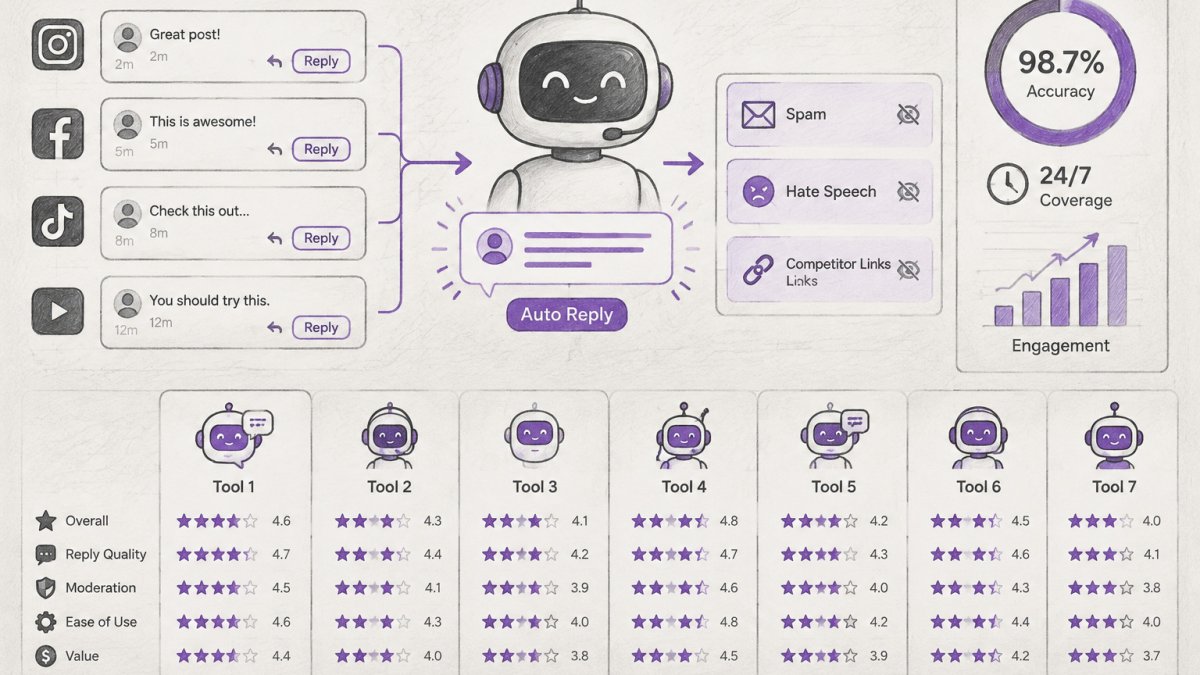
A comment reply bot is software that monitors your social media posts, reads incoming comments, and posts responses automatically, often hiding spam too. It suits repeatable questions about pricing, availability and order status, while complaints and sensitive comments should go to a person. Configuration quality matters as much as features, since a wrong reply can do more damage than silence.
- Route complaints, legal questions and emotional comments to a human.
- Hide spam rather than delete it, so hidden comments can be reviewed and restored.
- Set a cap and queue on replies, since platforms rate-limit automated activity.
- Run a two-week trial and track false positives where real comments get hidden.
- Confirm whether a tool automates public comments, DMs, or both before buying.
Table of Contents
- What an Automatic Comment Reply Bot Does for Business
- How We Evaluated These Tools
- Comparison Table: Features, Platforms and Pricing Access
- Tool-by-Tool Review: Where Each Option Fits
- AI Comment Moderation Tools: Accuracy, Risk and Human Handoff
- Writing Automated Response Templates That Don't Sound Like a Bot
- Choosing Your Tool and Running a Two-Week Trial
- Frequently Asked Questions
Automatic comment reply bots have moved from novelty to necessity for brands receiving hundreds of comments a day. This guide compares seven options for businesses of different sizes, covering how each tool handles public comments, direct messages and moderation, so you can match a tool to your volume and risk. For a broader set of alternatives to check beyond these seven, compare more AI social engagement tools.
What an Automatic Comment Reply Bot Does for Business
An automatic comment reply bot is software that monitors your social media posts, reads incoming comments, and posts responses without a person typing each one.
The business case is response time and consistency: a customer asking about shipping at 11 p.m. gets an answer instead of waiting until morning.
Automation is best suited to repeatable questions: pricing, availability, order status, and where to find a link.
How We Evaluated These Tools
We compared each option on five criteria:
- Coverage: Which platforms it handles (Instagram, Facebook, TikTok, YouTube, and messaging channels).
- Reply scope: Public comments only, direct messages, or both.
- Moderation: Whether it hides spam, scams or hateful comments, and whether it offers human review.
Where a vendor does not publish specifics we could verify, we say so rather than guess. Pricing changes often, so check each vendor's own pricing page before you buy.
Comparison Table: Features, Platforms and Pricing Access
| Tool | Public Comment Replies | DM Automation | Spam/Moderation | Free Tier or Trial | Best For |
|---|---|---|---|---|---|
| FeedGuardians | Yes | Yes | Yes, 98.7% accuracy claim | Free plan available | Brands needing moderation plus AI replies |
| Meta Business Suite | Limited, Facebook-focused | Limited | Basic | Free | Facebook-first teams |
| InstaChamp | Facebook replies | Unverified | Unverified | Unverified | Facebook auto-reply research |
| SleekFlow | Facebook replies | Yes | Unverified | Unverified | Messaging-led support |
| ManyChat | Limited | Yes | Unverified | Unverified | FAQs and DM campaigns |
| Chatfuel | Limited | Yes | Unverified | Unverified | Creators running DM promotions |
| Tidio | Facebook replies | Yes | Unverified | Unverified | Live chat plus automation |
| Sprinklr | Yes | Yes | Yes | Enterprise pricing | Large organizations |
| Emplifi | Yes | Yes | Yes | Enterprise pricing | Enterprise social teams |
Entries marked "Unverified" mean our sources did not confirm the feature or price. Pricing for FeedGuardians depends on your volume and platforms, so check the pricing page for current plans.
Tool-by-Tool Review: Where Each Option Fits
Below is how each option behaves in production, including the platform limitations that decide most purchases. Where a vendor does not publish a verifiable detail, we say so rather than guess.
FeedGuardians: Moderation Plus AI Replies
A strong fit for brands that need both moderation and replies in one place. Its Instagram auto-reply tool covers both comments and DMs.
The practical advantage is that moderation and replies run together, so a spam wave does not bury real customer questions.
Best for: e-commerce and agencies managing high comment volume across several platforms. Skip if: you only need Facebook replies and nothing else.
Meta Business Suite: The Free Baseline
Meta Business Suite is the default starting point because it costs nothing and already sits inside the Facebook and Instagram accounts most businesses run.
The limitation is scope.
Best for: small teams that want zero-cost basics on Facebook and Instagram. Skip if: you need AI replies, cross-platform coverage, or DM automation at volume.
InstaChamp: Facebook Reply Automation
InstaChamp is positioned around automated Facebook comment replies, and its published material focuses on that single channel. Our sources did not confirm DM automation, moderation depth, or a free tier, so verify those in a trial rather than assuming them.
Best for: Facebook-heavy pages testing comment automation cheaply. Skip if: you need Instagram, TikTok, or YouTube coverage in the same tool.
SleekFlow: Messaging-Led Support
SleekFlow is built around messaging channels and inbox workflows rather than public comment moderation. It supports Facebook replies and DM automation, and its strength is consolidating conversations from multiple messaging apps into one agent view.
Best for: support teams that live in messaging apps and want a shared inbox. Skip if: public comment spam is your primary problem.
ManyChat: DM Campaigns and FAQs
ManyChat is the best-known name in DM automation. For a comparable comment-triggered approach, see how comment-to-DM tracked links are delivered through FeedGuardians. It handles Instagram, Facebook Messenger and WhatsApp flows, and is strong at keyword-triggered FAQs, lead magnets and simple promotional sequences.
Best for: creators and small businesses whose growth depends on DM campaigns. Skip if: public comment moderation is your biggest problem.
Chatfuel: Creator Promotions
Chatfuel follows a similar DM-first model, with automation flows for Facebook Messenger and Instagram, and is popular with creators running promotions and lead-capture sequences. Comment moderation is not the core use case, and our sources did not confirm moderation depth or a free tier.
Best for: creators running DM promotions and giveaways. Skip if: you need comment moderation or multi-platform public replies.
Tidio: Live Chat Plus Automation
Tidio combines live chat with automation, supporting Facebook replies and DM automation. Its differentiator is blending a human agent inbox with bot flows, suiting businesses that want a person during business hours and automation after hours.
Best for: small businesses that want live chat and automation in one tool. Skip if: you need deep public comment moderation across several networks.
Sprinklr and Emplifi: Enterprise Social Suites
Sprinklr and Emplifi are enterprise social media management platforms with comment replies, DM automation and moderation built into a broader publishing and analytics suite. For a single-location business, a focused response process may matter more than an enterprise suite, especially when handling negative online reviews calls for a consistent, thoughtful tone.
Best for: large organizations with multi-brand or multi-region social teams. Skip if: you want a self-serve tool you can test this week.
Watch out: a tool that lists a platform in its marketing does not always support public comment replies on that platform, some only automate DMs, so confirm the specific trigger type (public comment, DM keyword, or ad comment) before you commit.
AI Comment Moderation Tools: Accuracy, Risk and Human Handoff
Moderation is where the risks are highest. To see how automatic spam hiding works in practice, including scam links and bot messages, review the hide-first approach below. An automated tool that hides a legitimate complaint, or replies to a sensitive comment, can create a bigger problem than the one it solved. Most competitors stop at 'use AI moderation.' The part they skip is the compliance and handoff layer, which is where accounts actually get restricted and customers actually get lost.
Hide, Delete, or Restrict: Know the Difference
Ask whether the tool hides comments or deletes them. Hidden comments can be reviewed and restored, and on Facebook and Instagram a hidden comment is visible to the commenter and their friends but not the public, preserving the customer relationship while removing the spam. Deletion is permanent and often triggers a notification, which can escalate an angry customer.
Platform Rules and Automation Policies
Automated replies must respect each platform's policies, and any promotional use should follow the rules of the network where you post. In practice that means three checks before you turn a bot loose:
- Messaging permissions. Facebook Messenger and Instagram Direct automation generally requires the user to message you first, or a valid opt-in, before promotional follow-ups. Tools promising to 'reply to every comment with a DM' depend on the platform's messaging window rules, not a universal capability.
- Comment-reply limits. Platforms rate-limit automated activity, and a bot replying to every comment on a viral post can get throttled. Build in a cap and a queue rather than replying instantly to all comments.
- Advertising and disclosure. Promotional replies and sponsored automation may need to follow platform advertising policies and, depending on the claim, disclosure rules enforced by the Federal Trade Commission. Keep promotional templates separate from service templates so compliance review is possible.
Consent, Data Handling, and Privacy
When a bot reads comments and DMs, it processes customer data. Confirm where that data is stored, how long it is retained, and whether the vendor uses it to train models. If you collect contact details through a DM flow, you need a lawful basis for outreach and a clear opt-out. For health, financial, or children's data, run the vendor's data-processing terms past counsel before launch, a comment bot is not the place to discover a privacy gap.
Human Handoff and Failure Handling
A good setup sends anything involving a refund dispute, a safety concern, or a legal threat to a person. Build the handoff before you build the replies:
- Define escalation triggers. Low-confidence AI answers, keywords like 'refund,' 'lawyer,' 'injury,' or 'recall,' and any comment from a verified or high-value customer should route to a human queue.
- Write a fallback response. When unsure, the bot should say so and promise a human follow-up within a stated window rather than guessing. 'I want to get this right, a team member will reply within one business hour' beats a confident wrong answer.
- Set a response-time target for the human queue. Automation that hands off to a queue nobody watches is worse than none, because the customer was told help was coming.
- Log and review. Keep a weekly sample of escalated and low-confidence conversations and use it to rewrite templates and tighten triggers.
Accuracy Claims and Accountability
Run your own sample before trusting any vendor's accuracy figure at scale. Ask every vendor three questions: what happens when the bot is wrong, who is responsible under the contract, and whether you can export the moderation log.
Watch out: an AI moderator tuned aggressively will hide legitimate complaints along with spam, and the customer whose complaint vanished is the one who posts about it publicly, test false positives on real comment history before you raise sensitivity.
Writing Automated Response Templates That Don't Sound Like a Bot
Automated replies fail when they sound generic. The fix is to write templates for specific situations rather than one catch-all message.
A useful template includes a greeting that names the customer's question, a direct answer, and a clear next step.
Keep templates short, use your brand's usual phrasing, and build a separate template for each frequent question.
Choosing Your Tool and Running a Two-Week Trial
Start by ranking your main problem: spam, slow replies, DM volume, or brand-consistent answers. That ranking narrows the list faster than any feature table.
Then run a two-week trial with your own comments. Track three numbers: the share of comments handled correctly, false positives where legitimate comments were hidden, and average response time before and after.
Start with a free plan or trial to test the fit, and check current pricing directly with each vendor before committing. Once the trial is done, see how FeedGuardians handles comment moderation and replies and compare it against the other options in this guide, or read more about how automated engagement supports brand reputation
Frequently Asked Questions
What is a good auto-reply message for business?
A good auto-reply names the business, confirms the comment or message was received, sets a realistic response window, and gives one clear next step such as a link, a product page or a order-status instruction. Keep it short and in your brand voice. Avoid promising specific delivery dates or prices in the reply itself, since those change and a bot cannot verify them. Test two or three versions for a week and compare which ones lead to follow-up questions versus completed purchases, then keep the version that moves customers forward.
Can automatic comment bots help improve social media ad performance?
They can help indirectly. Replying to comments quickly tends to keep conversations active under paid posts, and removing spam, scam links and hateful comments keeps the ad's comment section readable for prospective buyers. Neither effect is guaranteed, and you should measure it yourself by comparing ad engagement and conversion data before and after you turn the tool on. FeedGuardians states that its moderation can boost ad performance, but treat that as a claim to verify in your own account.
Are there risks to using automated comment reply bots on Instagram and Facebook?
The main risks are replies that misread context, such as answering a complaint with a sales pitch, and actions taken on comments that should have been reviewed by a person. Set a human escalation path for complaints, refund requests and legal or safety topics. Review the platform's automation and developer policies before you connect an account, and confirm what the tool can delete or hide and whether you can undo it. Start with reply-only permissions before allowing hide or delete actions.
What features should I look for in a social media comment automation tool?
Prioritize platform coverage for the networks you actually use, control over brand voice and approved answers, real-time moderation with adjustable rules, a clear human handoff option, and a way to review actions the bot took. Check whether DM automation is included or sold separately, and whether you can manage several client accounts from one dashboard if you are an agency. Confirm the free tier or trial limits before you commit, and ask the vendor how mistakes are logged and corrected.

Tired of manually moderating comments?
FeedGuardians automates spam filtering, responds to customers, and protects your brand — setup in 3 minutes.
Frequently Asked Questions
What is a good auto-reply message for business?
A good auto-reply names the business, confirms the comment or message was received, sets a realistic response window, and gives one clear next step such as a link, a product page or a order-status instruction. Keep it short and in your brand voice. Avoid promising specific delivery dates or prices in the reply itself, since those change and a bot cannot verify them. Test two or three versions for a week and compare which ones lead to follow-up questions versus completed purchases, then keep the version that moves customers forward.
Can automatic comment bots help improve social media ad performance?
They can help indirectly. Replying to comments quickly tends to keep conversations active under paid posts, and removing spam, scam links and hateful comments keeps the ad's comment section readable for prospective buyers. Neither effect is guaranteed, and you should measure it yourself by comparing ad engagement and conversion data before and after you turn the tool on. FeedGuardians states that its moderation can boost ad performance, but treat that as a claim to verify in your own account.
Are there risks to using automated comment reply bots on Instagram and Facebook?
The main risks are replies that misread context, such as answering a complaint with a sales pitch, and actions taken on comments that should have been reviewed by a person. Set a human escalation path for complaints, refund requests and legal or safety topics. Review the platform's automation and developer policies before you connect an account, and confirm what the tool can delete or hide and whether you can undo it. Start with reply-only permissions before allowing hide or delete actions.
What features should I look for in a social media comment automation tool?
Prioritize platform coverage for the networks you actually use, control over brand voice and approved answers, real-time moderation with adjustable rules, a clear human handoff option, and a way to review actions the bot took. Check whether DM automation is included or sold separately, and whether you can manage several client accounts from one dashboard if you are an agency. Confirm the free tier or trial limits before you commit, and ask the vendor how mistakes are logged and corrected.