
Quick Summary
| Key Insight | What You Need to Know |
|---|---|
| How to Find a Song From a Video | Quick Overview |
| Using Music Recognition Tools | Using Music Recognition Tools to Find a Song From a Video Uploading audio and extracting metadata Real-time analysis and instant results |
| Uploading audio and extracting | Uploading audio and extracting metadata |
| Real-time analysis and instant | Real-time analysis and instant results |
| How to Identify Music | How to Identify Music From Video Online Using Browser Extensions Setting up and using extensions for instant recognition |
| Setting up and using | Setting up and using extensions for instant recognition |
Table of Contents
- How to Find a Song From a Video: Quick Overview
- Using Music Recognition Tools to Find a Song From a Video
- How to Identify Music From Video Online Using Browser Extensions
- Finding a Song From a YouTube Link: Direct Methods
- Extracting Audio From Video Files Before Identification
- Handling Background Noise and Low-Quality Audio
- Manual Search Techniques When Recognition Tools Fail
- Conclusion
Last Updated: August 29, 2026
How to Find a Song From a Video: Quick Overview
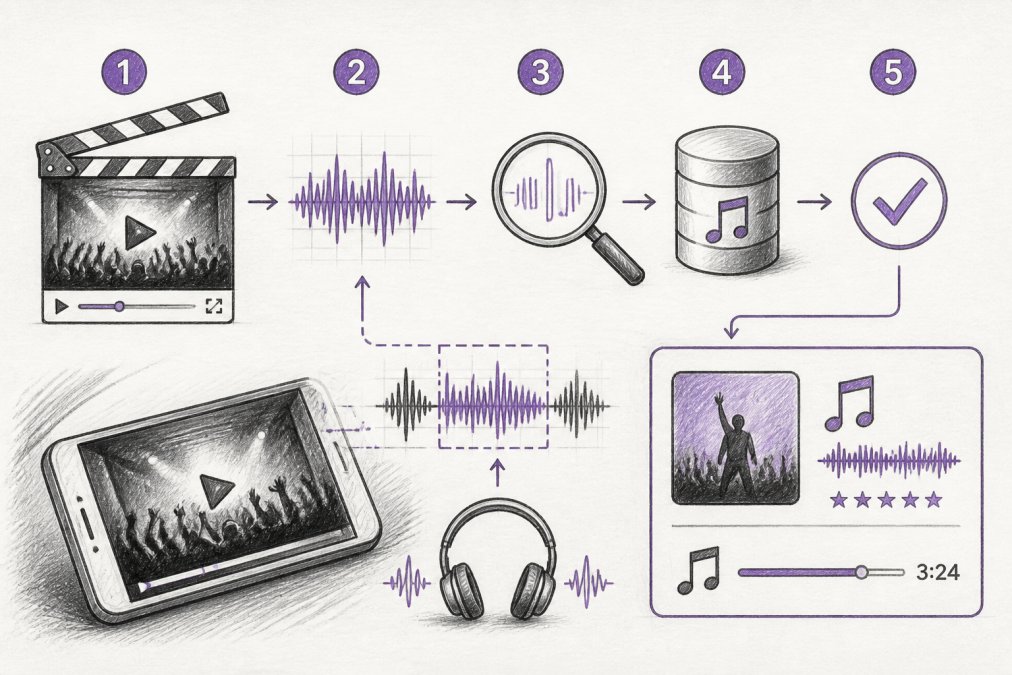
Finding a song from a video is straightforward thanks to modern music recognition technology. Whether you're watching social media content, YouTube, or downloaded files, you can identify music through real-time analysis, browser extensions, or dedicated recognition tools. Most music identification works through audio fingerprinting, a technique that analyzes a song's unique characteristics and matches them against massive music databases.
At FeedGuardians, we understand how brands use video content across Instagram, Facebook, TikTok, and YouTube, and identifying the right music for your content strategy matters. This guide walks you through every method to find a song from a video, from real-time recognition to manual search techniques when automated tools fall short.
Using Music Recognition Tools to Find a Song From a Video
Music recognition tools are the fastest way to identify music from video content. These platforms use audio fingerprinting to analyze your audio sample and return metadata including artist name, song title, album information, and direct links to streaming platforms. You either upload an audio file, paste a video link, or use real-time recording features to capture audio from your screen.
Uploading Audio and Extracting Metadata
When you upload a video file to a music recognition service, the tool extracts the audio track automatically. Most services support common video formats including MP4, MOV, and WebM, as well as audio files like MP3 and WAV. The recognition engine analyzes the audio and returns results within seconds.
For best results, extract at least 10-15 seconds of clean audio from your video (peer-reviewed research). This gives the recognition algorithm enough data to create a reliable fingerprint. High-fidelity audio produces faster matches than heavily compressed or distorted recordings.
Real-Time Analysis and Instant Results
Real-time music recognition features allow you to identify songs as they play without uploading files. Browser extensions and dedicated apps capture audio from your screen or speakers and match it instantly against the recognition database. This approach is ideal when watching content live or when you don't want to download and process files manually.
Real-time analysis works by continuously monitoring audio input and creating fingerprints of short segments. When a match is found, results appear within 5-10 seconds (ieee.org). Most modern tools provide instant results for well-known tracks from major artists and labels.
How to Identify Music From Video Online Using Browser Extensions
Browser extensions simplify music identification by integrating directly into your web browser. Once installed, these extensions add a button to your toolbar that you click to identify music playing on any webpage or through your speakers. The extension captures audio, sends it to the recognition service's database, and displays results in a popup window without interrupting your browsing.
Setting Up and Using Extensions for Instant Recognition
Installing a music recognition extension takes less than two minutes. Most extensions are available for Chrome, Firefox, and Edge browsers. After installation, you'll need to grant permission for the extension to access your microphone or audio output.
Once set up, click the extension icon whenever you want to identify music. The tool listens to audio from your speakers or microphone and returns results within seconds. Many extensions display the song title, artist name, and a direct link to streaming platforms like Spotify or Apple Music. Some allow you to add identified tracks to playlists automatically.
Browser extensions work best for real-time identification while you browse social media or watch videos online. They're less useful for identifying music from downloaded video files or audio that's not currently playing through your speakers. For those situations, uploading directly to a music recognition service is more reliable.
Finding a Song From a YouTube Link: Direct Methods
YouTube videos often contain background music, licensed tracks, or original compositions that viewers want to identify. You have several options: extract the audio and upload it to a recognition service, or use browser extensions while the video plays.
Extracting Audio From YouTube and Running It Through Recognition Tools
The most reliable method is extracting the audio track from the YouTube video and uploading it to a dedicated music recognition tool. Once you have the audio file, upload it to any music recognition service. The tool will analyze the audio and return results within seconds. This method works even if the YouTube video contains dialogue, multiple audio tracks, or background noise.
Alternatively, if the music plays clearly without interruption, use a browser extension while the video plays. Click the extension button during the section with music you want to identify. The extension captures the audio in real-time and returns results without requiring you to download or extract files.
Extracting Audio From Video Files Before Identification
Extracting audio from video files is necessary when working with downloaded content or files stored locally on your computer. The extraction process separates the audio track from the video, creating an audio-only file that you can upload to music recognition services.
Supported File Formats and Audio Quality Considerations
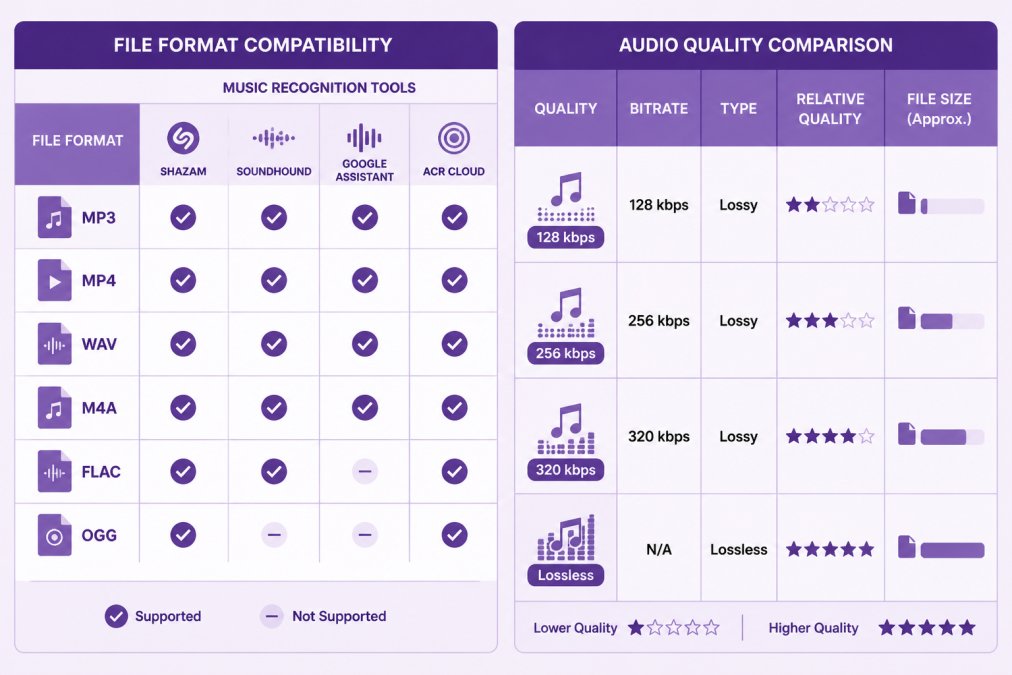
Most music recognition services accept common audio formats including MP3, WAV, FLAC, M4A, and OGG. Video formats like MP4, MOV, AVI, and WebM are also supported by many services. Audio quality significantly impacts recognition accuracy. Higher bitrate files (320 kbps or lossless) produce more reliable fingerprints than heavily compressed audio (128 kbps) (peer-reviewed research).
When extracting audio from video, the quality of the extracted file depends on the original video's audio quality. For best results, use video files from reliable sources with good audio quality. You can use free tools like FFmpeg, Audacity, or online conversion services to extract audio from video files. Most tools preserve the original audio quality during extraction.
Handling Background Noise and Low-Quality Audio
Background noise is the primary reason music recognition fails. When dialogue, ambient sound, or layered audio interferes with the music track, recognition algorithms struggle to create an accurate audio fingerprint.
Why Recognition Tools Struggle With Noise
Music recognition relies on audio fingerprinting, a process that extracts the unique spectral characteristics of a song. When background noise dominates the audio sample, the fingerprint becomes distorted, and the database match fails. Tools like Shazam and SoundHound perform best when the target music is the loudest element in the audio. Compressed audio (128 kbps MP3 files) also degrades fingerprint accuracy because compression removes subtle audio details that recognition algorithms rely on.
Isolating Music Tracks Before Upload
The most effective workaround is isolating the music from background noise before uploading. Audacity, a free audio editor available for Windows, macOS, and Linux, includes a Noise Reduction effect. To use it:
- Open your audio file in Audacity
- Select a 1-2 second section containing only background noise
- Go to Effect > Noise Reduction and click "Get Noise Profile"
- Select the entire audio track
- Return to Effect > Noise Reduction and apply the effect
This technique removes consistent background hum, ambient chatter, or traffic noise while preserving the music. Alternatively, if the video contains multiple audio tracks, use a video editor like DaVinci Resolve (free version available) to mute or remove the dialogue track entirely, leaving only the music.
Uploading Longer Audio Samples
When noise reduction isn't possible, upload a longer audio sample. Recognition algorithms perform better with more data, a 30-second sample is significantly more likely to match than a 10-second clip, even if both contain noise. If the video contains multiple songs, extract and upload each section separately.
When Tools Fail: Fallback Strategies
For very low-quality audio, recognition tools may fail entirely. In these cases, shift to manual search techniques:
Extract and search lyrics: Listen carefully for any audible lyrics, even partial phrases. Search the exact phrase in quotation marks on Google: "exact lyrics from the song". Google's algorithm excels at matching partial or slightly misheard lyrics to songs.
Check video metadata and comments: Social media videos, YouTube uploads, and TikTok posts frequently include song information in captions, descriptions, or comments. Users often identify songs in the comments section.
Reverse-search visual clues: If the video shows text overlays, credits, or on-screen graphics mentioning the artist or title, use that information directly. For branded content or advertisements, search for the campaign name plus "music" or "soundtrack."
Contact the creator: For user-generated content, reach out to the video creator directly via social media or email.
Manual Search Techniques When Recognition Tools Fail
When automated music recognition fails, manual search methods can still identify the song. These techniques rely on information visible in the video, lyrics you can hear, or context clues about where the music came from.
Finding Songs Through Lyrics and Metadata
Listen carefully to any lyrics in the song. Even a single phrase or chorus can be searched on Google to identify the track. Put the lyrics in quotation marks to search for exact matches: "exact phrase from song".
If the video shows credits, captions, or text overlays mentioning the artist or song title, use that information directly. Check the video's description, comments section, or any linked sources for music information. For videos from content creators or influencers, check their social media profiles. If the video is from a commercial source, a movie, TV show, advertisement, or branded content, search for the official soundtrack or music credits.
Understanding Copyright and Fair Use When Reusing Identified Music
Once you've identified a song, you may want to use it in your own content. All original music is automatically protected by copyright. The copyright holder owns the exclusive right to reproduce, distribute, and publicly perform the work.
Using a copyrighted song in your own video without permission is copyright infringement, even if you give credit to the artist. Platforms like YouTube, TikTok, and Instagram have automated copyright detection systems. When detected, the copyright holder can claim the content, mute the audio, block the content, or request takedown.
Fair Use and When You Can Use Copyrighted Music Legally
Fair use is a legal doctrine that permits limited use of copyrighted material without permission in specific circumstances. The four factors courts consider are:
- Purpose and character of use: Is your use transformative or commercial? Educational, critical, and transformative uses are more likely to qualify as fair use.
- Nature of the copyrighted work: Using music from an original composition is treated differently than using a recording.
- Amount and substantiality used: Using a 30-second clip is treated differently than using the entire song.
- Effect on the market: Does your use harm the original work's commercial value?
For most user-generated video content, fair use does not apply. A TikTok video, YouTube vlog, or Instagram Reel that uses a copyrighted song is unlikely to qualify as fair use, even if you're not making money from it.
Legal Alternatives to Using Copyrighted Music
If you want to use identified music legally without permission:
Obtain a license: Contact the copyright holder or their licensing agent and request permission. Licensing fees vary widely depending on how the music will be used.
Use royalty-free or Creative Commons music: Search for similar music available under royalty-free or Creative Commons licenses. Websites like Free Music Archive, Incompetech, and YouTube Audio Library offer thousands of tracks you can use legally.
Use music from the platform's library: YouTube, TikTok, and Instagram all provide free music libraries with thousands of tracks cleared for use in videos.
Contact the artist directly: Independent artists and smaller labels are sometimes willing to grant permission for non-commercial use or may offer their music under a Creative Commons license.
Conclusion
Finding a song from a video is achievable through multiple methods: real-time music recognition tools for instant identification, browser extensions for seamless integration while browsing, direct upload services for offline files, and manual search techniques when automated tools fall short.
For brands managing multiple social accounts and high comment volumes, tools like FeedGuardians help you maintain consistent engagement across platforms while protecting your brand voice. FeedGuardians's AI-powered comment moderation learns your tone and guidelines to deliver 24/7 responses in your unique brand voice, protecting your reputation and turning conversations into conversions. Start identifying music today, and if you're managing social media at scale, explore how FeedGuardians can automate your comment moderation with 98.7% accuracy across Instagram, Facebook, TikTok, and YouTube.
Frequently Asked Questions
How can I find a song from a video if I don't know any lyrics?
Use audio fingerprinting technology through music recognition tools. Upload the video or extracted audio file, and the tool's database matching will identify the track by analyzing the audio's unique waveform signature, even without knowing lyrics or artist details. Most tools provide instant results within seconds, returning the song title, artist, and album information.
What's the best way to find a song from a YouTube link?
Extract the audio from the YouTube video using an audio extraction tool, then upload it to a music recognition platform. Alternatively, use a browser extension that performs real-time analysis while you watch. For faster results, try searching the video's comments section first, viewers often identify background music there. If the video has a description, check for soundtrack or credits information.
Can I identify music from a video with background noise?
Yes, but accuracy depends on noise levels. Modern music recognition tools use digital signal processing to filter background noise, though very loud or distorted audio may reduce accuracy. If initial results are unclear, try extracting just the audio segment with the clearest music. Some tools offer noise reduction features that improve identification rates for low-quality or heavily layered audio.
What file formats work best for music identification?
MP3, MP4, WAV, M4A, and FLAC formats are widely supported by music recognition tools. Higher-quality audio (lossless formats like WAV and FLAC) typically yields more accurate results than compressed formats, though MP3 works reliably for most purposes. Before uploading, ensure your extracted audio is at least 10-15 seconds of the target song for optimal database matching and metadata accuracy.
This article was written using GrandRanker
Tired of manually moderating comments?
FeedGuardians automates spam filtering, responds to customers, and protects your brand — setup in 3 minutes.
Frequently Asked Questions
How can I find a song from a video if I don't know any lyrics?
Use audio fingerprinting technology through music recognition tools. Upload the video or extracted audio file, and the tool's database matching will identify the track by analyzing the audio's unique waveform signature, even without knowing lyrics or artist details. Most tools provide instant results within seconds, returning the song title, artist, and album information.
What's the best way to find a song from a YouTube link?
Extract the audio from the YouTube video using an audio extraction tool, then upload it to a music recognition platform. Alternatively, use a browser extension that performs real-time analysis while you watch. For faster results, try searching the video's comments section first—viewers often identify background music there. If the video has a description, check for soundtrack or credits information.
Can I identify music from a video with background noise?
Yes, but accuracy depends on noise levels. Modern music recognition tools use digital signal processing to filter background noise, though very loud or distorted audio may reduce accuracy. If initial results are unclear, try extracting just the audio segment with the clearest music. Some tools offer noise reduction features that improve identification rates for low-quality or heavily layered audio.
What file formats work best for music identification?
MP3, MP4, WAV, M4A, and FLAC formats are widely supported by music recognition tools. Higher-quality audio (lossless formats like WAV and FLAC) typically yields more accurate results than compressed formats, though MP3 works reliably for most purposes. Before uploading, ensure your extracted audio is at least 10-15 seconds of the target song for optimal database matching and metadata accuracy.