
Quick Summary
| Key Insight | What You Need to Know |
|---|---|
| Read each comment twice | Read each comment twice and pause before replying so a hot response never lives on a screenshot. |
| When you move a | When you move a complaint to DM, leave one short public note so the thread has closure. |
| Never delete a threatening | Never delete a threatening comment before you screenshot it as evidence. |
| Use Instagram's Hidden Words | Use Instagram's Hidden Words to filter offensive words, custom phrases, and message requests automatically. |
| Disengage after one calm | Disengage after one calm reply when someone repeats the same point or your temper is rising. |
| Why Toxic Comments Damage | Why Toxic Comments Damage Brands and the People Who Manage Them |
Last Updated: October 22, 2026
Quick Summary
To handle toxic comments on Instagram, sort each comment first: reply publicly to fair criticism, move complaints to DM, hide or ignore trolls, and report, block, and delete hate speech or threats. Hide first, delete second, block when it repeats, and report when someone's safety is at risk.
- Read each comment twice and pause before replying so a hot response never lives on a screenshot.
- When you move a complaint to DM, leave one short public note so the thread has closure.
- Never delete a threatening comment before you screenshot it as evidence.
- Use Instagram's Hidden Words to filter offensive words, custom phrases, and message requests automatically.
- Disengage after one calm reply when someone repeats the same point or your temper is rising.
Table of Contents
- Why Toxic Comments Damage Brands and the People Who Manage Them
- Sort the Comment Before You Respond: A Decision Framework
- How to Respond to Negative Instagram Comments Without Escalating
- Negative Comment Response Examples You Can Copy
- How to Hide Comments on Instagram and When to Delete, Block, or Report
- Social Media Comment Moderation Best Practices for High-Volume Accounts
- When to Disengage and Let a Toxic Comment Go
- Frequently Asked Questions
Why Toxic Comments Damage Brands and the People Who Manage Them
A single cruel comment can ruin a social media manager's week.
Toxic comments do two kinds of damage at once.
The first is public.
The second is private. The person reading that comment is a human being with a job to do. Online harassment wears people down.
Here is the part most guides skip: a slow or angry reply makes both problems worse. A calm, structured response fixes both.
Sort the Comment Before You Respond: A Decision Framework
Every comment falls into one of five buckets, and each bucket has one right action. Sort first, respond second.
The five types:
- Constructive criticism: a fair point about your product or service. Reply in public.
- Customer complaint: a real order or service problem. Move to DM and fix it.
- Trolling: bait with no real point. Hide it or ignore it.
Constructive Criticism, Trolling, and Abuse: Telling Them Apart
Constructive criticism names a problem and wants a fix. "My order arrived late and nobody answered my email" is a complaint you can solve.
Trolling wants a reaction, not a resolution. It attacks the person, not the product, and shifts targets when you answer.
Abuse crosses a line. Threats, slurs, and targeted harassment are not feedback but safety issues, and they get reported, not debated.
How to Respond to Negative Instagram Comments Without Escalating
The goal of any public reply is simple: stay calm, stay short, and move the conversation forward. Most escalations start with a defensive reply written in 30 seconds.
Pause, Breathe, and Read the Comment Twice
Read it once for the words, again for the intent. Anger makes us skim, and skimming makes us miss the actual complaint.
Then wait. A short delay costs nothing. A hot reply can live on a screenshot forever.
Try this before typing:
- Close the app for two minutes
- Reread the comment out loud
- Ask: would I say this to a customer standing in front of me?
Public Reply or Private DM: Choosing the Right Channel
Answer in public when the comment is fair and other shoppers are watching. A calm public reply shows your brand handles criticism well.
Move to DM when the comment involves order details, personal data, or a problem that needs several messages to fix.
Then leave one short public note so the thread has closure. Something like: "We've sent you a DM to sort this out."
Negative Comment Response Examples You Can Copy
For fair criticism:
"You're right, and we're sorry. That's not the experience we want you to have.
For a late order complaint:
"Thanks for flagging this. Late deliveries are frustrating.
For obvious trolling:
"Thanks for the feedback." (Then hide the comment if it turns abusive.)
For a hateful comment:
No reply. Report, block, and delete.
For a competitor plug in your comments:
"We can't speak for other brands.
How to Hide Comments on Instagram and When to Delete, Block, or Report
Instagram gives you four tools, each fitting a different situation. Knowing how to hide comments on Instagram saves you from overreacting. Interface labels change, so confirm the current path in your own account before training a team on it.
Here is the quick version:
- Hide: the comment stays visible to the person who wrote it, but nobody else sees it. Good for trolls and spam.
- Delete: the comment disappears for everyone. Use it for abuse or scams.
- Block: the account can no longer see or comment on your posts. Use it for repeat offenders.
Our rule of thumb: hide first, delete second, block when it repeats, report when someone's safety is at risk.
Step-by-Step: Hiding, Deleting, Restricting, and Blocking
To hide a comment: open the post, tap the comment (or swipe left on some versions), and choose Hide.
To delete a comment: tap the comment, then the trash icon (or use the swipe menu and choose Delete).
To restrict an account: open the person's profile, tap the three-dot menu, and choose Restrict.
To block an account: from the profile, tap the three-dot menu and choose Block.
Reporting Threats, Hate Speech, and Repeated Harassment
Not every nasty comment is a safety issue, but some are. Escalation-worthy: threats of violence, doxxing (posting someone's address, phone number, or workplace), slurs and dehumanizing language, sexual harassment, and coordinated pile-ons.
When you hit one of these, do four things in order:
- Screenshot and preserve evidence before you hide or delete. Capture the comment, username, timestamp, and post. Save screenshots to a shared folder, not a personal camera roll.
- Report through Instagram's in-app flow and note any reference provided. Reporting matters because Instagram's own tools are how patterns get logged.
- Block the account once evidence is saved, so the person cannot keep commenting while a report is reviewed.
- Escalate credible threats, a specific threat to a person's safety, doxxing, or stalking, to your company's legal or security contact and, where appropriate, local law enforcement. Do not handle a credible threat as an ordinary moderation decision.
Meta publishes its community guidelines on what counts as hate speech and harassment at Meta's Community Standards. Read the harassment and hate speech sections once so your team can recognize the line between rude and reportable.
A Simple Escalation Ladder
Use this ladder so every team member applies the same standard:
- Level 1, Rude but not abusive: hide or ignore. No report needed.
- Level 2, Abusive language, slurs, or targeted insults: hide, report, and log the account.
- Level 3, Threats, doxxing, or stalking: screenshot, report, block, escalate to legal or security, and consider law enforcement.
For a broader view of how platforms treat harassment, the Pew Research Center's work on online harassment is a useful baseline.
Social Media Comment Moderation Best Practices for High-Volume Accounts
At scale, manual moderation stops working. A busy e-commerce account can pull hundreds of comments a day, and no team can read them all without burning out.
The fix is a system, not more effort, starting with the controls Instagram gives you before a single toxic comment reaches your feed.
Set Up Proactive Comment Filters Before You Need Them
Instagram's Hidden Words feature lets you filter comments and message requests automatically. Find it under Settings → Privacy → Hidden Words. From there you can:
- Turn on the default filter for offensive words and phrases, which Instagram maintains for you.
- Add custom words and phrases, slurs, scam phrases, competitor names, and the insults your brand attracts. Add variants and misspellings, since trolls evade filters by changing one letter.
- Manage hidden comments in a review queue so filtered comments are held, not deleted, catching false positives like a customer quoting a slur to complain about it.
Also review comment settings under Settings → Privacy → Comments, where you can limit comments to certain groups, turn them off on specific posts, and control who can comment. For a launch likely to attract abuse, turn comments off for the first few hours and reopen once the wave passes.
Run Moderation as a Workflow, Not a Reflex
Once filters are in place, the remaining work needs a routine:
- Assign one owner per channel so nothing falls through, and name a backup for vacations and sick days.
- Review the queue twice a day at set times, mid-morning and late afternoon, rather than refreshing all day. Batching protects focus and reduces the emotional wear of constant exposure.
- Keep a reply library so common complaints get fast, consistent answers, and so no one has to improvise a response while upset.
Measure Whether Moderation Is Actually Working
Most teams never check whether moderation is effective. A few indicators tell you more than gut feel:
- Time to first response on public complaints, the gap between comment and reply.
- Repeat incidents, how often the same account or the same phrase reappears after action.
- Resolution rate, the share of complaints that end with a confirmed fix rather than a dead thread.
Track these monthly. If time to first response climbs or repeat incidents stay flat, your filters or staffing need attention.
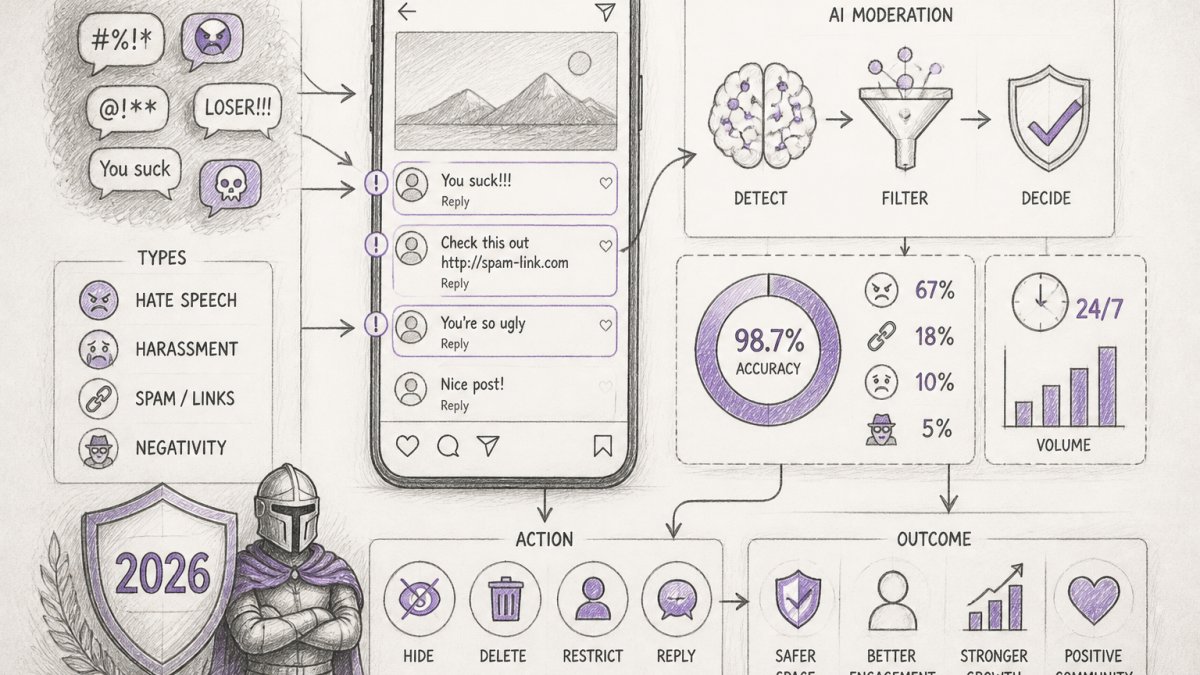
This is where FeedGuardians fits. Our AI detects and hides spam, scams, hate speech, and competitor links in real time, and it replies 24/7 in your brand voice. One team using it protected $400k in ad spend, and another turned 5.1× more membership inquiries.
When to Disengage and Let a Toxic Comment Go
Some comments do not deserve a reply. Walking away is a strategy, not a failure.
Disengage when:
- The person repeats the same point after your answer
- The thread has become a stage for an audience, not a conversation
- You feel your own temper rising
Set a boundary and hold it. One calm reply, then silence. If the abuse continues, hide, block, and report. Protecting your team's mental well-being is part of the job, not a luxury.
Frequently Asked Questions
Should you reply to toxic comments on Instagram or ignore them?
It depends on the intent behind the comment. If it is a customer complaint or constructive criticism, reply publicly once with a calm, factual answer, then move the details to a direct message. If it is trolling, bait, or abuse aimed at getting a reaction, do not engage. Replying feeds the thread and pushes it higher in the comment ranking. Hide the comment instead, and only report or block when it breaks Instagram's community guidelines or targets someone directly.
How do you hide or report an abusive comment on Instagram?
Swipe left on the comment on mobile, or tap the three dots beside it, and choose Hide. The comment stays visible to the person who wrote it but disappears for everyone else, which avoids a public fight. For threats, hate speech, or repeated harassment, use Report instead and pick the category that fits. You can also block the account from the same menu. Reporting feeds Instagram's review system and, on business accounts, adds a record you can reference later.
What should a brand say in response to a hateful Instagram comment?
Keep it short and neutral, or say nothing at all. Something like: "We're here for the product conversation. Comments that attack people aren't part of it." Then hide the comment. Avoid sarcasm, long explanations, and defensiveness, because each one gives the commenter more material. If the hate targets a customer or group, a brief public statement that your community does not tolerate that behavior protects the audience watching, even when the commenter never changes their mind.
How can businesses prevent spam and hate speech in Instagram comments?
Set up Instagram's Hidden Words in Settings under Privacy, and add your own list of slurs, competitor names, and scam phrases. Turn on the filter for offensive words and for comments on your ads. For high-volume accounts, manual filtering does not scale. FeedGuardians detects and hides spam, scams, hate speech, and competitor links with 98.7% accuracy in real time, and its AI replies in your brand voice around the clock, which takes the first pass off your team's plate.
Toxic comments will keep coming, and your team should not face them alone. FeedGuardians catches and hides abuse in real time with 98.7% accuracy, replies in your brand voice around the clock, and escalates the tough cases to a human. You get your hours back, your reputation stays intact, and your ad spend stays protected. Get started with FeedGuardians and turn your comments back into conversations.
Tired of manually moderating comments?
FeedGuardians automates spam filtering, responds to customers, and protects your brand — setup in 3 minutes.
Frequently Asked Questions
Should you reply to toxic comments on Instagram or ignore them?
It depends on the intent behind the comment. If it is a customer complaint or constructive criticism, reply publicly once with a calm, factual answer, then move the details to a direct message. If it is trolling, bait, or abuse aimed at getting a reaction, do not engage. Replying feeds the thread and pushes it higher in the comment ranking. Hide the comment instead, and only report or block when it breaks Instagram's community guidelines or targets someone directly.
How do you hide or report an abusive comment on Instagram?
Swipe left on the comment on mobile, or tap the three dots beside it, and choose Hide. The comment stays visible to the person who wrote it but disappears for everyone else, which avoids a public fight. For threats, hate speech, or repeated harassment, use Report instead and pick the category that fits. You can also block the account from the same menu. Reporting feeds Instagram's review system and, on business accounts, adds a record you can reference later.
What should a brand say in response to a hateful Instagram comment?
Keep it short and neutral, or say nothing at all. Something like: "We're here for the product conversation. Comments that attack people aren't part of it." Then hide the comment. Avoid sarcasm, long explanations, and defensiveness, because each one gives the commenter more material. If the hate targets a customer or group, a brief public statement that your community does not tolerate that behavior protects the audience watching, even when the commenter never changes their mind.
How can businesses prevent spam and hate speech in Instagram comments?
Set up Instagram's Hidden Words in Settings under Privacy, and add your own list of slurs, competitor names, and scam phrases. Turn on the filter for offensive words and for comments on your ads. For high-volume accounts, manual filtering does not scale. FeedGuardians detects and hides spam, scams, hate speech, and competitor links with 98.7% accuracy in real time, and its AI replies in your brand voice around the clock, which takes the first pass off your team's plate.