
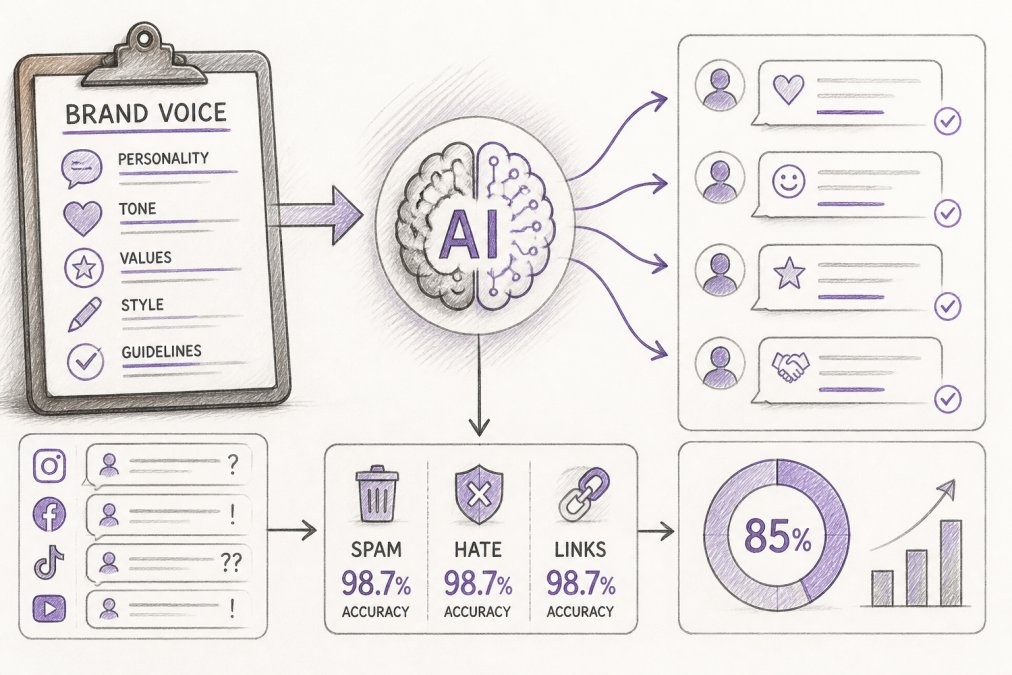
Quick Summary
| Key Insight | What You Need to Know |
|---|---|
| Why AI Replies Sound | Why AI Replies Sound Generic (and How to Fix It) |
| Step 1 | Audit Your Existing Content for Voice Patterns |
| Step 2 | Build AI Brand Voice Guidelines That Actually Work |
| Step 3 | Create AI Response Templates for Social Media |
| Step 4 | Set Up Human-in-the-Loop AI Moderation |
| Step 5 | Train Your AI on Brand-Specific DataThe Technical Mechanics of RAGSystem Prompts vs. Vector Databases: When to Use WhatTrade-offs and Pitfalls to AvoidThe Human Feedback Loop as Training Data |
Table of Contents
- Why AI Replies Sound Generic (and How to Fix It)
- Step 1: Audit Your Existing Content for Voice Patterns
- Step 2: Build AI Brand Voice Guidelines That Actually Work
- Step 3: Create AI Response Templates for Social Media
- Step 4: Set Up Human-in-the-Loop AI Moderation
- Step 5: Train Your AI on Brand-Specific Data
- Common Mistakes That Cause Brand Voice Drift
- Conclusion: Start Protecting Your Brand Voice Today
- Frequently Asked Questions
Last Updated: September 6, 2026
Why AI Replies Sound Generic (and How to Fix It)
Generic AI replies are the direct result of missing constraints (arxiv.org). Without a defined brand personality, a large language model defaults to a neutral, corporate tone.
The core problem is that most teams treat AI like a search bar. They type a question, get an answer, and publish it. That workflow ignores the single most important input: your brand lexicon.
The fix requires a five-step system: audit your content, write explicit guidelines, build response templates, add human oversight, and train on brand-specific data.
Step 1: Audit Your Existing Content for Voice Patterns
A brand voice audit catalogs your best-performing content to extract repeatable language patterns. This step creates the raw material for every AI prompt you will write later.
Start by collecting 30 to 50 pieces of high-performing content: customer replies, product descriptions, and social media captions that generated strong engagement. Look for recurring phrases, sentence structures, and vocabulary. Does your brand use contractions? Do you lead with humor or data? Are there words you never use?
Most teams discover their voice is more consistent than they thought. That consistency is what you will codify.
| Audit Element | What to Look For | Why It Matters |
|---|---|---|
| Vocabulary | Industry terms, slang, banned words | Defines your brand lexicon |
| Sentence Structure | Short vs. long, questions vs. statements | Shapes the AI's rhythm |
| Emotional Range | Humor, empathy, urgency | Guides tone adaptation |
| Formatting | Emojis, hashtags, punctuation | Keeps replies visually on-brand |
Step 2: Build AI Brand Voice Guidelines That Actually Work
AI brand voice guidelines translate your brand personality into rules a model can follow. Unlike a style guide for human writers, these guidelines must be explicit about constraints.
A practical framework includes four components: a voice profile, a do/don't list, vocabulary constraints, and example rewrites. The voice profile summarizes your personality in three adjectives. The do/don't list covers tone rules. Vocabulary constraints define your brand lexicon. Example rewrites show the model how to transform a generic response into an on-brand one.
Feed this document directly into your AI configuration so every reply passes through your brand's filter.
Step 3: Create AI Response Templates for Social Media
AI response templates for social media are pre-approved reply structures for the most common comment categories. They ensure consistency for routine interactions while leaving room for personalization.
Build templates for these categories: positive feedback, negative feedback, product questions, shipping inquiries, and spam or hate comments. Each template should have a clear structure: acknowledgment, response, and call to action. For example, a positive feedback template might be: "Thanks for the kind words, [name]! We're glad [product] worked out. Let us know if you need anything else."
For high-emotion or crisis scenarios, your template should escalate to a human rather than auto-reply. An angry customer does not want a bot response, no matter how well-written. Set a rule: if a comment contains strong negative sentiment or a complaint about safety, route it to your team for a personal reply.
Step 4: Set Up Human-in-the-Loop AI Moderation
Human-in-the-loop AI moderation is a workflow where AI drafts replies but a human approves them before publishing. It balances automation speed with your team's judgment and is the most effective way to prevent brand voice drift.
Start with a review queue. The AI generates a reply, flags its confidence level, and sends it to a human for approval. High-confidence replies for routine comments can auto-publish. Low-confidence replies, or those involving sensitive topics, require human sign-off.
This system also creates a feedback loop: every human edit becomes training data, so the AI learns your corrections and needs less oversight over time.
According to guidance on responsible AI deployment from the World Economic Forum, human oversight is essential for maintaining trust in automated systems. Their framework emphasizes that humans must retain control over high-stakes decisions, which aligns directly with how you should handle your brand's crisis communications.
Step 5: Train Your AI on Brand-Specific Data
Training your AI on brand-specific data moves your replies from generic to genuinely on-brand. The most effective method for most teams is Retrieval-Augmented Generation (RAG), which pulls from your content library in real time without full model retraining.
The Technical Mechanics of RAG
RAG connects your AI to a searchable database of approved content: past replies, product descriptions, and your brand voice guidelines. When a comment comes in, the AI retrieves relevant examples and uses them as context, grounding every response in your actual brand language.
The implementation has three layers:
-
The Vector Database: Your approved content is chunked into segments (typically 200-500 tokens each) and converted into numerical embeddings. These embeddings capture semantic meaning, so the system can find "refund policy" content when a customer asks about a "money-back guarantee." Tools like Pinecone, Weaviate, or pgvector (a PostgreSQL extension) are common choices for this layer.
-
The Retrieval Step: When a new comment arrives, the system converts that comment into an embedding and searches your vector database for the most semantically similar content chunks. You control how many chunks are retrieved (typically 3-5) and the similarity threshold that determines what counts as a match.
-
The Generation Step: The retrieved chunks are injected into the prompt alongside your system prompt and the customer's comment. The model then generates a reply that is grounded in both your brand guidelines and the retrieved examples.
System Prompts vs. Vector Databases: When to Use What
A common pattern is to use a system prompt for core voice rules and a vector database for situational examples. The system prompt handles the "always" and "never" rules; the vector database handles the "it depends" cases.
For example, your system prompt might say: "Always lead with the answer. Never use passive voice. Use contractions." But when a customer asks about a delayed shipment, the retrieval system pulls up three past examples of how your team handled shipping delays, and the model mirrors that specific language and structure.
Trade-offs and Pitfalls to Avoid
RAG is not a set-and-forget solution. Three pitfalls cause most implementation failures:
-
Chunking errors: If your content chunks are too large, the retrieval returns irrelevant context. If they are too small, the model loses the surrounding meaning. Most practitioners find that 300-token chunks with a 50-token overlap work well for customer service content.
-
Stale content: Your vector database is only as good as the content you put in it. If you change your return policy or launch a new product line, you must update the database. Schedule a monthly review to remove outdated examples and add new high-performing replies.
-
Retrieval noise: Sometimes the system retrieves content that is semantically similar but contextually wrong. A customer asking about a "return" on an investment might pull content about product returns. Your system prompt should include a rule: "If retrieved context does not match the customer's intent, ignore it and reply based on your core guidelines."
The Human Feedback Loop as Training Data
RAG handles the "what to say" problem, but not the "how to improve" problem. Every human correction should become a candidate for your vector database, shifting it from generic copy to your team's actual best responses.
Tag every approved reply with metadata, the comment category, sentiment level, and channel. This lets you retrieve not just "a good reply" but "a good reply to an angry customer about a defective product on Instagram." The more granular your metadata, the more precise your retrieval becomes.
For teams using a platform like FeedGuardians, the system learns your tone, terminology, and guidelines as you approve and edit replies. This is how you maintain brand voice with AI replies at scale, even across multiple accounts and high comment volumes.
Common Mistakes That Cause Brand Voice Drift
Brand voice drift is the gradual erosion of your brand personality in AI-generated content. Three mistakes cause most of the damage, and all three are fixable if you measure what matters.
The first mistake is inconsistent training data. If you feed the AI examples from different eras of your brand, it will produce mixed messaging. The second mistake is skipping the feedback loop. AI models need continuous correction to stay aligned. The third mistake is failing to measure drift. You cannot fix what you do not track.
How to Score Brand Voice Accuracy
Most teams rely on vibes to assess whether AI replies sound on-brand. That fails because drift is gradual, a 5% shift in tone is invisible week-to-week but obvious after a quarter. A quantitative scoring system catches drift early.
Build a simple rubric with five dimensions, each scored from 1 to 5:
| Dimension | Score 1 (Off-Brand) | Score 5 (On-Brand) |
|---|---|---|
| Vocabulary | Uses words your brand never says | Uses only approved lexicon terms |
| Sentence Rhythm | Long, complex, passive sentences | Short, active sentences matching your style |
| Emotional Tone | Neutral or robotic | Matches your brand's emotional range (e.g., warm, witty, urgent) |
| Formatting | Inconsistent punctuation, no emojis | Follows your formatting rules exactly |
| Prohibited Content | Violates a "never" rule | Adheres to all do/don't rules |
Each month, pull 50 AI-generated replies and score each on all five dimensions, then average the scores. A reply scoring below 3.0 on any dimension needs a system prompt update or a new template; a monthly average below 4.0 means you have drift.
The 80/20 Rule for Voice Audits
A common pattern is that 20% of your AI replies cause 80% of the drift, usually the edge cases: angry customers, unusual product questions, or comments mixing multiple topics. Instead of pulling a random 50 replies, pull 25 routine and 25 high-emotion or complex replies.
What to Do When You Detect Drift
When your monthly score drops, do not rewrite your entire system prompt. That creates new inconsistencies. Instead, follow this sequence:
- Isolate the failing dimension: If vocabulary scores dropped but tone is stable, the problem is your lexicon, not your personality rules.
- Review the last 10 human edits: The corrections your team made are the clearest signal of what the AI is getting wrong.
- Update the specific rule: Add a new "never" rule, add a banned word, or add a new example rewrite to your guidelines.
- Re-test on the failing cases: Run the 10 replies that scored lowest through the updated system before you redeploy.
:::takeaway Brand voice drift is not a one-time failure. It is a slow process that compounds over time. Monthly audits with a quantitative scoring system catch drift early, when it is easy to correct, rather than after your audience has noticed the change. Research on brand consistency and customer experience from Gartner shows that consistent messaging across channels is a key driver of customer trust and loyalty, and consistency is measurable.
Conclusion: Start Protecting Your Brand Voice Today
Maintaining brand voice with AI replies requires the same discipline as managing a human team: clear guidelines, consistent training, and regular oversight.
The challenge is execution. Most teams do not have the hours to manually review every AI reply or the technical expertise to build a RAG system from scratch. FeedGuardians handles this for you. The platform learns your unique brand voice, auto-moderates harmful content, and provides 24/7 AI-powered replies across Instagram, Facebook, TikTok, and YouTube. You keep control with human escalation options, while the system protects your reputation and turns comments into conversations. Get started with FeedGuardians and keep your brand voice consistent.
Frequently Asked Questions
How do I make my voice better with AI?
Start by auditing your best-performing posts and replies to identify recurring phrases, sentence structures, and vocabulary. Document these patterns in a style guide that includes specific examples and anti-examples. Then use that guide to write system prompts for your AI tool, and set up human-in-the-loop AI moderation to catch responses that miss the mark before they go live.
What are the best practices for training AI on brand tone?
Feed the AI at least 20 to 30 examples of on-brand replies, including edge cases like complaints or questions about pricing. Define your brand lexicon: list words you always use, words you never use, and emoji policies. Set clear constraints in your system prompts, and review weekly logs of AI replies to catch brand voice drift early.
How do you ensure AI replies remain human-centric?
Use response templates that leave room for context, and program the AI to acknowledge the commenter's specific question or concern before answering. Set escalation rules so high-emotion comments or crisis scenarios automatically route to a human. Human-in-the-loop AI moderation means a team member reviews flagged replies, which keeps the conversation feeling personal.
How to audit AI-generated responses for brand consistency?
Run a monthly content audit where you compare AI-generated replies against your brand voice guidelines. Score each reply on tone, vocabulary, and message alignment. Track the percentage of replies that needed human edits, and use that data to refine your system prompts and response templates.
Tired of manually moderating comments?
FeedGuardians automates spam filtering, responds to customers, and protects your brand — setup in 3 minutes.
Frequently Asked Questions
How do I make my voice better with AI?
Start by auditing your best-performing posts and replies to identify recurring phrases, sentence structures, and vocabulary. Document these patterns in a style guide that includes specific examples and anti-examples. Then use that guide to write system prompts for your AI tool, and set up human-in-the-loop AI moderation to catch responses that miss the mark before they go live.
What are the best practices for training AI on brand tone?
Feed the AI at least 20 to 30 examples of on-brand replies, including edge cases like complaints or questions about pricing. Define your brand lexicon: list words you always use, words you never use, and emoji policies. Set clear constraints in your system prompts, and review weekly logs of AI replies to catch brand voice drift early.
How do you ensure AI replies remain human-centric?
Use response templates that leave room for context, and program the AI to acknowledge the commenter's specific question or concern before answering. Set escalation rules so high-emotion comments or crisis scenarios automatically route to a human. Human-in-the-loop AI moderation means a team member reviews flagged replies, which keeps the conversation feeling personal.
How to audit AI-generated responses for brand consistency?
Run a monthly content audit where you compare AI-generated replies against your brand voice guidelines. Score each reply on tone, vocabulary, and message alignment. Track the percentage of replies that needed human edits, and use that data to refine your system prompts and response templates.