
Quick Summary
| Key Insight | What You Need to Know |
|---|---|
| Why Reporting Spam Comments | Why Reporting Spam Comments Matters for Your Brand |
| How to Report Spam Comments on TikTok | Step-by-StepReporting a Single CommentReporting Multiple Comments from the Same UserReporting Spam on Live Streams vs. Videos |
| Reporting a Single Comment | Reporting a Single Comment |
| Reporting Multiple Comments from | Reporting Multiple Comments from the Same User |
| Reporting Spam on Live | Reporting Spam on Live Streams vs. Videos |
| Understanding TikTok Community Guidelines | Understanding TikTok Community Guidelines and Spam Violations |
Table of Contents
- Why Reporting Spam Comments Matters for Your Brand
- How to Report Spam Comments on TikTok: Step-by-Step
- Understanding TikTok Community Guidelines and Spam Violations
- How to Filter Comments on TikTok to Prevent Spam
- Automated Comment Moderation for Brands: Beyond Manual Reporting
- What Happens After You Report a Comment
- Common Mistakes When Reporting Spam and How to Avoid Them
- Mistake 1: Reporting Without Specific Context
- Mistake 2: Confusing Criticism With Spam
- Mistake 3: Ignoring Patterns and Reporting in Isolation
- Mistake 4: Forgetting to Block After Reporting
- Mistake 5: Not Collecting Evidence for Severe Violations
- Mistake 6: Aggressively Reporting and Getting Your Own Account Flagged
- Mistake 7: Waiting Too Long to Report
- Mistake 8: Not Following Up on Restored Comments
- Conclusion
- Frequently Asked Questions
Last Updated: September 25, 2026
Why Reporting Spam Comments Matters for Your Brand
Spam comments damage your brand reputation and waste your team's time. They clutter your content, confuse real customers, and can drive engagement down. When spam goes unchecked, it signals poor account management to your audience.
How to Report Spam Comments on TikTok: Step-by-Step
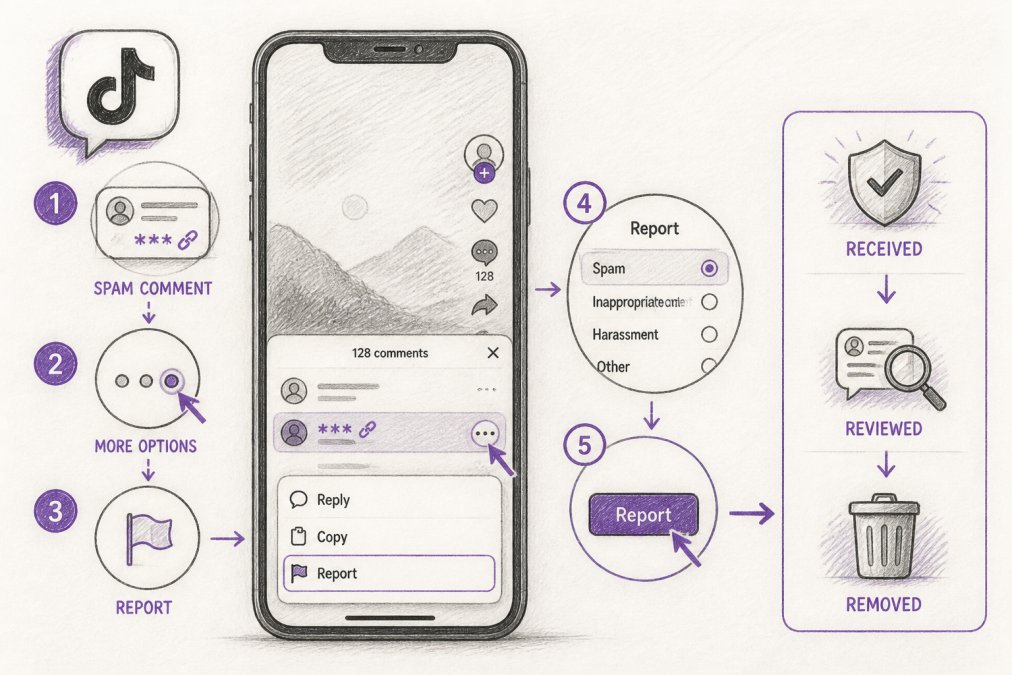
Reporting a single comment takes less than 30 seconds.
Reporting a Single Comment
Step 1: Find the comment you want to report
Open the video and scroll to the spam comment.
Step 2: Long-press the comment
Press and hold for 2-3 seconds until a menu appears.
Step 3: Tap "Report"
Select the "Report" option from the menu that appears.
Step 4: Choose the violation type
TikTok will ask why you're reporting the comment. Select the category that best matches the problem:
- Spam or scam
- Harassment or bullying
- Hate speech or discrimination
- Inappropriate content
- Other
Step 5: Submit your report
Reporting Multiple Comments from the Same User
Sometimes the same user floods your videos with spam. Reporting each comment individually takes forever. Here's a faster approach.
Option 1: Report and block the user
Option 2: Visit their profile and report
Reporting Spam on Live Streams vs. Videos
For live stream comments: Spam moves fast during broadcasts. Report in real-time by long-pressing and tapping "Report," or report after the stream ends while comments are still saved.
Understanding TikTok Community Guidelines and Spam Violations
Spam behavior includes:
- Repeated identical comments on multiple videos
- Links to external sites (especially phishing or scam sites)
- Requests for personal information or money
- Automated bot comments with no real engagement
- Comments promoting competing accounts or products without permission
Scam comments often contain:
- "Click here to win free gifts"
- "Verify your account" with a suspicious link
- Requests to move conversations off-platform
- Offers that sound too good to be true
How to Filter Comments on TikTok to Prevent Spam
Prevention beats reaction. TikTok offers built-in tools to filter spam before it reaches your videos.
Using Comment Filters and Keyword Blocking
Go to Settings → Comment and inbox → Enable "Auto filter comments." Then add custom keywords (competitor names, phishing phrases, spam patterns) under "Filter keywords." TikTok applies these filters immediately to new comments.
Managing Privacy Settings and Account Security
Enable two-factor authentication (Settings → Account security), limit comments to followers only, apply for account verification, and remove unrecognized connected apps. These steps prevent spam bots from compromising your profile.
Automated Comment Moderation for Brands: Beyond Manual Reporting
Manual reporting doesn't scale for high-volume accounts. Automated moderation tools scan comments 24/7, flag violations, and hide inappropriate content before it damages your brand. FeedGuardians uses AI to detect spam, scams, hate speech, and competitor links with 98.7% accuracy, escalating uncertain cases to your team for human review.
What Happens After You Report a Comment
TikTok hides reported comments while reviewing them (24-48 hours). They either remove or restore the comment; you may not receive notification of the outcome. If a pattern of violations is found, the user's account may be suspended or banned.
Common Mistakes When Reporting Spam and How to Avoid Them
Reporting spam seems straightforward, but small missteps can reduce effectiveness or even backfire. Understanding these pitfalls helps you report accurately and protects your own account from being flagged.
Mistake 1: Reporting Without Specific Context
The problem: Generic reports are lower priority.
How to avoid it: Always select the most specific violation category. For example, report "Spam or scam" instead of "Other," and "Phishing link" instead of generic spam. If multiple violations exist, choose the most severe.
Mistake 2: Confusing Criticism With Spam
The problem: Reporting legitimate criticism trains TikTok's system to ignore your future reports.
Mistake 3: Ignoring Patterns and Reporting in Isolation
The problem: Reporting one comment from a spam bot does nothing. The bot posts dozens more. You need to stop the source.
How to avoid it:
- After reporting 2-3 comments from the same user, report their entire account
- Go to their profile → tap the three dots → select "Report user"
- Account-level reports are prioritized over individual comment reports
- Include a note like "This account posts identical spam comments on multiple videos"
Mistake 4: Forgetting to Block After Reporting
The problem: Reporting removes one comment. Blocking prevents all future comments from that user. Many people do one but not the other.
How to avoid it:
- Always block after reporting a spam comment
- Tap the comment → long-press → select "Block user"
- This removes all their existing comments and prevents future posts
- Blocking is immediate; reporting takes 24-48 hours
Mistake 5: Not Collecting Evidence for Severe Violations
The problem: For phishing, scams, or harassment, TikTok's review team benefits from evidence. Without it, they may not take action.
How to collect evidence:
-
Take a screenshot of the comment, including:
- The comment text
- The user's profile name
- The timestamp (if visible)
- The video it's posted on
-
Screenshot the user's profile to show a pattern of spam
-
Record the link if the comment contains a URL (don't click it; just note it)
-
Document the context, if the comment is part of a harassment campaign, note how many similar comments exist
-
Save these files in case TikTok asks for clarification
When to collect evidence:
- Phishing or account verification scams
- Harassment or threats
- Hate speech or discrimination
- Competitor impersonation or fraud
- Coordinated spam from multiple accounts
How to submit evidence:
- TikTok doesn't have a built-in evidence upload feature in the app
- If a comment is restored after you report it, you can report it again and add a note describing what you've documented
- For severe cases, contact TikTok's support team through the app (Settings → Help → Report a problem) and attach screenshots
Mistake 6: Aggressively Reporting and Getting Your Own Account Flagged
The problem: If you report too many comments in a short time, TikTok's system may flag your account for abuse of the reporting feature. This can limit your ability to report in the future.
How to avoid it:
- Report spam as you encounter it, but don't batch-report hundreds of comments in one session
- Space out reports over hours or days if possible
- Focus on high-priority violations (scams, harassment) rather than minor spam
- Avoid reporting the same comment multiple times
- Don't report comments just because you disagree with them
What happens if you're flagged:
- Your reports may be deprioritized
- TikTok may temporarily restrict your ability to report
- Your account won't be suspended, but your reporting effectiveness decreases
Recovery:
- Stop reporting for a few days
- When you resume, report only clear violations
- Use the block feature instead of reporting for borderline cases
Mistake 7: Waiting Too Long to Report
The problem: Spam visibility increases over time. The longer it stays up, the more damage it does and the more users see it.
How to avoid it:
- Report spam immediately when you spot it
- Don't wait to collect evidence (unless it's a severe case like a scam)
- TikTok's review is faster for recent reports
- Early reporting also prevents the comment from getting likes and replies, which amplifies its reach
Mistake 8: Not Following Up on Restored Comments
The problem: Sometimes TikTok restores a comment you reported, meaning it didn't violate guidelines. If it's truly spam, you can report it again with more detail.
How to avoid it:
- Check back on reported comments after 24-48 hours
- If a comment is restored, review why it might not have violated guidelines
- If you still believe it's spam, report it again with a more specific reason
- Include a note: "This comment contains a phishing link" instead of just "Spam"
When to give up:
- If TikTok restores a comment twice, it likely doesn't violate guidelines
- Use the block feature instead to prevent that user from commenting again
- Focus your reporting energy on clearer violations
Conclusion
Spam comments hurt your brand and waste your team's time. TikTok's reporting tools work, but they require consistent action. For brands managing high comment volume, manual reporting becomes unsustainable.
Frequently Asked Questions
What happens when you report a comment on TikTok?
When you report a comment, TikTok's moderation team reviews it within 24-48 hours. If the comment violates community guidelines, TikTok hides it from your video and may take action against the user's account. Repeated violations can result in account suspension. You'll receive a notification if TikTok removes the comment, though the platform doesn't always notify you of every action taken.
How do I stop spam comments on TikTok without reporting each one?
Use TikTok's built-in comment filters to block keywords, turn off comments entirely, or restrict comments to friends only. In Settings, go to Privacy > Who can comment and adjust permissions. You can also enable the 'Filter comments' feature to automatically hide comments containing specific words or phrases. For high-volume accounts, automated comment moderation tools detect and hide spam, scams, and inappropriate content in real time.
Can I report spam comments in bulk, or do I have to report each one separately?
TikTok's native interface requires you to report comments individually. However, if a single user is posting multiple spam comments, reporting their profile instead of individual comments can be more effective. Many brands managing high comment volumes use third-party moderation tools that identify and remove spam in bulk automatically, saving hours of manual review.
What types of comments should I report as spam on TikTok?
Report comments that contain unsolicited links, phishing attempts, scams, fake profiles promoting products, automated bot messages, harassment, hate speech, or competitor links. Also report comments trying to move conversations off-platform. TikTok's community guidelines cover spam, scamming, harassment, and malicious activity. When reporting, select the specific violation type that best matches the content to help TikTok's moderation team take appropriate action.
Tired of manually moderating comments?
FeedGuardians automates spam filtering, responds to customers, and protects your brand — setup in 3 minutes.
Frequently Asked Questions
What happens when you report a comment on TikTok?
When you report a comment, TikTok's moderation team reviews it within 24-48 hours. If the comment violates community guidelines, TikTok hides it from your video and may take action against the user's account. Repeated violations can result in account suspension. You'll receive a notification if TikTok removes the comment, though the platform doesn't always notify you of every action taken.
How do I stop spam comments on TikTok without reporting each one?
Use TikTok's built-in comment filters to block keywords, turn off comments entirely, or restrict comments to friends only. In Settings, go to Privacy > Who can comment and adjust permissions. You can also enable the 'Filter comments' feature to automatically hide comments containing specific words or phrases. For high-volume accounts, automated comment moderation tools detect and hide spam, scams, and inappropriate content in real time.
Can I report spam comments in bulk, or do I have to report each one separately?
TikTok's native interface requires you to report comments individually. However, if a single user is posting multiple spam comments, reporting their profile instead of individual comments can be more effective. Many brands managing high comment volumes use third-party moderation tools that identify and remove spam in bulk automatically, saving hours of manual review.
What types of comments should I report as spam on TikTok?
Report comments that contain unsolicited links, phishing attempts, scams, fake profiles promoting products, automated bot messages, harassment, hate speech, or competitor links. Also report comments trying to move conversations off-platform. TikTok's community guidelines cover spam, scamming, harassment, and malicious activity. When reporting, select the specific violation type that best matches the content to help TikTok's moderation team take appropriate action.