
Quick Summary
| Key Insight | What You Need to Know |
|---|---|
| Why TikTok Comment Engagement | Why TikTok Comment Engagement Matters for Your Brand |
| Real-Time Moderation | The Foundation of Safe Comment SectionsDetecting Spam and Harmful ContentSetting Up Automated FiltersResponse Velocity and Algorithmic ImpactMonitoring Sentiment Shifts |
| Detecting Spam and Harmful | Detecting Spam and Harmful Content |
| Setting Up Automated Filters | Setting Up Automated Filters |
| Response Velocity and Algorithmic | Response Velocity and Algorithmic Impact |
| Monitoring Sentiment Shifts | Monitoring Sentiment Shifts |
Table of Contents
- Why TikTok Comment Engagement Matters for Your Brand
- Real-Time Moderation: The Foundation of Safe Comment Sections
- How to Reply to TikTok Comments With Video
- TikTok Engagement Rate Benchmarks and What They Mean
- Building Community Through Direct Engagement
- Scaling Comment Management Across Multiple Accounts
- Conversion Tracking: From Comments to Sales
- Common Mistakes That Kill Your Comment Engagement
- Frequently Asked Questions
Last Updated: September 22, 2026
Why TikTok Comment Engagement Matters for Your Brand
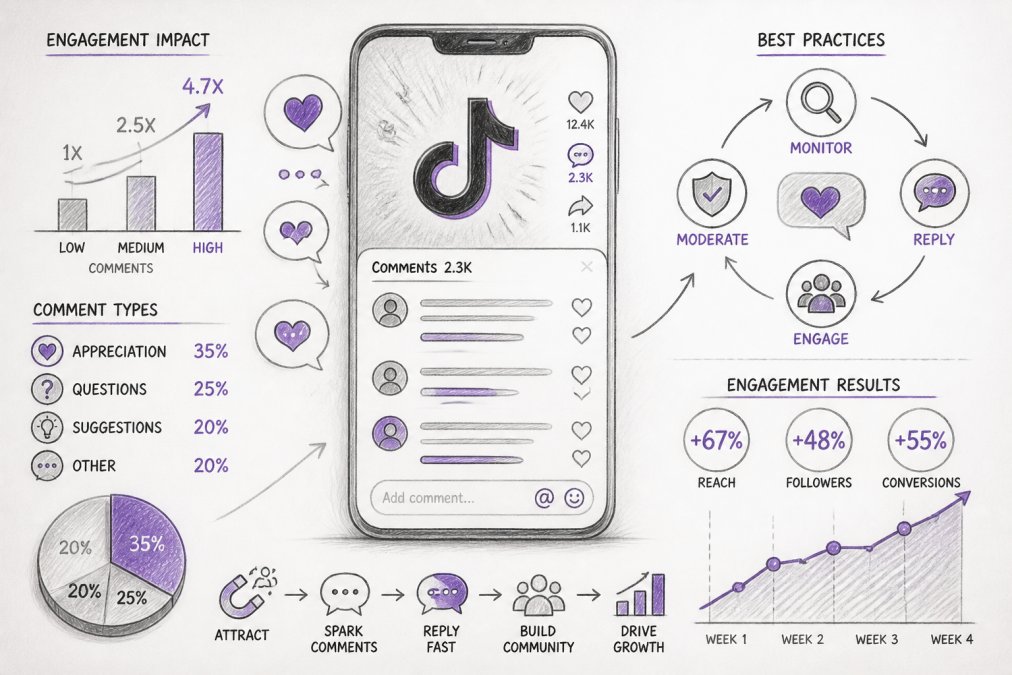
TikTok comment engagement isn't a vanity metric, it's the difference between a video that disappears and one that builds community. Comments signal to TikTok's algorithm that your content is worth amplifying. They're also where real conversations happen, where customers ask questions, and where brand loyalty either strengthens or fractures in real time.
Brands treating comments as afterthoughts lose potential conversions, while those responding thoughtfully and at scale see measurable improvements in ad performance and repeat engagement.
At scale, manual moderation becomes impossible. Winning brands use systems combining real-time moderation for brand safety, automated replies that feel personal, and data tracking to measure what works.
Real-Time Moderation: The Foundation of Safe Comment Sections
Real-time moderation catches spam, hate speech, and scams before they damage your brand. It also impacts the algorithm: TikTok deprioritizes videos with high rates of deleted or hidden comments.
Detecting Spam and Harmful Content
Harmful comments follow patterns: competitor links, scam phrases, hate speech. Manual detection is too slow; by the time you spot a problem, dozens have already seen it.
Automated detection flags spam links, scam phrases, and hate speech instantly, learning your brand's specific context. Real-time filtering hides harmful comments before they spread. FeedGuardians automatically detects and hides spam, scams, hate speech, and competitor links with 98.7% accuracy.
Key patterns to flag automatically:
- External links in comments (especially shortened URLs or unfamiliar domains)
- Repeated phrases across multiple comments (classic spam signature)
- All-caps text mixed with special characters (common scam formatting)
- Competitor mentions paired with promotional language
- Requests for personal information ("DM your email", "send payment to...")
- Slur variations using numbers or symbols ("h8" instead of "hate")
Setting Up Automated Filters
Define what spam looks like for your business: external links, keywords, competitor mentions. Balance protection with openness, over-filter and you hide legitimate questions; under-filter and spam dominates. Start conservative and adjust based on what appears.
Implement a tiered moderation system:
Tier 1 (Auto-hide): Hate speech, slurs, external links, scam phrases. Tier 2 (Flag for review): Competitor mentions, DM requests, multiple links. Review within 30 minutes. Tier 3 (Auto-approve): Legitimate questions and neutral comments appear immediately, tagged for sentiment analysis.
Response Velocity and Algorithmic Impact
Moderation speed affects the algorithm. Comments in the first hour receive more visibility, early moderation shapes tone and discourages spam, and fast moderation in the first 2 hours boosts distribution.
Use automation for Tier 1 and Tier 3, reserving human review for Tier 2 edge cases to maintain quality while hitting velocity targets.
Monitoring Sentiment Shifts
Track sentiment trends weekly: categorize comments as positive, neutral, or negative. Spikes in negative sentiment signal product issues before they tank metrics. Rises in product-specific questions signal demand to capitalize on.
How to Reply to TikTok Comments With Video
Video replies transform comment engagement from transactional to relational. A text response is functional. A video response shows personality, builds connection, and dramatically increases the likelihood that the commenter, and viewers of that reply, engage further.
Creating Effective Video Replies
Keep video replies under 15 seconds, specific to the comment, and consistent with your brand voice. Address the exact question or compliment; don't use generic responses.
Timing Your Video Responses
Respond within the first hour, early replies get more visibility and signal active conversation. Quick, authentic replies on your phone outperform polished responses posted later.
TikTok Engagement Rate Benchmarks and What They Mean
Most brands see engagement rates between 3-8%, with comments representing 20-40% of total engagement. Calculate your baseline over 30 days and compare to your category.
Track engagement quality, not just rate. A video with 100 comments from target customers outperforms 1,000 from random accounts. Focus energy on comments that convert to clicks, follows, or purchases. Refining these metrics requires a nuanced approach to how you measure video engagement across your entire content strategy.
Building Community Through Direct Engagement
Comments are where community lives. Responding thoughtfully to questions, acknowledging loyal followers, and joining conversations builds the kind of audience that stays, buys, and advocates for your brand.
Responding to Questions in Comments
Questions signal intent. Set up alerts for question words and respond to every question quickly. Create template responses for common questions but personalize each one slightly.
Using Stitches and Duets to Amplify Interaction
Stitches and duets turn comments into collaborative content. They directly engage commenters and create new content from conversations. Use stitches for complex questions and duets to build reciprocal relationships. Both increase visibility beyond your followers.
Scaling Comment Management Across Multiple Accounts
Use unified inbox tools to manage comments across multiple accounts. Set up automated replies for common questions and standardize brand voice with tone guidelines. Prioritize accounts by revenue impact for response speed allocation.
Conversion Tracking: From Comments to Sales
Track which comment types convert to sales. Identifying these patterns helps optimize strategy and prove ROI.
Setting Up Comment-Level Attribution
Tag comments by type: product-specific questions, quality affirmations, objections, social proof, and competitor comparisons. Track conversion rates by type. Product-specific questions convert higher than compliments; answered objections convert higher than unanswered ones.
Using UTM Parameters and Promo Codes
Create unique discount codes or UTM parameters for each video's comment replies. This lets you measure exactly how many sales came from your comment responses.
Method 1: Unique promo codes Reply to comments with a code specific to that video: "Use code REPLY15 at checkout for 15% off." Track redemptions in your e-commerce platform. Assign each video a unique code (REPLY_VID_001, REPLY_VID_002) so you can see which videos' comments drive the most conversions.
Method 2: UTM-tagged links
If you link to a product or landing page in your video replies, add UTM parameters: yoursite.com/product?utm_source=tiktok_comment&utm_medium=video_reply&utm_campaign=vid_12345. This shows in your analytics which comment-driven traffic converts.
Method 3: Unique landing pages Create a dedicated landing page for each high-performing video. Reply to comments with a link to that page. Track conversions separately for each video's comment traffic.
The most reliable method combines all three: use a unique promo code (for offline/in-store tracking), UTM parameters (for web analytics), and a dedicated landing page (for email capture and retargeting).
Analyzing Comment-to-Conversion Funnels
Not all conversions happen immediately.
Immediate conversion: User comments, clicks your link, purchases within 24 hours.
Set up a spreadsheet or analytics dashboard that tracks:
- Video ID
- Number of comments
- Number of replies you posted
- Number of unique promo code redemptions
- Revenue from those redemptions
- Cost of your engagement effort (team time)
- ROI (revenue ÷ cost)
Sentiment-to-Sales Correlation
Beyond individual conversions, track how overall comment sentiment correlates with video performance and sales.
Use this data to:
- Identify content themes that generate positive sentiment and higher conversion (e.g., "behind-the-scenes" videos might generate 65% positive sentiment vs. 50% for product-only videos)
- Spot product issues early: A sudden drop in positive sentiment from 65% to 45% often precedes a sales decline by 1-2 weeks
- Predict demand: A spike in product-specific questions ("When will this restock?" "Do you have this in blue?") signals unmet demand; capitalize with new inventory or variants
Tracking Comment-Driven Link Clicks and Email Signups
For email signups: Include a unique email capture code in your video replies. "Sign up at [yoursite.com/signup?code=REPLY_VID_001] for exclusive discounts." Track how many signups come from each video's comments.
Common Mistakes That Kill Your Comment Engagement
Most brands make predictable mistakes that tank their comment engagement before they even start. Knowing these patterns helps you avoid them.
Frequently Asked Questions
What's a good engagement rate on TikTok, and how does comment volume factor in?
Comments drive the algorithm more than likes because they signal active community building. High comment volume tells TikTok your content sparks conversation, which increases reach. The key is responding quickly and authentically, bots that sound generic kill engagement momentum.
How do TikTok comment moderation tools actually protect your brand reputation?
Modern TikTok comment moderation tools use AI to detect and hide spam, hate speech, scams, and competitor links in real time, typically with 98.7% accuracy. They prevent harmful content from appearing in your comment section without manual review, protecting your brand image and ad performance. Tools also flag comments for human review when uncertain, ensuring nothing slips through. For brands running paid campaigns, this protection is critical: a single hateful comment on an ad can tank campaign performance and damage customer trust.
Can AI really learn my brand voice well enough that replies don't sound robotic?
Yes, modern AI comment reply systems learn your tone, terminology, and guidelines through your existing content and past responses. The best tools analyze your captions, previous replies, and brand messaging to generate responses that match your voice. However, setup matters: spend time training the AI on your specific style, values, and common phrases. The system should also allow you to approve or edit replies before they post, so you maintain control.
How does responding quickly to comments actually boost TikTok ad performance?
Fast comment responses trigger two mechanisms: first, they increase social signals (comments breed more comments), which signals to TikTok's algorithm that your content is valuable, extending organic reach. Second, for paid ads specifically, quick, helpful responses reduce negative sentiment and improve comment quality, which TikTok's system factors into ad relevance scoring. Automated replies via AI tools enable this speed at scale without hiring additional staff.
Tired of manually moderating comments?
FeedGuardians automates spam filtering, responds to customers, and protects your brand — setup in 3 minutes.
Frequently Asked Questions
What's a good engagement rate on TikTok, and how does comment volume factor in?
Comments drive the algorithm more than likes because they signal active community building. High comment volume tells TikTok your content sparks conversation, which increases reach. The key is responding quickly and authentically—bots that sound generic kill engagement momentum.
How do TikTok comment moderation tools actually protect your brand reputation?
Modern TikTok comment moderation tools use AI to detect and hide spam, hate speech, scams, and competitor links in real time—typically with 98.7% accuracy. They prevent harmful content from appearing in your comment section without manual review, protecting your brand image and ad performance. Tools also flag comments for human review when uncertain, ensuring nothing slips through. For brands running paid campaigns, this protection is critical: a single hateful comment on an ad can tank campaign performance and damage customer trust.
Can AI really learn my brand voice well enough that replies don't sound robotic?
Yes, modern AI comment reply systems learn your tone, terminology, and guidelines through your existing content and past responses. The best tools analyze your captions, previous replies, and brand messaging to generate responses that match your voice. However, setup matters: spend time training the AI on your specific style, values, and common phrases. The system should also allow you to approve or edit replies before they post, so you maintain control.
How does responding quickly to comments actually boost TikTok ad performance?
Fast comment responses trigger two mechanisms: first, they increase social signals (comments breed more comments), which signals to TikTok's algorithm that your content is valuable, extending organic reach. Second, for paid ads specifically, quick, helpful responses reduce negative sentiment and improve comment quality, which TikTok's system factors into ad relevance scoring. Automated replies via AI tools enable this speed at scale without hiring additional staff.