
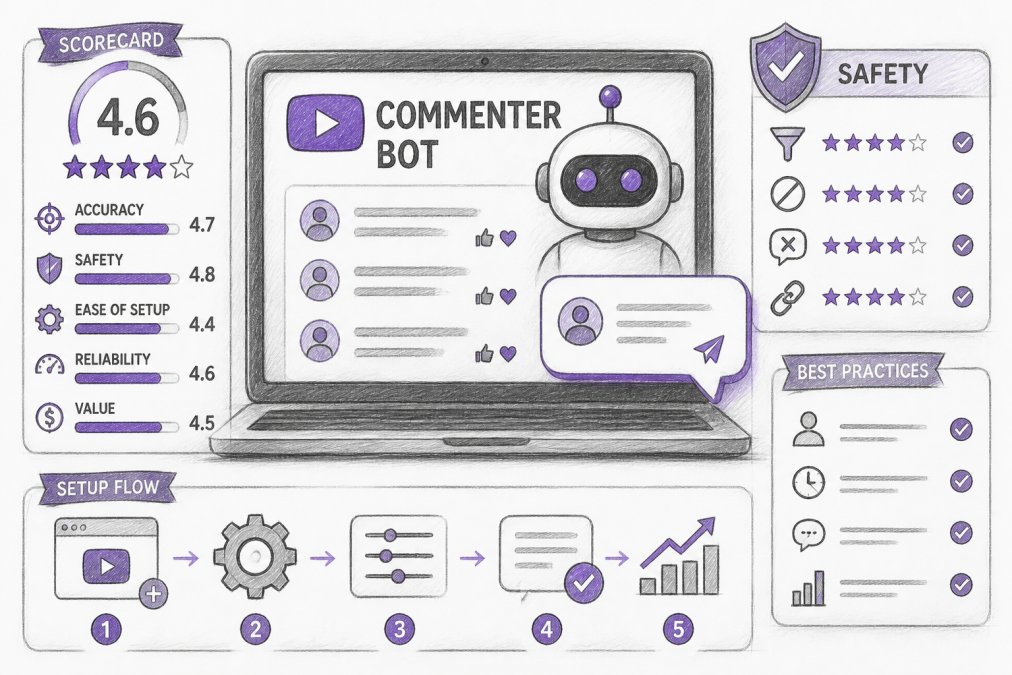
Quick Summary
| Key Insight | What You Need to Know |
|---|---|
| What Is a YouTube | What Is a YouTube Commenter Bot? |
| How YouTube Commenter Bots Work | Automation vs. AI Moderation Scripting and API-Based Automation AI-Powered Comment Generation and Responses |
| Scripting and API-Based Automation | Scripting and API-Based Automation |
| AI-Powered Comment Generation and | AI-Powered Comment Generation and Responses |
| YouTube Community Guidelines and | YouTube Community Guidelines and Spam Policy Compliance |
| Risks of Using YouTube | Risks of Using YouTube Commenter Bots Account Suspension and Channel Termination Reputation Damage and Loss of Audience Trust |
Table of Contents
- What Is a YouTube Commenter Bot?
- How YouTube Commenter Bots Work: Automation vs. AI Moderation
- YouTube Community Guidelines and Spam Policy Compliance
- Risks of Using YouTube Commenter Bots
- AI Comment Moderation Tools: A Safer Alternative
- YouTube Spam Comment Removal: Best Practices
- Legitimate Automation: Scheduling and Batch-Posting Replies
- Choosing the Right Tool: Key Features and Evaluation Criteria
Last Updated: August 20, 2026
What Is a YouTube Commenter Bot?
A YouTube commenter bot is an automated tool designed to post, manage, or moderate comments on YouTube videos at scale. Some bots post identical messages across videos to increase visibility, a practice that violates YouTube's terms of service. Others automate comment moderation and response, which is legitimate when used to filter spam and manage high-volume interactions. FeedGuardians, for example, focuses on moderation: it detects and hides spam, hate speech, and competitor links while generating authentic replies in your brand voice.
Understanding this distinction is critical because YouTube actively enforces against spam bots while tolerating moderation tools that comply with community guidelines. Choosing the wrong approach can result in account suspension. Choosing the right one transforms how you manage audience engagement.
How YouTube Commenter Bots Work: Automation vs. AI Moderation
YouTube commenter bots operate through two fundamentally different mechanisms: direct automation that posts or deletes comments, and intelligent moderation that filters and responds to existing comments.
Scripting and API-Based Automation
Traditional YouTube commenter bots use scripting languages and API calls to interact with the platform. Tools built on this foundation use Puppeteer, NodeJS, or similar frameworks to automate comment posting, scheduling batch replies, or scraping comment data.
A script connects to YouTube's Data API, identifies target videos, and executes predefined actions: posting comments at scheduled intervals, liking comments, or replying to specific keywords. The bot can filter target videos by view count, upload date, or channel subscriber count to focus automation on high-impact content.
The appeal is obvious: one operator can manage comments across hundreds of videos without manual intervention. The problem is equally obvious: YouTube's terms of service prohibit this. The platform defines spam as "repetitive comments," "comments posted by bots," and "coordinated inauthentic behavior." Accounts running scripted automation face comment removal, account warnings, and eventual channel termination.
AI-Powered Comment Generation and Responses
A newer category of YouTube commenter bots uses AI to generate responses rather than post templates. These systems analyze incoming comments, detect intent and sentiment, and generate contextual replies that sound human and and align with your brand voice.
Instead of posting to videos, the bot monitors your comment section, flags spam and off-topic comments for review or auto-hides them, and generates suggested or automatic replies to legitimate inquiries. Tools like FeedGuardians operate this way, using real-time monitoring to identify spam, scams, hate speech, and competitor mentions with stated 98.7% accuracy, then generate replies that sound like your team.
This approach complies with YouTube's policy because it doesn't post unsolicited comments or engage in coordinated inauthentic behavior. You're moderating your own comment section and responding to your own audience. For brands with high comment volume, e-commerce stores, and creators with tens of thousands of subscribers, this approach favors moderation over outreach.
YouTube Community Guidelines and Spam Policy Compliance
YouTube's Community Guidelines explicitly prohibit spam comments. Understanding what YouTube considers spam is non-negotiable before deploying any YouTube commenter bot.
YouTube defines spam comments as:
- Identical or near-identical comments posted repeatedly across videos
- Comments posted by bots or automated tools designed to artificially inflate engagement
- Unsolicited commercial promotion or links to external sites
- Coordinated inauthentic behavior
- Comments that violate the Community Guidelines
The platform uses machine learning to detect bot-like behavior: posting patterns that are too regular, generic content, or account activity that doesn't match human behavior.
The compliance distinction is critical: moderation bots that filter your own comments are compliant; posting bots that inject comments into other creators' videos are not. For brands using a YouTube commenter bot for moderation and response, compliance means:
- Ensuring the tool respects YouTube's API rate limits and data access policies
- Avoiding bulk posting of identical replies
- Maintaining human oversight through escalation workflows
- Disclosing automation where required
FeedGuardians includes a human escalation option, flagging contentious or ambiguous comments for your team rather than auto-replying.
Risks of Using YouTube Commenter Bots
The risks of YouTube commenter bots fall into two categories: platform enforcement and brand reputation.
Account Suspension and Channel Termination
YouTube's enforcement against bot-driven comment spam is swift. Accounts running scripted automation face escalating penalties: comment removal and warnings, then strikes, then channel termination. Three strikes within 90 days results in permanent deletion. Your videos, subscribers, and revenue are gone. YouTube's policy is permanent; you cannot recover the channel.
The timeline varies. Some accounts report comment removal within hours of deploying a bot. Others operate for weeks before detection. Posting identical comments across 50 videos triggers immediate detection. Posting contextual comments slowly might evade automated systems longer, but manual review eventually catches coordinated inauthentic behavior.
For brands, the cost of suspension is catastrophic: losing your subscriber base, video library, and revenue stream.
Reputation Damage and Loss of Audience Trust
Audiences recognize bot comments and respond with skepticism or hostility. A viewer reading generic, contextually irrelevant replies feels dismissed. A viewer reading the same comment across multiple videos recognizes automation and loses trust in your brand.
The second-order effect is viral backlash. If a user posts about your bot in a community forum or social media, it can spread quickly. Recovery requires public acknowledgment and a shift to genuine moderation, which takes weeks or months to rebuild audience trust.
AI Comment Moderation Tools: A Safer Alternative
The legitimate alternative to comment-posting bots is AI-powered comment moderation: tools that filter spam, detect harmful content, and generate contextual replies within your own comment section.
Real-Time Detection and Human-in-the-Loop Workflows
Modern AI moderation systems like FeedGuardians operate on a simple principle: detect harmful comments in real-time, hide them or flag them for review, and generate replies to legitimate comments. The system learns your brand voice, terminology, and guidelines, then applies that knowledge consistently.
Real-time detection means the system monitors your comment section continuously. As comments arrive, the AI evaluates them against multiple criteria: spam indicators, sentiment, brand relevance, competitor mentions, hate speech patterns. Comments flagged as spam or harmful are hidden immediately.
A human-in-the-loop workflow adds a critical layer: uncertain cases are flagged for your team rather than auto-hidden or auto-replied. If the AI is 85% confident a comment is spam but not 100% certain, it escalates to a human reviewer. This prevents false positives and maintains brand safety.
For high-volume channels, this workflow is transformative. An AI system with human escalation handles clearly legitimate or clearly spam comments automatically, escalating only a fraction for human review. Your team spends less time reviewing comments.
The AI learns over time. If your team consistently approves certain types of comments and rejects others, the system adjusts its thresholds. This feedback loop means the tool becomes more accurate and brand-aligned the longer you use it.
Sentiment Analysis and Brand Voice Learning
Sentiment analysis identifies and categorizes the emotional tone expressed in text. A comment saying "Love your product!" has positive sentiment. A comment saying "Your product broke after one week" has negative sentiment. A comment saying "Does this fit size XL?" is neutral.
Modern tools use sentiment analysis to route comments appropriately. Positive comments might be auto-liked or replied to with a thank-you message. Negative comments are escalated to your customer service team. Neutral comments are routed to the appropriate department.
Brand voice learning works similarly. The system analyzes your previous responses, your brand guidelines, and your team's communication style, then generates replies that match that voice. A luxury brand's replies sound formal and sophisticated. A casual creator's replies include casual language and humor. An e-commerce brand's replies focus on customer service.
The combination of sentiment analysis and brand voice learning means your comment section feels managed by your team, not by a generic bot.
YouTube Spam Comment Removal: Best Practices
Even with AI moderation, you need a systematic approach to identifying, filtering, and removing spam comments.
Manual Filtering vs. Automated Detection
Manual filtering means your team reviews each comment and decides whether to hide or delete it. This gives you complete control and prevents false positives. The cost is time.
Automated detection uses machine learning to identify spam patterns without human intervention. The system flags comments matching spam indicators: repetitive keywords, suspicious links, bot-like posting patterns. Comments flagged as spam are hidden automatically or queued for human review.
Best practice combines both: automated detection with human review for edge cases. Set your automation to flag suspicious comments rather than delete them immediately. Have a team member review flagged comments daily and approve or reject the system's assessment.
Setting Up Comment Filters and Approval Workflows
Most modern YouTube moderation tools offer configurable filters and approval workflows. Define your spam criteria: links to external sites, repetitive keywords, suspicious user profiles, hate speech, competitor mentions. For each criterion, decide: hide the comment automatically, queue it for review, or delete it. High-confidence spam can be deleted automatically. Medium-confidence spam should be queued for review.
If you're generating AI replies, decide whether replies are posted automatically or queued for approval. For high-trust channels, automatic posting is reasonable. For channels where brand safety is critical, require approval before posting. Review your filter settings weekly and adjust based on false positives and spam that gets through.
Legitimate Automation: Scheduling and Batch-Posting Replies
The distinction between spam automation and legitimate automation comes down to intent and execution. Legitimate automation serves your audience; spam automation exploits the platform.
Legitimate YouTube commenter bot use cases include: scheduling replies to common questions with personalized responses, batch-posting replies during off-hours, escalating urgent comments to your team, and removing spam and harmful content automatically. The common thread: legitimate automation serves your audience and your business, not the bot operator's engagement metrics.
Choosing the Right Tool: Key Features and Evaluation Criteria
If you decide to use a YouTube commenter bot for moderation and response, the tool you choose determines whether you succeed or get suspended.
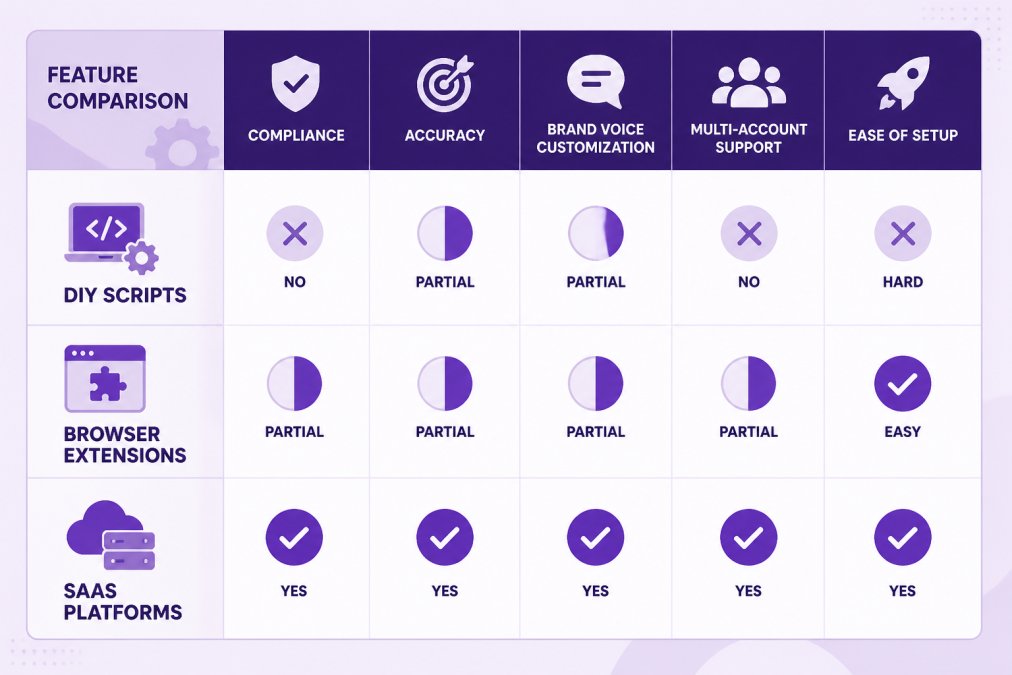
Compliance and Safety Features
The first evaluation criterion is compliance. Does the tool respect YouTube's API policies and community guidelines?
Red flags include: tools that claim to post comments to other creators' videos, tools that use proxy networks or VPN rotation to evade detection, tools that promise "guaranteed engagement growth," and tools that don't disclose how they work.
Green flags include: tools that use YouTube's official API, tools that include human escalation or approval workflows, tools that comply with YouTube's rate limits and data retention policies, and tools that disclose their moderation accuracy. FeedGuardians operates through YouTube's official API, includes human escalation for uncertain cases, and discloses its 98.7% detection accuracy.
Scalability and Multi-Account Management
If you're managing multiple YouTube channels or multiple client accounts, the tool must scale without multiplying your workload. Scalability features include: multi-account dashboards, bulk configuration, centralized reporting, and team collaboration. A tool that requires separate setup for each channel is not scalable.
Brand Voice Customization and Accuracy
If the tool generates replies, it must match your brand voice. Generic, obviously-automated replies undermine trust. Brand voice customization features include: tone templates, terminology customization, guideline input, manual editing, and learning feedback.
Accuracy metrics to evaluate: spam detection accuracy, false positive rate, reply relevance, and sentiment matching. Test the tool's brand voice learning before committing. Most tools offer free trials. Create a test account, provide examples of your brand voice, and see if generated replies sound like your team.
Choosing a YouTube commenter bot requires balancing automation efficiency with platform compliance and brand safety. Spam-posting bots offer short-term visibility gains but carry catastrophic risks: account suspension, reputation damage, and audience distrust. Legitimate moderation tools like FeedGuardians offer sustainable automation: they filter spam, generate on-brand replies, and maintain human oversight.
The decision ultimately depends on your priorities. If you're trying to game YouTube's algorithm with fake engagement, you'll lose eventually. If you're trying to manage genuine audience engagement at scale while protecting your brand reputation, legitimate moderation tools are the only rational choice. Start with a free trial, test the tool's accuracy and brand voice customization, and evaluate whether it actually saves time and improves customer relationships.
Frequently Asked Questions
Does YouTube allow comment bots?
YouTube's terms of service prohibit artificial engagement manipulation, including automated commenting and bot-generated replies. While the platform doesn't ban all automation, using a YouTube commenter bot to artificially inflate engagement, post spam, or violate community guidelines risks account suspension or permanent channel termination. Legitimate automation, like scheduling genuine replies or using moderation tools that comply with platform policies, is generally permitted.
What's the difference between a comment bot and AI moderation tools?
A YouTube commenter bot typically automates posting comments or replies without human review, often violating platform policies. AI comment moderation tools, by contrast, detect and filter spam, hate speech, and policy violations while allowing you to review and approve responses before they post. AI moderation prioritizes platform compliance and brand safety through human-in-the-loop workflows, whereas bots prioritize speed over accuracy.
How can I safely remove YouTube spam comments?
Use YouTube's built-in comment filters and approval settings to automatically hide spam based on keywords, links, and user history. For more advanced YouTube spam comment removal, implement AI-powered moderation tools that detect spam with high accuracy and flag suspicious comments for your review. Enable comment approval for first-time commenters, use blocklists for known spam accounts, and manually review flagged comments before deletion to ensure legitimate feedback isn't removed.
What are the risks of using automated comment software on YouTube?
Automated comment software risks account suspension, channel termination, reputation damage, and loss of audience trust. YouTube's bot detection systems identify unnatural posting patterns, and violating community guidelines can result in permanent bans. Additionally, bot-generated replies often sound generic or inappropriate, damaging your brand voice and credibility. The safest approach is using compliant AI moderation tools with human oversight rather than fully automated bots.
Is there a legitimate way to automate YouTube comment replies?
Yes. Use AI comment moderation tools that learn your brand voice, allow you to review replies before posting, and comply with YouTube policies. Batch-scheduling genuine, personalized responses through approved platforms is legitimate. Set up comment filters to auto-hide spam while preserving your ability to respond manually or through approved workflows. Tools offering human escalation options and real-time monitoring ensure compliance while saving time on community management.
This article was written using GrandRanker
Tired of manually moderating comments?
FeedGuardians automates spam filtering, responds to customers, and protects your brand — setup in 3 minutes.
Frequently Asked Questions
Does YouTube allow comment bots?
YouTube's terms of service prohibit artificial engagement manipulation, including automated commenting and bot-generated replies. While the platform doesn't ban all automation, using a YouTube commenter bot to artificially inflate engagement, post spam, or violate community guidelines risks account suspension or permanent channel termination. Legitimate automation—like scheduling genuine replies or using moderation tools that comply with platform policies—is generally permitted.
What's the difference between a comment bot and AI moderation tools?
A YouTube commenter bot typically automates posting comments or replies without human review, often violating platform policies. AI comment moderation tools, by contrast, detect and filter spam, hate speech, and policy violations while allowing you to review and approve responses before they post. AI moderation prioritizes platform compliance and brand safety through human-in-the-loop workflows, whereas bots prioritize speed over accuracy.
How can I safely remove YouTube spam comments?
Use YouTube's built-in comment filters and approval settings to automatically hide spam based on keywords, links, and user history. For more advanced YouTube spam comment removal, implement AI-powered moderation tools that detect spam with high accuracy and flag suspicious comments for your review. Enable comment approval for first-time commenters, use blocklists for known spam accounts, and manually review flagged comments before deletion to ensure legitimate feedback isn't removed.
What are the risks of using automated comment software on YouTube?
Automated comment software risks account suspension, channel termination, reputation damage, and loss of audience trust. YouTube's bot detection systems identify unnatural posting patterns, and violating community guidelines can result in permanent bans. Additionally, bot-generated replies often sound generic or inappropriate, damaging your brand voice and credibility. The safest approach is using compliant AI moderation tools with human oversight rather than fully automated bots.
Is there a legitimate way to automate YouTube comment replies?
Yes. Use AI comment moderation tools that learn your brand voice, allow you to review replies before posting, and comply with YouTube policies. Batch-scheduling genuine, personalized responses through approved platforms is legitimate. Set up comment filters to auto-hide spam while preserving your ability to respond manually or through approved workflows. Tools offering human escalation options and real-time monitoring ensure compliance while saving time on community management.