
Quick Summary
| Key Insight | What You Need to Know |
|---|---|
| How to View Your | How to View Your Own Comment History on Instagram |
| Finding Instagram Comments by Username | Native Limitations Why Instagram's Search Function Doesn't Find Comments Public Profile Searches vs. Comment-Specific Queries |
| Why Instagram's Search Function | Why Instagram's Search Function Doesn't Find Comments |
| Public Profile Searches vs | Public Profile Searches vs. Comment-Specific Queries |
| Browser-Based Workarounds to Search | Browser-Based Workarounds to Search Comments by Username Using Instagram's Built-in Search on Your Own Posts Mobile vs. Desktop Workflow Differences |
| Using Instagram's Built-in Search | Using Instagram's Built-in Search on Your Own Posts |
Table of Contents
- How to View Your Own Comment History on Instagram
- Finding Instagram Comments by Username: Native Limitations
- Browser-Based Workarounds to Search Comments by Username
- How to Monitor Instagram Comments for Business Growth
- Automated Instagram Comment Management Solutions
- How to Delete a Comment on Instagram and Manage Your Presence
- Legal and Ethical Boundaries of OSINT for Instagram
- Conclusion
Last Updated: August 19, 2026
How to View Your Own Comment History on Instagram
To view your comment history, open Instagram and navigate to your profile. Tap the menu icon (three horizontal lines) in the top right corner, then select "Your Activity." From there, tap "Interactions" and choose "Comments." This displays a chronological list of every comment you've posted, along with the posts you commented on and timestamps for each interaction.
This native feature works identically on both mobile and desktop. However, Instagram's native comment history doesn't allow you to sort by date range, keyword, or post type. For high-volume accounts, this becomes impractical quickly. The real value of this feature is accountability and record-keeping. Creators and brand managers often use it to audit their own engagement patterns and ensure their comments align with brand voice and community guidelines.
Finding Instagram Comments by Username: Native Limitations
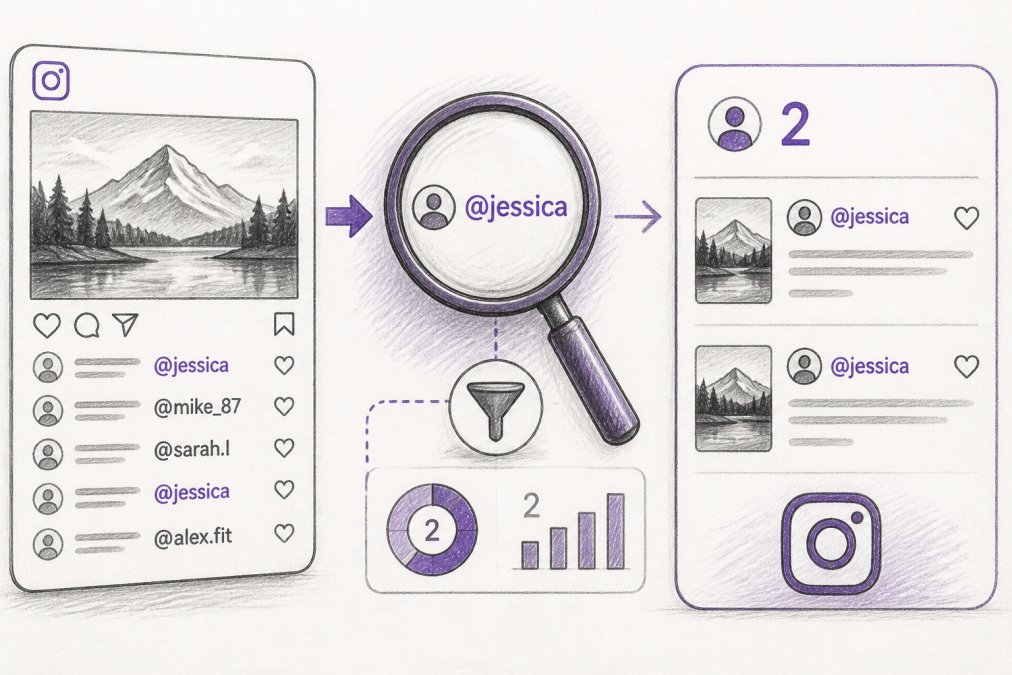
Instagram's native search functionality cannot find comments by username. This is one of the platform's most frustrating limitations for social media managers, community moderators, and brand analysts who need to track user activity across posts.
Why Instagram's Search Function Doesn't Find Comments
Instagram's search bar is designed to find accounts, hashtags, locations, and posts, not individual comments within those posts. When you search for a username, Instagram returns that user's profile and their public posts, but it won't show you comments they've made on other accounts' content. The search function also doesn't support advanced operators like quotation marks for exact matches or Boolean logic (AND, OR, NOT).
Many users mistakenly believe they can search within a specific post's comment section. While Instagram does allow you to search comments on individual posts you own, this search only works on your own content. If you want to find comments a specific user made on someone else's post, Instagram provides no native mechanism to do so.
Public Profile Searches vs. Comment-Specific Queries
A public profile search shows you what that user has posted publicly, their feed, stories, reels, and tagged content. It does not show you their comment activity on other accounts. Comment-specific queries require either manual inspection of comment threads or third-party tools.
For business purposes, this limitation creates real problems. If you're monitoring brand mentions or competitor activity, you need to know not just what competitors are posting, but what they're saying in comments on industry posts. Instagram's native search doesn't support this use case.
Browser-Based Workarounds to Search Comments by Username
Several browser-based methods exist to search for comments without relying on third-party tools. These workarounds require manual effort but don't involve account access risks or terms-of-service violations.
Using Instagram's Built-in Search on Your Own Posts
If you're looking for comments on your own posts, Instagram's native search tool is built directly into the comments section. Open any of your posts, tap the comments icon, and look for the search field at the top of the comment thread. Type the username you're searching for, and Instagram will filter the comments to show only that user's contributions to that specific post.
This method works well for moderation purposes on high-engagement posts. The search is case-insensitive and matches partial usernames. If you search for "smith," it will return comments from users with "smith" anywhere in their handle.
Mobile vs. Desktop Workflow Differences
The mobile and desktop experiences for finding comments differ significantly. On mobile, Instagram's comment search is limited to individual posts you own. Desktop Instagram (via web browser) offers slightly more functionality with a larger screen that makes reviewing comment threads easier.
Neither platform provides a way to search across all your comments for a specific username without visiting individual posts. For finding comments from other users on posts you don't own, neither mobile nor desktop Instagram provides a native solution.
How to Monitor Instagram Comments for Business Growth
Monitoring comments systematically is essential for brand growth, community management, and reputation protection. However, Instagram's native tools are insufficient for most business use cases.
Tracking User Activity and Engagement Metrics
Engagement metrics like comment frequency and reply threads provide insight into which users are most engaged with your content. Instagram's native analytics show you total comment count and top commenters on individual posts, but they don't provide a historical view of specific users' engagement patterns over time.
The real value of engagement tracking is identifying your most loyal customers and advocates. These repeat commenters are often your best candidates for community features, exclusive offers, or partnership opportunities. However, identifying them requires either manual effort or automated tooling.
FeedGuardians helps by providing tools to track user activity and engagement metrics across your social accounts. Instead of manually reviewing comments, you can leverage a dashboard showing your most active commenters, engagement trends, and interaction patterns.
Setting Up Real-Time Alerts for Specific Usernames
Real-time alerts notify you when specific usernames comment on your posts or mention your brand. Instagram doesn't offer this feature natively, but third-party automation platforms can monitor your account's activity and send notifications when specified usernames interact with your content.
For business accounts managing multiple social platforms, real-time alerts become critical. If you're running ads or promotions, knowing immediately when key users comment allows you to respond quickly, increasing the likelihood of conversion.
Automated Instagram Comment Management Solutions
When manual methods become insufficient, automated solutions provide the scale and efficiency required for professional comment management.
What Third-Party Tools Can and Cannot Do
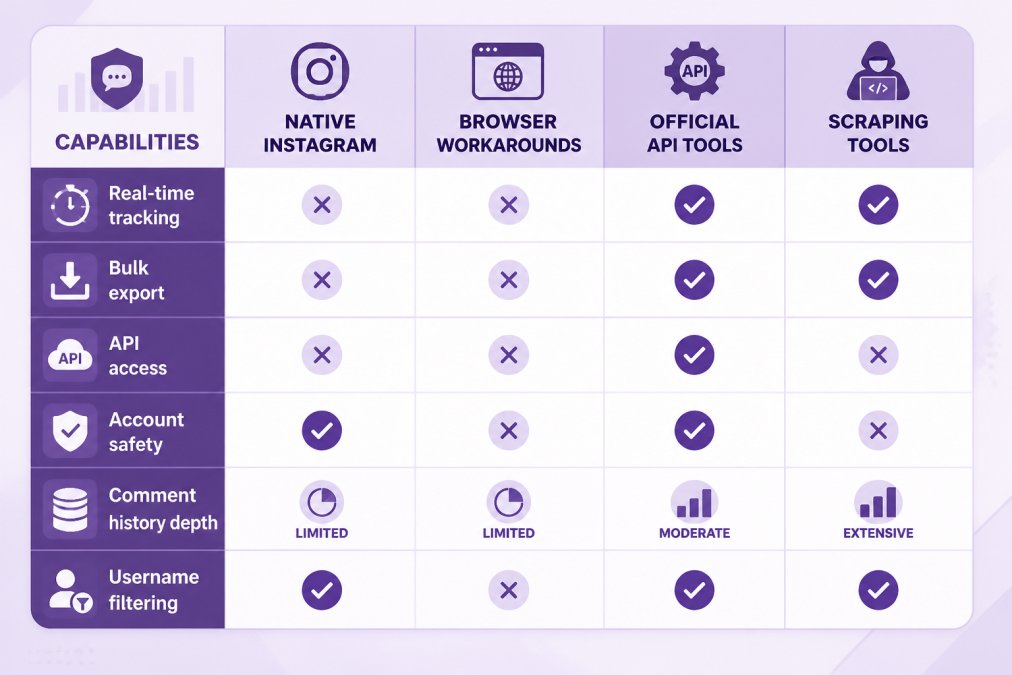
Third-party comment management tools can monitor comments across posts, filter by username, track engagement metrics, and provide analytics dashboards. However, they have limitations that users should understand.
Most tools cannot access comment history older than a certain date (typically 30-90 days) due to Instagram's API restrictions. They also cannot retrieve deleted comments or see private accounts' activity. API rate limits prevent tools from checking for new comments more frequently than once per minute on average, meaning there's typically a 1-5 minute delay.
Account safety is a critical concern. Tools that require full account access (username and password) carry higher risk than tools using Instagram's official API. Instagram's terms of service prohibit scraping and unauthorized data extraction, so tools operating outside the API face account flagging risks. Using tools that violate Instagram's terms could result in temporary action, account suspension, or permanent ban.
API Rate Limits and Account Flagging Risks
Instagram's API enforces strict rate limits to prevent abuse and protect user privacy. These limits typically allow tools to check for new comments once per minute per account. Rate limit violations trigger warnings, then temporary restrictions on API access. Repeated violations can result in permanent API access revocation.
If a tool relies on scraping (accessing Instagram through automated browser automation rather than the official API), Instagram's systems detect this activity and flag the account. Flagged accounts receive warnings, then face action ranging from temporary restrictions to permanent suspension.
For business accounts, account flagging is catastrophic. An Instagram account suspension means losing access to your audience, losing paid ad accounts, and potentially losing years of content and follower relationships. FeedGuardians uses Instagram's official API and operates within rate limits and terms of service, helping to eliminate account flagging risk.
How to Delete a Comment on Instagram and Manage Your Presence
Managing your comment presence, both deleting comments you've made and moderating comments on your content, is essential for brand reputation and community management.
Removing Your Own Comments vs. Moderating Others
Deleting your own comments is straightforward: find the comment in your comment history, tap it, and select "Delete." Instagram removes the comment immediately. However, there's no undo function, so deleted comments cannot be recovered.
Moderating comments on your own posts requires different steps. Open a post you own, tap the comment you want to remove, and select "Delete." You can also select multiple comments for bulk deletion, though this requires tapping each comment individually.
Instagram doesn't provide granular moderation tools natively. You cannot automatically hide comments matching certain keywords, block specific users from commenting, or set up comment filters. This is where the limitations of native tools become apparent for high-volume accounts.
Bulk Comment Management for High-Volume Accounts
For accounts receiving hundreds of comments daily, deleting comments one-by-one is impractical. Instagram's native tools don't support bulk comment deletion or automated filtering. Many managers resort to disabling comments entirely on certain posts, a blunt approach that reduces engagement.
Automated comment management solutions like FeedGuardians can assist with bulk moderation through AI-powered filtering. The system automatically detects and hides spam, hate speech, competitor links, and off-topic comments. Instead of manually reviewing hundreds of comments, you can leverage the system's recommendations, potentially reducing moderation time.
Legal and Ethical Boundaries of OSINT for Instagram
Open-source intelligence (OSINT), gathering publicly available information about individuals or organizations, has legitimate business uses but also legal and ethical boundaries that users must understand.
What Data Extraction Methods Violate Instagram's Terms
Instagram's terms of service explicitly prohibit scraping, automated data collection, and unauthorized access to user data. Methods that violate these terms include using tools that automate login and data collection without Instagram's official API, writing scripts to download comment data, using browser automation tools to systematically collect data at scale, and selling or sharing collected data with third parties.
These violations exist because they create security risks, overload Instagram's servers, and violate user privacy expectations. The distinction between permitted and prohibited data collection comes down to method. Using Instagram's official API with proper authentication is permitted. Manually viewing public profiles and taking screenshots is permitted. Automated scraping, regardless of intent, is prohibited.
Privacy Considerations When Tracking User Comments
Even if data collection is technically possible, ethical considerations matter. Users expect their comment activity to be visible to the account owner but not necessarily to be tracked, analyzed, or stored indefinitely by third parties.
For business purposes, monitoring comments for brand mentions, customer feedback, and competitor activity is legitimate and ethical. However, monitoring individual users' personal accounts without their knowledge crosses ethical lines, even if the data is public.
The safest approach is using tools that operate within Instagram's terms of service and official APIs. This eliminates legal risk, protects your account, and respects user privacy.
Finding Instagram comments by username requires understanding what Instagram's native tools can and cannot do. The platform's search functionality doesn't support comment-specific queries, making manual methods and third-party tools necessary for systematic comment analysis.
For social media managers and brand teams, the time investment in manual comment tracking quickly becomes unsustainable. FeedGuardians offers solutions to automate aspects of this process, assisting with comment moderation, user tracking, and engagement analytics. By leveraging such tools, your team can potentially focus more on strategy and customer relationships rather than manual comment management.
| Method | Best For | Limitations | Account Risk |
|---|---|---|---|
| Native Instagram search | Finding your own comments on your posts | Single-post only, no bulk export | None |
| Browser workarounds | Viewing comment threads on specific posts | Manual, time-consuming, no automation | Low |
| Official API tools | Systematic monitoring and analytics | Rate limits, historical data gaps | None |
| Scraping tools | Large-scale data extraction | Violates terms, account suspension risk | High |
Frequently Asked Questions
Can you search a user's comments on Instagram using the native search feature?
Instagram's native search function does not include a dedicated comment search by username. You can search for the username itself to find their profile, but you cannot search across all comments they've made on posts. For your own posts, you can view comments in the comments section, but finding comments by a specific username across someone else's entire profile requires manual browsing or third-party tools.
Is there a free way to find Instagram comments by username?
Yes. You can manually browse a public profile's activity by visiting their profile and scrolling through their comment thread on their own posts. Instagram's Activity Status and tagged posts sections show some interaction logs. For business accounts, Instagram's native Insights provide engagement metrics, but detailed comment extraction by username requires either manual review or third-party solutions. Most third-party tools offer free trials or limited free tiers, though full data extraction features typically require a paid plan.
What are the risks of using third-party tools to extract Instagram comment data?
Third-party scraping tools can trigger API rate limits, leading to temporary account restrictions or flagging by Instagram's security systems. These tools may violate Instagram's Terms of Service, risking account suspension. Additionally, some tools store user data insecurely, creating privacy and security vulnerabilities. For businesses, using unauthorized data extraction methods can expose you to legal liability. Safe alternatives include using Instagram's official APIs for business accounts or relying on native features like comment filters and real-time monitoring tools designed to comply with platform rules.
How can I monitor Instagram comments for business without risking my account?
Use Instagram's native features: enable comment filters, set up notifications for mentions, and use your business account's Activity Dashboard to track engagement metrics and user interactions. For automated monitoring, choose tools that integrate officially with Instagram's API and comply with their Terms of Service. Set up real-time alerts for specific keywords or usernames relevant to your brand. For high-volume accounts, AI-powered moderation solutions designed for business use, like those offering 24/7 monitoring and automated responses, provide safe, compliant comment management while protecting your account status.
This article was written using GrandRanker
Tired of manually moderating comments?
FeedGuardians automates spam filtering, responds to customers, and protects your brand — setup in 3 minutes.
Frequently Asked Questions
Can you search a user's comments on Instagram using the native search feature?
Instagram's native search function does not include a dedicated comment search by username. You can search for the username itself to find their profile, but you cannot search across all comments they've made on posts. For your own posts, you can view comments in the comments section, but finding comments by a specific username across someone else's entire profile requires manual browsing or third-party tools.
Is there a free way to find Instagram comments by username?
Yes. You can manually browse a public profile's activity by visiting their profile and scrolling through their comment thread on their own posts. Instagram's Activity Status and tagged posts sections show some interaction logs. For business accounts, Instagram's native Insights provide engagement metrics, but detailed comment extraction by username requires either manual review or third-party solutions. Most third-party tools offer free trials or limited free tiers, though full data extraction features typically require a paid plan.
What are the risks of using third-party tools to extract Instagram comment data?
Third-party scraping tools can trigger API rate limits, leading to temporary account restrictions or flagging by Instagram's security systems. These tools may violate Instagram's Terms of Service, risking account suspension. Additionally, some tools store user data insecurely, creating privacy and security vulnerabilities. For businesses, using unauthorized data extraction methods can expose you to legal liability. Safe alternatives include using Instagram's official APIs for business accounts or relying on native features like comment filters and real-time monitoring tools designed to comply with platform rules.
How can I monitor Instagram comments for business without risking my account?
Use Instagram's native features: enable comment filters, set up notifications for mentions, and use your business account's Activity Dashboard to track engagement metrics and user interactions. For automated monitoring, choose tools that integrate officially with Instagram's API and comply with their Terms of Service. Set up real-time alerts for specific keywords or usernames relevant to your brand. For high-volume accounts, AI-powered moderation solutions designed for business use—like those offering 24/7 monitoring and automated responses—provide safe, compliant comment management while protecting your account status.