
Quick Summary
| Key Insight | What You Need to Know |
|---|---|
| How to Remove Spam From Instagram | The Complete Approach Why Instagram Spam Is Getting Worse Understanding the Psychology Behind Spam Bots |
| Why Instagram Spam Is | Why Instagram Spam Is Getting Worse |
| Understanding the Psychology Behind | Understanding the Psychology Behind Spam Bots |
| Step 1 | Set Your Account to Private and Adjust Instagram Privacy Settings How to Switch to a Private Account Managing Tag Requests and Approval Controls |
| How to Switch to | How to Switch to a Private Account |
| Managing Tag Requests and | Managing Tag Requests and Approval Controls |
Table of Contents
- How to Remove Spam From Instagram: The Complete Approach
- Step 1: Set Your Account to Private and Adjust Instagram Privacy Settings
- Step 2: Block Spam Instagram Accounts and Report Spam to Instagram
- Step 3: Remove Instagram Spam Followers and Inactive Accounts
- Step 4: Filter Spam Comments and Manage Direct Message Requests
- Step 5: Turn Off Follow Suggestions and Block Hidden Words
- Step 6: Third-Party Tools vs. Built-In Features: What Actually Works
- Step 7: Post-Cleanup Engagement Recovery and Long-Term Maintenance
Last Updated: July 20, 2026
How to Remove Spam From Instagram: The Complete Approach
Instagram spam, fake followers, bot accounts, scam messages, and malicious comments, damages engagement metrics, credibility, and account security. Learning to remove spam isn't just about cleaning your follower list; it's about protecting your brand reputation and maintaining genuine audience engagement. Most people wait too long to act, allowing spam to severely damage their metrics before taking action. The challenge is removing existing spam while preventing new spam from taking root.
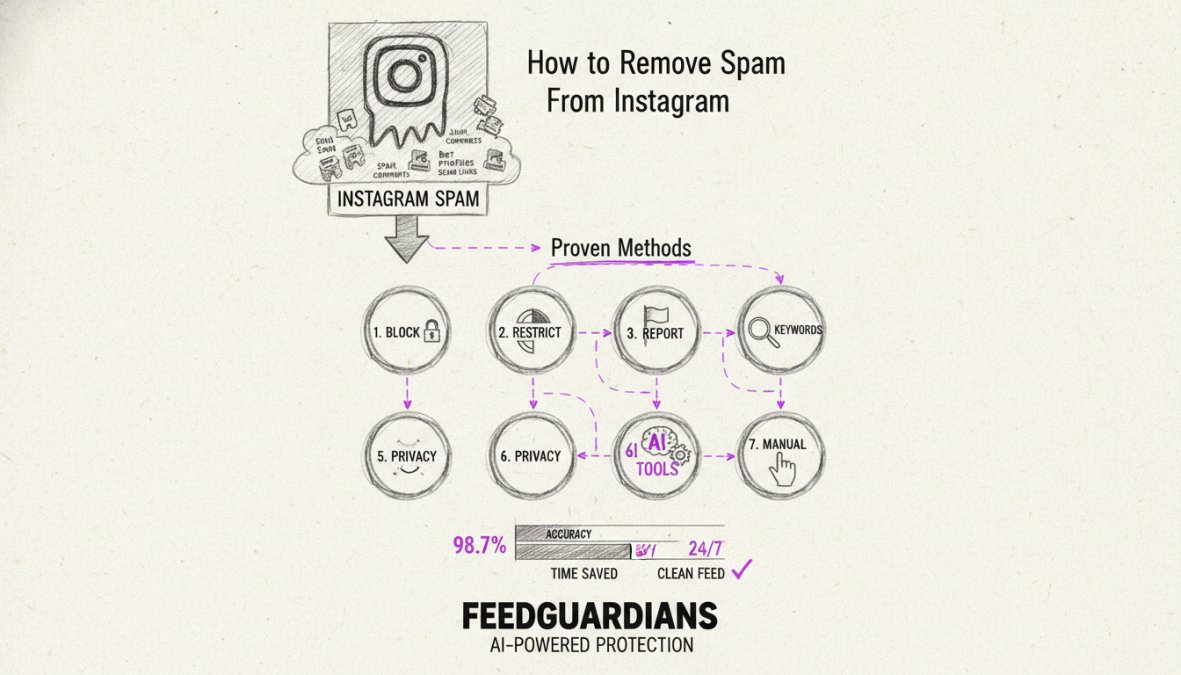
Below are seven proven methods to remove spam from Instagram, ranging from built-in privacy settings to third-party AI tools that have helped brands recover from severe spam infestations.
Why Instagram Spam Is Getting Worse
Bot networks are increasingly sophisticated, using machine learning to mimic human behavior and evade Instagram's detection systems. Spam isn't random, it targets accounts with high follower counts, active engagement, or niche audiences because they offer the most value to scammers.
Spam takes multiple forms: fake followers from bot farms, engagement pods, phishing messages, scam comments with malicious links, and direct messages promoting fake services. Each requires a different removal strategy. Beyond damaging metrics, spam signals to Instagram's algorithm that your account may be compromised, suppressing your organic reach and damaging your platform standing.
Understanding the Psychology Behind Spam Bots
Spam bots operate on clear economic logic: they target valuable accounts with engaged audiences. Most follow predictable patterns, generic comments, rapid follow bursts, and incomplete profiles with no posts or bio. The hardest to spot are bots using stolen photos or real engagement, often part of larger fraud networks targeting e-commerce, fitness, or finance industries.
Spammers target your account because your followers are potential victims. If your audience trusts you, scammers can exploit that trust by impersonating you, promoting fake products, or redirecting followers to phishing sites. Removing spam protects both your metrics and your audience's security.
Step 1: Set Your Account to Private and Adjust Instagram Privacy Settings
A private account immediately cuts off access for most bot networks by requiring approval for new followers. This dramatically reduces unsolicited followers and spam comments.
How to Switch to a Private Account
Navigate to your Instagram profile, tap the menu icon, select "Settings and privacy," then "Account type and tools." Toggle "Private account" on. Your account switches immediately; existing followers remain, but new followers must request permission.
The trade-off is visibility, private accounts don't appear in search results or the Explore page. For personal accounts or niche communities, this is acceptable. For brands seeking growth, a private account may be too restrictive.
Managing Tag Requests and Approval Controls
Enable tag approval to prevent spammers from tagging you in inappropriate content. Go to Settings > Privacy > Tags and toggle "Manually approve tags" on. You can also control who can mention you in comments by setting Messages to "People you follow" or "Connections," filtering spam DMs from unknown accounts.
Step 2: Block Spam Instagram Accounts and Report Spam to Instagram
Blocking and reporting are your most direct tools for removing spam accounts already following you or engaging with your content.
How to Block Spam Accounts Manually
Open a spam account's profile, tap the three dots, and select "Block." The account can't see your posts, stories, or profile. If they're already following you, blocking removes them from your followers list. You can also remove followers without blocking by tapping the three dots next to their name and selecting "Remove," which is quieter but allows them to follow again.
Reporting Spam to Instagram: The Official Process
Go to the account's profile, tap the three dots, and select "Report." Choose the most accurate category, "It's spam," "Scam or fraud," or another option. Instagram reviews reports and takes action if the account meets violation thresholds. Reporting is most effective when multiple users report the same account; coordinated reports trigger faster action.
Step 3: Remove Instagram Spam Followers and Inactive Accounts
Removing fake and inactive followers improves your engagement rate, which Instagram's algorithm uses to determine reach. A high engagement rate signals that your content resonates with your audience, causing Instagram to prioritize your posts.
Identifying Fake Followers vs. Inactive Followers
Fake followers are bot accounts with telltale signs: no profile photo or stolen photos, zero posts, generic usernames (strings of numbers), and engagement patterns that don't match real users. Inactive followers are real accounts that haven't engaged in months or years, they may have legitimate profiles but never like, comment, or view your stories.
Removing fake followers is straightforward; they're clearly harmful. Removing inactive followers is a judgment call, as some may eventually return. Many brands keep inactive followers since they don't actively harm metrics, though removing them boosts your engagement rate.
Manual vs. Automated Risk Assessment for Bulk Removal
Manual removal gives you complete control, inspect each account's profile and engagement history before deciding. This is time-consuming but carries zero risk of accidentally removing legitimate followers.
Automated tools scan followers in minutes and flag suspicious accounts based on algorithms, but they carry risk. Automated tools sometimes flag legitimate accounts as fake, especially newer accounts or accounts from regions with different naming conventions. A hybrid approach works best: use automated tools to identify candidates, then manually review flagged accounts before removing them.
Step 4: Filter Spam Comments and Manage Direct Message Requests
Spam comments damage credibility, clutter content, and can include phishing links or scam promotions. Managing comments proactively protects your brand reputation.
Using Instagram's Comment Filtering Tools
Go to Settings > Accounts > Filters and keywords to add words or phrases you want filtered. When someone comments using a filtered word, their comment is automatically hidden from your audience. You can also filter comments from accounts that don't follow you or recently followed you by toggling these options in Settings > Accounts > Comments.
You can manually hide, delete, or disable comments on specific posts. Hiding removes comments from view for everyone except the commenter; deleting removes them entirely; disabling prevents new comments on that post.
Screening Spam Messages and Direct Message Requests
Instagram separates messages from followers (main inbox) from messages from non-followers (message requests). You don't have to accept or respond to message requests. Delete or block spam messages by tapping the three dots next to them.
Set your message settings to filter requests by going to Settings > Privacy > Messages and choosing "People you follow." This means only people you follow can message you directly; everyone else goes to requests.
For brand accounts with high DM volumes, consider automated comment moderation solutions. FeedGuardians automatically detects and hides spam, phishing attempts, and malicious links in comments and DMs with 98.7% accuracy, protecting your brand reputation while your team focuses on genuine customer interactions.
Step 5: Turn Off Follow Suggestions and Block Hidden Words
Instagram's follow suggestion algorithm can inadvertently connect you with spam accounts. Disabling follow suggestions reduces exposure to low-quality accounts.
Disabling Follow Suggestions to Reduce Bot Exposure
Go to Settings > Privacy > Accounts you follow and toggle "Suggest accounts" off. Additionally, review your "Following" list regularly and unfollow suspicious or inactive accounts. If an account you follow starts posting spam, unfollow immediately to prevent their activity from appearing in your feed.
Using Hidden Words to Block Spam in Stories and Reels
Go to Settings > Privacy > Hidden words and add words related to spam or scams. Stories and reels containing those words won't appear in your feed. You can also mute accounts or keywords by tapping the three dots on a post and selecting "Mute," which hides content without unfollowing or blocking.
Step 6: Third-Party Tools vs. Built-In Features: What Actually Works
Instagram's built-in tools catch obvious spam but miss sophisticated spam that mimics human behavior. Third-party tools use AI to detect patterns that Instagram's systems miss.
When to Use Third-Party Apps for Spam Removal
Third-party apps are worth considering for high-volume accounts, brands with significant audiences, or accounts dealing with organized spam networks. Built-in tools work for personal accounts or small communities, but managing hundreds of daily spam comments manually becomes unsustainable.
Prioritize accuracy and security when evaluating tools. The tool must correctly identify spam without flagging legitimate comments and require secure account access. Most third-party tools charge monthly fees, typically ranging from entry-level plans for small accounts to premium plans for agencies. For most brands, the cost is justified by time saved and protection gained.
AI-Powered Comment Moderation: Real-Time Protection
AI-powered moderation tools scan comments and direct messages in real-time, hiding spam before your audience sees it. These tools use machine learning trained on millions of comments to identify phishing attempts, competitor spam, hate speech, scams, and malicious links.
FeedGuardians automatically detects and hides spam, scams, hate speech, and competitor links with 98.7% accuracy while delivering 24/7 AI-powered replies in your unique brand voice. The tool learns your tone and guidelines, so responses sound authentically like your brand. This means you're not just removing spam, you're turning comments into conversations and conversions by responding to every genuine inquiry instantly, even outside business hours.
AI moderation applies consistent standards 24/7 without fatigue or inconsistency. It scales effortlessly whether you receive 10 or 10,000 comments daily.
Step 7: Post-Cleanup Engagement Recovery and Long-Term Maintenance
After removing spam followers and implementing filtering, your engagement metrics may temporarily drop, this is normal and actually positive. Your engagement rate improves because you've removed inactive and fake followers. Instagram's algorithm responds positively to higher engagement rates, so over time, your posts reach more people and attract more genuine followers.
Rebuilding Your Engagement Rate After Spam Removal
Focus on content that drives engagement: post consistently, use relevant hashtags, engage with audience comments, and create conversation-sparking content. Ask questions in captions, share behind-the-scenes content, and respond to genuine comments within the first hour. Use Stories and Reels, which receive higher algorithmic priority. Over two to four weeks, your metrics should stabilize at a healthier baseline with higher engagement rates and more genuine audience growth.
Ongoing Account Security and Spam Prevention
Set a monthly audit schedule to review followers, check for new spam, and update filter keywords. Enable two-factor authentication by going to Settings > Security > Two-factor authentication. Review account activity in Settings > Security > Logins and change your password if you see unfamiliar logins. Remove third-party apps you don't actively use from Settings > Apps and websites.
For brand accounts managing high-volume engagement, implement real-time moderation systems. AI-powered tools continuously monitor your account and flag suspicious activity as it happens, preventing spam accumulation and keeping your community clean automatically.
| Strategy | Frequency | Effort Level | Effectiveness | Best For |
|---|---|---|---|---|
| Private account + tag approval | One-time setup | Low | Moderate | Personal accounts, niche communities |
| Manual blocking and reporting | Ongoing, as needed | Medium | Moderate | Small accounts, low spam volume |
| Bulk follower removal | Monthly audit | Medium | High | Accounts with established fake follower base |
| Comment filtering + keywords | One-time setup + monthly updates | Low | Moderate | All account types |
| AI-powered moderation | Continuous, automated | Low | Very high | Brands, high-volume accounts, agencies |
| Hybrid approach (automated + manual review) | Ongoing, 2-3 hours monthly | Medium | Very high | Growing brands, accounts with moderate spam |
Removing spam from Instagram requires a multi-layered approach. No single strategy eliminates all spam; the most effective accounts combine built-in Instagram features with third-party tools and ongoing vigilance. For brands managing significant reach, the time investment in spam removal pays dividends in engagement rate, audience trust, and algorithmic visibility. FeedGuardians offers real-time AI moderation that automatically detects and hides spam while delivering 24/7 AI-powered replies in your brand voice, transforming your Instagram comments from a spam liability into a genuine conversation channel that drives engagement and conversions.
Frequently Asked Questions
How do I stop spam comments on Instagram and protect my account?
Use Instagram's built-in comment filtering by going to Settings > Account > Comment Controls. Enable the filter to hide comments with specific words, emojis, or from accounts without followers. For stronger protection, use AI-powered comment moderation tools that detect spam, malicious links, phishing attempts, and scams in real time with high accuracy. Monitor your Stories and Reels separately, as spam patterns differ across content types.
What's the difference between fake followers and inactive followers when removing Instagram spam followers?
Fake followers are bot accounts or purchased followers designed to artificially inflate numbers, they never engage authentically. Inactive followers are real accounts that simply don't interact anymore. When removing Instagram spam followers, prioritize deleting fake accounts first, as they harm your engagement rate and credibility. Inactive followers have less impact, but removing them improves your organic reach metrics. Manual audits are safer than automated bulk removal tools, which risk deleting legitimate followers.
Can I use Instagram hidden words to filter spam in Stories and Reels?
Yes. Instagram hidden words work in comments on all content types, including Stories and Reels. Go to Settings > Account > Hidden Words to add spam-related terms, hashtags, or emojis you want to automatically hide. This feature filters comments containing those words without notifying the commenter. It's effective for blocking repetitive spam messages and phishing attempts, but combine it with comment filtering and direct message request screening for comprehensive spam protection across your entire account.
Should I use third-party tools to remove spam, or stick with Instagram's built-in features?
Instagram's native tools are free and safe, use them first. However, built-in features have limitations for accounts with high spam volume or complex moderation needs. Third-party AI cleaners and moderation tools offer automated detection, bulk removal, and 24/7 protection, but assess the risks carefully. Ensure any tool you choose has strong security credentials, clear data handling policies, and human escalation options. For brands managing multiple accounts or high-engagement content, AI-powered real-time moderation provides better account security and engagement recovery than manual-only approaches.
This article was written using GrandRanker
Tired of manually moderating comments?
FeedGuardians automates spam filtering, responds to customers, and protects your brand — setup in 3 minutes.
Frequently Asked Questions
How do I stop spam comments on Instagram and protect my account?
Use Instagram's built-in comment filtering by going to Settings > Account > Comment Controls. Enable the filter to hide comments with specific words, emojis, or from accounts without followers. For stronger protection, use AI-powered comment moderation tools that detect spam, malicious links, phishing attempts, and scams in real time with high accuracy. Monitor your Stories and Reels separately, as spam patterns differ across content types.
What's the difference between fake followers and inactive followers when removing Instagram spam followers?
Fake followers are bot accounts or purchased followers designed to artificially inflate numbers—they never engage authentically. Inactive followers are real accounts that simply don't interact anymore. When removing Instagram spam followers, prioritize deleting fake accounts first, as they harm your engagement rate and credibility. Inactive followers have less impact, but removing them improves your organic reach metrics. Manual audits are safer than automated bulk removal tools, which risk deleting legitimate followers.
Can I use Instagram hidden words to filter spam in Stories and Reels?
Yes. Instagram hidden words work in comments on all content types, including Stories and Reels. Go to Settings > Account > Hidden Words to add spam-related terms, hashtags, or emojis you want to automatically hide. This feature filters comments containing those words without notifying the commenter. It's effective for blocking repetitive spam messages and phishing attempts, but combine it with comment filtering and direct message request screening for comprehensive spam protection across your entire account.
Should I use third-party tools to remove spam, or stick with Instagram's built-in features?
Instagram's native tools are free and safe—use them first. However, built-in features have limitations for accounts with high spam volume or complex moderation needs. Third-party AI cleaners and moderation tools offer automated detection, bulk removal, and 24/7 protection, but assess the risks carefully. Ensure any tool you choose has strong security credentials, clear data handling policies, and human escalation options. For brands managing multiple accounts or high-engagement content, AI-powered real-time moderation provides better account security and engagement recovery than manual-only approaches.