
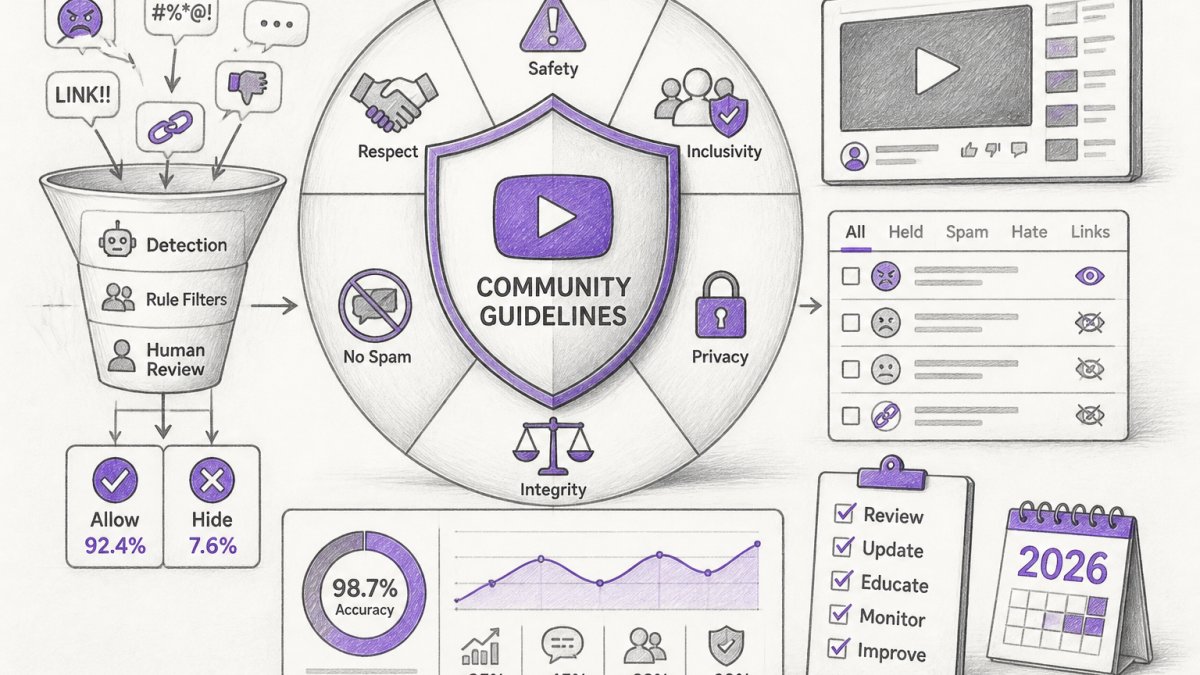
Quick Summary
| Key Insight | What You Need to Know |
|---|---|
| What YouTube Community Guidelines | What YouTube Community Guidelines Are and Why They Matter |
| YouTube Community Guidelines Examples | Content That Violates Policy |
| YouTube Comment Moderation Best | YouTube Comment Moderation Best PracticesSetting Up Comment ControlsHandling Abusive Comments and Trolls |
| Setting Up Comment Controls | Setting Up Comment Controls |
| Handling Abusive Comments and | Handling Abusive Comments and Trolls |
| Warnings, Strikes, and How | Warnings, Strikes, and How YouTube Enforcement Works |
Table of Contents
- What YouTube Community Guidelines Are and Why They Matter
- YouTube Community Guidelines Examples: Content That Violates Policy
- YouTube Comment Moderation Best Practices
- Warnings, Strikes, and How YouTube Enforcement Works
- YouTube Community Guidelines Warning and Strike Appeal Process
- YouTube Comment Moderation Tools and Automation
- Building a Compliance Workflow for Your Channel
- Frequently Asked Questions
Last Updated: October 13, 2026
What YouTube Community Guidelines Are and Why They Matter
YouTube Community Guidelines are the official rules that govern what content and conduct are allowed on the platform. They cover spam, deceptive practices, child safety, hate speech, violence, harassment, and dozens of other policy areas. Think of them as the contract between creators, viewers, and YouTube itself, they define what keeps the platform safe and usable for everyone.
Why do they matter? Because violations trigger warnings, strikes, and ultimately channel termination, which is why managing YouTube community guidelines is essential for every creator. A single strike can limit your monetization. Three strikes and your channel is gone. Beyond the mechanics, guidelines shape what your audience sees.
At FeedGuardians, we work with brands managing high-volume comment sections daily. Understanding these guidelines isn't just about avoiding punishment, it's about building trust with your audience. Viewers stay longer on channels they perceive as safe. Advertisers pay more to run ads on compliant channels. The business case for policy compliance is as strong as the ethical one.
The challenge isn't knowing the guidelines exist. It's implementing them consistently across comments, replies, and community posts when you're managing hundreds of interactions daily. That's where most creators stumble.
YouTube Community Guidelines Examples: Content That Violates Policy
YouTube's policies fall into several categories, and knowing the difference between borderline and clearly violative content is essential for smart moderation.
Spam and deceptive practices include repetitive comments, scam links, and misleading promotional content. A comment like "Click here for free money!!!" with a shortened URL gets hidden automatically on most channels. But a genuine product recommendation from a viewer?
Hate speech and harassment are zero-tolerance areas. Comments targeting someone's identity, religion, ethnicity, or sexual orientation violate policy. So do threats of violence, even veiled ones.
Child safety violations are treated with extreme severity. Any content sexualizing minors, grooming behavior, or endangerment gets removed and reported.
Reused content (also called "spam-like behavior") includes copy-pasting the same comment across multiple videos or channels. It signals low-effort engagement and gets deprioritized in the algorithm.
Borderline content is where most moderation decisions happen. A comment criticizing your business decision is allowed. A comment saying your business is a scam with no evidence is borderline.
The key insight: YouTube's enforcement isn't always binary. Some violations are clear-cut. Others require context. Understanding that nuance prevents you from over-moderating (which damages community trust) or under-moderating (which invites spam and abuse).
YouTube Comment Moderation Best Practices
Managing comments at scale requires both strategy and tools. Here's how to approach it systematically.
Setting Up Comment Controls
Start with YouTube's built-in features. In your channel settings, you can enable "Hold potentially inappropriate comments for review", this filters comments containing profanity, spam signals, or other red flags without automatically deleting them. You review them first, which protects against false positives.
You can also set up a "Blocked words" list. Add common spam phrases, competitor names, or terms specific to your brand. Any comment containing those words gets held for review. This is your first line of defense and requires zero additional tools.
For channels with high comment volume, consider restricting comments to "Approved users only." This means only people you've previously approved can comment without review. It's heavy-handed for community building, but it works for channels that prioritize safety over engagement volume.
Finally, enable the "Subscribers only" option if you want to limit comments to paying members. This reduces spam significantly because spammers don't invest in subscriptions.
Handling Abusive Comments and Trolls
Trolls and abusive commenters fall into predictable patterns. Some want attention. Others are testing your boundaries. The worst are coordinated harassment campaigns, though those are rarer.
For isolated trolls, don't engage publicly. Delete the comment, hide the user (which hides all their comments without them knowing), or block them entirely. Responding to trolls amplifies their reach and invites more attacks. Silence is the most effective tactic.
For coordinated harassment or repeated violations, document everything. Screenshot comments before deletion. Keep a record of which users are violating policy repeatedly. This documentation becomes critical if you need to appeal a YouTube decision later or if legal action becomes necessary.
Abusive comments toward other viewers are your responsibility to moderate, even if they're not directed at you. Viewers won't return to a channel where they're harassed. Hide those comments immediately. A healthy comment section is a competitive advantage, it keeps people coming back.
The common mistake is trying to "win" arguments with trolls in the comments. You won't. Your energy is better spent building positive community and removing negativity.
Warnings, Strikes, and How YouTube Enforcement Works
YouTube's enforcement system has three levels: warnings, strikes, and termination.
A warning is a notification that you've violated policy, but no action is taken against your channel. You don't lose monetization or reach.
A strike is more serious. You receive a notification that content violated policy. Your channel loses monetization for 1-2 weeks. You can't upload new content during a strike period (usually 1-3 weeks depending on severity). One strike is survivable.
Termination is irreversible. Your channel, all videos, and all subscriber relationships are deleted. You cannot create a new channel to replace it (YouTube will link accounts and terminate again).
How does YouTube decide what's a warning vs. a strike? The severity of the violation, your history, and the volume of violations matter. A single spam comment gets hidden. Dozens of spam comments across your channel might trigger a warning.
YouTube's enforcement uses a mix of automation and human review. Their AI systems flag content that violates policy with high confidence. Borderline content goes to human reviewers. This is why you can appeal decisions, humans make mistakes, and YouTube knows it.
YouTube Community Guidelines Warning and Strike Appeal Process
If you receive a warning or strike, you have options. The appeal process is your chance to contest the decision.
When you receive a strike notification, YouTube provides details about which video or comment violated policy and which guideline was broken. Read this carefully. Sometimes the decision is wrong. Sometimes it's a judgment call you disagree with.
To appeal, go to your YouTube Studio, find the strike in your "Violations" tab, and click "Appeal." You then write a brief explanation of why you believe the decision was incorrect. Be specific.
YouTube reviews appeals within a few days to a week. They either uphold the strike, overturn it, or sometimes reduce the penalty.
Common appeal mistakes: being defensive or angry, making excuses instead of explaining context, or submitting an appeal without reading YouTube's explanation. Treat appeals like a professional document.
If you receive a second strike, the stakes are higher. Your channel is at serious risk. Appeals at this stage should be even more careful and detailed. If you lose, a third strike terminates your channel.
For channels with high stakes (significant revenue, large audience), consider having a lawyer review your appeal before submitting.
YouTube Comment Moderation Tools and Automation
Manual moderation doesn't scale. Beyond a few hundred comments per video, you need tools.
YouTube's native tools are free but limited. The "Hold for review" filter and "Blocked words" list handle obvious spam, but they miss nuance. They can't detect sophisticated scams, competitor spam disguised as genuine comments, or context-dependent violations.
Third-party moderation tools fill this gap. They integrate with YouTube and use AI to detect spam, hate speech, and other violations automatically. Some tools also offer AI-powered replies, which is valuable for high-volume channels, you can respond to legitimate comments 24/7 without hiring a team.
FeedGuardians is built specifically for this use case. It detects spam, scams, hate speech, and competitor links with 98.7% accuracy, then hides violative comments automatically. It also learns your brand voice and can reply to comments in your unique tone, turning comment sections into revenue-generating conversations.
When evaluating tools, ask: Does it integrate with YouTube directly? Can it detect the specific violations that plague your channel? Does it offer human escalation for borderline cases? Can it learn your moderation standards over time? The best tools handle 95%+ of decisions automatically and escalate the rest to humans.
Building a Compliance Workflow for Your Channel
Compliance isn't a one-time setup. It's an ongoing process. Here's a practical workflow that scales.
Step 1: Pre-publication review. Before uploading a video, review it against YouTube's guidelines. Does it contain content that could be misinterpreted?
Step 2: Monitor comments actively. Set up alerts for new comments on recent videos. Review them within hours, not days.
Step 3: Apply consistent standards. Document your moderation decisions. If you delete a comment for mild profanity in one video, delete similar comments in others.
Step 4: Escalate borderline cases. Don't guess on borderline content. Flag it for human review.
Step 5: Track violations and appeals. Keep a spreadsheet or document of strikes, warnings, and appeals. Note what you appealed and whether it succeeded.
Step 6: Update your standards quarterly. YouTube's policies evolve. Review the official guidelines every three months. Your moderation standards should evolve too.
For channels with high comment volume, this workflow is unsustainable manually.
The workflow also protects you legally.
Managing YouTube Community Guidelines effectively isn't about memorizing every rule. It's about building systems that catch violations early, applying standards consistently, and protecting your channel from strikes.
Frequently Asked Questions
What exactly counts as a violation of YouTube Community Guidelines?
YouTube prohibits content involving spam, deceptive practices, hate speech, harassment, child safety violations, and dangerous or illegal activities. Examples include selling fake products, using misleading thumbnails, posting abusive comments targeting individuals, and uploading content that endangers minors. Review YouTube's official Community Guidelines Transparency Report for detailed examples across each policy area. Borderline content may receive reduced recommendations rather than removal.
How can I appeal a YouTube Community Guidelines strike or warning?
You can appeal through your YouTube Studio under the 'Community' or 'Monetization' tab where the warning appears. Submit your appeal explaining why you believe the decision was incorrect. YouTube reviews appeals within days to weeks. During the appeal period, your channel remains functional, but monetization may be suspended. Document your moderation practices and keep records of removed content to strengthen future appeals and demonstrate policy compliance.
What are the best YouTube comment moderation tools for managing high-volume channels?
Automated moderation tools detect and hide spam, hate speech, and competitor links in real time. FeedGuardians, for example, uses AI to identify harmful comments with 98.7% accuracy and can deliver automated replies in your brand voice 24/7. Many tools offer human escalation options, allowing your team to review flagged comments before action. Choose tools that integrate with your existing workflow and let you customize moderation rules to match your brand standards.
How often should I review my channel's moderation settings and comment section?
Review comment moderation settings monthly or after policy changes. Monitor your comment section weekly, especially if your channel has high engagement. Check your Community tab regularly for new comments and community posts. Set up alerts for flagged comments and prioritize responses to questions from engaged viewers. Use analytics to identify patterns in harmful content and adjust filters accordingly. Consistent monitoring helps catch policy violations early and maintains a positive community environment.
What happens if an automated moderation tool makes a mistake and hides a legitimate comment?
Most moderation tools allow you to review and restore incorrectly flagged comments. Maintain a clear escalation process where your team can quickly assess borderline content and override automated decisions. Document mistakes to help train your tool's filters over time. Tools with human escalation options let you flag uncertain cases for manual review before hiding them. Always keep records of moderation actions so you can explain decisions if viewers request explanations or if YouTube reviews your enforcement practices.
How does managing YouTube Community Guidelines affect my channel's ad performance?
Channels with strong moderation practices and high-quality communities attract more advertiser interest and maintain better ad performance. Advertisers avoid channels with frequent policy violations or toxic comment sections. By reducing spam and harmful comments, you create a safer environment that encourages viewer trust and engagement. Quick responses to comments, especially through automated replies, increase interaction rates, which can boost recommendations. Protecting your channel from strikes also prevents monetization suspension, directly preserving ad revenue.
Can I set up different moderation rules for different types of content on my channel?
YouTube's native comment controls apply channel-wide, but you can customize settings by turning comments on or off for specific videos. Some moderation tools allow you to create custom rules based on keywords, comment patterns, or user behavior. For example, you might hold all comments for approval on sensitive videos but auto-approve trusted commenters on lighter content. Document your rules and apply them consistently to avoid accusations of unfair moderation. Transparency about your approach builds community trust.
Tired of manually moderating comments?
FeedGuardians automates spam filtering, responds to customers, and protects your brand — setup in 3 minutes.
Frequently Asked Questions
What exactly counts as a violation of YouTube Community Guidelines?
YouTube prohibits content involving spam, deceptive practices, hate speech, harassment, child safety violations, and dangerous or illegal activities. Examples include selling fake products, using misleading thumbnails, posting abusive comments targeting individuals, and uploading content that endangers minors. Review YouTube's official Community Guidelines Transparency Report for detailed examples across each policy area. Borderline content may receive reduced recommendations rather than removal.
How can I appeal a YouTube Community Guidelines strike or warning?
You can appeal through your YouTube Studio under the 'Community' or 'Monetization' tab where the warning appears. Submit your appeal explaining why you believe the decision was incorrect. YouTube reviews appeals within days to weeks. During the appeal period, your channel remains functional, but monetization may be suspended. Document your moderation practices and keep records of removed content to strengthen future appeals and demonstrate policy compliance.
What are the best YouTube comment moderation tools for managing high-volume channels?
Automated moderation tools detect and hide spam, hate speech, and competitor links in real time. FeedGuardians, for example, uses AI to identify harmful comments with 98.7% accuracy and can deliver automated replies in your brand voice 24/7. Many tools offer human escalation options, allowing your team to review flagged comments before action. Choose tools that integrate with your existing workflow and let you customize moderation rules to match your brand standards.
How often should I review my channel's moderation settings and comment section?
Review comment moderation settings monthly or after policy changes. Monitor your comment section weekly, especially if your channel has high engagement. Check your Community tab regularly for new comments and community posts. Set up alerts for flagged comments and prioritize responses to questions from engaged viewers. Use analytics to identify patterns in harmful content and adjust filters accordingly. Consistent monitoring helps catch policy violations early and maintains a positive community environment.
What happens if an automated moderation tool makes a mistake and hides a legitimate comment?
Most moderation tools allow you to review and restore incorrectly flagged comments. Maintain a clear escalation process where your team can quickly assess borderline content and override automated decisions. Document mistakes to help train your tool's filters over time. Tools with human escalation options let you flag uncertain cases for manual review before hiding them. Always keep records of moderation actions so you can explain decisions if viewers request explanations or if YouTube reviews your enforcement practices.
How does managing YouTube Community Guidelines affect my channel's ad performance?
Channels with strong moderation practices and high-quality communities attract more advertiser interest and maintain better ad performance. Advertisers avoid channels with frequent policy violations or toxic comment sections. By reducing spam and harmful comments, you create a safer environment that encourages viewer trust and engagement. Quick responses to comments—especially through automated replies—increase interaction rates, which can boost recommendations. Protecting your channel from strikes also prevents monetization suspension, directly preserving ad revenue.
Can I set up different moderation rules for different types of content on my channel?
YouTube's native comment controls apply channel-wide, but you can customize settings by turning comments on or off for specific videos. Some moderation tools allow you to create custom rules based on keywords, comment patterns, or user behavior. For example, you might hold all comments for approval on sensitive videos but auto-approve trusted commenters on lighter content. Document your rules and apply them consistently to avoid accusations of unfair moderation. Transparency about your approach builds community trust.