
Quick Summary
| Key Insight | What You Need to Know |
|---|---|
| Why Social Comments Are | Why Social Comments Are Your Highest-Intent Sales Channel |
| Step 1 | Score Purchase Intent in Every Comment ThreadThe Four Intent Tiers: Browsing, Asking, Objecting, Buying |
| The Four Intent Tiers | Browsing, Asking, Objecting, Buying |
| Social Media Comment Response | Social Media Comment Response Templates That Move Buyers Forward |
| The Trigger Layer | What Starts the Workflow |
| The Handoff Sequence, Step | The Handoff Sequence, Step by Step |
Table of Contents
- Why Social Comments Are Your Highest-Intent Sales Channel
- Step 1: Score Purchase Intent in Every Comment Thread
- Social Media Comment Response Templates That Move Buyers Forward
- Automate the Comment-to-DM Workflow (The Step Most Brands Skip)
- Social Media Customer Service Best Practices for Public Threads
- AI Social Media Moderation Tools: What to Look For
- Track Micro-Conversions to Prove Comment ROI
- Conclusion: Build Your Comment-to-Conversion Engine
- Frequently Asked Questions
Last Updated: September 13, 2026
Why Social Comments Are Your Highest-Intent Sales Channel
Most brands treat comment sections as a chore to clean up, a framing that costs them money. A comment thread is where a shopper tells you, unprompted, what they want and how close they are to buying. Turning social comments into sales conversions is about reading the signals already under your posts, not posting more.
Social comments are the public replies, questions, and reactions shoppers leave on your posts, ads, and Reels. Unlike a passive like, a comment is an active signal of interest that often carries purchase intent the algorithm cannot see.
That intent is perishable. A shopper who asks "where can I buy this?" at 9 a.m. and hears nothing by evening has usually bought from the brand that answered first (sproutsocial.com). This guide from FeedGuardians walks through a repeatable system: scoring intent, replying with templates, automating the comment-to-DM handoff, and tracking the micro-conversions that prove comments drive revenue.
Step 1: Score Purchase Intent in Every Comment Thread
Not every comment deserves the same response. Sorting them by intent lets a small team spend its time where revenue lives.
A simple four-tier system works: browsing comments get a light touch, asking comments get a reply plus a nudge, objecting comments get a human, and buying comments get an immediate private message.
The Four Intent Tiers: Browsing, Asking, Objecting, Buying
Browsing comments are low urgency: "Love this," "so cute," emojis. A like or short reply is enough. Asking comments carry real intent: sizing, ingredients, shipping, restock dates, answer directly plus a link or retargeting tag. Objecting comments raise price, quality, or trust concerns and need a careful human reply. Buying comments are closest to checkout: "How do I order?" or "Is this in stock?" Move those to a private message within minutes.
The mistake most teams make is answering all four tiers at the same speed, burying the buying questions that convert.
Social Media Comment Response Templates That Move Buyers Forward
Templates are not about sounding robotic, they are about never leaving a high-intent comment unanswered. Adapt these to your brand voice: short, warm, specific.
Asking (product question):
"Great question, [name]. The [product] fits true to size and ships in 2-3 days. Want me to send you the size guide in a DM?"
Objecting (price concern):
"Totally fair, [name]. It is an investment piece, and here is why: [one concrete reason]. Happy to walk you through it if that helps."
Buying (ready to order):
"Love it, [name]. Just sent you a DM with the direct link so you do not have to hunt for it."
Browsing (light engagement):
"Thank you, [name]. Glad you like it."
Automate the Comment-to-DM Workflow (The Step Most Brands Skip)
The comment-to-DM workflow is the highest-leverage move in social selling, and the one most brands never set up. It captures a public buying signal and moves it into a private thread where a sale can close.
The Trigger Layer: What Starts the Workflow
A comment-to-DM workflow fires on one of three trigger types:
- Keyword trigger. The shopper comments a specific word or phrase, "price," "link," "size," "restock," or a branded hashtag like #sendthelink. Most reliable because it is explicit and easy to audit.
- Intent trigger. The tool classifies the comment as a buying signal using natural language processing, even without a keyword. "How much is this?" and "where can I get one?" both fire the workflow, catching shoppers who do not know your trigger phrase.
- Ad comment trigger. Any comment on a paid ad or boosted post fires the workflow automatically. Highest ROI because the shopper already clicked into a paid placement, pre-qualified by the ad spend itself.
Most teams start with keyword triggers, then layer in intent triggers once that flow is stable.
The Handoff Sequence, Step by Step
- Detect. The tool reads the comment within seconds of posting. Reply rates drop sharply after a few minutes, so aim for a sub-minute detection window (hubspot.com).
- Acknowledge publicly. The tool posts a short public reply, "Just sent you a DM, [name]!", so the audience sees the brand responds, generating social proof.
- Open the private thread. The tool sends the DM within the same minute, delivering the link, size guide, or offer and asking exactly one qualifying question. Multi-question DMs get ignored.
- Qualify. The shopper's reply is scored. A reply naming a size, color, or shipping deadline routes to a human; a single emoji or "ok" stays in automated nurture.
- Route and tag. Qualified contacts route to a human closer with full comment context attached. Every contact, qualified or not, gets tagged in your CRM or audience list for retargeting.
Platform Mechanics You Need to Know
Each platform handles the comment-to-DM handoff differently:
- Instagram and Facebook support native keyword-triggered DM automation through Meta's messaging tools and most third-party social suites. The public reply and private DM can fire from the same rule.
- TikTok automation is more limited natively, so most teams use a third-party tool that reads comments via API and sends DMs through the platform's messaging layer. Expect slightly higher latency.
- YouTube comments are the hardest to automate because the platform's DM equivalent is weaker. Most teams route YouTube commenters to an email capture or link-in-description flow instead.
The Failure Modes That Kill the Workflow
Three things break comment-to-DM automation:
- Over-automation. If every comment gets a DM, your account gets flagged for spam and reach drops (help.instagram.com). Cap automated DMs to genuine buying or asking signals only.
- No human escape hatch. A workflow with no escalation path will eventually send a cheerful sales DM to someone complaining about a broken product. Build the escalation rule before launch.
- No retargeting tag. If the contact is not tagged, the workflow ends at the DM. Tagging lets the same shopper see your ads again later, where the second and third touches convert.
Public replies build social proof; private messages remove the friction that kills the sale. Doing both, with a real trigger layer, handoff sequence, and escalation rule, separates a comment section that sells from one that just looks busy.
Social Media Customer Service Best Practices for Public Threads
Public threads are a performance, not a private chat. Every reply is read by hundreds of people who never comment, so your tone under pressure matters as much as the answer.
A few social media customer service best practices hold up across platforms: respond fast, even if the full answer comes later; never argue; move the resolution to a private message while leaving a short, calm public reply; and sign with a human name when the issue is sensitive.
Handling Objections and Complaints Without Losing the Sale
The instinct when a complaint goes public is to defend. That instinct loses sales. Acknowledge the concern, avoid blame, and take it offline.
"That is not the experience we want, [name]. I am sending you a DM now so we can make it right."
That sentence reassures the complainer and every silent reader deciding whether to trust you. The audience is the real customer in a public thread.
AI Social Media Moderation Tools: What to Look For
At high comment volume, manual moderation stops scaling. AI social media moderation tools earn their place, but only if they do more than filter. What to evaluate:
- Detection accuracy on spam, scams, hate speech, and competitor links, not just profanity.
- Reply quality in your brand voice, so automated answers do not read as generic.
- Human escalation, so sensitive threads reach a person instead of a bot.
- Multi-platform coverage across Instagram, Facebook, TikTok, and YouTube.
- Audit and control, so you can see what was hidden or answered and why.
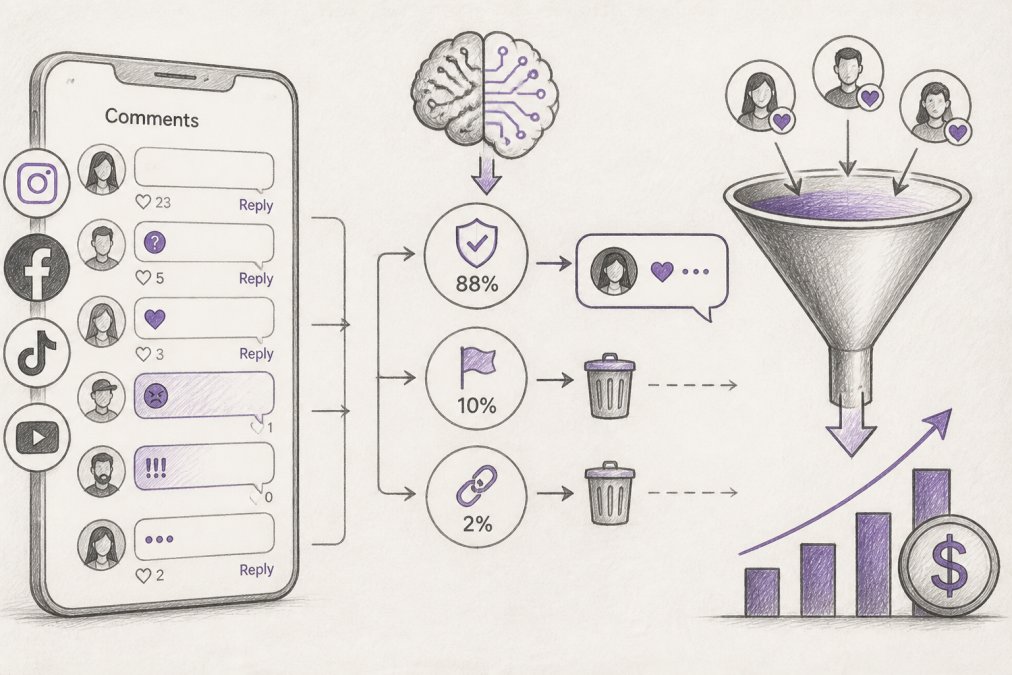
FeedGuardians fits this category directly: it detects and hides spam, hate speech, and competitor links with 98.7% accuracy, replies 24/7 in your brand voice, and keeps a human escalation option for threads that need one. For teams drowning in volume, that protects ad performance and reputation at once.
Track Micro-Conversions to Prove Comment ROI
Likes and follower counts do not prove that comments drive revenue. Micro-conversions do. The hard part is attributing, valuing, and reporting them in a way that survives a budget review.
A micro-conversion is a small, trackable action between a comment and a purchase: a DM opened, a link clicked, a size guide requested, a "notify me" signup, a saved post, a profile visit. Track these and you can connect a comment thread to a sale.
The Attribution Problem, and How to Solve It
Most social platforms do not natively connect a comment to a downstream purchase. You have to build the bridge. Three mechanisms do most of the work:
- UTM-tagged links in DMs. Every link in a comment-triggered DM carries a unique UTM parameter, source, medium, campaign, and a comment-ID field. When it converts, your analytics platform attributes the sale back to the specific DM, and from there back to the comment.
- Unique discount codes per thread. For high-value threads, issue a one-time code tied to the commenter. When used, you know exactly which comment produced the sale. Most reliable because it does not depend on cookies or tracking pixels.
- CRM tagging at the DM stage. When a commenter enters your DM flow, tag them in your CRM with the source comment and date. If they buy three weeks later through a different channel, the tag still connects the purchase back to the original comment.
Most teams layer all three: UTMs for volume, unique codes for high-value threads, and CRM tags for the long tail.
Valuing a Comment That Does Not Convert Today
A comment that does not produce an immediate sale still has measurable value if it moves a lead down the funnel. Assign a probability weight to each micro-conversion stage based on your own historical data:
| Signal | What It Means | Typical Funnel Stage | Action |
|---|---|---|---|
| DM opened, no reply | Curious, not ready | Top of funnel | Retarget in 48 hours |
| Link clicked | High intent | Mid funnel | Send a follow-up offer |
| Size guide requested | Near purchase | Bottom funnel | Human follow-up same day |
| "Notify me" signup | Waiting on restock | Bottom funnel | Alert on drop, then DM |
| Post saved | Considering | Top of funnel | Retarget with social proof |
| Profile visit from comment | Researching | Mid funnel | Retarget with a review or UGC |
The weights come from your own data, not a benchmark. If one in five link-clickers eventually buys, a link click is worth roughly one-fifth of your average order value, a dollar figure on a comment thread that never produced a same-day sale. Assigning this precise monetary value to every interaction provides the necessary clarity to justify the resources required to grow event audience through sustained community engagement.
Building the Tracking Table Your Team Actually Uses
A tracking table only works if it is simple enough to update daily. Keep four columns: the signal, the source comment or thread, the date, and the assigned value. Review weekly. Over a quarter, patterns emerge, certain post types generate higher-value comments, certain trigger phrases produce more qualified DMs, certain reply templates convert better.
Those patterns are the real output: which posts to make more of, which templates to keep, and which threads to prioritize when your team is short on time.
Reporting Comment ROI to Decision-Makers
When you can point to the comment that started a sale, budget conversations get easier. Report three numbers, not ten: total attributed revenue from comment-triggered flows, cost per attributed sale, and the ratio of high-intent comments to total comments. The third is the leading indicator, if it rises, your content is attracting better buyers, and the other two follow.
Comments stop looking like a cost center and start looking like a channel, the shift that protects the budget when someone asks why the social team spends time in the comment section.
Conclusion: Build Your Comment-to-Conversion Engine
The hard part is not knowing that comments carry intent. It is answering every high-intent thread fast enough, at volume, without letting spam and hate bury the buyers, the gap between a comment section that looks active and one that sells.
FeedGuardians was built for exactly this. It hides spam, scams, hate speech, and competitor links automatically, replies 24/7 in your brand voice, and escalates sensitive threads to a human when needed. Teams using it save hours a day and turn comment sections into a real sales channel.
Get started with FeedGuardians and turn your social comments into sales conversions, not just notifications.
Frequently Asked Questions
How do you turn social media engagement into actual sales?
Start by treating comments as a sales funnel. Score intent: a question about sizing is a warm lead, a complaint is a retention risk, and a tag is a referral. Reply with a template that includes a next step, like a link or a DM prompt. Use shoppable tags on product mentions so buyers can checkout without leaving the app. Then retarget everyone who engaged with a product-specific ad. Brands using this flow see comment-to-conversion rates climb because they stop treating every comment the same.
What is the best way to respond to comments to drive conversions?
Match your response to the comment's intent tier. For buying questions, reply within minutes with a direct link or a 'check your DMs' prompt. For objections, acknowledge the concern publicly, then move the details to a private message. For praise, thank the person and ask a follow-up question that keeps the thread active. Always include a call to action, even a soft one like 'tap the tag to see colors.' Avoid generic 'Thanks!' replies that end the conversation.
How can AI tools help in managing social media comments for business?
AI social media moderation tools handle the volume problem. They hide spam, hate speech, and competitor links automatically, which protects your ad performance and brand reputation. They also draft or send replies in your brand voice 24/7, so a question at 2 a.m. gets an answer before the buyer moves on. The best tools let you set escalation rules so a human reviews sensitive threads. This cuts response time from hours to seconds and frees your team to focus on high-value conversations.
How do you measure the ROI of social media comment management?
Track micro-conversions, not just final sales. Assign values to link clicks from comment replies, DM opens, and shoppable tag taps. Use UTM parameters on every link you drop in a comment so you can tie revenue back to the thread. Compare conversion rates for comments answered within 5 minutes versus those answered after an hour. Also monitor sentiment trends and the percentage of comments that turn into DMs. These metrics show whether your comment strategy is moving buyers down the funnel.
Tired of manually moderating comments?
FeedGuardians automates spam filtering, responds to customers, and protects your brand — setup in 3 minutes.
Frequently Asked Questions
How do you turn social media engagement into actual sales?
Start by treating comments as a sales funnel. Score intent: a question about sizing is a warm lead, a complaint is a retention risk, and a tag is a referral. Reply with a template that includes a next step, like a link or a DM prompt. Use shoppable tags on product mentions so buyers can checkout without leaving the app. Then retarget everyone who engaged with a product-specific ad. Brands using this flow see comment-to-conversion rates climb because they stop treating every comment the same.
What is the best way to respond to comments to drive conversions?
Match your response to the comment's intent tier. For buying questions, reply within minutes with a direct link or a 'check your DMs' prompt. For objections, acknowledge the concern publicly, then move the details to a private message. For praise, thank the person and ask a follow-up question that keeps the thread active. Always include a call to action, even a soft one like 'tap the tag to see colors.' Avoid generic 'Thanks!' replies that end the conversation.
How can AI tools help in managing social media comments for business?
AI social media moderation tools handle the volume problem. They hide spam, hate speech, and competitor links automatically, which protects your ad performance and brand reputation. They also draft or send replies in your brand voice 24/7, so a question at 2 a.m. gets an answer before the buyer moves on. The best tools let you set escalation rules so a human reviews sensitive threads. This cuts response time from hours to seconds and frees your team to focus on high-value conversations.
How do you measure the ROI of social media comment management?
Track micro-conversions, not just final sales. Assign values to link clicks from comment replies, DM opens, and shoppable tag taps. Use UTM parameters on every link you drop in a comment so you can tie revenue back to the thread. Compare conversion rates for comments answered within 5 minutes versus those answered after an hour. Also monitor sentiment trends and the percentage of comments that turn into DMs. These metrics show whether your comment strategy is moving buyers down the funnel.