
Quick Summary
| Key Insight | What You Need to Know |
|---|---|
| Why Hiding Comments Creates | Why Hiding Comments Creates Legal Exposure |
| Defamation and False Statements | When Hiding Crosses Into Liability |
| Can Businesses Delete Negative | Can Businesses Delete Negative Comments Legally? |
| How to Respond to | How to Respond to Negative Comments on Social Media |
| Building a Social Media | Building a Social Media Comment Moderation Policy for BusinessesThe four actions, definedThe decision treeEscalation thresholdsWhat the policy document must containConsistency is the legal point |
| The four actions, defined | The four actions, defined |
Table of Contents
- Why Hiding Comments Creates Legal Exposure
- Defamation and False Statements: When Hiding Crosses Into Liability
- Can Businesses Delete Negative Comments Legally?
- How to Respond to Negative Comments on Social Media
- Building a Social Media Comment Moderation Policy for Businesses
- Social Media Comment Moderation Tools and Legal Compliance
- Evidence Preservation and Documentation: Protecting Yourself Legally
- Frequently Asked Questions
Last Updated: October 19, 2026
Why Hiding Comments Creates Legal Exposure
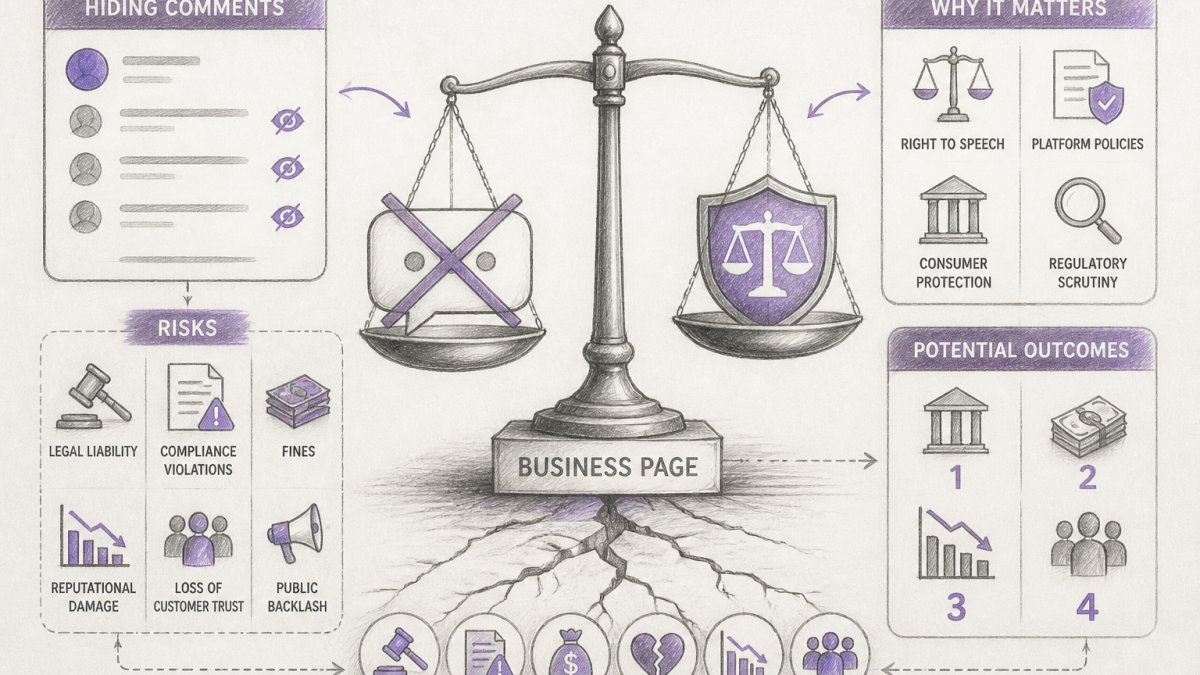
The legal risks of hiding comments on business pages stem from several sources.
FeedGuardians works with brands managing high-volume comment sections, and most don't understand the difference between hiding, deleting, and ignoring comments, that gap is where legal trouble starts.
The key distinction: hiding comments is visible only to you and the commenter. Deleting removes them entirely. When you selectively hide comments without a clear, documented policy, you signal bias.
Defamation and False Statements: When Hiding Crosses Into Liability
Defamation is the claim most business owners worry about when a comment attacks their reputation. But the narrower question is whether hiding a defamatory comment creates exposure that deleting it or leaving it up would not.
Where hiding changes the analysis is in three specific places:
-
Spoliation and evidence preservation. A hidden comment disappears from public view but remains in the platform's backend and may still be visible to the commenter and their connections. If litigation is reasonably anticipated, a demand letter, a cease-and-desist, a threatened suit, you have a duty to preserve relevant evidence, and letting a comment age out of a platform's retention window can look like destruction of evidence even if unintended. Export the comment, its timestamp, and the poster's handle before you hide it.
-
The "conscious disregard" inference. A plaintiff suing over a false statement usually must show actual malice (for public figures) or at least negligence (for private figures). Hiding a comment doesn't create malice, but a pattern of hiding only criticism while leaving equally false praise up can show you knew the claim existed and chose to suppress rather than correct it, an inference that strengthens when paired with a written policy you didn't follow.
-
The commenter's own claim. The person whose comment you hid is usually not your defamation plaintiff, they posted the allegedly false statement. Their claim, if any, is more likely to sound in contract (if your page terms promise a forum), platform-policy violation, or, for government pages, First Amendment territory. Private businesses generally have no obligation to host speech, so the risk isn't that they win a defamation suit; it's that their complaint triggers a regulator or journalist who reframes your moderation as censorship.
Hiding is not the same as endorsing. If you hide a false claim and then repost a similar claim yourself, or an employee amplifies it in a reply, you can lose the Section 230 shield for that content because you've effectively adopted it.
What matters more than hiding is responding with facts. A public reply correcting a false claim creates a record of good-faith engagement, the posture courts and regulators view as legitimate moderation rather than censorship. The safest sequence: export the comment, hide it only if it violates a written policy, log the reason, and respond publicly to the substance if the claim is false.
Can Businesses Delete Negative Comments Legally?
Yes, you can delete negative comments, but "negative" and "unlawful" are not the same thing.
The line is this: delete based on behavior, not opinion. "Your product is terrible" is opinion.
Courts have consistently ruled that businesses cannot delete negative comments just because they hurt feelings or damage reputation.
The practical rule: have a written policy that applies equally to all comments.
How to Respond to Negative Comments on Social Media
Responding to negative comments is almost always better than hiding or deleting them, it shows you're listening and creates a public record of your good faith.
Here's how to respond effectively:
- Acknowledge the concern. "We're sorry you had this experience" signals empathy.
- Don't make excuses. "We've improved our shipping process since then" beats "You didn't follow instructions."
- Take it offline when needed. For complex matters, ask the commenter to message you directly: "We'd like to help. Please send us a DM with your order number."
- Be honest about mistakes. "You're right, we should have responded faster" builds trust.
- Document your response. Keep screenshots of every response as evidence of good faith.
Responding publicly also shows potential customers how you handle problems, customers trust brands more when they see respectful, helpful replies to complaints.
The legal benefit: responding thoughtfully reduces the legal risks of hiding comments or being accused of censorship.
Building a Social Media Comment Moderation Policy for Businesses
A written moderation policy is your legal foundation, but a list of topics is not a policy. What protects you in a complaint, charge, or lawsuit is a documented decision workflow showing every moderator applied the same criteria to every comment, plus escalation thresholds for when a comment stops being a moderation decision and becomes a legal one.
The four actions, defined
Before you write criteria, define the actions precisely so moderators do not improvise:
- Preserve. Export the comment, timestamp, author handle, and any replies to your own records, an evidence step that should precede any hide or delete when a comment may be relevant to a dispute.
- Hide. Remove the comment from public view while leaving it in the platform's backend. Use for comments that violate policy but are not unlawful and do not require escalation.
- Delete. Remove the comment entirely. Reserve for content that is unlawful, threatening, or clearly outside any protected category, and preserve a copy first.
- Escalate. Route to counsel, communications, or law enforcement when the comment triggers one of the thresholds below.
The decision tree
Run every comment through the same sequence. Order matters: preserve before hide, hide before delete only when content isn't unlawful, and escalate before acting when a threshold is met.
Escalation thresholds
Set explicit triggers so moderators don't have to guess. Escalate when a comment:
- Contains a credible threat of violence against a named individual.
- Alleges a specific criminal act by a named employee or officer.
- Alleges a specific product defect or health harm detailed enough to suggest a real incident.
- Is accompanied by a demand letter, a charge, or a subpoena.
- Comes from a public figure, regulator, or journalist writing professionally.
- Appears coordinated with other comments in a way that suggests a campaign.
When a threshold is met, the moderator's job is to preserve and escalate, not decide. That separation keeps one tired moderator's judgment call from becoming the company's legal position.
What the policy document must contain
A defensible policy has six parts:
- Scope. Which pages, platforms, and comment types it covers.
- Prohibited content categories. Spam, hate speech, threats, harassment, false health claims, competitor links, doxxing, defined with examples, not adjectives.
- Action matrix. Which category maps to preserve, hide, delete, or escalate.
- Response standards. Which complaints get a public reply, in what tone, and within what window.
- Documentation requirements. What is logged for every action, by whom, and where it is stored.
- Review cadence. Who owns the policy and how often it is revisited as platform rules and state law change.
Consistency is the legal point
The policy protects you because it converts discretion into published rules. If you can point to the policy and show the same category of comment received the same action every time, you're much harder to characterize as biased or censorious. The legal risks of hiding comments come from inconsistency and undocumented judgment, not hiding itself. A specific, uniformly applied, logged policy is the cheapest legal insurance a page owner can buy.
Social Media Comment Moderation Tools and Legal Compliance
Managing comments manually is risky: you're tired, you miss things, you make inconsistent decisions. Automated tools keep you consistent, the foundation of legal protection.
The best moderation tools:
- Flag spam and hate speech automatically, reducing human bias.
- Log every action, hidden, deleted, or flagged, with a timestamp and reason.
- Let you set rules in advance so the tool applies them consistently.
- Escalate to humans when needed, letting you review flagged comments before acting.
- Integrate with multiple platforms, so you manage Instagram, Facebook, TikTok, and YouTube from one place.
FeedGuardians is built specifically for this. It automatically detects spam, hate speech, and competitor links with 98.7% accuracy, and it hides those comments in real-time. Because it's automated, every decision is logged and consistent.
The legal advantage of a tool is consistency: applying the same rules across thousands of comments eliminates the appearance of bias, enforcing guidelines that apply equally to everyone rather than arbitrary decisions based on mood or politics.
Evidence Preservation and Documentation: Protecting Yourself Legally
If you face a lawsuit or regulatory investigation over comment moderation, evidence is everything, you need to prove you acted in good faith, followed your policy, and didn't suppress comments for illegal reasons.
Start documenting now:
- Keep screenshots of every comment you hide or delete, including the date, commenter's name, and full text.
- Record your reason for action, "spam," "hate speech," "off-topic," "false health claim", be specific.
- Preserve your moderation policy, saving every version and documenting when and why it changed.
- Log your responses to complaints, keeping copies of every reply to a negative comment.
- Back up everything on your own servers or cloud storage, not just the platform.
Why it matters: if someone sues claiming you violated their rights by hiding their comment, you must show the comment existed, what it said, and why you acted.
The legal risks of hiding comments increase dramatically if you can't prove why you hid them.
Documentation also protects you from regulators: if the Federal Trade Commission or a state attorney general investigates whether you're suppressing consumer complaints, your records show you acted transparently and in good faith.
Managing comments on your business page is a daily responsibility with real legal stakes.
FeedGuardians automates this process. Start with a free trial and see how automated moderation can protect your reputation while keeping your comment section healthy and compliant. FTC guidance on social media endorsements and moderation and Section 230 of the Communications Decency Act provide the legal framework.
Frequently Asked Questions
Is it illegal for a business to hide negative comments on social media?
Hiding negative comments itself is not illegal, but the legal risk depends on what you're hiding and why. If you hide legitimate criticism or truthful negative feedback, you expose yourself to defamation claims if someone can prove you acted with intent to deceive or suppress truthful information. The safest approach is to hide only comments that violate platform rules, contain hate speech, or make false statements, not comments that are simply negative or critical of your product. Document why each comment was hidden.
What happens if I hide a comment that contains a true statement?
Hiding truthful comments creates legal and reputational risk. While you have the right to moderate your page, hiding factual criticism, even if it's negative, can trigger defamation counterclaims, consumer protection complaints, or platform enforcement action. Courts and regulators view selective hiding of truthful comments as potential evidence of bad faith. If a comment is true, respond to it or leave it visible. Reserve hiding for spam, false statements, or unlawful content only.
Should I keep records of comments I hide or delete?
Yes, absolutely. Maintaining records of hidden or deleted comments, including screenshots, timestamps, and the reason for removal, protects you if you're sued or investigated. Courts and regulatory agencies view documented moderation decisions as evidence of good faith. Without records, you appear to have hidden comments arbitrarily, which strengthens a plaintiff's case. Store records in a secure location, and include the original comment text, platform, date, and your reason for the action.
Can I be held liable for defamatory comments posted by others on my business page?
Generally, no, the Section 230 safe harbor of the Communications Decency Act protects business page owners from liability for user-generated comments. However, this protection does not apply if you edit, endorse, or repost a user's comment in a way that changes its meaning or adds your own defamatory statements. If you actively participate in creating defamatory content, you lose Section 230 protection. The safest approach is to hide or delete unlawful comments without engaging with them.
Tired of manually moderating comments?
FeedGuardians automates spam filtering, responds to customers, and protects your brand — setup in 3 minutes.
Frequently Asked Questions
Is it illegal for a business to hide negative comments on social media?
Hiding negative comments itself is not illegal, but the legal risk depends on what you're hiding and why. If you hide legitimate criticism or truthful negative feedback, you expose yourself to defamation claims if someone can prove you acted with intent to deceive or suppress truthful information. The safest approach is to hide only comments that violate platform rules, contain hate speech, or make false statements—not comments that are simply negative or critical of your product. Document why each comment was hidden.
What happens if I hide a comment that contains a true statement?
Hiding truthful comments creates legal and reputational risk. While you have the right to moderate your page, hiding factual criticism—even if it's negative—can trigger defamation counterclaims, consumer protection complaints, or platform enforcement action. Courts and regulators view selective hiding of truthful comments as potential evidence of bad faith. If a comment is true, respond to it or leave it visible. Reserve hiding for spam, false statements, or unlawful content only.
Should I keep records of comments I hide or delete?
Yes, absolutely. Maintaining records of hidden or deleted comments—including screenshots, timestamps, and the reason for removal—protects you if you're sued or investigated. Courts and regulatory agencies view documented moderation decisions as evidence of good faith. Without records, you appear to have hidden comments arbitrarily, which strengthens a plaintiff's case. Store records in a secure location, and include the original comment text, platform, date, and your reason for the action.
Can I be held liable for defamatory comments posted by others on my business page?
Generally, no—the Section 230 safe harbor of the Communications Decency Act protects business page owners from liability for user-generated comments. However, this protection does not apply if you edit, endorse, or repost a user's comment in a way that changes its meaning or adds your own defamatory statements. If you actively participate in creating defamatory content, you lose Section 230 protection. The safest approach is to hide or delete unlawful comments without engaging with them.