
Quick Summary
| Key Insight | What You Need to Know |
|---|---|
| Head over to your | Head over to your Meta Business Suite. |
| Find and click on | Find and click on “Inbox” in the menu on the left. |
| At the top of | At the top of your Inbox, look for the “Automations” icon (it’s the little lightning bolt). |
Setting up an auto reply for Facebook messages is your first line of defense in customer service. It’s the quickest way to let people know you've heard them, manage their expectations, and keep your Page looking active around the clock. These can be as simple as an instant "we got your message" or as sophisticated as a multi-step conversation that answers questions and gathers leads.
Why Smart Auto Replies Are a Game Changer
When it comes to customer conversations, speed is everything. An auto reply on Facebook Messenger is more than just a handy feature; it's a vital tool for building trust from that very first "hello." Think about it—when a potential customer reaches out, dead silence is the worst possible response. A quick, automated message instantly confirms you’ve received their question and sets a positive tone.
That immediate acknowledgment can be the difference between landing a new customer and losing them to a competitor who was just a little bit faster.
Even better, it's the key to earning Facebook's coveted "Very responsive to messages" badge. This little icon on your Page is powerful social proof, signaling to everyone that you're an active and attentive brand. If you're just starting, this easy guide to Automated Reply Facebook Messenger provides a great foundational overview.
The Rise of Messenger Automation
The need for this kind of automation really clicked into place after Facebook opened its platform to chatbots back in 2016. Suddenly, businesses and customers were exchanging over 8 billion messages per month. That's a scale no human team can handle alone.
Today, well-designed Messenger bots and auto-reply flows can field up to 80% of routine customer questions. This frees up your team to focus on the more complex issues that actually require a human touch.
An effective auto reply does more than just say "we got your message." It manages expectations by providing an estimated response time, directs users to helpful resources like an FAQ page, or even captures essential information to qualify a lead before a human ever steps in.
Ultimately, smart automation turns your Facebook Page from a static profile into a dynamic, helpful part of your customer service team. This kind of proactive communication is central to modern marketing and a huge part of what it takes to build a community. If you want to explore this further, we have a helpful guide on how to improve social media engagement that ties in perfectly with these strategies.
Getting Started with Facebook’s Built-in Auto-Replies
You don't need fancy, expensive tools to start automating your Facebook messages. Facebook actually gives you a solid set of free, built-in features right inside the Meta Business Suite. They’re perfect for getting your first line of defense up and running quickly.
The idea here is to cover the basics: letting people know you got their message, managing expectations when you're not around, and answering the most common questions before a human even has to step in. These native tools are your direct path to setting up an effective auto reply for Facebook messages, and any page admin can get them running in just a few minutes.
Finding Your Automation Hub
First, you need to know where to look. Everything you need is tucked away in the Meta Business Suite, which is your control center for both Facebook and Instagram.
Here’s where to go:
- Head over to your Meta Business Suite.
- Find and click on “Inbox” in the menu on the left.
- At the top of your Inbox, look for the “Automations” icon (it’s the little lightning bolt).
That "Automations" section is where you'll find the three main types of replies we’re going to set up.
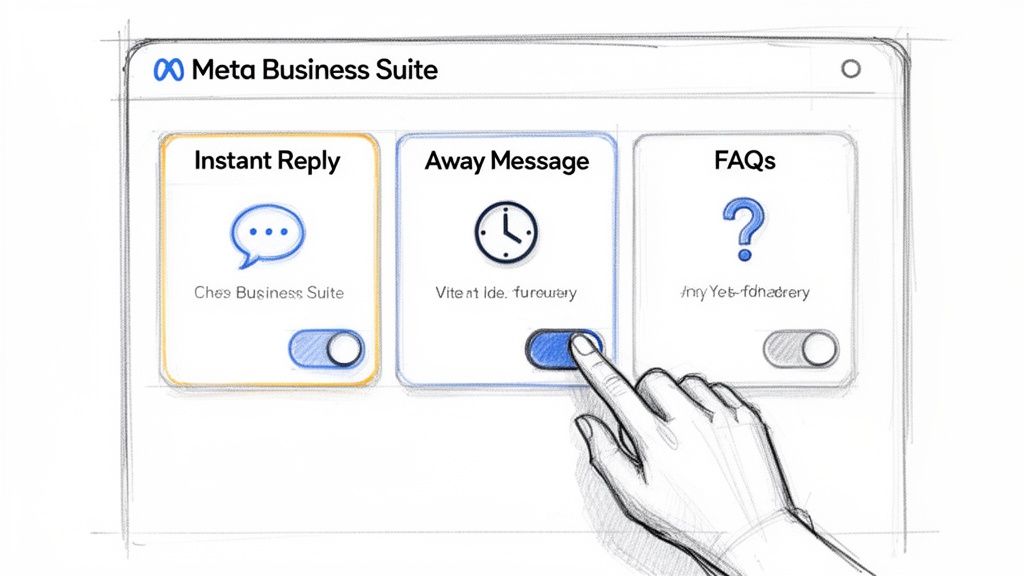
As you can see, it's a simple setup with easy-to-use toggles for each feature.
Configure Your Instant Reply
The Instant Reply is the most basic, and arguably most important, auto-response. It fires off the moment someone messages your Page for the first time. Its main job is simple: acknowledge the message and let them know what to expect next.
A good Instant Reply is friendly, confirms you got the message, and gives a realistic timeline for a personal response.
For example, a local boutique could set theirs to:
"Hey there! Thanks for reaching out to us. We've received your message and one of our style experts will get back to you within 24 hours. In the meantime, feel free to browse our new arrivals here: [link]"
This message nails it. It’s warm, sets a clear expectation for a reply (within 24 hours), and even gives them something to do while they wait.
Setting an Away Message
The Away Message is your out-of-office assistant. It automatically responds to messages that arrive outside of your set business hours, which is a lifesaver for handling late-night or weekend inquiries. No more leaving potential customers hanging.
For this to work, you have to set your business hours in your Page settings first. Once that's done, Facebook handles the rest, sending your Away Message to anyone who messages you when you're "closed."
A great Away Message could be something like:
"Thanks for your message! Our team has gone home for the day, but we'll be back in the office at 9 AM EST. We’ll respond to you first thing in the morning. Have a great evening!"
This is professional, informative, and tells the person exactly when they can expect to hear from a real human.
Use FAQs to Handle Common Questions
Finally, the Frequently Asked Questions (FAQs) feature is a game-changer for efficiency. It lets you build a menu of common questions that people can choose from as soon as they open a chat with your Page.
This is an incredibly powerful way to deflect simple, repetitive questions that eat up your team's time. Think about the questions you get over and over.
For an e-commerce store, that might be:
- What is your return policy?
- Where do you ship to?
- How can I track my order?
You pair each question with a pre-written answer, giving people instant solutions without them having to wait. It's a fantastic way to scale your customer service without scaling your team.
Choosing Your Auto-Reply Strategy
Once you've gotten the hang of Facebook's built-in features, you'll eventually hit a fork in the road and ask yourself: is this enough? The answer really comes down to what you're trying to achieve. Deciding whether to stick with Facebook’s native tools or jump to a dedicated automation platform is the biggest strategic choice you'll make for your Messenger marketing.
If your main goal is just to acknowledge messages and let people know you'll get back to them, the native tools are fantastic. They’re free, a breeze to set up, and do a great job handling the basics like away messages or simple FAQs. This is the perfect starting point for small businesses or anyone just beginning to see more messages coming in.
But if you want Messenger to be more than just a customer service inbox—if you want it to be an active part of your sales and marketing machine—you'll outgrow those basic features pretty quickly.
When to Upgrade to an Advanced Platform
The moment you want to do more than just respond—when you want to actually guide a conversation—it's time to look at more powerful tools. These platforms, like ManyChat or Chatfuel, let you move beyond simple, one-off replies and build interactive, multi-step conversational flows.
Think about these real-world situations. An upgrade makes sense when you need to:
- Qualify Leads: A real estate agent could build a flow that asks potential buyers about their budget, dream neighborhood, and how many bedrooms they need. The bot could then automatically tag the hot leads for immediate follow-up.
- Handle E-commerce Questions: An online store can set up keyword triggers. If someone types "track order," the bot can ask for their order number and pull a real-time status update by connecting to their shipping software.
- Book Appointments: A local salon could create a bot that shows available time slots and books appointments right inside Messenger, syncing everything with their main calendar.
These are things you simply can't do with the native tools. Building a solid customer relationship is about more than just fast replies; you can dig deeper into this by checking out some best practices for social media engagement that are totally relevant here.
The core difference is simple: Native tools are reactive, sending a single reply to an incoming message. Advanced platforms are proactive, capable of starting and directing a conversation based on user input and smart logic.
Comparing Your Options Side-by-Side
To help you see the differences clearly, let's put them head-to-head. This isn't about which one is "better," but about finding the right fit for your business right now.
Native Facebook Tools vs. Advanced Automation Platforms
| Feature | Native Facebook Tools | Advanced Automation Platforms |
|---|---|---|
| Complexity | Simple toggles and text boxes. Perfect for beginners. | Visual flow builders. Requires a bit of a learning curve. |
| Logic | Limited to basic triggers (first message, after-hours). | Complex logic, keyword triggers, and user segmentation. |
| Personalization | Basic (e.g., using a person's first name). | Dynamic personalization based on user answers and data. |
| Integrations | None. It's a closed loop within Facebook's ecosystem. | Connects to your CRM, email tools, calendars, and more. |
| Cost | 100% Free. | Monthly subscription fees, usually based on contacts. |
Ultimately, starting with Facebook’s tools is a no-brainer. But as your business grows and your ambitions get bigger, don't be afraid to explore what a more advanced platform can unlock for you.
Taking Your Messenger Automation to the Next Level
Facebook's built-in tools are a fantastic starting point for managing your inbox. But if you want to turn Messenger into a powerful engine for your business, you'll eventually need to look beyond the basics. This is where dedicated automation platforms really shine. They let you move past simple "we got your message" replies and start building smart, interactive conversations that actually guide customers, solve real problems, and drive your business forward.
Think of it this way: a basic auto-reply is like a receptionist who just takes a message. An advanced automation flow is like having a skilled team member who can answer questions, qualify leads, and even start the sales process, 24/7.
For example, imagine a customer messages your e-commerce page asking about "shipping." A simple reply might just link to your shipping policy. An advanced flow, on the other hand, could ask for their order number, ping your Shopify store in the background, and give them a real-time tracking update right there in the chat.
Choosing between a simple setup and a more advanced one really comes down to what you're trying to achieve.
This decision tree can help you figure out if your goals are best served by the native tools or if it's time to invest in a more robust automation platform.
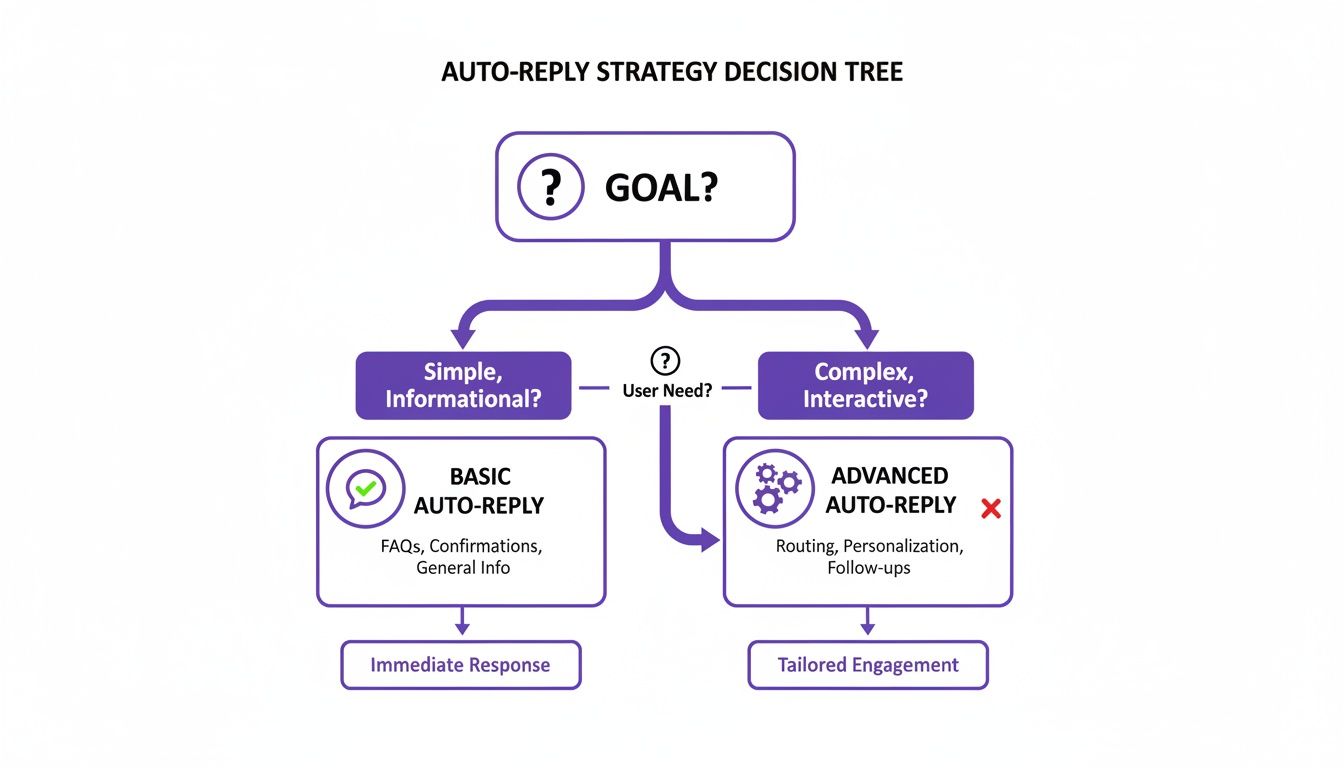
The bottom line is that your goal—whether it’s just acknowledging messages or actively nurturing leads—is what should dictate the technology you use.
Building Smart Workflows with Keyword Triggers
The real magic behind advanced automation begins with keyword triggers. These are simply specific words or phrases that kick off a pre-built conversational sequence when a user types them. This allows you to serve up hyper-relevant information in an instant.
Let's say you run a software company. You could set up triggers for common questions:
- "Pricing": This keyword could start a conversation that asks a couple of quick questions, like "How many people are on your team?" to guide them to the right pricing page.
- "Demo": This could launch a flow that offers a pre-recorded video tour or provides a link to book a live call with someone on your sales team.
- "Support": This trigger could walk the user through a few troubleshooting steps before offering to create a support ticket or connect them with a live agent.
See what's happening here? These flows don't just answer questions; they actively sort your audience based on what they need. Someone asking about pricing is a much warmer lead than someone asking a general support question.
By creating different paths for different user intents, you're not just managing your inbox—you're building a sales funnel right inside Messenger. This approach transforms customer service into a powerful opportunity for lead qualification.
Connecting Automation with Your Business Systems
The true power of these platforms is their ability to talk to the other tools you already rely on. A conversation doesn't have to stay locked inside Messenger. Through integrations, it can set off a chain of events across your entire tech stack.
Take a real estate agent using a Messenger flow to capture new leads. When someone messages their Page and provides their contact info and what they're looking for in a home, the automation platform can instantly:
- Create a new lead in their CRM (like Salesforce or HubSpot).
- Assign that lead to the right agent based on the desired neighborhood.
- Send an automated confirmation email to the prospect with the agent's details.
This kind of seamless integration gets rid of tedious manual data entry and ensures that hot leads get a follow-up right away. Speed and availability are huge wins here. An automated response helps brands earn those "Very Responsive to Messages" badges on Facebook, and some platforms have seen response times drop by 40%–100%. When you pair that speed with targeted flows, click-through rates can jump to anywhere from 15%–56%, with open rates often hitting 60%–80% in the first hour.
This level of connectivity is essential for any modern business. To learn more, check out our https://feedguardians.com/blog/customer-service-automation-complete-guide-2025. You can even extend your reach beyond Messenger by exploring automated SMS marketing for Facebook leads. By connecting your systems, you’re building an operation that’s more responsive, efficient, and ready to scale.
Crafting Auto Replies That Don't Sound Robotic
The biggest mistake I see brands make with automation is forgetting there's a human on the other side of the screen. An auto reply for Facebook messages should feel helpful and warm, not like you've just hit a digital brick wall. The goal is to build trust, not create a frustrating dead end.
It all starts with your brand’s voice. Are you fun and casual, or more buttoned-up and professional? Whatever your style, your automated messages need to match the tone people see in your posts and ads. Consistency is what makes automation feel like a seamless part of your customer experience, rather than a jarring interruption.
Set Clear Expectations Immediately
The single most important job of an auto-reply is to manage expectations. A customer who knows what to expect is a patient one. Leave them in the dark, and frustration builds fast.
Your first message should immediately answer two critical questions:
- What happens next? Let them know you got their message and it's in the queue.
- When will a person respond? Give them a realistic timeframe. Something like "within 24 hours" or "during our business hours, 9-5 PM EST," works perfectly.
This simple act shows you respect their time and instantly lowers any anxiety. It’s a small touch that makes a massive difference in how people perceive your brand.
Your auto-reply is your first promise to the customer. A message that says, "We'll get back to you within one business day," and then delivering on that promise, is a foundational step in building customer loyalty.
Give Them an Escape Hatch
Even the smartest automation can't handle every unique or sensitive issue. That's why every single one of your auto reply Facebook messages needs a clear, easy way for someone to reach a live person.
Think of it as an "escape hatch" that prevents a customer from getting stuck in a frustrating loop. It can be a simple button labeled "Talk to an Agent" or a quick line like, "If this is urgent, just type 'support' and we'll connect you with our team."
Making this option obvious shows you aren't trying to hide behind a bot. Crafting messages that connect is a skill, and many of the same principles apply when you learn how to write engaging blog posts in 2025—it's all about clarity and providing value.
Good vs. Bad Auto-Reply Examples
Let’s look at a couple of real-world scenarios to see how this plays out.
Scenario 1: Standard Welcome Message
- Bad: "Your message has been received. We will respond soon."
- Good: "Hey there! Thanks so much for reaching out. We've got your message and our team will get back to you within the next 4-6 business hours. Cheers!"
The "Good" example is friendly, sets a specific expectation, and has a touch of personality. The "Bad" one is cold and vague.
Scenario 2: After-Hours Message
- Bad: "We are currently closed."
- Good: "Thanks for your message! Our team is offline for the night, but we'll be back at it first thing at 9 AM EST. We'll reply to you then. Have a great evening!"
See the difference? The "Good" version is polite, gives a precise time for the follow-up, and ends on a positive note. It turns a potential roadblock into a pleasant interaction.
Common Questions About Facebook Auto Replies
Even with a solid plan, a few questions always seem to pop up when you're setting up auto-reply Facebook messages. Let's tackle some of the most common ones so you can get your automation running without a hitch.
Will Using Auto Replies Hurt My Page Engagement?
It's a fair question, but the answer is usually the opposite. When done right, auto-replies can actually give your engagement a serious boost.
Why? Because you're responding instantly. That speed and reliability help you earn Facebook’s coveted “Very responsive to messages” badge. Think of it as a little seal of approval that shows potential customers your Page is active and you care about getting back to them quickly.
The trick is to avoid sounding like a robot. A great auto-reply is helpful. It either points the user in the right direction or clearly explains when a real person will jump in. This simple step heads off frustration and keeps the conversation going, which is fundamental to building a solid online reputation. You can dig deeper into this topic with this online reputation management guide for 2025.
Can I Automate Replies to Facebook Group Comments?
This is where a lot of people get tripped up. While you have a ton of options for automating direct messages to your Facebook Page, automating public comments inside a Facebook Group is a whole different ballgame.
Meta has tightened up its API policies over the years, which means most third-party tools can no longer post comments automatically in Groups for you. It's a measure to cut down on spam. So, while some software can help you monitor what's happening in your Group, the ability to auto-reply directly to comments just isn't there anymore. Automation is really built for the private, one-on-one channel of Messenger.
Key Takeaway: Keep your auto-reply strategy focused on your Facebook Page's Messenger inbox. That's where Facebook gives you the official tools and permissions to create helpful, automated conversations with people who message you.
What About Sending Promotions or Ads?
You have to tread very carefully here. Facebook has strict rules about sending promotional content through Messenger to avoid spamming users.
The big one to remember is the 24-hour rule. You are only allowed to send messages that contain a promotion within 24 hours of the last time that person messaged your Page.
For example, if someone asks about a current sale, your auto-reply can absolutely include a relevant discount code. That’s a direct, helpful response. What you can't do is use auto-replies to blast out unsolicited ads to everyone who has ever messaged you. For that kind of mass promotion, you'll need to look into sponsored messages or get very clear, explicit opt-ins from your audience first.
Ready to stop worrying about spam and start engaging real customers? FeedGuardians uses AI to automatically hide harmful comments and reply to customer questions in real-time, turning your comment section into a conversion engine. Learn more and start your free trial at https://feedguardians.com.
Tired of manually moderating comments?
FeedGuardians automates spam filtering, responds to customers, and protects your brand — setup in 3 minutes.