
Quick Summary
| Key Insight | What You Need to Know |
|---|---|
| Instant replies keep leads | Instant replies keep leads hot. |
| A unified brand tone | A unified brand tone builds trust. |
| Complex questions get routed | Complex questions get routed to human specialists. |
Automated replies on Instagram pick up the pace when your audience is active. By tagging certain keywords, you trigger instant messages the moment comments arrive. That means brands can capture leads and slash response times—all without a single manual reply.
Understanding The Value Of Automated Comments On Instagram
Picture a cosmetics line dropping a new Reel and seeing 300 comments in under an hour. It’s a gold mine of engagement but a nightmare to handle by hand. Automation swoops in, routing common queries to predefined replies so conversations never stall.
In another case, an ecommerce team ran an ad that attracted 500+ questions overnight. Instead of burning hours on routine answers, they let a tool spot intent keywords and fire off a first-touch message. Meanwhile, their support crew tackled the tougher issues.
Brands that answer within minutes see up to 9x higher conversions, according to recent data. Faster responses turn casual browsers into direct messages—and, ultimately, sales. For more strategies on boosting interactions, check out our guide on improving social media engagement.
- Instant replies keep leads hot.
- A unified brand tone builds trust.
- Complex questions get routed to human specialists.
Speed Drives Conversions
A beauty label added auto-replies to its comment threads and watched DM traffic jump 3x within days. That uptick translated into a 15% spike in promo-code redemptions almost immediately.
Below is a snapshot showing how median engagement rates shifted on Instagram from January 2024 to January 2025.
Organic engagement slid from 2.94% to 0.61% over that year, highlighting why swift, automated comments matter more than ever. According to platform reports, Instagram’s active user base will hit roughly 2.0 billion by 2025, with ad reach near 1.74 billion. Learn more about Instagram metrics on RecurPost.
Businesses responding within minutes are up to 9x more likely to convert leads, making comment triggers a measurable growth lever.
Consistent Brand Voice
Keeping every reply on-brand is tough when volume spikes. Automation platforms let you build and rotate response templates, so messages feel natural rather than robotic.
In practice, teams schedule quarterly audits of their canned replies—tweaking slang, updating seasonal promos, and freshening tone. This approach cuts manual workload by over 70% during peak seasons.
One sports retailer relied on auto-replies to answer preseason sale questions. The result? A 45% surge in DM engagement and happier customers who felt seen.
Teams stay agile and customers feel noticed instantly—a win for everyone.
Choosing The Right Tools For Automated Comments Instagram
Picking a comment management platform can feel like facing a huge buffet without a menu. One vendor touts AI-driven filters, another promises instant rule enforcement, and yet another dazzles with analytics graphs. Instead of chasing every shiny feature, focus on the trade-offs that matter most to your team.
Some groups balk at setups that demand coding against Instagram’s Graph API. Others are happy to click through a plug-and-play interface. Think through your resources: developer hours versus training time, monthly budget versus long-term scalability.
Design teams I’ve worked with gave FeedGuardians high marks for letting them craft moderation rules in under three minutes. Meanwhile, NapoleonCat users applaud sentiment filters but wish for more CRM connectors. And if you lean on the native Instagram API, be ready to involve someone who speaks code.
Comparison Of Top Instagram Comment Automation Tools
Here’s a side-by-side look at leading platforms. Use this to match features, price points, and integration options against your project needs.
| Tool Name | Key Features | Pricing | Integration |
|---|---|---|---|
| FeedGuardians | Real-time rule enforcement, spam hiding, intent analysis | Starts at $49/mo | CRM plugins, API |
| NapoleonCat | Sentiment filters, analytics dashboard, bulk actions | From $25/mo | Native integrations |
| Instagram API | Full customization, high throughput | Free | Direct API calls |
Whether you’re a small team or an enterprise, this chart helps you zero in on the best fit without getting lost in marketing speak.
That dashboard snapshot shows just how intuitive FeedGuardians’ rule-builder is. Keyword triggers, live monitoring and quick toggles all live on one screen—no hidden menus.
Critical Demo Questions
Before you sign any contract, run through these checks in your demo:
- Can you create custom triggers based on sentiment, tags or keywords?
- Is there an option to cap reply volume limits and prevent flooding?
- How straightforward is the CRM connection to tools like Salesforce or HubSpot?
Falling short on any of these can mean a costly workaround later.
“Evaluating custom triggers early helped one team avoid a costly rewrite.”
By 2025, many ad campaigns will handle 70–90% of routine comments automatically, keeping false positives under 10%. With 1.74 billion users on Instagram and engagement rates of 0.5–1.5%, that scale makes a huge difference. For the full deep dive, check out the research from NapoleonCat.
Feature Highlights
- Real-time rule enforcement instantly hides spam
- Sentiment filters flag negative or offensive language
- Dashboards track reply speed, approval rates and more
For more on moderation options, see Explore moderation tools at FeedGuardians.
Choosing wisely here means protecting your brand and saving hours of manual work. The right balance of setup effort, feature depth and support responsiveness sets you up for smooth scaling.
Integration Considerations
APIs and connectors vary widely—plan ahead to avoid surprises:
- API rate limits and throughput constraints
- Prebuilt connectors for Salesforce, HubSpot, Zendesk
- Webhook support for real-time notifications
Run your own pilot, track any errors in a sandbox, and watch for edge cases. That early testing reveals hidden costs, setup time, and volume hiccups before they hit production.
Budget for extra seats or higher tiers, and weigh vendor response times as part of your selection criteria. A little planning now saves headaches later.
Creating Effective Moderation Rules
A solid set of moderation rules is the heart of any automated Instagram comment system. It helps you sort through hundreds of replies without missing critical issues or sounding off-brand. By grouping phrases into clear categories, you keep your responses sharp and on point.
For instance, a mid-sized fashion label once split keywords into three buckets—spam, negative feedback, and purchase inquiries—to trigger workflows that felt natural and timely.
- Spam terms get blocked before cluttering your feed
- Negative words ping your support team immediately
- Intent phrases fire off helpful auto-replies
Tagging high-frequency words with custom labels also speeds up audits and reporting, giving you a quick snapshot of audience sentiment.
Building Keyword Sets
Start with your own comment history. Export past conversations and highlight recurring themes that mattered most.
Positive signals like “love,” “thank you,” and “😍” can amplify good vibes. On the flip side, words such as “late,” “broken,” or “not delivered” flag real problems.
- Sample Positive List: “awesome,” “got it,” “💯”
- Sample Negative List: “delay,” “worst,” “refund”
Every quarter, run a scan for slang or regional expressions—you’ll often pick up 20–30 new terms. Always test new keywords in a sandbox first to prevent over-blocking genuine praise.
“We avoided burying valid praise by running keyword tests in staging first,” says a community lead.
Setting Actions And Hierarchies
Once your keyword sets are locked down, decide how each should be handled. Clear action mapping keeps your feed tidy and your team focused.
- Hide spammy or offensive comments immediately
- Delete botlike patterns on repeat
- Tag complex issues for a human review
Arrange these rules so urgent customer queries rise to the top, and promotional autoposts sit lower. Linking tags to Slack or email alerts brings human reviewers into the loop exactly when you need them.
Audits And Version Control
Language evolves, and so should your rules. A quarterly audit helps you catch new trends before they slip through.
- Keep an audit log for every rule change
- Review updates with your team every 3 months
- Roll back misfiring rules in one click
Treat your rulebook like code: a Git-style commit history ensures every tweak is timestamped and reversible. When a term like “sick” flips tone overnight, you’ll adapt before anyone notices.
“Collaboration across teams cut moderation errors by 40%.”
Align your rules with marketing and support teams. Share weekly update reports and maintain a shared glossary of approved terms to keep everyone on the same page.
Learn more about automated comment workflows in our detailed guide on effective comment moderation.
Setting Up Auto Replies And Workflows
When a comment pops up on your Instagram post, you don’t want to let potential customers slip away. By connecting your automation platform—whether directly via Instagram’s API or through a partner app—you can transform static comments into personalized interactions in seconds.
Imagine running a flash‐sale campaign: the moment someone types “half‐price” or “sale now,” an auto‐reply bot launches a direct message funnel, guiding that user toward checkout without any manual delay.
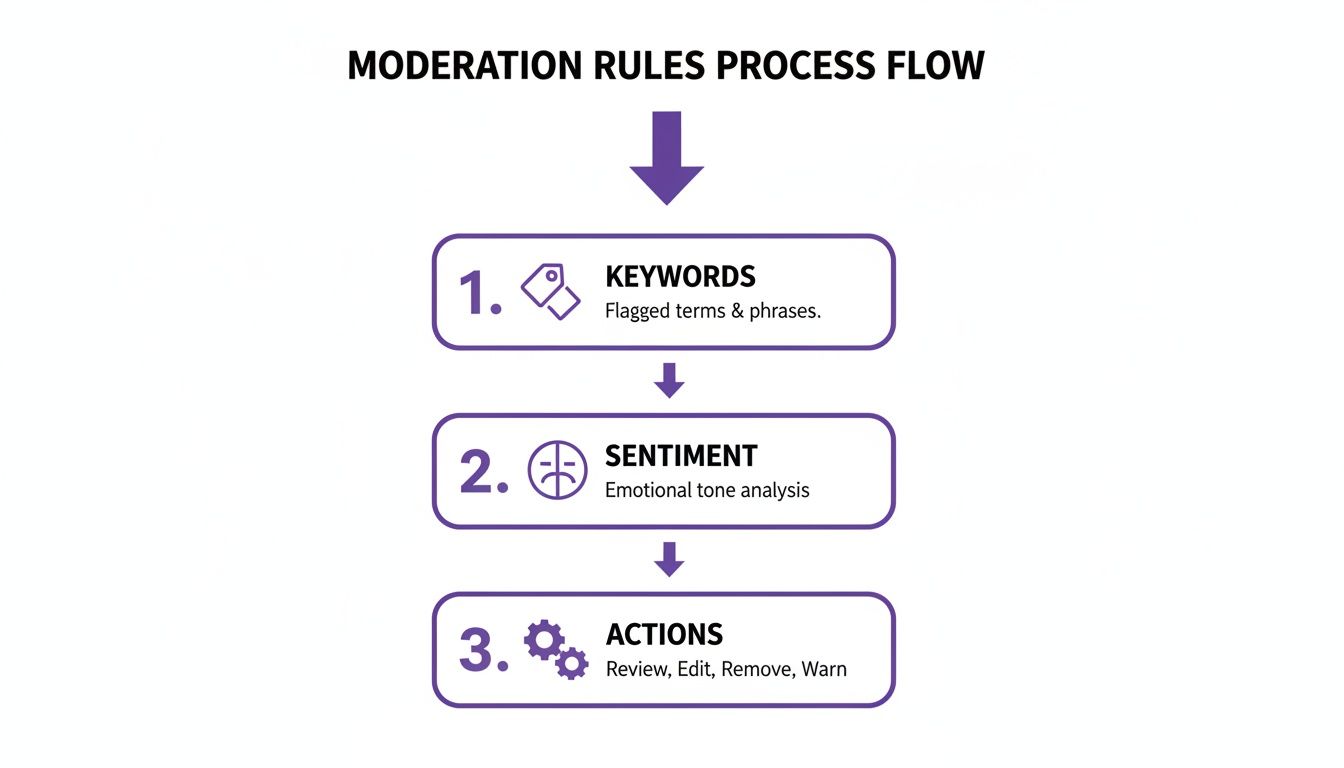
This graphic breaks down how comments get filtered by rules, sentiment analysis kicks in, and tailored replies roll out. Tweak your keyword lists and sentiment thresholds to scale your response volume up or down, depending on campaign intensity.
Mapping Triggers To Dynamic Templates
First, list the words or phrases that signal different user intents—like “order,” “price,” or “webinar.” Next, craft message templates that slot in user names or product details automatically. By creating a handful of variations (we recommend up to five per template), you avoid looking robotic and keep your account in good standing.
Key Template Examples:
- Product Inquiry: Sends a DM with specs and a shop link.
- Webinar Signup: Delivers the registration URL and event highlights.
- Feedback Request: Thanks the user and asks for a quick rating.
Before going live, test everything in a staging space to catch hiccups early and refine your wording.
Tracking Key Metrics For ROI
Automation really shines when you compare comment volume before and after setup. One brand saw comments jump from 10 per day to 500 per hour—and snagged 64 orders out of roughly 100 engaged users, hitting about a 6% conversion rate during a live flash sale. Dive deeper into these results in this vendor case study from Spurnow.
Marketers typically keep an eye on:
- Conversion Rate From Comment‐Triggered DMs
- Click‐Through Rate On Automated Links
- Coupon Redemption Rate
You can also explore our guide on Instagram DM strategies for more advanced workflows: Instagram DM Automation Workflows
Automating replies effectively can handle thousands of comments per hour without extra staff, turning engagement spikes into revenue streams.
Wrap up each week with a quick performance audit—update keywords, swap out stale message variants, and involve your team to roll out rule changes. These small tweaks keep your auto‐reply engine sharp, aligned with brand voice, and ready to convert at every peak.
Measuring Performance And Ensuring Safety
Keeping a close eye on how your automated comments perform is the best way to avoid unexpected pitfalls and protect your Instagram presence. I’ve seen teams pivot their entire strategy simply by spotting a lag in response time or a spike in moderation errors.
Digging into metrics—like the conversion rate from comment-triggered DMs—turns raw engagement into real business insight. Combine that with moderation accuracy and speed, and you’ll know exactly where to tighten up before rolling out your next major push.

Key Performance Metrics
Here’s an at-a-glance view of the core indicators you should track to keep your automated comment system healthy and effective:
Key Performance Metrics for Automated Comments Instagram
| Metric | Description | Target |
|---|---|---|
| Conversion Rate From DMs | Share of users who take action after receiving an automated DM | 6–10% |
| False-Positive Moderation Rate | Percentage of genuine comments mistakenly hidden or removed | Under 5% |
| Average Time To First Response | Interval between comment posting and automated public reply | Under 60 seconds |
| Throughput During Peak Volume | Volume of comment replies processed per hour | 500+ comments per hour |
By benchmarking these figures, you’ll have clear thresholds for spotting trouble early and fine-tuning your rules as conversation volumes change.
Load Testing And Rate Limits
Before you go live, simulate a flood of comments to see how your setup holds up. I usually run a mock campaign that mimics a viral post—hundreds of messages in minutes—to make sure nothing breaks.
Key tactics I rely on:
- Generate test comments at scale using our internal load tool
- Watch API call rates closely to dodge Instagram’s rate caps
- Build in exponential backoff when you hit thresholds
- Schedule these tests ahead of product launches or big announcements
This prep work keeps your account from tripping spam flags when real engagement surges.
Legal Checkpoints And Privacy
Handling user data responsibly isn’t optional. Instagram’s terms and global privacy laws demand transparency about how you collect and use comment information.
Practical steps that saved us headaches:
- Present clear opt-in prompts before sending automated DMs
- Maintain an archive of consent logs for every interaction
- Review data retention schedules with your legal advisor quarterly
- Encrypt comment data at rest to guard against unauthorized access
“Keeping audit trails ready nailed down our compliance review in record time,” recalls a compliance lead I spoke with last month.
Benchmarking Live Campaigns
Nothing beats real-world testing when setting your targets. Take a travel brand I worked with: during a summer flash sale, they ran automated comments and saw a 8% conversion rate from DMs. That live result became the benchmark for all future promotions.
Typical performance ranges include:
- Seasonal promotions: 5–8% conversion from comment DMs
- Product launches: under 2% false-positive rate
- Influencer collaborations: roughly 90 seconds average reply time
Adjust your sentiment thresholds on days with heavier traffic to reduce false hits without slowing replies.
“When our response time spiked during an influencer event, we tweaked batch sizes and saw immediate improvement,” notes a social media lead.
Example Audit Dashboard
A simple, color-coded dashboard can be a game-changer for busy teams. I like setting up a view that highlights each KPI next to its monthly target, with green for on-point and red for alerts.
| KPI | Current Month | Target Range |
|---|---|---|
| Conversion Rate From DMs | 7.2% | 6–10% |
| False-Positive Moderation Rate | 4.5% | Under 5% |
| Average Time To First Response | 45 seconds | Under 60s |
| Peak Throughput | 620 comments/hr | 500+ comments/hr |
Embedding this snapshot into your team chat ensures everyone sees trends as they happen, so you can course-correct in real time.
Weekly Audits And Dashboards
Routine check-ins stop performance drift before it starts. Every week, I recommend you:
- Export your latest KPI report and stack it against targets
- Tweak moderation sensitivity based on false-positive patterns
- Refresh sentiment keyword lists to catch new slang
- Share highlights with stakeholders for full transparency
- Log any rule changes along with the “why” behind them
For deeper context on how comment data ties into broader brand health, check out our guide on social media sentiment analysis tools.
With a steady rhythm of audits and real-world benchmarks, you’ll keep your automation sharp, robust, and fully compliant—setting you up to turn Instagram comments into genuine business outcomes.
FAQ
What Is Automated Comments Instagram And Why Use It
Automated comments Instagram refers to tools that monitor your feed and send replies based on rules you define. Brands rely on this approach to capture leads in real time and ease the burden of manual moderation.
- Instant responses in under 60 seconds
- Consistent messaging that reinforces trust during spikes in activity
- Smart routing of complex queries to your support team, keeping interactions personal
Which Instagram APIs Support Comment Automation
You can work directly with the Instagram Graph API if you have developer resources and want full control, despite its rate limits. On the other hand, platforms like FeedGuardians and NapoleonCat layer on sentiment filters, CRM integrations, and advanced reporting. Both paths keep you compliant with Instagram’s policies—pick the one that fits your workflow.
“Combining API compliance with partner tools cut moderation errors by 40%,” a social media lead shared.
How Do I Avoid Spam Flags When Automating Comments
Keeping your automation under Instagram’s radar is all about pacing and variety. Space out replies, randomize intervals, and never rely on one single message template.
- Simulate busy days with load tests to catch rate-limit issues early
- Rotate at least 5 distinct reply templates to prevent repetition
- Audit logs weekly to identify and correct false positives
What KPIs Should I Track For Comment Automation Success
To turn engagement into improvement, focus on a handful of core metrics. Track how many comments convert to direct messages, monitor your moderation accuracy, and measure reply speed.
| Metric | Description | Target |
|---|---|---|
| Conversion Rate From DMs | Users who take action after receiving a DM | 6–10% |
| False-Positive Moderation Rate | Genuine comments mistakenly hidden or removed | Under 5% |
| Average Time To First Public Response | Interval between comment and automated reply | Under 60s |
Ready to step up your comment management game? Discover more with FeedGuardians at FeedGuardians.
Tired of manually moderating comments?
FeedGuardians automates spam filtering, responds to customers, and protects your brand — setup in 3 minutes.