
Quick Summary
| Key Insight | What You Need to Know |
|---|---|
| Safety and Compliance | You have to use Meta-approved tools. This keeps your account safe and automatically filters out all the spam and junk comments you don't want. |
| Relevance and Personalization | Your automated replies need to sound like you. They should match your brand voice and actually address what the user is asking, making the whole thing feel natural. |
| Measurement and Optimization | You need to track what's working. Keeping an eye on the right metrics will show you exactly how your automation is affecting engagement and sales. |
Automated comments on Instagram aren't what you might think. We're not talking about spam bots. We're talking about using smart software to instantly reply to people based on rules you set up. It’s a way to manage a flood of interactions, give people instant answers, and get a nice little boost from the Instagram algorithm.
When done right, this kind of instant engagement can make a huge difference for your customer experience and, ultimately, your sales.
Rethinking Instagram Engagement with Automation
Let's be honest, the word "automation" can sound a bit scary. It often brings to mind those generic, cringey bot comments we’ve all seen. But modern comment automation is a completely different beast. It's a sophisticated way to manage real conversations at a scale that's impossible for humans to keep up with, not a tool for faking them.
Think about it. If you're a growing brand or you've just launched a massive campaign, trying to reply to every single comment is a recipe for burnout. Your team just can't keep up.
This is where intelligent automation becomes your secret weapon. It’s not a risky shortcut; it's a system built to give your audience immediate value. Imagine someone comments on your post asking for the price. Instead of them waiting hours for a reply, an automated response can instantly pop up, guiding them to your DMs for the details. That immediate touchpoint is everything when it comes to capturing someone's interest at its peak.
The Shift from Manual to Strategic Engagement
The real magic of automating comments is how it handles all the simple, repetitive questions. This frees up your social media managers to jump into the more complex, high-touch conversations that truly need a human.
A solid strategy really comes down to three things:
- Safety and Compliance: You have to use Meta-approved tools. This keeps your account safe and automatically filters out all the spam and junk comments you don't want.
- Relevance and Personalization: Your automated replies need to sound like you. They should match your brand voice and actually address what the user is asking, making the whole thing feel natural.
- Measurement and Optimization: You need to track what's working. Keeping an eye on the right metrics will show you exactly how your automation is affecting engagement and sales.
When you nail these three pillars, your comment section transforms from a chaotic mess into a powerful conversion funnel. The goal is never to replace your team, but to give them superpowers so no customer is ever left hanging.
Boosting Visibility Through Instant Interaction
Here's another huge benefit: automated comments can give your content a serious visibility boost. The Instagram algorithm absolutely loves posts that get a lot of engagement right away. It sees that activity as a signal that your content is interesting and worth showing to more people.
When you instantly reply to a comment, you're immediately doubling the comment count for that interaction. That's a quick, easy algorithmic win. We've seen this play out with brands during big events. For instance, the Indian apparel brand Libas used this exact strategy during a live sale and managed to convert 64 orders from just over 100 commenters. That’s a crystal-clear line from engagement straight to revenue.
This approach doesn't just help one post; it lifts your entire social media presence. By being hyper-responsive, you're not only making your followers happy, but you're also telling the algorithm that your account is active and valuable. Over time, that can lead to much better reach across the board. For more tips, check out our guide on how to improve social media engagement.
Designing Your Smart Commenting System
Alright, let's get into the nitty-gritty. Moving from why you should automate comments to how you actually do it is where the magic happens. This isn’t about just flipping a switch; it's about building an intelligent system that gets the nuance of human conversation and genuinely helps your audience.
Think of it as creating a smart filter. A well-designed system handles all the low-hanging fruit—the same questions you get a dozen times a day—freeing up your team to focus on the conversations that really need a human touch.
Building Your Foundation with Triggers and Rules
The heart of any smart commenting setup is its ability to react to specific triggers. These are the words, phrases, or even the general vibe of a comment that kicks your automation into gear. You're basically teaching the system what to listen for and how to respond when it hears it.
First, map out the most common comments you see. If you run an e-commerce brand, you probably know these by heart:
- Price Inquiries: Keywords like "price," "how much," or even just "$$$."
- Product Details: Common questions like "is this available in blue," "what's it made of," or "more info please."
- Shipping Questions: Anything with "shipping," "delivery," or "do you ship to Canada."
Once you've got your list, you can build a specific rule for each. A comment with "price" could trigger a public reply saying, "Hey! Just sent you a DM with all the details 😊," while it simultaneously shoots a private message to their inbox with a direct link to the product page.
This is all about moving people smoothly from curiosity to action.
As you can see, the goal isn't just to talk. It's to guide the user toward a meaningful next step.
Layering in Sentiment and Intent Analysis
Keyword triggers are a great start, but what about the tricky comments where context is everything? This is where sentiment analysis becomes your best friend. A comment like, "OMG, your new dress is amazing!" is a world away from "My dress arrived damaged!"—even though both mention the exact same product.
A smart system can tell the difference between positive, neutral, and negative feelings.
- Positive Comments: Automate a warm thank-you reply.
- Neutral Questions: Trigger your standard informational response.
- Negative Feedback: Immediately flag the comment for a real person to review.
The absolute worst thing you can do is send a cheerful, automated "Thanks for your comment!" to a genuinely upset customer. Sentiment analysis stops these brand-damaging mistakes in their tracks and makes sure urgent issues get escalated immediately. This is also where exploring different Instagram moderation tools can really pay off.
Real-World System Design Scenarios
Let's make this practical. Here’s how two very different businesses might set up their systems.
Scenario 1: The Fashion Retailer
A clothing brand just dropped a new collection and the comments are flooding in. Their system is set up to:
- Identify Buying Signals: It looks for comments with "price," "buy," or "link" and instantly sends a DM with a direct shopping link.
- Answer Sizing Questions: For any comment containing "size" or "fit," it DMs a link to their sizing guide.
- Zap Spam: It automatically hides comments with shady links or self-promotion.
Scenario 2: The SaaS Company
A software company is running a campaign for an upcoming webinar. Their automation is built to:
- Capture Leads: It triggers on comments with "webinar," "register," or "sign me up." It then posts a public reply and DMs the registration link.
- Handle FAQs: It answers questions about the time or topic by sending a link to the webinar landing page.
- Flag Technical Questions: If a comment mentions something specific like "integration" or "API," it tags a support specialist to jump in with a detailed answer.
As we look toward 2025, the tools for this have become incredibly sophisticated. Modern platforms use AI not just to answer questions, but to actively protect your ad comments by filtering out spam and harmful content before most people even see it. This keeps the experience on your ads clean and positive, which is absolutely critical as Instagram's role in advertising just keeps getting bigger.
How to Write Automated Replies That Actually Sound Human
Automating your Instagram comments is a game-changer for staying on top of engagement, but there’s a catch: nobody wants to talk to a robot. Your goal isn't to trick people, but to give them a quick, genuinely helpful response that feels like it came from your brand.
A well-written automated reply can make a follower’s day. A generic one can make them scroll right past you. The secret sauce is a mix of personality, variety, and a clear purpose for every message.
Nail Your Brand Voice in Every Reply
First things first: your automated replies have to sound like you. If your brand is fun and a little quirky, your auto-replies should be too. If you’re more buttoned-up and professional, keep that same energy. Consistency is everything when you're building trust.
Think about a common comment, like someone asking for the price. The robotic way is a flat "DM sent." But what if you did it with a little personality?
- For a fun, youthful brand: "You got it! ✨ Details are sliding into your DMs now."
- For a polished, premium brand: "Happy to help. We've sent the product information to your inbox."
See the difference? These tiny adjustments show you've put thought into the entire customer experience, even the automated parts.
Pro Tip: Don't let automation strip away your brand's personality—use it to scale it. Write every reply as if your best social media manager were typing it out by hand, every single time.
Why Spintax is Your Best Friend
Nothing screams "BOT!" louder than seeing the exact same reply copied and pasted a dozen times under a post. It looks spammy to your followers and can even get your account flagged by Instagram. This is where spintax comes in.
Spintax is a simple formatting trick that lets you create tons of sentence variations from a single template. You just use curly braces {} to group your options and a pipe | to separate them. The tool then randomly picks one option each time it posts.
So, instead of a static reply like this:Hey there! We just sent the info to your DMs. Let us know if you need anything else!
You can create a dynamic one that always feels different:{Hey there!|Hi!|Hello!} We've just {sent|popped|dropped} the info {into your DMs|over to your inbox}. {Let us know if you need anything else!|Feel free to reach out with more questions!}
This one simple technique keeps your replies fresh, prevents your comment section from looking robotic, and helps keep your account in good standing with the platform.
Building Your Reply Playbook for Common Scenarios
You'll quickly notice that most comments fall into a few key categories. Building a solid library of reply templates for these common situations means you're always ready with a relevant, helpful response. For more on this, it's worth learning about how to manage the different kinds of bots commenting on Instagram to refine your own automation rules.
Here are a few essential scenarios you should plan for:
Automated Reply Template Comparison
It's one thing to talk about good and bad replies, but it's another to see them side-by-side. The table below shows just how big of an impact a little personalization can have. Notice how the "Effective" replies acknowledge the user's specific comment and feel much more conversational.
| User Comment Scenario | Generic (Poor) Reply | Effective (Human-like) Reply |
|---|---|---|
| Price Inquiry: "How much is this?" | "DM sent." | "Great question! ✨ We just slid the price and a direct link into your DMs for you." |
| Giveaway Entry: "Done!" | "Entry confirmed." | "You're in! 🎉 Just sent you a DM to confirm. Fingers crossed and good luck!" |
| Positive Feedback: "I love this so much!" | "Thanks." | "That's so awesome to hear! Comments like this seriously make our day. ❤️ Thank you!" |
| Product Question: "Does it come in blue?" | "Check our website for details." | "It sure does! 💙 Popping a DM over to you now with the link to the blue version." |
The takeaway is clear: a little effort in crafting your templates goes a long way in making your community feel seen and valued, even when a system is doing the heavy lifting.
Price & Product Inquiries
This is probably the most frequent comment you'll automate. The strategy is simple: acknowledge them publicly, then pull them into a private DM to give them the details and a clear call-to-action.
- Public Reply: "Great question! We're sending all the details your way via DM right now. 😊"
- Private DM: "Hey [Username]! Here is the link to the product you asked about: [link]. We're offering 15% off for the next 24 hours!"
Giveaway or Contest Entries
For any kind of campaign, your automation needs to confirm that their entry was received and tell them what to do next. This avoids confusion and makes the process smooth.
- Public Reply: "Thanks for entering! 🎉 We just DMed you to confirm your entry. Good luck!"
- Private DM: "You're in! To finalize your entry, just reply with your email below so we can notify the winner. 👍"
General Compliments or Positive Feedback
When someone leaves a nice comment, you absolutely want to acknowledge it! This builds community and encourages others to share positive feedback, too.
- Public Reply: "Thank you so much! 🙏 We're so glad you love it. Your support means the world to us!"
- Public Reply Variation: "That's so kind of you to say! Comments like this make our day. ❤️"
Turning Comments into Conversions with DMs
Automating public comments is great for keeping your engagement numbers up and your posts looking lively. But the real magic happens when you move that public chatter into a private conversation. This is where you turn a casual scroller into a genuine lead.
By strategically connecting your automated comment replies to your Direct Messages, you’re essentially building a seamless sales funnel. It’s a smooth path that guides someone from simple curiosity all the way to a potential sale.
The whole thing kicks off in your post caption. You create a clear call-to-action that asks for a specific keyword in the comments. Instead of the old "link in bio," you're inviting people to actively ask for something valuable.
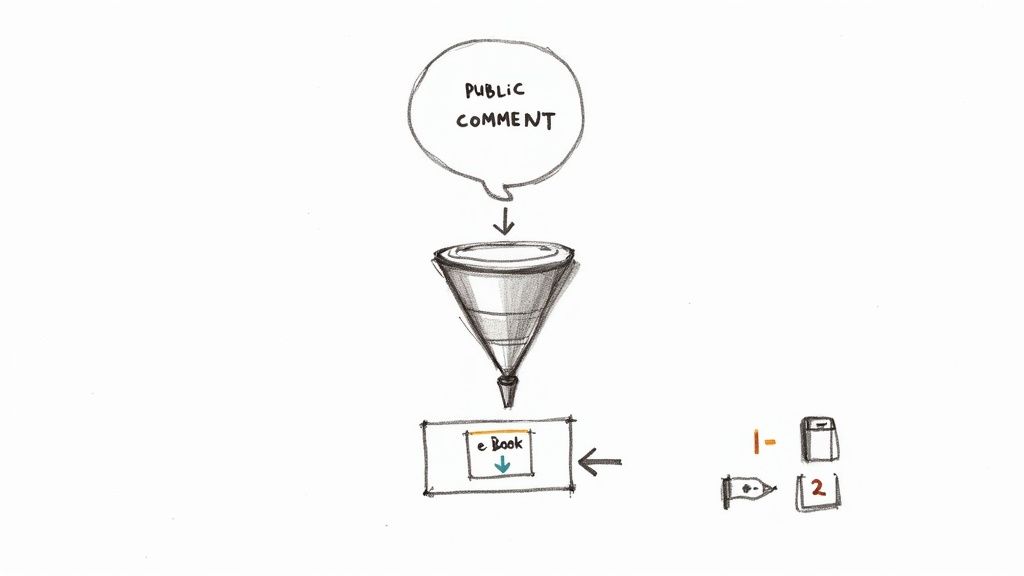
This approach works so well because the user starts the conversation. It feels helpful, not pushy.
Crafting the Perfect Opt-In Offer
Your comment-to-DM funnel is only as good as the offer you're making. People need a real reason to stop scrolling and type a comment. You need to think about what your audience genuinely wants—something that gives them immediate value.
Here are a few ideas that consistently get results:
- Exclusive Content: A free e-book, a detailed guide, or an insightful case study. A simple "Comment GUIDE to get our free social media checklist!" is a classic for a reason.
- Special Discounts: Drive sales directly with a time-sensitive coupon. Try something like, "Want 20% off? Comment VOUCHER and we'll send it over."
- Early Access: Make your most engaged followers feel special with a sneak peek at a new product. "Comment EARLYBIRD for a first look at our new collection."
- Webinar or Event Registration: Make signing up effortless. "Comment WEBINAR and we'll DM you the registration link."
The trick is to make the offer irresistible and the keyword dead simple. The less friction, the more people will jump on it.
The Two-Step Automation Flow
So, what happens when someone comments with your keyword? A good automation system will fire off a two-part response. This makes the entire interaction feel polished and professional, acknowledging the user both publicly and privately.
Part 1: The Public Acknowledgment
First, your system should post a short, friendly reply right under their comment. This does two things: it lets them know their comment worked, and it shows everyone else scrolling by that your brand is on the ball and super responsive.
A great public reply is simple and direct. Something like, "You got it! Just sent the guide over to your DMs. Let us know what you think! 😊" works perfectly. It’s warm, confirms the action, and adds a nice bit of social proof.
Part 2: The Private Delivery
At the exact same time, the system sends the promised goodie via Direct Message. This is where you can make a strong impression. Don't just dump a link and run. Personalize the message and give them a clear next step.
This is also a great place to start thinking about more advanced flows. For a deeper look, our guide on Instagram DM automation in 2025 breaks down how to build these out for maximum impact.
Driving Sales and Qualifying Leads
This funnel does so much more than just deliver a PDF. It opens a direct line of communication with someone who is clearly interested in what you do. Honestly, modern Instagram DM and comment automation is an incredibly effective way to generate leads, often blowing traditional methods out of the water.
In fact, brands using this strategy can see up to nine times higher lead conversion when they reply within just five minutes—a speed that only automation can reliably hit.
Here’s how you can turn that first DM into a real business result.
The Nurturing Sequence
Once you've delivered the goods, don't let the conversation go cold. The user has given you permission to be in their inbox, so use it wisely.
- Follow-Up: A day or so later, send an automated message. "Hey, did you get a chance to check out the guide? Any questions?"
- Offer More Value: Share a related tip, a quick customer story, or a link to a relevant blog post. Keep helping them.
- Introduce the Offer: After you've built a bit of rapport, you can naturally introduce a product or service that solves their problem.
By turning a simple comment into a thoughtful DM sequence, you build trust and guide a potential customer along their journey. It never feels pushy. This methodical approach transforms your Instagram comments from a vanity metric into a powerful and scalable engine for growth.
How to Measure and Optimize Your Automation
Getting your automated comments up and running on Instagram isn't the finish line—it's just the start. If you truly want this system to work for you, you have to keep a close eye on it, measure what’s happening, and make smart adjustments along the way.
Without tracking your performance, you’re basically flying blind. You have no real way of knowing if your automated replies are genuinely boosting engagement or just creating more noise in your comments section. The goal is to get past simply seeing if it works and start digging into how well it works. This means connecting your automation to real business goals, like generating leads and driving sales.
What Should You Be Tracking?
To get the full picture, you need to look at a handful of key metrics that cover engagement, conversions, and the overall health of your system. These numbers tell a story and help you make informed decisions instead of just guessing.
Here are the essential KPIs I always recommend clients track to measure the true success and ROI of their Instagram comment automation strategy.
Key Metrics for Automation Performance
| Metric | What It Measures | Why It's Important |
|---|---|---|
| Response Rate | The percentage of comments with trigger keywords that received an automated reply. | This is your first-line health check. A low rate could mean your trigger rules are too narrow or the tool is having issues. |
| DM Opt-in Rate | The percentage of users who reply to your initial automated DM. | This is a big one. It shows how many people are actually taking the next step and entering your funnel after that first public comment. |
| Engagement Lift | The change in average comments per post before and after implementing automation. | This is direct proof of whether your strategy is encouraging more interaction, which is a great signal to the Instagram algorithm. |
| Lead Generation | The number of qualified leads captured through your DM sequences (like email sign-ups). | This connects your Instagram activity directly to your sales pipeline, proving tangible business value. |
| Conversion Rate | The percentage of users who complete a desired action (like a purchase) after entering your DM funnel. | This is the ultimate ROI metric. It shows how effectively your automation is turning conversations into revenue. |
These data points will give you the clarity you need to move from hoping your strategy works to knowing exactly how to improve it.
Staying on Instagram's Good Side
One of the biggest anxieties brands have with automation is breaking Instagram’s rules. The platform is built for genuine human interaction, and overly aggressive, spammy automation is a surefire way to get your account flagged or even shut down.
So, how do you play it safe?
The single most important thing you can do is only use an official Meta Business Partner for your automation. Tools like ManyChat or Statusbrew are built on Instagram’s official API and have safeguards baked in. Trying to cut corners with a cheap, unapproved tool is a massive risk that just isn't worth taking.
A word of caution: Instagram's spam filters are incredibly sophisticated. They can easily spot repetitive, bot-like behavior. This is why using spintax to vary your public replies and avoiding generic, emoji-only comments are such critical habits.
You also need to be mindful of rate limits. An official tool will handle this for you by automatically slowing down replies if you suddenly get a flood of comments. This prevents your account from looking like it’s spamming its own posts—a major red flag for the platform.
A Quick Monthly Check-Up for Your Setup
Think of your automation like a garden; it needs regular tending to thrive. Once a month, take a few minutes to run through this quick audit to keep everything running smoothly.
- Audit Your Keywords: Are your triggers still relevant? Have you noticed new phrases your audience is using? More importantly, are any keywords accidentally firing on sarcastic or negative comments?
- Refresh Your Replies: Do your spintax variations still sound fresh and on-brand? If they’re starting to feel stale, it's time for a refresh to keep them from sounding robotic.
- Walk Through Your DM Funnel: Is the first message crystal clear? Is the call-to-action easy to understand and follow? Put yourself in your user's shoes and test the entire flow to spot any confusing or awkward steps.
- Listen for Negative Feedback: Keep an eye out for complaints about the automation itself. If users are finding it annoying or unhelpful, that’s your cue to adjust your tone, timing, or overall approach.
This habit of continuous improvement is what separates a basic, "set-it-and-forget-it" setup from a powerful engagement engine that actually grows your business.
Common Questions About Instagram Automation
Even with a solid plan, jumping into Instagram comment automation can feel a little daunting. It's smart to think through the details before you flip the switch.
Let's walk through some of the most common questions and concerns we hear from brands. Think of this as the final check-in before you go live.
Will Automation Make My Brand Seem Inauthentic?
This is probably the biggest fear, and for good reason. But the short answer is: not if you do it right. Authenticity isn't about doing everything by hand; it's about being consistent, helpful, and true to your brand's voice.
Your followers know you're a business. What they really want are fast, useful answers. In fact, research shows that 80% of Instagram users expect a response within 24 hours, and a surprising 40% expect one within just one hour. A well-tuned automation system helps you meet—and exceed—those expectations every single time.
The secret is to infuse your brand's personality into every automated message. If you’re playful and use emojis, your bot should too. If you’re more buttoned-up, keep that tone consistent. The goal isn't to fool anyone; it's to scale your brand's helpful personality so you can be there for more people, faster.
How Do I Avoid Getting Flagged as Spam?
Instagram is always on the hunt for spammy, bot-like activity, so you have to play by the rules. The platform's filters are smart, and they're specifically designed to catch repetitive, low-value comments.
To keep your account safe, stick to these fundamentals:
- Vary Your Public Replies: Never post the exact same comment over and over. A good tool will let you create multiple variations of your replies, so they always feel fresh and human.
- Avoid Generic Comments: Stay away from one-word answers or just dropping an emoji. These are classic red flags for spam filters.
- Use a Meta-Approved Tool: This is the big one. Official Meta Business Partners build their tools with built-in safeguards, like rate limiting, which automatically prevents your account from posting too fast and looking like a spam bot.
Following these practices ensures your automation boosts engagement without putting your account in jeopardy.
What if Someone Leaves a Negative Comment?
This is where a smart system really proves its worth. The last thing you want is a cheerful, automated reply going out to an angry customer—that’s a recipe for a PR nightmare.
Your automation rules need to be sharp enough to tell the difference between a compliment and a complaint. A robust setup uses a mix of keyword triggers and sentiment analysis to get this right. For example, you can build a rule that tells the system not to reply publicly if a comment contains negative words like "broken," "disappointed," or "scam."
Instead of replying, the system should do two things:
- Immediately hide the comment if it's abusive, offensive, or violates your community guidelines.
- Flag the comment and send a notification to a human team member to handle it personally.
This turns automation into a powerful filter. It handles the easy stuff and makes sure sensitive issues are escalated to a real person who can provide the empathy and support needed to turn a bad experience around.
Ready to turn your Instagram engagement from a time-consuming chore into a powerful conversion engine? FeedGuardians uses AI to keep your comment sections clean, responsive, and optimized for growth. Hide spam, answer questions instantly, and never miss a lead again. Discover how FeedGuardians can help you scale.
Tired of manually moderating comments?
FeedGuardians automates spam filtering, responds to customers, and protects your brand — setup in 3 minutes.