
Quick Summary
| Key Insight | What You Need to Know |
|---|---|
| Exponential Reach | Every single tag introduces your post to a new person who is likely to be interested. |
| Increased Engagement | A flood of comments is a strong signal to the Instagram algorithm that your content is a hit, which helps boost its visibility even further. |
| User-Generated Content (UGC) | The comments themselves become social proof, showing new visitors that your brand has a vibrant and active community. |
Tagging someone in an Instagram comment isn't just about sending a notification. It’s a powerful way to build a community and show that your content is worth sharing.
The mechanics are straightforward: just type the '@' symbol followed immediately by their username in the comment box. As you type, a list of profiles will pop up, and you can simply tap the correct one to complete the tag. This single action transforms a basic comment into a direct, personal recommendation, which is one of the strongest forms of social proof you can get.
Why Tagging in Comments Drives Real Engagement
Think of a tag as a direct invitation. You're not just hoping someone sees your post; you're actively pulling them into the conversation, which is a huge driver of interaction. A simple "like" is passive, but a tagged comment is a personal endorsement. It signals to both the person being tagged and the Instagram algorithm that your content is genuinely compelling.
This is how you turn a static comments section into a lively hub for conversation and organic growth.
The Algorithmic Impact of a Tag
When someone comments "@username you need to see this," they're essentially sharing your post with their personal network. This simple act exposes your content to a completely fresh audience.
Instagram's algorithm pays close attention to this behavior. It sees tagging as a strong sign that your content is valuable and shareable, which can lead to better visibility on the Explore page and in user feeds.
This creates a powerful ripple effect. One tag often leads to another as friends join the conversation, which can dramatically boost your post's reach and engagement numbers. For any business, this kind of organic, word-of-mouth marketing is priceless for building brand awareness and credibility. For an even deeper dive, explore our guide on https://feedguardians.com/blog/how-to-improve-social-media-engagement for more advanced strategies.
By encouraging and acknowledging tagged comments, you're not just responding to your audience—you're activating them as brand advocates. This transforms passive viewers into active participants in your community.
Strategic Tagging for Brands
For anyone managing a brand's social media, from e-commerce store owners to community managers, knowing how to leverage comment tags is fundamental. It's a simple, effective technique that should be a core part of any strategy aimed at building genuine connections.
The difference between a generic comment and one with a tag is significant. Here’s a quick breakdown of the impact.
Engagement Impact of Different Comment Types
| Metric | Generic Comment (e.g., 'Nice post!') | Tagged Comment (e.g., '@friend check this out!') |
|---|---|---|
| Reach | Limited to the commenter's followers who see the activity. | Directly notifies the tagged user(s) and their network, expanding reach. |
| Algorithm Signal | Low to moderate. Viewed as simple feedback. | High. Signals content is shareable and valuable, boosting visibility. |
| Community Building | Minimal. One-way interaction. | High. Fosters conversation and brings new people into the community. |
| Social Proof | Low. Standard positive feedback. | Strong. Acts as a personal recommendation, building trust and credibility. |
As you can see, encouraging tagged comments provides a much higher return on engagement.
Beyond just tagging, exploring broader tactics to increase engagement on Instagram will help you build a comprehensive and effective community management plan.
Getting the Hang of Instagram Tagging
Tagging someone in an Instagram comment is pretty straightforward, but doing it right can make a huge difference in how your community interacts with you. It’s all about pulling the right people into the conversation at the right time.
The magic starts with the "@" symbol. Think of it as your tool for grabbing someone's attention and inviting them into the chat.
How to Tag One Person in a Comment
This is the most common use case. You might be giving a shout-out to a creator, answering a direct question, or just making sure a specific person sees a post.
It’s simple: head to the comment box, type @, and immediately start typing their username. No spaces. As you type, Instagram will pop up a list of suggestions. This is a lifesaver for catching typos and making sure you’ve got the right account.
For example, if you start typing @feedguardians, our profile will appear in the list. Just tap it, and you're good to go. Once you post the comment, that username turns into a live link to their profile.
Tagging Multiple People in a Single Comment
What if you need to loop in more than one person? Maybe you're running a giveaway asking people to tag their friends, or you're responding to a group question. Instagram lets you tag up to five people in a single comment.
You just rinse and repeat the process for each person. For example: "Great point! Hey @user1 and @user2, what do you think about this?"
A Quick Word of Advice: Just because you can tag five people doesn't always mean you should. Make sure every tag is relevant. Tagging random accounts just to get attention comes across as spammy and can get your comment ignored or even reported.
This is exactly what the auto-suggest feature looks like in action. It’s your best friend for accurate tagging.
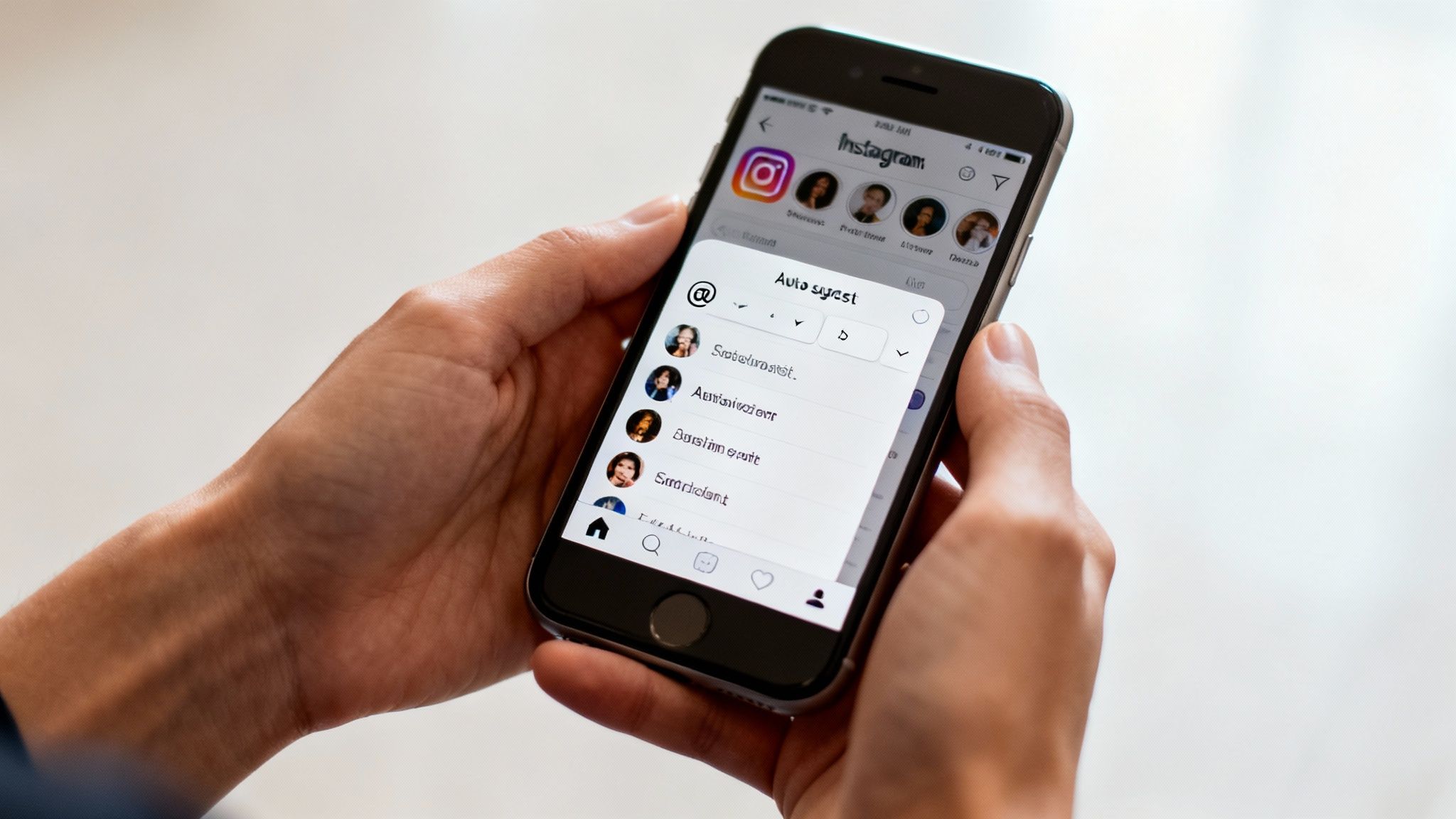
Always try to select the person from this dropdown list. It confirms the tag will work and links to the correct profile.
How to Tag Someone in a Reply
Using tags in replies is key to keeping conversations clean and easy to follow. When you tap "Reply" on someone's comment, Instagram automatically includes their handle, so they’re notified you responded.
But you're not limited to just that one person. You can easily bring others into the thread. Let's say someone asks a question and another person tags their friend for the answer. You could reply directly to the original comment like this: "@originalcommenter you can find it on our site! And thanks for the assist, @friend."
This little trick keeps everyone in the loop and makes the conversation feel connected. It's a fundamental skill, right up there with knowing how to search Instagram comments when you need to track down a specific conversation later.
Advanced Tagging Strategies for Marketers
Beyond simple replies, tagging people in comments is a surprisingly powerful marketing tool. For anyone in marketing, strategically tagging on Instagram is about turning engagement into real business results—think lead generation, solid brand partnerships, and stronger customer loyalty.
These advanced methods are all about hitting specific goals. They can transform your comments section from a passive feedback forum into a dynamic, active part of your marketing funnel. It just starts with having a clear objective for each campaign.
Drive Reach With Tag-a-Friend Contests
One of the most reliable ways to get massive organic reach is by running a "tag-a-friend" contest. The concept is straightforward: ask your followers to tag one or more friends in the comments for a shot at winning a prize. This works so well because it taps into something people already do—sharing things they find cool with their friends.
This single tactic achieves several things at once:
- Exponential Reach: Every single tag introduces your post to a new person who is likely to be interested.
- Increased Engagement: A flood of comments is a strong signal to the Instagram algorithm that your content is a hit, which helps boost its visibility even further.
- User-Generated Content (UGC): The comments themselves become social proof, showing new visitors that your brand has a vibrant and active community.
For instance, a clothing brand could post a new collection and ask followers to "Tag a friend who would love this outfit for a chance for you both to win it!" Not only does this drive a ton of interaction, but it also gives you valuable insights into what your audience likes. Before launching, it's always smart to conduct a thorough audience analysis to make sure your contest and prize will actually land with the right people.
Foster Partnerships and Cross-Promotion
Tagging isn't just for your followers. It's a fantastic, low-effort way to build and maintain relationships with collaborators, influencers, and other brands you partner with.
When you feature a collaborator's product or give an influencer a nod in your post, a quick tag in the comments can spark a valuable cross-promotional dialogue.
Let's say you run a coffee shop that uses pastries from a local bakery. You could post a photo of a new latte and croissant, then drop a comment like, "The perfect pairing! Shoutout to @LocalBakery for crafting these amazing croissants." This kind of authentic acknowledgment builds goodwill and often encourages the other brand to engage, exposing your post to their loyal followers.
This technique creates a public conversation that helps both brands. It comes across as a genuine recommendation, not a stuffy ad, which does wonders for your credibility.
Elevate Your Customer Service
Using tagged comments for customer service can turn a potential problem into a public win for your brand's reputation. When a customer raises a question or a concern, you can tag a specific support specialist or even a dedicated support account to jump in.
A simple comment like, "Hi @username, thanks for reaching out. I'm tagging our support lead, @BrandSupportPro, to help you with this right away," accomplishes two key things. First, it gives the customer a direct line to someone who can solve their problem. Second, it shows everyone else reading the comments that you take customer support seriously.
You can also automate the initial responses to common questions, which is a lifesaver for managing high volumes of comments. To get the full picture on how to set this up, check out our complete Instagram comment automation guide for more in-depth strategies.
Navigating Instagram Tagging Etiquette
Knowing the mechanics of tagging someone on Instagram is easy. Knowing when and why you should do it—that's what separates a savvy brand from a spammy one.
Tagging is an incredibly direct way to get someone's attention, but mishandling it can backfire, fast. The core principle I always come back to is this: every single tag should add genuine value to the conversation for everyone involved.
Before we get into the unwritten rules, let’s cover the hard-and-fast one from Instagram. To keep spam under control, the platform limits you to tagging a maximum of five accounts in a single comment. Sure, you can post multiple comments to tag more people, but that’s a one-way ticket to getting your comment flagged or your account restricted. It's just not worth it.
The Golden Rule of Relevance
If you take only one thing away from this, let it be this: relevance is everything.
Never, ever tag accounts that have no connection to your post just to get on their radar. This is a common mistake I see brands make—they'll tag celebrities, massive influencers, or other big brands hoping for a sliver of attention. In reality, it’s the digital equivalent of shouting a stranger's name across a crowded restaurant. It's disruptive, annoying, and makes you look desperate.
Instead, keep your tags focused and intentional. A good tag is always:
- Contextual: You're tagging a photographer whose work is featured in your post.
- Helpful: You're mentioning an expert who can answer another user's specific question.
- Conversational: You're pulling a colleague into a discussion they’d genuinely be interested in.
One thoughtful, relevant tag will always outperform a dozen random ones. It's how you build trust and show your audience you respect their time and their notifications.
Think of a tag as an invitation, not an advertisement. When you treat it that way, you're not just chasing engagement—you're starting a real conversation. That's how you build a community that sticks around.
Running Contests Without Encouraging Spam
"Tag a friend" contests are everywhere for a reason—they can work. But they can also devolve into a spam-fest if you're not careful.
The typical "tag as many friends as you can!" approach is a problem. It encourages mindless tagging and clogs up people's notifications with irrelevant mentions. A much better way is to add a little friction and purpose.
Try changing your call to action to something like, "Tag one friend who you think would love this." This simple tweak encourages people to actually think about who they’re tagging, which leads to higher-quality connections and a much better user experience. You end up with followers who are genuinely interested, not just people chasing a prize.
This kind of aggressive, low-quality tagging is a hallmark of certain accounts. To get a better sense of the other red flags, our guide on what defines a spam account breaks down what to look out for.
To keep your brand on the right side of the tracks, I've put together a quick guide on the do's and don'ts.
The Do's and Don'ts of Tagging Etiquette
| Do | Don't |
|---|---|
| Tag people directly relevant to the post or ongoing conversation. | Tag random accounts, celebrities, or big brands just for attention. |
| Give credit where it's due by tagging collaborators and partners. | Mass-tag multiple users in a single comment to try and boost visibility. |
| Use tags to be helpful by connecting people with answers or experts. | Run contests that encourage users to spam their friends with irrelevant tags. |
| Reply to comments where you're tagged to show you're listening. | Jump into a conversation and tag someone without reading the context first. |
At the end of the day, good tagging etiquette boils down to being a good digital citizen. When you tag with purpose and respect, you're not just following rules—you're building genuine connections that will do more for your brand than any spam tactic ever could.
Troubleshooting Common Instagram Tagging Problems
Even those of us who live and breathe social media run into glitches. You’ve written the perfect comment, you go to tag someone, and… crickets. The name doesn’t turn into a blue, clickable link. It’s a small hiccup, but an annoying one that can throw a wrench in your engagement strategy.
Thankfully, most of these tagging troubles are pretty simple to solve once you know what’s going on. Let's walk through the usual suspects so you can fix it and get back to building your community.
The Most Common Culprit: The Username Typo
Honestly, nine times out of ten, a tag that doesn't work is just a simple typo. A forgotten underscore, a swapped number, or an extra letter is all it takes for the mention to fail. Instagram's auto-suggest feature helps a lot, but it's still surprisingly easy to rush and tap the wrong thing or just misspell the handle.
Before you start digging deeper, always double-check the spelling.
- Actionable Fix: The quickest way to be sure is to pop over to the person's profile and verify their exact username. You can even copy and paste it directly into your comment to eliminate any guesswork. Otherwise, just re-type it slowly and make sure you select the correct account from the dropdown list that appears.
Why You Can't Tag a Private Account
Sometimes, the issue has nothing to do with you. If you’re typing a username perfectly and it’s just not showing up in the suggestions, there's a strong chance the account is set to private.
Instagram's privacy settings are there for a reason—to give people control. If you don’t follow a private account, the platform won’t let you pull them into a public conversation by tagging them.
Key Takeaway: You can't tag a private account you aren't following. This isn't a bug; it's a fundamental privacy feature. Good community management means respecting those boundaries.
When a User Changes Their Username
This one can be a little confusing. You know you tagged someone correctly, but you come back later and the tag is dead—just black text, no link. What happened? More than likely, the person changed their Instagram handle.
Here’s the thing: when someone updates their username, Instagram does not go back and update all the old tags across the platform. Your original mention is now pointing to a username that doesn't exist anymore, which breaks the link.
- Actionable Fix: To fix this, you’ll have to do a little detective work to find their new handle. Try searching for their real name or looking through the followers of a mutual friend. Once you track down the new username, you'll need to edit your original comment or just reply with a new one to get that tag working again.
Using Smart Tools to Tame the Comment Chaos
Once your Instagram account starts to take off, the comment section can quickly become a wild place. When you're running a popular giveaway or a viral post, the sheer volume of tags and mentions is often too much to handle manually. For any busy social media manager or brand owner, sifting through it all is a massive time sink.
This is where having the right tools in your corner makes a world of difference. Modern AI-powered platforms are built to bring order to the chaos. They can automatically scan your comments, identify which ones include tags, and even figure out the intent behind them.
Focusing on the Conversations That Count
Was that tag just a friend sharing your post, or was it a frustrated customer trying to get your attention? These tools can tell the difference. They're designed to flag high-priority comments—like sales questions or support issues—so they land at the top of your to-do list.
Instead of drowning in a sea of notifications, you get to focus your energy on what actually moves the needle. These systems can filter out spam, automate replies to frequently asked questions, and make sure your team only gets pulled in for conversations that truly need a human response.
This way, you can keep up with the incredible engagement that tagged comments generate without burning out your team. It allows you to jump on high-intent interactions instantly, turning a happy mention into a sale or resolving a complaint before it gets out of hand. If you're looking to explore what's out there, you can dig into some of the best Instagram moderation tools that can put these workflows on autopilot.
The real goal here isn’t to replace your team with bots. It’s about letting technology handle the noise so your team can focus on what they do best: building real relationships with your community.
Struggling with a tag that just won't work? The flowchart below breaks down the most common culprits so you can troubleshoot the problem in seconds.
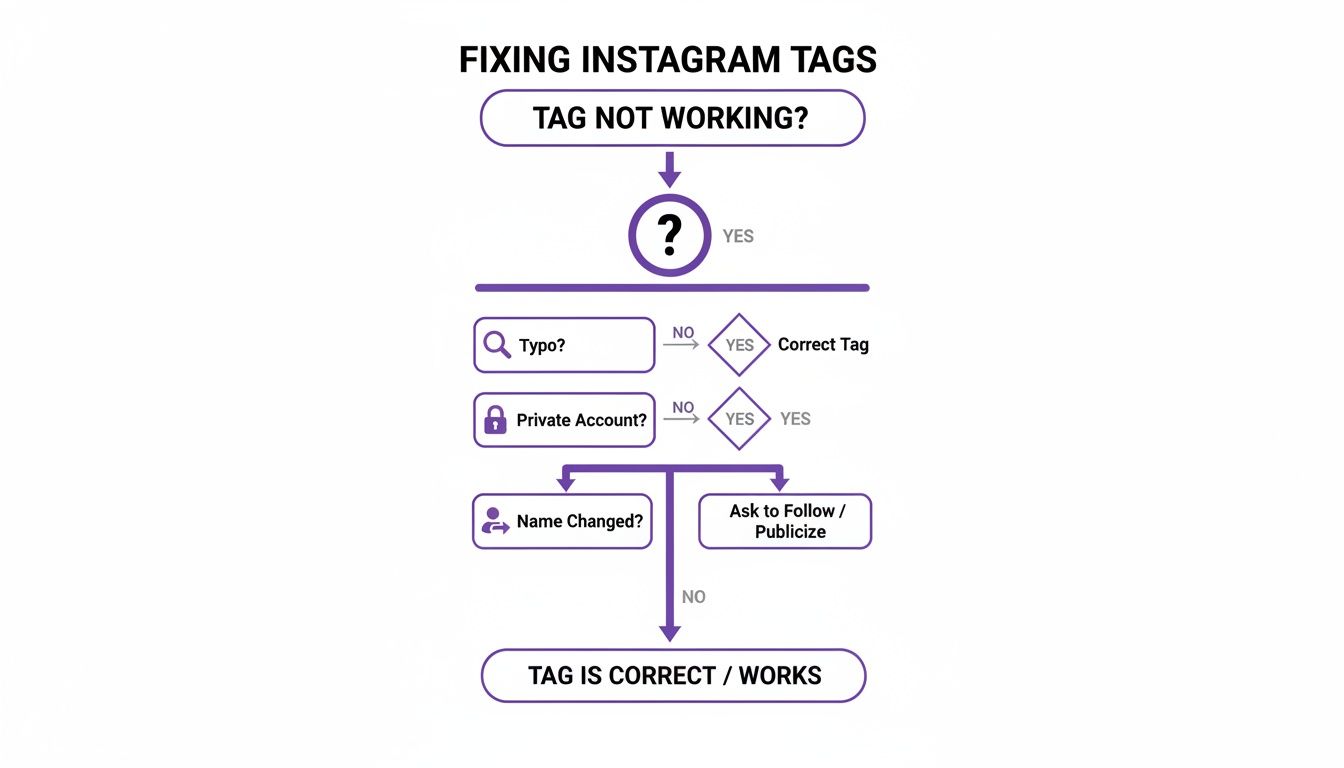
As you can see, nearly every tagging problem comes down to one of three simple things: a typo in the username, trying to tag a private account, or the person having changed their handle.
Got More Tagging Questions? We've Got Answers
Once you get the hang of tagging, you'll inevitably run into some specific, "what if" scenarios. Let's tackle a few of the most common questions that pop up.
Can I Tag Someone Who Blocked Me?
The short answer is no. If someone has blocked your account on Instagram, you won't be able to interact with them at all. This includes tagging them in a comment, a post, or a Story.
When you try to type their handle, it simply won't show up in the suggestion list. Even if you type it out perfectly, it won't create a clickable link. This is a built-in privacy feature on Instagram, and there's no way around it.
Why Do My Tags Sometimes Disappear?
Ever gone back to an old comment and found a tag is no longer working? It’s a common issue, and it usually boils down to one of two things:
- They changed their username. The tag is linked to the exact username at the moment you post the comment. If they update their handle later on, your original tag breaks.
- They deleted their account. If the user's account no longer exists, there's nothing for the tag to link to, so it becomes plain text.
In either case, you'd have to edit your comment with the new username (if you know it) to fix the broken tag.
Is There a Limit to How Many People I Can Tag in a Comment?
Yes, there is. Instagram caps the number of tags in a single comment at five users.
This limit is in place to help cut down on spam. While you could technically post multiple comments back-to-back to tag more people, it's not a great look. That kind of activity can easily get your account flagged by Instagram's algorithm, so it's best to stick to the rules.
Ready to manage your growing comment section without the chaos? FeedGuardians uses AI to automatically hide spam, prioritize important conversations, and ensure your brand always responds when it matters most.
Tired of manually moderating comments?
FeedGuardians automates spam filtering, responds to customers, and protects your brand — setup in 3 minutes.