
Quick Summary
| Key Insight | What You Need to Know |
|---|---|
| NapoleonCat vs Yuma | Feature Comparison at a Glance |
| How AI Comment Moderation | How AI Comment Moderation Works in Both Platforms |
| Coverage matrix | what each tool actually reaches |
| Why ad-level context changes | Why ad-level context changes moderation quality |
| A reproducible way to | A reproducible way to test both tools |
| What this means for | What this means for your decision |
Table of Contents
- NapoleonCat vs Yuma: Feature Comparison at a Glance
- How AI Comment Moderation Works in Both Platforms
- Facebook Ad Comment Moderation: Coverage and Accuracy
- Automated Social Media Replies and Response Customization
- NapoleonCat Alternatives: When to Consider Other Tools
- Pricing, Setup Time, and Scaling Across Multiple Accounts
- Which Tool Should You Choose?
- Frequently Asked Questions
Last Updated: October 15, 2026
NapoleonCat vs Yuma: Feature Comparison at a Glance
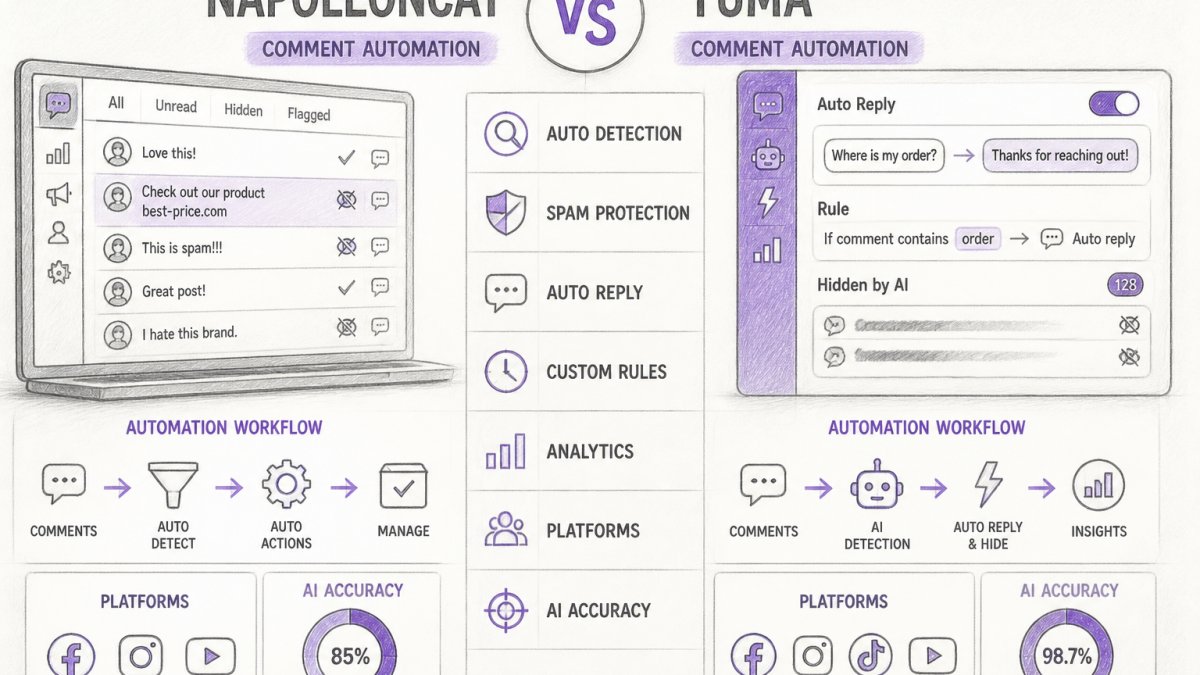
For high-volume social media accounts, comment automation is essential. Both NapoleonCat and Yuma offer AI-powered moderation and automated replies, but differ in approach, coverage, and depth.
NapoleonCat focuses on comprehensive workflow automation across channels, while Yuma emphasizes lightweight, rule-based comment management.
How AI Comment Moderation Works in Both Platforms
AI comment moderation works on two principles: classification and action. The system identifies problematic comments (spam, hate speech, competitor mentions) and hides, flags, or deletes them per your rules.
NapoleonCat combines rule-based automation with machine learning.
Yuma detects common patterns: unknown-domain links, repeated messages, and flagged keywords.
Both claim high accuracy for spam and abuse detection. The real difference appears in edge cases, comments technically compliant but strategically problematic, like competitor promotions disguised as customer questions.
Facebook Ad Comment Moderation: Coverage and Accuracy
Facebook ad comments behave differently from organic post comments. They arrive on dark posts (ads that never appear on your Page timeline), boosted posts, and ads across multiple placements. A tool that only reads your Page's comment stream misses dark-post comments entirely, because those live on the ad object, not the Page post.
Coverage matrix: what each tool actually reaches
| Comment source | NapoleonCat | Yuma |
|---|---|---|
| Organic Page post comments | Yes | Yes |
| Instagram post and Reel comments | Yes | Yes |
| Facebook ad (dark post) comments | Yes, via ad account connection | Limited, depends on whether the ad is linked to a Page post |
| Boosted post comments | Yes | Yes (treated as a Page post) |
| Ad-level filtering (per campaign, per ad set) | Yes | No, comments surface in a single stream |
| Instagram ad comments | Yes | Partial |
| Comment replies (threaded) | Yes | Yes |
| Hidden / spam-folder comments | Yes | Partial |
The practical consequence: if you run ads that never appear on your Page (the default for many direct-response campaigns), a tool without ad-account access cannot moderate those comments at all, you'd miss your highest-spend placements.
Why ad-level context changes moderation quality
Grouping comments by campaign and ad set reveals patterns a flat stream hides. A spike in "Is this still in stock?" comments on one ad set usually means the creative promises something the landing page doesn't deliver; a cluster of competitor links on a single ad often means a competitor is targeting your audience. NapoleonCat preserves that grouping; Yuma's single-stream model flattens it.
A reproducible way to test both tools
Feature pages won't tell you which tool catches what. Test before you commit:
- Set up a dark-post ad with a small daily budget and no Page-post association. Confirm the tool surfaces its comments at all.
- Post five comment types on that ad: a plain spam link, a competitor mention, a profanity-laced complaint, a legitimate product question, and a comment in a non-English language you support.
- Record the outcome for each: auto-hidden, auto-replied, flagged for review, or missed entirely.
- Repeat after two weeks to see whether the tool's classification improved with training data.
- Check the false-positive rate by posting a legitimate comment that contains a flagged keyword (for example, a customer quoting a competitor's price to ask if you'll match it).
The false-positive test is where rule-based systems struggle most, since a competitor's name appears in both hostile and legitimate contexts.
What this means for your decision
If your Facebook spend is concentrated in dark-post ads, ad-account integration determines whether the tool works on your highest-value comments at all. If your ads are mostly boosted Page posts, both tools cover the same ground and the decision shifts to reply quality and price.
Meta Ads Manager comment moderation documentation
Automated Social Media Replies and Response Customization
Here the platforms diverge most sharply. Automated social media replies require understanding brand voice, product knowledge, and customer intent.
NapoleonCat offers AI-powered reply generation that learns your brand terminology and tone.
Yuma uses rule-based replies: if a comment contains "shipping," reply with your standard shipping message.
The practical difference: NapoleonCat replies feel like your team; Yuma replies feel like chatbots.
Both allow human override: if an automated reply misses the mark, team members can respond manually.
NapoleonCat Alternatives: When to Consider Other Tools
NapoleonCat works well for mid-to-large teams managing multiple accounts across platforms, but it's not always the best fit.
Consider alternatives for lightweight, single-platform automation. NapoleonCat's feature depth becomes overhead if you're only moderating Instagram comments; Yuma handles that case more efficiently.
Consider alternatives if you need comment automation plus broader social media management (scheduling, analytics, reporting).
Consider alternatives if your team is very small and can't justify setup time.
FeedGuardians addresses several gaps both platforms leave open.
Pricing, Setup Time, and Scaling Across Multiple Accounts
Pricing is where most comparison articles go vague, and where the buying decision gets made. Here's the like-for-like math to run.
The two billing models, side by side
NapoleonCat bills primarily on a per-profile (per-account) basis, with tiers unlocking more profiles, seats, and automation limits. Yuma bills on a workspace/seat basis, where connected profiles are less tightly coupled to price than team members.
That single structural difference drives everything downstream:
| Scenario | Per-profile model (NapoleonCat-style) | Per-workspace model (Yuma-style) |
|---|---|---|
| 1 brand, 1 profile, 2 seats | Low entry cost | Low entry cost |
| 1 agency, 15 client profiles, 5 seats | Cost scales with 15 profiles | Cost scales with 5 seats |
| 1 brand, 3 profiles, 20 seats | Cost scales with 3 profiles | Cost scales with 20 seats |
| 1 agency, 40 profiles, 3 seats | Cost scales steeply | Cost stays relatively flat |
The crossover is predictable: per-profile pricing wins with many seats and few profiles; per-workspace pricing wins with many profiles and few seats. Agencies with a small core team managing dozens of client accounts almost always land on the second pattern.
The costs that don't appear on the pricing page
The subscription line item is rarely the full cost. Three hidden costs decide the real total:
- Setup and configuration time. A rule-based tool can be operational in hours. An AI-learning tool needs one to two weeks of feeding examples and correcting mistakes before classification is reliable, a real line item at a blended internal rate.
- Per-account training overhead. If the AI trains per profile, every new client account resets the learning curve, fifteen accounts means fifteen training periods. A rule-based tool applying one rule set across all accounts avoids this.
- Add-on modules. Ad-comment moderation, additional channels, and advanced approval workflows are frequently sold as upgrades. Ask which of your required features sit above the entry plan.
Setup time: what actually happens in week one
A realistic deployment timeline for each model:
- Rule-based (Yuma-style): Day 1, connect profiles, define keyword and link rules, set escalation. Day 2, live. Ongoing, add rules as new spam patterns appear.
- AI-learning (NapoleonCat-style): Days 1-3, connect profiles, define moderation categories, upload reply examples. Days 4-14, monitor and correct classifications, tune thresholds. Week 3 onward, accuracy stabilizes; ongoing tuning continues at a lower rate.
If you onboard a new client every week, the AI-learning timeline compounds; a handful of accounts a year, it doesn't.
Scaling across accounts: the training question
The most under-discussed scaling difference is whether learning transfers between accounts. If each profile trains independently, your twentieth account is as untrained as your first; if rules are shared across a workspace, it inherits everything you've learned. Ask each vendor: "When I add a new profile, does it start from zero or inherit my existing rules and training?" The answer changes your per-account cost of ownership more than the sticker price.
Approval workflows and team controls
Both platforms support human review before automated replies post, but granularity differs. Look for role-based permissions (can a junior moderator publish or only draft?), per-channel approval rules (auto-post on Instagram, review on Facebook ads), and an audit log. If client contracts require sign-off on public replies, confirm the approval workflow exists on the tier you're buying, it's often gated above entry level.
The pricing question is not "which is cheaper" but "which billing model matches my profile-to-seat ratio, and how much hidden setup and per-account training cost sits on top of the subscription." Get quotes at 2x your current scale, ask whether learning transfers between accounts, and confirm which required features sit above the entry tier before you sign.
Which Tool Should You Choose?
Choose NapoleonCat if you manage fewer than five accounts and need sophisticated automation.
Choose Yuma if you manage many accounts and need fast, predictable automation.
But there's a third option worth considering. FeedGuardians learns your brand voice and automatically detects spam, hate speech, and competitor links with 98.7% accuracy.
The decision comes down to team size, account count, and setup time you can invest.
Frequently Asked Questions
How accurate is comment automation at detecting spam and offensive content?
Both NapoleonCat and Yuma use AI to classify and filter harmful comments, but accuracy varies by platform and content type. Spam detection typically achieves 90-95% accuracy, while hate speech and offensive language detection ranges from 85-95% depending on context and language nuance. Real-world performance depends on your brand's specific moderation rules and how well the tool is trained on your comment history. Always enable human review escalation for borderline cases to maintain brand safety.
Can these tools handle comment automation across Instagram, TikTok, and YouTube at the same time?
NapoleonCat covers Instagram, Facebook, and TikTok natively, with limited YouTube support. Yuma supports Instagram, Facebook, and YouTube, with TikTok integration available through third-party connectors. Neither platform offers equal depth across all four channels, your choice depends on which platforms drive the most engagement for your brand. If you manage multiple client accounts, verify that each tool's team collaboration features support your workflow without requiring separate setups per client.
How long does it take to set up comment automation and train the AI to match your brand voice?
Initial setup typically takes 30 minutes to 2 hours depending on the number of accounts and platforms. Training the AI to recognize your brand voice and reply style requires feeding it 20-50 sample comments and responses, most tools learn faster with more examples. Expect 3-7 days of real-world testing before the AI reaches acceptable accuracy for your specific audience. Setup time increases if you're migrating moderation rules from another tool or managing 10+ client accounts simultaneously.
What happens if the automation tool makes a mistake, like replying to the wrong comment or hiding a legitimate one?
Both platforms include approval workflows and human escalation options to catch errors before they go live. You can set the AI to suggest replies for your review rather than posting automatically, or flag high-risk comments for human moderation. Most tools log all actions, so you can audit what was hidden or deleted and restore comments if needed. Liability typically falls on your brand, not the tool provider, so always maintain human oversight on safety-critical decisions and test automation rules on a small audience first.
Protect your brand reputation and boost ad performance instantly. FeedGuardians automatically detects and hides spam, scams, hate speech, and competitor links while delivering 24/7 AI-powered replies in your unique brand voice. Save hours every day while turning comments into conversations and conversions. Start for free and see why brands like World Discovery and Golden Tree trust FeedGuardians to manage their social presence at scale.
Tired of manually moderating comments?
FeedGuardians automates spam filtering, responds to customers, and protects your brand — setup in 3 minutes.
Frequently Asked Questions
How accurate is comment automation at detecting spam and offensive content?
Both NapoleonCat and Yuma use AI to classify and filter harmful comments, but accuracy varies by platform and content type. Spam detection typically achieves 90-95% accuracy, while hate speech and offensive language detection ranges from 85-95% depending on context and language nuance. Real-world performance depends on your brand's specific moderation rules and how well the tool is trained on your comment history. Always enable human review escalation for borderline cases to maintain brand safety.
Can these tools handle comment automation across Instagram, TikTok, and YouTube at the same time?
NapoleonCat covers Instagram, Facebook, and TikTok natively, with limited YouTube support. Yuma supports Instagram, Facebook, and YouTube, with TikTok integration available through third-party connectors. Neither platform offers equal depth across all four channels—your choice depends on which platforms drive the most engagement for your brand. If you manage multiple client accounts, verify that each tool's team collaboration features support your workflow without requiring separate setups per client.
How long does it take to set up comment automation and train the AI to match your brand voice?
Initial setup typically takes 30 minutes to 2 hours depending on the number of accounts and platforms. Training the AI to recognize your brand voice and reply style requires feeding it 20-50 sample comments and responses—most tools learn faster with more examples. Expect 3-7 days of real-world testing before the AI reaches acceptable accuracy for your specific audience. Setup time increases if you're migrating moderation rules from another tool or managing 10+ client accounts simultaneously.
What happens if the automation tool makes a mistake, like replying to the wrong comment or hiding a legitimate one?
Both platforms include approval workflows and human escalation options to catch errors before they go live. You can set the AI to suggest replies for your review rather than posting automatically, or flag high-risk comments for human moderation. Most tools log all actions, so you can audit what was hidden or deleted and restore comments if needed. Liability typically falls on your brand, not the tool provider, so always maintain human oversight on safety-critical decisions and test automation rules on a small audience first.