
Quick Summary
| Key Insight | What You Need to Know |
|---|---|
| Social Media vs Email Support | Key Differences |
| Comparison Table | Social Media Customer Service and Email Support |
| Average Response Time for | Average Response Time for Social Media Support vs Email |
| Social Media Customer Service | Social Media Customer Service Best Practices |
| Email Support Templates for | Email Support Templates for Customer Service |
| Tools for Managing Social | Tools for Managing Social Media and Email Support |
Table of Contents
- Social Media vs Email Support: Key Differences
- Comparison Table: Social Media Customer Service and Email Support
- Average Response Time for Social Media Support vs Email
- Social Media Customer Service Best Practices
- Email Support Templates for Customer Service
- Tools for Managing Social Media and Email Support
- When to Use Social Media, Email, or Both
- Conclusion
Last Updated: August 16, 2026
Social Media vs Email Support: Key Differences
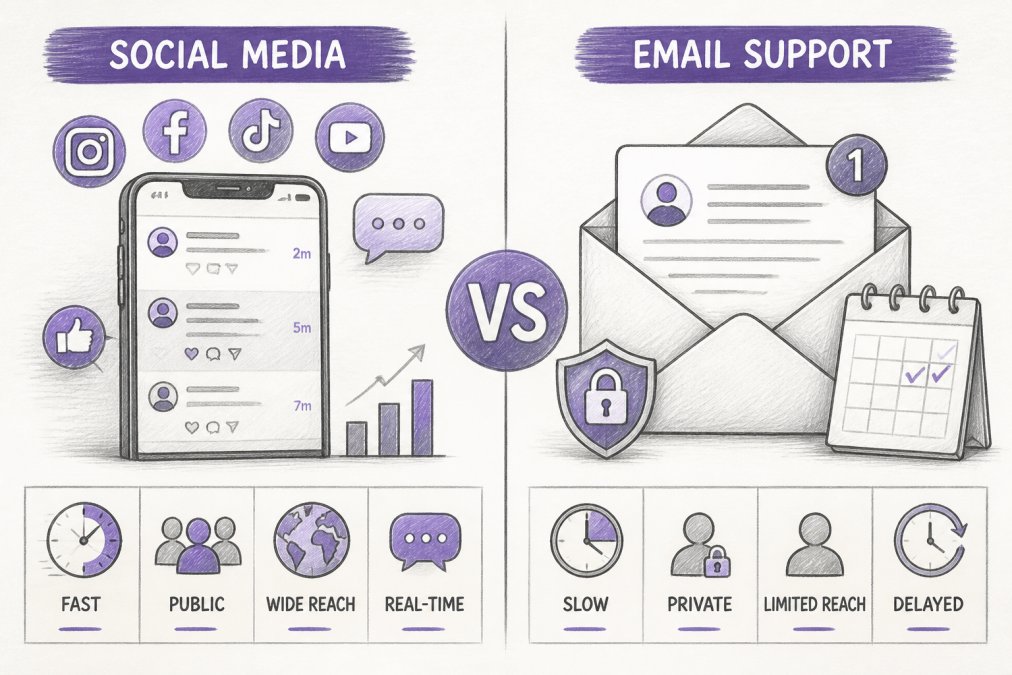
Social media is synchronous, public, and immediate. Email is asynchronous, private, and deliberate. The real question isn't which to use, but how to orchestrate both effectively.
Social media customer service operates in real-time across platforms like Instagram, Facebook, TikTok, and YouTube. Customers expect responses within hours, not days. Conversations happen publicly or in DMs, shaping your brand's reputation instantly. Email support is ticket-based and asynchronous, slower, but ideal for complex issues requiring thorough investigation and documentation.
A negative comment on Instagram reaches thousands in minutes. An angry email reaches your support team privately. One demands speed and brand protection; the other demands depth and documentation.
Comparison Table: Social Media Customer Service and Email Support
| Dimension | Social Media Support | Email Support | Clear Winner |
|---|---|---|---|
| Response Time Expectation | 1-4 hours | 24-48 hours | Social Media |
| Visibility | Public/semi-public | Private | |
| Complexity Handling | Simple inquiries, quick answers | Complex troubleshooting, detailed issues | |
| Scalability | High volume, low depth | Lower volume, high depth | Social Media |
| Cost Per Contact | Lower (with automation) | Higher (more agent time) | Social Media |
| Brand Reputation Impact | Immediate and visible | Delayed and private | Social Media |
| Customer Expectation | Fast, conversational | Thorough, documented | Varies by issue |
| Best For | Quick wins, brand defense | Problem resolution, documentation | Depends on use case |
Social media wins on speed and scale; email wins on depth and documentation. At scale, the real cost difference emerges: a team managing 500 comments per day faces the same bottleneck as one handling 500 email tickets. The solution is automating the right parts of each channel.
Average Response Time for Social Media Support vs Email
Social media customers expect answers fast. Email customers expect thorough answers.
For social media support, the industry standard is a first response within 1-4 hours. Brands hitting the 1-hour mark see significantly higher satisfaction. A customer posting at 10 AM has often moved on or purchased elsewhere by 2 PM. By 6 PM without a response, they're frustrated and likely to leave negative comments.
Email support operates on a different timeline. Customers expect first response within 24-48 hours. This slower pace serves a purpose: it gives your team time to investigate and provide thorough answers rather than quick deflections.
For social media support, you need AI-powered responses handling common questions instantly ("What are your hours?" "How do I track your order?") while flagging complex issues for human review. Email automation helps with routing and acknowledgment, but depth still requires human judgment.
Social Media Customer Service Best Practices
Respond faster than competitors. Most brands respond within 4-8 hours. Responding in 1-2 hours wins. A quick "We're looking into this and will follow up within 2 hours" beats silence.
Use consistent brand voice across platforms. Instagram comments should sound like TikTok responses and YouTube replies. Inconsistency signals either bot responses or misaligned teams. Maintain your tone even when responding to complaints.
Separate public responses from private follow-up. Respond publicly and quickly: "We see this and we're sorry. Let's take this to DMs so we can resolve it faster." Move detailed troubleshooting to direct messages, protecting your brand reputation while providing depth.
Escalate intelligently. Routine questions ("What are your hours?") don't need manager time. Complaints about unresponsive support absolutely do. Use AI to handle routine questions and flag escalations based on keywords, sentiment, and customer history.
Monitor sentiment, not just volume. One negative comment among 100 positive ones shapes public perception if left unanswered. Social listening helps catch emerging issues before they become crises.
Email Support Templates for Customer Service
Initial Response Template: Subject: Re: [Customer Issue]
Hi [Customer Name],
Thank you for reaching out. We received your inquiry about [brief summary of issue] and we're prioritizing this.
I'm looking into this now and will follow up with a solution by [specific time]. If I need additional information, I'll ask in my next email.
We appreciate your patience.
Best regards, [Your Name] [Title] [Contact Information]
Complex Issue / Troubleshooting Template: Subject: Re: [Issue] - Troubleshooting Steps
Hi [Customer Name],
Thanks for the details. I have a few questions to help narrow this down:
- [Specific question about their setup/situation]
- [Specific question about when the issue started]
- [Specific question about what they've already tried]
Once I have this information, I can provide a direct fix or escalate to our technical team if needed.
Best regards, [Your Name]
Resolution Template: Subject: Re: [Issue] - RESOLVED
Hi [Customer Name],
Good news, I've identified the issue and here's how to fix it:
[Step-by-step instructions or explanation]
If you run into trouble, just reply and I'll walk you through it.
Best regards, [Your Name]
Follow-up Template: Subject: Following Up - [Issue]
Hi [Customer Name],
I wanted to check in and make sure the solution is working for you. Have you had a chance to try the steps I sent?
If you're still experiencing issues, please let me know.
Thanks, [Your Name]
Tools for Managing Social Media and Email Support
FeedGuardians is purpose-built for social media comment management across Instagram, Facebook, TikTok, and YouTube. It automatically detects spam and hate speech with 98.7% accuracy while delivering AI-powered replies in your brand voice 24/7. The AI learns your tone and guidelines, so responses feel authentic. Escalation to human agents is one click away for complex issues.
Zendesk consolidates email, social media, live chat, and phone support into a single agent workspace. Built for teams needing deep customization, complex workflows, and reporting across all channels.
Sprout Social combines social media management with customer service. Strongest for teams publishing content, monitoring brand mentions, and responding to comments from one platform. The Smart Inbox consolidates messages and comments.
Freshdesk offers a free tier for up to 2 agents, making it accessible for small teams. The unified inbox pulls in email, social media, and chat. Many advanced features require add-ons.
Help Scout prioritizes human-centric support for teams under 500 employees. Email-first with social channel integration. The shared inbox is intuitive, and AI Drafts help agents respond faster.
The decision: if your challenge is managing high-volume social media comments, FeedGuardians solves that directly. For orchestrating support across multiple channels at scale, consider tools like Zendesk or Sprout Social. For small teams on a budget, Freshdesk or Help Scout.
When to Use Social Media, Email, or Both
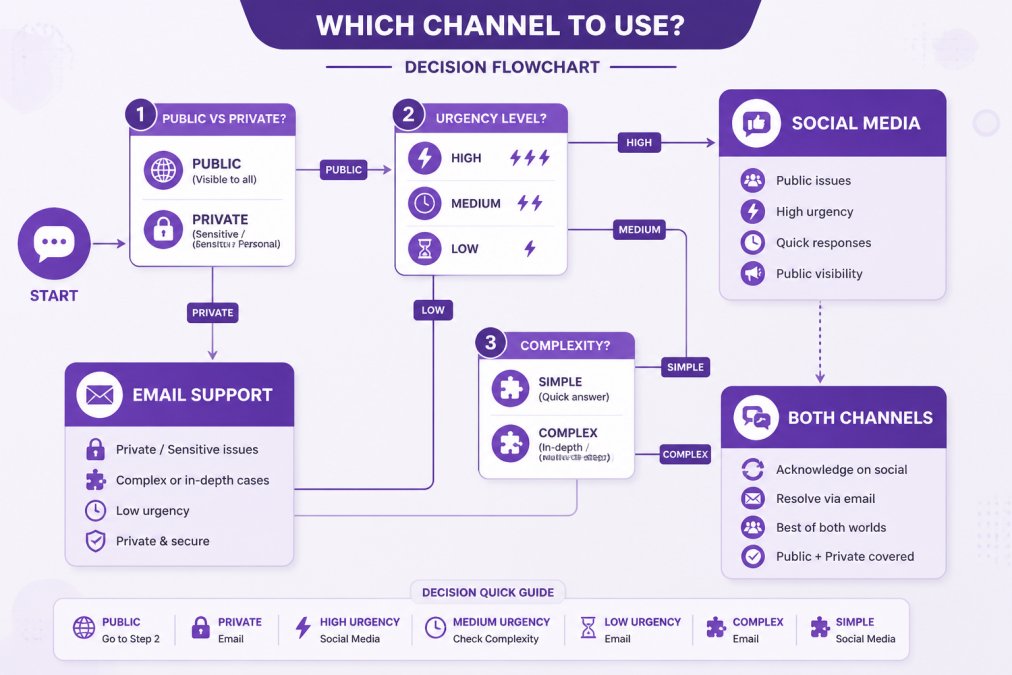
Use social media support for:
- Public questions about hours, shipping, product differences
- Time-sensitive issues needing immediate acknowledgment
- Brand defense against negative comments
- Simple troubleshooting resolvable in 1-2 exchanges
- Anything where your response reaches potential customers
Use email support for:
- Private account issues (billing, passwords, account access)
- Complex technical troubleshooting requiring investigation
- Issues requiring documentation and audit trails
- Sensitive customer information
- Anything requiring legal or compliance review
Use both channels for:
- Initial public response on social media + detailed resolution via email
- High-volume scenarios with automation on social media and human expertise on email
- Multi-step processes where first step is public acknowledgment and resolution happens privately
A customer posts a complaint on Instagram. Your AI-powered support responds within 30 minutes: "We're sorry. We've sent you a DM with next steps." Detailed troubleshooting happens in the DM or email, where you have space to investigate and document. The public response protects your brand; the private resolution solves the problem.
The future of customer support isn't about choosing between channels, it's about orchestrating them. Social media is where your brand's reputation is built or damaged in real-time. Email is where problems get solved. Winning teams use automation to handle routine social media responses, escalate complex issues to human agents, and maintain consistent experience across both channels. Speed on social media, depth on email, and clear handoffs between them, that's the formula.
Frequently Asked Questions
What is the main difference between social media customer service and email support?
Social media customer service handles public comments and direct messages with real-time, visible interactions that build brand presence. Email support operates asynchronously in private channels, ideal for complex issues requiring detailed documentation. Social media prioritizes speed and public sentiment; email prioritizes resolution depth and customer privacy. Most brands use both to address different customer needs within a unified omnichannel support framework.
What is the average response time for social media support compared to email?
Social media customers expect responses within 1-4 hours; email typically allows 24-48 hours. This expectation gap reflects social media's public nature and real-time communication model. However, response time standards vary by industry and customer base. Brands managing high comment volume benefit from tools that automate initial responses while maintaining tone consistency, allowing human agents to focus on complex escalations.
How do I choose between social media and email for customer service?
Use social media for quick questions, public complaints, and brand-building conversations. Route complex issues, account-specific problems, and sensitive matters to email. Social media excels at building customer loyalty and brand advocacy through visible, authentic interactions. Email provides privacy and detailed ticket management for troubleshooting. A hybrid approach, using both channels with integrated workflows, maximizes customer experience while protecting your brand reputation across digital support channels.
Can AI tools maintain my brand voice in social media responses?
Modern AI solutions learn your tone, terminology, and communication style through training on your previous responses. Tools that integrate with your brand guidelines can deliver consistent, on-brand replies 24/7. However, effectiveness depends on the quality of training data and how quirky or specialized your voice is. Always include human escalation options for complex interactions to ensure brand authenticity and customer satisfaction.
This article was written using GrandRanker
Tired of manually moderating comments?
FeedGuardians automates spam filtering, responds to customers, and protects your brand — setup in 3 minutes.
Frequently Asked Questions
What is the main difference between social media customer service and email support?
Social media customer service handles public comments and direct messages with real-time, visible interactions that build brand presence. Email support operates asynchronously in private channels, ideal for complex issues requiring detailed documentation. Social media prioritizes speed and public sentiment; email prioritizes resolution depth and customer privacy. Most brands use both to address different customer needs within a unified omnichannel support framework.
What is the average response time for social media support compared to email?
Social media customers expect responses within 1-4 hours; email typically allows 24-48 hours. This expectation gap reflects social media's public nature and real-time communication model. However, response time standards vary by industry and customer base. Brands managing high comment volume benefit from tools that automate initial responses while maintaining tone consistency, allowing human agents to focus on complex escalations.
How do I choose between social media and email for customer service?
Use social media for quick questions, public complaints, and brand-building conversations. Route complex issues, account-specific problems, and sensitive matters to email. Social media excels at building customer loyalty and brand advocacy through visible, authentic interactions. Email provides privacy and detailed ticket management for troubleshooting. A hybrid approach—using both channels with integrated workflows—maximizes customer experience while protecting your brand reputation across digital support channels.
Can AI tools maintain my brand voice in social media responses?
Modern AI solutions learn your tone, terminology, and communication style through training on your previous responses. Tools that integrate with your brand guidelines can deliver consistent, on-brand replies 24/7. However, effectiveness depends on the quality of training data and how quirky or specialized your voice is. Always include human escalation options for complex interactions to ensure brand authenticity and customer satisfaction.