
Quick Summary
| Key Insight | What You Need to Know |
|---|---|
| Map the top five | Map the top five questions from the last 30 days of comments and DMs first. |
| Route complaints, refunds, and | Route complaints, refunds, and unusual messages to a human, never to automation. |
| Keep comment triggers short | Keep comment triggers short and move details into the private DM. |
| Test every flow with | Test every flow with a personal account before going live. |
| Track handled inquiries, response | Track handled inquiries, response time, and handoff rate to measure results. |
| What Instagram DM Automation | What Instagram DM Automation Handles and What It Should Not |
Last Updated: November 14, 2026
Quick Summary
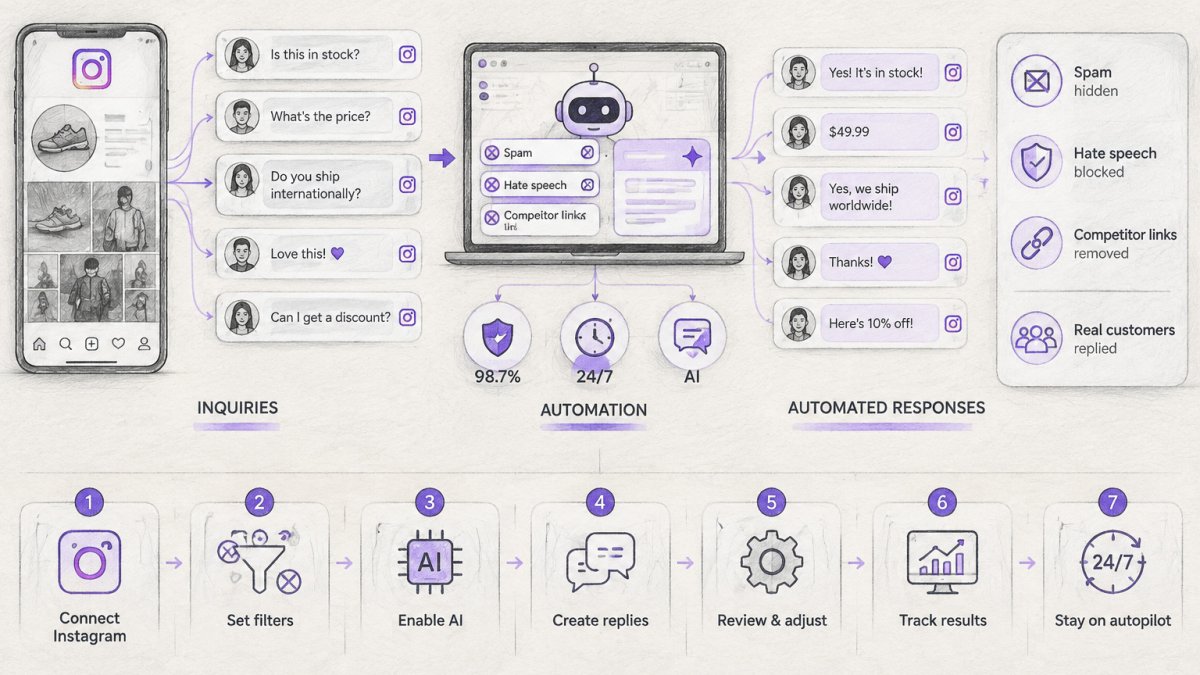
To automate Instagram customer inquiries, map your most frequent questions, write one approved answer for each, and build keyword triggers that send replies. Route complaints and unusual messages to a human, then test and review your flows weekly. Start with your single most common question.
- Map the top five questions from the last 30 days of comments and DMs first.
- Route complaints, refunds, and unusual messages to a human, never to automation.
- Keep comment triggers short and move details into the private DM.
- Test every flow with a personal account before going live.
- Track handled inquiries, response time, and handoff rate to measure results.
Table of Contents
- What Instagram DM Automation Handles and What It Should Not
- Choosing an Instagram DM Automation Tool: Rules-Based or AI
- Step-by-Step: Setting Up Instagram Automated Replies
- Free Options for Instagram DM Automation and Their Limits
- How to Automate Instagram Customer Service Without Losing the Human Touch
- Privacy, Consent, and Platform Compliance Checklist
- Measuring Results and Setting Up Your First Automated Inquiry Flow
- Frequently Asked Questions
What Instagram DM Automation Handles and What It Should Not
Instagram DM automation is the practice of sending pre-built replies to direct messages and comments based on keywords or triggers.
Automation works best on predictable questions with predictable answers. It fails when a customer is upset, when a question is unusual, or when money or a legal issue is involved.
Watch out: automated replies that ignore a complaint can escalate a public comment into a brand reputation problem within hours. Set clear rules for which topics always reach a human.
Choosing an Instagram DM Automation Tool: Rules-Based or AI
Rules-based tools respond when a message contains a specific keyword, such as "price" or "link." They are predictable, easy to audit, and cheap to run.
Choose rules-based automation if your questions are few and stable. Choose AI-assisted replies if customers phrase the same question dozens of different ways.
For a shortlist, compare comment moderation tools side by side on features and pricing before committing. If you want a dedicated option, the Instagram auto-reply tool that handles comments and DMs covers both channels in one place.
Step-by-Step: Setting Up Instagram Automated Replies
Setting up automated replies follows a clear sequence. Work through these steps in order, and test each one before moving on.
- Map your most frequent questions from the last 30 days of comments and DMs.
- Write one approved answer for each question, in your brand voice.
- Define the trigger keywords that should activate each reply.
- Build the comment trigger and DM flow for each question.
- Set rules for human handoff on complaints, refunds, and unusual messages.
- Test every flow with a personal account before going live.
- Review performance weekly and refine the triggers that miss messages.
Mapping Your Top Repetitive Questions
Export or scroll through the last month of comments and messages. Count how often each question appears and sort them from most to least common. Your top five questions usually account for most of the repetitive workload, so automate those first.
A practical method is a simple spreadsheet with three columns: the question, how many times it appeared, and the approved answer. Pull the answers from your FAQ page, product pages, and shipping policy so every automated reply matches what customers read elsewhere.
Building Comment Triggers and DM Flows
A comment trigger sends a direct message when a user comments a specific keyword, such as "info" or "link." You can see how this works as a funnel on Comments Become Leads, which shows how comment-to-DM automation turns engagement into leads. You can turn Instagram comments into DMs automatically, sending links, discount codes, lead magnets, or quote requests without opening the app.
Build each flow with one clear goal: send a link, share a discount code, collect an email, or request a quote. Avoid long flows with many branches, because customers abandon them. A two- or three-step flow usually converts better than a complex one.
The setup follows seven steps in order, each with a clear purpose and timing.
| Step | What to do | Time or frequency |
|---|---|---|
| 1. Map questions | List the most frequent questions from comments and DMs | Last 30 days |
| 2. Write answers | Draft one approved answer per question in your brand voice | Once per question |
| 3. Define triggers | Set trigger keywords for each reply | Before building flows |
| 4. Build flows | Create the comment trigger and DM flow for each question | Per question |
| 5. Set handoffs | Route complaints, refunds and unusual messages to a human | Before going live |
| 6. Test flows | Test every flow with a personal account | Before going live |
| 7. Review and refine | Check performance and fix triggers that miss messages | Weekly |
Free Options for Instagram DM Automation and Their Limits
Several platforms offer free plans for basic automation. Free tiers commonly limit message volume, the number of connected accounts, or access to advanced features.
The main limit to watch is volume. A free plan that works for 200 messages a month may fail during a product launch.
FeedGuardians offers a free plan, which lets you test comment moderation and automated replies before you decide whether to upgrade.
How to Automate Instagram Customer Service Without Losing the Human Touch
The goal of automation is to save time, not to hide your business from customers. The difference between automation that feels helpful and automation that feels like a wall is not the tool, it is the handoff design.
Start every automated flow with a clear statement that the reply is automated, and give customers an easy way to reach a person.
Signals That Should Trigger a Human Handoff
Route a conversation to a person when any of the following appears:
- Uncertainty in the automation. If an AI reply's confidence is low, or a rules-based flow matches no keyword after two turns, stop and hand off rather than guessing.
- Complaint language. Words and phrases such as "refund," "broken," "never arrived," "charged twice," "cancel," "lawyer," or "report" should bypass automation entirely.
- Sensitive categories. Health questions, payment disputes, account security, minors, and anything that could become a legal matter should always reach a human.
Passing Context, Not Just the Conversation
A handoff that drops the customer into a blank inbox forces them to repeat themselves, which is worse than no automation at all. When you route a conversation, pass along:
- The customer's Instagram handle and the message thread so far.
- Which flow fired and which answer was sent.
- The detected intent or the keyword that triggered the flow.
Most shared inboxes and CRM connectors support this through custom fields or conversation notes. If yours does not, a simple internal note with the flow name and the last automated reply is enough for an agent to pick up without asking the customer to start over.
Designing the Handoff Itself
Decide in advance who owns handoffs during business hours and who owns them after hours. Keeping handoff owners aligned on response-time targets also helps Live Leads preserve a consistent brand voice across every shift.
Watch out: an automated reply that ignores a complaint can escalate a public comment into a brand reputation problem within hours. Set clear rules for which topics always reach a human, and test those rules by sending a complaint through every flow before launch.
Reviewing Handoffs Weekly
Review automated conversations every week. Look for replies that customers answer with frustration, such as "that's not what I asked." Those are signals to rewrite the reply or add a handoff rule. Also review the conversations that were handed off: if the same question keeps reaching a human, the automation is missing a trigger or an answer. Good automation feels helpful, and customers rarely notice it when it is working, but they always notice when a handoff fails.
Privacy, Consent, and Platform Compliance Checklist
Automation collects more data than most businesses realize. Every automated DM can capture a handle, a message history, a phone number or email if you ask for one, a purchase intent signal, and a timestamp. Before you turn on a flow, decide what you actually need and write down why. That decision is the foundation of everything below.
What Instagram Automation Collects
Typical automation tools capture:
- The customer's Instagram handle and profile information the platform exposes.
- The message text and any attachments.
- Contact details the customer types, such as an email address or phone number.
You rarely need all of this. Collect the contact detail only when the flow's goal requires it, a link to a product page does not need an email address, but a booking or a quote request usually does.
Consent in a DM Context
Consent for automated messages is not the same as consent for marketing. A customer who DMs you a question has invited a reply to that question; they have not automatically opted in to promotional messages.
U.S. state privacy laws give consumers rights to know, delete, and opt out of certain processing. The exact wording and thresholds vary by state, so check with your legal advisor about the consent language you need for your audience and your size.
Retention and Minimization
Write down a retention period for message logs and contact details, and enforce it in the tool rather than in a spreadsheet. A common approach is to keep conversation logs for a defined window (for example, 12 to 24 months) and to delete contact details that were never used for a transaction sooner. Minimize at the point of collection: do not ask for a phone number if an email will do, and do not store data the flow does not use.
Platform Compliance Checklist
Before going live, confirm the following:
- Your automated messages follow Instagram's current platform policies on messaging and promotional content, including its rules on messaging windows and frequency.
- Your automation uses an approved integration or API rather than unofficial scripts that risk account restrictions.
- You collect only the contact details you need, and you state how they will be used.
Watch out: a flow that asks for an email address without saying why will depress conversion and create a consent problem at the same time.
Privacy rules for messaging vary by state, so check with your legal advisor about the consent wording you need for your audience. The checklist above is a starting point for that conversation, not a substitute for it.
Measuring Results and Setting Up Your First Automated Inquiry Flow
Track four numbers: the share of inquiries handled automatically, average response time, the percentage of automated conversations that reach a human, and conversions from DM flows to purchases or sign-ups. Compare these figures before and after launch to see the real effect.
Set up your first flow this week. Choose your single most common question, write one approved answer, build one comment trigger, and test it with a personal account. Once that flow runs cleanly for two weeks, add the next question.
Ready to automate your Instagram inquiries? FeedGuardians helps you reply to comments and messages 24/7 in your brand voice. Start for Free and see how much time you can get back.
Frequently Asked Questions
Can I create automated direct messages on Instagram?
Yes, but only through approved tools that connect to Instagram's official messaging integration. Instagram allows businesses to send automated replies to users who message first or who comment on a post, typically within a defined response window. Automated messages must follow Meta's messaging policies, so avoid unsolicited bulk DMs and always give customers a route to a human. Set up keyword triggers for common questions such as shipping, sizing, or order status, and test each flow before going live. Check your platform's current rules, since Meta updates messaging permissions periodically.
Can AI automatically respond to Instagram comments?
Yes. AI-powered tools can read incoming comments, reply in your brand voice, and move the conversation into a DM when a question needs detail. FeedGuardians, for example, combines automatic replies with real-time moderation that hides spam, scams, hate speech, and competitor links, and it offers a human escalation option for anything it should not handle alone. Start with a narrow set of comment types, such as price or availability questions, and review the replies weekly before expanding coverage.
Is there a free automation tool for Instagram DMs?
Some tools offer a free plan or free trial, which is usually enough to test keyword triggers and a few FAQ flows. FeedGuardians offers a free plan, so you can evaluate reply quality on your own account before paying. Free tiers commonly limit message volume, number of flows, or connected accounts, so check those limits against your monthly inquiry count. For current plan details, review the pricing page on the FeedGuardians website rather than relying on third-party summaries.
How do I automate replies to common Instagram customer questions?
List your ten most frequent questions from the last 30 days, group them by intent, and write one approved answer per group. Then create a comment or DM trigger for each group, using keywords your customers actually type, such as shipping, restock, or returns. Include a clear next step in every reply, like a link to the size guide or a prompt to share an order number. Review unmatched messages weekly to add new triggers, and route anything involving refunds, complaints, or account problems to a person.

Tired of manually moderating comments?
FeedGuardians automates spam filtering, responds to customers, and protects your brand — setup in 3 minutes.
Frequently Asked Questions
Can I create automated direct messages on Instagram?
Yes, but only through approved tools that connect to Instagram's official messaging integration. Instagram allows businesses to send automated replies to users who message first or who comment on a post, typically within a defined response window. Automated messages must follow Meta's messaging policies, so avoid unsolicited bulk DMs and always give customers a route to a human. Set up keyword triggers for common questions such as shipping, sizing, or order status, and test each flow before going live. Check your platform's current rules, since Meta updates messaging permissions periodically.
Can AI automatically respond to Instagram comments?
Yes. AI-powered tools can read incoming comments, reply in your brand voice, and move the conversation into a DM when a question needs detail. FeedGuardians, for example, combines automatic replies with real-time moderation that hides spam, scams, hate speech, and competitor links, and it offers a human escalation option for anything it should not handle alone. Start with a narrow set of comment types, such as price or availability questions, and review the replies weekly before expanding coverage.
Is there a free automation tool for Instagram DMs?
Some tools offer a free plan or free trial, which is usually enough to test keyword triggers and a few FAQ flows. FeedGuardians offers a free plan, so you can evaluate reply quality on your own account before paying. Free tiers commonly limit message volume, number of flows, or connected accounts, so check those limits against your monthly inquiry count. For current plan details, review the pricing page on the FeedGuardians website rather than relying on third-party summaries.
How do I automate replies to common Instagram customer questions?
List your ten most frequent questions from the last 30 days, group them by intent, and write one approved answer per group. Then create a comment or DM trigger for each group, using keywords your customers actually type, such as shipping, restock, or returns. Include a clear next step in every reply, like a link to the size guide or a prompt to share an order number. Review unmatched messages weekly to add new triggers, and route anything involving refunds, complaints, or account problems to a person.