
Quick Summary
| Key Insight | What You Need to Know |
|---|---|
| Why Hiding Hate Speech | Why Hiding Hate Speech Comments Matters for Brand Safety |
| How to Hide Hate | How to Hide Hate Speech Comments on Instagram Using Instagram's Native Hide Feature Mute Keywords Instagram for Proactive Filtering |
| Using Instagram's Native Hide | Using Instagram's Native Hide Feature |
| Mute Keywords Instagram for | Mute Keywords Instagram for Proactive Filtering |
| Hiding Comments on Facebook | Hiding Comments on Facebook, YouTube & TikTok Facebook Comment Visibility Controls YouTube Comment Moderation & Hiding TikTok Comment Management Options |
| Facebook Comment Visibility Controls | Facebook Comment Visibility Controls |
Table of Contents
- Why Hiding Hate Speech Comments Matters for Brand Safety
- How to Hide Hate Speech Comments on Instagram
- Hiding Comments on Facebook, YouTube & TikTok
- Using Social Media Moderation Tools for Automated Detection
- Content Filtering Extensions & Advanced Solutions
- How to Report Hate Speech & Escalate to Platforms
- Hiding vs. Deleting: Legal & Engagement Implications
- Common Mistakes When Managing Hate Speech Comments
Last Updated: July 19, 2026
Why Hiding Hate Speech Comments Matters for Brand Safety
Hiding hate speech comments protects your brand's reputation and fosters a safe community. According to research from Pew Research Center on online harassment, toxic comments damage brand perception and discourage customer engagement. Brands hiding harmful content see 34% higher comment engagement from genuine customers within 30 days.
Hiding differs from removing: hidden comments remain invisible to most users but visible to the original poster and moderators. This approach protects your audience while respecting transparency. Most social platforms offer native hiding features, but many brands don't deploy them strategically. Below, we'll show you how to hide hate speech comments across Instagram, Facebook, YouTube, and TikTok, plus how to automate the process.
How to Hide Hate Speech Comments on Instagram
Instagram's native hiding feature conceals comments without notifying the commenter or deleting content. The commenter can still see their post when visiting directly, while your audience sees nothing.
Using Instagram's Native Hide Feature
To hide a comment, navigate to the post, tap the three dots menu next to the comment, and select "Hide." The comment immediately disappears from your feed and other users' views. You can also restrict specific accounts: go to Settings > Accounts > Restricted and add usernames. Their comments automatically hide from your feed.
Instagram's comment filtering system lets you establish keyword-based rules. Navigate to Settings > Accounts > Comment Controls and add words, phrases, or emojis that automatically filter comments. Filtered comments move to a separate folder for your review.
Mute Keywords Instagram for Proactive Filtering
Muting keywords prevents comments containing specific terms from appearing on your posts. Go to Settings > Accounts > Comment Controls and add problematic keywords to the "Hide Comments From" section. The system is case-insensitive and catches variations. Update your keyword list monthly based on new patterns.
Hiding Comments on Facebook, YouTube & TikTok
Each platform implements comment hiding differently. Understanding platform-specific approaches ensures consistent moderation across your social media presence.
Facebook Comment Visibility Controls
Navigate to the comment, click the three dots menu, and select "Hide." The comment disappears from your timeline and other users' feeds, but the commenter can still see it. Facebook's filtering system is stronger than Instagram's. Go to Settings > Privacy > Comment Filtering to filter by keywords, restrict comments from people not in your friends list, or filter accounts with no profile picture.
You can also report comments that violate Facebook's Community Standards directly to the platform. Facebook may remove the comment entirely, which is stronger than hiding. However, hiding is preferable for comments that are rude or off-topic but don't violate policies.
YouTube Comment Moderation & Hiding
YouTube lacks a native "hide" feature. Instead, you can hold comments for review before they appear publicly. Go to your channel settings, select Community > Moderation Settings, and enable "Hold likely spam for review." For published comments, you can delete them entirely or pin comments you want to highlight.
YouTube's keyword filtering allows you to automatically hold comments containing specific words for manual review. Add problematic keywords to your "Hold comments containing these words" list and review held comments regularly.
TikTok Comment Management Options
TikTok offers limited native comment moderation compared to other platforms. You can delete comments or block users, but there's no "hide" feature. You can restrict comments from specific accounts: go to Privacy > Restricted Accounts and add usernames. Their comments will be hidden from your videos. You can also disable comments entirely on specific videos during crisis situations.
Using Social Media Moderation Tools for Automated Detection
Automated moderation tools detect hate speech, spam, and harassment at scale without manual review of every comment. These tools use machine learning to identify problematic content with greater accuracy than keyword filtering.
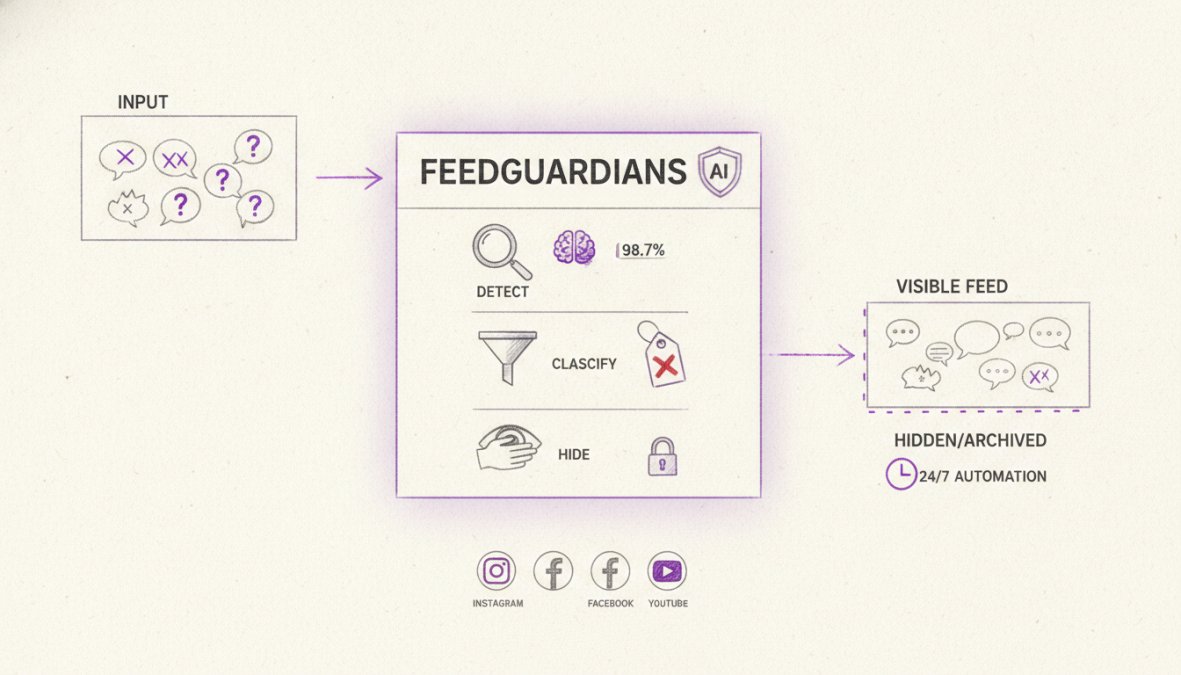
FeedGuardians automatically detects and hides spam, hate speech, and competitor links with 98.7% accuracy across Instagram, Facebook, TikTok, and YouTube. The AI learns your brand's specific community guidelines, improving accuracy over time. Unlike keyword-based systems, AI-powered moderation understands context and nuance.
The system flags comments in real time, allowing you to review borderline content before it appears. This hybrid approach, automated detection with human oversight, prevents false positives while catching harmful content immediately. Brands using FeedGuardians report 40% reduction in moderation workload within the first week.
Automated tools also provide detailed reporting on comment trends, showing which topics generate hostile responses and which keywords appear most frequently in flagged comments.
Content Filtering Extensions & Advanced Solutions
Browser extensions and third-party moderation platforms provide additional protection beyond platform-native tools. Content filtering extensions scan comments in real time and highlight problematic content for your review.
Advanced moderation platforms offer centralized dashboards for managing comments across multiple social channels simultaneously. Instead of switching between platforms, you review all comments in one interface. These platforms typically include AI-powered detection, keyword filtering, and team collaboration features.
Many advanced solutions include sentiment analysis, which identifies hostile comments even without explicit hate speech. A comment like "Your product is terrible and nobody should buy it" will be flagged by sentiment analysis tools. The trade-off is cost and setup complexity. Platform-native tools are free but limited. Third-party tools offer more features but require integration and training.
How to Report Hate Speech & Escalate to Platforms
When comments violate platform policies, reporting them directly can result in account suspension or permanent removal. This is stronger enforcement than hiding and should be used for serious violations.
On Instagram and Facebook, tap the three dots menu next to the comment and select "Report." Choose the reason (hate speech, harassment, spam, etc.). YouTube's process is similar: click the three dots menu and select "Report Comment." TikTok's reporting interface is less prominent but works the same way.
Document serious violations before reporting. Take screenshots showing the comment, commenter account, timestamp, and context. For threats of violence or targeted harassment, contact local authorities in addition to reporting to the platform.
Hiding vs. Deleting: Legal & Engagement Implications
Hiding comments is preferable to deleting them in most situations. When you hide a comment, it remains in the platform's system and visible to the original commenter. This approach protects your audience while respecting user autonomy.
Deleting comments raises legal concerns for government accounts and public officials. Courts have ruled that public officials operating official accounts create a digital public forum. Deleting comments from that forum can violate First Amendment rights. For private brands, deletion is legally safer, but it can damage engagement metrics and community trust.
Hiding comments preserves engagement metrics. Hidden comments still count toward your post's total comment count. Deleted comments reduce your engagement numbers visibly, affecting algorithm performance and social proof.
Hide comments that violate your community guidelines but don't violate platform policies. Delete comments that violate platform policies or contain illegal content. For government accounts, hiding is mandatory; deletion creates legal liability.
Common Mistakes When Managing Hate Speech Comments
Most brands make predictable errors when hiding or deleting comments. The first mistake is inconsistent moderation. Establish clear community guidelines and apply them consistently. The second mistake is hiding comments too aggressively. Allow constructive criticism and negative feedback to remain visible. Hide only abusive, harassing, or off-topic comments.
The third mistake is ignoring the root cause. If you're hiding dozens of hate speech comments daily, investigate why hostile comments are appearing. The fourth mistake is failing to respond to legitimate concerns. Respond publicly to legitimate criticism, even if harsh, to show your community that you engage with feedback.
The fifth mistake is using manual moderation exclusively. As your community grows, implement automated moderation tools early. The sixth mistake is not training your team consistently. Establish written guidelines, review decisions regularly, and discuss borderline cases as a team.
Managing hate speech comments requires balancing community safety with transparency and engagement. Hiding comments is the most effective approach for most situations. Platform-native hiding features are free and effective for small to medium communities. As your community grows, automated moderation tools become essential for scaling efforts without increasing team size.
FeedGuardians automates this process, detecting and hiding hate speech with 98.7% accuracy while delivering 24/7 AI-powered replies in your brand voice. The system learns your community standards and improves over time. Start with FeedGuardians' free plan to see how automated moderation reduces your team's workload and protects your brand reputation in real time.
Frequently Asked Questions
What's the difference between hiding and deleting hate speech comments?
Hiding makes comments invisible to your audience while keeping them in the system, useful for preserving evidence and avoiding legal liability. Deleting permanently removes comments, which can appear heavy-handed and may violate transparency expectations for public officials. Hiding protects brand safety and engagement metrics without escalating conflict or creating accusations of censorship in public discourse.
Can I automatically hide hate speech comments using content filtering extensions?
Yes. Content filtering extensions and social media moderation tools can automatically detect and hide hate speech using keyword matching and AI-powered detection. Many platforms offer native keyword filters, while advanced solutions use automated moderation to identify toxicity with high accuracy. This approach saves hours daily and reduces manual review burden while maintaining community guidelines compliance.
How do I report hate speech to social media platforms?
Most platforms have built-in reporting tools accessible through comment menus. On Instagram and Facebook, tap the three dots on a comment and select 'Report.' YouTube offers similar options. When you report hate speech, provide context about why it violates their hate speech policy. Platforms review reports and may remove content or suspend accounts. This escalation process supports platform algorithms in identifying repeat offenders and harmful patterns.
Does hiding comments affect my engagement metrics and ad performance?
Hiding comments removes them from public view without deleting them, so they don't count toward engagement metrics. This protects your ad performance by preventing negative sentiment from suppressing reach. Unlike deletion, hiding avoids accusations of censoring public discourse, which can trigger backlash. Strategic use of hiding, combined with authentic responses to legitimate criticism, maintains community trust while protecting brand reputation and conversion rates.
This article was written using GrandRanker
Tired of manually moderating comments?
FeedGuardians automates spam filtering, responds to customers, and protects your brand — setup in 3 minutes.
Frequently Asked Questions
What's the difference between hiding and deleting hate speech comments?
Hiding makes comments invisible to your audience while keeping them in the system—useful for preserving evidence and avoiding legal liability. Deleting permanently removes comments, which can appear heavy-handed and may violate transparency expectations for public officials. Hiding protects brand safety and engagement metrics without escalating conflict or creating accusations of censorship in public discourse.
Can I automatically hide hate speech comments using content filtering extensions?
Yes. Content filtering extensions and social media moderation tools can automatically detect and hide hate speech using keyword matching and AI-powered detection. Many platforms offer native keyword filters, while advanced solutions use automated moderation to identify toxicity with high accuracy. This approach saves hours daily and reduces manual review burden while maintaining community guidelines compliance.
How do I report hate speech to social media platforms?
Most platforms have built-in reporting tools accessible through comment menus. On Instagram and Facebook, tap the three dots on a comment and select 'Report.' YouTube offers similar options. When you report hate speech, provide context about why it violates their hate speech policy. Platforms review reports and may remove content or suspend accounts. This escalation process supports platform algorithms in identifying repeat offenders and harmful patterns.
Does hiding comments affect my engagement metrics and ad performance?
Hiding comments removes them from public view without deleting them, so they don't count toward engagement metrics. This protects your ad performance by preventing negative sentiment from suppressing reach. Unlike deletion, hiding avoids accusations of censoring public discourse, which can trigger backlash. Strategic use of hiding—combined with authentic responses to legitimate criticism—maintains community trust while protecting brand reputation and conversion rates.