
Quick Summary
| Key Insight | What You Need to Know |
|---|---|
| The Connection Between Comment | The Connection Between Comment Moderation and Ad Conversions |
| How Harmful Comments Damage | How Harmful Comments Damage Ad Performance and ROAS |
| Facebook Ad Comment Moderation | Platform-Specific Strategy |
| Managing Negative Comments Under | Managing Negative Comments Under Ads Without Losing Trust |
| Implementing Automated Comment Moderation | Implementing Automated Comment Moderation for Scale |
| Responding to Comments on Facebook Ads | Timing, Tone, and Impact |
Table of Contents
- The Connection Between Comment Moderation and Ad Conversions
- How Harmful Comments Damage Ad Performance and ROAS
- Facebook Ad Comment Moderation: Platform-Specific Strategy
- Managing Negative Comments Under Ads Without Losing Trust
- Implementing Automated Comment Moderation for Scale
- Responding to Comments on Facebook Ads: Timing, Tone, and Impact
- Measuring the Incremental Impact of Comment Moderation on Conversions
- Moderation Trade-Offs: What You Risk When You Over-Moderate
- Frequently Asked Questions
Last Updated: October 8, 2026
The Connection Between Comment Moderation and Ad Conversions
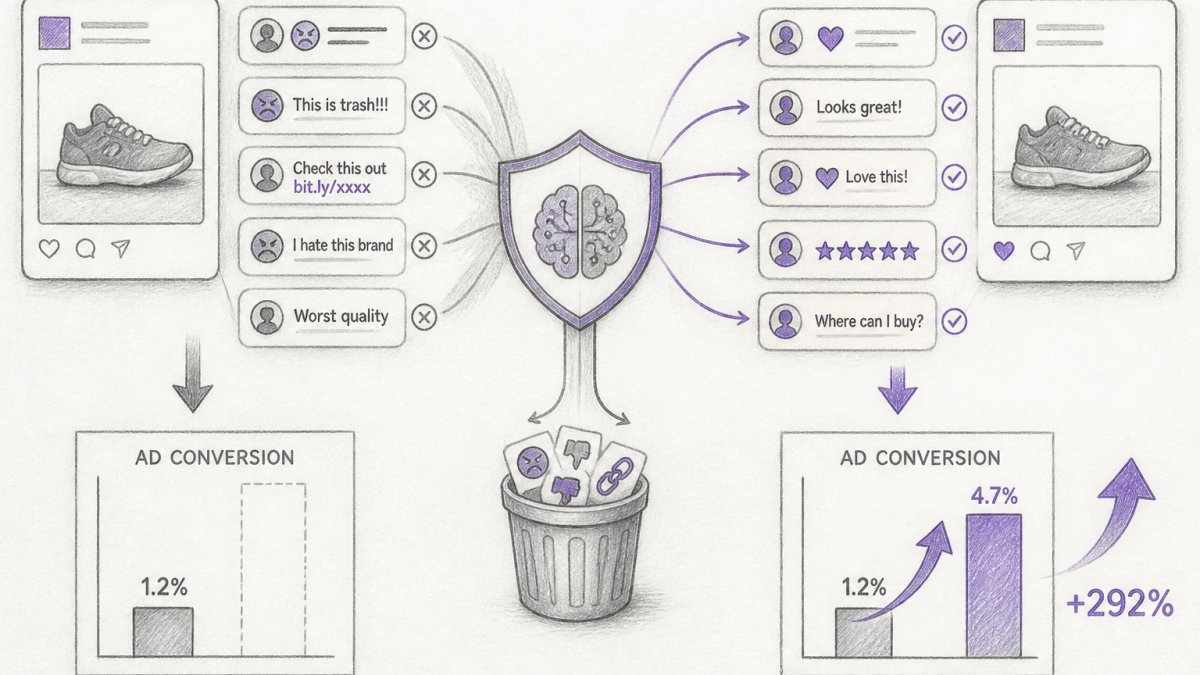
Does comment moderation increase ad conversions? The short answer is yes, but the relationship is more nuanced than a simple cause-and-effect. When you remove harmful comments, respond to audience questions, and maintain a clean comment environment under your paid social ads, you create conditions where conversions are more likely to happen.
Think of your ad's comment section as an extension of your sales funnel. A prospect clicks your ad, lands on the post, and then encounters either a conversation that builds confidence or a minefield of spam, negativity, and unanswered objections. The first scenario moves people toward purchase. The second stops them cold.
But here's what most guides miss: the improvement isn't automatic. You have to moderate strategically. Deleting every critical comment destroys authenticity. Ignoring comments entirely leaves money on the table.
How Harmful Comments Damage Ad Performance and ROAS
Harmful comments don't just look bad. They actively suppress conversions by creating friction at a critical decision moment. When a prospect sees spam, hate speech, competitor links, or unresolved objections in your ad's comment section, they perceive risk. That perception triggers hesitation, and hesitation often converts to abandonment.
The damage operates on multiple levels. First, harmful comments create audience distrust. A prospect who sees your ad but then scrolls through comments filled with complaints, scams, or irrelevant noise questions whether the product is worth the risk.
Second, harmful comments obscure your key selling points.
Third, unaddressed objections in comments extend the sales cycle unnecessarily. A prospect asks "Does this work for sensitive skin?" If that question sits unanswered for hours or days, the prospect either leaves to research competitors or buys with lingering doubt. Either way, you've lost the moment.
Facebook Ad Comment Moderation: Platform-Specific Strategy
Facebook ads operate in a unique environment where comment volume scales quickly and audience composition is often broad. Your Facebook ad comment moderation strategy needs to account for both the platform's algorithm and the behavioral patterns of Facebook users specifically.
On Facebook, comments directly influence ad delivery through the auction system. When your ad receives high-quality engagement (meaningful comments, shares, reactions), Facebook's algorithm rewards it with lower cost per mille (CPM) and better delivery. When your ad receives spam, irrelevant comments, or negative sentiment, the algorithm penalizes it.
One practical approach: hide comments that are off-topic, promotional, or hostile without deleting them. This removes the negative signal from your ad's comment section while preserving the comment for the user (they see it on their own profile). This approach protects both brand safety and user experience.
Managing Negative Comments Under Ads Without Losing Trust
The biggest mistake brands make is treating all negative comments the same. A customer saying "I had a problem with shipping" is fundamentally different from a troll saying "This brand is garbage." One deserves a thoughtful response. The other deserves removal. Conflating them costs you authenticity and conversions.
Legitimate criticism, especially from real customers, should be visible and addressed. When a prospect sees a brand respond professionally to a complaint, they perceive competence and care. That builds trust. When they see complaints deleted or ignored, they perceive defensiveness. So the rule is: keep real feedback, respond to it, and let people see the response.
For managing negative comments on paid social campaigns, create a decision framework:
- Genuine customer issue? Respond publicly, take it to DM if needed, show you care.
- Unfounded accusation? Respond once with facts, then move on. Don't engage further.
- Spam or abuse? Hide or delete. No response necessary.
- Competitor link or promotional? Remove immediately. This isn't censorship; it's keeping your ad clean.
The tone of your response matters enormously. A defensive or dismissive reply to a legitimate concern will damage your brand more than the original comment. A warm, solution-focused response, even to criticism, builds audience trust and signals that you're a brand worth buying from.
Implementing Automated Comment Moderation for Scale
Manual comment moderation becomes impossible once your paid social volume scales. If you're running ads across multiple platforms to multiple audiences, you'll receive hundreds or thousands of comments daily. Responding to each one manually isn't feasible, and missing comments for hours kills their impact.
Automated comment moderation solves the scale problem by filtering comments in real-time according to rules you define. The best systems use AI to detect spam, hate speech, competitor links, and other harmful content with high accuracy.
To implement automated moderation effectively: (1) Define your rules clearly. What constitutes spam? What language or phrases trigger removal? What topics are off-limits? (2) Set escalation thresholds. Not every flagged comment should be auto-hidden.
The time savings can be substantial. Automated moderation can free up time that can be redirected to actually responding to high-value comments and optimizing other parts of your campaign.
Responding to Comments on Facebook Ads: Timing, Tone, and Impact
Response timing matters more than most brands realize. A response to a comment within 2 hours carries different weight than a response 12 hours later. Early responses signal that you're actively monitoring and engaged. Late responses feel obligatory.
For responding to comments on Facebook ads specifically, aim for a response window of 1-4 hours during your audience's active hours. If your audience is primarily US-based, that typically means 9 AM to 9 PM in their timezone.
Tone is equally critical. Your response should match your brand's voice and the comment's intent. If a comment is a genuine question, answer it directly and warmly. If it's a complaint, acknowledge the issue and offer a solution. If it's a compliment, thank them genuinely.
The impact of good responses compounds. Each response you post becomes visible to other prospects reading the comment section.
Measuring the Incremental Impact of Comment Moderation on Conversions
Here's where most brands fail: they implement moderation and assume it's working without actually measuring it. Measuring the incremental impact of comment moderation on conversions requires a testing framework, because correlation is easy to spot but causation is harder to prove.
(/best-instagram-comment-management-tools) is paying off, and for most brands running ads, it absolutely does.
Moderation Trade-Offs: What You Risk When You Over-Moderate
Over-moderation is a real risk, and it's often overlooked. Delete too many comments, hide too aggressively, or respond with defensiveness, and you'll damage the very trust you're trying to build.
The most common over-moderation mistakes: (1) Deleting all negative comments. This makes your brand look fragile and inauthentic.
The solution is balance. Moderate aggressively for spam, hate speech, and off-topic promotion. Moderate lightly for criticism and disagreement. Respond to questions and objections, but skip the noise.
One more trade-off to watch: moderation costs time and resources. If you're moderating manually, that's hours per day. If you're using automated tools, there's a platform cost.
The evidence is clear: comment moderation increases ad conversions when done strategically. The mechanism is straightforward, you reduce friction, build trust, and answer objections at the moment they matter most.
Frequently Asked Questions
Does moderating comments on ads actually increase conversions?
Comment moderation affects conversions indirectly by improving the environment around your ads. Removing spam, scams, and harmful comments reduces friction for genuine prospects. Responding to customer questions and objections removes barriers to purchase. However, moderation itself doesn't drive conversions, the quality of your product, offer, and ad creative do. The real lift comes from faster response times, cleaner comment sections, and addressing audience concerns before they abandon your ad. Test this by comparing conversion rates on moderated vs. unmoderated campaigns over 2-4 weeks.
How do negative comments affect social media ad performance?
Negative comments signal distrust to prospects scrolling through your ads. They increase purchase hesitation, lower perceived brand authority, and reduce click-through rates. Comments containing complaints, scams, or spam create cognitive friction, prospects spend mental energy evaluating the criticism instead of evaluating your offer. Negative sentiment in visible comments can reduce conversion rates depending on comment prominence and audience segment. The effect is stronger on lower-intent audiences who are still evaluating the brand.
Should brands hide negative comments on ads or respond to them?
The answer depends on the comment type and your brand voice. Hide spam, scams, hate speech, and irrelevant competitor links immediately, these add no value and damage trust. For legitimate negative feedback (product complaints, genuine concerns), respond transparently. Ignoring valid criticism makes you look dismissive; responding professionally shows accountability and builds trust with other prospects reading the thread. A mix of hiding low-quality comments and responding to legitimate objections performs better than either strategy alone. Use comment-level decision rules: Is this a real customer concern or noise? If noise, hide it. If real, reply.
How quickly should brands respond to comments on social media ads?
Response time directly affects conversion impact. Comments answered within 2-4 hours see higher engagement and conversion lift than those answered after 24 hours. For paid social campaigns, the auction is active for days or weeks, so timely replies to questions and objections remove purchase barriers while the prospect is still in decision mode. Automated replies in your brand voice can handle common questions instantly, while human escalation routes complex issues to your team. Slower response times (8+ hours) reduce the moderation benefit significantly because prospects have already moved on.
What types of comments should brands hide from ads?
Hide comments in this order of priority: spam (promotional links, bot comments), scams (fake offers, phishing), hate speech and harassment, irrelevant competitor links, and off-topic noise. Do not hide legitimate customer complaints, skeptical questions, or differing opinions, these are real feedback that other prospects need to see. Hiding too aggressively damages credibility and can trigger audience backlash. A good rule: if a real customer with a genuine concern posted it, let it stay and respond to it. If it's obviously bot-generated or malicious, hide it.
Can automated comment moderation improve return on ad spend?
Yes, but indirectly. Automated moderation removes low-quality comments and spam that damage your ad environment, and it enables 24/7 replies to customer questions, both reduce friction in the conversion path. The ROAS lift comes from faster response times, higher-quality engagement, and lower cost per acquisition because fewer prospects are distracted by negative comments. Automated moderation can also save hours per week in manual work, freeing your team to optimize ad creative and targeting instead. The efficiency gain compounds over time as you scale to multiple platforms and accounts.
How do you measure the impact of comment moderation on ad conversions?
Run a controlled test: split your ad spend across two identical campaigns for 2-4 weeks. Apply full moderation (hide harmful comments, respond to questions) on one; leave the other unmoderated as a control. Track these metrics for both: conversion rate, cost per acquisition, return on ad spend, comment response rate, and audience sentiment (positive vs. negative comment ratio). Calculate the incremental lift: (moderated conversion rate - control conversion rate) / control conversion rate × 100. Document which comment types you removed or responded to so you can correlate specific moderation actions with performance changes.
What's the difference between correlation and proof that moderation increases conversions?
Correlation means moderated campaigns have higher conversions; causation means moderation caused the increase. Many factors affect conversions: time of day, audience segment, offer strength, and creative quality. To prove causation, you need a control group (unmoderated) and treatment group (moderated) running simultaneously with all other variables held constant. If moderated campaigns convert 15% higher but also have better creative or a stronger offer, you can't credit moderation alone. A/B testing with proper controls is the only reliable way to isolate moderation's actual impact. Without controls, you're seeing correlation, not proof.
Tired of manually moderating comments?
FeedGuardians automates spam filtering, responds to customers, and protects your brand — setup in 3 minutes.
Frequently Asked Questions
Does moderating comments on ads actually increase conversions?
Comment moderation affects conversions indirectly by improving the environment around your ads. Removing spam, scams, and harmful comments reduces friction for genuine prospects. Responding to customer questions and objections removes barriers to purchase. However, moderation itself doesn't drive conversions—the quality of your product, offer, and ad creative do. The real lift comes from faster response times, cleaner comment sections, and addressing audience concerns before they abandon your ad. Test this by comparing conversion rates on moderated vs. unmoderated campaigns over 2-4 weeks.
How do negative comments affect social media ad performance?
Negative comments signal distrust to prospects scrolling through your ads. They increase purchase hesitation, lower perceived brand authority, and reduce click-through rates. Comments containing complaints, scams, or spam create cognitive friction—prospects spend mental energy evaluating the criticism instead of evaluating your offer. Negative sentiment in visible comments can reduce conversion rates depending on comment prominence and audience segment. The effect is stronger on lower-intent audiences who are still evaluating the brand.
Should brands hide negative comments on ads or respond to them?
The answer depends on the comment type and your brand voice. Hide spam, scams, hate speech, and irrelevant competitor links immediately—these add no value and damage trust. For legitimate negative feedback (product complaints, genuine concerns), respond transparently. Ignoring valid criticism makes you look dismissive; responding professionally shows accountability and builds trust with other prospects reading the thread. A mix of hiding low-quality comments and responding to legitimate objections performs better than either strategy alone. Use comment-level decision rules: Is this a real customer concern or noise? If noise, hide it. If real, reply.
How quickly should brands respond to comments on social media ads?
Response time directly affects conversion impact. Comments answered within 2-4 hours see higher engagement and conversion lift than those answered after 24 hours. For paid social campaigns, the auction is active for days or weeks, so timely replies to questions and objections remove purchase barriers while the prospect is still in decision mode. Automated replies in your brand voice can handle common questions instantly, while human escalation routes complex issues to your team. Slower response times (8+ hours) reduce the moderation benefit significantly because prospects have already moved on.
What types of comments should brands hide from ads?
Hide comments in this order of priority: spam (promotional links, bot comments), scams (fake offers, phishing), hate speech and harassment, irrelevant competitor links, and off-topic noise. Do not hide legitimate customer complaints, skeptical questions, or differing opinions—these are real feedback that other prospects need to see. Hiding too aggressively damages credibility and can trigger audience backlash. A good rule: if a real customer with a genuine concern posted it, let it stay and respond to it. If it's obviously bot-generated or malicious, hide it.
Can automated comment moderation improve return on ad spend?
Yes, but indirectly. Automated moderation removes low-quality comments and spam that damage your ad environment, and it enables 24/7 replies to customer questions—both reduce friction in the conversion path. The ROAS lift comes from faster response times, higher-quality engagement, and lower cost per acquisition because fewer prospects are distracted by negative comments. Automated moderation can also save hours per week in manual work, freeing your team to optimize ad creative and targeting instead. The efficiency gain compounds over time as you scale to multiple platforms and accounts.
How do you measure the impact of comment moderation on ad conversions?
Run a controlled test: split your ad spend across two identical campaigns for 2-4 weeks. Apply full moderation (hide harmful comments, respond to questions) on one; leave the other unmoderated as a control. Track these metrics for both: conversion rate, cost per acquisition, return on ad spend, comment response rate, and audience sentiment (positive vs. negative comment ratio). Calculate the incremental lift: (moderated conversion rate – control conversion rate) / control conversion rate × 100. Document which comment types you removed or responded to so you can correlate specific moderation actions with performance changes.
What's the difference between correlation and proof that moderation increases conversions?
Correlation means moderated campaigns have higher conversions; causation means moderation caused the increase. Many factors affect conversions: time of day, audience segment, offer strength, and creative quality. To prove causation, you need a control group (unmoderated) and treatment group (moderated) running simultaneously with all other variables held constant. If moderated campaigns convert 15% higher but also have better creative or a stronger offer, you can't credit moderation alone. A/B testing with proper controls is the only reliable way to isolate moderation's actual impact. Without controls, you're seeing correlation, not proof.