
Quick Summary
| Key Insight | What You Need to Know |
|---|---|
| Understanding Toxic Comments and | Understanding Toxic Comments and Their ImpactThe difference between constructive criticism and harassmentHow negativity affects your channel and mental well-being |
| The difference between constructive | The difference between constructive criticism and harassment |
| How negativity affects your | How negativity affects your channel and mental well-being |
| YouTube Comment Moderation Settings | YouTube Comment Moderation Settings You Should ConfigureSetting up community guidelines and automated filtersUsing blacklist keywords and shadowbanning options |
| Setting up community guidelines | Setting up community guidelines and automated filters |
| Using blacklist keywords and | Using blacklist keywords and shadowbanning options |
Table of Contents
- Understanding Toxic Comments and Their Impact
- YouTube Comment Moderation Settings You Should Configure
- Step-by-Step: How to Block and Hide Comments
- Responding to Negative Feedback on Social Media
- Using Automated Comment Moderation Tools
- Reporting Harassment and When to Involve Platform Support
- Building a Positive Community Culture
- Frequently Asked Questions
Last Updated: October 3, 2026
Understanding Toxic Comments and Their Impact
Learning how to deal with toxic comments on YouTube starts with understanding that toxic comments are negative, abusive, or deliberately hurtful messages left on your videos.
Constructive criticism offers specific feedback with suggestions for improvement, for example: "The audio quality in the first five minutes was hard to follow.
This distinction is crucial for how you respond. Constructive comments deserve engagement; toxic comments deserve moderation or blocking.
The difference between constructive criticism and harassment
Constructive feedback identifies a specific problem. It's usually respectful in tone. Harassment attacks your character, appearance, or identity. It often includes profanity or threats.
Here's the key: constructive criticism makes you better. Harassment makes you worse. One builds community. The other tears it down.
When you see a comment, ask yourself: "Does this person want to help me improve, or do they want to hurt me?" That answer determines whether you engage or block.
How negativity affects your channel and mental well-being
Understanding how to deal with toxic comments on YouTube is essential because they drain your energy and can lead to anxiety or burnout. They also hurt engagement metrics, YouTube's algorithm suppresses reach when viewers spend time arguing in comments, and harassment drives away other viewers. Your well-being matters more than any video view count.
YouTube Comment Moderation Settings You Should Configure
YouTube offers powerful built-in tools to control your comment section. Here's what to set up first.
Setting up community guidelines and automated filters
Go to YouTube Studio > Settings > Community to define what's acceptable on your channel. Write clear guidelines specifying what you won't tolerate: hate speech, slurs, spam, harassment, threats, and misinformation. Enable all three automated filter levels: "Likely to be spam or abuse," "Might not be appropriate for all audiences," and "Might be inappropriate for this channel." The more specific your filters, the less manual moderation you'll do.
Using blacklist keywords and shadowbanning options
Create a blacklist of words or phrases you won't allow, including slurs, competitor names, or spam links. When someone uses a blacklisted word, their comment goes to your held-for-review queue for approval or deletion. You can also hide comments from public view while keeping them visible to the poster, useful for borderline toxic comments not worth deleting.
Step-by-Step: How to Block and Hide Comments
Blocking users stops them from commenting on your channel again. Hiding comments removes them from view without deleting them. Both are useful. Here's how to do each.
Blocking individual users and managing your blacklist
Click the three dots next to a comment and select "Block user" to prevent that person from commenting on any of your videos. Manage your blocklist from YouTube Studio > Settings > Community > Blocked users. Block accounts that repeatedly harass you or spam competitor links, but don't block someone for a single critical comment. Distinguishing between genuine feedback and bad-faith disruption requires you to manage communication styles effectively to maintain a constructive environment for your community.
Hiding comments without deleting them
Click the three dots next to a comment and select "Hide comment" to remove it from public view while keeping it in your records. The poster still sees their comment; everyone else sees nothing. Use this for off-topic or mildly inappropriate comments that don't warrant permanent blocking.
Responding to Negative Feedback on Social Media
Not every negative comment deserves a response. Knowing which ones do saves time and energy while preventing you from amplifying trolls.
De-escalation scripts for hostile interactions
A calm, specific response can shift the dynamic with genuinely upset commenters. Acknowledge their concern without defending yourself. For disagreement, reframe it as valuable. For valid criticism wrapped in hostility, separate the feedback from the tone and show willingness to improve. For pure trolling, do not respond, it signals defensiveness and rewards the troll with attention.
Identifying genuine criticism versus trolling
Before responding, ask: Does the comment identify a specific problem (genuine criticism) or is it vague and personal (trolling)? Is there a constructive element, even buried? Would your response clarify something for the audience or model good behavior?
When to engage and when to ignore
Engage with specific, detailed criticism that's respectful or raises points other viewers might wonder about. Ignore purely insulting, repetitive, or off-topic comments. Responding thoughtfully to valid criticism while ignoring trolling makes you look confident and in control.
The mental cost of engagement
Set a time limit for comment responses, no more than 10-15 minutes per day. Your creative energy matters more than having the last word.
Using Automated Comment Moderation Tools
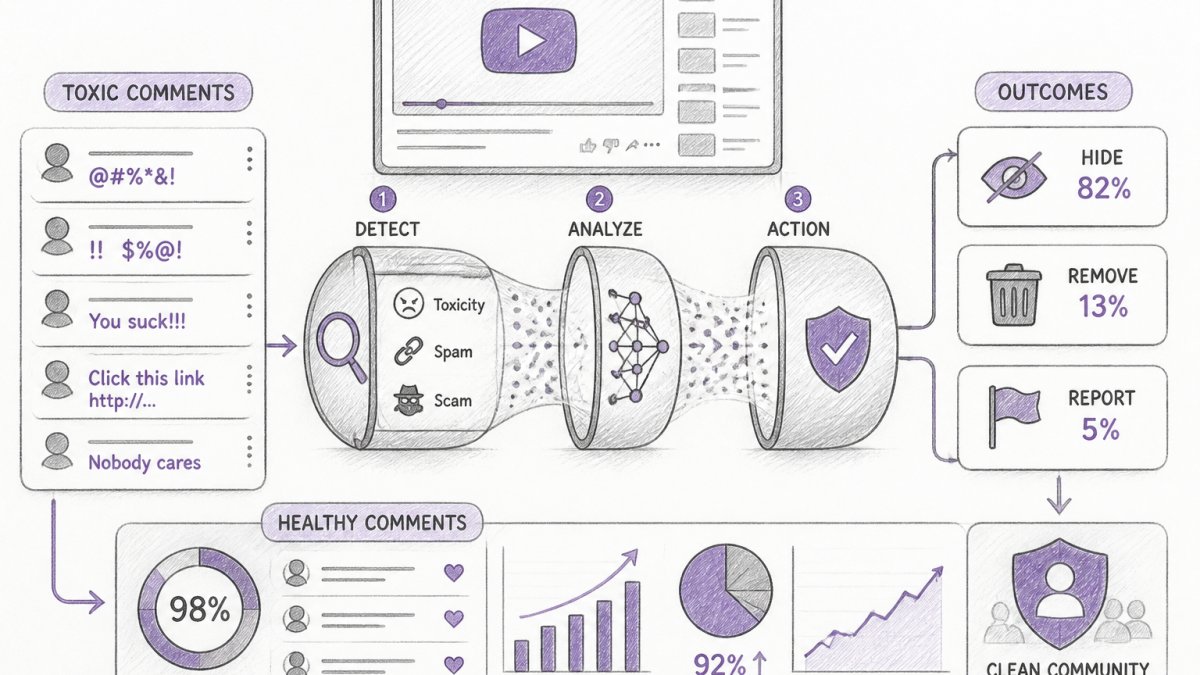
Automated tools handle spam detection, keyword filtering, and initial triage so you only review borderline cases, saving 5-10 hours per week for active channels.
How automated moderation systems work
Automated moderation uses rule-based filtering (blacklist keywords, URL patterns, account age) for fast, predictable results, and machine learning to detect patterns in spam and harassment without explicit rules. YouTube's built-in filters use primarily rule-based detection; third-party tools often combine both approaches.
Setting up keyword blacklists and filter thresholds
Start with a blacklist of words and phrases you will not tolerate on your channel. This includes:
- Slurs and hate speech: Specific terms targeting protected groups
- Spam indicators: "Click here," "Buy now," "DM me," cryptocurrency wallet addresses
- Competitor names or links: If you want to prevent promotion of rival channels or products
- Misinformation keywords: If you run a health or finance channel, you might flag claims like "cures cancer" or "guaranteed returns"
- Off-topic spam: Repeated phrases like "Check out my channel" if they appear in multiple comments
YouTube's built-in filter lets you add custom keywords. When someone uses a blacklisted word, their comment goes to your held-for-review queue.
Pro tip: Don't blacklist common words used in legitimate discussion. If you blacklist "vaccine," you'll flag comments from people discussing your health content. Be specific. Blacklist the slur, not the group name.
You can also set filter aggressiveness. YouTube offers three levels:
- Likely spam or abuse: Catches obvious violations
- Might not be appropriate: Flags profanity and borderline content
- Might be inappropriate for this channel: Your custom keywords
Start with the first two enabled. Add custom keywords only if you have a specific need. Too aggressive a filter and you'll spend hours reviewing false positives.
Understanding held-for-review versus shadowbanning
When a comment triggers your filters, it enters a held-for-review queue. The comment is not live. The person who posted it doesn't see it published. You review it and decide:
- Approve: The comment goes live
- Delete: The comment is removed permanently
- Hide: The comment stays in your records but is invisible to other viewers
This is different from shadowbanning. YouTube doesn't officially use the term, but the effect is similar: a comment can be hidden from public view while remaining visible to the person who posted it. They think their comment is live. Everyone else sees nothing. Use this for borderline comments, slightly off-topic, mildly rude, but not worth deletion.
The advantage of held-for-review: you maintain control. You're not automatically silencing anyone. You're just filtering what appears publicly.
Real-time filtering and escalation workflows
Real-time filtering means comments are scanned the moment someone posts them. Spam and hate speech get hidden or held before they appear on your channel. Your viewers never see them.
An escalation workflow routes ambiguous comments to your review queue. For example:
- A comment with a link (might be spam, might be a legitimate resource)
- A comment with profanity (might be sarcasm, might be harassment)
- A comment that disagrees strongly (might be constructive criticism, might be trolling)
You review these in batches, usually once or twice daily. This saves you from reviewing obvious spam while keeping you in control of nuanced cases.
Third-party moderation tools and their trade-offs
YouTube's built-in tools are free and integrated, but they're basic. Third-party moderation platforms offer more sophisticated filtering, cross-platform support (YouTube, Instagram, TikTok, etc.), and sometimes AI-powered response generation.
When evaluating third-party tools, ask:
- What detection methods do they use? Rule-based only, or machine learning? Machine learning is more powerful but less transparent.
- Do they require training on your channel? Some tools learn your specific community standards over time. This takes a few weeks but improves accuracy.
- What's the false positive rate? How often do they flag legitimate comments as toxic? High false positives mean you spend more time reviewing.
- Do they integrate with YouTube's native moderation? Some tools work alongside YouTube's filters; others replace them.
- What's the cost? Free tools usually offer basic filtering. Paid tiers ($10-50/month) add AI detection and response generation.
- Do they generate responses? Some tools can draft replies in your brand voice. This saves time but requires you to review before publishing.
No tool is perfect. All of them require human oversight. Treat automation as a force multiplier, not a replacement for your judgment.
Reporting Harassment and When to Involve Platform Support
Some comments cross the line into criminal territory. Threats, doxxing, and targeted harassment deserve platform action and sometimes legal action.
YouTube's reporting system sends complaints to their trust and safety team. They investigate serious violations.
Report a comment by clicking the three dots and selecting "Report comment." Choose the reason: spam, harassment, hate speech, or other.
Document serious harassment. Take screenshots. Keep records. If someone threatens you, report it to local law enforcement as well as YouTube.
Building a Positive Community Culture
The comments you get reflect the culture you build. Encourage good behavior and you'll see more of it.
Establishing clear community guidelines upfront
Pin a comment at the top of your channel. State your rules clearly. Tell people what you expect. Mention what you won't tolerate.
Be specific. "Be respectful" is vague. "No slurs, no spam, no harassment" is clear. People know exactly where the line is.
Review your guidelines every six months. As your channel grows, your needs change. Update them to reflect your current community.
Encouraging constructive discourse and digital boundaries
Thank people who leave thoughtful comments. Reply to questions. Show that you value genuine engagement.
Establish digital boundaries. You don't owe anyone a response. You don't have to engage with every criticism.
Highlight good comments. Pin thoughtful responses. Feature community discussions. This shows viewers what you value. They'll follow your lead.
Toxic comments are part of running a public channel. But they don't have to control your experience.
FeedGuardians automates comment moderation across YouTube, Instagram, Facebook, and TikTok.
Start with FeedGuardians free plan and see how much time you reclaim. YouTube's official community guidelines and Google's support documentation on comment moderation offer additional resources for managing your channel. For deeper insights on online harassment prevention, the Cyberbullying Research Center's resources provides evidence-based strategies for creators and community managers.
Frequently Asked Questions
What's the difference between toxic comments and constructive criticism on YouTube?
Constructive criticism identifies specific issues and suggests improvement, while toxic comments use personal attacks, insults, or harassment. Toxic comments often include hate speech, cyberbullying, or deliberate attempts to provoke. The intent matters: constructive feedback aims to help; toxic comments aim to harm. Learning this distinction helps you respond appropriately and know when to report harassment versus engage with legitimate feedback.
How do automated comment moderation tools detect toxic comments with such high accuracy?
AI-powered moderation tools analyze text patterns, keywords, and context to identify spam, hate speech, and harassment. They learn from thousands of labeled examples to recognize toxic behavior. Tools like FeedGuardians detect these patterns with 98.7% accuracy. They also flag edge cases for human review, ensuring both speed and accuracy without missing harmful content.
Should I delete or hide toxic comments on my YouTube channel?
Hiding comments is often better than deleting them. Hidden comments remain visible only to the commenter, reducing their impact on your community while preserving evidence if you need to report harassment. Deletion removes all record. Use hiding for borderline cases; reserve deletion for spam or platform policy violations. YouTube's moderation settings let you hide comments automatically based on keywords or user history, giving you control without constant manual work.
How can I respond to negative feedback without escalating tension?
Use de-escalation techniques: acknowledge the concern, stay professional, avoid defensive language, and offer a solution when possible. For example, 'Thanks for the feedback. We're always improving, please reach out directly so we can help.' Keep responses brief and focused on the issue, not the person. For harassment or trolling, don't engage; hide or report instead. Responding to genuine complaints with empathy builds trust with your audience and shows you value their input.
Tired of manually moderating comments?
FeedGuardians automates spam filtering, responds to customers, and protects your brand — setup in 3 minutes.
Frequently Asked Questions
What's the difference between toxic comments and constructive criticism on YouTube?
Constructive criticism identifies specific issues and suggests improvement, while toxic comments use personal attacks, insults, or harassment. Toxic comments often include hate speech, cyberbullying, or deliberate attempts to provoke. The intent matters: constructive feedback aims to help; toxic comments aim to harm. Learning this distinction helps you respond appropriately and know when to report harassment versus engage with legitimate feedback.
How do automated comment moderation tools detect toxic comments with such high accuracy?
AI-powered moderation tools analyze text patterns, keywords, and context to identify spam, hate speech, and harassment. They learn from thousands of labeled examples to recognize toxic behavior. Tools like FeedGuardians detect these patterns with 98.7% accuracy. They also flag edge cases for human review, ensuring both speed and accuracy without missing harmful content.
Should I delete or hide toxic comments on my YouTube channel?
Hiding comments is often better than deleting them. Hidden comments remain visible only to the commenter, reducing their impact on your community while preserving evidence if you need to report harassment. Deletion removes all record. Use hiding for borderline cases; reserve deletion for spam or platform policy violations. YouTube's moderation settings let you hide comments automatically based on keywords or user history, giving you control without constant manual work.
How can I respond to negative feedback without escalating tension?
Use de-escalation techniques: acknowledge the concern, stay professional, avoid defensive language, and offer a solution when possible. For example, 'Thanks for the feedback. We're always improving—please reach out directly so we can help.' Keep responses brief and focused on the issue, not the person. For harassment or trolling, don't engage; hide or report instead. Responding to genuine complaints with empathy builds trust with your audience and shows you value their input.