
Quick Summary
| Key Insight | What You Need to Know |
|---|---|
| Why YouTube Comments Drive | Why YouTube Comments Drive Real Engagement |
| Questions to Ask Viewers | Questions to Ask Viewers on YouTubeOpen-Ended Questions That Spark DiscussionSpecific Questions That Drive Higher Response Rates |
| Open-Ended Questions That Spark | Open-Ended Questions That Spark Discussion |
| Specific Questions That Drive | Specific Questions That Drive Higher Response Rates |
| YouTube Comment Reply Examples | YouTube Comment Reply Examples and Best PracticesHow to Reply Quickly and AuthenticallyUsing Creator Comments to Start Conversations |
| How to Reply Quickly | How to Reply Quickly and Authentically |
Table of Contents
- Why YouTube Comments Drive Real Engagement
- Questions to Ask Viewers on YouTube
- YouTube Comment Reply Examples and Best Practices
- YouTube Comment Moderation Tools and Strategies
- YouTube Community Engagement Best Practices
- Measuring Comment Engagement and Optimizing Results
- Common Mistakes to Avoid When Engaging Through Comments
- Frequently Asked Questions
Last Updated: October 8, 2026
Why YouTube Comments Drive Real Engagement
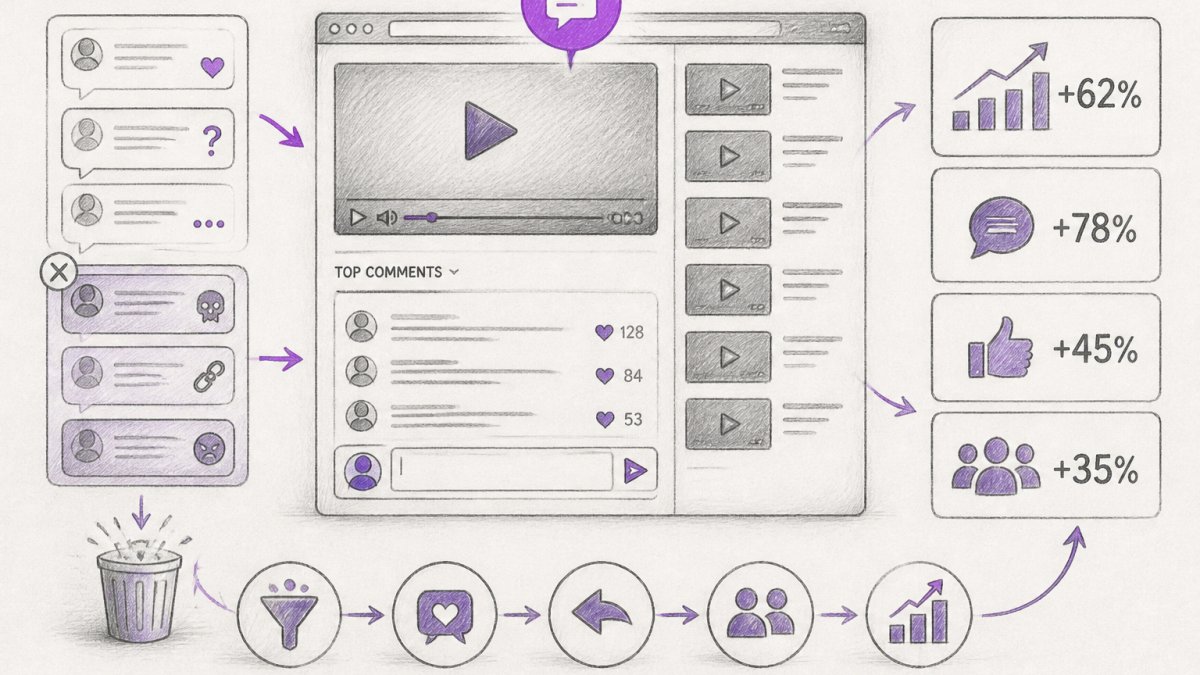
YouTube comments are where real engagement happens. Learning how to increase engagement through YouTube comments means understanding they're not just feedback, they're conversations that build community, boost your video visibility, and turn casual viewers into loyal subscribers.
When viewers comment, YouTube's algorithm notices. The platform prioritizes videos with active comment sections. More comments mean higher reach, which means more people see your content. But here's what matters most: comments create a direct line between you and your audience.
Brands that understand how to increase engagement through YouTube comments see measurable improvements in viewer loyalty and repeat visits. The difference between a video that gets 10 comments and one that gets 100 isn't just numbers, it's community.
The challenge is managing that volume. As your channel grows, responding to every comment becomes impossible. Spam floods in. Competitor links appear. Negative comments pile up. This is where strategy matters. You need a system that lets you engage meaningfully without burning out your team.
Questions to Ask Viewers on YouTube
Open-Ended Questions That Spark Discussion
Open-ended questions invite opinions and experiences. They don't have a single "right" answer, so viewers feel comfortable sharing their thoughts.
Ask questions like:
- "What's your biggest challenge with this?"
- "How would you handle this differently?"
- "What's your experience been?"
- "Tell us your story, how did you discover this?"
These questions work because they encourage real responses. Viewers share personal experiences. Those responses spark replies from other viewers. A single open-ended question can launch a discussion thread with dozens of comments.
The key is specificity. Don't ask "What do you think?" Ask "What surprised you most in this video?" The more specific your question, the more thoughtful the responses.
Specific Questions That Drive Higher Response Rates
Specific questions get more answers than vague ones. They give viewers a clear target to respond to.
Instead of asking "Do you like this?" ask "Which strategy would work best for your business, the first one or the second one?" The second version forces a choice. It's easier to answer.
Use these patterns:
- Either/or questions: "Would you choose A or B?"
- Numbered questions: "Of these three options, which is your favorite?"
- Scenario-based questions: "If you were in this situation, what would you do?"
- Preference questions: "What's your go-to method for solving this?"
Specific questions also give you data. When 60% of commenters pick option A, you know what resonates. You can use that insight to guide future content.
YouTube Comment Reply Examples and Best Practices
How to Reply Quickly and Authentically
Speed matters. When you reply within the first few hours, you catch viewers while they're still thinking about your video. They see your response, feel acknowledged, and often reply again.
But speed without authenticity backfires. Generic replies like "Thanks for watching!" don't spark conversation. They signal that you didn't really read the comment.
Authentic replies reference something specific from the comment:
- "Great point about the second strategy, I've had the same experience."
- "I love that you tried this approach. Did you see results?"
- "You're right, and here's what I'd add to your thinking..."
Each reply should feel like a real person wrote it. Reference details. Ask follow-up questions. Show that you actually read what they wrote.
Using Creator Comments to Start Conversations
Creator comments are special. They appear with a badge that marks them as from the channel owner. Use them strategically.
A creator comment works best when it:
- Adds new information or context that viewers didn't see in the video
- Asks a specific question that invites discussion
- Acknowledges a great comment from a viewer
- Clarifies something viewers are confused about
Don't use creator comments to reply to every single comment. Use them to launch new discussion threads. Pin one creator comment that asks a compelling question. That becomes the focal point for engagement.
Example creator comment: "I realize I didn't explain the reasoning behind step three clearly. Here's the full breakdown: [explanation]. What questions does that raise for you?"
This comment adds value, explains something viewers missed, and invites them to ask follow-up questions.
YouTube Comment Moderation Tools and Strategies
Filtering Spam, Hate Speech, and Competitor Links
Spam destroys engagement. It clutters your comment section and makes viewers feel like your channel isn't maintained. Hate speech drives away good viewers. Competitor links steal your traffic.
You need filters. YouTube has built-in moderation tools, but they're basic. You can:
- Hide comments with specific keywords
- Filter comments with links
- Hide comments from channels you specify
- Review held comments before they appear
The problem is scale. If you get hundreds of comments daily, manual moderation is impossible. You need automation.
This is where comment moderation tools become essential. Tools like FeedGuardians use AI to detect spam, hate speech, and competitor links with 98.7% accuracy. They flag problems before they appear in your comment section. FeedGuardians also offers human escalation, if the AI is unsure, a team member reviews it.
The benefit: your comment section stays clean. Viewers see genuine discussion, not spam. Your brand reputation stays protected.
Managing Comment Volume at Scale
As your channel grows, comment volume explodes. You might go from 50 comments per video to 500. Managing that manually becomes impossible.
Automation is the answer. You can:
- Set up auto-replies for common questions
- Use AI to respond to simple inquiries 24/7
- Flag comments that need human review
- Organize comments by sentiment (positive, neutral, negative)
The goal isn't to eliminate human interaction, it's to handle the routine stuff so you can focus on meaningful conversations. If someone asks "Where can I buy this?" the AI replies with a link. If someone shares a detailed story or raises a complex question, it gets flagged for you to respond personally.
This approach scales your engagement without burning out your team.
YouTube Community Engagement Best Practices
Building Viewer Loyalty Through Consistent Interaction
Consistency matters more than perfection. If you reply to comments on some videos but not others, viewers stop expecting responses. If you reply to some viewers but ignore others, they feel dismissed.
Build a system. Reply to at least 20-30 comments per video. Do it within the first 24 hours. Show up in your comment section regularly, not sporadically.
Viewers who see you responding become loyal. They comment on your next video because they know you'll actually engage. They recommend your channel to others. They're more likely to become subscribers.
The pattern is simple:
- New video goes live
- Within 2 hours, reply to the first 10-15 comments
- Check back in 24 hours and reply to new comments
- Respond to replies to your own comments
- Pin a creator comment with a question
This takes 15-30 minutes per video. It compounds over time.
Using Comments to Guide Your Content Strategy
Your comments are a goldmine of information about what your audience cares about. Pay attention to what they ask, what they disagree with, and what they want more of.
Create a simple tracking system:
- What questions appear repeatedly in comments?
- What topics spark the most discussion?
- What misconceptions do viewers have?
- What do viewers ask for in follow-up videos?
Use this data to guide your next batch of videos. If 15 people ask the same question in comments, that's your next video topic. If viewers debate a specific point, that's worth exploring deeper. If viewers request a tutorial on something, you've found your next series.
This approach ensures your content matches what your audience actually wants. It also makes viewers feel heard, when you create a video based on their comments, they know you're listening.
Measuring Comment Engagement and Optimizing Results
Comment engagement isn't just about volume. It's about quality and impact. Track these metrics:
Comments per view: Divide total comments by total views. A healthy rate is 1-3 comments per 100 views, depending on your niche. Videos with higher rates indicate stronger audience connection.
Engagement rate over time: Are comments increasing or declining? Track weekly trends. If engagement drops after a change you made, revert it. If it spikes after a new strategy, double down.
Comment sentiment: What percentage are positive, neutral, or negative? Tools can categorize this automatically. Aim for 70%+ positive sentiment. If negative comments spike, investigate why.
Reply speed: How long does it take you to reply to the first comment? Faster replies (within 2 hours) correlate with more total comments. Slow replies (24+ hours) get fewer follow-ups.
Repeat commenters: Are the same people commenting on multiple videos? This indicates loyal viewers. Track this number, it should grow over time.
Once you have these numbers, optimize. If your reply speed is slow, set a daily reminder to check comments. If comment sentiment is declining, review what changed in your recent videos. If repeat commenter numbers are flat, you need a stronger engagement strategy.
Common Mistakes to Avoid When Engaging Through Comments
Ignoring negative comments. Negative comments feel like attacks. The instinct is to hide them or delete them. Don't. Respond professionally. Acknowledge their concern.
Replying with generic responses. "Thanks for watching!" doesn't create engagement. It signals that you didn't really read the comment. Take 30 seconds to reference something specific.
Asking vague questions. "What do you think?" gets fewer responses than "Which of these three approaches would you use?" Specific questions get specific answers.
Forgetting to respond to replies. If someone replies to your comment, reply back. This extends the conversation and shows you're genuinely engaged, not just broadcasting.
Moderating too aggressively. Delete spam and hate speech. But don't delete criticism or disagreement.
Not pinning anything. Your pinned comment is prime real estate. Use it to ask a question, add context, or highlight a great viewer comment.
Waiting too long to respond. A reply after 48 hours gets less engagement than one after 2 hours. The viewer has already moved on.
FeedGuardians helps teams manage this at scale.
Ready to turn your comments into real conversations? Start for free with FeedGuardians and see how automation can scale your engagement without sacrificing authenticity.
Frequently Asked Questions
What types of questions get more YouTube comments?
Open-ended questions that ask for opinions, experiences, or preferences generate significantly more responses than yes-no questions. Specific questions tied to your video content also perform well, for example, asking viewers which strategy they'll try first, or what challenge they face with a topic you covered. Questions that invite viewers to share personal stories or disagree with a point tend to spark the most discussion and create meaningful audience interaction.
How should creators respond to YouTube comments?
Reply within the first 24-48 hours when possible, as early responses boost visibility and show viewers you're actively engaged. Keep replies authentic and conversational, avoid generic responses that sound automated. Address the viewer by name when relevant, answer their specific question or acknowledge their point, and ask a follow-up question to keep the conversation going. Pinning thoughtful replies or creator comments can elevate valuable discussions and encourage others to participate in the comment thread.
How can I manage spam and negative comments on YouTube?
Use YouTube's built-in comment filters and moderation settings to automatically hide spam, profanity, and suspected spam. Review held comments regularly and approve legitimate ones. For negative comments, decide whether to respond constructively, hide them, or delete if they violate community guidelines. Tools designed for comment moderation, like FeedGuardians, can detect and hide harmful content like hate speech and competitor links with 98.7% accuracy, protecting your brand reputation while you focus on meaningful audience engagement and viewer feedback.
Does responding to comments actually increase YouTube views and engagement?
Yes. When you reply to comments, it signals to YouTube's algorithm that your video is generating active discussion, which can improve visibility. Responding also encourages viewers to return to your video and subscribe, building long-term audience loyalty. Additionally, each reply creates a new notification for that viewer, keeping them engaged with your content. Channels that respond consistently to comments tend to see higher engagement rates, longer audience retention, and stronger subscriber growth over time.
Tired of manually moderating comments?
FeedGuardians automates spam filtering, responds to customers, and protects your brand — setup in 3 minutes.
Frequently Asked Questions
What types of questions get more YouTube comments?
Open-ended questions that ask for opinions, experiences, or preferences generate significantly more responses than yes-no questions. Specific questions tied to your video content also perform well—for example, asking viewers which strategy they'll try first, or what challenge they face with a topic you covered. Questions that invite viewers to share personal stories or disagree with a point tend to spark the most discussion and create meaningful audience interaction.
How should creators respond to YouTube comments?
Reply within the first 24-48 hours when possible, as early responses boost visibility and show viewers you're actively engaged. Keep replies authentic and conversational—avoid generic responses that sound automated. Address the viewer by name when relevant, answer their specific question or acknowledge their point, and ask a follow-up question to keep the conversation going. Pinning thoughtful replies or creator comments can elevate valuable discussions and encourage others to participate in the comment thread.
How can I manage spam and negative comments on YouTube?
Use YouTube's built-in comment filters and moderation settings to automatically hide spam, profanity, and suspected spam. Review held comments regularly and approve legitimate ones. For negative comments, decide whether to respond constructively, hide them, or delete if they violate community guidelines. Tools designed for comment moderation, like FeedGuardians, can detect and hide harmful content like hate speech and competitor links with 98.7% accuracy, protecting your brand reputation while you focus on meaningful audience engagement and viewer feedback.
Does responding to comments actually increase YouTube views and engagement?
Yes. When you reply to comments, it signals to YouTube's algorithm that your video is generating active discussion, which can improve visibility. Responding also encourages viewers to return to your video and subscribe, building long-term audience loyalty. Additionally, each reply creates a new notification for that viewer, keeping them engaged with your content. Channels that respond consistently to comments tend to see higher engagement rates, longer audience retention, and stronger subscriber growth over time.