
Quick Summary
| Key Insight | What You Need to Know |
|---|---|
| Why Community Guidelines Need | Why Community Guidelines Need Automated Moderation |
| Understanding Automated Content Moderation | Understanding Automated Content Moderation ToolsHow Automated Systems Detect ViolationsReal-Time Detection and Response |
| How Automated Systems Detect | How Automated Systems Detect Violations |
| Real-Time Detection and Response | Real-Time Detection and Response |
| Building Your Content Moderation | Building Your Content Moderation GuidelinesDefining What Violates Your StandardsA Practical Workflow for Translating Guidelines Into Moderation RulesKeeping Guidelines and Rules in Sync |
| Defining What Violates Your | Defining What Violates Your Standards |
Table of Contents
- Why Community Guidelines Need Automated Moderation
- Understanding Automated Content Moderation Tools
- Building Your Content Moderation Guidelines
- Establishing an Automated Moderation Workflow
- Community Moderation Best Practices
- Avoiding Common Moderation Mistakes
- Implementing Automated Moderation at Scale
- Governance, Accountability, and Privacy
- Frequently Asked Questions
Last Updated: October 17, 2026
Why Community Guidelines Need Automated Moderation
Managing community guidelines with automated moderation tools has become essential for brands managing high-volume social media engagement. Without automation, your team faces an impossible choice: respond to every comment manually and burn out, or ignore most interactions and watch spam, hate speech, and competitor attacks damage your reputation.
The challenge is scale. A single Instagram post on a popular account can generate hundreds of comments within hours. A TikTok video might hit thousands. Manual review of each one isn't just slow, it's unrealistic. Your team gets overwhelmed, inconsistency creeps in, and harmful content slips through the cracks.
Automated moderation tools solve this by operating 24/7, applying your guidelines consistently, and flagging edge cases for human review. They catch spam and hate speech in seconds, not hours. They also enable something manual moderation can't: instant, personalized replies in your brand voice, turning comment sections into conversion opportunities instead of support headaches.
At FeedGuardians, we've seen firsthand how brands transform their social presence when they implement the right automated moderation strategy. The difference isn't just efficiency, it's the quality of community you build and the trust you maintain with your audience.
Understanding Automated Content Moderation Tools
Automated content moderation tools are software systems that use rules, machine learning, or artificial intelligence to detect, filter, and respond to user-generated content in real-time. These tools examine comments, messages, and posts against your defined guidelines and take action, hiding, flagging, or responding, without human intervention.
The core function is straightforward: identify violations and enforce consequences. But the sophistication varies dramatically. Basic rule-based systems match keywords against blacklists. Advanced AI-powered systems understand context, sarcasm, and nuance. The best automated moderation tools combine both approaches: rules for obvious violations, AI for edge cases, and humans for appeals.
Most automated moderation tools operate across multiple platforms simultaneously. Instagram, Facebook, TikTok, YouTube, your guidelines should apply consistently everywhere. A tool that forces you to configure rules separately for each platform multiplies your work and increases the chance of inconsistency.
How Automated Systems Detect Violations
Automated systems detect violations through three primary mechanisms: keyword matching, pattern recognition, and contextual analysis.
Keyword matching is the simplest approach. You define a blacklist of prohibited words or phrases. When the system encounters one, it flags or hides the content. This works for obvious spam and slurs, but it's brittle. A misspelled version of a banned word slips through. Context gets ignored, someone defending your brand against a slur will trigger the same filter as someone using it to attack.
Pattern recognition looks beyond individual words. The system identifies sequences or combinations that signal spam: multiple links in one comment, repeated identical messages, suspicious account behavior. This catches many scams and bot networks that keyword matching misses.
Contextual analysis is where AI enters. The system evaluates the full comment, the account's history, the post's context, and the relationships between users. It understands that "I hate waiting for shipping" is customer feedback, not a hate attack. This is where modern automated moderation tools create real value, they reduce false positives that frustrate legitimate users.
The best automated moderation tools layer all three. Start with rules for obvious violations, add pattern detection for coordinated spam, and use AI to understand nuance. This combination catches more violations while minimizing false positives.
Real-Time Detection and Response
Real-time detection means the system analyzes each comment the moment it's posted. There's no queue, no delay. A spam comment appears and disappears within seconds. A harmful message gets flagged before most of your audience sees it.
Real-time response is equally critical. The system doesn't just detect violations, it acts on them immediately. Hide the comment, remove it, add it to a moderation queue, or trigger an automated reply. This speed matters because social media moves fast. A comment that sits visible for 10 minutes can generate dozens of replies, shares, and reactions. By then, the damage is done.
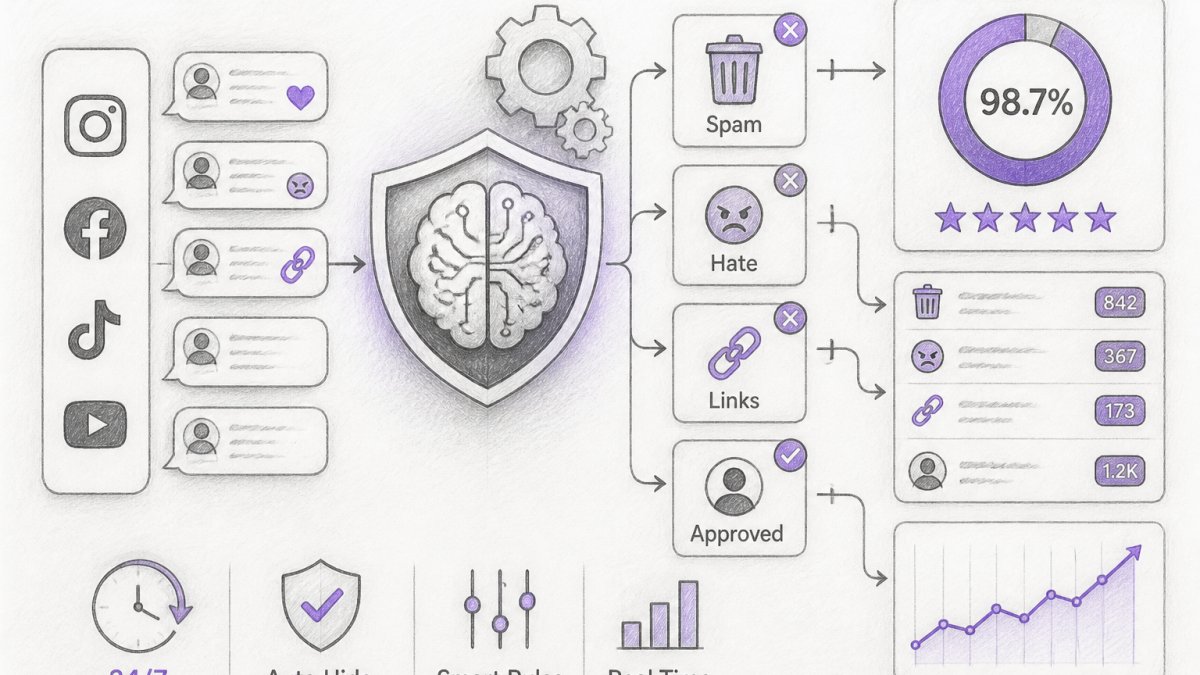
FeedGuardians detects and hides violations with 98.7% accuracy, which means harmful content is caught reliably while legitimate comments pass through. This accuracy comes from combining rule-based detection with machine learning trained on millions of real moderation decisions.
Response speed also enables proactive engagement. When a customer asks a question in a comment, an automated moderation tool can deliver an instant reply in your brand voice. You're not just moderating, you're converting. A customer who gets an answer within seconds is more likely to make a purchase than one who waits hours for a human response.
Building Your Content Moderation Guidelines
Your moderation guidelines define what's acceptable in your community. They're the foundation for everything that follows. Without clear guidelines, your automated moderation tool has no instructions. It doesn't know what to hide, what to flag, or what to allow.
Guidelines should cover the obvious categories: spam, hate speech, harassment, explicit content, competitor promotion. But they should also reflect your brand's specific values and audience. A luxury fashion brand and a gaming community have different standards. Your guidelines need to encode those differences.
Most teams stop here, they publish a policy page and assume the moderation tool will 'figure it out.' That is where automation fails. The real work is a repeatable workflow that turns policy language into configurable rules, examples, thresholds, escalation paths, and review queues. This section walks through that workflow step by step.
Defining What Violates Your Standards
Start by listing violation categories. Most communities need these:
- Spam: Promotional links, repeated identical messages, suspicious URLs, phishing attempts
- Hate speech and slurs: Language targeting protected characteristics, dehumanizing language
- Harassment: Personal attacks, threats, coordinated abuse, doxing
- Misinformation: False health claims, conspiracy theories, deliberately misleading content
- Competitor promotion: Direct links to competitors, competitor brand mentions in promotional context
- Explicit content: Nudity, graphic violence, sexual content (varies by platform and audience)
- Off-topic spam: Comments completely unrelated to your post, promoting unrelated products
Within each category, define severity. Not all spam is equal. A competitor link is different from a phishing URL. A single off-topic comment is different from coordinated spam. Your guidelines should distinguish between these and specify different actions: some comments get hidden, others get removed, others get flagged for human review.
Document your reasoning. Why do you prohibit competitor links? Because they distract your audience and drive traffic away. Why allow constructive criticism but remove personal attacks? Because feedback improves your business, but personal attacks harm community. This reasoning helps your team stay consistent and helps your automated moderation tool understand edge cases.
A Practical Workflow for Translating Guidelines Into Moderation Rules
This is the step most teams skip, and it is the single biggest reason automated moderation underperforms. Guidelines are principles written for humans. Rules are specific, testable conditions a system can evaluate. You need a structured translation process, not a one-time brainstorm. Use this six-step workflow.
Step 1, Decompose each guideline into categories and subcategories. A guideline like 'no harassment' is too broad to configure. Break it into subcategories: personal attacks, threats of violence, coordinated pile-ons, doxing, sexual harassment. Each subcategory becomes its own rule set with its own thresholds. A guideline that produces only one rule is almost always under-specified.
Step 2, Write positive and negative examples for every subcategory. For each subcategory, collect 10-20 real examples from your comment history: 5-10 that clearly violate, 5-10 that clearly do not, and 5 that are genuinely ambiguous. These examples do three things: they force your team to agree on the boundary, they become test data for your rules, and they become training data for any machine-learning component. Ambiguous examples are the most valuable, they are where your escalation path will live.
Step 3, Choose a detection mechanism per subcategory. Not every rule should be AI. Match the mechanism to the signal:
- Keyword and phrase lists for high-confidence, low-ambiguity violations (slurs, known phishing domains, banned promotional phrases). Cheap, fast, explainable, and brittle if used alone.
- Pattern and behavioral rules for coordinated spam: more than two URLs in one comment, the same message posted three or more times within an hour, a new account posting promotional content, rapid-fire identical comments across posts.
- Classifier or AI scoring for context-dependent categories: harassment, misinformation, sarcasm, implied threats. These produce a confidence score rather than a yes/no, which is what makes tiering possible.
- Allowlists and exceptions for known-good patterns: your own domain names, verified partner accounts, moderator accounts, and phrases that legitimately contain a banned substring (the classic 'Scunthorpe problem').
Step 4, Set thresholds and map them to actions. A threshold is the confidence level at which a rule fires, and every threshold must map to a specific action. A workable default pattern:
- Hide automatically at very high confidence (obvious slurs, confirmed phishing URLs, exact-match spam).
- Flag for human review in the middle band, where the system is fairly but not fully confident.
- Allow but monitor at low confidence, keeping the comment visible while logging it for pattern analysis.
- Always escalate for categories where a wrong automated call is costly: threats of violence, self-harm content, legal or medical claims, and anything involving a minor.
Thresholds are not universal. They should be tuned per community and per category, and revisited as your example library grows.
Step 5, Define escalation paths and review queues. Every flagged comment needs a destination. Build separate queues rather than one giant pile: a brand-safety queue for threats and harassment, a misinformation queue for claims that need fact-checking, a customer-service queue for comments that look like complaints or product questions, and an appeals queue for contested decisions. Route by category and severity so reviewers see similar decisions together, this is what makes consistent judgment possible.
Step 6, Test against history, then deploy in shadow mode. Before any rule hides a live comment, run it against your last 30-90 days of comment history. Count how many comments it would have hidden, how many of those were legitimate, and how many real violations it would have missed. Then run it in shadow mode, the system flags but takes no action, for one to two weeks and compare its calls against your team's. Only promote a rule to live enforcement once its false-positive rate is acceptable for that category.
Keeping Guidelines and Rules in Sync
Guidelines change. New products, new scams, new cultural flashpoints. When a guideline changes, the corresponding rules must change in the same release, or you create a gap between what you say you enforce and what the system actually enforces. Version both together: tag each rule with the guideline version it implements, and keep a changelog. When a reviewer overrides the system on the same kind of comment repeatedly, treat that as a signal that a rule needs updating, not as noise to be ignored.
Establishing an Automated Moderation Workflow
Your workflow defines what happens to each comment from the moment it's posted to the moment it's resolved. A clear workflow prevents comments from getting lost, ensures consistency, and makes it easy to audit decisions.
A basic workflow looks like this: comment posted → system analyzes → system decides → action taken → user notified. But most workflows need more nuance. Some comments need human review. Some users appeal decisions. Some comments need context from your team.
Flagging and Filtering Process
The system evaluates each comment against your rules and assigns it a confidence score. High-confidence violations get hidden immediately. Lower-confidence comments get flagged for human review.
This tiering is crucial. If you hide every flagged comment, you'll remove legitimate content and frustrate users. If you only hide high-confidence violations, harmful content slips through. The balance depends on your risk tolerance and your team's capacity.
Define what each tier means:
- Tier 1 (hide immediately): Obvious violations with >95% confidence. Slurs, phishing URLs, known spam domains.
- Tier 2 (flag for review): Likely violations with 70-95% confidence. Potential harassment, ambiguous competitor mentions, possible misinformation.
- Tier 3 (allow with monitoring): Low-confidence flags with <70% confidence. Comments that might be violations but could also be legitimate. These stay visible but are added to a monitoring list.
Your team reviews Tier 2 comments and makes the final call. This human-in-the-loop approach catches violations that pure automation would miss while preventing over-moderation.
Escalation and Human Review
Not every moderation decision can be made by a rule or algorithm. Some comments require judgment, context, or brand knowledge. Your workflow needs a clear escalation path.
When a comment gets flagged for human review, it enters a moderation queue. Your team reviews it, considers context, and decides whether to hide, remove, or allow it. This is where your guidelines become real. Your team is interpreting them, making judgment calls, setting precedents.
Document these decisions. When your team hides a comment, record why. Over time, you'll see patterns. Certain types of comments consistently get hidden or allowed. Use this data to refine your rules. If your team is overriding the system on a particular type of comment, that's a signal to adjust your automation.
Set response time expectations. How quickly should flagged comments be reviewed? For brand safety, you might want same-day review. For community engagement, you might accept a few hours. Make this explicit so your team knows what's expected and so you can measure performance.
Appeals and Correction
Users should be able to appeal moderation decisions. If a comment was hidden or removed, the user should know why and have a way to contest it.
An appeals process looks like this: user requests review → your team re-evaluates → decision is upheld or reversed → user is notified.
This serves two purposes. First, it catches mistakes. Your system isn't perfect. False positives happen. Appeals give you a chance to correct them and restore user trust. Second, it provides valuable feedback. If many users appeal a particular type of decision, that's a signal that your rules are too aggressive or your guidelines aren't clear enough.
Document appeals too. Which decisions get appealed most? Which appeals succeed? Use this data to improve your moderation accuracy over time.
Community Moderation Best Practices
Effective automated moderation isn't just about tools, it's about strategy. You need to balance automation with human judgment, measure your effectiveness, and continuously improve.
Balancing Automation With Human Judgment
The best moderation approach combines automation with human review. Automation handles volume and consistency. Humans handle nuance and judgment.
Don't automate everything. Some decisions require context that algorithms can't access. Is a comment sarcasm or a genuine complaint? Is it constructive criticism or harassment? Does a competitor mention belong in the conversation or is it promotional spam? These require human judgment.
Use automation for high-confidence decisions: obvious spam, known slurs, phishing URLs. Use human review for edge cases and context-dependent decisions. This keeps your team focused on what they do best while letting automation handle the routine work.
Also recognize that automation can be wrong. Your system might hide a comment that should have been allowed. It might miss a subtle violation. Build feedback loops so your team can correct these mistakes and improve the system over time.
Measuring Moderation Quality and Accuracy
You can't improve what you don't measure. Define metrics for moderation quality and track them over time.
Accuracy measures how often your system makes the right call. Track false positives (legitimate comments hidden) and false negatives (violations missed). Aim to minimize both, though the trade-off depends on your risk tolerance.
Coverage measures how much of your content gets reviewed. If you're only moderating 50% of comments because the rest are low-confidence, you're missing violations. If you're reviewing 100% of comments, you might be over-moderating.
Response time measures how quickly violations are addressed. A comment that sits visible for an hour causes more damage than one that's hidden in 30 seconds.
Appeal rate measures how often users contest decisions. A high appeal rate suggests your rules are too aggressive. A very low appeal rate might mean users don't know they can appeal.
User satisfaction measures whether your community feels safe and respected. Survey users, monitor sentiment, track retention. If users are leaving because they feel moderation is unfair or inadequate, adjust your approach.
Track these metrics over time. You should see improvement as your team learns and your rules evolve.
Avoiding Common Moderation Mistakes
Most teams make predictable mistakes when implementing automated moderation. Understanding these pitfalls helps you avoid them.
False Positives and Over-Moderation
The most common mistake is being too aggressive. A comment gets hidden because it matched a rule, but it shouldn't have been hidden. A customer asks "Where do you source your materials?" and gets flagged as spam because it contains a question mark and the word "source." A user defends your brand against a slur and gets hidden because they used the slur in their defense.
False positives frustrate legitimate users and damage trust. They also create more work, users appeal, your team reviews, and you have to explain the mistake.
Prevent this by testing your rules thoroughly before deploying them. Run them against your comment history. Look for patterns in false positives. Adjust your rules to be more specific. If a rule is catching too many false positives, either refine it or move it to a lower confidence tier so humans review it instead of the system hiding it automatically.
Also recognize that some violation categories are inherently ambiguous. Misinformation, off-topic content, and self-promotion can all be legitimate in certain contexts. For these, use human review instead of automatic hiding.
Inconsistent Policy Enforcement
Your guidelines should apply consistently across all comments and all users. But consistency is hard to maintain manually. One moderator hides a comment that another moderator would allow. Rules get applied differently on different days. Competitors get held to different standards than regular users.
Inconsistency erodes trust. Users feel like moderation is arbitrary and unfair.
Prevent this by documenting your decisions and using automation to enforce consistency. When your team makes a moderation decision, record it. Over time, you'll build a library of precedents. Use this library to train both your team and your automated system. When a new comment comes in that's similar to a previous one, apply the same decision.
Also use automation to enforce rules consistently. A rule that says "hide comments with more than two URLs" applies the same way to every comment. A human moderator might be more lenient on Mondays and stricter on Fridays. Automation removes that variability.
Implementing Automated Moderation at Scale
Scaling moderation from a single account to dozens requires planning. You need to think about integration, team training, and ongoing management.
Platform Integration and Setup
Most automated moderation tools connect to your social platforms via API. The setup process varies, but generally involves: connecting your accounts, configuring permissions, defining your guidelines, and setting your rules.
Start with one platform and one account. Get the configuration right, measure results, and then expand. If you're managing multiple accounts or multiple platforms, you'll want to understand how the tool handles this. Can you define rules once and apply them everywhere, or do you configure separately for each account?
FeedGuardians integrates across Instagram, Facebook, TikTok, and YouTube, so you can manage all your accounts from one dashboard. This consistency matters when you're scaling to multiple clients or multiple brand accounts.
Training Your Team and AI System
Your team needs to understand your guidelines, your rules, and your workflow. Spend time training them on what to look for, how to make consistent decisions, and how to use the moderation tool.
Your AI system also needs training. Most modern automated moderation tools use machine learning, which means they improve as they see more examples. When your team makes moderation decisions, the system learns from those decisions. Over time, it gets better at predicting what your team would do.
Provide feedback to the system. If it makes a mistake, correct it. If it makes a good call, acknowledge it. This feedback loop is how the system improves.
Governance, Accountability, and Privacy
As your moderation operation grows, you need to think about governance. Who makes decisions? How are decisions audited? What happens when something goes wrong?
Audit Trails and Decision Transparency
Maintain a complete audit trail of every moderation decision. Who made the decision? When? Why? What was the comment? This trail serves multiple purposes: it helps you identify patterns and improve your process, it provides transparency if a user disputes a decision, and it protects you if someone challenges your moderation practices.
Make your audit trail accessible to your team. When someone appeals a decision, your team should be able to see the full context: the comment, the rules that were applied, the confidence score, and any notes from the moderator.
Also be transparent with your users. When you hide or remove a comment, let the user know why. "This comment was hidden because it violates our community guidelines" is better than silence. If you can explain specifically why, "This comment was hidden because it contains a prohibited word", that's even better. Users are more likely to accept a decision they understand.
Data Retention and Compliance
Your moderation system stores data: comments, user information, moderation decisions. You need policies for how long you keep this data and how you protect it.
Many jurisdictions have data protection laws that limit how long you can store personal information. The GDPR in Europe, the CCPA in California, and similar laws elsewhere require you to delete data when it's no longer needed. Your moderation system should support this: you should be able to delete old data automatically or on request.
Also think about data security. Your moderation system has access to your social accounts and your comment data. Make sure the tool you choose has strong security practices: encryption, access controls, regular security audits.
FeedGuardians follows strict data retention and security practices, ensuring your data is protected while you maintain the audit trail you need for accountability.
Effective moderation at scale requires the right combination of automation, human judgment, and governance. The goal isn't perfect moderation, it's consistent, fair moderation that protects your brand and builds community trust. Start with clear guidelines, implement rules that enforce those guidelines, and use human review for edge cases. Measure your results, learn from mistakes, and continuously improve. With FeedGuardians, you get AI-powered detection that catches harmful content with 98.7% accuracy, real-time response that protects your brand instantly, and the human escalation option to ensure fairness. Get started for free and see how automated moderation transforms your community management.
Frequently Asked Questions
What does automated moderation mean?
Automated moderation uses AI and rule-based systems to detect and filter harmful or spam comments in real time without manual intervention. These tools scan incoming user-generated content against your community guidelines and either approve, flag for review, or hide violations automatically. Automated moderation tools reduce moderator workload and provide 24/7 coverage, though they work best when paired with human review for edge cases and appeals.
How do automated content moderation tools detect violations?
Automated tools use multiple detection methods: keyword filtering catches blacklisted words and phrases, AI models recognize context and intent (spam, hate speech, scams), competitor link detection identifies prohibited domains, and behavioral analysis flags suspicious patterns. These systems learn from your content moderation guidelines and adapt over time.
What should community guidelines include?
Effective community guidelines define prohibited content (hate speech, spam, scams, misinformation), specify consequences (comment hiding, warnings, account suspension), clarify what counts as promotional content, address competitor mentions, and outline appeals processes. Guidelines should reflect your brand voice and values. Document them clearly so your moderation team and AI system interpret them consistently. Include examples of violations and acceptable content to reduce ambiguity and false positives.
How do you reduce false positives in automated moderation?
Reduce false positives by: training your AI system on your specific guidelines with real examples, starting with high-confidence rules and gradually adding nuanced filters, setting escalation thresholds so borderline content goes to human review, and regularly auditing flagged comments to identify over-aggressive rules. Monitor your moderation queue metrics, if legitimate comments are being hidden, adjust your filters. A human-in-the-loop approach catches mistakes before they harm user experience.
When should a moderator review content flagged by AI?
Moderators should review content when confidence scores fall below your threshold (typically 70-80%), when comments use slang or cultural references the AI may misinterpret, during high-volume periods when false positives compound, and whenever users file appeals. Establish escalation rules so your team focuses on genuinely ambiguous cases rather than clear violations. This human-in-the-loop approach preserves moderation accuracy while letting automation handle routine spam and obvious policy breaches.
Can AI be used for content moderation?
Yes. AI excels at content moderation for high-volume platforms because it detects patterns, learns from examples, and operates 24/7. AI systems identify spam, hate speech, scams, and policy violations faster than humans. However, AI alone cannot handle context-dependent decisions, cultural nuance, or appeals fairly. The most effective approach combines AI's speed and consistency with human review for edge cases. This hybrid model, human-in-the-loop moderation, balances efficiency with accuracy and fairness.
Tired of manually moderating comments?
FeedGuardians automates spam filtering, responds to customers, and protects your brand — setup in 3 minutes.
Frequently Asked Questions
What does automated moderation mean?
Automated moderation uses AI and rule-based systems to detect and filter harmful or spam comments in real time without manual intervention. These tools scan incoming user-generated content against your community guidelines and either approve, flag for review, or hide violations automatically. Automated moderation tools reduce moderator workload and provide 24/7 coverage, though they work best when paired with human review for edge cases and appeals.
How do automated content moderation tools detect violations?
Automated tools use multiple detection methods: keyword filtering catches blacklisted words and phrases, AI models recognize context and intent (spam, hate speech, scams), competitor link detection identifies prohibited domains, and behavioral analysis flags suspicious patterns. These systems learn from your content moderation guidelines and adapt over time.
What should community guidelines include?
Effective community guidelines define prohibited content (hate speech, spam, scams, misinformation), specify consequences (comment hiding, warnings, account suspension), clarify what counts as promotional content, address competitor mentions, and outline appeals processes. Guidelines should reflect your brand voice and values. Document them clearly so your moderation team and AI system interpret them consistently. Include examples of violations and acceptable content to reduce ambiguity and false positives.
How do you reduce false positives in automated moderation?
Reduce false positives by: training your AI system on your specific guidelines with real examples, starting with high-confidence rules and gradually adding nuanced filters, setting escalation thresholds so borderline content goes to human review, and regularly auditing flagged comments to identify over-aggressive rules. Monitor your moderation queue metrics—if legitimate comments are being hidden, adjust your filters. A human-in-the-loop approach catches mistakes before they harm user experience.
When should a moderator review content flagged by AI?
Moderators should review content when confidence scores fall below your threshold (typically 70-80%), when comments use slang or cultural references the AI may misinterpret, during high-volume periods when false positives compound, and whenever users file appeals. Establish escalation rules so your team focuses on genuinely ambiguous cases rather than clear violations. This human-in-the-loop approach preserves moderation accuracy while letting automation handle routine spam and obvious policy breaches.
Can AI be used for content moderation?
Yes. AI excels at content moderation for high-volume platforms because it detects patterns, learns from examples, and operates 24/7. AI systems identify spam, hate speech, scams, and policy violations faster than humans. However, AI alone cannot handle context-dependent decisions, cultural nuance, or appeals fairly. The most effective approach combines AI's speed and consistency with human review for edge cases. This hybrid model—human-in-the-loop moderation—balances efficiency with accuracy and fairness.