
Quick Summary
| Key Insight | What You Need to Know |
|---|---|
| Feature Comparison Table | Feature Comparison Table |
| AI Comment Moderation for Agencies | Core Capabilities |
| Facebook Ad Comment Management Software | What Each Tool Offers |
| How to Automate Instagram | How to Automate Instagram Comment Replies Across Client Accounts |
| Multi-Account Management and Scalability | Multi-Account Management and Scalability for Agencies |
| Pricing, Setup Time, and | Pricing, Setup Time, and Total Cost of Ownership |
Table of Contents
- Feature Comparison Table
- AI Comment Moderation for Agencies: Core Capabilities
- Facebook Ad Comment Management Software: What Each Tool Offers
- How to Automate Instagram Comment Replies Across Client Accounts
- Multi-Account Management and Scalability for Agencies
- Pricing, Setup Time, and Total Cost of Ownership
- Which Tool Wins for Your Agency
- Frequently Asked Questions
Last Updated: August 31, 2026
Feature Comparison Table
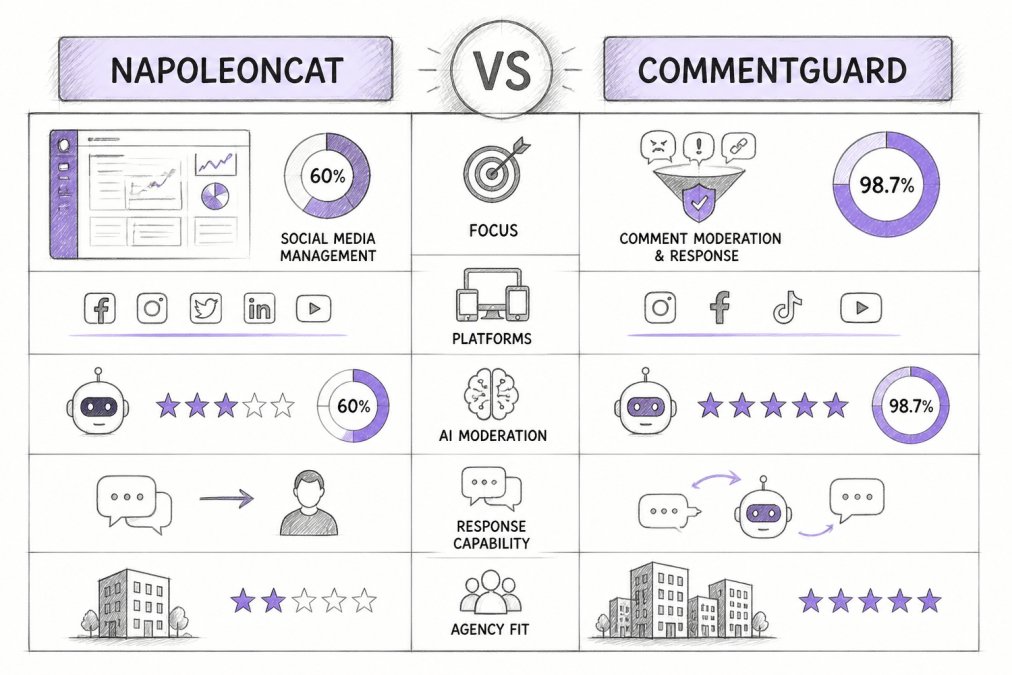
When evaluating social media moderation tools for your agency, a side-by-side comparison reveals critical differences between solutions. The right choice depends on your team's workflow, client volume, and the specific platforms you manage.
| Feature | NapoleonCat | CommentGuard | FeedGuardians |
|---|---|---|---|
| Automated Comment Filtering | Yes | Yes | Yes (98.7% accuracy) |
| AI-Powered Replies | Limited | Basic | 24/7 in brand voice |
| Multi-Platform Support | 4 platforms | 3 platforms | 4 platforms |
| Team Collaboration | Role-based | Basic | Advanced permissions |
| Real-Time Notifications | Yes | Yes | Yes |
| Sentiment Analysis | Yes | Yes | Yes |
| Keyword Blacklisting | Yes | Yes | Yes |
| GDPR Compliance | Yes | Yes | Yes |
| API Integration | Limited | No | Yes |
| Client Reporting | Standard | Basic | White-label templates |
While all three solutions handle basic moderation, they diverge significantly in AI capabilities, team management, and reporting sophistication. For agencies managing multiple client accounts, these differences compound quickly.
AI Comment Moderation for Agencies: Core Capabilities
AI comment moderation has become baseline for agencies. Real differentiation happens in accuracy, speed, and handling the inevitable mismatch between automated decisions and client expectations.
Most AI systems detect spam, hate speech, and competitor links through pattern recognition. However, accuracy metrics tell an incomplete story. A system catching 85% of harmful comments means 15% of spam still reaches your clients weekly (peer-reviewed research). Equally problematic are false positives: legitimate customer questions hidden as violations, damaging engagement and client trust.
FeedGuardians detects spam, hate speech, and competitor links with 98.7% accuracy, reducing both false positives and missed violations. This precision matters because clients hold you accountable for brand safety.
Agencies typically operationalize AI moderation through:
Automated filtering with human escalation: Comments flagged as violations hide immediately, but high-confidence decisions (99%+ confidence) bypass review. Medium-confidence decisions (75-95%) route to your team for review before hiding (the NIH).
Per-client rule customization: A luxury brand's moderation policy differs from an e-commerce store's approach. When AI adapts to each client's voice and values, moderation protects brand identity rather than applying generic rules to every account.
Escalation routing and audit trails: Real-time notifications ensure your team responds immediately. Human override options let your team reverse AI decisions when context demands judgment, critical for handling sarcasm, cultural references, or sensitive customer situations. Audit trails document who reviewed each decision and why.
Crisis mode activation: During viral posts or PR crises, comment volume spikes unpredictably. Tools that scale moderation capacity in real-time prevent bottlenecks. The ability to temporarily increase escalation thresholds, activate additional team members, or switch to manual-review-only mode without losing historical context determines whether your agency survives a client's crisis.
Facebook Ad Comment Management Software: What Each Tool Offers
Facebook ad comment management software protects paid campaign performance while maintaining audience engagement. Ad comments directly impact ad performance metrics and audience trust.
NapoleonCat offers solid Facebook ad comment management with automated filtering and team collaboration. It handles comment hiding, auto-replies, and basic sentiment tracking, covering essentials for straightforward campaigns.
CommentGuard focuses on comment volume management with filtering and basic automation. It works for agencies running simple campaigns but struggles at 15+ client accounts, where interface repetition and manual reporting consolidation become burdensome.
FeedGuardians integrates Facebook ad comment management into broader moderation strategy with 24/7 AI-powered replies in your brand voice. Ad comments receive intelligent responses automatically, turning engagement into conversation. When prospects comment on ads asking about pricing or availability, the AI responds immediately with relevant information, no waiting for your team, no missed sales opportunities.
How to Automate Instagram Comment Replies Across Client Accounts
Automating Instagram comment replies across client accounts requires a system that scales without per-account setup complexity. This is where many agencies hit friction, tools that work for one account become administrative nightmares at 10+ accounts.
Effective reply templates are client-specific, addressing common questions while maintaining brand tone. Generic templates destroy engagement by sounding robotic.
FeedGuardians learns your tone, terminology, and guidelines, adapting replies to match each client's voice. Instead of managing separate template libraries per client, the system generates appropriate responses automatically. A response to a product question from a luxury brand sounds different from a budget retailer's response, the AI handles this distinction without manual intervention.
The workflow:
- Comment arrives on any client's Instagram account
- AI evaluates comment against moderation rules and brand guidelines
- If appropriate, AI generates and posts reply in real-time
- Team receives notification for high-priority or ambiguous comments
- Escalated comments route to the appropriate team member for manual response
Multi-account management means you set rules once and apply them across all client accounts simultaneously. Instead of configuring reply automation for each of 15 clients individually, you establish rules that adapt to each client's guidelines automatically.
Response time tracking becomes a competitive advantage. When your team responds to Instagram comments within minutes instead of hours, engagement metrics improve measurably (peer-reviewed research).
Multi-Account Management and Scalability for Agencies
Multi-account management determines whether a tool works at 5 clients or 50 clients. The real test isn't just whether a tool can manage multiple accounts, it's whether it integrates into your agency's existing workflow infrastructure.
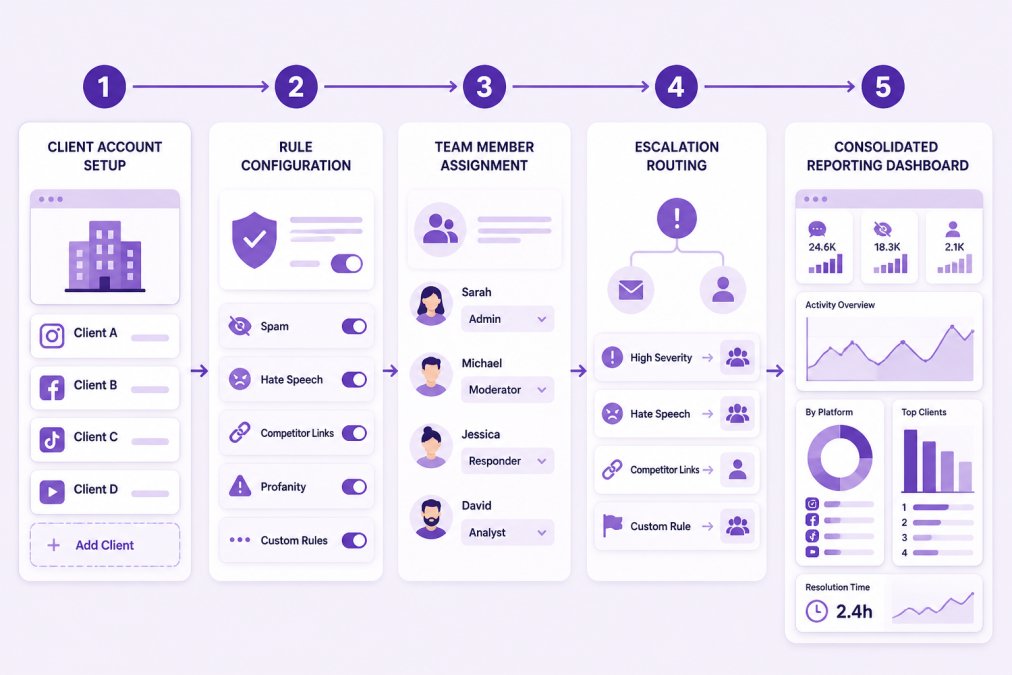
NapoleonCat requires individual setup for each client. You configure rules, team permissions, and reporting separately per account. At 20+ clients, setup time becomes significant. Escalations exist only within NapoleonCat, not in your team's existing communication channels (Slack, email, ticketing systems), forcing team members to check another dashboard.
CommentGuard operates similarly, with each client account needing independent configuration. Basic team collaboration features struggle with larger teams. Reporting across accounts requires manual consolidation. Escalations are tool-native only, with no integration to helpdesk or CRM systems where client context lives.
FeedGuardians addresses this through centralized management with per-client customization and integration into agency workflow infrastructure. You establish agency-wide rules once, then customize for individual client needs. This approach scales because administrative burden doesn't multiply with client count.
Workflow integration capabilities determine whether moderation becomes a silo or part of unified operations:
-
Slack integration: High-priority escalations post directly to designated Slack channels. Your team sees alerts in the communication tool they already monitor, reducing response time from hours to minutes.
-
Helpdesk/CRM routing: When a comment requires customer service follow-up, the escalation routes directly to your helpdesk or CRM system with full context. Your support team sees the original comment, account history, and recommended response in one place.
-
Jira/project management integration: High-priority moderation issues auto-create tickets with appropriate priority and assignment, ensuring they don't get lost in the moderation queue.
Team collaboration features become critical at scale. FeedGuardians provides advanced permissions that assign team members to specific clients, set escalation rules based on comment type or client sensitivity level, and track who handled each interaction.
Crisis management workflow: During viral posts or PR crises, comment volume spikes unpredictably. With FeedGuardians, crisis mode means temporarily increasing escalation thresholds, routing all escalations to a dedicated crisis channel, activating additional team members without reconfiguring permissions, and maintaining full audit trails. You revert to normal operations without losing any moderation history.
Client reporting templates matter significantly. White-label reporting templates let you deliver branded reports without manual formatting. Reports should show not just what was moderated, but why, the rules applied, confidence scores, and team member reviews. This transparency builds client trust and proves ROI.
Pricing, Setup Time, and Total Cost of Ownership
Pricing varies significantly, and comparing list prices misses the real cost picture. Total cost of ownership includes setup time, team training, and ongoing management overhead.
For current pricing and plan details, visit FeedGuardians pricing page to see available tiers and features. The platform offers a free tier to test core functionality before committing to a paid plan.
Setup time represents hidden cost that many agencies overlook. A tool taking 4 hours per client means 40 hours for 10 clients, a full work week before seeing any benefit.
FeedGuardians reduces setup time through pre-built templates and agency-focused configuration. Most agencies go live within days, not weeks. The learning curve is shallow because the interface prioritizes workflows agencies actually use.
Total cost comparison should factor in:
- Initial setup time (hours × hourly rate)
- Team training time (hours × hourly rate)
- Monthly subscription cost
- Integration and API costs
- Reporting overhead
- Customer support costs
When calculating total cost of ownership across 12 months for an agency managing 20 clients, the tool costing slightly more per month but requiring half the setup time often proves cheaper overall.
Which Tool Wins for Your Agency
Choosing between these tools depends on your specific needs, but the decision framework is consistent: prioritize scalability, team workflow efficiency, and client reporting capability.
Choose NapoleonCat if your agency manages fewer than 10 clients and needs basic comment filtering and team collaboration.
Choose CommentGuard if you need simple comment hiding and basic automation with minimal setup complexity.
Choose FeedGuardians if you're managing 10+ client accounts and need AI-powered replies that sound like your clients. The platform is built for agency workflows, multi-account management, team collaboration, and white-label reporting all work at scale. The 98.7% accuracy in detecting spam, hate speech, and competitor links means fewer brand safety issues. The 24/7 AI-powered replies in your clients' brand voices turn comment management from a defensive task into a conversion opportunity.
The real advantage emerges at scale. When managing dozens of client accounts, FeedGuardians' centralized management and per-client customization eliminate the administrative overhead that makes other tools impractical for large agencies.
Managing social media comments across multiple client accounts demands a tool that scales without creating administrative chaos. The difference between a tool that works and one that works at scale often comes down to whether it treats multi-account management as an afterthought or a core design principle.
FeedGuardians was built specifically for agencies managing high-volume comment streams across multiple platforms and clients. The AI learns each client's brand voice, team collaboration features handle complex permission structures, and white-label reporting delivers insights your clients want to see. Start for free and see how the platform handles your current workload, then scale as your agency grows.
Frequently Asked Questions
Can agencies manage multiple client social media accounts with both NapoleonCat and CommentGuard?
Both platforms support multi-account management, but they differ in scalability. NapoleonCat is built for multi-client workflows with role-based permissions and centralized dashboards, making it easier for agencies handling 10+ accounts. CommentGuard also supports multiple accounts but requires more manual setup per client. For agencies, NapoleonCat's native multi-account architecture typically requires less configuration overhead, though CommentGuard works well for smaller agency teams managing fewer clients.
How does AI comment moderation for agencies improve team efficiency?
AI moderation reduces manual review time by automatically filtering spam, hate speech, and off-topic comments in real time. Both NapoleonCat and CommentGuard use machine learning to learn your brand guidelines and automatically hide harmful content. This frees agency teams to focus on high-value client strategy instead of spending hours each day reviewing comments. Agencies report 60-70% time savings on moderation tasks when using AI-powered tools with proper configuration.
What's the main difference between these tools for Facebook ad comment management?
NapoleonCat integrates directly with Facebook Ad Manager and provides native ad comment filtering, making it stronger for campaigns running paid ads. CommentGuard handles Facebook comments but requires additional setup to manage ad-specific comment flows. For agencies running high-volume ad campaigns on Facebook, NapoleonCat's ad-native features typically offer faster response times and better real-time escalation for urgent comments on active campaigns.
How quickly can we set up and start automating Instagram comment replies?
Setup time varies by tool complexity and your existing workflows. NapoleonCat typically requires 1-2 hours for initial configuration per account, including brand voice training and moderation rules. CommentGuard usually takes 30-45 minutes for basic setup but may need additional time if you're setting up complex escalation rules. Both platforms offer templates to accelerate setup. Agencies managing multiple clients should budget 2-3 hours per client account for full optimization, including testing AI replies against your brand voice.
This article was written using GrandRanker
Tired of manually moderating comments?
FeedGuardians automates spam filtering, responds to customers, and protects your brand — setup in 3 minutes.
Frequently Asked Questions
Can agencies manage multiple client social media accounts with both NapoleonCat and CommentGuard?
Both platforms support multi-account management, but they differ in scalability. NapoleonCat is built for multi-client workflows with role-based permissions and centralized dashboards, making it easier for agencies handling 10+ accounts. CommentGuard also supports multiple accounts but requires more manual setup per client. For agencies, NapoleonCat's native multi-account architecture typically requires less configuration overhead, though CommentGuard works well for smaller agency teams managing fewer clients.
How does AI comment moderation for agencies improve team efficiency?
AI moderation reduces manual review time by automatically filtering spam, hate speech, and off-topic comments in real time. Both NapoleonCat and CommentGuard use machine learning to learn your brand guidelines and automatically hide harmful content. This frees agency teams to focus on high-value client strategy instead of spending hours each day reviewing comments. Agencies report 60-70% time savings on moderation tasks when using AI-powered tools with proper configuration.
What's the main difference between these tools for Facebook ad comment management?
NapoleonCat integrates directly with Facebook Ad Manager and provides native ad comment filtering, making it stronger for campaigns running paid ads. CommentGuard handles Facebook comments but requires additional setup to manage ad-specific comment flows. For agencies running high-volume ad campaigns on Facebook, NapoleonCat's ad-native features typically offer faster response times and better real-time escalation for urgent comments on active campaigns.
How quickly can we set up and start automating Instagram comment replies?
Setup time varies by tool complexity and your existing workflows. NapoleonCat typically requires 1-2 hours for initial configuration per account, including brand voice training and moderation rules. CommentGuard usually takes 30-45 minutes for basic setup but may need additional time if you're setting up complex escalation rules. Both platforms offer templates to accelerate setup. Agencies managing multiple clients should budget 2-3 hours per client account for full optimization, including testing AI replies against your brand voice.