
Quick Summary
| Key Insight | What You Need to Know |
|---|---|
| How to Automate Social Media Comments | Core Methods Rule-Based vs. AI-Powered Automation Workflow Triggers and Response Templates |
| Rule-Based vs. AI-Powered Automation | Rule-Based vs. AI-Powered Automation |
| Workflow Triggers and Response | Workflow Triggers and Response Templates |
| Best Social Media Automation Tools for Comment Management Feature Comparison Table Selection Criteria | What to Look For |
| Feature Comparison Table | Feature Comparison Table |
| Selection Criteria | What to Look For |
Table of Contents
- How to Automate Social Media Comments: Core Methods
- Best Social Media Automation Tools for Comment Management
- Setting Up Comment Automation Workflows: Step-by-Step
- AI Comment Reply Generators: How They Work
- Social Media Comment Automation Risks and Compliance
- Social Media Engagement Best Practices for Automation
- Cost-Benefit Analysis: Is Automation Right for Your Business?
- Conclusion
Last Updated: July 12, 2026
How to Automate Social Media Comments: Core Methods
Teams managing social media without automation spend 15-20 hours weekly on comment moderation alone. Automating workflows dramatically improves response time, engagement consistency, and team capacity. The key is choosing the right automation type: rule-based systems or context-aware AI.
Rule-Based vs. AI-Powered Automation
Rule-based automation works like a decision tree. You set conditions: if a comment contains specific keywords, then assign an action. This approach is transparent but struggles with real-world variation. A customer asking "Is this available in size M?" looks different from "Do you have this in medium?" Rule-based systems miss these variations or trigger false positives.
AI-powered automation understands intent. It recognizes that "Does this ship to Canada?" and "Can you deliver to the Great White North?" are the same question. It catches spam mimicking legitimate engagement and detects sentiment shifts. This flexibility makes automation feel natural rather than robotic.
The trade-off is complexity. AI systems require training data and refinement. You teach the system your brand voice, product terminology, and customer base. This takes time upfront but compounds into massive savings over weeks and months.
Workflow Triggers and Response Templates
Automation runs on triggers and actions. A trigger is the event that starts the process, a new comment appears, a comment contains specific words, a user reaches a follower threshold. An action is what happens next, send an automated reply, escalate to a human, hide the comment, or add the user to your CRM.
The most effective triggers are behavioral. Instead of "comment contains the word 'price,'" use "comment asks about product availability or pricing AND user has not engaged before." This specificity prevents false triggers while catching comments that matter.
Response templates form automation's backbone. Effective templates include dynamic fields: customer name, product mentioned, previous purchase history. A template might read: "Thanks [Name]! We have [Product] in stock and ship to [Location] within [Timeframe]. Here's a link to order: [URL]." The system fills in blanks using your customer database, product catalog, and CRM, creating personalized replies that feel human-written.
Best Social Media Automation Tools for Comment Management
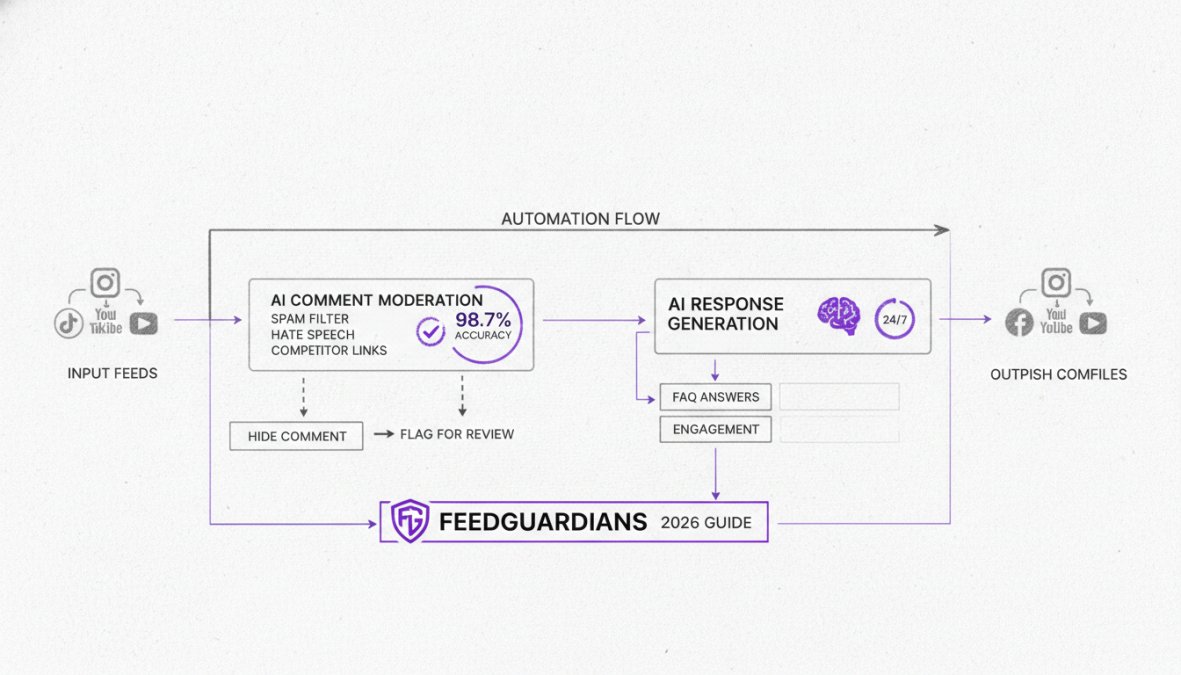
The right tool determines whether automation saves time or creates more work. FeedGuardians leads this category with AI-powered replies in your unique brand voice, real-time moderation detecting spam and hate speech with 98.7% accuracy, and seamless CRM integration.
When evaluating tools, focus on: Does it handle multiple platforms (Facebook, Instagram, TikTok, YouTube) from one dashboard? Can it detect spam and hate speech accurately? Does it offer AI-powered replies or just rule-based automation? Can it integrate with your CRM?
Feature Comparison Table
| Tool | AI Replies | Multi-Platform | Sentiment Analysis | CRM Integration | Spam Detection | Best For |
|---|---|---|---|---|---|---|
| FeedGuardians | Yes, brand voice | Instagram, Facebook, TikTok, YouTube | Yes | Yes | 98.7% accuracy | Brands needing 24/7 intelligent replies |
| ManyChat | Limited | Facebook, Instagram | Basic | Yes | Moderate | Facebook/Instagram-focused businesses |
| SocialBee | No | Multiple platforms | No | Limited | Basic | Content scheduling + light moderation |
| Make.com | Rule-based only | Multiple platforms | No | Yes | No | Custom workflows for technical teams |
| Comm100 | Yes | Multiple channels | Yes | Yes | Yes | Enterprise customer support |
Selection Criteria: What to Look For
Platform coverage matters significantly. If you're on Instagram and Facebook, a tool handling only one platform forces fragmented workflows.
Accuracy in spam and hate speech detection directly impacts brand reputation. Tools claiming 95%+ accuracy, like FeedGuardians with 98.7% detection, save you from moderating obvious spam while protecting your community.
AI reply quality is best assessed through a 7-day trial with real comments. Does the AI understand your products? Does it match your tone? Does it handle edge cases gracefully?
CRM integration determines whether automation feeds your sales pipeline or stays siloed. Look for tools that automatically tag customers by engagement level, capture contact information, and log interactions.
Setting Up Comment Automation Workflows: Step-by-Step
Success comes from planning before configuring. Most teams jump straight to the platform and build workflows reactively, creating scattered, inconsistent automation.
Step 1: Choose Your Platform and Tool
Audit where your comments actually live. Track comments across Instagram, Facebook, TikTok, and YouTube for one week. Note volume, sentiment, and common themes. Most brands discover 80% of engagement happens on one or two platforms.
Choose a tool covering your actual platforms. Set up integrations immediately: connect social accounts, link your CRM, authorize API access. This takes 15-30 minutes but prevents friction later.
Step 2: Define Triggers and Conditions
Map out comment types you receive: product questions (availability, sizing, shipping, features), positive feedback, complaints, spam, and direct contact requests.
For each category, define triggers using keyword combinations with context. Create a decision matrix. If a comment is from a verified account with 5K+ followers and contains positive keywords, it's likely genuine. If it's from a 2-day-old account with no followers and contains a link, it's likely spam.
Step 3: Create Response Templates and Train AI
Write 3-5 core templates covering your main comment types. Templates should include personalized acknowledgment, specific answer, call-to-action, and dynamic fields for product names, links, timeframes, and locations.
Example: "Hi [Name], thanks for asking about [Product]! We have it in stock in [Sizes/Colors] and ship to [Location] within [Timeframe]. Here's the link to order: [URL]."
Feed templates into your AI system. Test the AI on 50-100 historical comments. Review for accuracy, tone, and appropriateness. This training phase typically takes 2-4 hours.
Step 4: Integrate with CRM and DMs
Connect automation to your CRM so customer interactions flow into your sales pipeline. When a customer comments about a product, log that interaction, tag them as "interested in [product]," and optionally add them to a nurture sequence.
Set up direct message automation for comments needing private follow-up. Configure escalation rules so sensitive comments reach your team immediately.
Step 5: Test, Monitor, and Refine
Launch automation on a subset of comments first in "reply and notify you" mode. Monitor for 3-5 days, looking for incorrect replies, missed comments, or false positives. Adjust triggers and templates based on observations.
After 1-2 weeks, switch to "reply and log" mode. Track key metrics: response time, reply accuracy, escalation rate, and engagement impact.
AI Comment Reply Generators: How They Work
AI reply generators amplify your team's capacity through intelligent automation. Modern systems understand context, detect sentiment, and generate replies that feel genuinely human.
Sentiment Analysis and Smart Routing
Sentiment analysis identifies emotions in text to determine the writer's attitude. "Finally got my order, and it's even better than expected!" registers as highly positive. "Been waiting two weeks, still no tracking number" registers as negative. "Does this come in black?" registers as neutral.
Smart routing uses sentiment to determine next steps. Positive comments get auto-replied with thanks. Neutral product questions route to your AI reply system. Negative comments escalate to your support team immediately. This prevents your team from drowning in positive feedback while complaints wait.
Brand Voice Training and Personalization
Your brand voice is the personality in your replies. AI systems need to learn this voice to avoid sounding generic.
Brand voice training works by feeding the AI examples of how your team writes. Provide 20-50 sample replies to real comments. The AI analyzes tone, vocabulary, sentence structure, humor, and formality.
Personalization goes beyond voice. The AI learns about your customers, products, and common scenarios. If a customer asks about a specific product, the AI knows features, pricing, and availability. If they mention a previous purchase, the AI references it. This creates replies feeling like they came from someone who knows the customer.
Social Media Comment Automation Risks and Compliance
Automation creates blind spots without proper safeguards. A system replying to every comment might reply to spam. A system hiding negative comments might hide legitimate complaints. These risks are manageable with proper safeguards.
Platform-Specific Safety Guidelines
Each platform has rules about automated engagement. Facebook allows automated replies but prohibits misleading automation. Instagram permits automation but reserves the right to limit reach if it violates community guidelines. TikTok monitors for bot-like behavior. YouTube allows automation but requires disclosure if replies are AI-generated.
The safest approach is transparency. If a reply is AI-generated, say so. This builds trust rather than eroding it.
Platform compliance also means respecting rate limits. Stagger replies so they appear natural. FeedGuardians handles this automatically, ensuring replies appear natural while maintaining fast response times.
Handling Negative and Crisis Comments
Negative comments require human judgment. A customer complaining about a product defect needs empathy and real solutions, not templates. Set up escalation rules catching negative sentiment and routing those comments to your team immediately.
Crisis comments, mentions of injury, legal issues, or safety concerns, should never be auto-replied. Set up alerts so your team sees them within minutes.
Spam Prevention and Content Moderation
Spam detection is where automation shines. Modern systems catch spam with high accuracy. FeedGuardians detects and hides spam, hate speech, and competitor links with 98.7% accuracy.
Define content moderation rules reflecting your brand values. Some brands allow political discussion; others prohibit it. Define rules clearly and teach your automation system to enforce them consistently.
Social Media Engagement Best Practices for Automation
Automation amplifies your team's impact when used strategically. A poorly designed system creates problems; a well-designed system multiplies capacity while improving customer experience.
Maintaining Human Touch in Automated Responses
The biggest risk is sounding robotic. Effective automated replies acknowledge customers by name, reference specific details, and provide useful information. They sound like helpful team members, not templates.
The human touch means knowing when to escalate. If a question is complex, don't force an automated answer. Escalate to a human who can provide a thoughtful, customized response.
Lead generation through comments is underutilized. When a customer asks about a product, that's a buying signal. Automation can identify these signals and route them to your sales team immediately.
Common Mistakes to Avoid
The most common mistake is automating too much. Be selective. The second mistake is poor quality training data. Invest time in training with diverse examples.
The third mistake is ignoring escalation. Not every comment should be auto-replied. The fourth mistake is static automation. Review automation monthly and update templates based on new products or common questions.
The fifth mistake is measuring wrong metrics. Don't just measure reply volume. Measure customer satisfaction with replies, conversion rates from commented customers, and sentiment in follow-up comments.
Cost-Benefit Analysis: Is Automation Right for Your Business?
Automation usually costs less than hiring additional team members. For small businesses managing 100-200 comments weekly, automation saves 3-5 hours weekly. At $25/hour labor cost, that's $75-125 per week in savings. Most tools cost $29-99 monthly, so payback happens within the first month.
For enterprise teams managing 10,000+ comments weekly, automation saves 40-60 hours weekly. At $35/hour labor cost, that's $1,400-2,100 per week in savings. Enterprise tools cost $500-2,000 monthly, so payback happens within days.
Secondary benefits often exceed labor savings. Faster response times improve customer satisfaction and lifetime value. Better moderation protects brand reputation. Lead capture feeds your sales pipeline. A business getting 500 comments monthly with 20% being purchase-intent questions could see 10-20 additional conversions monthly from faster responses. At $100 average order value, that's $1,000-2,000 in additional monthly revenue.
Conclusion
Automating social media comments isn't about removing the human element, it's about making your team more human. By handling spam, answering common questions, and escalating complex issues automatically, you free your team to focus on genuine customer relationships.
FeedGuardians delivers 24/7 AI-powered replies in your brand voice, detects and hides spam and hate speech with 98.7% accuracy, and integrates seamlessly with your CRM and DMs. The platform learns your tone and terminology, ensuring automated replies feel authentic. Start for free and scale as your comment volume grows.
Frequently Asked Questions
Is it safe to automate social media comments?
Yes, when done correctly with proper safeguards. Safety depends on choosing tools that comply with platform policies, implementing sentiment analysis to avoid inappropriate responses, and maintaining human escalation options for sensitive comments. Platform-specific compliance, like respecting Facebook API guidelines and Instagram automation rules, is essential. Always monitor automated responses initially and keep human oversight for crisis situations or negative feedback.
What are the best tools for social media comment automation?
Top social media automation tools include ManyChat, SocialBee, Make.com, Comm100, and GoHighLevel, each offering different strengths. ManyChat excels in conversational marketing, SocialBee provides unified inbox management, and Make.com offers deep workflow customization. Your choice depends on whether you need AI-powered replies, CRM integration, multi-platform support, or advanced sentiment analysis. Evaluate based on your platform (Facebook, Instagram, TikTok, YouTube) and budget.
How do I set up auto-replies for social media comments on Instagram and Facebook?
Start by selecting an automation tool that supports your platform's API (Facebook API for both platforms). Define triggers, like specific keywords or comment types, then create response templates aligned with your brand voice. Configure the tool to route comments through sentiment analysis to ensure appropriate responses. Test thoroughly before full deployment. Both platforms require you to maintain compliance with their automation policies and avoid spam-like behavior. Monitor performance and adjust templates based on engagement metrics.
Can automating comments hurt my social media engagement rate?
Automation can hurt engagement if responses feel robotic, irrelevant, or impersonal. To protect engagement rates, use AI-powered tools that learn your brand voice and terminology, maintain a human touch in automated responses, and always escalate complex or sensitive comments to your team. The key is balancing speed with authenticity, fast, personalized responses boost engagement, while generic or delayed responses diminish it. Track engagement metrics closely after implementing automation to ensure performance improves.
This article was written using GrandRanker
Tired of manually moderating comments?
FeedGuardians automates spam filtering, responds to customers, and protects your brand — setup in 3 minutes.
Frequently Asked Questions
Is it safe to automate social media comments?
Yes, when done correctly with proper safeguards. Safety depends on choosing tools that comply with platform policies, implementing sentiment analysis to avoid inappropriate responses, and maintaining human escalation options for sensitive comments. Platform-specific compliance—like respecting Facebook API guidelines and Instagram automation rules—is essential. Always monitor automated responses initially and keep human oversight for crisis situations or negative feedback.
What are the best tools for social media comment automation?
Top social media automation tools include ManyChat, SocialBee, Make.com, Comm100, and GoHighLevel, each offering different strengths. ManyChat excels in conversational marketing, SocialBee provides unified inbox management, and Make.com offers deep workflow customization. Your choice depends on whether you need AI-powered replies, CRM integration, multi-platform support, or advanced sentiment analysis. Evaluate based on your platform (Facebook, Instagram, TikTok, YouTube) and budget.
How do I set up auto-replies for social media comments on Instagram and Facebook?
Start by selecting an automation tool that supports your platform's API (Facebook API for both platforms). Define triggers—like specific keywords or comment types—then create response templates aligned with your brand voice. Configure the tool to route comments through sentiment analysis to ensure appropriate responses. Test thoroughly before full deployment. Both platforms require you to maintain compliance with their automation policies and avoid spam-like behavior. Monitor performance and adjust templates based on engagement metrics.
Can automating comments hurt my social media engagement rate?
Automation can hurt engagement if responses feel robotic, irrelevant, or impersonal. To protect engagement rates, use AI-powered tools that learn your brand voice and terminology, maintain a human touch in automated responses, and always escalate complex or sensitive comments to your team. The key is balancing speed with authenticity—fast, personalized responses boost engagement, while generic or delayed responses diminish it. Track engagement metrics closely after implementing automation to ensure performance improves.