
Quick Summary
| Key Insight | What You Need to Know |
|---|---|
| Why Automate Client Social | Why Automate Client Social Media Reporting in 2025 |
| Benefits of Automated Social | Benefits of Automated Social Media Reporting Time-Saving Advantages for Agencies Improving Client Retention Through Transparency |
| Time-Saving Advantages for Agencies | Time-Saving Advantages for Agencies |
| Improving Client Retention Through | Improving Client Retention Through Transparency |
| Challenges of Manual Social | Challenges of Manual Social Media Reporting |
| Real-Time Data vs. Manual | Real-Time Data vs. Manual Aggregation |
Table of Contents
- Why Automate Client Social Media Reporting in 2025
- Benefits of Automated Social Media Reporting
- Challenges of Manual Social Media Reporting
- Real-Time Data vs. Manual Aggregation
- Social Media Reporting Tools for Agencies
- Client Social Media Report Templates and Customization
- Cost-Benefit Analysis: DIY vs. SaaS Automation Tools
- How Automated Reporting Builds Client Trust and Accountability
Last Updated: July 31, 2026
Why Automate Client Social Media Reporting in 2025
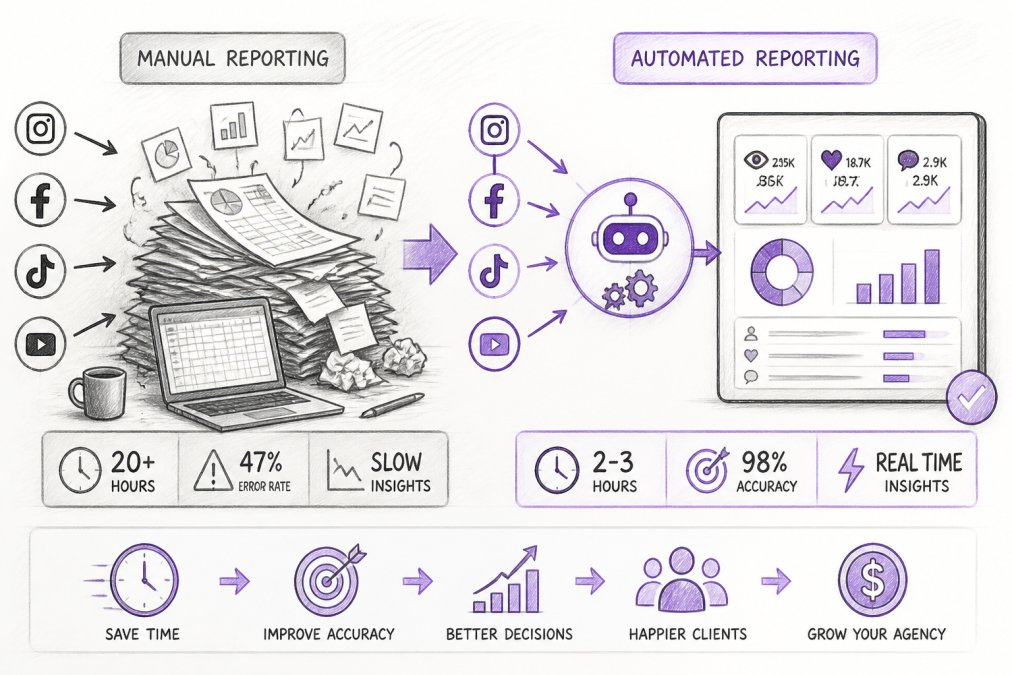
Manual social media reporting forces teams to spend 10+ hours weekly copying metrics from multiple platforms, building spreadsheets, and formatting dashboards, time not spent on strategy or client consultation. When you automate this process, clients start trusting you more because data becomes consistent, real-time, and impossible to dispute. Automated reporting isn't optional anymore; it's the baseline expectation for competitive agencies.
Benefits of Automated Social Media Reporting
Automated reporting delivers measurable benefits across your entire operation. Teams reclaim 8-12 hours per week previously lost to spreadsheets and data aggregation. Consistency becomes guaranteed, every client receives their report on schedule, formatted identically, with the same metrics tracked the same way, eliminating human error that creeps into manual reporting.
Real-time data visibility changes how you work with clients. Instead of reviewing performance once monthly, stakeholders can check dashboards anytime, shifting conversations from "here's what happened" to "here's what's happening, and here's what we're doing about it."
Time-Saving Advantages for Agencies
An agency managing 15-20 client accounts typically dedicates one full-time equivalent employee to manual reporting. Automation eliminates roughly 70-80% of that work. The real advantage extends beyond labor costs: when your team isn't buried in data entry, they have capacity for higher-value work, analyzing performance drops, testing new content strategies, building custom dashboards for high-value clients, or prospecting new business.
Setup time varies by tool and platform complexity. Most teams get basic automated reporting running within 2-3 hours. Advanced customization typically takes a day or two. The payback period is immediate: by week one, you've already saved more time than you invested in setup.
Improving Client Retention Through Transparency
Client retention lives or dies on transparency. Automated dashboards make performance visible constantly, allowing clients to log in anytime and see engagement rates, conversion tracking, audience growth, and ROI measurement in real-time. This visibility builds trust: clients see the work is actually happening and see it consistently, removing doubt about whether numbers are being manipulated.
When a client sees a dashboard updated daily with real data, they feel like they're part of an operation that has its act together. Agencies using automated reporting report significantly higher client satisfaction scores and lower churn rates because accountability becomes mutual, clients see exactly what's being tracked and how it's measured.
Challenges of Manual Social Media Reporting
Manual reporting creates problems that compound over time. Consistency suffers when humans create reports manually, one month you track five metrics, the next month you add a sixth. Data accuracy suffers too: pulling metrics from multiple platforms, screenshotting numbers, and transferring them to spreadsheets introduces risk at each handoff. By delivery time, data is already 24-48 hours old.
The time drain is substantial. Teams don't realize how much context-switching happens during manual reporting: pulling data from platform A, then B, then C, formatting reports, fielding client questions. The cognitive load kills productivity on strategic work.
Scalability breaks down quickly. An agency managing 5 clients can sustain manual reporting. At 15 clients, it becomes painful. At 50 clients, it's impossible without hiring dedicated reporting staff. Automated reporting scales linearly, adding a new client takes minutes, not hours.
Real-Time Data vs. Manual Aggregation
Manual reporting is inherently backward-looking. You compile data, format it, review it, and deliver it. By the time a client sees the report, metrics are already stale. Real-time dashboards show performance as it unfolds, allowing you to catch drops immediately and adjust strategy within hours, not weeks.
Real-time data also improves accuracy. Automated systems pull data directly from platform APIs, eliminating transcription errors. However, real-time reporting requires understanding platform latency, Instagram updates metrics with a 24-48 hour delay, while TikTok updates more frequently. A good automated reporting tool accounts for these delays and clearly indicates when data was last updated.
Social Media Reporting Tools for Agencies
The market for social media reporting tools has expanded significantly. The best tools for agencies integrate with major platforms (Instagram, Facebook, TikTok, YouTube, LinkedIn), offer customizable templates, support white-labeling, and automate scheduling so reports distribute on a fixed cadence without manual intervention.
Most tools operate on a SaaS model with pricing based on connected accounts or reporting features. Some offer free tiers for small agencies; others charge per-client or per-platform.
How to Choose the Right Reporting Tool
Start with platform coverage: does the tool connect to every platform your clients use? Next, evaluate customization, can you create custom metrics, add your agency branding, and build reports matching specific KPIs, or are you locked into standard templates?
Integration capability matters too. Does the tool connect to your CRM or project management system? Can you automate report distribution so clients receive dashboards on a fixed schedule?
Test the user experience. Can you build a custom report in under five minutes? Will your clients find the dashboard intuitive? Evaluate pricing and scalability, what happens when you add your 20th client? Finally, assess support and documentation. If you hit a problem when a client report is due, can you get help?
Client Social Media Report Templates and Customization
Templates form the foundation of efficient reporting. A good template includes all relevant metrics while remaining scannable and visually clear. Most agencies benefit from 3-5 template variations: one for e-commerce clients focused on conversion tracking, one for B2B clients focused on lead generation, one for content creators focused on audience growth.
The best templates balance data density with readability. Include 8-12 key metrics per platform, a visual summary of month-over-month change, a narrative section highlighting wins and opportunities, and recommendations for next month. Customization should be quick, if building a custom report takes two hours, you'll resist doing it; if it takes 15 minutes, you'll customize freely.
Key Metrics to Include in Social Reports
Metrics should align with client goals, not just what platforms make easy to measure. For e-commerce clients, focus on conversion tracking and revenue attribution. For B2B clients, focus on lead generation and engagement quality. For content creators, focus on audience growth and engagement rates.
Core metrics for almost every report: engagement rates, reach and impressions, audience growth, click-through rates, and conversion tracking when available. Platform-specific metrics add depth, Instagram reports should include saves and shares; TikTok reports should include watch time and completion rates; YouTube reports should include average view duration; Facebook reports should include cost per result and ROAS.
The mistake most agencies make is including too many metrics. Clients need 10-12 key metrics that tell them whether their investment is working, not 40 data points. Data visualization matters as much as metric selection, a bar chart showing engagement trend over 12 months is more useful than a table of numbers.
Cost-Benefit Analysis: DIY vs. SaaS Automation Tools
Building custom reporting solutions in-house requires technical expertise and ongoing maintenance as platforms update their APIs. The real cost isn't the initial build, it's ongoing maintenance. When Instagram changes how it reports metrics, your DIY solution breaks. When a client adds a new platform, you need to rebuild connectors.
SaaS tools eliminate this maintenance burden. The vendor handles API updates, platform changes, and feature development. You pay a subscription fee but avoid the complexity of building and maintaining custom infrastructure. For most agencies, a small SaaS subscription costs less than the salary of one part-time developer maintaining custom code.
However, SaaS tools have trade-offs. You're locked into the vendor's feature set and roadmap. If they don't support a metric you need, you can't add it. You're also subject to price increases. The pragmatic approach: Start with a SaaS tool to move fast and remove maintenance burden. If your needs outgrow what the tool can do, then consider building custom solutions.
| Approach | Setup Time | Monthly Cost | Maintenance Burden | Customization | Scalability |
|---|---|---|---|---|---|
| DIY Custom Build | 40-80 hours | $0-500 (hosting) | High | Very High | Low |
| SaaS Tool | 2-4 hours | $50-500+ | None | Medium | High |
| Hybrid (SaaS + Custom) | 10-20 hours | $100-800 | Medium | Very High | Medium |
How Automated Reporting Builds Client Trust and Accountability
Trust in agency relationships is built on delivering results, communicating those results clearly, and being accountable for what you promise. Automated reporting strengthens all three. When reporting is automated, consistency becomes guaranteed, clients know they'll receive their report on the same day every month, formatted the same way.
Automated reporting also creates accountability. When data is pulled directly from platform APIs and presented in a standardized format, there's no room for interpretation or selective reporting. This transparency actually builds trust, clients see that you're not hiding anything.
Real-time dashboards create a psychological impact. When a client can log in anytime and see current performance, they feel like they're part of an operation actively managing their accounts. Automated reporting also creates a paper trail, if a client questions why engagement dropped, you have historical data showing exactly when it happened.
The most important trust-building element is speed of response. When you see a problem in real-time, you can address it immediately. This responsiveness signals that you care about results, not just delivering a report.
Agencies that still rely on manual reporting operate with a competitive disadvantage that grows larger every month. Your clients expect transparency, consistency, and real-time visibility into their performance.
FeedGuardians transforms how agencies manage client communication by automating comment moderation and response across Instagram, Facebook, TikTok, and YouTube with 98.7% accuracy. While our focus is on protecting brand reputation through AI-powered replies in your unique brand voice and real-time spam detection, the underlying principle applies to all client-facing operations: automation builds trust through consistency and frees your team to focus on strategy. Start for free and see how FeedGuardians helps you protect ad performance and boost client satisfaction instantly.
Frequently Asked Questions
What are the main benefits of automated social media reporting for client relationships?
Automated reporting improves client transparency by delivering consistent, real-time data on key performance indicators without manual delays. Agencies can provide more frequent updates, demonstrate clear ROI measurement and campaign effectiveness, and reduce time spent on manual data aggregation. This accountability builds trust and improves client retention by showing measurable results across platforms like Instagram, TikTok, and YouTube.
How does automating social media reporting save time for marketing agencies managing multiple clients?
Manual data entry and cross-platform aggregation typically consume 10-15+ hours weekly per agency team. Automation eliminates this through API integration, real-time dashboards, and report scheduling that runs without human intervention. Agencies can redirect staff to strategic work, analyzing data-driven insights, optimizing campaigns, and improving client satisfaction, rather than compiling spreadsheets and PDFs.
What challenges of manual social media reporting make automation necessary?
Manual reporting introduces data entry errors, inconsistent reporting frequency, outdated metrics by delivery time, and difficulty tracking performance across multiple platforms. Teams struggle with scalability when managing 10+ client accounts, face burnout from repetitive tasks, and lack real-time visibility into campaign performance. These challenges delay strategic decision-making and reduce client confidence in reported results.
Which key metrics should be included in automated client social media reports?
Essential metrics include engagement rates, conversion tracking, audience growth, reach and impressions, click-through rates, and ROI measurement tied to business outcomes. Include platform-specific KPIs: Instagram (saves, shares, story interactions), TikTok (video completion rate), YouTube (watch time, subscriber growth). Customize templates to align with client goals, e-commerce brands prioritize conversion tracking; B2B focuses on lead generation and strategic alignment with business objectives.
This article was written using GrandRanker
Tired of manually moderating comments?
FeedGuardians automates spam filtering, responds to customers, and protects your brand — setup in 3 minutes.
Frequently Asked Questions
What are the main benefits of automated social media reporting for client relationships?
Automated reporting improves client transparency by delivering consistent, real-time data on key performance indicators without manual delays. Agencies can provide more frequent updates, demonstrate clear ROI measurement and campaign effectiveness, and reduce time spent on manual data aggregation. This accountability builds trust and improves client retention by showing measurable results across platforms like Instagram, TikTok, and YouTube.
How does automating social media reporting save time for marketing agencies managing multiple clients?
Manual data entry and cross-platform aggregation typically consume 10-15+ hours weekly per agency team. Automation eliminates this through API integration, real-time dashboards, and report scheduling that runs without human intervention. Agencies can redirect staff to strategic work—analyzing data-driven insights, optimizing campaigns, and improving client satisfaction—rather than compiling spreadsheets and PDFs.
What challenges of manual social media reporting make automation necessary?
Manual reporting introduces data entry errors, inconsistent reporting frequency, outdated metrics by delivery time, and difficulty tracking performance across multiple platforms. Teams struggle with scalability when managing 10+ client accounts, face burnout from repetitive tasks, and lack real-time visibility into campaign performance. These challenges delay strategic decision-making and reduce client confidence in reported results.
Which key metrics should be included in automated client social media reports?
Essential metrics include engagement rates, conversion tracking, audience growth, reach and impressions, click-through rates, and ROI measurement tied to business outcomes. Include platform-specific KPIs: Instagram (saves, shares, story interactions), TikTok (video completion rate), YouTube (watch time, subscriber growth). Customize templates to align with client goals—e-commerce brands prioritize conversion tracking; B2B focuses on lead generation and strategic alignment with business objectives.