
Quick Summary
| Key Insight | What You Need to Know |
|---|---|
| Why Manual Comment Moderation | Why Manual Comment Moderation Kills Ad Performance |
| Strategy 1 | Implement Real-Time Comment Moderation to Protect Brand Reputation Set detection rules for spam, hate speech, and competitor links Enable human escalation for edge cases |
| Set detection rules for | Set detection rules for spam, hate speech, and competitor links |
| Enable human escalation for | Enable human escalation for edge cases |
| Train AI to match | Train AI to match your brand voice and tone |
| Enable 24/7 automated replies | Enable 24/7 automated replies across Instagram, Facebook, TikTok, and YouTube |
Table of Contents
- Why Manual Comment Moderation Kills Ad Performance
- Strategy 1: Implement Real-Time Comment Moderation to Protect Brand Reputation
- Strategy 2: Use Social Media Automation Tools for Ecommerce to Scale Responses
- Strategy 3: Deploy Ecommerce Customer Service Automation Scripts for Buyer Inquiries
- Strategy 4: Apply Best Practices for Ad Comment Moderation to Reduce Ad Decay
- Strategy 5: Unify Comment Management and Ad Performance Monitoring
- Strategy 6: Use Real-Time Sentiment Analysis to Protect Campaign Health
- Common Mistakes to Avoid When Automating Comment Moderation
Last Updated: August 5, 2026
Why Manual Comment Moderation Kills Ad Performance
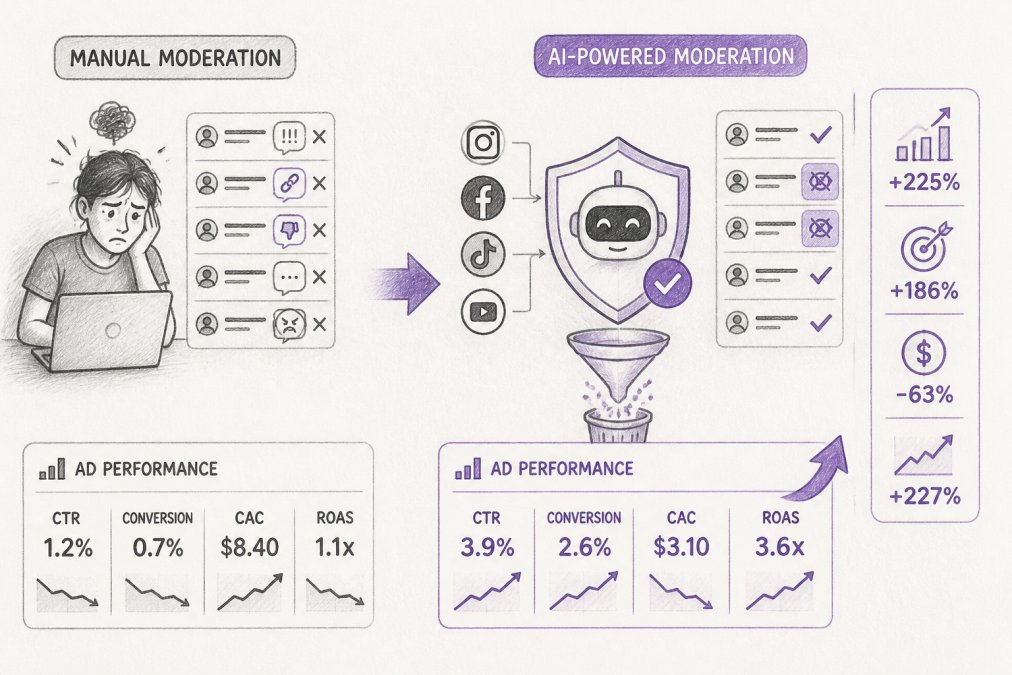
Manual comment moderation consumes hours daily while damaging ad performance through delayed responses, inconsistent brand voice, and missed engagement opportunities. When comments go unanswered for hours, your ad quality score drops, platforms reward reply speed and engagement signals. Manual moderation forces you to choose between speed and consistency: respond quickly with generic replies that erode brand voice, or craft thoughtful responses and let engagement decay.
FeedGuardians solves this by automating detection, moderation, response, and performance monitoring. The platform automatically detects and hides spam, hate speech, and competitor links with 98.7% accuracy while delivering 24/7 AI-powered replies in your unique brand voice across Instagram, Facebook, TikTok, and YouTube.
Strategy 1: Implement Real-Time Comment Moderation to Protect Brand Reputation
Real-time comment moderation detects and hides harmful content before it accumulates visibility and damages your ad quality score. Manual moderation can't achieve real-time speed at scale.
Set detection rules for spam, hate speech, and competitor links
Your moderation system needs clear, enforceable rules matching your brand values and platform policies. Start with fundamentals: spam detection (unrelated links, repetitive promotions, bot patterns), hate speech and abuse (slurs, threats, dehumanizing language), competitor links (promotional references to competing brands), and misinformation (claims contradicting your product specs or policies).
The key is specificity. Generic rules like "hide negative comments" backfire, legitimate customer concerns get hidden and you lose valuable feedback. Instead, target behavior: hide unsolicited promotions, not criticism. Hide threats, not disagreement.
FeedGuardians lets you configure detection rules without technical expertise, applying them consistently across all platforms.
Enable human escalation for edge cases
No automated system catches 100% of edge cases. Comments that are sarcastic, culturally specific, or ambiguous in tone should be flagged for human review rather than making a wrong call automatically.
Set escalation thresholds: comments scoring 40-60% confidence on your moderation scale go to a human reviewer. Temporarily hide uncertain comments to prevent damage, then restore if approved. Your team should see escalated comments in a dedicated queue with full context and the reason the system flagged it.
Strategy 2: Use Social Media Automation Tools for Ecommerce to Scale Responses
Responding to comments at scale requires consistency impossible to achieve manually. Social media automation tools for ecommerce let you respond 24/7 with consistent brand voice, generating contextually appropriate responses that sound like they came from your team.
Train AI to match your brand voice and tone
Your brand voice distinguishes you from competitors. Luxury brands need sophisticated, exclusive responses. Direct-to-consumer startups need approachable, conversational ones.
Train your AI response system by providing examples. Share 10-20 actual responses your team has written to common questions: shipping inquiries, product questions, complaints, and compliments. The system analyzes these examples to understand your vocabulary, sentence structure, tone, and how you handle different situations.
FeedGuardians generates responses that sound authentically like your brand. When a customer asks "How long does shipping take?", the system generates a response in your voice, not a generic template.
Enable 24/7 automated replies across Instagram, Facebook, TikTok, and YouTube
Comments don't stop arriving at 5 PM. Without 24/7 responses, you're ceding engagement to competitors.
Automated replies trigger based on comment type and content. A customer asking about product availability gets an instant response with stock status. A compliment gets a thank-you. A complaint gets routed to your team with context. Response speed itself is an ad performance signal, platforms measure reply speed as part of engagement metrics, resulting in higher engagement and better ad quality scores.
Strategy 3: Deploy Ecommerce Customer Service Automation Scripts for Buyer Inquiries
Inquiries arrive through comments, DMs, email, and platform-specific messaging systems. Without a unified system, responses are inconsistent and slow.
Ecommerce customer service automation scripts centralize inquiries and standardize responses, handling the most common questions, the 70% that represent your incoming volume, instantly and consistently.
Create templates for common questions (shipping, returns, product specs)
Audit your actual inquiries. Pull the last 100 customer questions from all channels and group them by topic. You'll likely see 60-70% fall into 5-10 categories: shipping timelines, return policies, product specifications, size guidance, and order status.
For each category, write a template response that answers completely with specific information: "Orders placed by 2 PM ET ship same-day. Standard shipping arrives in 5-7 business days to continental US." Your automation system customizes it with order-specific data, sending personalized responses in seconds.
Route complex inquiries to your team automatically
The system should only handle questions it's confident about. If a customer's inquiry doesn't match your templates, quality complaints, custom order requests, unusual situations, the system routes it to your team with full context.
Set response time targets for escalated inquiries: your automation handles 70% instantly, your team handles 30% within 4 hours.
Strategy 4: Apply Best Practices for Ad Comment Moderation to Reduce Ad Decay
Ad decay happens when comment quality deteriorates over time. Early comments are thoughtful and authentic. Later comments are spam, off-topic, or negative. This decay damages engagement metrics and signals declining relevance to the algorithm.
Hide negative comments before they tank your ad quality score
Distinguish between "negative feedback" and "policy violations." A customer saying "This didn't fit right" is valuable feedback, not hidden. A troll saying "This brand is garbage" with no context is a policy violation, hidden immediately. Target behavior, not sentiment: hide abusive, off-topic, or promotional comments. Keep critical but constructive feedback.
Respond to positive comments fast to boost engagement signals
Positive comments are engagement amplifiers. A customer says "Love this product!" Your instant response encourages further engagement and signals to other users that your brand is actively present.
Speed matters. A response within 30 minutes gets more engagement than one after 2 hours. Automated responses achieve this speed at scale.
Strategy 5: Unify Comment Management and Ad Performance Monitoring
Fragmentation kills performance. Comments live in Facebook's comment section. Ad performance data lives in Ads Manager. Sentiment insights live in a separate analytics tool. Your team switches between systems to understand what's happening.
A unified dashboard connects all three. You see comments, moderation actions, automated responses, and ad performance metrics in one view. You spot patterns instantly: negative sentiment correlates with lower CTR, so you adjust creative. Comments asking about a specific feature spike when that feature is promoted, so you emphasize it more.
FeedGuardians provides this unified view across Instagram, Facebook, TikTok, and YouTube. You see real-time comment volume, moderation actions, sentiment breakdown, and ad performance metrics side-by-side. The dashboard surfaces insights invisible in fragmented systems: comments on your highest-performing ads have 40% faster response times, positive sentiment correlates with 15% higher ROAS, and which products generate the most questions.
Strategy 6: Use Real-Time Sentiment Analysis to Protect Campaign Health
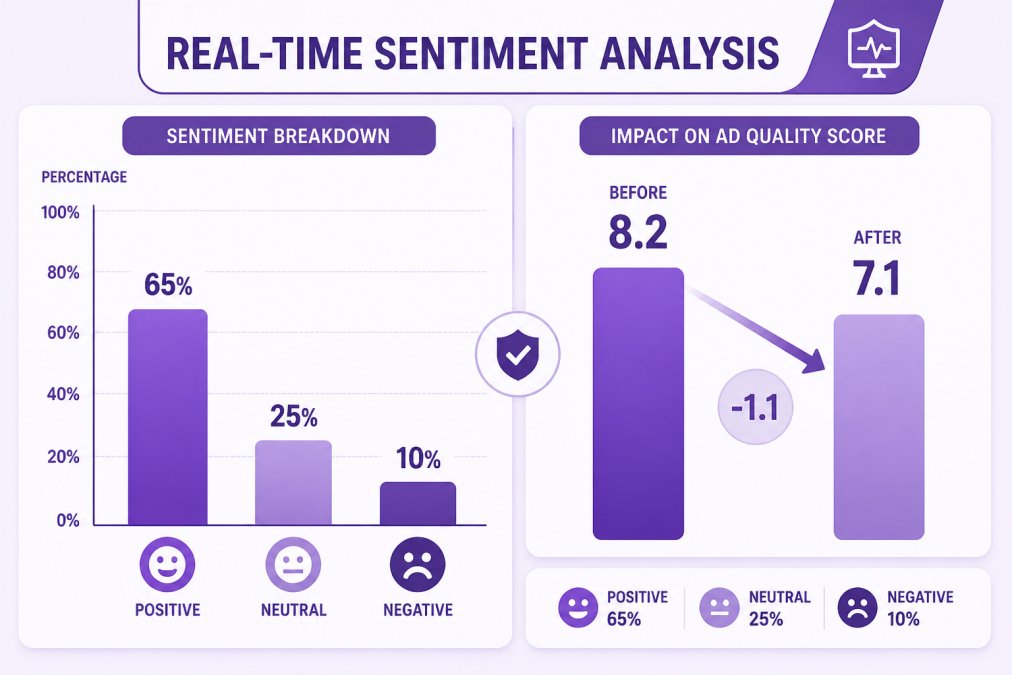
Sentiment analysis identifies the emotional tone of comments: positive, neutral, or negative. Real-time sentiment analysis detects when comment sentiment is declining before it tanks your ad quality score.
A healthy ad accumulates positive and neutral comments with sentiment above 70% positive. When sentiment drops below 50% positive, it's a leading indicator that something's wrong: the creative isn't resonating, the offer is unclear, or external factors are driving negative reactions.
Real-time sentiment monitoring lets you catch this decline early and adjust creative immediately. FeedGuardians analyzes comment sentiment in real time across all platforms, categorizing each comment as positive, neutral, or negative, then aggregating this data into a sentiment score for each ad. When sentiment declines, the system alerts you to investigate and respond accordingly.
Common Mistakes to Avoid When Automating Comment Moderation
Mistake 1: Setting rules too broad. A rule like "hide all negative comments" hides legitimate customer feedback. Instead, target specific behaviors: hide spam, hide abuse, hide off-topic content. Keep critical feedback visible.
Mistake 2: Automating responses without training the system. Deploying a generic response template that doesn't match your brand voice signals to customers that they're talking to a bot. Invest time training your AI system with real examples.
Mistake 3: Ignoring escalated inquiries. Your automation routes complex issues to your team, but your team ignores the queue. Set clear SLAs for escalated inquiries and monitor compliance.
Mistake 4: Not monitoring false positives. Your moderation system occasionally hides legitimate comments. Audit moderation logs weekly and track false-positive rate. Adjust rules when it exceeds 2%.
Mistake 5: Treating automation as set-and-forget. Review and update detection rules and response templates quarterly as your brand voice evolves and customer questions change.
Mistake 6: Fragmented setup across platforms. Configure moderation rules consistently across Facebook, Instagram, TikTok, and YouTube. Use a unified system that applies consistent rules across all platforms simultaneously.
Mistake 7: Over-automating customer service. A customer complaining about a defective product needs to talk to a human who can issue a refund or replacement. Use automation for high-volume, low-complexity inquiries. Route everything else to your team.
Manual comment moderation consumes hours daily while damaging ad performance through delayed responses and inconsistent brand voice. The solution isn't hiring more moderators, it's automating the workflow entirely.
Real-time comment detection protects your brand reputation by hiding harmful content before it accumulates visibility. Automated responses in your brand voice maintain engagement 24/7 across all platforms. Unified dashboards connect comments to ad performance, turning sentiment into actionable insights. Sentiment analysis detects campaign decay before it happens, letting you adjust creative proactively.
FeedGuardians automates the entire workflow with 98.7% accuracy. The platform detects and hides spam, hate speech, and competitor links while delivering AI-powered replies in your unique brand voice. This frees your team to focus on strategy and optimization instead of manual moderation. Get started free and see how automation transforms your ad performance instantly.
Frequently Asked Questions
How does comment moderation actually affect Facebook ad performance?
Negative comments and spam reduce your ad quality score, which increases your cost per click and decreases your ad reach. Platforms like Meta prioritize ads with higher engagement quality. When you hide harmful comments and respond quickly to positive ones, you signal to the algorithm that your ad is trustworthy. This improves your ad rank and lowers your cost per acquisition. Brands using automated comment moderation report faster response times, which directly correlates with higher conversion rates because buyers see their questions answered immediately.
What are the best tools for automating ecommerce customer inquiries?
The best tools combine real-time comment detection, AI-powered replies in your brand voice, and human escalation options. Look for platforms that work across Instagram, Facebook, TikTok, and YouTube simultaneously, so you don't have to manage each platform separately. Key features include 24/7 automated responses, customizable templates for common questions (shipping, returns, product specs), sentiment analysis to flag urgent issues, and a unified dashboard where you can see all inquiries and ad performance in one place. This reduces the time your team spends on manual replies and lets you focus on strategy.
Can I start with just one or two platforms, or do I need to set up all four at once?
Most automation platforms, including FeedGuardians, let you start with whichever platforms matter most to your business. You can begin with Instagram and Facebook, then add TikTok and YouTube later as your team scales. This approach lets you test the system, train the AI on your brand voice, and prove ROI before rolling out across all channels. Starting smaller also means you're not overwhelmed during setup, your team can focus on getting moderation rules and response templates right before expanding.
How do I know the AI won't make mistakes and reply to comments it shouldn't, or delete something by accident?
Reputable automation tools use human escalation workflows, which means flagged or uncertain comments are held for your team to review before any action is taken. The AI also learns from your feedback, if it misclassifies a comment, you can correct it and the system improves. Additionally, all actions are logged and auditable, so you can see exactly what was hidden, replied to, or escalated and by whom. This transparency protects your brand and gives you full control over what goes out under your name.
This article was written using GrandRanker
Tired of manually moderating comments?
FeedGuardians automates spam filtering, responds to customers, and protects your brand — setup in 3 minutes.
Frequently Asked Questions
How does comment moderation actually affect Facebook ad performance?
Negative comments and spam reduce your ad quality score, which increases your cost per click and decreases your ad reach. Platforms like Meta prioritize ads with higher engagement quality. When you hide harmful comments and respond quickly to positive ones, you signal to the algorithm that your ad is trustworthy. This improves your ad rank and lowers your cost per acquisition. Brands using automated comment moderation report faster response times, which directly correlates with higher conversion rates because buyers see their questions answered immediately.
What are the best tools for automating ecommerce customer inquiries?
The best tools combine real-time comment detection, AI-powered replies in your brand voice, and human escalation options. Look for platforms that work across Instagram, Facebook, TikTok, and YouTube simultaneously, so you don't have to manage each platform separately. Key features include 24/7 automated responses, customizable templates for common questions (shipping, returns, product specs), sentiment analysis to flag urgent issues, and a unified dashboard where you can see all inquiries and ad performance in one place. This reduces the time your team spends on manual replies and lets you focus on strategy.
Can I start with just one or two platforms, or do I need to set up all four at once?
Most automation platforms, including FeedGuardians, let you start with whichever platforms matter most to your business. You can begin with Instagram and Facebook, then add TikTok and YouTube later as your team scales. This approach lets you test the system, train the AI on your brand voice, and prove ROI before rolling out across all channels. Starting smaller also means you're not overwhelmed during setup—your team can focus on getting moderation rules and response templates right before expanding.
How do I know the AI won't make mistakes and reply to comments it shouldn't, or delete something by accident?
Reputable automation tools use human escalation workflows, which means flagged or uncertain comments are held for your team to review before any action is taken. The AI also learns from your feedback—if it misclassifies a comment, you can correct it and the system improves. Additionally, all actions are logged and auditable, so you can see exactly what was hidden, replied to, or escalated and by whom. This transparency protects your brand and gives you full control over what goes out under your name.