
Quick Summary
| Key Insight | What You Need to Know |
|---|---|
| How Automated Comment Responses | How Automated Comment Responses Drive Real Engagement |
| The Business Case | Speed, Scale, and Customer Loyalty |
| Social Media Response Templates | Social Media Response Templates That WorkTemplate Structure and Customization |
| Template Structure and Customization | Template Structure and Customization |
| Social Media Comment Response | Social Media Comment Response Examples Across PlatformsE-commerce Product QuestionsCustomer Complaints and Negative FeedbackLead Capture and Inquiry Routing |
| E-commerce Product Questions | E-commerce Product Questions |
Table of Contents
- How Automated Comment Responses Drive Real Engagement
- The Business Case: Speed, Scale, and Customer Loyalty
- Social Media Response Templates That Work
- Social Media Comment Response Examples Across Platforms
- Social Media Engagement Best Practices for Automation
- Social Media Comment Management Tools and Implementation
- Measuring Impact: Metrics That Matter
- Common Risks and How to Mitigate Them
- Frequently Asked Questions
Last Updated: October 4, 2026
How Automated Comment Responses Drive Real Engagement
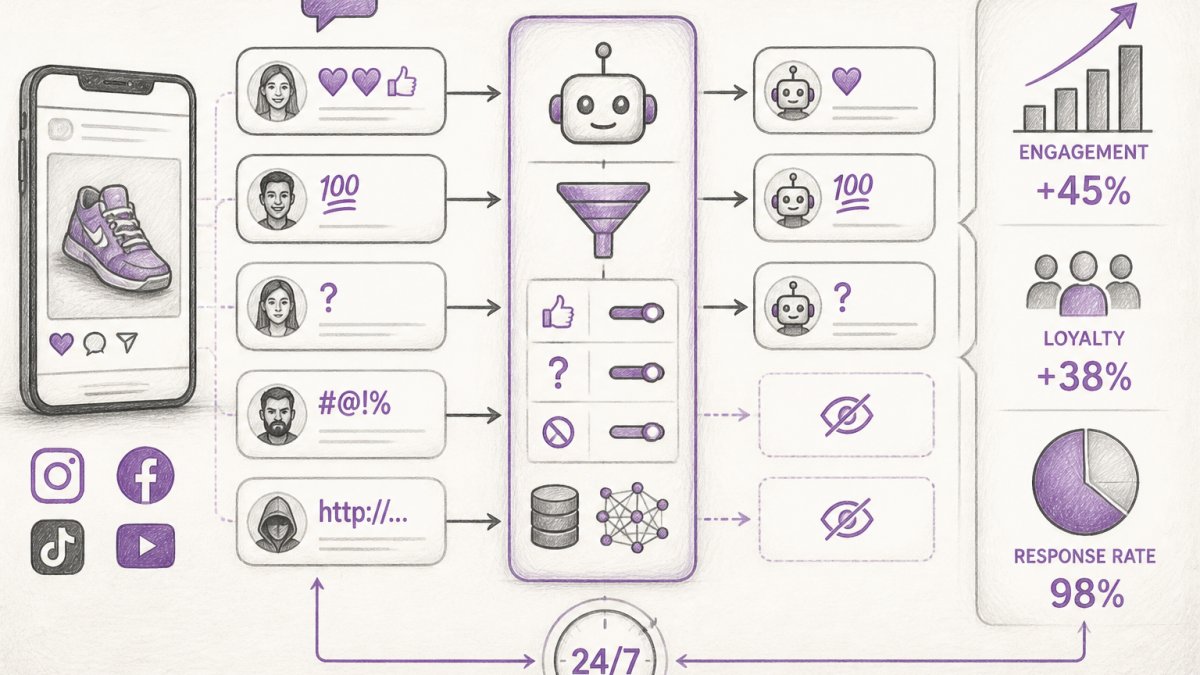
Automated comment responses have become essential for brands managing high-volume social conversations.
This matters because response speed directly impacts customer perception.
The real power of automated comment responses goes beyond speed. These systems learn your brand voice and tone.
FeedGuardians helps brands cut their manual comment moderation time by hours daily while actually improving customer satisfaction.
The Business Case: Speed, Scale, and Customer Loyalty
Speed in social media engagement creates a competitive advantage. Customers notice when you respond quickly.
Fast responses lead to better outcomes:
- Customers feel valued and heard
- Issues get resolved before they escalate
- Positive comments get acknowledged, building community
The scaling problem is real.
Automated comment responses solve the volume problem. Your system handles routine inquiries instantly.
Customer loyalty improves when people feel acknowledged. A quick reply to a product question increases the likelihood that person buys.
Social Media Response Templates That Work
Templates are the foundation of effective automation. A good template feels personal while scaling across hundreds of conversations.
The best templates share common characteristics. They acknowledge the customer by name or reference their specific comment. They're brief, usually two to three sentences. They include a clear next step, whether that's a link to more information or an invitation to direct message your team.
Template Structure and Customization
A strong template has three parts: acknowledgment, information or action, and next step.
Acknowledgment shows you read their comment. Use their name if available. Reference what they said specifically.
Information or action delivers value.
Next step tells them what happens next.
Templates need flexibility. Your system should adapt based on the comment type.
Social Media Comment Response Examples Across Platforms
Different platforms have different norms. Instagram comments are more casual. LinkedIn comments are more professional. YouTube comments span the full spectrum. Your templates should match the platform and your audience.
E-commerce Product Questions
Product questions are the easiest to automate. Customers ask specific things: "Is this in stock?" "What colors do you have?" "How long does shipping take?"
Your automated response should answer the question directly or point them to the answer. Example:
"Thanks for asking! We have this item in stock in Black and Navy. Shipping is typically 3-5 business days. Check our product page for full details or reply here if you have other questions."
This response is fast, helpful, and moves the conversation forward. If the customer needs more help, they know how to get it.
Customer Complaints and Negative Feedback
Negative comments require care. Automation here means acknowledging the issue quickly and escalating to a human. Never let a complaint sit.
Example automated response:
"We're sorry you had this experience. Your feedback matters to us. Our team is looking into this now and will reach out within 24 hours to make it right."
This response shows you take the issue seriously without making promises your team hasn't approved. It escalates the comment to your team while keeping the customer calm.
Lead Capture and Inquiry Routing
Comments with purchase intent or partnership inquiries should be captured automatically. Your system can qualify the lead and route it to the right person.
Example:
"Thanks for your interest! We'd love to help. Reply here or click the link to schedule a quick call with our team."
This response captures the lead's interest while moving the conversation to a channel where you can actually close the deal.
Social Media Engagement Best Practices for Automation
Automation works best when paired with strategy. Random replies don't build engagement. Intentional, timely responses do.
The first rule: respond to everything if you can. Every comment is an opportunity.
The second rule: match your audience's tone.
The third rule: include a reason to stay engaged. Don't just answer the question and disappear.
When to Automate and When to Go Human
Not every comment should be automated. Some require human judgment.
Automate these:
- Simple product questions
- Requests for links or resources
- Thank you comments
Go human for these:
- Complaints or negative feedback
- Complex product issues
- Requests that need personalization
The key is having a system that routes comments correctly. FeedGuardians uses AI to detect comment type and route accordingly. Straightforward questions go to automation. Complex issues go to your team. This hybrid approach gives you speed and quality.
Maintaining Brand Voice and Authenticity
Your brand voice should be recognizable in every response. Customers should feel like they're talking to your brand, not a robot.
This means training your system on your actual communication style. Show it examples of how your team writes.
Authenticity also means knowing your limits. Don't let automation pretend to be something it's not.
Social Media Comment Management Tools and Implementation
Implementing automated comment responses requires more than picking a tool. You need a structured workflow that minimizes risk, ensures quality, and integrates with your existing systems.
Step-by-Step Implementation Workflow
Phase 1: Audit and Planning (Week 1)
Before selecting a tool, document your current state.
Identify your response gaps. Where are customers waiting longest?
Phase 2: Template Development and Testing (Weeks 2-3)
Set up a staging environment if your tool allows it.
Phase 3: Platform Integration and Routing Rules (Week 4)
Define routing rules. Which comment types trigger automation?
Set escalation thresholds.
Phase 4: Team Training and Soft Launch (Week 5)
Train your team on the new system.
Phase 5: Full Rollout and Optimization (Week 6+)
Expand to all platforms and accounts.
Schedule weekly reviews for the first month.
Tool Selection Criteria
When evaluating tools, use this checklist:
Platform Coverage: Does it support all platforms where you engage? Instagram, Facebook, TikTok, YouTube, and LinkedIn should all be included. If you use niche platforms, verify support before committing.
Response Quality: Can you customize responses per platform?
Escalation and Human Handoff: Can it flag comments for human review?
Integration Depth: Does it integrate with your CRM, email platform, or helpdesk?
Compliance and Safety: Does it follow platform policies for automation?
Pricing and Scalability: What's the cost per account or per comment?
Integration Checklist
Before going live, verify:
- All social accounts are connected and comments appear in the unified inbox
- Response templates are written and approved by your team
- Routing rules are set up and tested on historical comments
Common Implementation Mistakes to Avoid
Automating too much, too fast. Start with simple, high-confidence comment types.
Ignoring platform differences. Instagram comments are casual. LinkedIn comments are professional. YouTube comments are unfiltered.
Setting and forgetting. Automation requires ongoing monitoring. Review escalations daily. Audit automated responses weekly.
Over-relying on keyword matching. "Refund" doesn't always mean a complaint.
Measuring Impact: Metrics That Matter
Automation should improve measurable outcomes. If it doesn't, it's just creating work. But measuring impact requires a structured approach: establish baselines before implementation, define what success looks like, and track the right metrics over time.
Building Your Measurement Framework
Step 1: Establish Baselines Before You Automate
Measure your current performance across all key metrics before implementing automation.
Spend one week (or one month if you have lower volume) tracking:
- Response time: How long between when a comment is posted and when you reply? Measure the average and the 95th percentile (the slowest 5% of responses). Most brands manually replying to comments see average response times of 4-24 hours.
- Reply rate: What percentage of comments receive a response? Most brands reply to 20-40% of comments manually. The rest go unanswered.
- Engagement per comment: On posts where you reply to comments, how many additional likes, shares, and follow-up comments do those posts receive compared to posts where you don't reply? Use your platform's native analytics or a social media management tool to measure this.
Document these baselines in a simple spreadsheet. You'll compare against them after automation is live.
Step 2: Define Success Metrics and Targets
Not all metrics matter equally. Choose 3-5 that align with your business goals.
If your goal is customer satisfaction and retention, focus on:
- Response time (target: under 1 hour)
- Reply rate (target: 80%+)
- Customer satisfaction score (target: 4.5+ out of 5)
If your goal is lead generation, focus on:
- Lead capture rate (target: capture 90%+ of purchase-intent comments)
- Lead-to-conversation rate (target: 70%+ of captured leads respond to your follow-up)
- Lead-to-customer rate (target: 20%+ of leads convert to paying customers within 30 days)
If your goal is engagement and reach, focus on:
- Reply rate (target: 80%+)
- Engagement lift (target: 25%+ more engagement on posts with replies)
- Comment volume growth (target: 15%+ increase in comments month-over-month)
Set realistic targets. A 50% improvement in response time is achievable.
Key Metrics to Track Post-Implementation
Response Time (Speed)
Automation should cut response time from hours to seconds. Measure:
- Average response time (should drop from 4-24 hours to under 5 minutes)
- 95th percentile response time (should drop significantly)
- Response time by comment type (product questions should be fastest; complaints may take longer if escalated)
Track this weekly. Plot it on a graph.
Reply Rate (Coverage)
Automation lets you reply to more comments because you're not limited by your team's capacity. Measure:
- Total comments received per week
- Total comments replied to per week
- Reply rate as a percentage
Most brands see reply rates jump from 30% to 80%+ after automation.
Engagement Lift (Quality)
Do comments with replies get more engagement? They should. Measure:
- Average likes per comment on posts where you reply
- Average likes per comment on posts where you don't reply
- Ratio of follow-up comments to initial comments (on replied posts vs. non-replied posts)
Lead Capture and Conversion (Revenue)
Comments are sales opportunities. Measure:
- Number of purchase-intent comments per week
- Number of those comments that get a response
- Number of responses that lead to a conversation (follow-up comment or DM)
Calculate your conversion funnel: If 100 purchase-intent comments come in, how many convert to customers?
For e-commerce brands, this is the metric that justifies automation investment.
Customer Satisfaction (Loyalty)
Measure satisfaction through:
- Post-purchase surveys ("How satisfied are you with our response to your questions?")
- Net Promoter Score (NPS) on social channels
- Sentiment analysis on comments (what percentage are positive, neutral, negative?)
Sentiment and Brand Health
Automation can improve or harm brand perception depending on quality. Measure:
- Sentiment of comments over time (positive, neutral, negative percentage)
- Sentiment of replies to your automated responses (are customers happy with them?)
- Brand mention volume (are people talking about you more?)
Use a tool like Brandwatch or Mention to track sentiment automatically.
Measurement Timeline and Reporting
Week 1-2 After Launch: Monitor daily. Are responses going out?
Week 3-4: Start comparing to baseline. Response time should be dramatically lower.
Month 2: Full month of data. You should see clear trends.
Month 3+: Quarterly reviews. Compare three-month averages to your baseline.
Create a simple dashboard or report that shows:
- Response time (current vs. baseline)
- Reply rate (current vs. baseline)
- Engagement lift (current vs. baseline)
Share this report with your team and leadership monthly.
Diagnosing Problems: When Metrics Don't Improve
If metrics aren't improving after four weeks, investigate:
Response time isn't dropping? Check if automation is actually running. Are comments being routed correctly? Is there a technical issue? Verify in your tool's logs.
Reply rate isn't increasing? You might be escalating too many comments.
Engagement isn't lifting? Your response quality might be poor. Review automated responses.
Leads aren't converting? Your lead capture might be working, but your follow-up might be slow.
Satisfaction is declining? Customers might feel like they're talking to a robot. Add more personalization.
ROI Calculation
To justify automation investment, calculate ROI:
Labor savings: How many hours per week does automation save your team? Multiply by your team's hourly rate. Example: 10 hours/week × $50/hour × 52 weeks = $26,000/year.
Revenue impact: How many additional leads or sales does faster response time generate?
Retention impact: Do faster responses reduce churn?
Total annual benefit: $26,000 + $6,000 + $10,000 = $42,000.
Tool cost: Most automation tools cost $100-500/month, or $1,200-6,000/year.
Net ROI: $42,000 - $3,000 (average tool cost) = $39,000 net benefit, or 1,300% ROI.
This is why automation is worth doing, the ROI can be positive within a short timeframe.
Common Risks and How to Mitigate Them
Automation introduces risks. Knowing them helps you avoid them.
The biggest risk is tone-deaf responses.
Another risk is over-automation. Not every comment deserves an automated reply.
Privacy and consent matter.
Platform policy compliance is critical.
The final risk is losing the human touch entirely.
Automated comment responses aren't optional anymore for brands managing high-volume social channels.
FeedGuardians helps you automate comment responses while keeping your brand voice intact.
Frequently Asked Questions
Does replying to comments boost engagement?
Yes. Replying to comments signals that your brand listens and values customer input, which encourages further interaction. Faster, consistent replies increase the likelihood that commenters return to your posts and engage with future content. This active conversation management strengthens community bonds and improves reach through platform algorithms that reward engagement activity.
How quickly should a brand respond to social media comments?
The faster, the better. Responses within 1-2 hours capture the commenter while they're still active and interested. Automated comment responses eliminate delays by operating 24/7, ensuring no inquiry goes unanswered overnight or during off-hours. This speed boost directly improves customer experience and increases the likelihood of conversion from comment to inquiry or sale.
Can automated replies make a brand seem less authentic?
Not if they're done correctly. Automated responses trained on your brand voice, terminology, and guidelines sound genuinely like your team. The key is personalizing templates with customer names, order details, or specific questions asked, generic, robotic replies feel inauthentic. Many brands use automation for initial acknowledgment and routing, then escalate complex issues to humans for a personal touch.
What metrics show whether comment automation is working?
Track response time (should drop significantly), reply rate (percentage of comments answered), engagement rate (likes and replies to your responses), conversion rate from comments to inquiries or sales, and customer satisfaction scores. Compare these metrics 30 days before and after implementation. Brands using automated comment responses can see faster response times, higher reply rates, and increased repeat purchases.
Tired of manually moderating comments?
FeedGuardians automates spam filtering, responds to customers, and protects your brand — setup in 3 minutes.
Frequently Asked Questions
Does replying to comments boost engagement?
Yes. Replying to comments signals that your brand listens and values customer input, which encourages further interaction. Faster, consistent replies increase the likelihood that commenters return to your posts and engage with future content. This active conversation management strengthens community bonds and improves reach through platform algorithms that reward engagement activity.
How quickly should a brand respond to social media comments?
The faster, the better. Responses within 1-2 hours capture the commenter while they're still active and interested. Automated comment responses eliminate delays by operating 24/7, ensuring no inquiry goes unanswered overnight or during off-hours. This speed boost directly improves customer experience and increases the likelihood of conversion from comment to inquiry or sale.
Can automated replies make a brand seem less authentic?
Not if they're done correctly. Automated responses trained on your brand voice, terminology, and guidelines sound genuinely like your team. The key is personalizing templates with customer names, order details, or specific questions asked—generic, robotic replies feel inauthentic. Many brands use automation for initial acknowledgment and routing, then escalate complex issues to humans for a personal touch.
What metrics show whether comment automation is working?
Track response time (should drop significantly), reply rate (percentage of comments answered), engagement rate (likes and replies to your responses), conversion rate from comments to inquiries or sales, and customer satisfaction scores. Compare these metrics 30 days before and after implementation. Brands using automated comment responses can see faster response times, higher reply rates, and increased repeat purchases.