
Quick Summary
| Key Insight | What You Need to Know |
|---|---|
| What Are Online Reputation | What Are Online Reputation Management Tools? |
| Top Online Reputation Management | Top Online Reputation Management Tools for 2026FeedGuardiansReputationBirdeyeAppFollowMentionNiceJobHighLevelSprout SocialSurveySparrowYext |
| Step 1 | Segment by footprint, not by feature list |
| Step 2 | Run the ROI math before the demo |
| Step 3 | Filter for compliance and data handling |
| Step 4 | Demand a time-to-value estimate |
Table of Contents
- What Are Online Reputation Management Tools?
- Top Online Reputation Management Tools for 2026
- How to Choose the Right Online Reputation Management Tool
- Social Media Comment Moderation Tools: A Critical Layer
- How to Handle Negative Social Media Comments
- Protect Brand Reputation on Social Media with the Right Tools
- Making the Decision: What Matters Most
- Frequently Asked Questions
Last Updated: September 20, 2026
What Are Online Reputation Management Tools?
Online reputation management tools are software platforms that monitor, collect, and act on what customers say about a brand across review sites, social platforms, search results, and business listings, combining review aggregation, sentiment analysis, social listening, and automated response workflows into one dashboard.
Top Online Reputation Management Tools for 2026
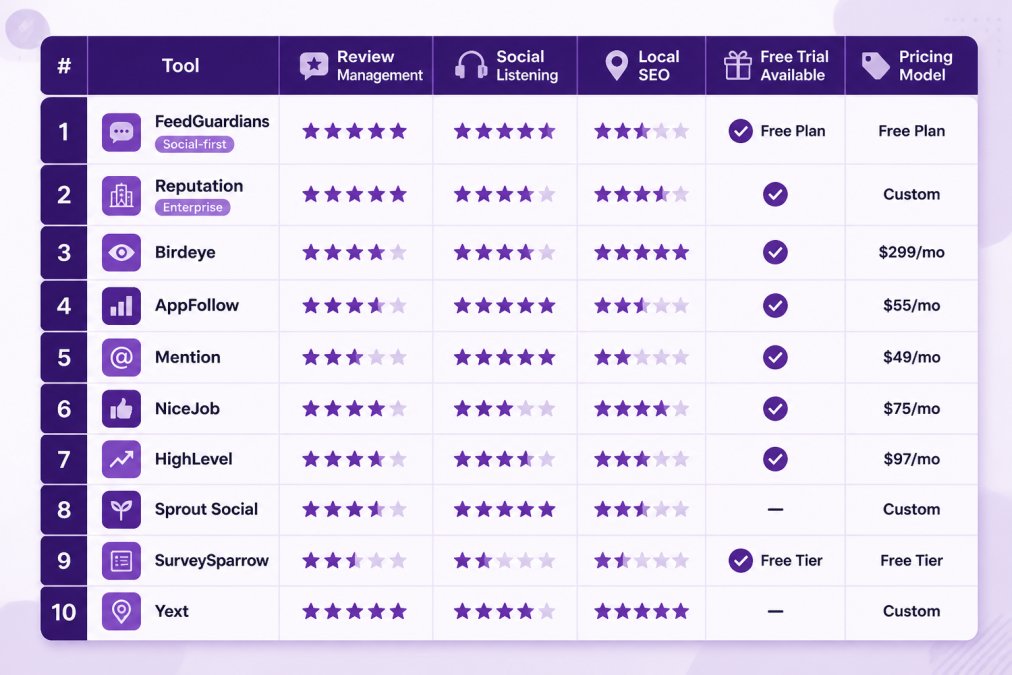
The best reputation management tools in 2026 split into three groups: social comment moderation, review collection, and all-in-one suites that attempt both. Knowing which group you need is half the decision.
FeedGuardians
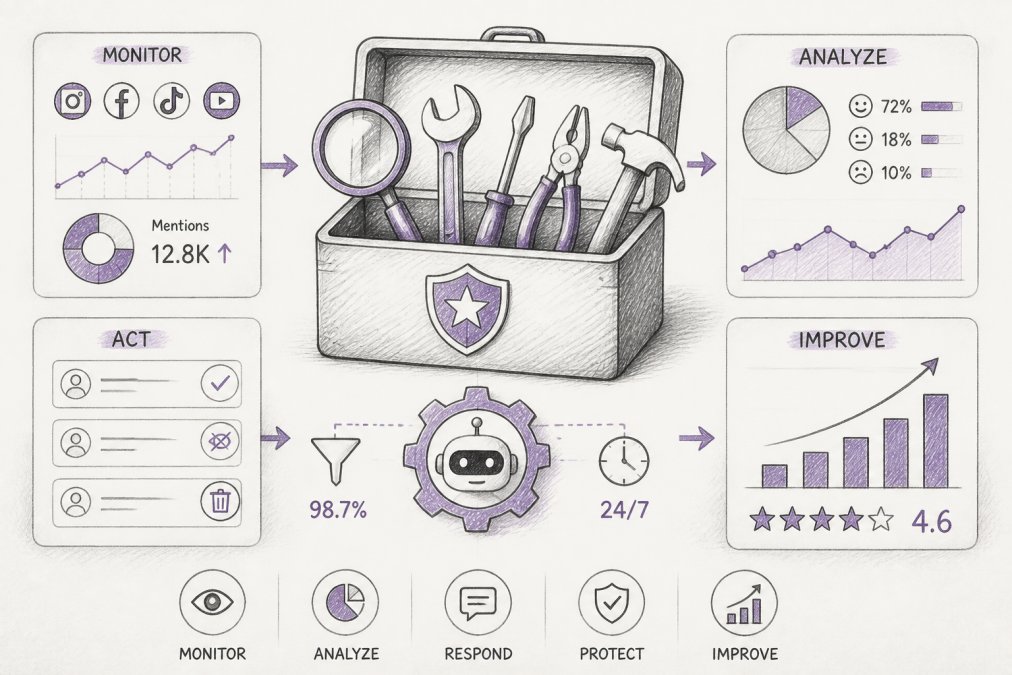
FeedGuardians is an AI-powered comment moderation and response platform for Instagram, Facebook, TikTok, and YouTube. It detects and hides spam, scams, hate speech, and competitor links with 98.7% accuracy, then replies 24/7 in your brand voice, with human escalation for edge cases.
Reputation
Reputation aggregates reviews, business listings, and customer surveys into one intelligence dashboard. Its strength is multi-location reporting: sentiment analysis flags which locations need attention first.
Birdeye
Birdeye pairs automated review requests via SMS and email with a unified inbox across review and social channels, plus competitor benchmarking.
AppFollow
AppFollow focuses narrowly on App Store and Google Play reviews. Real-time monitoring, semantic analysis of common complaints, and Slack, Zendesk, and Jira integrations make it useful for product teams.
Mention
Mention tracks brand mentions across news sites, blogs, and social platforms with real-time alerts and competitive analysis.
NiceJob
NiceJob automates review request sequences and turns collected reviews into website widgets. CRM integrations trigger requests automatically after a job or purchase.
HighLevel
HighLevel bundles reputation features into a broader sales and marketing platform, with white-label capabilities agencies can resell.
Sprout Social
Sprout Social is a social media management platform with a unified inbox, advanced social listening, and engagement analytics.
SurveySparrow
SurveySparrow collects customer feedback through conversational surveys, tracks Net Promoter Score, and triggers surveys based on customer actions.
Yext
Yext synchronizes business listings across hundreds of sites and manages review responses from one dashboard.
| Tool | Starting Price | Best For | Free Tier |
|---|---|---|---|
| FeedGuardians | Free plan available | Social comment moderation | Yes |
| Reputation | Custom | Multi-location enterprises | No |
| Birdeye | $299/month | All-in-one SMBs | No |
| AppFollow | $55/month | Mobile app teams | Yes |
| Mention | $49/month | PR and brand monitoring | Yes |
| NiceJob | $75/month | Service businesses | No |
| HighLevel | $97/month | Agencies | No |
| Sprout Social | Custom | Mid-to-large teams | No |
| SurveySparrow | Custom | Customer feedback loops | Yes |
| Yext | Custom | Franchises | No |
How to Choose the Right Online Reputation Management Tool
Start with the channel where your reputation actually lives. A restaurant chain needs listing accuracy and review responses; a TikTok-first apparel brand needs comment moderation at scale. Those are different products, and no single platform is best at both.
Step 1: Segment by footprint, not by feature list
The tool that fits a single-location business rarely fits a 200-location franchise, and the tool that fits an agency managing 40 client accounts rarely fits either. Segment before you look at any pricing page:
- Single location (1-5): Review collection, response templates, and listing accuracy on the major directories. Setup speed matters more than analytics depth; most tools here go live in under a week.
- Multi-location (6-100): Location-level dashboards, role-based permissions, and brand-approved replies a local manager can personalize. Bulk review requests and per-location sentiment scoring are non-negotiable.
- Enterprise and franchise (100+): API access, SSO, audit logs, custom data retention, and a named onboarding team. Expect a procurement cycle measured in weeks.
- Agencies: White-label reporting, multi-client workspaces, and per-client billing. Confirm whether the vendor charges per seat, per location, or per client account, the model changes your margin more than the sticker price does.
Step 2: Run the ROI math before the demo
Annual value = (hours saved per week × 52 × fully loaded hourly cost) + (recovered ad spend) + (incremental revenue from improved conversion)
Work each term with your own numbers:
- Labor saved. If moderation and review responses consume 15 hours a week across your team at a fully loaded $35/hour, that is roughly $27,300 a year in recovered time. Adjust to your reality.
- Recovered ad spend. Spam and scam comments under paid social ads get shown to the audience you paid to reach, so the waste is measurable against your cost per impression.
- Conversion lift. Review volume and recency correlate with conversion on local and e-commerce pages. Pull your own before-and-after data from a pilot rather than trusting a vendor's case study.
Step 3: Filter for compliance and data handling
Enterprise buyers increasingly cannot sign without answers here, and most roundups skip it. Ask every vendor:
- Data privacy: How is customer data handled under the California Consumer Privacy Act (CCPA) and the EU's General Data Protection Regulation (GDPR) if you serve customers there? Where is data stored, and can you honor deletion requests?
- Review incentives: Does the review request workflow comply with the FTC's rules on endorsements and testimonials? Incentivizing reviews without disclosure, or gating requests to only happy customers, creates legal exposure.
- AI disclosure: If the platform auto-replies with AI, does it disclose that, and can you toggle disclosure per channel? Platform terms and consumer expectations are tightening here.
- Accessibility and retention: Can you export your data if you leave? What is the retention policy on moderated content?
Step 4: Demand a time-to-value estimate
Implementation timelines vary more than vendors admit, and "how long until we see results" is what buyers actually care about. Ask for a written estimate broken into phases:
- Review request tools: Live in days; first new reviews typically appear within one to two weeks of the first request batch.
- Comment moderation platforms: Live in days to two weeks, depending on brand-voice training. Accuracy improves over the first month as the model learns your edge cases.
- Listing and multi-location platforms: Two to six weeks for setup across locations, longer for franchises with inconsistent data. Listing corrections take additional weeks to propagate.
- Enterprise suites: Four to twelve weeks including procurement, SSO configuration, and team training.
Step 5: Run the pre-demo checklist
- List your top three platforms by comment and review volume
- Estimate daily comment volume per platform (under 100, 100-1,000, or 1,000+)
- Identify who responds today and how many hours per week it takes
- Confirm whether you need review collection, comment moderation, or both
- Check whether the tool supports your platforms natively or through workarounds
- Test the AI's brand voice on your own past comments before committing
- Verify the escalation path when the AI is unsure
- Ask how long onboarding takes and who handles it
- Request the compliance answers in writing
- Get a written time-to-value estimate with named owners
Social Media Comment Moderation Tools: A Critical Layer
Social media comment moderation tools handle a narrower job than full reputation suites: they watch comment streams in real time, filter harmful content, and respond on your behalf. That narrowness is the point. Review platforms tell you what customers thought last month; moderation tools protect the conversation happening right now.
How to Handle Negative Social Media Comments
- Respond within the first hour when possible. Speed signals the comment was seen, not filtered.
- Acknowledge the specific issue. Generic apologies read as automated and make things worse.
- Move the resolution to a private channel for anything involving order details, refunds, or personal information.
- Never delete legitimate criticism. Deleting invites screenshots and turns one complaint into a story.
- Hide, do not delete, spam and abuse. Hiding removes it from public view while preserving the record.
- Escalate threats, legal claims, and safety issues to a human immediately.
- Log recurring complaints and route them to the team that can fix the root cause.
A reply template keeps this consistent across a team:
Hi [name], thanks for flagging this. That is not the experience we want for you. Could you send your order number to [support email] so we can sort it out directly? We will follow up today.
Protect Brand Reputation on Social Media with the Right Tools
Protecting brand reputation on social media comes down to three controls: what gets hidden, what gets answered, and how fast both happen. Tools that do only one leave a gap your team fills manually, and manual gaps widen as volume grows.
The three controls, and what each one actually requires
What gets hidden. A moderation layer classifies incoming comments in real time and hides spam, scam links, hate speech, and competitor links before your audience sees them. Hiding preserves the record while removing the comment from public view, different from deleting, which invites screenshots.
The compounding effect, in plain terms
Every answered comment is a customer touchpoint that builds loyalty; every hidden scam is ad budget preserved. Run those two loops consistently and search engine visibility, conversion rate optimization, and brand health all move in the same direction.
Scaling from one brand to many
The controls are the same whether you manage one account or five hundred, but the tooling is not. A single-location brand can run moderation with one person and a dashboard. An agency managing dozens of client accounts needs multi-client workspaces, per-client reporting, and white-label options so the client sees your brand, not the vendor's.
Making the Decision: What Matters Most
Choose the tool that matches your actual bottleneck, not the longest feature list. If comment volume is crushing your team, start with a moderation-first platform. If reviews are sparse and listings are wrong, start with a review and listings tool. If you need both, budget for two.
Frequently Asked Questions
How much do online reputation management tools cost?
Pricing varies widely. Entry-level tools like AppFollow start at $55 per month, while comprehensive platforms like Birdeye start at $299 per month. Enterprise solutions such as Reputation, Sprout Social, and Yext require custom quotes. FeedGuardians offers a free plan and paid tiers on its website. Most tools charge based on number of locations, users, or review volume.
What features should I look for in reputation management software?
Prioritize review aggregation from multiple platforms, sentiment analysis, automated review generation, social listening, and local listing management. For social media comment moderation tools, real-time detection of spam, hate speech, and competitor links is essential. Also check for API integrations, reporting dashboards, and the ability to respond from a unified inbox.
How do I handle negative social media comments effectively?
Respond quickly and professionally, acknowledge the issue, and move the conversation offline if needed. Use a tool with real-time alerts and sentiment analysis to catch negative comments early. Automate responses for common complaints while escalating serious issues to a human. This approach protects brand reputation on social media and shows customers you care.
Is AI-powered moderation necessary for modern brand reputation?
With high comment volumes across platforms, manual moderation is impractical. AI tools like FeedGuardians detect and hide harmful content with 98.7% accuracy and reply 24/7 in your brand voice. This prevents spam and hate from damaging your reputation and boosts ad performance by keeping conversations positive. For brands with active social presence, AI moderation is a practical necessity.
Can I start with just one or two platforms instead of a full suite?
Yes. Many tools offer modular plans. FeedGuardians supports Instagram, Facebook, TikTok, and YouTube, and you can often start with the platforms you need most and add others later. Check each vendor's pricing page for details on scaling up. This flexibility helps agencies and growing brands manage costs while protecting their reputation.
Your comment sections are working against you right now if nobody is watching them. FeedGuardians gives you real-time moderation across Instagram, Facebook, TikTok, and YouTube, AI replies in your brand voice around the clock, competitor link protection, and a human escalation path when judgment matters. Get started with FeedGuardians and turn your comments into conversations that protect revenue instead of leaking it.
Tired of manually moderating comments?
FeedGuardians automates spam filtering, responds to customers, and protects your brand — setup in 3 minutes.
Frequently Asked Questions
How much do online reputation management tools cost?
Pricing varies widely. Entry-level tools like AppFollow start at $55 per month, while comprehensive platforms like Birdeye start at $299 per month. Enterprise solutions such as Reputation, Sprout Social, and Yext require custom quotes. FeedGuardians offers a free plan and paid tiers on its website. Most tools charge based on number of locations, users, or review volume.
What features should I look for in reputation management software?
Prioritize review aggregation from multiple platforms, sentiment analysis, automated review generation, social listening, and local listing management. For social media comment moderation tools, real-time detection of spam, hate speech, and competitor links is essential. Also check for API integrations, reporting dashboards, and the ability to respond from a unified inbox.
How do I handle negative social media comments effectively?
Respond quickly and professionally, acknowledge the issue, and move the conversation offline if needed. Use a tool with real-time alerts and sentiment analysis to catch negative comments early. Automate responses for common complaints while escalating serious issues to a human. This approach protects brand reputation on social media and shows customers you care.
Is AI-powered moderation necessary for modern brand reputation?
With high comment volumes across platforms, manual moderation is impractical. AI tools like FeedGuardians detect and hide harmful content with 98.7% accuracy and reply 24/7 in your brand voice. This prevents spam and hate from damaging your reputation and boosts ad performance by keeping conversations positive. For brands with active social presence, AI moderation is a practical necessity.
Can I start with just one or two platforms instead of a full suite?
Yes. Many tools offer modular plans. FeedGuardians supports Instagram, Facebook, TikTok, and YouTube, and you can often start with the platforms you need most and add others later. Check each vendor's pricing page for details on scaling up. This flexibility helps agencies and growing brands manage costs while protecting their reputation.