
Quick Summary
| Key Insight | What You Need to Know |
|---|---|
| Why Reporting Harassment on | Why Reporting Harassment on YouTube Matters |
| How to Report a | How to Report a YouTube Comment for HarassmentFinding the Report OptionSelecting the Right Report Reason |
| Finding the Report Option | Finding the Report Option |
| Selecting the Right Report | Selecting the Right Report Reason |
| How to Report Someone | How to Report Someone on YouTube for CyberbullyingIdentifying Targeted Abuse PatternsSubmitting Multiple Reports for Repeated Abuse |
| Identifying Targeted Abuse Patterns | Identifying Targeted Abuse Patterns |
Table of Contents
- Why Reporting Harassment on YouTube Matters
- How to Report a YouTube Comment for Harassment
- How to Report Someone on YouTube for Cyberbullying
- How to Block Someone from Commenting on YouTube
- How to Document Online Harassment for Escalation
- What Happens After You Report Harassment
- Common Mistakes to Avoid When Reporting
- Protecting Your Channel: Beyond Reporting
- Frequently Asked Questions
Last Updated: October 11, 2026
Why Reporting Harassment on YouTube Matters
Harassment on YouTube doesn't stop itself. When someone targets your channel with abusive comments, repeated attacks, or threats, the platform won't fix it automatically.
YouTube's moderation team reviews thousands of reports daily. Vague reports get deprioritized; well-documented ones with specific evidence move faster and are far more likely to result in action.
At FeedGuardians, we work with brands and creators dealing with high comment volumes daily.
Beyond manual reporting, tools like FeedGuardians reduce harassment before it becomes a crisis. Our AI-powered moderation detects and hides hate speech, abusive content, and targeted attacks with 98.7% accuracy in real time.
How to Report a YouTube Comment for Harassment
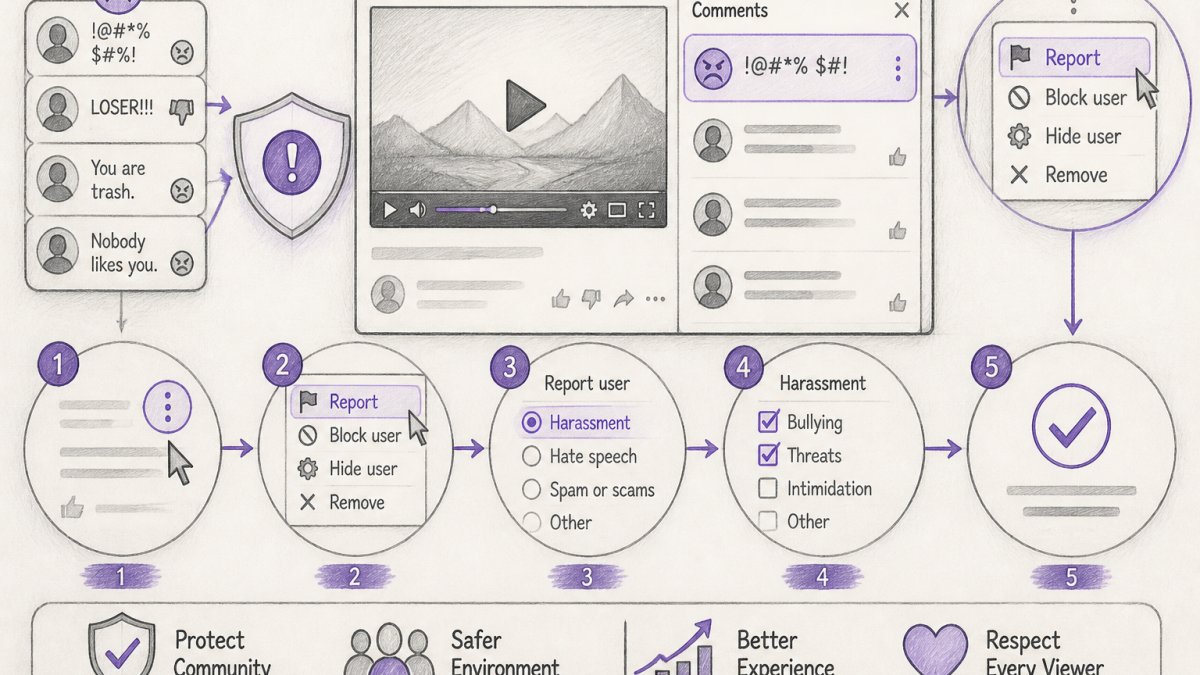
To report a YouTube comment for harassment, find the three-dot menu next to the comment, click it, and select the report option. Then choose the reason that best describes the harassment and submit your report.
Finding the Report Option
The report button is hidden by design, YouTube doesn't want accidental reports cluttering the system, so the option sits in a menu.
Here's where to find it:
- Locate the comment you want to report
- Click the three vertical dots (⋮) on the right side of the comment
- Select "Report comment" from the menu
On mobile, the three-dot menu appears in the same place, tap it to reveal the same options.
On desktop, hover over the comment if the dots aren't visible; on mobile they're usually always shown.
Selecting the Right Report Reason
Choosing the correct reason category matters more than most people realize. YouTube routes your report based on your selection, so the wrong category may send it to a reviewer untrained for that violation type.
YouTube offers several reason options when reporting comments:
- Harassment or bullying, Use this for repeated negative comments, name-calling, or personal attacks
- Hate speech, Use this for comments targeting someone based on protected characteristics like race, religion, gender, or sexual orientation
- Threats or violence, Use this for comments that threaten physical harm, death, or violence
- Spam or misleading, Use this for repetitive commercial comments or scams (not for harassment, but worth knowing)
- Child safety, Use this if the comment involves exploitation or endangerment of minors
Match the comment's actual violation to the category that describes it best. If a comment uses a slur and attacks someone's identity, hate speech is more specific than harassment or bullying and routes to trained specialists.
How to Report Someone on YouTube for Cyberbullying
Reporting someone for cyberbullying means reporting their comments, videos, or channel when they're engaged in a pattern of targeted abuse. A single mean comment is harassment. Repeated attacks over time from the same person is cyberbullying.
Identifying Targeted Abuse Patterns
Cyberbullying differs from a one-off rude comment in repetition and intent. One person attacking you across multiple videos shows a pattern of abuse, not isolated incidents.
Signs of targeted abuse include:
- The same user posting hostile comments on multiple videos
- Comments referencing personal information about you
- Attacks clustered at specific days or times
- Escalation over time, with comments growing more aggressive or threatening
- Repeated insults that mock or belittle you by name
- Replies designed to provoke or continue the conflict
If you see this pattern, screenshot the comments with dates visible. Document which videos they appeared on. This evidence becomes crucial when you report.
Submitting Multiple Reports for Repeated Abuse
One report may not be enough when someone repeatedly harasses you. YouTube's system looks for patterns, so multiple reports on the same person's comments strengthen your case.
Here's how to build a stronger report:
- Report each abusive comment individually via the three-dot menu
- Select "Harassment or bullying" as the reason
- Add a note in follow-up if YouTube allows comments
- Submit additional reports if harassment continues
- Document the dates and video titles involved
With multiple reports, YouTube's moderation team can see a pattern of violations and is more likely to warn, suspend commenting privileges, or remove the account.
If the harassment escalates to threats or doxxing, don't rely on multiple standard reports alone. Use the escalation process covered later in this guide.
How to Block Someone from Commenting on YouTube
Blocking prevents someone from commenting on your channel, but it doesn't remove their existing comments or report them to YouTube. Blocking is immediate defense; reporting gets YouTube's moderation team involved. Maintaining this digital distance is a necessary step toward setting healthy boundaries in your personal life as well.
You can block a user directly from their comment:
- Find the three-dot menu next to their comment
- Select "Block user"
- They can no longer comment on your channel
- Existing comments stay visible unless you delete them manually
Blocking gives immediate relief but doesn't address the root problem: the person is still on YouTube, still able to comment elsewhere, and their abusive content stays on your channel until you delete it.
Combine blocking with reporting for the strongest response:
- Report the comment using the three-dot menu
- Block the user to stop future comments
- Delete their existing comments manually if they're still visible
This three-step approach removes the immediate threat, documents the violation for YouTube, and prevents future attacks from that user on your channel.
How to Document Online Harassment for Escalation
When harassment involves threats, doxxing, or coordinated attacks, standard reporting isn't enough. You need documentation proving a pattern and severity, critical if you escalate to YouTube's trust and safety team or involve law enforcement.
Taking Screenshots and Preserving Evidence
Screenshots are your proof, they show exactly what was said, when, and by whom. A screenshot with timestamp, username, and full comment text is evidence; a description is not.
When taking screenshots:
- Capture the full comment including username and timestamp
- Include the video title or URL if possible
- Use your device's native screenshot tool
- Save with a clear filename like "harassment_username_date.jpg"
- Store them in a dedicated folder
For serious incidents, take multiple screenshots:
- A wide shot showing the comment in context on the video page
- A close-up of the comment text and username
- A shot showing your channel name and video title
These angles prove the comment appeared on your channel.
Recording Dates and Incident Details
Timestamps matter, YouTube uses dates to track patterns and severity. A single threat is concerning; five threats over two weeks shows escalation.
Create a simple log for each incident:
- Date and time of the harassment
- Username who posted it
- Video title where it appeared
- Comment text (copy and paste if possible)
- Your response, did you reply or delete it?
- Action taken, did you report or block?
Keep this log in a document and update it each time something happens. Over time it becomes a timeline showing YouTube exactly how the harassment unfolded.
If threats or doxxing are involved, add:
- Any identifying information revealed about you
- Whether they mentioned your location, workplace, or family
- Whether they encouraged others to target you
- Whether comments reference your offline activities
This transforms bad comments into evidence of a coordinated campaign.
What Happens After You Report Harassment
After you submit a report, YouTube sends no confirmation email and no notification when it's reviewed. The process happens behind the scenes.
YouTube's Review and Moderation Process
YouTube adds your report to a queue. Review speed depends on daily report volume, how clear the violation is, and whether multiple people reported the same content.
Here's what typically happens:
- Your report enters YouTube's moderation system
- A reviewer or automated system evaluates it against the Community Guidelines
- Violating comments are removed and the user may get a warning
- Non-violating comments get no action and no notification
- Users with multiple violations may be suspended or terminated
Timelines vary from hours to weeks, and there's no way to check a specific report's status, YouTube doesn't provide that visibility.
If nothing happens after several days, it may mean YouTube found no violation, your report got lost in high volume, or review is still pending. That's why documentation and multiple reports matter, additional reports with detailed evidence strengthen the case.
Escalating Credible Threats or Doxxing
Standard reporting works for general harassment, but credible threats or doxxing require escalation, serious violations needing immediate attention.
A credible threat is specific and shows intent to harm.
Doxxing means publishing your personal information (home address, phone number, workplace, family members' names) with intent to harass or endanger you.
To escalate a credible threat or doxxing:
- Document everything with screenshots and dates
- Report through YouTube's standard system first
- Go to YouTube's Help Center and find "Report a safety concern"
- Fill out the form with your documentation
- Explain specifically why this is a credible threat
- Include your evidence files
If violence or criminal activity is involved, contact local law enforcement with the same documentation. They can work with YouTube's legal team to preserve evidence and investigate.
YouTube takes credible threats and doxxing seriously because they can lead to real-world harm.
Common Mistakes to Avoid When Reporting
Most people make reporting harder than it needs to be. These mistakes slow the process or produce reports that lead nowhere.
Reporting without evidence. A report that says "this person is harassing me" is weak.
Expecting immediate action. YouTube gets millions of reports daily.
Deleting evidence before reporting. If you delete a comment before reporting it, YouTube can't review it.
Ignoring patterns. One bad comment is annoying; a pattern from the same user is reportable harassment.
Not using available tools. YouTube offers blocking, reporting, and comment moderation settings.
Protecting Your Channel: Beyond Reporting
Reporting handles existing harassment; protection prevents future harassment in the first place.
For brands managing multiple channels or high comment volumes, manual moderation becomes impossible.
Combining YouTube's built-in tools, active reporting, and automated moderation creates layers of protection, harassment still happens, but it's caught faster and causes less damage.
Beyond the platform, set clear community expectations: pin a comment explaining your rules, respond to legitimate comments quickly, and show you're actively managing your space.
If you're managing social media for multiple clients or running a high-volume e-commerce channel, the time spent on manual moderation adds up. According to research on social media management, teams spend an average of 15-20 hours per week on comment moderation alone.
Document your reporting efforts, who you reported, when, and what happened.
Harassment on YouTube doesn't disappear on its own. It requires action: reporting, blocking, documenting, and protecting your channel proactively.
Frequently Asked Questions
How do I report harassment on YouTube without the person knowing?
YouTube's reporting system is private, the user you report won't be notified. When you submit a report through the three-dot menu or report button, only YouTube's moderation team reviews it. However, if you block the user or delete their comment, they may notice those actions. For sensitive situations involving threats or doxxing, document the evidence first, then report. YouTube keeps reports confidential during their review process.
What should I include when reporting harassment on YouTube?
Include specific details: the exact comment or video content, the username of the person harassing you, the date and time of the incident, and context about repeated behavior if applicable. Take screenshots showing the full comment thread or video. Describe how the content violates YouTube's Community Guidelines, whether it's abusive language, threats, cyberbullying, or targeted harassment. If the harassment involves doxxing or credible threats, mention that in your report description to flag it for priority review.
What happens if YouTube doesn't remove reported harassment?
If YouTube denies your report, you can appeal the decision through your account's help center. Document why you believe the content violates guidelines and resubmit. If the harassment continues, block the user to prevent further comments on your channel. For serious threats or safety concerns, contact YouTube support directly through their help portal or escalate to law enforcement if the threats are credible. Building a record of multiple reports strengthens your case for escalation.
Can I report a YouTube video or channel for harassment?
Yes. Click the three-dot menu on the video or channel, select 'Report,' and choose the reason, harassment, abusive content, or threats. For channels dedicated to harassment, select 'Report channel' from their main page. YouTube reviews channel-level reports to determine if the entire channel violates Community Guidelines. Provide specific examples of harassing content in your report description. If a channel repeatedly targets individuals or groups, multiple reports from different users increase the likelihood of action.
Tired of manually moderating comments?
FeedGuardians automates spam filtering, responds to customers, and protects your brand — setup in 3 minutes.
Frequently Asked Questions
How do I report harassment on YouTube without the person knowing?
YouTube's reporting system is private—the user you report won't be notified. When you submit a report through the three-dot menu or report button, only YouTube's moderation team reviews it. However, if you block the user or delete their comment, they may notice those actions. For sensitive situations involving threats or doxxing, document the evidence first, then report. YouTube keeps reports confidential during their review process.
What should I include when reporting harassment on YouTube?
Include specific details: the exact comment or video content, the username of the person harassing you, the date and time of the incident, and context about repeated behavior if applicable. Take screenshots showing the full comment thread or video. Describe how the content violates YouTube's Community Guidelines—whether it's abusive language, threats, cyberbullying, or targeted harassment. If the harassment involves doxxing or credible threats, mention that in your report description to flag it for priority review.
What happens if YouTube doesn't remove reported harassment?
If YouTube denies your report, you can appeal the decision through your account's help center. Document why you believe the content violates guidelines and resubmit. If the harassment continues, block the user to prevent further comments on your channel. For serious threats or safety concerns, contact YouTube support directly through their help portal or escalate to law enforcement if the threats are credible. Building a record of multiple reports strengthens your case for escalation.
Can I report a YouTube video or channel for harassment?
Yes. Click the three-dot menu on the video or channel, select 'Report,' and choose the reason—harassment, abusive content, or threats. For channels dedicated to harassment, select 'Report channel' from their main page. YouTube reviews channel-level reports to determine if the entire channel violates Community Guidelines. Provide specific examples of harassing content in your report description. If a channel repeatedly targets individuals or groups, multiple reports from different users increase the likelihood of action.