
Quick Summary
| Key Insight | What You Need to Know |
|---|---|
| Reclaim Your Time | Stop wasting hours manually deleting spam or typing out the same answers to frequently asked questions again and again. |
| Capture Every Lead | Instantly spot comments showing purchase intent and slide into their DMs to guide them through the sales process. |
| Improve Customer Experience | Delight your followers by giving them immediate answers to questions about pricing, stock, or shipping. |
| Trigger | If sentiment is detected as negative OR a comment includes words like "disappointed," "broken," or "angry." |
| Action | Do not auto-reply. Instead, the system should immediately hide the comment and send a notification to a human support agent to step in and respond personally. |
| Trigger | If a comment contains phrases like "how much," "where to buy," or "I need this." |
So, what exactly are automated Instagram comments? Think of them as smart, AI-driven replies that instantly engage with comments on your posts based on rules you set. This isn't about spam bots. It's about turning your comment section from a manual, time-sucking chore into an efficient machine for engagement and customer service, all without sacrificing your brand's unique voice.
The New Reality of Instagram Engagement
For any growing brand, trying to keep up with the flood of Instagram comments feels like an uphill battle. Your comment section should be a lively hub for your community, but more often than not, it's buried under spam, repetitive questions, and comments that go nowhere. This digital noise isn't just a nuisance—it's costing you business.
Tucked away in that mess are golden nuggets: comments from people ready to buy. When someone asks, "How much?" or "Is this available in blue?", they're holding up a sign that says, "I want to buy this now!" But here’s the catch: studies show that most people expect a reply within an hour. Letting those hot leads go cold for hours, or even days, is just like watching customers walk out of your store.
Turning Chaos into Conversions
This is where smart automation changes the game entirely. We're not talking about those generic, robotic "Great post!" comments that everyone hates. Modern automation is a sophisticated AI tool built to cut through the noise and highlight genuine opportunities. It's like having an intelligent assistant working around the clock to make sure you never miss a lead.
The whole system works on a simple yet powerful idea: figure out what a commenter wants and respond instantly with the right action. By setting up smart rules, you can turn a chaotic comment thread into a smooth path to purchase.
By turning comments into direct conversations, brands can capture interest at its peak. The key is to move the interaction from a public forum to a private, personalized DM, where you can guide a potential customer toward a purchase without friction.
A Strategic Advantage
Using automated Instagram comments effectively gives your brand a serious competitive edge. It lets you provide instant, helpful answers at a scale that’s simply impossible for a human team to match. This doesn't just make for a better customer experience; it directly boosts your bottom line. It all starts when you boost your Instagram interaction rate by building real connections, and automation helps you do that consistently.
Here’s how this strategy completely reshapes your workflow:
- Reclaim Your Time: Stop wasting hours manually deleting spam or typing out the same answers to frequently asked questions again and again.
- Capture Every Lead: Instantly spot comments showing purchase intent and slide into their DMs to guide them through the sales process.
- Improve Customer Experience: Delight your followers by giving them immediate answers to questions about pricing, stock, or shipping.
This guide will walk you through how modern, brand-safe tools like FeedGuardians can transform your comment section from a burden into your most powerful growth engine. For more foundational tips, check out our guide on how to improve social media engagement.
How Comment Automation Actually Works

Let's pull back the curtain on how this all works. To really get it, think about a busy supermarket. Imagine one lone cashier trying to handle a dozen long, winding checkout lines. That’s your social media manager trying to manually reply to every single comment—it’s slow, overwhelming, and impossible to keep up with.
Now, picture that same store filled with smart, self-checkout lanes. They handle hundreds of customers at once, only flagging a human manager when a real issue pops up.
That's the essence of modern comment automation. It’s not about unleashing mindless bots. It’s about building an intelligent, efficient system that manages conversations at scale, freeing up your team to focus on the stuff that really matters.
The whole thing runs on rules and triggers you set up beforehand. When someone comments on your post, the tool instantly scans it, matches it against your rules, and fires off a pre-planned action. This happens in the blink of an eye, giving your followers the immediate, relevant engagement they crave.
The Two Levels of Automation
Comment automation isn't just a single "on" switch. The technology comes in a couple of different flavors, from simple systems that spot keywords to advanced AI that can actually understand what people mean.
1. Basic Keyword Triggers
This is automation at its most straightforward. You create a list of words or phrases, and when one of them appears in a comment, it triggers a specific, preset response. Think of it as a simple "if this, then that" command.
- If a comment includes the word "price," the system can automatically shoot back a reply like, "We've sent the details to your DMs!"
- If someone comments with a giveaway keyword like "ENTER," the system can instantly DM them the entry instructions.
2. Advanced AI-Powered Analysis
This is where platforms like FeedGuardians really change the game. Instead of just looking for simple keywords, these systems use Natural Language Processing (NLP) and sentiment analysis to grasp the meaning and feeling behind the words.
The real power of AI is its ability to go beyond keywords. It can tell the difference between a customer asking, "How do I buy this?" (high purchase intent) and another saying, "I don't like this product" (negative sentiment), and then respond in a much more human and appropriate way.
This deeper understanding allows the system to sort comments and react with precision. It can spot spam, hide nasty comments, answer common customer service questions, and—most importantly—identify hot leads who are ready to buy.
Many AI moderation tools rely on this tech to create a safer, more productive space for brands. To see how they stack up, check out our guide on the best AI comment moderation tools of 2025.
Safe Systems vs. Risky Bots
It's absolutely critical to know the difference between sophisticated, officially approved automation and the sketchy, spammy bots that can get your account shut down. The key distinction is how they talk to Instagram.
Risky Bots: These are rogue programs that fly under the radar and often break Instagram's rules. They act like spammers, dropping generic comments on thousands of accounts or aggressively following and unfollowing users. Using them is a fast track to getting your account's reach throttled or even permanently banned.
Approved Automation Platforms: Tools like FeedGuardians are different. They use Instagram's official API (Application Programming Interface), which means they work with Instagram, not against it. They operate within a strict set of rules to keep every interaction safe, compliant, and authentic. The focus is on responding to engagement on your own content, not blasting spam across the platform. To get a better handle on the tech, it's worth exploring the different social media automation tools available.
By sticking with an approved system, you get all the upside of speed and efficiency without ever having to worry about putting your brand’s reputation or account security on the line.
Why Smart Automation Makes Business Sense
Let's move past the "how" and get straight to the "why." Putting automated Instagram comments to work for your brand isn't just about clearing out notifications—it’s a strategic decision that directly boosts your efficiency, strengthens customer relationships, and ultimately, grows your revenue. The case for it is incredibly strong, and it all comes down to solving three major headaches for any growing business.
The first, and most obvious, win is getting your time back. Think about it: social media managers and founders lose hours every single week just wading through comments, deleting spam, and typing the same replies again and again. That's time and energy that could be poured into creating amazing content, refining your strategy, or engaging in high-value conversations.
Think of automation as your tireless, 24/7 frontline support team. It handles all the repetitive, low-impact work so you can focus on what actually matters. It instantly hides spam and gives quick answers to common questions, freeing up a huge chunk of your schedule.
Making Your Customer Experience Shine
In a world where everyone expects instant answers, speed is your secret weapon. When a potential customer asks about shipping costs or if a product is in stock, they don't want to wait hours for you to see it. Long delays create friction, kill excitement, and can even cost you a sale.
Automation solves this by making sure every common question gets an immediate, helpful reply, no matter the time of day.
This turns your comments section from a chaotic feed into a genuinely useful customer service hub. By being so quick to respond, you don't just keep your current followers happy—you build a reputation for being a brand that truly cares. That kind of responsiveness is a huge advantage in a crowded marketplace and is exactly what turns casual followers into loyal customers.
Turning Comments into Conversions
This is where automation goes from being a handy tool to a serious money-maker. So many of the comments on your posts aren't just small talk; they're clear signals that someone is ready to buy. A comment like, "I need this!" or "Where can I find the blue one?" is a direct expression of purchase intent. Ignoring it is like turning your back on a customer standing at the cash register.
Smart automation tools are built to catch these moments and act on them instantly.
For example, a clothing store can set a rule that triggers a personalized DM whenever a comment includes phrases like "I want this" or "how to buy." That DM can provide a direct link to the product, a special discount code, or an offer to help complete the purchase. You're striking while the iron is hot.
This kind of proactive engagement closes the gap between interest and purchase. Instead of just hoping someone will find the link in your bio, you bring the shopping cart right to their inbox. It’s no surprise that leading automation platforms report that these comment-to-DM funnels see incredible 10-25% click-through rates on the links they send. That absolutely blows away the typical 2-5% you might get from a bio link.
By putting a solid system in place, you transform passive comments into active sales opportunities. To find the right fit for your brand, it helps to see how different tools stack up. Take a look at our guide comparing the top social media automation tools to see what's out there.
The difference between managing comments by hand and using an AI-powered tool is night and day. Let's look at the numbers.
Manual Moderation vs. Automated Management: A Comparison
This table breaks down how key metrics stack up when you compare the old way of doing things with the power of an AI-driven tool like FeedGuardians.
| Metric | Manual Management | AI-Powered Automation |
|---|---|---|
| Response Time | Hours to Days | Instant (Under 60 seconds) |
| Comment Coverage | 40-60% (Best effort) | 100% |
| Spam/Troll Removal | Manual, often delayed | Instant & Proactive |
| Lead Capture Rate | Low (relies on manual spotting) | High (automated intent detection) |
| Team Hours Spent | 8-15 hours/week | 1-2 hours/week (for setup & review) |
| Cost | High (salary/hourly costs) | Low (predictable subscription fee) |
As you can see, the data speaks for itself. Automation doesn't just make your life easier—it delivers measurably better results across the board, from customer satisfaction to your bottom line.
How to Automate Comments Without Putting Your Brand at Risk
On social media, trust is the only currency that matters. When you bring automation into the mix, you have to be fiercely protective of that trust. So, let’s get right to the biggest worry people have: the risk. We've all seen it happen—poorly done automation that spams posts with generic, tone-deaf replies that just scream "BOT!" and drive followers away. Or worse, it gets you on the wrong side of Instagram's algorithm.
That fear is completely valid. Nobody wants their brand to come across as spammy or fake. But the answer isn't to shy away from automation altogether; it's to approach it with a "governance-first" mindset. Think of it like driving a race car. You wouldn't just slam the accelerator without knowing where the brakes are and how to handle the turns. Safe automation is all about setting up smart, clear guardrails before you even turn the key.
Building Your Brand Safety Guardrails
The secret to safe and effective automation is maintaining total control through deep customization. This isn't about setting up a blunt instrument; it's about fine-tuning a precision tool. You need a system that's smart enough to understand the context, sentiment, and intent behind a comment before it ever makes a move.
Here are the three pillars you need to build a brand-safe automation strategy:
- Sentiment Analysis: Your system has to know the difference between a happy customer and an upset one. Sentiment analysis lets your tool read the emotional tone of a comment, which stops it from firing off a cheerful, automated "Thanks for the feedback!" to someone with a serious complaint.
- Intent Detection: The AI also needs to figure out what someone is trying to do. Is their comment just a compliment? A question for your support team? Or a massive buying signal like, "Where can I get this?" By identifying the intent, you can send comments down the right path—a product link for a sales question or a flag for your human team to handle a support issue.
- Spam and Troll Filtering: Your comments section should be a positive space for your community. A good automation system is your first line of defense, automatically hiding or deleting comments that contain profanity, spammy links, or anything else you've added to a custom blocklist.
Safe, effective automation isn't about a robot taking over. It's about giving your brand a smart assistant that follows your rules to the letter, protecting your reputation while it works around the clock. With platforms like FeedGuardians, you’re always the one in charge.
The Power of Official API Access
The single most important factor for keeping your brand safe is using an officially approved platform. There’s a massive difference between a shady, unauthorized bot and a tool that works through Instagram's official API. Unauthorized bots scrape the site and break Instagram's rules, which can get your account penalized or even suspended. It's critical to know how to spot these sketchy services, and our guide on bots commenting on Instagram can show you the red flags.
Official partners like FeedGuardians, on the other hand, are given legitimate, secure access to work within Instagram's ecosystem. This means every single action is compliant and safe. As Instagram continues its crackdown on fake engagement—punishing accounts that use bots or buy comments—using a legitimate tool is non-negotiable. Official APIs ensure you're encouraging genuine interaction, which is exactly what the platform wants to see.
Crafting Rules for Real-World Scenarios
Once your guardrails are up, you can start building sophisticated workflows that feel genuinely helpful, not robotic. The trick is to map out the most common types of comments you receive and create custom rules for handling each one.
Here’s what that looks like in action:
- Rule for Negative Feedback:
- Trigger: If sentiment is detected as negative OR a comment includes words like "disappointed," "broken," or "angry."
- Action: Do not auto-reply. Instead, the system should immediately hide the comment and send a notification to a human support agent to step in and respond personally.
- Rule for High-Intent Keywords:
- Trigger: If a comment contains phrases like "how much," "where to buy," or "I need this."
- Action: Post a public reply like, "Great question! Just sent the details to your DMs," while an automated message with a direct product link and maybe a special offer goes out privately.
- Rule for Spam Filtering:
- Trigger: If a comment contains a link, promotional fluff ("check out my page"), or any word from your custom blocklist.
- Action: Automatically hide or delete the comment on the spot. No questions asked.
When you adopt this strategic, governance-first mindset, you essentially eliminate the risks of using automated Instagram comments. You get all the powerful benefits of speed and efficiency without ever sacrificing your brand's voice or integrity.
Your Step-by-Step Implementation Plan
Okay, let's move from theory to practice. This is where the real magic of automated Instagram comments happens. Getting an intelligent system up and running isn't just about flipping a switch; it’s about carefully building a workflow that actually serves your business goals. This plan will walk you through creating an automation engine that's both effective and safe for your brand.
Think of it this way: imagine you run an e-commerce brand that sells custom pet portraits. Your big-picture goal is to turn followers who are just browsing into happy customers. Every part of your implementation plan should be laser-focused on that one clear objective.
First, Define Your Primary Goal
Before you write a single rule, you have to know what you’re trying to accomplish. Are you looking to generate more leads? Provide faster customer support? Or maybe just keep your comments section from turning into a spam-filled mess? Each goal requires a totally different playbook.
For our pet portrait brand, the main goal is lead generation. This means every rule we create will be designed to spot a potential customer and gently guide them toward making a purchase. Having this kind of clarity keeps your system from feeling random or unhelpful.
Identify and Categorize Common Comments
Next up, it’s time to do a little recon on your own comment section. Spend some time scrolling through your past posts to see what people are actually saying. As you do, you'll start to see patterns. Group those comments into categories.
For the pet portrait business, you'd likely find comments that fall into these buckets:
- Purchase Intent: "How much is this?", "I need one for my golden retriever!", "Where can I order?"
- General Questions: "What kind of paint do you use?", "How long does it take?", "Do you ship internationally?"
- Positive Feedback: "This is so beautiful!", "Amazing work!", "❤️"
- Spam: "Check out my profile!", "DM for collabs"
Sorting comments like this is a game-changer. It lets you create specific, targeted responses for each scenario, which makes your automation feel way more personal and less like a robot.
Craft Authentic and Varied Reply Templates
Now for the fun part: writing your replies. The golden rule here is to sound like an actual human. Ditch the stiff, corporate language and write in your brand’s unique voice. To keep things from getting stale, create a few different versions for each type of automated response.
This simple workflow shows how you can keep your comments productive and safe.
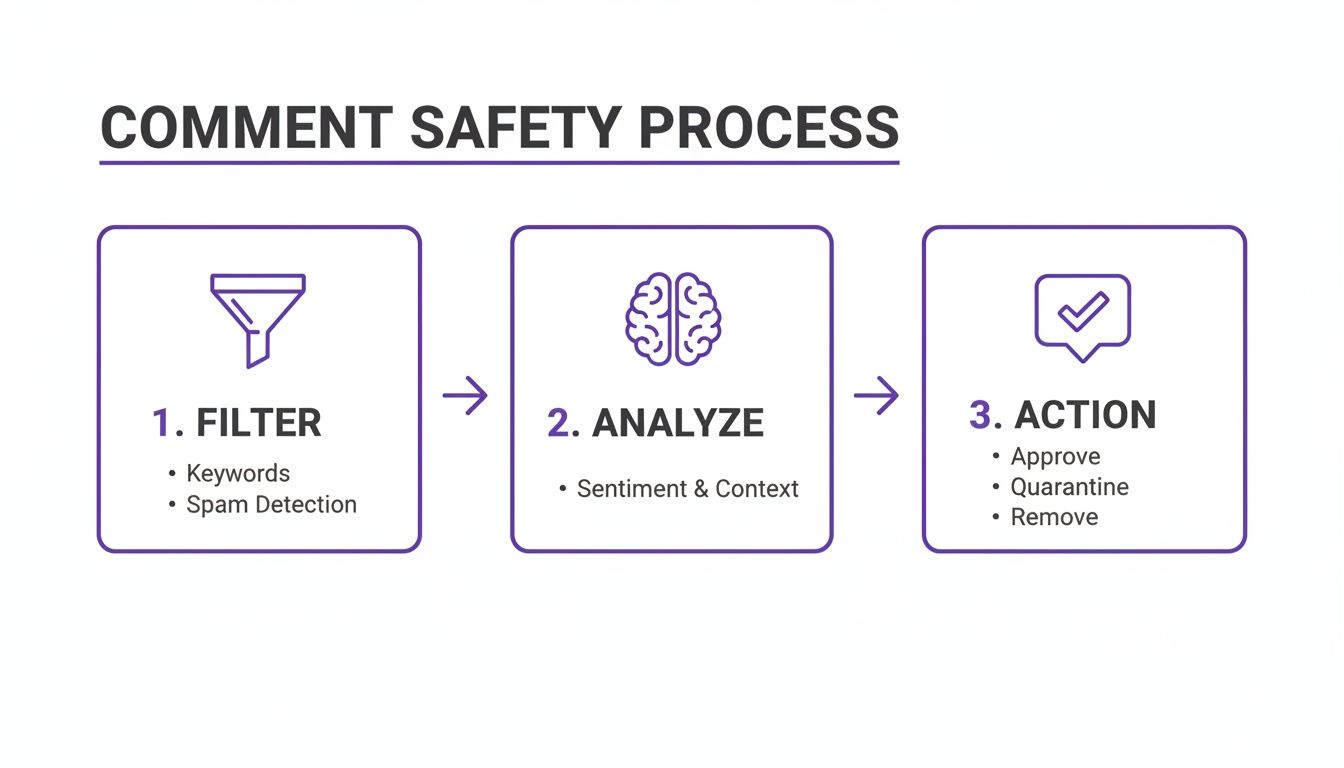
As you can see, the system first filters all incoming comments, then analyzes what the user is trying to say, and finally takes the right action. It’s a simple but powerful process.
The Big Idea: You’re not trying to trick people into thinking they're talking to a person. You're trying to give them a smooth, helpful experience that feels intentional, not automated.
Build and Configure Your Automation Rules
With your goals defined, comments categorized, and templates written, you're ready to build the engine. This is where you’ll set up keyword triggers, sentiment filters, and specific actions inside a tool like FeedGuardians.
Let's put it all together for our e-commerce example:
Rule for Purchase Intent:
- Trigger: If a comment contains keywords like "price," "how much," "order," or "buy."
- Action 1 (Public Reply): Post one of several pre-written replies, like: "So glad you're interested! I just sent all the details over to your DMs. 😊"
- Action 2 (Private DM): Send a personalized DM with a direct link to the product page and a friendly message.
Rule for Spam Filtering:
- Trigger: If a comment contains a URL or a word from your blocklist (e.g., "collab," "crypto," "follow me").
- Action: Automatically hide the comment. No reply needed.
Tools like FeedGuardians make handling this kind of complex moderation feel surprisingly simple. In fact, research from NapoleonCat shows that automations like these can save teams over 10 hours per week just on manual moderation. That’s time you get back by automatically removing spam and replying to real questions. You can learn more about these strategies in our complete guide to Instagram moderation tools.
Monitor, Test, and Refine
Finally, remember that this isn't a "set it and forget it" task. Once you launch your automations, keep a close eye on how they're performing. Are the replies hitting the right tone? Are your keyword triggers catching the right comments? Check your analytics and DMs to see what’s working, and don't be afraid to tweak your rules. This ongoing process is what keeps your system sharp and ensures it keeps delivering results.
Real-World Examples of Automation in Action
It’s one thing to talk about theory, but what really matters is seeing how automated Instagram comments actually work for real businesses. Let's get practical and look at a few scenarios where smart automation completely changes the game. These examples show just how powerful your comment section can become when you treat it like an intelligent sales and support tool.
Imagine an e-commerce brand dropping a teaser Reel for a new product. The comments instantly flood with things like "I need this!" and "Where's the link?!" Trying to reply to every single person manually is a losing battle, and every missed comment is a lost sale.
This is exactly where automation steps in.
E-commerce Product Launches
For a big product launch, a brand can set up a simple but incredibly effective rule. Any comment that includes keywords like “link,” “buy,” or “need” will instantly kick off two things:
- A quick public reply pops up, like, "Awesome! We just sent the exclusive launch link straight to your DMs." This simple move shows everyone else how responsive the brand is.
- At the same time, a private DM goes out with a direct link to the product page. You could even toss in a limited-time launch discount to nudge them toward buying right away.
This whole process captures a customer’s interest the second they show it. Instead of forcing people to go digging for a link in your bio, you bring the store right to their inbox, which can do wonders for conversion rates.
Service-Based Businesses and Lead Generation
Now, let's think about a service-based business, maybe a digital marketing agency. They share a killer case study, and the comments start rolling in: "What are your prices?" or "How can we work with you?"
These are hot leads you can't afford to ignore. With automation, a public reply can go out instantly: "Glad you're interested! We've sent our service guide over to your DMs for you to check out." A moment later, a DM arrives with a PDF of their pricing and a link to book a free consultation.
This approach turns a simple Instagram post into a powerful lead-generation machine. It qualifies prospects and moves them down the sales funnel 24/7, ensuring no opportunity is ever missed.
The impact here is huge. For instance, a case study from Interakt showed an EdTech platform grew its follower count from 500k to over 511k in just one month by automating replies. Better yet, this saved their team 2-3 hours of manual work every single day. You can find even more stories about the impressive results of Instagram DM automation.
Scaling Engagement and Community Growth
Smart automation isn't just about making sales; it’s also a fantastic tool for building a community. Think about brands running a giveaway or contest. They can set a rule to automatically DM the entry instructions to anyone who comments with a specific keyword, like “ENTER.”
This makes it ridiculously easy for people to join in, which means more engagement, more participants, and a much stronger community vibe. By letting tools like FeedGuardians handle the grunt work, social media managers can get back to what they do best: creating great content that gets people talking.
Frequently Asked Questions
Jumping into the world of automated Instagram comments can definitely bring up a few questions. Let's walk through some of the most common ones so you can feel confident putting this powerful tool to work for your brand.
Will Using Automated Comments Get My Account Banned?
This is the big one, and the answer is a solid no—but with a very important catch. You have to use an official, Meta-approved tool.
Platforms like FeedGuardians are built on Instagram's official API, which means every action we take is 100% compliant with their rules. The real danger comes from those shady, unauthorized bot services that scrape Instagram and blast out spam. That's a fast track to getting your account flagged.
Approved automation is all about responding to engagement on your own content, not spamming other people's feeds. This keeps your account perfectly safe.
Can I Customize Replies to Match My Brand Voice?
Absolutely. In fact, you should! The whole point is to make your brand’s life easier, not to turn it into a robot.
Good automation platforms give you total control over your reply templates. You can write a bunch of different responses for different situations, toss in emojis, and even drop in the user's name for a personal touch. This way, every single automated reply sounds like it came straight from you and fits right in with your brand's personality.
The key is to make automation feel intentional, not fake. By varying your messages and writing in your brand's true tone, you create a seamless and helpful experience that strengthens your connection with followers.
How Does the AI Understand Different Comment Types?
This is where the magic really happens. Modern systems use something called Natural Language Processing (NLP) and sentiment analysis to figure out the meaning behind a comment, not just the words.
You get to be the director here. You set up simple rules based on specific keywords (like "price" or "how to buy"), negative tones, or spammy phrases. Each rule then triggers a specific action. You can tell it to automatically hide a nasty comment, send a helpful DM with a link, or post a public thank-you for a kind word.
Spam and trolls used to be a nightmare for community managers. Now, AI moderation turns it into a non-issue. Just by automating spam removal and answering common questions instantly, brands are saving hours every single week. You can find more stats on how brands save time with automation at NapoleonCat.com.
What Kind of Results Should I Expect?
The impact usually shows up in three main areas.
First, you'll get a ton of time back. We see brands reclaim 10+ hours per week that used to be lost to scrolling and typing. Second, you’ll see much better click-through rates on links you send through automated DMs—sometimes hitting as high as 25%.
Finally, all of this adds up to capturing more qualified leads right when they're most interested. Your comment section stops being just a conversation pit and starts becoming a reliable engine for customer service and sales.
Ready to turn your comment section into a conversion powerhouse? FeedGuardians offers brand-safe, AI-powered automation to filter spam, capture leads, and engage customers 24/7. Start your free trial today and see the difference.
Tired of manually moderating comments?
FeedGuardians automates spam filtering, responds to customers, and protects your brand — setup in 3 minutes.