
Quick Summary
| Key Insight | What You Need to Know |
|---|---|
| Why Your Comments Are Disappearing | It’s a scenario every social media manager knows well. You get a notification about a new comment on your Facebook Page, but when you go to look, it... |
| The Real Business Cost of Hidden Comments | Hidden comments aren't just a minor headache for your social media team. They're a silent killer for your business, slowly draining revenue and chippi... |
| How to Manually Find and Reveal Comments | Ready to dive in and find those lost conversations? The good news is that finding and managing hidden comments on Facebook is pretty simple once you k... |
| Building a Proactive Moderation Strategy | If you're only finding and unhiding comments, you're always playing defense. It's the digital equivalent of bailing water out of a leaky boat instead ... |
| Got Questions About Hidden Comments? We've Got Answers. | When you're managing a busy Facebook Page, dealing with hidden comments can be a real head-scratcher. Let's clear up some of the most common questions... |
Have you ever felt like you're talking to a wall on your own Facebook Page? You see the notification for a new comment, but when you look, it's nowhere to be found. You're not imagining things. You've just encountered a Facebook hidden comment.
These are comments on your posts that Facebook's own system has automatically tucked away from public view. The algorithm flags them as potential spam or offensive content, so while the person who wrote it can still see their comment (and maybe their friends can too), it's invisible to the rest of your audience. This creates a weird, invisible barrier between you and your community.
The Invisible Conversations on Your Facebook Page
Think of it like this: you're on stage at a big event for your brand, but a bunch of people in the audience are asking questions in a soundproof room you didn't even know existed. That’s what’s happening on your Facebook Page every day. These comments aren't deleted—they're just filtered out by Facebook's automated systems.
And while this auto-moderation is meant to be helpful, it often gets things wrong. The algorithm can easily mistake industry-specific terms, a bit of sarcasm, or even a genuine customer question for something harmful, and poof—it's gone.
Why This Is a Critical Business Problem
For any brand, this isn't just a minor annoyance. Missing these comments means missing real opportunities and getting a skewed picture of what your community actually thinks. When legitimate comments just vanish, the impact on your business is direct and negative.
- Lost Customer Service Opportunities: A potential customer asks about shipping times. The comment gets hidden. They get no answer, get frustrated, and buy from your competitor instead. That's a lost sale.
- Damaged Brand Perception: When positive feedback or even constructive criticism gets hidden, it looks like you’re either ignoring your audience or, worse, censoring them. Your page can start to feel less authentic and trustworthy.
- Inaccurate Engagement Metrics: Your analytics might show engagement is down, but in reality, people are talking—you just can't see it. This can lead you to make bad marketing decisions based on flawed data.
This isn't a small-scale issue, either. Recent data showed that a staggering 30% of comments on Meta ads were hidden in 2025 because they were flagged as spam or toxic. Looking at the bigger picture, Facebook was responsible for 55.8% of all hidden comments across social media during its peak.
To truly understand the invisible conversations happening on your page and avoid missing critical feedback, consider leveraging techniques for understanding customer sentiment.
At the end of the day, managing facebook hidden comments isn't just another social media task. It’s a core business function that directly affects your customer support, brand reputation, and marketing ROI. Knowing how to find and manage these comments is the first step. It's also helpful to understand what other comment statuses mean, so for a deeper dive, check out our guide on what a highlighted comment means on Facebook. If you ignore these invisible conversations, you're only getting half the story.
Why Your Comments Are Disappearing
It’s a scenario every social media manager knows well. You get a notification about a new comment on your Facebook Page, but when you go to look, it’s gone. Poof. Vanished. This isn’t a bug; it’s Facebook’s own moderation system in action.
Think of it like an overeager bouncer at a club—it means well and wants to keep trouble out, but sometimes it gets things wrong and accidentally boots a perfectly good customer. Facebook's system is constantly scanning for spam, hate speech, and other content that breaks its rules. The goal is noble, but the execution can be clumsy.
The Algorithm's Blind Spots
Facebook’s automated filters are built to spot obvious red flags, but they often struggle with the nuances of human conversation. This is where most of your legitimate comments get caught in the crossfire. The algorithm just doesn't get the context, so it ends up hiding perfectly harmless interactions.
Here’s a breakdown of the usual suspects:
- Automated Spam Filters: This is the big one. If a comment is packed with links, uses too many sales-y trigger words ("free," "giveaway," "buy now"), or just looks like something a bot would post, the system will probably hide it. This is a huge reason the Facebook hidden comments problem can get out of hand so quickly.
- User Reports: Anyone on Facebook can report a comment they don’t like. If a comment gets flagged enough times, Facebook often hides it automatically while it waits for a review—even if the reports are totally baseless.
- Your Own Page Settings: You have control over moderation rules in your Meta Business Suite, including a profanity filter and a custom blocklist of words. These are useful tools, but if your blocklist is too aggressive, you might accidentally hide comments that use common slang or even industry-specific terms.
At its core, the system acts a bit like a voice assistant that mishears your request. A customer might comment, "Your new product is sick!" meaning it's amazing, but the algorithm might only register a potentially negative word and hide it from view.
The system is built to identify patterns, not intent. It can't distinguish between a genuine question about a "broken link" in an order confirmation and a spammer posting malicious URLs.
So, let's take a closer look at the different triggers that can make your comments go invisible.
Common Reasons Facebook Hides Your Comments
Here's a breakdown of the automatic triggers and manual settings that cause comments to become invisible on your Facebook Page.
| Reason for Hiding | What It Means | Common Example |
|---|---|---|
| Spam Filter | The comment contains elements Facebook's algorithm associates with spam, like too many links, excessive emojis, or suspicious phrasing. | A customer posts, "Check out my review here: [link to their blog]." The algorithm sees the external link and hides it. |
| Profanity Filter | The comment includes words on Facebook’s default profanity blocklist or a custom list you’ve created in your Page settings. | A fan comments, "That's badass!" but your filter is set to "Strong," so the comment is hidden. |
| Custom Keyword Blocklist | You've manually added specific words or phrases to your Page’s moderation rules, and a comment contains one of them. | You block the word "scam" to prevent false accusations, but a comment asking, "Is this a scam?" gets hidden. |
| User Reports | One or more users have reported the comment as inappropriate, spam, or harassment, triggering an automatic hide pending review. | Two users get into a heated debate, and one reports the other's comment, causing it to disappear. |
| Low-Quality Account | The comment is from a new, inactive, or previously flagged account that Facebook's system deems untrustworthy. | An account created yesterday with no profile picture leaves a generic "Great post!" comment, which gets hidden. |
As you can see, a lot of these filters can misfire and hide perfectly valid engagement.
Manual Triggers and False Positives
Beyond the purely automated stuff, comments can also disappear because of manual actions. When a user reports a comment, it gets sent to a moderation queue. And if a comment comes from an account that has a history of spam-like behavior, it's far more likely to get hidden right away.
If you want to dive deeper into how Facebook identifies and penalizes these types of profiles, you can learn more about what a spam account really is.
Ultimately, these systems are notorious for producing "false positives"—instances where genuine customer engagement is mistaken for something harmful. This lack of context is precisely why you can’t rely on automation alone. Without a human in the loop, you’re letting an algorithm decide which of your customers get a voice and which ones are silenced.
The Real Business Cost of Hidden Comments
Hidden comments aren't just a minor headache for your social media team. They're a silent killer for your business, slowly draining revenue and chipping away at your brand's reputation. Each one of those invisible interactions has a real price tag attached, and the consequences of missing them can be surprisingly severe.
Picture this: a potential customer is on the fence about buying your product. They drop a simple question on your ad about shipping times. But Facebook's algorithm gets it wrong, flags the comment, and poof—it's gone. To that customer, it looks like you just ignored them. That single moment of perceived neglect is often all it takes to send them straight to your competitor.
The Erosion of Trust and Social Proof
Beyond losing individual sales, hidden comments systematically dismantle the trust you've worked so hard to build. Every time a glowing testimonial or a positive review gets hidden, you lose a powerful piece of social proof. These are the authentic, user-generated endorsements that give new buyers the confidence to click "add to cart," and their absence leaves a huge gap that slick marketing copy just can't fill.
On the flip side, hiding negative feedback doesn't make the problem go away. The customer is still unhappy, and their issue is left to fester. This creates a couple of major risks:
- Public Escalation: An ignored customer might take their complaint somewhere far more public, like a review site or their own feed, where you have zero control over the conversation.
- Silent Churn: Other followers might see valid questions or concerns disappear, leading them to believe you simply delete criticism instead of addressing it. This kills transparency and encourages them to quietly take their business elsewhere.
When genuine customer feedback—both positive and negative—is unintentionally silenced, it creates an environment where brand trust cannot thrive. The cost isn't just a single sale; it's the long-term loyalty of your entire community.
Making Decisions with Incomplete Data
The damage doesn't stop with public perception. Hidden comments create a massive blind spot in your data, leading you to make bad business decisions. Your engagement metrics, like comment counts and interaction rates, look artificially low. You might think a campaign is bombing when, in reality, a vibrant conversation is happening right under your nose, just out of sight.
This skewed data makes it impossible to conduct effective social listening. You need to know what your audience is really saying to guide everything from product development to marketing messaging. When a big chunk of that feedback is invisible, you're essentially flying blind. To get a complete picture, you need to account for every interaction. You can learn more about the importance of tracking these conversations in our complete guide to what is social listening.
Ultimately, ignoring facebook hidden comments means you're operating with half the story. You're leaving money on the table and unknowingly hurting your brand's reputation, one invisible comment at a time. This is why proactive moderation isn't just a "nice-to-have"—it's an essential business activity.
How to Manually Find and Reveal Comments
Ready to dive in and find those lost conversations? The good news is that finding and managing hidden comments on Facebook is pretty simple once you know where to look. Everything you need is tucked away inside Meta Business Suite, which is the control panel for your brand's presence.
You won't find these moderation tools on your public-facing Page feed. Instead, you have to go "backstage" to the area where Facebook corrals all the content it has flagged for you.
Your Step-by-Step Guide to the Moderation Queue
This is where you'll find a list of every single comment Facebook has automatically hidden. From here, you’re in the driver's seat—you get to review each one and decide what happens next.
- Go to Meta Business Suite: First, log in and choose the Facebook Page you need to work on.
- Navigate to the Inbox: Look for the "Inbox" icon on the left-hand menu. This is where all your Page's messages and interactions live.
- Select 'Comments & More': Once you're in the Inbox, click on the "Comments & More" tab.
- Find the 'Hidden' Filter: Near the top of the comment list, you'll see a filter or dropdown menu. Click it and select the "Hidden" view. This instantly filters the list to show only the comments hidden by Facebook or your own moderation rules.
Once you’re looking at the "Hidden" queue, you’ll see a list of comments waiting for your attention. This is where your community manager instincts kick in.
Making the Right Moderation Decision
For every hidden comment, you have a few choices. The right one really depends on what the comment says and what your community guidelines are.
- Unhide: Was the comment hidden by mistake? Maybe it's a genuine customer question or some positive feedback that got caught in the filter. Use this option to make it visible to everyone.
- Delete: This permanently removes the comment. It’s the best choice for obvious spam, irrelevant links, or content that adds zero value.
- Hide: This is the state you found it in. If you aren't sure what to do, you can just leave it hidden while you figure out a policy or look into the user.
- Ban User: For trolls, repeat offenders, or people posting abusive content, this is your strongest move. Banning them stops them from ever interacting with your Page again.
It's easy to forget just how much of an impact a few missed comments can have. The flow below shows how quickly an unanswered question can hurt your bottom line.
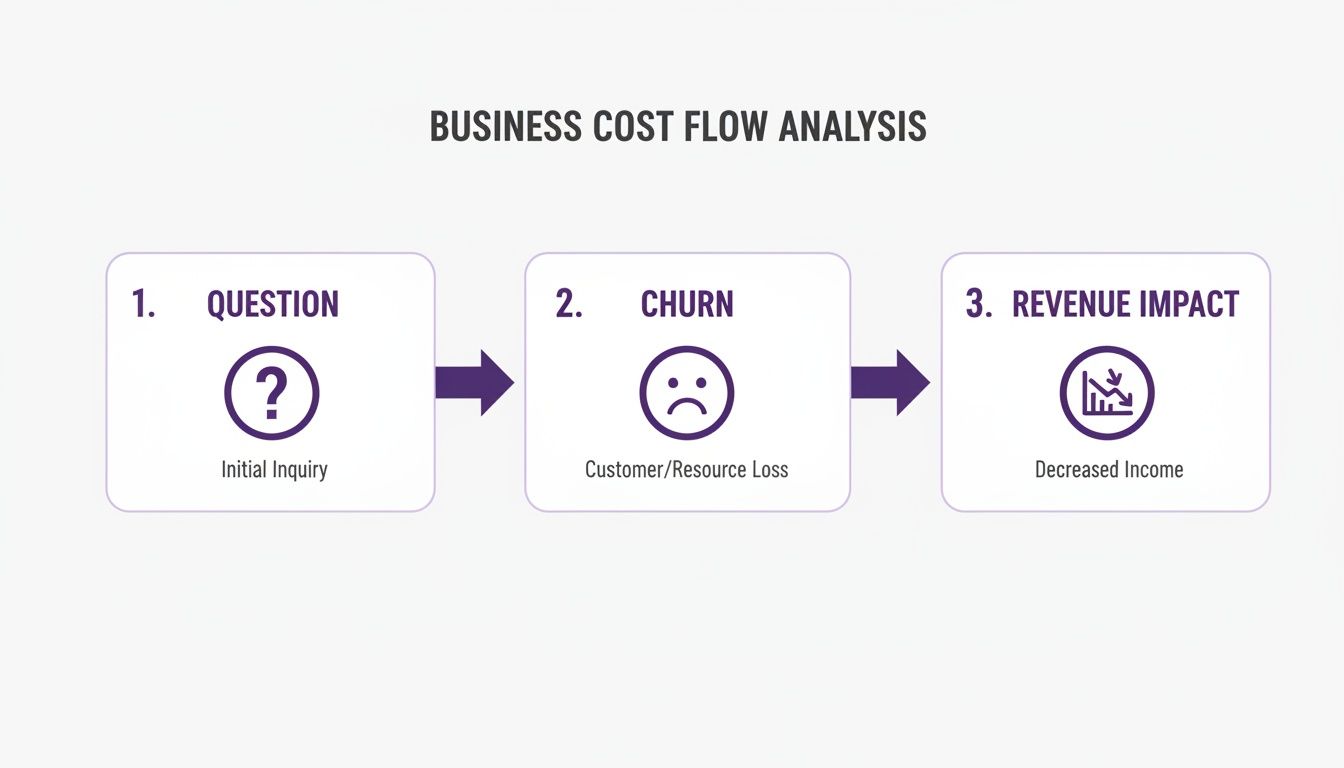
As you can see, a single missed inquiry can easily lead to a lost customer—and lost revenue.
Best Practice: Always, always prioritize unhiding legitimate customer questions. One study found that 53% of customers expect a brand to respond to their social media query in under an hour. When their comments stay hidden, you're not just quiet—you're failing to meet a fundamental expectation.
While checking this queue manually is essential, it can definitely eat up your time. To get even better at finding specific types of comments that might be hidden, check out this guide to searching Facebook for keywords. Learning how to search well can help you spot feedback trends or find specific conversations much faster. Getting these manual steps down is the first step to making sure no customer feels ignored and no opportunity for engagement slips through the cracks.
Building a Proactive Moderation Strategy
If you're only finding and unhiding comments, you're always playing defense. It's the digital equivalent of bailing water out of a leaky boat instead of just fixing the hole. To really get a handle on your community and protect your brand's reputation, you have to move from just reacting to problems to actively preventing them. This means building a solid framework that lets your audience know exactly what to expect.
A smart moderation strategy begins with clear community guidelines that everyone can see. These rules aren't just for your internal team—they're for your audience. When you spell out what's okay and what's not, you create a transparent space and give your moderators the confidence to make tough calls. This one step can dramatically cut down on the number of troublesome comments you have to deal with.
Establish Your Moderation Ground Rules
Think of your guidelines as the house rules for your corner of the internet. They need to be easy to find, a breeze to understand, and—most importantly—enforced consistently. The goal is to create a positive environment, not to shut down every opinion you don't agree with.
Your community guidelines should clearly cover a few key areas:
- Respectful Communication: Make it clear you have a zero-tolerance policy for hate speech, personal attacks, and any form of harassment.
- Staying on Topic: Gently ask people to keep their comments relevant to the post. This helps cut down on spam and blatant self-promotion.
- Prohibited Content: Give a straightforward list of what will be removed, like spammy links, illegal content, or harmful misinformation.
A well-defined set of community guidelines empowers your team to act decisively and provides a public justification for removing or hiding comments that violate the rules, protecting you from accusations of unfair censorship.
Create a Smart Keyword Blocklist
Next up, it’s time to make Facebook's automated filters work for you. The platform lets you create a custom keyword blocklist that automatically hides comments with certain words or phrases. But be careful—a sloppy list can cause more problems than it solves, hiding legitimate customer questions right alongside the junk.
Don't just block a list of obvious swear words. Think more strategically. Add terms that spammers in your niche love to use, maybe even the names of competitors to stop them from poaching your audience. Get specific with it. For example, blocking the word "problem" is a bad idea because you'll hide real support requests. But blocking a full phrase like "make money fast" is a much safer bet.
You’ll want to revisit this list from time to time to make sure it isn't accidentally catching good comments. This kind of proactive work is a huge part of effective Facebook comment moderation. If you want to dive deeper into keeping your comments section pristine, check out our in-depth guide to Facebook comment moderation in 2025.
Finally, settle on a consistent voice for your brand's replies. Are you formal and corporate, or more casual and friendly? Whatever you choose, stick with it. Map out a simple plan for when to engage with negative feedback and when it's better to just hide the comment and not feed the trolls. This turns moderation from a daily headache into a powerful tool for building a better community.
Using Automation to Protect Your Brand 24/7
Let's be realistic. For any brand with a decent-sized audience, manually digging through the moderation queue for Facebook hidden comments just isn't going to work long-term. Your team can't be on watch every second of the day, but you can bet spammers and trolls are ready to post anytime.
This is the point where automation shifts from a "nice-to-have" to a must-have for brand protection.
Think of an automated moderation tool as your Page's dedicated security guard, one that never sleeps. While your team is busy with big-picture strategy, this system is in the background, instantly hiding nasty comments and stopping PR fires before they even have a chance to start. It's truly 24/7 brand defense.
This doesn't just save your team from mind-numbing work. It also means your actual customers get faster help. When Facebook's overzealous filters hide a legitimate question, an intelligent tool can spot the mistake, unhide it, and get it in front of your team right away.
The Power of Contextual AI
So, what makes modern tools so much better than Facebook’s built-in filters? It all comes down to understanding context. Facebook's native tools are pretty blunt—they see a flagged keyword and hide the comment, period. They don't really get the intent behind the words, which is why so many harmless comments end up in filter jail.
AI-powered moderation is smarter than simple keyword blocking. It can analyze sentiment and nuance to tell the difference between a frustrated customer who needs help and a troll just trying to start a fight. It keeps the good conversations visible while neutralizing the real threats.
By grasping the subtleties of human language, these systems can do some pretty amazing things:
- Find and flag potential sales leads buried in comments.
- Bubble up urgent customer service requests that need immediate attention.
- Catch sophisticated spam and scams that easily trick basic filters.
This kind of smart automation is a game-changer for any brand trying to grow on social media without letting the comment section turn into a toxic mess. To get a better feel for the different options out there, check out our guide to the best AI comment moderation tools for 2025.
With the right tool in place, you can finally turn your comment section from a constant headache into a genuine asset for your business.
Got Questions About Hidden Comments? We've Got Answers.
When you're managing a busy Facebook Page, dealing with hidden comments can be a real head-scratcher. Let's clear up some of the most common questions people ask.
Will Someone Know if I Hide Their Comment?
Nope. The person who wrote the comment won't get any kind of notification.
Here's how it works: When you hide a comment, it's still perfectly visible to the person who posted it and all of their friends. But for everyone else—the general public visiting your Page—it's completely gone.
This is a subtle but powerful way to handle tricky situations. You can remove a negative or spammy comment without directly challenging the user, which often just pours fuel on the fire.
Think of it like a bouncer quietly escorting a disruptive person to a private area. The party goes on, and the person doesn't even realize they've been removed from the main room.
Where Do Automatically Hidden Comments Go?
Facebook tucks these comments away in a special section inside your Meta Business Suite.
To find them, just follow these steps:
- Go to your "Inbox" in the Business Suite.
- Click on the "Comments & More" tab.
- Use the filter dropdown and select the "Hidden" view.
This spot is your central hub for reviewing everything Facebook has flagged and deciding what to do with it.
Of course, who has time to check that hidden comments queue 24/7? For busy teams, it's just not realistic. That's where FeedGuardians comes in. We automate the whole process, using AI to instantly hide harmful comments while making sure you never miss a genuine customer question. It’s brand protection that never sleeps. Learn how FeedGuardians can safeguard your social media presence.
Tired of manually moderating comments?
FeedGuardians automates spam filtering, responds to customers, and protects your brand — setup in 3 minutes.