
Quick Summary
| Key Insight | What You Need to Know |
|---|---|
| Aim for a first | Aim for a first public reply within one hour during business hours, and track resolution time as a separate clock. |
| Never ask for order | Never ask for order numbers, addresses, payment details, or account handles in a public reply. |
| Sort complaints by impact | Sort complaints by impact using four tiers, since a safety defect outranks a high-follower late-delivery complaint. |
| Empathize first, solve second | Empathize first, solve second, and never argue with the customer in public. |
| Measure first response time | Measure first response time, resolution time, reopen rate, and post-resolution satisfaction, and review 20 to 30 threads weekly. |
| Why Public Customer Complaints | Why Public Customer Complaints on Twitter Escalate Fast |
Last Updated: November 13, 2026
Quick Summary
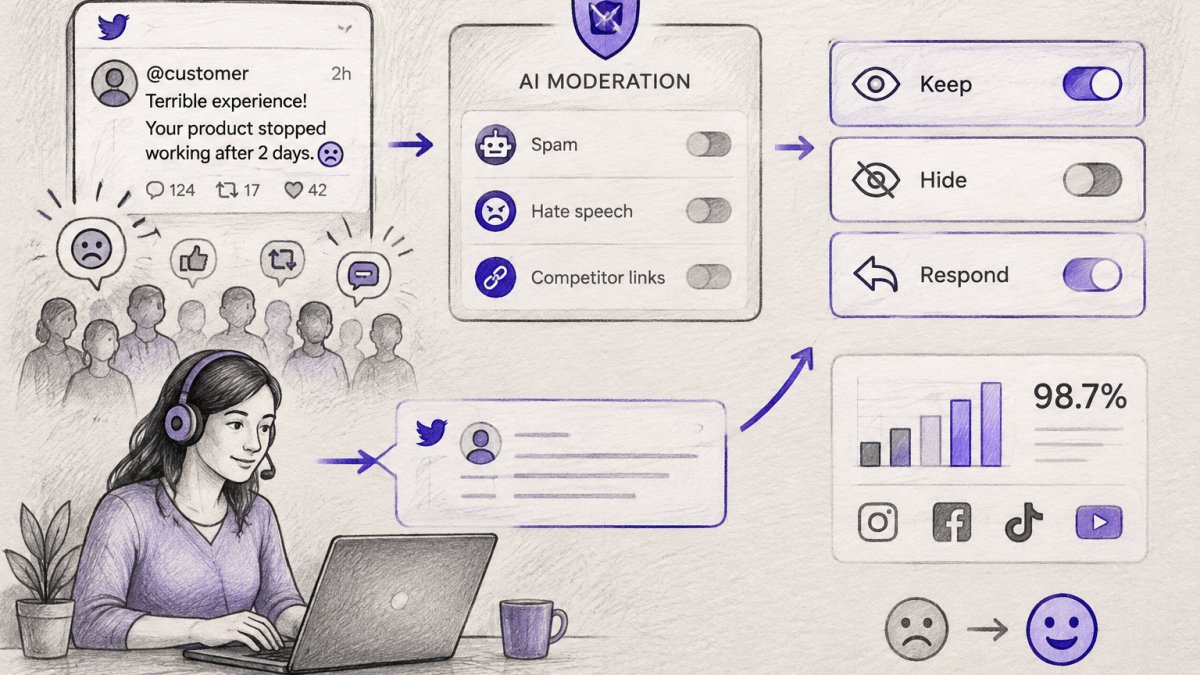
Handle public customer complaints on Twitter with a three-step loop: acknowledge the complaint in public fast, move sensitive details like order numbers to a private channel such as a DM, then resolve the issue and post a short public closing reply so the audience sees it was handled.
- Aim for a first public reply within one hour during business hours, and track resolution time as a separate clock.
- Never ask for order numbers, addresses, payment details, or account handles in a public reply.
- Sort complaints by impact using four tiers, since a safety defect outranks a high-follower late-delivery complaint.
- Empathize first, solve second, and never argue with the customer in public.
- Measure first response time, resolution time, reopen rate, and post-resolution satisfaction, and review 20 to 30 threads weekly.
Table of Contents
- Why Public Customer Complaints on Twitter Escalate Fast
- Twitter Customer Service Response Time: The Standard to Hit
- The Public-to-Private Workflow for Public Customer Complaints
- Customer Complaint Response Templates for Social Media
- How to Handle Public Customer Complaints on Twitter Examples
- Twitter Customer Service Best Practices That Prevent Escalation
- Triage, Privacy, and Escalation Rules for High-Volume Accounts
- Measuring How Well Your Team Handles Complaints
- Frequently Asked Questions
Why Public Customer Complaints on Twitter Escalate Fast
A public complaint on Twitter is a performance. The customer has an audience, and so do you.
The speed is the problem. A complaint posted at 9 a.m. can be quoted, screenshotted, and reshared by lunch.
The emotional math matters too. A customer who feels ignored in public tends to escalate, not calm down. Silence reads as arrogance.
The complaint itself is rarely the crisis. If you want a deeper framework for containing that spread, our guide to social media crisis management covers detection through recovery.
Twitter Customer Service Response Time: The Standard to Hit
A common target for social customer care teams is a first public reply within one hour during business hours.
Fast first contact buys you patience. A quick acknowledgment tells the customer someone is there.
But speed without a plan backfires. A rushed "sorry, DM us" with no follow-through makes things worse.
What most guides miss is that response time is a staffing decision, not a willpower decision.
If you need to hit fast response times without adding headcount, our breakdown of customer service automation shows how teams structure that coverage.
The Public-to-Private Workflow for Public Customer Complaints
The reliable way to handle public customer complaints on Twitter is a three-step loop: acknowledge in public, move sensitive details to a private channel, then close the loop publicly.
Step 1: Acknowledge the Complaint in Public
Reply where the complaint was posted, and do it fast. Name the issue, show empathy, and take ownership without arguing the facts yet.
Keep it short. One or two sentences is enough. The goal is recognition, not a full defense.
Step 2: Move Sensitive Details to a Private Channel
Order numbers, addresses, payment details, and account handles do not belong in a public thread. Ask the customer to continue in a direct message.
Never ask for personal data in a public reply. That is a privacy and security risk, and it looks careless to everyone reading.
Once the conversation is private, a dedicated support agent can work the resolution without an audience.
Step 3: Resolve, Follow Up, and Close the Loop Publicly
Fix the problem in private, then return to the public thread with a short closing reply. Something like "Glad we got this sorted, thanks for your patience" tells the audience the issue was handled.
That final public reply is the part most teams forget. Routing the right complaint to the right team automatically is exactly what our comment escalation workflow is built to do.
Customer Complaint Response Templates for Social Media
Templates save time under pressure, but they must sound human. Use these as starting points, then adjust the wording to fit the situation.
- Order delay: "Hi [name], sorry your order is running late. That's on us. Send us a DM with your order number and we'll sort it today."
- Refund request: "We hear you, [name]. Let's get this refund moving. Please DM us your order details so we can process it."
- Service failure: "That's not the experience we want you to have, [name]. We're sorry. DM us and we'll make it right."
Watch out: copying a template word for word across every complaint reads as robotic. Customers notice, and it makes them angrier.
How to Handle Public Customer Complaints on Twitter Examples
Real examples show the difference between a reply that calms and one that fuels the fire.
The de-escalating reply (use): "We're sorry this caught you off guard, [name]. Let's look at what we can do.
The ownership reply (use): "You're right, we dropped the ball on this one.
The pattern across all of them: empathize first, solve second, never argue.
Twitter Customer Service Best Practices That Prevent Escalation
Most escalations start before the complaint is ever posted. Proactive service is cheaper than reactive damage control.
- Monitor mentions and brand keywords so you catch complaints early.
- Reply to negative comments before they gain traction.
- Keep your tone professional and genuine, even when the customer is heated.
If you want to stop complaints from arising at all, our guide on preventing negative customer feedback covers the proactive side in detail.
Triage, Privacy, and Escalation Rules for High-Volume Accounts
High-volume accounts cannot treat every complaint the same. Without written triage rules, the loudest complaint wins, the quiet safety issue waits, and your team argues in public about things that should have gone straight to legal. A severity matrix fixes that by assigning every incoming complaint a tier, a response clock, and an owner before anyone types a reply.
Build a Four-Tier Severity Matrix
Sort complaints by impact, not by tone. An angry customer with a late order is still a standard ticket; a calm customer describing a safety defect is urgent. Use these tiers as the default and adjust the labels to your industry.
- Tier 1, Safety, legal, or fraud: threats of violence, self-harm mentions, product safety defects, injury claims, legal threats, data breaches, or suspected fraud. Route to a team lead and legal or trust and safety immediately. Public reply: one short acknowledgment that you are looking into it, with no facts admitted. Move to a private channel within minutes.
- Tier 2, High-impact or amplifying: a verified account, journalist, or high-follower user posting the complaint, or a complaint already gaining quote-tweets and replies. Route to a senior agent. Target first public reply inside 30 minutes during coverage hours.
- Tier 3, Standard service failure: order delays, billing disputes, refund requests, damaged goods, account access problems. Route to the standard queue. Target first public reply inside one hour during business hours.
A common pattern is to let tier assignment drift because the person watching the account is also answering phones.
Watch out: tiering by follower count alone backfires.
Privacy Safeguards: What Never Goes Public
Never ask for or post order numbers, full names, addresses, phone numbers, email addresses, payment card data, government ID numbers, or account passwords in a public reply.
When you move to a direct message, verify identity before discussing the account.
Limit who on your team can read and export direct messages. Role-based access, audit logs, and a retention policy that deletes resolved DM threads on a set schedule all reduce the blast radius if an account is compromised.
Escalation Rules for Abusive, Threatening, and Misleading Posts
Threats and harassment get reported through the platform's reporting flow and documented internally with a timestamp and screenshot, not argued with.
Misinformation gets one calm public correction that states the fact without repeating the false claim in a way that spreads it, followed by an offer to continue privately.
Legal threats, safety claims, and anything involving a minor go to a human lead before any public reply.
Sort complaints by impact, not tone, using these four default tiers.
| Tier | What it covers | Route to | First public reply target |
|---|---|---|---|
| Tier 1 | Safety, legal, or fraud: threats, injury claims, data breaches | Team lead and legal or trust and safety | Short acknowledgment, private within minutes |
| Tier 2 | High-impact or amplifying: verified, journalist, or high-follower user | Senior agent | Inside 30 minutes during coverage hours |
| Tier 3 | Standard service failure: delays, billing, refunds, damaged goods | Standard queue | Inside one hour during business hours |
| Tier 4 | Low priority: general grumbles, feature requests, answered questions | Reply with link or short answer | When the queue allows |
Measuring How Well Your Team Handles Complaints
You cannot improve complaint handling without measuring it, and you cannot measure it with anecdotes about the one thread that went viral. Define a small set of metrics, calculate them the same way every week, and review them against targets. Four metrics cover most of what matters.
The Four Core Complaint-Handling KPIs
- First response time: the gap between the complaint's timestamp and your first public reply. Calculate the median, not the average, because one complaint answered the next morning will drag an average into uselessness. Report it separately for business hours and after hours, and break it out by tier so a slow tier 1 does not hide behind fast tier 4 replies.
- Resolution time: the gap between the first reply and the point the customer confirms the issue is fixed or the thread is closed. This is a separate clock from first response, and conflating the two hides the cases where you replied fast and then went silent.
- Reopen rate: the share of complaints that come back to the public thread after being marked resolved, either because the customer says it is not fixed or because they post again about the same issue. A rising reopen rate usually means private handoffs are failing, not that customers are unreasonable.
A common pattern is to add a fifth metric once the first four are stable: the share of complaints closed with a public follow-up reply. That number tells you whether the close-the-loop step is actually happening or whether threads are quietly abandoned after the private handoff.
Set Targets You Can Staff To
Targets should follow from coverage, not from ambition. If you have one person watching the account during business hours, a 30-minute median first response is realistic for tier 3 and tier 4 complaints and unrealistic for tier 1 unless that person can drop everything.
Watch out: publishing an aggressive public response-time promise, such as replies within 15 minutes around the clock, creates a standard you will be measured against on every future complaint. Set the public promise below what your internal target can sustain.
Run a Weekly Thread Review
Pull a sample of resolved and unresolved threads each week, 20 to 30 is enough for most teams, and score each one against a short checklist: was the first reply within target, was the tone empathetic, were personal details kept out of public view, was the private handoff made, and was there a public close-the-loop reply. See FeedGuardians in Action to watch spam, toxic comments, and hate speech detected and hidden across platforms in real time.
Review the metrics monthly against the previous month and against the same month a year earlier if you have the history. A metric that moves without a staffing or process change behind it is usually a measurement artifact, not a real improvement.
Handling public customer complaints on Twitter is a system, not a talent. You need fast acknowledgment, a clean path to private resolution, and a public close that shows the audience you fixed it.
Frequently Asked Questions
Should a brand respond publicly or move a Twitter complaint to direct messages?
Do both, in that order. Reply publicly first so other customers and anyone watching the thread see that you responded quickly and take the issue seriously. Then ask the customer to continue in a direct message so you can collect order numbers, account details, and other sensitive information privately. Never ask for personal data in a public reply, and never leave a public complaint with no visible response, because a silent thread reads as indifference to every other person who sees it.
How quickly should a business respond to a complaint on Twitter?
Aim to send a first public acknowledgment within one hour during business hours, and never let a complaint sit overnight without a reply. Customers who post publicly are already frustrated, and a slow first response is often what turns a single complaint into a thread of retweets. Set an internal standard, such as a one-hour first response and a 24-hour resolution target, then track how often you hit it. FeedGuardians replies 24/7 in your brand voice, which keeps response times consistent outside staffed hours.
What should you avoid saying when responding to an angry customer on Twitter?
Avoid arguing, blaming the customer, copying and pasting generic replies, and asking for account details in public. Do not delete the complaint or hide it unless it contains spam, threats, or personal data. Skip phrases like 'per our policy' and 'calm down,' which escalate anger. Keep replies concise and professional, acknowledge the specific problem the customer described, and take ownership of the fix. Defensive responses get screenshotted and shared far more often than the original complaint.
How do you take a Twitter complaint offline while keeping the customer informed?
Reply publicly with an acknowledgment and a direct message invitation, then send the direct message immediately so the customer does not have to chase you. Give a specific next step and a timeframe, such as 'I've sent you a DM, please check your messages.' When the issue is resolved, ask the customer if you can post a short public follow-up, or post one yourself confirming the fix. That public close-the-loop reply shows other customers the complaint was handled, which protects your reputation.

Tired of manually moderating comments?
FeedGuardians automates spam filtering, responds to customers, and protects your brand — setup in 3 minutes.
Frequently Asked Questions
Should a brand respond publicly or move a Twitter complaint to direct messages?
Do both, in that order. Reply publicly first so other customers and anyone watching the thread see that you responded quickly and take the issue seriously. Then ask the customer to continue in a direct message so you can collect order numbers, account details, and other sensitive information privately. Never ask for personal data in a public reply, and never leave a public complaint with no visible response, because a silent thread reads as indifference to every other person who sees it.
How quickly should a business respond to a complaint on Twitter?
Aim to send a first public acknowledgment within one hour during business hours, and never let a complaint sit overnight without a reply. Customers who post publicly are already frustrated, and a slow first response is often what turns a single complaint into a thread of retweets. Set an internal standard, such as a one-hour first response and a 24-hour resolution target, then track how often you hit it. FeedGuardians replies 24/7 in your brand voice, which keeps response times consistent outside staffed hours.
What should you avoid saying when responding to an angry customer on Twitter?
Avoid arguing, blaming the customer, copying and pasting generic replies, and asking for account details in public. Do not delete the complaint or hide it unless it contains spam, threats, or personal data. Skip phrases like 'per our policy' and 'calm down,' which escalate anger. Keep replies concise and professional, acknowledge the specific problem the customer described, and take ownership of the fix. Defensive responses get screenshotted and shared far more often than the original complaint.
How do you take a Twitter complaint offline while keeping the customer informed?
Reply publicly with an acknowledgment and a direct message invitation, then send the direct message immediately so the customer does not have to chase you. Give a specific next step and a timeframe, such as 'I've sent you a DM, please check your messages.' When the issue is resolved, ask the customer if you can post a short public follow-up, or post one yourself confirming the fix. That public close-the-loop reply shows other customers the complaint was handled, which protects your reputation.