
Quick Summary
| Key Insight | What You Need to Know |
|---|---|
| Why You Should Care About Instagram Story Replies | Think of turning on Story replies as opening a dedicated hotline for your most engaged followers. Instead of just watching your content, they can inst... |
| How to Actually Turn On Instagram Story Replies | Getting message replies turned on for your Instagram Stories is pretty simple, but the settings are buried in a place you wouldn't intuitively look. L... |
| Solving Common Problems With Story Replies | So you've enabled Story replies, but things still aren't working quite right. Maybe the replies aren't coming through, or worse, your DMs are suddenly... |
| Advanced Strategies For Managing Story Replies | So, you’ve flipped the switch and turned on your Instagram Story replies. Great. Now comes the hard part. |
| Got Questions About Instagram Story Replies? We’ve Got Answers. | Even after you've got your settings just right, a few questions about how Story replies actually work can pop up. It seems like a simple feature, but ... |
Before we dive into how to turn on comments on your Instagram Story, let's get one thing straight. What we're actually enabling here are direct message replies. This small change flips your Story from a one-way broadcast into a real, two-way conversation, opening a direct line to your audience.
Why You Should Care About Instagram Story Replies
Think of turning on Story replies as opening a dedicated hotline for your most engaged followers. Instead of just watching your content, they can instantly react, ask a question, or share an opinion in a private message. It’s a simple feature that transforms a passive view into a genuine interaction.
For brands, this is so much more than a toggle in your settings; it’s a powerful strategic tool. Every single reply is a piece of valuable, unfiltered feedback, served up in real time.
Build Real Connections With Your Audience
When someone takes the time to reply to your Story, they're starting a personal chat. This is your chance to build some serious rapport and show there’s an actual human behind the logo. A quick, genuine response can make a follower feel heard and valued, building a type of loyalty that public comments rarely achieve.
These little interactions are the foundation of a strong community. Over time, they add up, creating a base of followers who feel truly invested in your brand. You can explore more on this by checking out the best practices for social media engagement.
Get Unfiltered Customer Insights
Story replies are like having an instant focus group at your fingertips. Just launched a new product? A Story showcasing it can spark immediate questions and reactions, giving you a clear picture of what's landing with your audience and what might be causing confusion.
This direct line to your customers is priceless. It lets you gather qualitative data—real opinions, pain points, and desires—straight from the source, without the hassle of formal surveys or feedback forms.
Let's look at the numbers. Over 500 million users watch Instagram Stories every single day. And with roughly one in five of those Stories getting a direct message reply, it’s obvious people want to connect. For e-commerce brands, this is a massive opportunity for customer service and feedback. By enabling replies, you’re not just posting content; you’re starting a conversation that can shape your entire business strategy.
How to Actually Turn On Instagram Story Replies
Getting message replies turned on for your Instagram Stories is pretty simple, but the settings are buried in a place you wouldn't intuitively look. Let's walk through exactly where to find them and what each option really means for your brand's engagement.
First things first: you won't find these controls while you're actually building or posting a Story. It’s a global setting you have to adjust from your main profile.
Finding Your Story Controls
To get started, head to your profile page and tap the "hamburger" menu (the three horizontal lines) in the top-right corner. From there, go into Settings and privacy.
You'll have to scroll down a bit until you find the section labeled "How others can interact with you." This is Instagram's hub for all things related to messages and mentions. Tap on Messages and story replies.
This screen is your central command for all incoming communication. The option you're looking for is Story reply controls.
This is it—the spot where you decide who gets to slide into your DMs from a Story.

As you can see, you get three simple but powerful choices that give you direct control over your engagement strategy.
Picking the Right Reply Setting for Your Goals
Now you’re faced with three options. The "right" one really just depends on what you're trying to accomplish. Each serves a very different purpose.
To make it crystal clear, here’s a quick breakdown of what each setting does and when you’d want to use it.
Understanding Your Instagram Story Reply Options
| Setting Option | Who Can Reply? | Best For Brands When... |
|---|---|---|
| Allow story replies from everyone | Any Instagram user (followers or not) | You want to maximize engagement, gather feedback, and open the door for new customers. |
| Allow story replies from people you follow | Only accounts that you follow | You're collaborating with a select group or want to limit conversations to partners. |
| Don't allow story replies | No one can reply to your Stories | You're broadcasting information only and want to prevent any direct message replies. |
For most e-commerce brands, the choice is obvious.
Setting your replies to Everyone is almost always the best move. It removes any barriers that might stop a potential customer from asking a quick question or sharing their thoughts. You want those spontaneous interactions—that's how you build a real community.
One quick heads-up: This setting is universal. It applies to all your Stories, even the ones you share with just your "Close Friends" list. You can't toggle it on or off for individual Stories.
If the thought of opening the floodgates makes you a bit nervous, don't worry. You have other tools to manage the conversation. For instance, if you need to keep interactions on your posts positive, you can learn more about how to hide comments on Instagram and apply similar moderation strategies to your DMs.
Solving Common Problems With Story Replies
So you've enabled Story replies, but things still aren't working quite right. Maybe the replies aren't coming through, or worse, your DMs are suddenly a chaotic mess of spam. It's frustrating, but don't worry—these are common hiccups, and the fixes are usually straightforward.
More often than not, the culprit is a simple glitch within the Instagram app itself. It's a massive platform, and temporary bugs pop up. Before you start digging deep into settings, try the basics first.
A quick restart of the app or even your phone can work wonders. It’s the oldest trick in the tech support book for a reason: it actually works a surprising amount of the time.
Your Troubleshooting Checklist
If a simple reboot doesn't cut it, it's time to investigate a bit further. Let's walk through a few checks to pinpoint what's going wrong, whether it's an app issue, a setting you missed, or an account-specific problem.
Check for App Updates: Running an old version of Instagram is a classic source of trouble. Pop over to your phone's app store and make sure you have the latest version installed. Updates frequently patch bugs related to messaging and other core features.
Clear Your Cache: Your app collects temporary data over time, and a cluttered cache can cause it to act sluggish or glitchy. Go into your phone’s settings, find the Instagram app, and clear its cache. This won’t delete any of your important data, but it can solve a lot of performance problems.
Review Your Privacy Settings: It's easy to accidentally change a setting. Go back and double-check your work. Head to Settings and privacy > Messages and story replies > Story reply controls and confirm that your preferred option (like "Allow story replies from everyone") is still selected.
Sometimes the issue isn't technical at all—it's about volume. If your account is growing fast or you're running a popular promotion, you might get hit with a tidal wave of replies, and a lot of them could be spam.
Keep in mind, a flood of spam or bot activity isn't just an annoyance. It can easily bury genuine customer questions and hurt your brand's credibility. Staying on top of it is non-negotiable.
When you find yourself constantly deleting junk messages, it’s a clear sign you need a more powerful solution. Understanding how to handle bots commenting on Instagram is a great starting point, as the same principles for cleaning up public comments can help you manage private replies. This proactive approach lets you keep the conversation going without letting spam derail your team’s focus.
Advanced Strategies For Managing Story Replies
So, you’ve flipped the switch and turned on your Instagram Story replies. Great. Now comes the hard part.
Enabling replies is one thing, but managing the potential flood of DMs is a whole different ballgame, especially for a brand that gets a lot of engagement. This isn't just about answering messages as they pop up; it’s about having a real strategy to protect your brand and nurture your community.
Without a solid plan, your team can get buried in spam, miss genuine customer questions, and let important sales opportunities fall through the cracks. Let's move past the basic settings and get into the practical tactics that separate the brands thriving in their DMs from those just trying to stay afloat.
Set The Tone With A Consistent Brand Voice
Every reply you send from your Instagram account is a mini-conversation that represents your brand. To keep things consistent, you need to define your brand voice and tone before your team ever hits "send."
Are you fun and casual, using lots of GIFs? Or are you more professional and straight to the point? Nailing this down ensures that no matter who is responding, the customer has a seamless experience.
A simple style guide can work wonders here. Just outline a few key things:
- Greetings and Sign-offs: How do you start and end a chat? "Hey there!" feels very different from "Dear customer."
- Emoji Use: Are there specific emojis that fit your brand? Are there any that are completely off-limits?
- Handling Complaints: What's the protocol when someone sends negative feedback?
This simple step is huge for building trust. A unified voice makes your brand feel more human and reliable with every single DM you send.
Filter The Noise With Instagram’s Hidden Words
Instagram actually gives you a great, free tool to help you weed out the junk. It's called Hidden Words, and you can find it in your Settings and privacy menu.
This feature lets you create your own custom list of words, phrases, and even emojis you consider spammy or offensive. When a Story reply contains one of those terms, Instagram automatically tucks it away in a "Hidden Requests" folder. This keeps your main inbox clean, so your team can focus on real conversations instead of sifting through noise.
This isn't a one-and-done task. You'll want to revisit and update your hidden words list every so often. New spam tactics pop up all the time, and keeping your list fresh ensures the filter stays effective.
Sometimes, the issue isn't spam but a technical glitch. If your replies suddenly stop working, this flowchart can help you diagnose the problem, starting with the most common culprits.
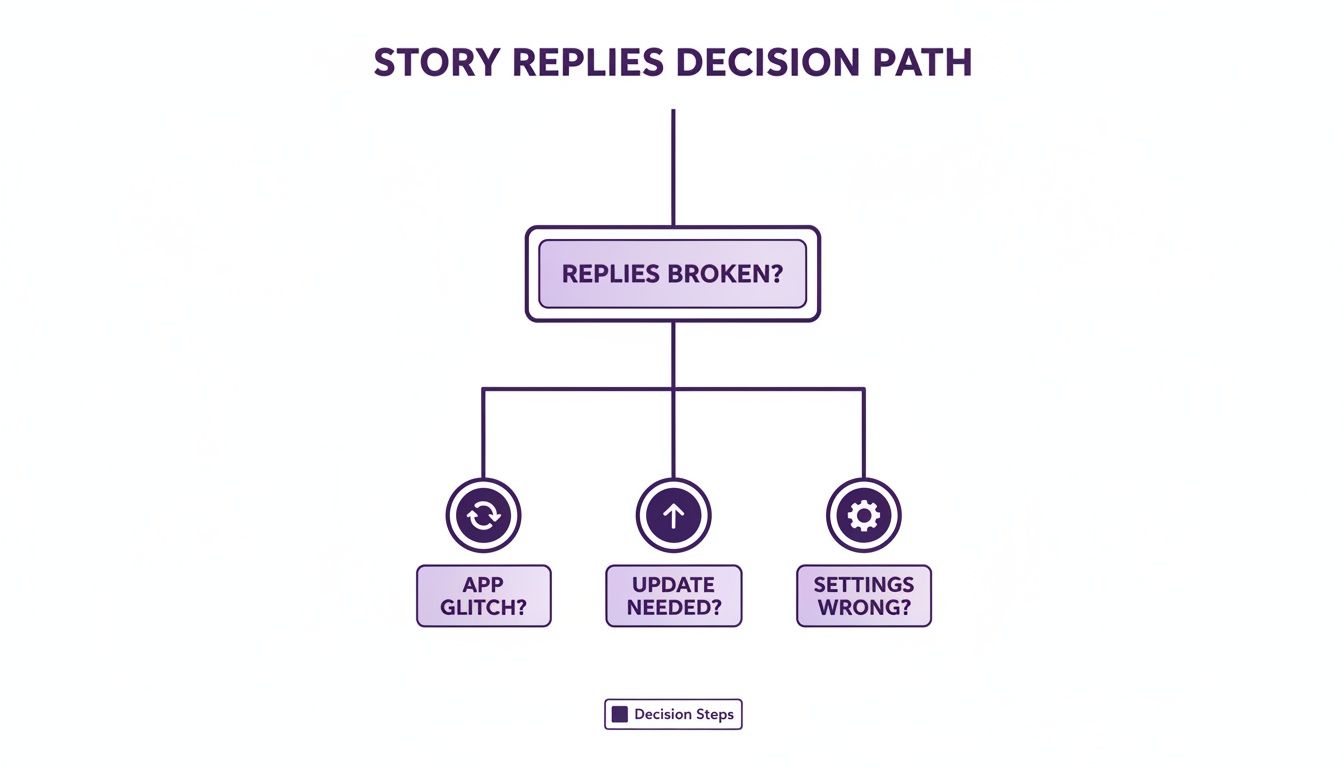
As the guide shows, more often than not, the fix is something simple like an app update rather than a deep dive into account settings.
Automate Moderation To Scale Your Efforts
For brands getting tons of replies, manual moderation just isn't sustainable. This is where AI-powered tools come into play. A good moderation solution can analyze replies in real-time, automatically hiding spam, flagging harmful comments, and even spotting messages that signal a clear intent to buy. Of course, to get more replies in the first place, you have to post when your audience is active, which means knowing the best time to post on social media.
Automating the grunt work frees up your social media team to do what they do best: build relationships. Instead of spending hours deleting bot comments, they can focus their energy on answering product questions, helping customers, and turning conversations into sales.
If you want to dig deeper, there are some fantastic Instagram moderation tools out there that can completely streamline this process. By implementing these strategies, you can transform your Story replies from a chaotic inbox into a powerful tool for growth.
How Smart Reply Management Drives Real Business Results

Turning on Story replies is about much more than just ticking a box for engagement. Think of it as opening a direct pipeline to customer insights and, frankly, to sales. Every DM that slides in from a Story is a chance to learn something, build a connection, and guide a potential customer.
Stop thinking of them as "comments." Start seeing them as qualified leads. That mental shift is the key to unlocking their massive business potential.
When you turn on comments on your Instagram Story, you’re essentially opening up a private, one-on-one chat room. This is where people feel safe enough to ask the questions they wouldn't want to post on a public feed. Inquiries about sizing, shipping, or materials aren't just questions—they're incredibly strong signals of purchase intent.
From Inquiry To Insight
Effectively managing these DMs means your team can spot these buying signals and jump on them right away. Often, a quick, genuinely helpful response is the final nudge someone needs to go from a curious browser to a confident buyer.
Imagine a boutique clothing brand posts a Story of a new dress. A follower replies, "Does this come in other colors?" That's not just a casual question; it's a clear sign they're considering a purchase. A fast, personal answer doesn't just resolve the query—it moves that person down the funnel.
Smart reply management isn't just about being fast. It's about understanding the context of the conversation and seeing the revenue opportunities hiding in your DMs.
The Real Commercial Impact Of Stories
The financial clout of Instagram Stories is hard to overstate. Story ads now account for 24.6% of Instagram's total ad revenue, which translates to more than $17 billion a year. Marketers are also pouring roughly 31% of their Instagram ad spend into Stories. The writing is on the wall: this is where brands are seeing a major return.
To really cash in, you have to treat your Story DMs as a crucial part of your sales process. When you create a system for tracking common questions and buying signals, you start collecting data that can inform everything from your next product launch to the copy on your website.
This becomes even more powerful when you use Instagram's interactive stickers. You can seriously ramp up the number of valuable replies you get by using features like:
- Polls: Let your audience vote on their favorite product.
- Quizzes: Test their knowledge about your brand or industry.
- Question Stickers: A direct invitation to ask you anything.
Each of these tools is designed to get a response, opening the door for more conversations. The real trick is turning these one-off interactions into a scalable strategy. For brands getting swamped with messages, checking out an Instagram comment automation guide can offer a solid framework for managing the volume without losing that personal touch. When you treat Story replies as a core business function, you turn a simple feature into a powerful engine for customer loyalty and growth.
Got Questions About Instagram Story Replies? We’ve Got Answers.
Even after you've got your settings just right, a few questions about how Story replies actually work can pop up. It seems like a simple feature, but some of the finer points can trip up even the most experienced social media pros. Let's tackle some of the most common head-scratchers.
Getting these details straight will help you manage your community interactions like a pro, so you know exactly who can message you and why.
If I Turn Off Replies For One Story, Does It Affect All Of Them?
Yes, and this is a big one to remember. The message reply setting is a global control for your entire account, not something you can toggle for individual Stories.
So, when you make a change—say, switching from allowing replies from "Everyone" to "Off"—that new rule applies to every single Story you post from that moment on. You can't, for instance, shut off replies for a specific promo Story while keeping them open for your daily behind-the-scenes content.
Can I Still See Who Viewed My Story If Replies Are Turned Off?
You sure can. Your viewer list and your reply function are two totally separate things. Turning off message replies has zero effect on your ability to see who watched your Story.
Just swipe up on your live Story, and you'll see the full list of viewers, as always. This means you can keep tracking your reach and audience engagement without interruption, no matter what your reply settings are.
The Bottom Line: Disabling replies simply closes one communication door. It doesn’t touch your viewership data or other core analytics.
How Can I Filter Out Spam Or Inappropriate Story Replies?
Instagram gives you a solid starting point with its built-in "Hidden Words" feature, which you can find in your Privacy settings. Here, you can create a custom list of words, phrases, and even emojis you want to block. Any message request containing those terms gets automatically shuffled into a hidden folder.
For brands dealing with high volume, a more powerful, automated approach is often necessary. This is where third-party moderation tools come in. They use AI to hide spammy or harmful comments the second they appear, saving your team from hours of manual work and helping protect your brand's image.
Why Can’t I Reply To Someone’s Story Anymore?
If you suddenly find the reply box missing on a specific person's Story, it's almost always because they've adjusted their own settings. They’ve likely changed their permissions to only allow replies from "People They Follow" or have switched replies "Off" entirely.
This is a personal privacy setting on their end. The only way you’ll be able to reply to their Stories again is if they decide to change their settings back to a more open option.
Trying to manage a flood of Story replies while hunting for real sales leads is a huge time sink. FeedGuardians uses AI to automatically hide spam, spot purchase intent, and keep your DMs organized, freeing up your team to focus on the conversations that actually grow your business.
Tired of manually moderating comments?
FeedGuardians automates spam filtering, responds to customers, and protects your brand — setup in 3 minutes.