
Quick Summary
| Key Insight | What You Need to Know |
|---|---|
| Lead Generation | A software company offers a free guide in a post. Anyone who comments "GUIDE" gets a DM with the download link, which automatically adds them to a follow-up email sequence. |
| How to Use Automation Without Getting Flagged | Let's be honest, diving into Instagram automated comments can feel a bit like walking a tightrope. You want the efficiency, but you’re worried about... |
| Crafting Your Smart Automation Strategy | Alright, let's move from theory to practice. A smart automation strategy isn't about just flipping a switch and hoping for the best; it’s about buil... |
| Choosing the Right Instagram Automation Tool | Picking the right tool for Instagram automated comments is a lot like choosing between a basic flip phone and a brand-new smartphone. Both can make ca... |
| Got Questions About Comment Automation? Let's Clear Things Up | Diving into automated comments on Instagram can feel a little tricky at first. Let's walk through some of the most common questions brands have so you... |
Ever wondered how big brands manage to reply to hundreds of comments on their Instagram posts almost instantly? The secret isn't a massive team of social media managers working around the clock. It's Instagram automated comments.
Think of it as a smart assistant for your Instagram page. When someone comments on your post using a specific word you've chosen, like "link" or "deal," this system jumps into action. It can post a quick public reply and, at the same time, slide a private message right into their DMs with the info they asked for. It’s all about managing a flood of comments and engaging with people the moment they show interest.
What Instagram Automated Comments Really Are
At its core, an Instagram automated comment system is a set of rules you create to handle common, predictable comments. It’s not meant to replace genuine human conversations. Instead, it acts as the perfect first point of contact, guiding followers to a specific next step, whether that's checking out a product page or entering your latest giveaway.
Picture this: you’re running a campaign where anyone who comments with a secret keyword gets a discount code. Without automation, you'd be stuck manually DMing every single person. With it, the system does the heavy lifting. The second a user comments with your keyword, a DM with the code is on its way to them. That speed is everything—people today expect fast answers, and a delay can mean a lost sale.
The Mechanics Behind the Magic
So, how does this actually work? It's a pretty straightforward process that happens in a flash.
- The Trigger: It all starts when a user leaves a comment on one of your posts or Reels. You can set up your system to listen for specific keywords (like "info" or "subscribe") or just reply to every single comment that comes in.
- The Public Reply (Optional): Your tool can then post a public comment back to the user. This is a great touch because it shows everyone else scrolling by that your brand is on the ball and actively engaging, which often encourages more people to comment.
- The Private Message: At the same time, a DM is sent directly to the user. This is where the magic really happens. You’ve just turned a public shout-out into a private, one-on-one conversation, which is the perfect place to nurture a lead or close a sale.
The tech behind this can be simple or surprisingly smart. Basic systems just look for those keywords. But more advanced tools use a technology called Natural Language Processing (NLP) to figure out what a comment actually means. This helps the system send much more relevant and helpful replies instead of just reacting to a single word.
A Quick Guide to Automated Comments Pros and Cons
Before you jump in, it's smart to weigh the good against the bad. This kind of automation can be a game-changer for efficiency, but if you're not careful, it can backfire.
Here’s a quick breakdown to help you see both sides of the coin.
| Aspect | Potential Benefits (The Upside) | Potential Risks (The Downside) |
|---|---|---|
| Speed & Efficiency | You can reply instantly to every key comment, 24/7, capturing interest when people are most excited. | If your replies are all the same, they can come off as robotic and cold, which can hurt your brand's image. |
| Engagement & Reach | More comment activity tells the Instagram algorithm your content is a hit, which can help it reach a wider audience. | Going overboard with automation can get you flagged as spam by Instagram, which could lead to penalties. |
| Scalability | You can handle thousands of comments during a huge sale or giveaway without needing to hire extra help. | Sending a generic "Thanks!" to a negative or sarcastic comment can make for a seriously awkward moment. |
| Lead Generation | It's a smooth way to move curious followers from a public comment into a private sales conversation in your DMs. | Using tools that aren't officially approved by Meta can violate Instagram's rules and even put your account at risk. |
Ultimately, automation is a powerful tool when used thoughtfully. The goal is to make your life easier and your followers' experience better, not to fake a connection.
Why Leading Brands Automate Instagram Engagement
For the biggest brands, using Instagram automated comments isn’t about shaving a few minutes off the clock. It's a core strategy to turn public chatter into a powerful engine for sales and customer service. It’s all about meeting customers exactly where they are, the second they raise their hand.
Think of it like a busy airport. Without check-in kiosks and digital flight boards, every single passenger would have to stand in one massive line to talk to a human agent. The whole system would grind to a halt. The same thing happens on Instagram when a post goes viral or a new product drops—thousands of comments can flood in at once, and a human team just can’t keep up.
This is where automation comes in. It doesn't replace human connection; it acts as a smart sorting system. It makes sure no one gets lost in the noise and that every person who shows real interest gets an immediate, helpful response.
Turning Comments Into High-Intent Conversations
The real magic here is the ability to move someone from a public comment to a private, one-on-one conversation. This is often called the comment-to-DM funnel, and it's a total game-changer for turning likes and comments into actual sales. The process itself is surprisingly simple.
A user sees a post for a new sneaker drop and comments with a keyword like "DEAL" or "INFO." Instantly, two things happen:
- A Public Acknowledgment: An automated reply pops up under their comment saying something like, "Just sent the details to your DMs! Check your inbox." This not only helps the user but also shows everyone else that the brand is on top of its game, encouraging them to comment, too.
- A Private DM: At the same time, the user gets a direct message with exactly what they asked for—a unique discount code, a direct link to the product, or more details.
That instant reply is everything. We live in a world of instant gratification, and studies show that 40% of Instagram users expect a brand to respond within an hour. By automating that first touchpoint, brands capture a customer's attention at its peak, making a sale far more likely before they get distracted and scroll away. Want to learn more about keeping your audience hooked? Check out our guide on the best practices for social media engagement.
The Strategic Shift to Private Channels
This comment-to-DM strategy is more important than ever because of how people are using the platform. Public comments are great for visibility and social proof, but the real conversations—the ones that lead to conversions—are happening in private DMs. While overall engagement on posts has plateaued, direct messaging is where the high-value action is.
Engagement trends show a significant shift from public comments toward private DMs. Instagram DM open rates can reach 80–100%, with reply rates as high as 50–60%—metrics that far outperform traditional channels like email.
This shift turns comment automation into an incredibly effective lead-capture tool. The numbers don't lie. With click-through rates from automated DMs hitting as high as 28%, brands can build a direct and profitable sales pipeline right inside Instagram.
Unlocking Scalability and Driving Revenue
Ultimately, the biggest reason top brands use Instagram automated comments is for scale. Automation lets a brand have thousands of personalized "first conversations" at the same time, something that would otherwise require a massive—and expensive—human team.
Think about these common scenarios where automation delivers real business results:
- Flash Sales: A fashion brand posts a 24-hour offer and tells followers to comment "FLASH25" to get the discount code. The system instantly DMs the code to thousands of people, creating urgency and driving a huge spike in sales.
- Lead Generation: A software company offers a free guide in a post. Anyone who comments "GUIDE" gets a DM with the download link, which automatically adds them to a follow-up email sequence.
- Giveaway Entries: Brands running contests can manage thousands of entries without breaking a sweat. A comment like "ENTER" can trigger a DM that confirms their entry and maybe asks them to follow the account or tag a friend.
In every case, the automation isn't just "replying." It's executing a clear business goal at a scale that was never possible before. It transforms the comment section from a simple social feed into a revenue-driving machine that works for you 24/7.
How to Use Automation Without Getting Flagged
Let's be honest, diving into Instagram automated comments can feel a bit like walking a tightrope. You want the efficiency, but you’re worried about falling into the "spam" category and getting your account flagged. The secret to staying on Instagram's good side is surprisingly simple: play by the rules and use automation to help, not replace, real human connection.
Think of it like this: Instagram has an official front door called the API (Application Programming Interface). Approved tools are given a key to this door. They work with Instagram. The sketchy bots? They're trying to climb in through a side window, usually by asking for your password—a huge red flag and a fast track to getting your account shut down.
At the end of the day, Instagram just wants to protect its users from spammy, annoying experiences. If your automation feels authentic and helpful, you’re on the right track.
API-Approved Tools Are Your Best Friend
The most critical decision you'll make is what tool you use. The line between safe and risky is bright and clear.
- Safe Tools: Look for official Meta Business Partners. These services connect to your account the right way and will never, ever ask for your Instagram password. They’re built to respect Instagram's rules.
- Risky Tools: These are the ones that ask for your username and password. They often work by mimicking a person using a web browser, which Instagram’s systems are very good at spotting. Never give your login details to a third-party app.
Using an unapproved tool isn't just risky; it's like handing over the keys to your house. You're opening yourself up to security threats and account penalties, from a temporary "slap on the wrist" to a permanent ban.
Common Mistakes That Get You Flagged
Even if you choose a great, API-approved tool, a lazy strategy can still land you in hot water. Instagram's spam filters are smarter than you think and they're always on the lookout for unnatural behavior.
The single biggest mistake is blasting out the exact same generic reply to every comment. Imagine seeing a post where a hundred different comments all get the same "Thanks! ✨" reply. It screams "BOT!" and Instagram will notice. This is why variety is your secret weapon. For a deeper dive into how this works, it's worth understanding the red flags associated with bots commenting on Instagram.
Always create multiple versions of your public replies. Good automation tools let you write 5-10 different responses and will rotate them for you. This one small step makes your automated engagement feel so much more human.
Another common pitfall is sending replies that make no sense. A simple keyword trigger might see the word "price" in a sarcastic comment and fire off a sales DM, which just looks silly. To keep your responses relevant and avoid these awkward moments, it's important to know how to reduce hallucinations in LLMs, ensuring your AI-powered replies are consistently on point.
Best Practices for Safe Automation
Want to get all the benefits of automation without the risk? Stick to these golden rules.
- Focus on Quality, Not Quantity: Don't feel the need to auto-reply to every single comment. Instead, target high-intent keywords like "info," "link," or "help." This way, your automation is genuinely useful, not just noisy.
- Blend Automation with a Human Touch: Let the bots handle the first, simple response. But empower your team to jump in for the more complex questions and conversations. This hybrid approach is the perfect balance of efficiency and authentic engagement.
- Use Public Replies Wisely: A public "Sent you a DM!" is great, but seeing it on every other comment clutters up your feed. A good practice is to set your tool to only post a public reply to a fraction of the comments it handles.
- Keep an Eye on Your Bot: Check in on your automation regularly. Make sure the replies are firing correctly and making sense. If you spot a reply that’s off the mark, pause the workflow and tweak your triggers or response text.
Crafting Your Smart Automation Strategy
Alright, let's move from theory to practice. A smart automation strategy isn't about just flipping a switch and hoping for the best; it’s about building a thoughtful system that actually helps people and reflects your brand. The whole process starts with one simple question: What are you trying to accomplish?
Your goal is the foundation for everything else. Are you trying to get leads for a new product? Offer instant answers to customer questions? Or maybe you're running a giveaway and need to manage entries. Each of these goals needs a totally different setup.
For example, a sales-focused goal would probably trigger a DM with a product link. A support goal, on the other hand, might point someone to your help desk. Nailing down your purpose first is what keeps your automation from feeling random and spammy.
Defining Your Triggers and Responses
Once you know your "why," it’s time to map out the "how" with keyword triggers. Think of these as the magic words that kick your automation into gear. They're the "if" in an "if-this-then-that" scenario: if someone comments with a specific word, then your system does something.
You can set up different groups of triggers for different user intentions.
- For Sales: Keywords like "price," "buy," "link," or "deal" can instantly send a DM with a link to your shop or a discount code.
- For Support: If someone uses phrases like "help," "doesn't work," or "support," you can automate a reply that sends them to your FAQ page or lets them know a human will be in touch.
- For Engagement: Words like "enter," "giveaway," or a campaign hashtag can trigger a confirmation that they’ve successfully entered your contest.
Here's the secret to making Instagram automated comments not feel automated: response variation. Please don't use the same exact canned reply every single time. You need to write at least 5-10 different versions of your public comments and DM openers. A good tool will cycle through these randomly, which makes your interactions feel much more organic.
This simple flow shows the three core pillars of keeping your automation safe and effective.
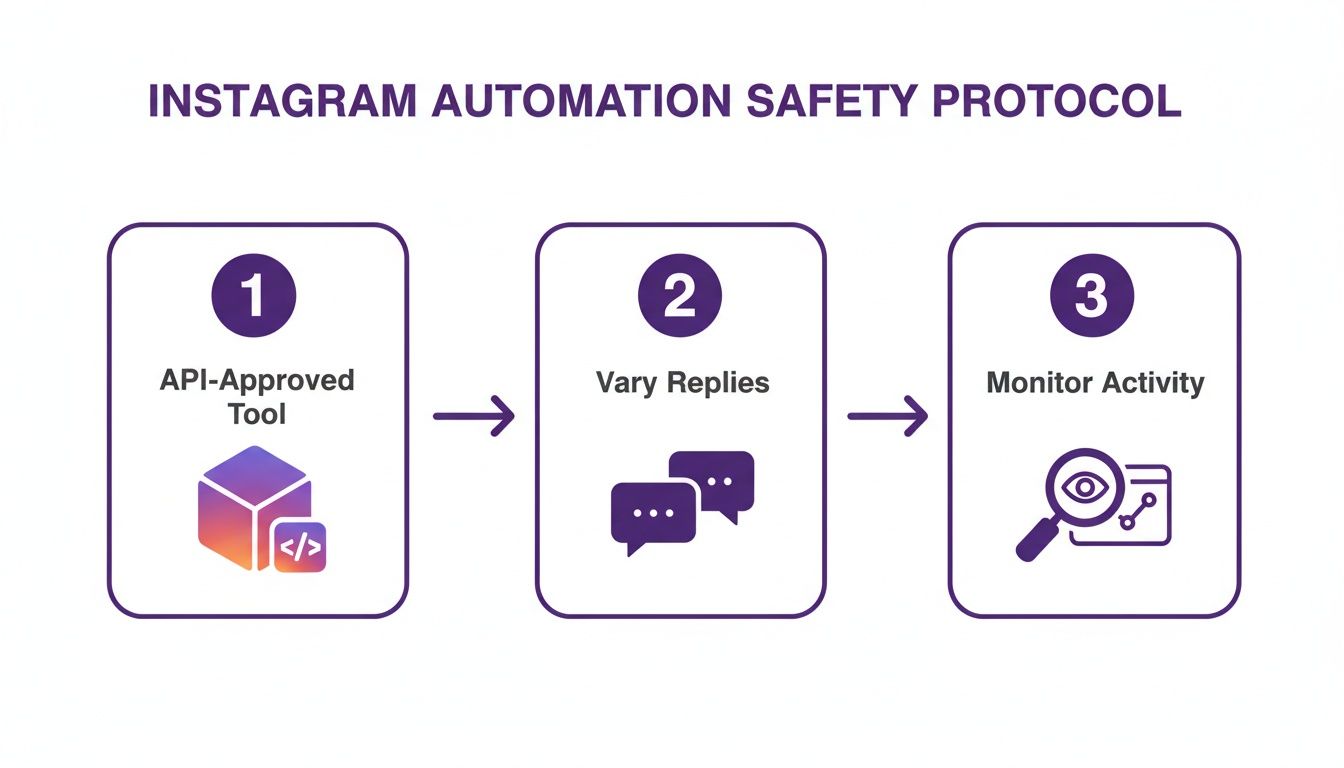
It all starts with using an official, API-approved tool. From there, you mix up your replies to sound human and always, always keep an eye on how things are performing.
Using Negative Keywords for Brand Safety
Just as important as your trigger words are your negative keywords. These are the words you tell your automation to flat-out ignore. This is your brand's safety net, and it stops your bot from chiming in where it has no business being—which could be awkward at best and a PR nightmare at worst.
A negative keyword list is your first line of defense. It stops your bot from replying to angry customers, sensitive topics, or sarcastic comments, ensuring it only jumps in when it can genuinely be helpful.
For instance, you’ll want to add words like "scam," "broken," "disappointed," and any profanity to this list. That way, you won't have a bot cheerfully saying, "Thanks for your comment!" to a genuinely frustrated customer. Building a solid negative keyword list isn't optional; it's essential for protecting your brand's reputation and a key part of handling all the different kinds of spam on Instagram.
Smart Automation Workflow Examples
To see how this all connects, let's look at a few practical setups. This table shows how different business goals can be translated into simple but powerful automation workflows.
| Business Goal | Trigger Keywords | Automated Action (Example) | Best Practice Tip |
|---|---|---|---|
| Generate Leads | "demo," "info," "more details" | Send a DM with a link to a sign-up form. | Ask a qualifying question in the DM to gauge interest before sending the link. |
| Run a Giveaway | "enter," "[contest hashtag]" | Reply to the comment confirming their entry and send a DM with the official rules. | Use reply variations to avoid looking like a bot to other commenters. |
| Drive Product Sales | "shop," "link," "buy now" | Send a DM containing a direct link to the product page. | Add a limited-time discount code to the DM to encourage immediate purchase. |
| Offer Customer Support | "help," "support," "broken" | Send a DM with a link to the help center and an escalation option. | Use negative keywords to prevent the bot from replying to highly emotional or angry comments. |
These examples are just starting points, of course. The real power comes from tailoring these workflows to fit your specific audience and business needs perfectly. By thinking through the user's journey, you can create automated experiences that feel personal and genuinely useful.
Using AI for Smarter Comment Moderation
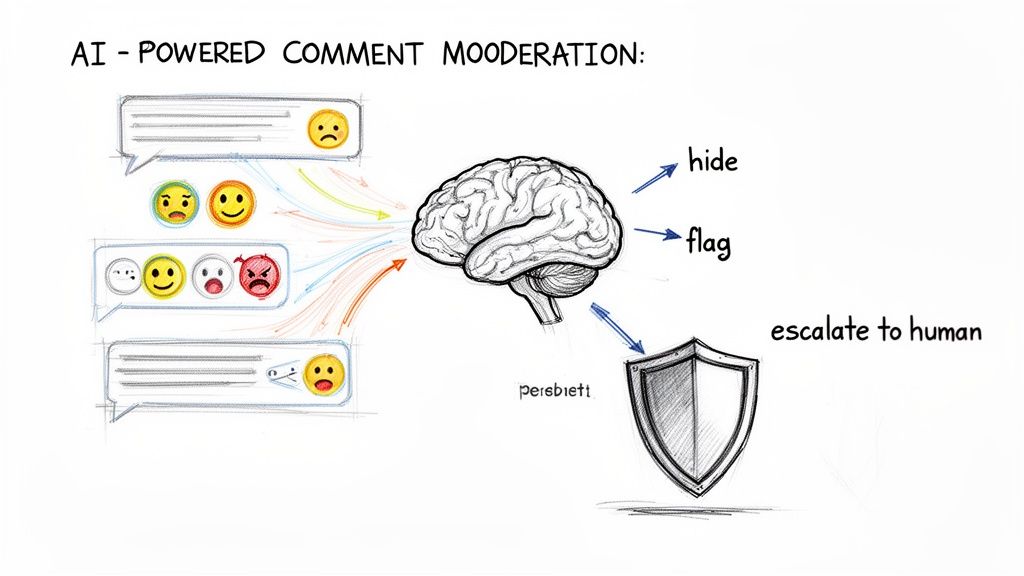
Standard Instagram automated comments that trigger on keywords are a solid first step. Think of them as a helpful front-desk assistant who can handle the easy, repetitive questions. But what happens when things get messy? When a comment is dripping with sarcasm, a customer is furious, or your brand’s reputation is suddenly on the line?
That's when you need someone who understands nuance, not just words. This is where AI moderation truly shines.
AI-powered systems go way beyond simple "if/then" rules to figure out what a comment actually means. It's the difference between a tool that just sees the word "price" and one that understands the user's frustration, excitement, or sarcasm behind it. This intelligent layer gives you a far more sophisticated and brand-safe way to manage your comments.
Beyond Keywords: The Power of Sentiment Analysis
The biggest game-changer with AI is its ability to perform sentiment analysis. In simple terms, it can read a comment and instantly tell you the emotional tone—is it positive, negative, or just neutral? This one ability completely transforms how you can safely and effectively automate your comment section.
For example, a user comments, "Wow, I can't believe this price!" A basic keyword tool might see "price" and send a DM with a link to buy. But an AI can read between the lines. It can figure out if the user is thrilled about a great deal or sarcastically complaining about how expensive it is.
This unlocks a whole new level of smart sorting:
- Positive Comments: The AI can spot your happy customers, flagging their comments for a personal thank you from your team or even sending a warm automated reply.
- Negative Comments: Angry or frustrated comments can be instantly hidden from public view and routed to your support team to handle privately. This stops a potential PR fire before it even starts.
- Neutral Questions: Simple questions get sent to the right automated workflow, making sure people get fast, accurate answers without any fuss.
By automatically hiding spam and filtering toxic comments, brands can see a significant boost in positive engagement. A clean, well-moderated comment section makes your brand appear more trustworthy and encourages more constructive conversations.
Automating Brand Protection 24/7
Your comment section is your brand’s digital storefront. Leaving it unattended is like leaving the front door wide open overnight. Spam, scams, and hateful comments can quickly take over a post, ruining your credibility and scaring away real customers. AI is your tireless security guard, working around the clock to keep your community safe.
Modern AI systems are trained to spot a huge range of junk. This isn't just about blocking a list of bad words.
These systems can detect and shut down:
- Spam and Scams: Automatically hiding comments with shady links, fake giveaways, or other nonsense.
- Hate Speech and Bullying: Identifying and removing abusive or offensive language to keep the vibe positive.
- Self-Promotion: Filtering out those "Check out my page!" comments from people trying to hijack your audience.
This proactive defense saves your team from the soul-crushing job of manual moderation. Instead of deleting spam for hours, they can focus on what they do best: building relationships with your fans and helping customers who really need it. If you're looking to see what's out there, many of the top AI comment moderation tools in 2025 are built with these features.
Prioritizing What Truly Matters
One of the smartest things an AI moderation system can do is triage. Let's be honest, not all comments are created equal. A glowing review, a simple question about shipping, and an angry complaint about a broken product all need to be handled differently.
AI can instantly analyze and sort incoming comments into priority lists for your team. For example, it can spot purchase intent in comments like, "Do you have this in blue?" or "Where can I buy this?" These are hot leads, and the AI can flag them to send straight to your sales team to help close the deal.
At the same time, urgent customer service fires can be escalated immediately. The AI can identify phrases that signal a major problem, creating a high-priority ticket for a support agent. This ensures your most critical conversations are never missed, turning potential disasters into chances to deliver amazing service. This kind of smart workflow makes Instagram automated comments more than just an efficiency hack—it’s a core part of your growth and reputation strategy.
Choosing the Right Instagram Automation Tool
Picking the right tool for Instagram automated comments is a lot like choosing between a basic flip phone and a brand-new smartphone. Both can make calls, but only one gives you the power to run your life with intelligence and precision. The market is packed with options, so knowing what to look for is key to keeping your account safe and actually hitting your goals.
Your absolute top priority has to be safety and compliance. The single most important thing to check for is official Meta API integration. A legitimate, trustworthy tool will never, ever ask for your Instagram password. It connects to your account the right way—through Meta's approved, secure channels. This ensures you're playing by the rules and not risking getting your account flagged or shut down.
Core Features That Matter
Once you've covered the safety basics, you need a tool that offers real control and insight. A simple auto-responder is a blunt instrument; what you're looking for is a surgical tool that lets you manage conversations with nuance.
Here are the non-negotiables:
- Advanced Filtering and Triggers: You need to be able to set up rules based on specific keywords, block negative keywords, and even understand what a user is trying to ask.
- AI Sentiment Analysis: This is huge. It allows the tool to tell if a comment is positive, negative, or just neutral. It's the difference between a helpful reply and an awkward automated response to an angry customer.
- Response Variation: To avoid sounding like a broken record, your tool absolutely must let you create and rotate a bunch of different replies. This keeps things feeling fresh and human.
- Robust Analytics: If you can't measure it, you can't improve it. Look for a dashboard that gives you the real story on engagement rates, response times, and how well your automated funnels are performing.
These are the features that separate a simple bot from a genuine comment management platform. For a closer look at what the best tools offer, check out our breakdown of top Instagram moderation tools.
From Simple Replies to Smart Funnels
The real magic happens when your tool can build automated comment-to-DM funnels that drive actual business outcomes. This is where you graduate from just managing comments to actively turning curious followers into paying customers.
A great automation tool does more than just reply; it creates a seamless journey from a public comment to a private, high-intent conversation, turning your comment section into a reliable sales channel.
This isn't just theory—it has a proven impact on the bottom line. Automated comment-to-DM funnels can be a game-changer for driving immediate sales, especially when you pair them with a great offer. One retail brand, for example, converted roughly 6% of its commenters into buyers during a single Instagram Live session just by sending instant DMs with a product link and a discount code. You can see more examples of these powerful conversion strategies on Spurnow.com.
So, when you're evaluating your options, ask yourself if the tool can handle these more advanced workflows. Can it send unique discount codes? Can it tag users based on their comments for future marketing? Does it connect with your other business systems?
The right platform will grow with you. It gives you the functionality you need today and the power you'll need as your brand scales. By focusing on these key features, you can confidently pick a tool that not only protects your brand but also opens up entirely new ways to grow.
Got Questions About Comment Automation? Let's Clear Things Up
Diving into automated comments on Instagram can feel a little tricky at first. Let's walk through some of the most common questions brands have so you can move forward with confidence.
Are Instagram Automated Comments Even Allowed?
Yes, they absolutely are—but you have to do it the right way. Using an official, Meta-approved tool that connects through the proper Instagram API is completely safe and within the rules. These platforms are built to play by Instagram's book.
The real danger comes from sketchy, unofficial tools, especially any that ask for your account password. Those are a huge red flag and a fast track to getting your account penalized or even shut down for good. Stick with the approved tech.
Will Automation Make My Brand Sound Like a Robot?
It only sounds robotic if your replies are robotic. The secret to sounding human is all about response variation. Good automation platforms let you write several different versions of your replies. The system then rotates through them, so your interactions always feel fresh and natural.
Think of it this way: when your automated messages are thoughtful, personalized, and genuinely helpful, your brand doesn't seem impersonal. It seems incredibly responsive and on top of things.
How Do I Know if This is Actually Working?
You measure success based on the goals you set in the first place. Don't just look at vanity metrics; track the numbers that show you're actually getting closer to what you want to achieve with your Instagram strategy.
Here’s what that might look like:
- If you want more sales: Track how many people click the links in your automated DMs and how many use the unique discount codes you send out.
- If you're after leads: Keep an eye on clicks to your landing pages or how many forms get filled out from your Instagram traffic.
- If your goal is engagement: Compare your comment volume and reply rates from before and after you turned automation on. The difference should be obvious.
Ready to protect your brand and turn comments into conversions safely? FeedGuardians uses AI to filter spam, detect purchase intent, and automate helpful replies 24/7. Discover how FeedGuardians can help you today!
Tired of manually moderating comments?
FeedGuardians automates spam filtering, responds to customers, and protects your brand — setup in 3 minutes.